Leaderboard




Popular Content
Showing content with the highest reputation on 08/15/21 in Posts
-
Oh! It's alive!! That's exciting!4 points
-
yeah, database can be hard. But, after many hours auditing the thing, it seems to be okay. Just have to properly edit the table row with title sequence data next. Did you know that a database will sometimes maintain it's file size even if its empty? I know right?!? Also have to check print duration of each episode prior to running the task. If the user changes this, we'll have reprint the entire season. Probably should put that as a warning in the UI somewhere. Also, how big should the database be? Really big? Oh good! Because it will be.2 points
-
Testet too and all plays fine now on Fire TV non 4k second gen. So good job. Thanks.2 points
-
Because if it isn't broken "don't fix it". Other programs from writers like Tiny Media Manager to front ends such as Kodi expect the NFO file to be in the same folder as the media. NFO isn't an Emby invention but is used by many platforms so Emby needs to follow the spec of how they are suppose to work so they are compatible with other systems. Building on that you want all info to be "portable" so graphics, thumbs, chapters, external subtitles, main media all move together when you move the folder.2 points
-
The point of the NFO is to remove the risk of not restoring the meta-data back the way you had it previously. Without the NFO & graphics stored with your media (same for bif/thumbnails) you would loose any custom meta-data edits, would loose any custom collections, would loose any artwork you've switched/changed and would have to rebuild the thumbs (if using). It's far better for most people to write this info to the movie/show folder so in the event of a rebuild you get back what you had previously vs starting from scratch. The storing of NFO files certainly doesn't mess up reloading this data and these have nothing to do with conventional backups. To me it seems you got things backwards are far as risk is concerned.2 points
-
Yes we need to look at the platforms that are missing it. Thanks.2 points
-
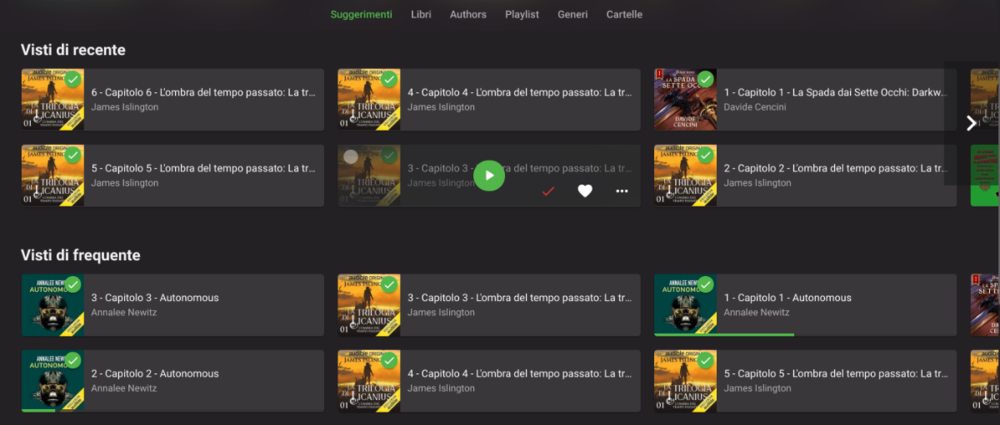
I have my audiobooks as separate mp3 files, one for each chapter, inside a folder for the book, inside a folder for the author. Emby sees them as multiple songs inside an album, which is then considered as a book. This brings 3 problems: In my library, I see multiple chapters of the same book in sections like "Recently seen" or "Continue listening", which brings a lot of clutter to the UI, with 0 benefits (see multiple_chapters.png for a reference) The playlist section in the navigation menu is now filled with books and auto-expands everytime I open the menu. Worsening this mild inconvenience, the playlist thumbnail is the book cover x4 (because all the chapters have the same cover) When I resume listening from the "Continue listening" section, it only resumes the current chapter, so when it ends, the playback stops. I had an additional problem, where a book wouldn't show up in "Continue listening", but I think I solved it by going into "advanced setting" of the audiobook library and selecting 0 and 99 as percentage for "continue listening"; this wouldn't be a problem if the "media" was the book and not the chapter. Since this is just a way to organize an audiobook library, considering books strictly as a single media could be an option in the library setting.
 1 point
 -
Hi, It will be good option to show me (as I'm admin) favourites or tagged movies/series of my friends who use my emby server. I will know which content not to delete. Regards, Przemek1 point
-
I have a Zidoo X9S boxed up and have not used in quite awhile. As I recall, it did not work very well with the Emby client, so I boxed it up, and put it away. I have concentrated all of my attention to these inexpensive Android boxes running CoreELEC.... Right now, Emby for Kodi (next-gen by Quickmic) is struggling with the high bitrate videos. Otherwise, CoreELEC running on these boxes, shine when playing your own media.1 point
-
OK - but a lot of this is the exact reason (I expect) that you are moving away from an HTPC (as was I). I just want to install the native App, open it and play the content at 90-95% of the format capability. From an emby perspective, the Shield Pro is THE goto client, and thus it generally gets all the latest Beta's and toys first. It was the first to get DV for example and is generally in front of the other mainstream clients from an look and feel perspective as well.1 point
-
I had Zidoo before and must say PQ is above anything except for HTPC with MadVR., as I understand the company developed the player and optimised for the RD chip. I'm not impressed with their media organiser but I think it'd be a perfect solution if their media organiser integrates to Emby (as client).1 point
-
It doesn't seem like you're grasping what NFO files are used for. It's a way of saving your meta-data outside of Emby database so it can also be re-imported again if ever needed plus support any other program that can read/write NFO files. Most programs using NFO files work at the system level and are not client/server apps. The king of these are Kodi, but many other programs can also use NFO files. Once you grasp/understand how NFO files are used you wouldn't be suggesting work arounds or where they can be placed or how plugins can use them. That is exactly why you can't do this because there is no use in doing this as it would break the standard and wouldn't allow all info to be stored with the media in it's folder. NFO is simply a text file containing information about the media that MUST be located onside the media using a specific file name (same as media with NFO extension).1 point
-
I think you are confusing the emby server database with nfo/image files.1 point
-
If using an Emby plugin for Kodi it would use the Emby API and talk to the Emby Server so it would act like more or less like any other Emby Client. However, if you just use a standalone/out of the box Kodi install without an Emby plugin then it will look at the media folders and use the NFO and graphics in the media folders. Kodi will also be able to use any existing STRM files (if you use them as well).1 point
-
Who said anything about same machine, you can have your media on one machine and the server on another machine, different servers pointing to the same media files that its on a different machine.1 point
-
That's too much work doing it on any single item as opposed to simply prevent it to scrape anything at all, hence ensuring only local data is read. As you said, you can Search for missing afterwards.1 point
-
Okay, I installed the 2.0.37 Beta for Amazon Firestick. I pulled up several of the files I know to be HEVC H.265 10 Bit renders, and they all played fine, so SUCCESS! I assume you'll be putting out a general release at some point (hopefully soon), I will try the beta on my other 2 firesticks to make sure later today. The H.264 file you observe in the ffmpeg log was what we watched last night. It worked fine, but I know it wasn't you were looking for. The problem with the ffmpeg (and other) log files, is that there's so much there, and in many log files, it's hard for the un-initiated to tell which one to pick. Thank you! Dave1 point
-
We're not missing it, in contrary, we're taking the above precautions exactly because we're aware of it. And we obviously agree, that is how it should function, @cayarsyesterday asked the Dev exactly same question in this very thread. However, with all things being as they are, you do what you can to work around that.1 point
-
You can very easily confirm what was written above: make a folder with few items only, that contain only media file and local nfo+artwork, make a Library that has all meta-providers disabled (unselect literally all metadata and image fetchers), leave only Nfo reader enabled. Check how long it will take you to scan and populate that Library. Likely single-digit minutes.1 point
-
Can you please play one of the problem files for a few seconds with the beta version of the app and then send a log from the app? Actually, try the new release I just put up in that same thread. Thanks.1 point
-
Is that a HDR file? Do you have tonemapping enabled?1 point
-
I'd still take Emby for Android TV running on the Shield Pro.1 point
-
Not sure. Most likely not, but I have a second server setup so I'll try it out. Wouldn't want to mess up movie night.1 point
-
That's true, I'm not complaining just a little different Cheers bro!1 point
-
Yes Ill probably end up buying one of these1 point
-
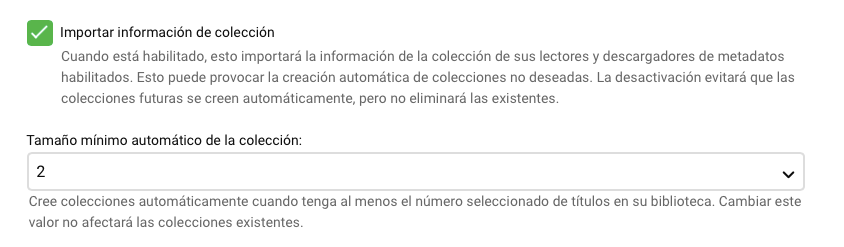
Debes configurarlo en la biblioteca. Después de configurarlo realiza un escaneo de la biblioteca.
 1 point
 -
You don't have them set-up equally. Enable "Show Pre-Playback Media Selections" in Settings>Playback on your Shield Pro. Enjoy.1 point
-
Hi, not yet, but hopefully soon. Thanks.1 point
-
Yes it's something we can look at adding. Thanks for the feedback.1 point
-
Installed new Relais 2.0.37 and now everything plays again fine. Thanks.1 point
-
Yes it's something that can be looked at. Thanks for reporting.1 point
-
Hi, yes we can look at adding this kind of sorting option. Thanks for the feedback.1 point
-
@chef I figured there had to be a more efficient way to do it and I had a bit of time, so I created a simple C# project in Visual Studio and tried messing around with that. I don't know C# very well, but I can somewhat understand it. So after a bit of googling and trying various solutions, I came up with this: var fingerprint = new List<uint>(); using (BinaryReader b = new BinaryReader(File.Open("FILENAME.bin", FileMode.Open))) { int length = (int)b.BaseStream.Length / sizeof(uint); for (int i = 0; i < length; i++) { fingerprint.Add(b.ReadUInt32()); } } Seems simple enough and gives the expected result. Also, the fingerprint is already in an unsigned int array/list, so no need for an intermediary byte array/list. Just don't know if this solution would work in .NET Core or not.1 point
-
Hi ! I did more test using a local instance of Emby to have only the problematic show in a library, reproducing the folder structure with Season 2 in a different folder. From what I could see, the S00E08, which is in the Specials folder, but indicated as airing during Season 2 is causing the split issue. (so However, in order to fix the issue after removing that episode, I need to remove the folders from the library on Emby side and add them back (to remove all remaining metadata I guess). And then do a reset of the Kodi library (but that part makes sense) After that, if I add the S00E08 back on the server and scan it, the plugin will correctly pick it up on kodi, keeping only 1 entry. If I do a reset of the Kodi library, it will have 2 entries. Here are 2 logs, one with the successful attempt giving one show, when the Special is not there, the second one giving 2 entries, with the special. kodi.unified.logkodi.split.log1 point
-
Here's my tasks.json file in my plugin directory. I don't recall any other changes to the editor I made to build beyond installing C# plugin in VSCode and dotnet system-wide. $ cat .vscode/tasks.json { // See https://go.microsoft.com/fwlink/?LinkId=733558 // for the documentation about the tasks.json format "version": "2.0.0", "tasks": [ { "label": "build Debug", "command": "dotnet", "type": "process", "args": [ "build", // Ask dotnet build to generate full paths for file names. "/property:GenerateFullPaths=true", // Do not generate summary otherwise it leads to duplicate errors in Problems panel "/consoleloggerparameters:NoSummary" ], "problemMatcher": "$msCompile", "group": { "kind": "build", "isDefault": true } }, { "label": "build Release", "command": "dotnet", "type": "process", "args": [ "build", "-c", "Release", // Ask dotnet build to generate full paths for file names. "/property:GenerateFullPaths=true", // Do not generate summary otherwise it leads to duplicate errors in Problems panel "/consoleloggerparameters:NoSummary" ], "problemMatcher": "$msCompile", "group": { "kind": "build", "isDefault": true } } ] } $1 point
-
Luke has mentioned bring back reading as there are features that only exist in the nfo like Overview. Now if everything could be self contained in the tracks then sure album.nfo could be obsolete.1 point