Leaderboard




Popular Content
Showing content with the highest reputation on 07/30/21 in all areas
-
You obviously don't use the ATV app then. Hopefully your latest ET updates may make it look closer, but it's functionally is not as good as the ATV app. Functional issues have been brought up many times, but you have never dealt with them. There are some things the app does slightly better out of the box than the ATV app, but not many.4 points
-
This should be corrected in the beta of the app that is going up now (2.0.33). We will get a release out as soon as we can confirm no major issues. Thanks.3 points
-
ET for Android and ET for Windows UI Improvements - Match Android TV App - Android - Emby Community3 points
-
personally i buy the best value per TB external WD drives and shuck the internal drives out of them. in the UK thats still 14Tb which have previously dropped as low as £200 each. although white labelled they are usually the same model as the red drives and i havent come across any SHR drives through this method yet. finally, although they say that shucking them voids the warranty i have RMA'd a couple in my time and they have exchanged them without question3 points
-
Good call. I'm using an ungoogled modified chromium. I just checked and it looks like they add their own x265 HEVC codecs. Disregard my issue, looks like it's isolated to this particular version of Chrome. Thanks @GrimReaper76 ! I don't even watch using this browser, I just wanted to ensure my family who uses Chrome wouldn't run into issues.2 points
-
Lol OP got three ways to achieve desired result in 10 minutes. Now that's some support!2 points
-
We are using the following bundle: https://curl.haxx.se/ca/cacert.pem We've gradually moved platforms to this bundle as we've found an issue with the system certificates, but some, like asustor, qnap (non-mono) and synology (non-mono) are still using the system ones.2 points
-
Sounds like this thread that's already being discussed. Might be a change with YT causing it2 points
-
think for starters your folders need to be named Season 1 Season 2 etc2 points
-
Only one subtitle per language (or none, if hash match is required and there are no matches) will ever be downloaded, IIRC by logic Hash > Name > IMDB Id, and if there are multiple matches, first one returned from provider will be used. Again, IIRC Opensubtitles limit on free tier is either 100 or 200 daily; if you don't want to go VIP (which also has a limit, I think it's on 1000/day), you will still get all subtitles over time after Download missing subtitles has run several times (how long that will take depends on the size of your library). There's an open FR for something similar, your can lend your support here:2 points
-
I'd have to agree with @CBers. The Android app is ok but more generic in nature then the ATV app which has been tweaked like crazy by @ebr for a great ATV media experience UI wise.2 points
-
I feel the following filter & sort options are lacking the following: * filter by HDR * sort by video bitrate * sort by audio bitrate * sort by filesize * filter by subtitle language * filter by audio channels * filter by audio language Anybody have anything they would like to add to this list?1 point
-
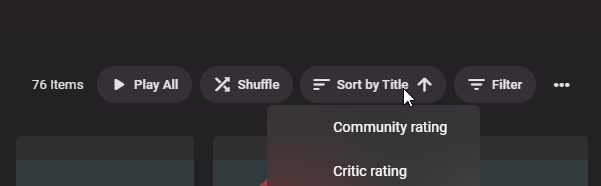
Please add sorting by channel number in Tags categories.
 1 point
 -
Hey, that was so easy, now I feel stupid, I was trying to figure it out for hours, then decide to ask how to do it you told me about the Notepad edit and now I am a "pro" ... LOL. This is exactly what I wanted I am tagging the movies in the Kids folder Kids so my grandson and my daughter can view those movies and tagging some of the movies in the Movies folder "Teen" so my daughter can view those and as she get older I will tag other ones that become age appropriate "Teen" wish I had asked earlier would have saved me a lot of time.1 point
-
1 point
-
Trailers are working again here. Shield pro 20171 point
-
You're right. Just playing a bit with this it seems it only allows pause/play but no rewind/FF. @Luke1 point
-
OK I'll keep it in mind. I run it in a docker container and normally just do a fresh pull every few weeks, so wouldn't have expected that I switched channels (since it's the same tag). In any case, thanks for the quick and effective support.1 point
-
That looks familiar.1 point
-
forfiles "C:\Users\tbeck\AppData\Roaming\Emby-Server\programdata\transcoding-temp" /s /m *.ts /d -2 /c "cmd /c del @PATH I run this in a .bat daily using Task Scheduler thanks to @cayars1 point
-
Yes mine also did you find a fix mine crashes mine nas also when playing one anime with only lg app1 point
-
My Christmas Music is in it's own library, so it can stay where it is all the time, still be accessed if wanted and used when it's the season but can move on the homescreen more to the front for the Holiday time. That's the way I like it.1 point
-
Being able to add a tag to an entire library might be a good option for photos.1 point
-
I absolutely agree, we each have our own precerences, end-result is what matters.1 point
-
I was actually trying cayars idea out and just figured out what to do, but you have a compelling argument so trying yours out now, just got to figure out how to do the Tags all this is new to me so it takes me a few to figure things out. Me using Parental Controls was not the greatest thing as James Bond movies get through even the PG Rating so thats not what I needed for my grandson.1 point
-
Not using photos so never got involved there, but I would assume @VicMoore might add support for it in his excellent tool, seeing he's been doing great stuff with it?1 point
-
No moving things at all after setup. Think more like this: BabyShows KidsCartoons AdultCartoons Reality TV Anime Foreign TV Cooking Shows Fitness TV etc So basically categories of movies or tv shows that allow you to customize what you get in your listing. The main objective is to be able to remove or add categories of shows you like or don't like. So this way you can easily filter out things you don't want to see or not interested in. You of course could do the same thing with tags but I like this because it's an additional layer of choice/selection and I still have other filtering on top of this like parental filters and tags. There is no right or wrong way to do this of course and it's just what is best for each admin!1 point
-
Cayars Thanks for the link this looks like exactly what I'm looking for.1 point
-
While in general it certainly is a viable option, I do see few issues in that arrangement: 1) Future-proof level is quite low, as you'll be perpetually moving files from AdultMovies to SharedMovies as the kid grows 2) You can inadvertently place movie in a wrong folder (even in ChildMovies) and must constantly be aware where something is located, as opposed to Tag-based access where kid has NO access to any new content by default, irrespective of where it is placed, until you explicitly tag it 3) No nice custom image for their own library1 point
-
Hey, the "Noah" tag is reserved for my son. LOL1 point
-
Okay, I'm back. I have spent quite a while trying to figure out why the UI might not update properly. Lot's of moments of frustration while I was trying to understand the movie sorter. please try this. clear the browser cache, and perhaps click the "clear all" button before installation, event though nothing is currently rendered in the UI. DOWNLOAD: Emby.AutoOrganize.zip1 point
-
That would be okay if there's a value greater than null for the start offset under playback options. Although i probably better disable that completely for music videos in the future.1 point
-
Hi, Instead of doing this I would organize your folders so you can have a single Movie library but use folder access to manage this. So much easier. https://emby.media/support/articles/Folder-based-Access-Control.html1 point
-
When I want to start the trailer for a selected movie, it doesn't start in some applications, but does in others: nVidia SHIELD: loads backdrop and shows endless spinner smartphone app: works (android) Browser app: works (Chrome in Windows) Emby Theater (Windows app): Black screen and freezes (have to close the app and restart) However, on al these devices, when I start the movie itself, it does show a random trailer, followed by the custom intro video, followed by the custom codec video, followed by the movie itself. I'm not sure what is wrong (everything is updated to the latest version, including the YouTube apps), but I've been browsing through multiple forums looking for a solution, and all I can find is that I'm not the only one with this problem, no nobody seems to have fond a working solution. Having paid for Emby Premiere, this is a serious disappointment, and I hope this issue gets fixed soon.1 point
-
Hi @cayars! Now I had some time to look into the issue. I have Emby version 4.6.4.0 running on my NAS with DSM 7. I checked your guide and the video. The only thing I needed to do was to add read/write access to my media folder to the user 'emby'. Everything else was in place (the folder /volume1/Emby did not exist any more and all the data was under /volume1/@appdata/EmbyServer). So this was quite easy. Thanks for your support!1 point
-
Agree - the folders need to be named Season 1-4 but you can then label them (as in edit the metadata in Emby) as Part 1-4 as shown above.1 point
-
@cayars I personally prefer the horizontal home screen as it gives you a nice quick overview with minimal scrolling. Having the library names as text at the top feels much nicer than the ATV large/small versions. I find the ATV app has large spacing between posters and the labels having year and age rating makes it feel unclear, this would be better just as the title and centered. The ATV spacing also makes the poster much smaller than the mobile app even though they both display the same amount per row. On my 50inch screen ATV has 4cm x 7.5cm spacing and the mobile version has 2cm x 5.5cm spacing. Something about this spacing makes the ATV posters feel really rounded to me..even though I'm sure the round corners distance is the same for both apps. I think it would be nice to be able to disable round corners and adjust the spacing of posters within a set range (no gap when enlarged to what it is now). As for the mobile app, I think it's really clean and user friendly for the most part. If it could get seek bar function using a control (with thumbnails), chapter selection (like ATV up on D pad), round corners toggle and maybe the ability to enlarge the home screen (some wasted space below widgets and above library names) then it would..in my eyes atleast be the perfect client app. I also tried Kodi with the Emby add-on which looks and works great but only being able to have a movie in one set at a time destroyed my organisation. I also found it was really slow to generate the dynamic widgets like continue watching. The other big reason for using the mobile app is consistency for other users. If someone is coming from theater on desktop then the mobile app is immediately familiar. This makes it all feel much more professional in my opinion. Well..that was a mouth full but hopefully its helpful. @Luke that's good to hear! do you guys have a Trello or something of the sort so users can follow planned features/progress? Thanks for the quick responses.1 point
-
I see. Then yes the TVs sub formats are very bad. Thank you for the explanation.1 point
-
Hi I noticed that unlike the web app. The Fire TV app does not have a Tags Tab, that you can click on view of all your tags for that content type and then drill down. From the web. Can this be added to FireTV? Thanks, -vicpa
 1 point
 -
I have installed Emby on various other PCs previously with the old tuners to see if the issues were unique to my main Emby server. At that stage they all had the same issues. One of my other PCs still has Emby installed so I'll do as you suggest and uninstall Emby, install the latest HD Homerun drivers, re-install Emby, point it at the old HD Homerun and let you know what happens. Cheers1 point
-
Hi A new version of the plugin has been released. By making changes in the Subscene site and making compatibility in the plugin, it was possible to reuse the site subtitles. Download: https://github.com/nRafinia/Emby.Subtitle.Subscene/releases/latest1 point
-
@anv Good news, it's done. The upcoming beta will include support for this. You will have to create the hierarchical structure for Series-Seasons-Episodes manually, but it seems you've already got to that point. You need to set up the channel items as follows: Item Ids A note about channel item ids: Those ids are strings that are not constrained by length. When working with the Emby channels API, you'll see that it can be difficult at times to determine an item's parent items. My suggestion is to use a path-like structure for item ids that works in a way that an item's id always contains the items ids of all its parent items, e.g.: /toplevelfolderid/SeriesItemId/SeasonItemId/EpisodeItemId Series Create a series item like this: var item = new ChannelItemInfo { FolderType = ChannelFolderType.Series, MediaType = ChannelMediaType.Video, Name = SeriesName, // "Baking Bread" Id = SeriesPathId, // "/bb123" Type = ChannelItemType.Folder, }; Seasons var item = new ChannelItemInfo { FolderType = ChannelFolderType.Season, MediaType = ChannelMediaType.Video, Name = SeasonName, // "Season 1" IndexNumber = 1, // 1 Id = SeasonPathId, // "/bb123/bbs456" Type = ChannelItemType.Folder, }; Episodes return new ChannelItemInfo { ContentType = ChannelMediaContentType.Episode, Id = EpisodeId, // "/bb123/bbs456/bbe789" ImageUrl = origin.ImageUrl, MediaType = ChannelMediaType.Video, SeriesName = SeriesName, // "Baking Bread" Name = EpisodeName, // "Pilot", Type = ChannelItemType.Media, Overview = Overview, // "All it takes is flour, water and yeast. IndexNumber = EpisodeNumber, // 1 ParentIndexNumber = SeasonNumber, // 1 }; Please let me know when you got any questions! softworkz1 point
-
Yes WinTV is still needed for now. The work in progress version of the next generation Live TV can communicate directly with your hardware and that version will not need WinTV.1 point
-
Attached is the latest code. I cleaned it up a bit and fixed a few things concerning liveTV. Let me know if you have any suggestions. Vic emby-tag-tool-23.html1 point
-
When I select a trailer it just spins… it use to work.1 point
-
Hi @Nafe, I would suggest checking out our Connection Troubleshooter: https://support.emby.media/support/solutions/articles/44001849007-connectivity Please try the steps listed there and let us know which ones succeed and which ones do not. Thanks !1 point
-
You have changed to using your new IP address, have you? Paul1 point
-
Maybe your ports arent forward on your router, maybe a firewall is blocking incoming connections. Need to check those.1 point
-
Testing this. I too am having trouble with trailers on ATV as well. A lot of trailers just do the infinite spin and won't play.1 point
-
@trinected has this helped?1 point