Leaderboard




Popular Content
Showing content with the highest reputation on 06/26/21 in all areas
-
Python is actually up to v3.9. That is what I utilized and it is working for me. You may want to update, though I'm thinking that is not your issue. However, it easy enough to do. What did you utilize for the username, password, and IP address when you created the config.ini file? The username and password would be those for Locast. Also, you must be subscribed (donor) to Locast for this to function. Assuming you installed this on a PC that hosts Emby, you would utilize that IP address. You don't need to specify the port number, in the config.ini, unless you have a conflict with the default 6077 and have to change it.2 points
-
copy files from old Emby share to new data location: cp -r /volume1/Emby /volume1/@appdata/EmbyServer This step is copying the old location to the new location. This would include all config files, all databases, users, watched status, the whole cha-bang. What your doing essentially is the same as moving it to a new NAS or other OS.2 points
-
With you now - it's not 'broken' but agree that the pop up dialogue is referring to the 'Next Up' function and thus all responses to it should relate to that function only. Also agree 'Cancel' or 'Cancel Next Up' is better represented than 'stop' and should only cancel the 'Next Up' function, not the current playback. If you want to stop that, then use back - like you do for every other time when you want the current playback to stop.2 points
-
Be able to create playlist based on a certain criteria, like genre and or year, in order to create a dynamic playlist that it refreshes automatically when new content is added. This way you can for example, create a tv comedy playlist from the 90's, or a new sci-fi Movies playlist. Some other criteria for rules could be the rating, watched/unwantched, score, tags, language, audio codec, etc The possibilities could be endless1 point
-
Referenced in https://emby.media/community/index.php?/topic/67868-potential-plugin-for-media-organization-based-on-tags/ Would like an option for the Movie DB provider (and other providers if available) to import keywords into tags, for organization and potentially sorting/searching purposes. Thanks guys! -J1 point
-
Playback reporting plugin: View playback reports View user activity View performance and system usage Install it from the Emby server plugin catalogue. Source: https://github.com/faush01/playback_reporting Restoring data for recent (remote address) schema change STOP this is destructive, back up your playback reporting data first. stop emby server and take a copy of the playback_reporting.db DB before you start. In the query tab run this to get a list of all the tables SELECT name FROM sqlite_master It should show a list of tables like this: PlaybackActivity_20190525_085249 UserList PlaybackActivity_20230425_063417 PlaybackActivity the two tables you are interested in are PlaybackActivity and any table with the date sting in the end like PlaybackActivity_20230425_063417 Edit the following query with the name you have in your above results (DONT USE MINE) INSERT INTO PlaybackActivity SELECT *, "" AS RemoteAddress FROM PlaybackActivity_<TABLE NAME HERE> WHERE DateCreated NOT IN (SELECT DateCreated FROM PlaybackActivity) This will import all the old data into the new table.1 point
-
I was updating meta data for some of my soundtracks today in Emby and thought it might be interesting if provided a link between the soundtrack and the movie where if you were looking at one you could quickly click to go to the other. I don't know if the current structure would facilitate this seeing as even the metadata for people is separated when it comes to music and movies/series: Its not really a priority item or anything just thought it would be something that could be neat for people that typically keep both the album and the movie (and it might raise the awareness for users of the system that the content is available, say if they just watched interstellar and said "Wow I liked that music quite a bit", oh look the movie soundtrack is already in here).1 point
-
Hello, Perhaps I am not the first one to ask this question but it will be very cool if this feature could be implemented. I have 2 servers one at home and the other at work. ( and soon a third one...) So I have a movies library called movies on each server. I would like to see all the movies from a single 'virtual server location' when I use the app (ios or android ) where I will see only one movies library containing movies informations from the movie library at work and the movie library at home. It's an aggregation of movies informations from the movie library at work and the movie library at home. In fact when a user have multiple servers it will be perfect if another choice in the server list called "all servers" for example appears automatically with a merge of media informations from librairies with the same name on different servers.1 point
-
One of the nice things about MBC is that empty TV folders (after the latest show is deleted) are hidden. This makes Emby look very smart. I know @@ebr wants to get rid of this feature from MBC as he sees that this is better as a server feature that can be applied to all clients. I agree. So what does it take to get this useful feature into the Emby server? I'm hoping that asking nicely is enough, I'm also hoping that enough other users consider this feature useful enough ot include in the server. How about it, @@Luke?1 point
-
 Audiobooks continue to be challenging to use in Emby. A separate request for reinstatement of Fast Forward by chapter ">>" has been created so that audio books often one track with many hours can be navigated easily. This "feature" request is around reading some ID3v2 tags and populating the metadata in Emby's database so they can be shown on the screen. ID3v2 Tag: COPYRIGHT to be mapped to Emby's STUDIO ID3v2 Tag: DESCRIPTION to be mapped to Emby's OVERVIEW At the moment, these do not get populated in Emby's database, despite being there. DESCRIPTION is also used for Podcasts too and is a brief summary of the what the chapter/track is about. This should be populated on screen under each chapter/track or a way to easily see the info. Commercial Audiobooks often use "Lyrics" with a much bigger description field too, but this one might get messy as music tracks actually have lyrics in them, hence suggestion of using Podcast DESCRIPTION Id3v2 tag.1 point
 -
I prefer "CANCEL NEXT" or "CANCEL NEXT UP" or even "CANCEL NEXT EPISODE", but you can call it "Eric's magnificent magical mystery button" as long as I can see my Marvel post credit scenes1 point
-
I tested the latest from beta repo. It's still the same. If I watch anything straight from the beginning to the end, it's counted only once, but if I pause the playback for a while or skip/fast forward some minutes, it is counted twice on trakt.1 point
-
Why not Just crate a config into the Android cliente to enable or disable this feature and set the sensibility/activation area instead of remove such usefull feature?1 point
-
Its working. Thanks.1 point
-
Hi Sir. all working fine now. absolute mystery to me. but thank you for the reply. if something comes up again, i will start a new thread.1 point
-
Thanks for reporting this. We'll take a look.1 point
-
I'm happy with CANCEL - but if we have room then CANCEL NEXT covers all possible ambiguity imo. CANCEL refers to a planned but not started action - STOP refers to a current action. So as it functions today, STOP is technically correct, but if we only want it to STOP once the episode finishes, then it should say CANCEL. ()1 point
-
Thank you very much for your help XcOM9876, what you told me worked perfectly, a clear answer to my problem.1 point
-
Also looks like your logged in to root which has a different home directory to your standard user home directory, I assume you used something like "sudo su" to get to that terminal prompt, or are running terminal as root? It's better to download the package to your users home directory /home/username (or ~ for short) and install it from there using sudo1 point
-
Hi. When your device updates with a new version and you can see the new sort option in the menu.1 point
-
With my TV content the popup usually shows almost exactly at the start of the credits. I've found most of this content has 45 seconds of end credits. I don't think a button labeled "Cancel" is clear either. At least, it wouldn't be clear to me that button would hide the overlay and not advance to the next episode. So we'd need a better label than that and one that isn't twelve words long... suggestions?1 point
-
Update: So I was able to find more collections folders in the database that I deleted. I restarted again. Then by some miracle the option to delete the library manually inside Emby showed up and I was able to remove all the collections libraries, rescan and now I only have the one folder. Just like I wanted. Thank y'all for the help.1 point
-
Erm the Android Platform is the one with the issue. As per my video screencast showing the issue above on a android mobile device as well as my last comment The comma may have seperated this better by being a full stop1 point
-
Personally I find it best to use wget: cd ~ wget https://github.com/MediaBrowser/Emby.Releases/releases/download/4.6.3.0/emby-server-deb_4.6.3.0_amd64.deb sudo systemctl stop emby-server sudo dpkg -i emby-server-deb_4.6.3.0_amd64.deb I find this the most reliable method to updating emby server on Debian/Ubuntu/Similar, this way you are downloading the package to your home directory and running from the same location, once complete you can delete the files after, I tend to keep the last 3 that I installed.1 point
-
Surely though, if you disable Google Play Services you'll never get any other app updates, including Emby. I just uninstalled the updates to Android TV. I don't have auto updates enabled, never have.1 point
-
@cayarswith the official release of DSM 7 in the next few days, I think there will be many many posts like this. The testing thread doesn't really explain how to update without losing all your previous settings. I suggest some sort of sticky post with real instructions on how to back up, install and restore previous settings and libraries.1 point
-
Wait a second. LOL, so you wait for the pop-up to stop playback when you could have clicked back-back when the credits first started? Meanwhile your current solution is for me to do the same after the server begins processing the next episode. Again, you ARE proving my point why the logic is all wrong. You couldn't make my case any easier than you already have , Thanks1 point
-
Exactly it is a function of the "Up Next" panel. The "Stop" button on the Up Next panel is a Child of the Up Next panel. The Up Next panel is a Child of the Video Player object. In this case the Child object "Stop" button is speaking to its Parent object the "Up Next" panel. It isn't speaking to the GrandParent object Video Player. Although it could do that. But it should involve the Parent object in some way when doing that. And the GrandParent object would want that the Child finish the task at hand before not completing any more. Which is what having the video player dismiss the rest of the queue and finish playing to the end of that item. Saying "the Child" this much makes me want more Mandalorian series!1 point
-
Reinstalled and working. Thanks.1 point
-
There is now a workaround that I got from Nvidia support. Settings > Apps > See All Apps > Show System Apps > open Google Play Services > click Force Stop > click Disable > click Clear Cache. That worked for me. Ads are gone and good freaking riddance. To those suggesting nvidia was the spawn of satan, they didn't put out this update. This is all google. The level of evil you want to assign to anyone involved I'll leave up to you1 point
-
Your solution doesn't get what I want because it only works after the server starts to play the next episode though so it doesn't really get me what I'm after because I'm already aware I can stop the next episode after it starts. What I would like to tell the server is to stop automatically playing the next episode after the current episode and still see the hidden scene at the very end of the current episode. The best time to do that would be when the pop-up shows. Carlos gets it. I1 point
-
If you want to change it make it so you have 2 buttons. One jumps to the next episode NOW and the other after the episode fully plays. This way for those shows with scenes in the credits you can still watch the complete ending followed by a new episode. If you want to stop, we have that covered already. This to me is the best of all worlds as it also solves the scene in credit endings.1 point
-
interesting you mention Disney... The new movie "Luca" was coming out on Roku. Disney must have told Roku they wanted to own the screensaver. The City Scroll screen-scape screen saver became a full screen advertisement for the movie Luca. I mean it was beautiful. It was a double parallax with animated elements. It was interesting. But it wasn't City Scroll. It was full on Disney+ and I do not even have Disney+. But it was thrust in my face on every Roku TV I own without my consent. It was interesting to see that it appear 2 days before the movie could even be watched. That was Disney hoping for early subscribers or something. But it shows a trend. Disney is much more powerful than Google. Google doesn't produce content. They forgot to jump on that band wagon. Google is merely a distributor. It has a lot of catching up to do. That is why they are infuriate you on your Nvidia Shield. That is entirely why. They can only scrape money with advertisement. They cannot make royalties like Amazon, Netflix, or anybody else.1 point
-
I agree. We need compensation for watching. They need to share the money with us they get. We are doing the work watching... Else there needs to be some kind of on-screen dialog box saying (The advertiser is paying us 2 cents for us to force you to sit through this). A disclaimer of some kind to let the consumer know their view is subsidized by a sponsor partner who is financially incentivized to produce content for them. That this behavior isn't nice. Same way they have legislated sponsored posts on social media. That should apply to these interstitial advertisements shown on device home screens. It should apply to all. There should be no favored media consumption platform. They should all be on the same ball field with same rules applied to all. .....But that will never happen because politicians are people. People are biased by financial contributions to their campaign to office. The politicians "owe" for these contributions. There is no free lunch or luncheon. This means that once they are in an office where they can make real change that instead they now for the next several decades will continue to push for rewards via bills/laws to dish out the rewards for decades ago contributions. The system is rigged that way. People are forced to make bad decisions. It will take decades before any law put into place today has any meaningful effect tomorrow. The effect that the people really want may take a century of change. Look at racism. It has taken two centuries to clean up and it still is not done.1 point
-
The issue is that you can't cancel playing the next episode and still watch the current one to the end. The STOP is redundant because as ebr mentioned there are several ways to do that without the STOP button already1 point
-
I think I've seen the new home screen once. I start right up into Emby1 point
-
Yes, the version for Emby 4.6.x1 point
-
Probably because they want to keep certain things independent of each other. There are tradeoffs to consider either way.1 point
-
Hi, plex splits their server into multiple processes whereas emby does not, so you have to make sure to add up all of the usage of all of the processes.1 point
-
#Yatse 10.9.0 released. * Added: Added: Remove the need to import favorites and merge both local and remote favorites to simplify. * Changed: Another pass at needed changes for Android 12. See forums for solutions to Plugin issues. * Changed: Many external libraries updates and related changes, as usual if you have issues contact support. * Fixed: Improved error display when adding hosts. * Fixed: Improved Plex support for 2FA. * Fixed: Only offline filter is now working in all categories of Android Auto. * Fixed: Some other reported issues and always more optimizations. Do not forget to rate the application. If you like this, please buy the Unlocker / Donate to ensure continued development. https://community.yatse.tv/t/yatse-10-9-0-released/35001 point
-
Hello Some weeks ago I start to add my e-books to Emby and most things works for me, but one thing is a littlebit annoying: If you have one e-book in different file format, you could not really see which is which. Only when you start the download you see the complete file name with the extension. So it would be really helpful to see the file format before you open the e-book overview, a solution would be to add a small logo with the file extension to the thumbnail (or in list view add a column for the file format), or if there is the same book in different format, show it as one book and when you want to download it, you could choose which format you want to download (for late if an e-book reader will be in Emby). I would say it has not a high priority but maybe easy to integrate. Varmandra1 point
-
I think replacement home screen apps are going to start getting more and more popular on Amazon and Android boxes. I was thinking of doing a replacement on the FireStick 4K this weekend.1 point
-
OK so that means when direct playing, the android video player isn't auto-rotating. So that's something that needs to be looked at. Thanks.1 point
-
Are you still working on this? The post is now open for 4 years, it would be nice to have that basic function in a new version now very soon. Jumping 30 sec in the middle of a movie is a pain in the ass.1 point
-
@Luke How can it be that such basic function is still under development after so many years?!1 point
-
Often times when I see "Reason for transcodng: Media bitrate exceeds limit." in the info I wonder, what kind of internet connection do they have? I know this can cover multiple scenarios like bandwidth limit set for user, server, client side quality setting, as well as AUTO bandwidth detection... Can you PLEASE add to the dashboard the returned client bandwidth capabilities? The value you are getting from the client that tells emby its bandwidth abilities. While you are at it tighten up the spaces between lines on the transcode items, and align the results to the right instead of center.. MAYBE SOMETHING LIKE THIS :1 point
-
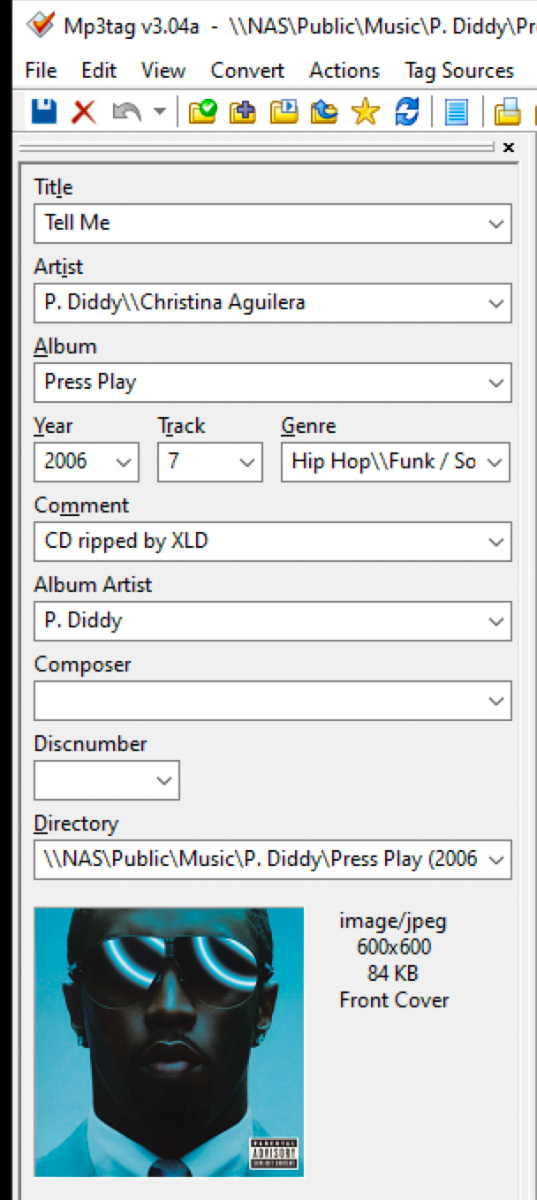
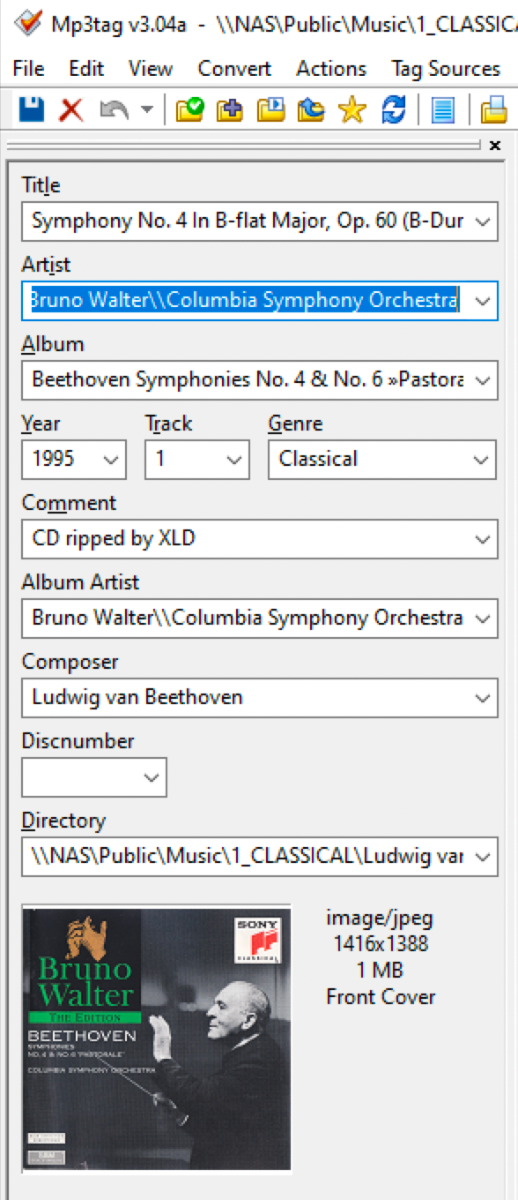
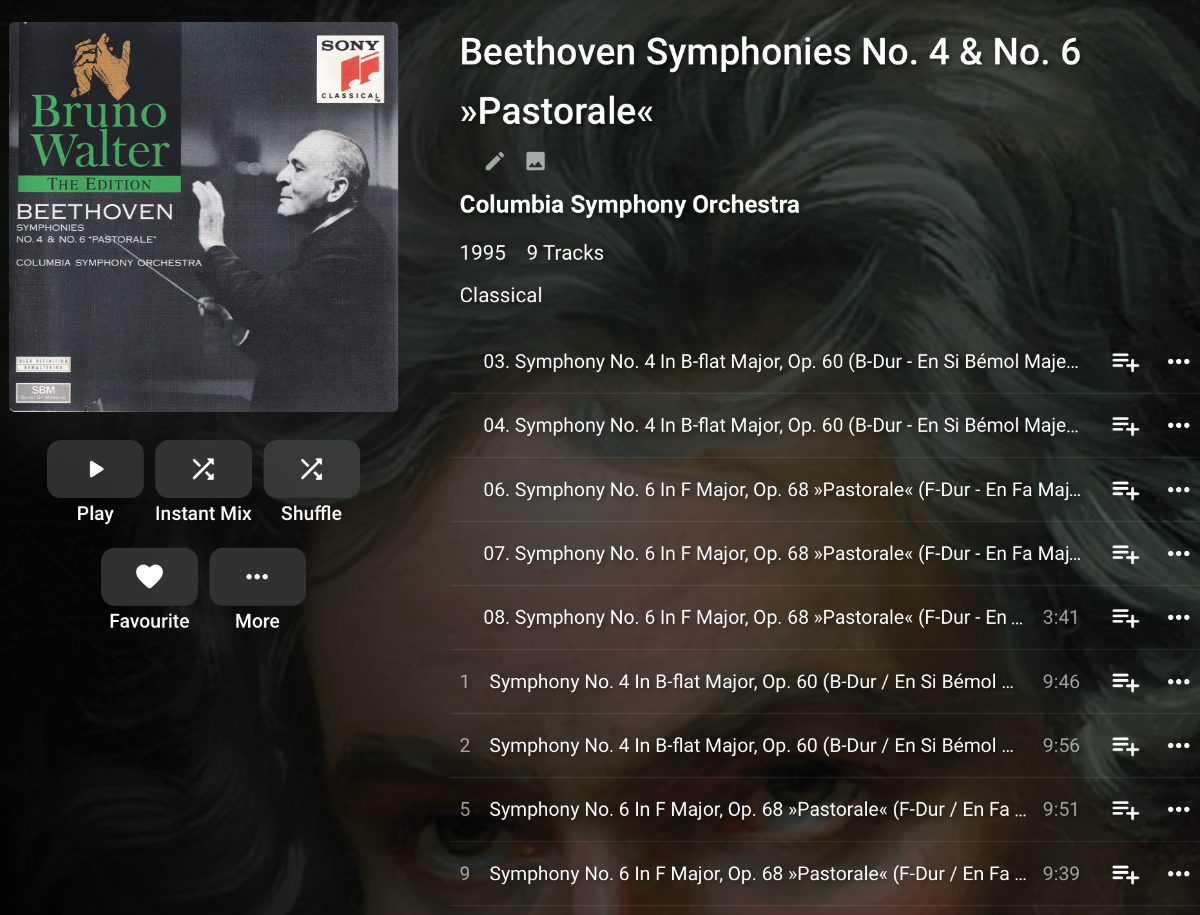
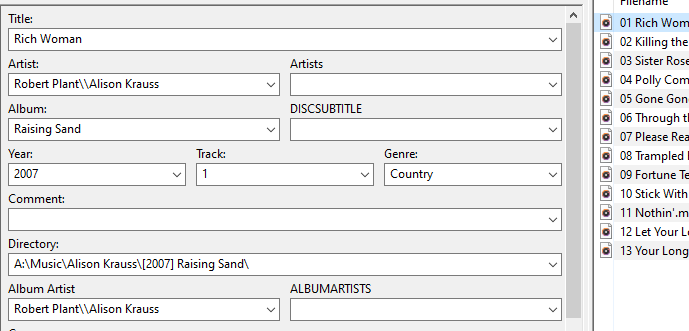
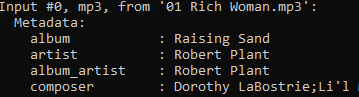
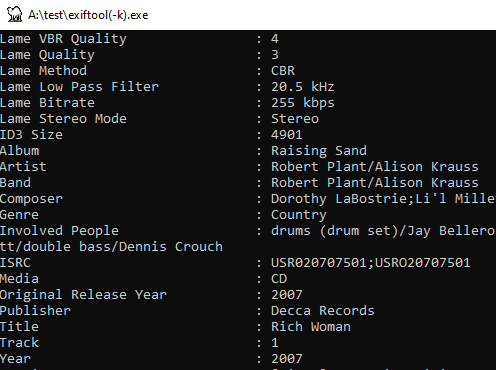
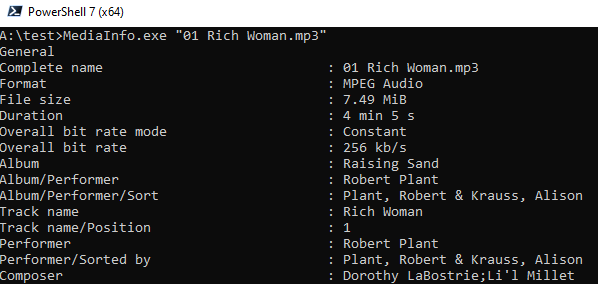
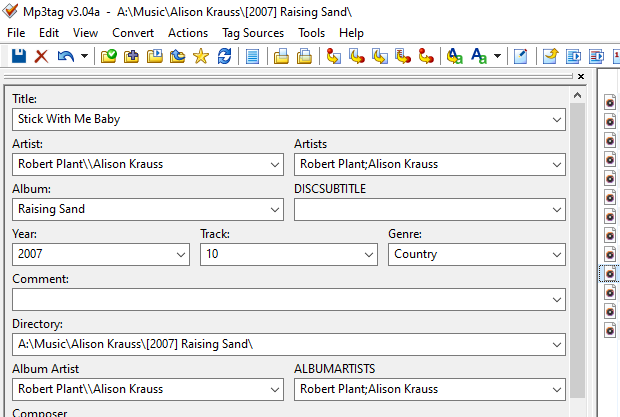
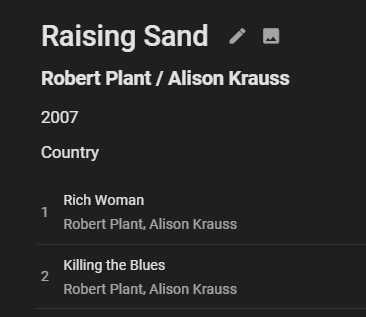
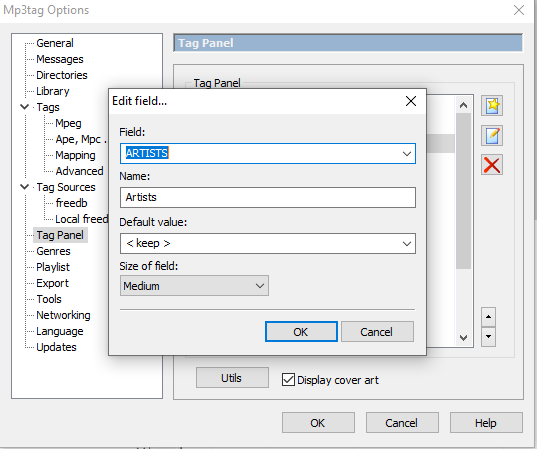
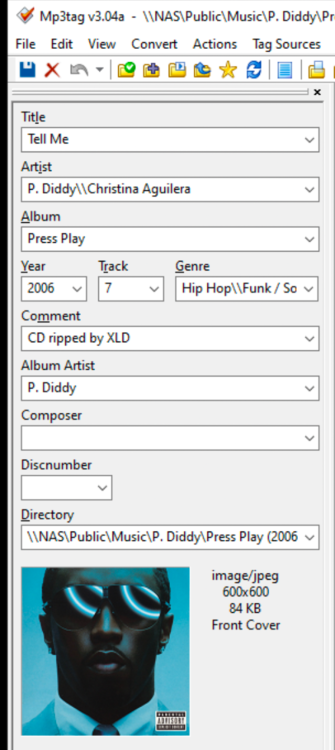
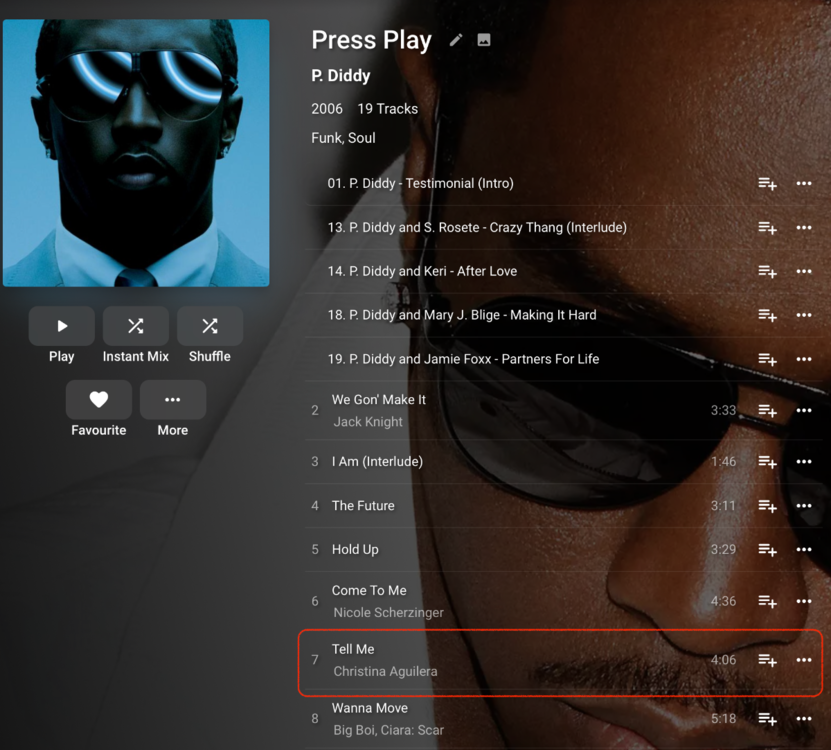
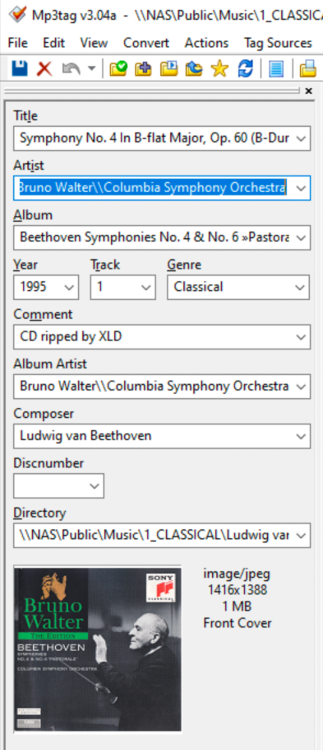
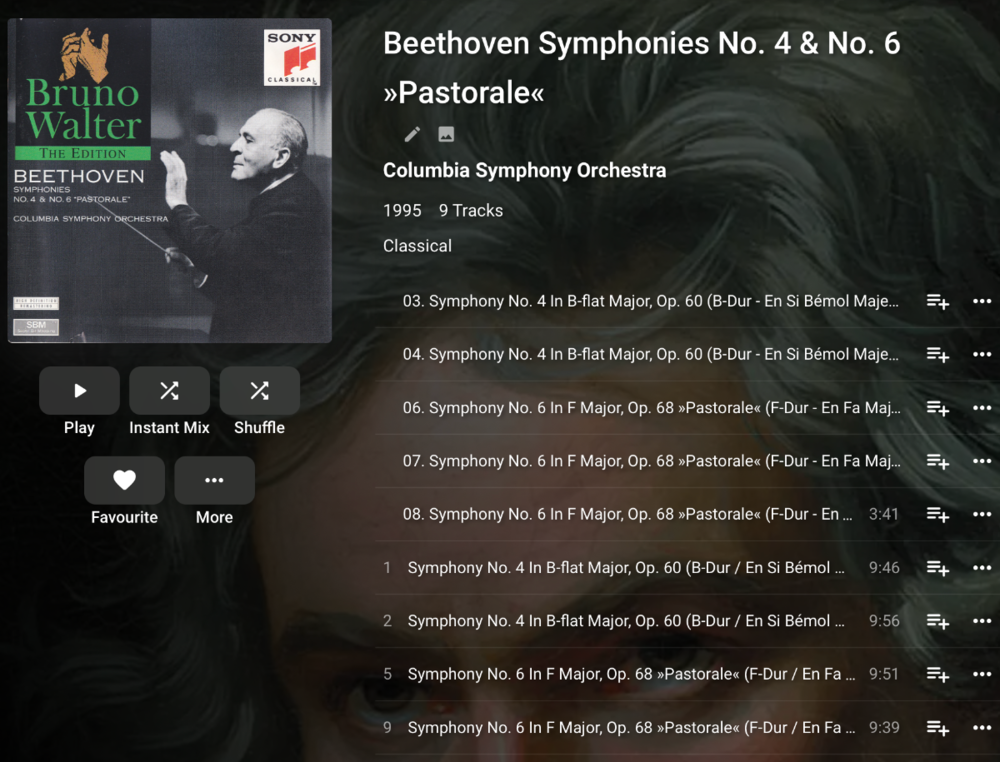
(3) is work in progress for Emby. As i linked in a previous post there is a feature request open for better classical presentation, it would be a great help if you were to give your views/designs on how you would would like use / show / filter / navigate classical music re composer, conductor, performers, perhaps in relation to how other softwares do it. that said support for composer tag is coming (in beta currently) but imo the devs need some feedback on how composer should be used/shown in the ui design / functionality. in terms of (1) and (2) it seems (without some files to test) your issue is caused by ffprobe (the tool emby uses to extract tag data) . FFprobe does not understand \\ separator*** (emby only sees what is in front of \\ due to a limitation in ffprobe on mp3 files).. *** there are two-ish solutions (assuming my hypothesis is correct) could you consider using ';' as separator for artist/albumartist tags/foobar/emby? could you consider using ';' as separator for artistS/albumartistS tags/emby? (Assuming these tags are ignored by foobar..they will take priority in emby.) rip your entire library in flacs Working example....this is what these tags look like in emby for me..(note population of artistS and albumartistS tag using ';' separator. (by configuring the mp3tag ui to show these tags on tag panel you can set them easily) voila, you can keep the old artist/albumartist tags and introduce artistS/AlbumartistS with an emby compatable separator (as long as they dont interfere with your other clients). if you confirm the concept works, i can have a go at advising on how to programmatically make this change to all your files in mp3tag in one go if you like.. Appendix esp. for @Luke tags looking like this on mp3 files are seen by ffprobe as this that is a shame for emby because \\ 'separator' (as shown in mp3tag) seems popular. there are other command line tools like exif which can read this. but mediainfo likewise can not see maybe there is some very fancy ffprobe command line option which provides more of a 'raw' assessment. its a shame ffmpeg team never fixed this for mp3 files. maybe the emby team has some contacts there.
 1 point
 -
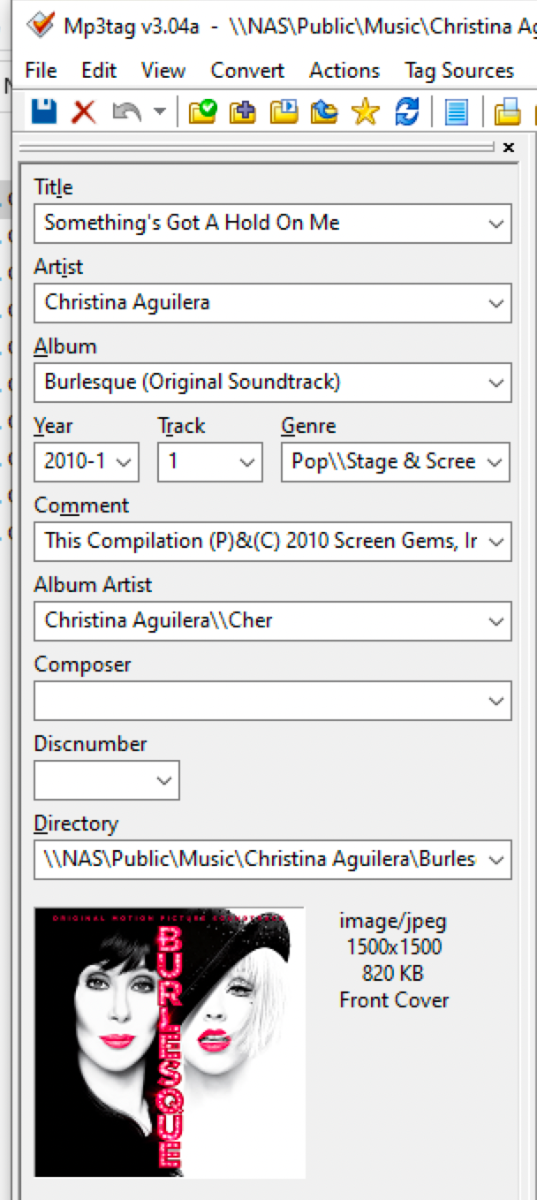
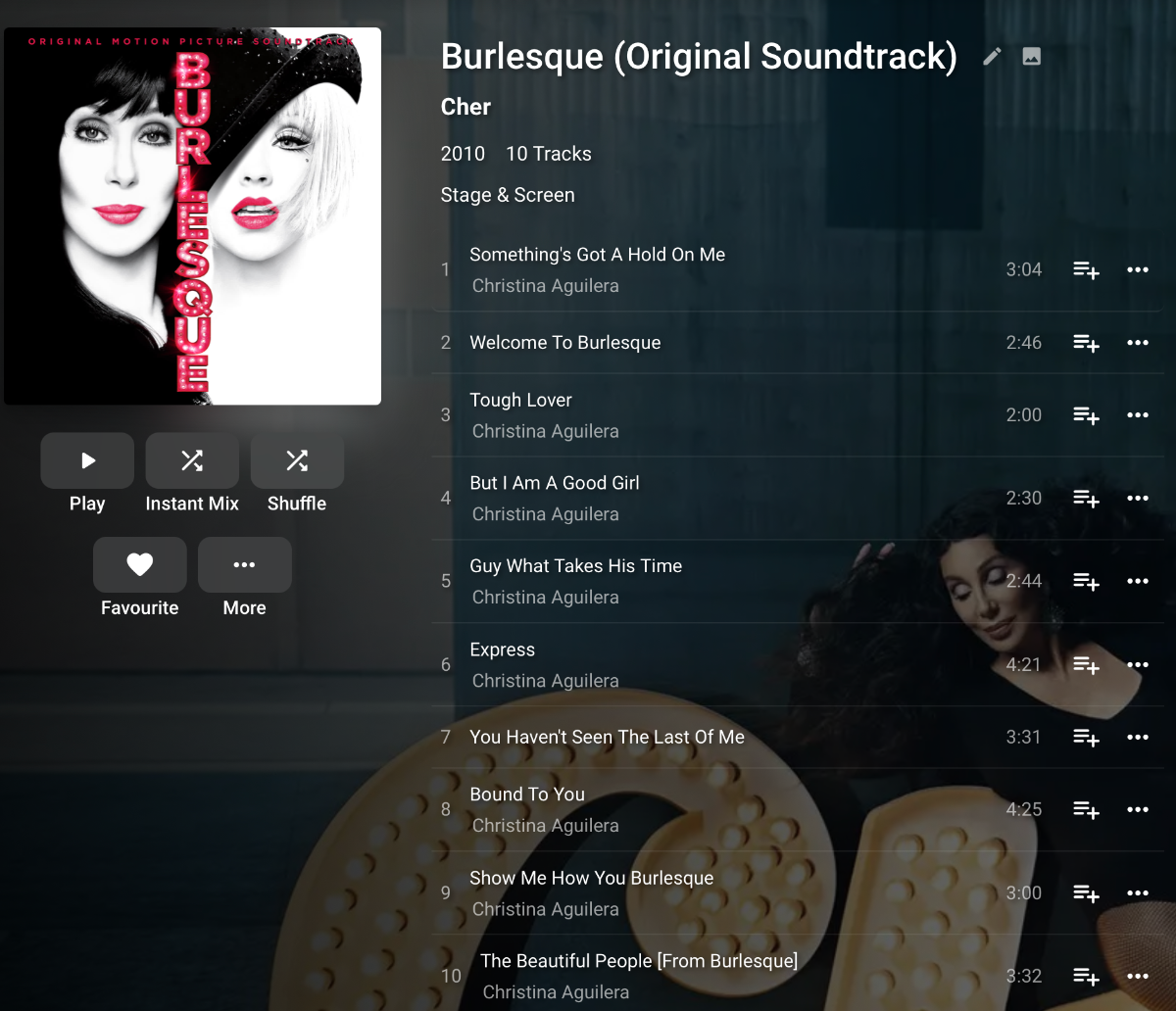
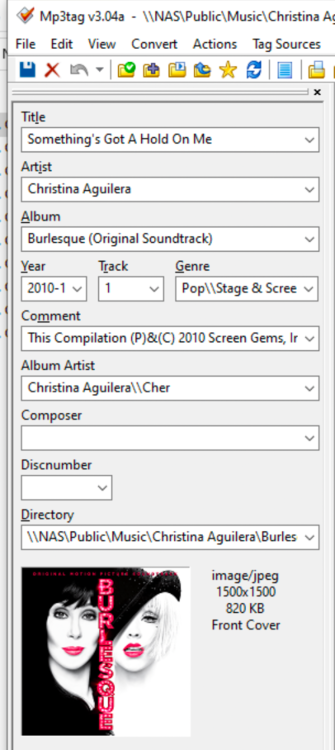
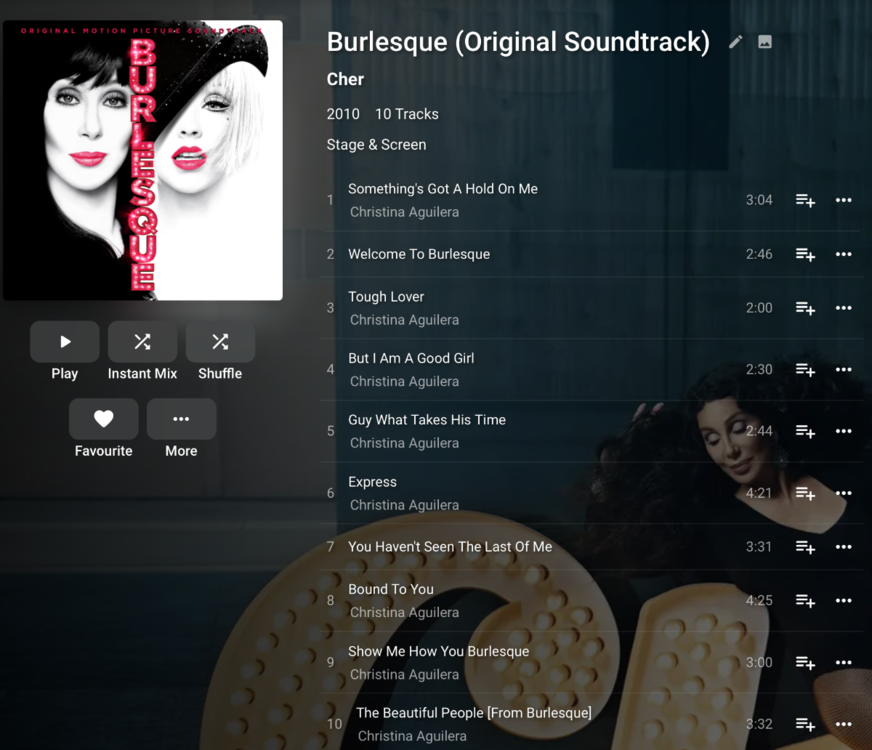
Hi, I will post a few examples. 1) Album artist, please see below example. Two album artists Christina/Cher, but only Cher is used in Emby: 2) Track artists - again two track artists but only 2nd artist is displayed under track 3) Now for classical music it is a real problem for me because of (a) composer is not displayed (b) conductor is not displayed (c) performer is not displayed (d) if multiple artists (very often for classical music) only last one is displayed: Please be advised that the artist tags work fine in Foobar2000, Kodi and Mp3tag, so I only experience the "issues" in Emby.
 1 point
 -
This would have to be optional and on a series by series level. It would also need to be off by default.1 point