Leaderboard




Popular Content
Showing content with the highest reputation on 06/19/21 in all areas
-
A small update to our 4.6 release is currently rolling out to address a few minor issues that came up. Here are the highlights: Fix web app playback regressions of videos that successfully played in previous server version Fix sporadic cases of audio playback stopping in the web app Fix sporadic cases of subtitle burn in not working Update sort by date last episode added to not be affected by virtual items in the database Fix Synology dashboard showing Emby Server as stopped when it is still running Fix album items being added to playlist alphabetically Fix transcoding audio channels for converted files using the convert media feature You can learn about the original 4.6 release here: View the full article3 points
-
How does the matrix not say the same? I guess no one understood the actual question you were trying to ask. As I never saw any question on how to unlock the device.
 2 points
 -
I'm curious what monthly fee you think you're paying to Roku?2 points
-
-= PLEASE UP VOTE & PROMOTE THIS REQUEST IF YOU WOULD LIKE THIS FEATURE =- DO THIS BY CLICKING THE "LIKE" BUTTON ON THIS POST REQUEST: Properly pool multiple M3u IPTV sources, so when adding more than one with the exact same M3u emby treats them as one source with however many "Concurrent Streams" you set for each. https://emby.media/community/index.php?/topic/63725-multiple-iptv-tuners-double-channels/?p=636718 https://emby.media/community/index.php?/topic/59607-duplicate-channels-one-tuner/?p=607031 https://emby.media/community/index.php?/topic/57420-multiple-identical-m3u-tuners-without-duplicate-channels/?p=560949 Basically once M3u #1 has used all 5 of its tuners, I then need to start using the login info that is within M3u #2... once those 5 tuners are used (now all 10 tuners), then emby issues "no tuners available". This is how emby treats HDhomeruns today, so it can't be to difficult. @@snodrog742 @@manolodf @@robrhedrick @@cayars1 point
-
Please click "Like this" and share it if you want to support this feature. Thank you ! Hello, There is a Kodi addon call "gdrive" from ddurdle who can read videos (original and transcoding version) directly from Google Drive. Why not build on this idea to integrate Google Drive as source directly in Emby Server ? In addition, Emby could generate automatically the STRM files from one or many Drive folders. And transcodings are already available with Drive so no need to transcode with Emby server. What do you think ? ------------- Three reasons why this feature will be useful and awesome: 1. Cloud is the future and today the cost is affordable. I have a Google Drive Unlimited for $50/month (ie $600/year) and I have unlimited space that is secured against crashes. Knowing the cost of hard drive and the cost of power consumption, its a very good deal. 2. Google Drive transcode video file. This provides different stream quality like Youtube (1080p, 720p, 480p and 360p) and the "image quality/compression ratio" is very satisfying. I can play 720p video on my poor 4 Mbits DSL. 3. You don't need to have a big server. Personally, I opted for a little dedicated server (Kimsufi 2G) for the cost and I can leave it run 24/7! Furthermore, me and my friends can watch movies from anywhere! Basics features that should be included: GOOGLE APPS OAUTH2 for activation and permission playing transcoded version (MP4 360p, 480p, 720p & 1080p) directly into Emby's app playing original file (avi, mkv, mp4) directly into Emby's app import embedded subtitles porwerful script module for multiple folder scanning and STRM generating1 point
-
It would be nice if we could have an additional level in audio books for book series, rather than just author, book, chapters. It would be nice if they were listed in series order too. Author > (series) > Book > Chapters. I just realised.. this is probably not really doable if you're pulling data out of tags in the file... ah well. I guess it'd be more hassle than its worth, I dont see many people opting to add in series tags into each of their files...1 point
-
I feel the following filter & sort options are lacking the following: * filter by HDR * sort by video bitrate * sort by audio bitrate * sort by filesize * filter by subtitle language * filter by audio channels * filter by audio language Anybody have anything they would like to add to this list?1 point
-
I think i was going to try this feature when it first rolled out in emby. Sounds cool as heck to take a picture and have it show up on the server! But realized it would upload all photos in my gallery to the server. I've got nothing to hide, but having labels that i need to take pictures of in order to blow them up to read and other trivial crap aren't worthy of server space, but phone worthy. So i backed off doing it then. Tonight i figured i would try this out again (years later?) only to remember why i didnt do it in the first place... There is just stuff on my phone that i dont need in the server. But i figured maybe if i went into my photo gallery on my phone that i might be able to select photos to upload. Selecting one of the pictures and choosing share i realized there are many places that i can actually choose, but not emby. It would be great to share a selected picture (instead of the whole phone library). Make the share option in the photo gallery link to whatever it is in the emby android app that knows how to share the whole library? If i turned on camera upload i would then have to go in and manually delete pictures when i was back at the server. And having not played with this feature at all, would it then keep uploading pictures that i want on my phone but deleted from the server when syncing? Anyway, thanks for all you folks do, and this is far from any type of priority on my side! (I searched the topic before posting, so if someone else already has it suggested i apologize in advance)1 point
-
When playing videos on an iPhone 12 mini, the bottom of the screen is blurred with a grey bar. The bar has a high opacity making it impossible to read subtitles. It doesn’t matter what type of video is streamed, it happens with all videos. It’s driving me insane because I can’t find anything about this online. I’ll upload some pictures of the issue. If anytime can help, I’d appreciate it. I don’t even know where to begin. latest Emby server latest Emby app iOS 14.4.2 If anyone can point me in the right direction, I’d appreciate it
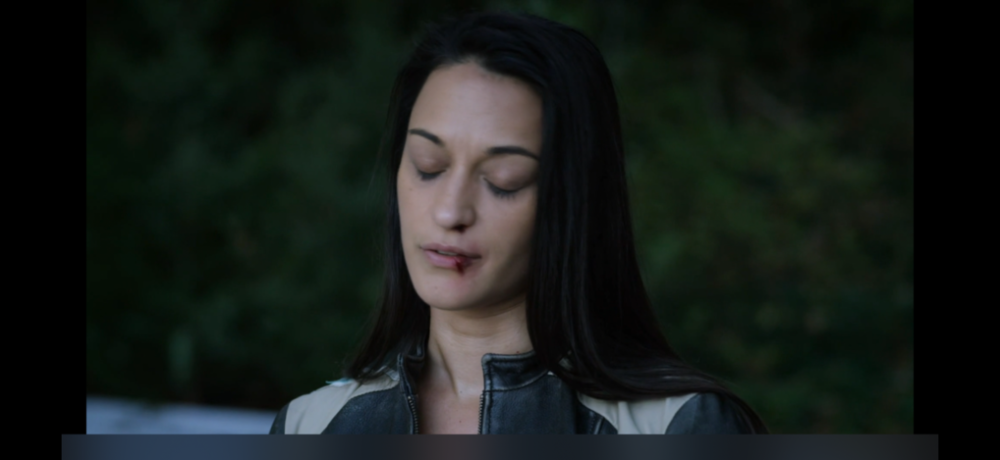
 1 point
 -
A small update to our 4.6 release is currently rolling out to address a few minor issues that came up. Here are the highlights: Fix web app playback regressions of videos that successfully played in previous server version Fix sporadic cases of audio playback stopping in the web app Fix sporadic cases of subtitle burn in not working Update sort by date last episode added to not be affected by virtual items in the database Fix Synology dashboard showing Emby Server as stopped when it is still running Fix album items being added to playlist alphabetically Fix transcoding audio channels for converted files using the convert media feature You can learn about the original 4.6 release here:1 point
-
 Audiobooks continue to be challenging to use in Emby. A separate request for reinstatement of Fast Forward by chapter ">>" has been created so that audio books often one track with many hours can be navigated easily. This "feature" request is around reading some ID3v2 tags and populating the metadata in Emby's database so they can be shown on the screen. ID3v2 Tag: COPYRIGHT to be mapped to Emby's STUDIO ID3v2 Tag: DESCRIPTION to be mapped to Emby's OVERVIEW At the moment, these do not get populated in Emby's database, despite being there. DESCRIPTION is also used for Podcasts too and is a brief summary of the what the chapter/track is about. This should be populated on screen under each chapter/track or a way to easily see the info. Commercial Audiobooks often use "Lyrics" with a much bigger description field too, but this one might get messy as music tracks actually have lyrics in them, hence suggestion of using Podcast DESCRIPTION Id3v2 tag.1 point
 -
Done it!1 point
-
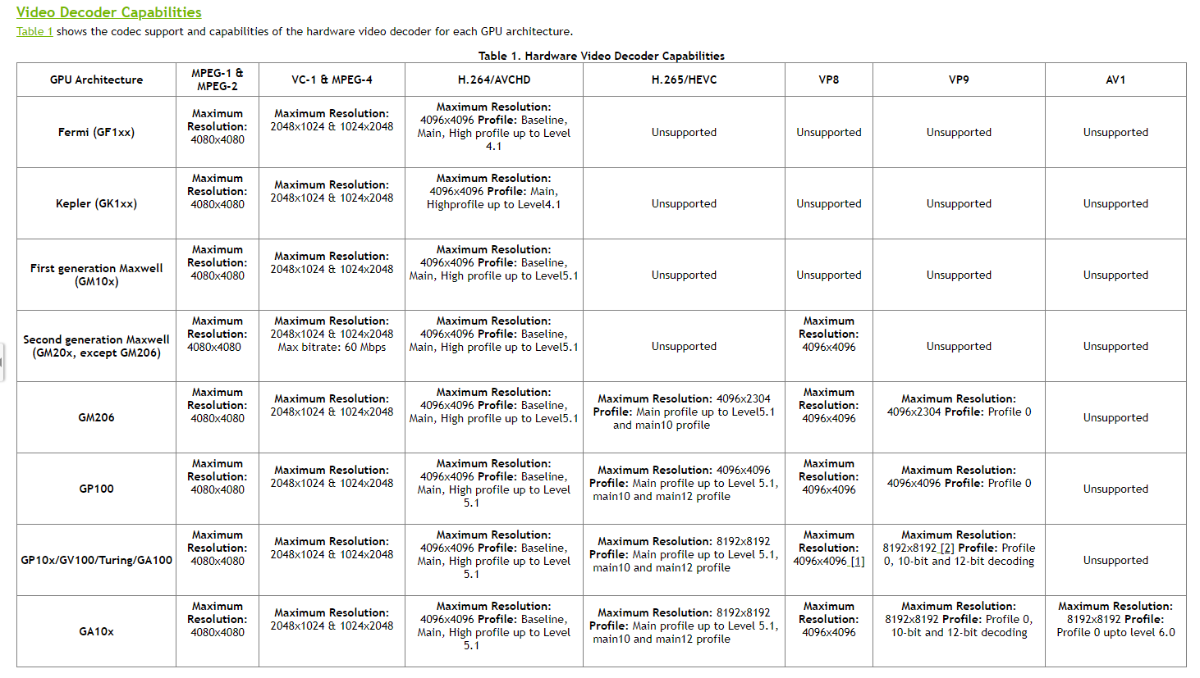
Well, HW acceleration is enabled, but it would seem your Turing 2080 does not support High 10 profile: >>>>>> Affected codecs Encoder NVENC NVIDIA GeForce RTX 2080 - H.264 (AVC) Adapter #0: 'NVIDIA GeForce RTX 2080' ComputeCapability: 7.5 Frame Sizes: max 4096x4096 - Width Alignment: 2 - Height Alignment: 2 Profiles: Baseline Profile (Level 6.2), Main Profile (Level 6.2), High Profile (Level 6.2), High 4:4:4 Predictive Profile (Level 6.2) Decoder NVDEC NVIDIA GeForce RTX 2080 - H.264 (AVC) Adapter #0: 'NVIDIA GeForce RTX 2080' ComputeCapability: 7.5 Frame Sizes: 48x16...4096x4096 - Width Alignment: 2 - Height Alignment: 2 Profiles: Constrained Baseline Profile (Level 6), Baseline Profile (Level 6), Main Profile (Level 6), High Profile (Level 6), Constrained High Profile (Level 6), Progressive High Profile (Level 6) >>>>>> FindVideoEncoder - Media: h264, UseHardwareCodecs: True, Mode: Automatic Info Checking: 'NVENC NVIDIA GeForce RTX 2080 - H.264 (AVC)' Info Check successful - selecting 'NVENC NVIDIA GeForce RTX 2080 - H.264 (AVC)' >>>>>> FindVideoDecoder - MediaType: h264, Mode: Automatic Info Checking: 'NVDEC NVIDIA GeForce RTX 2080 - H.264 (AVC)' NoMatch Codec does not support profile 'High 10 Profile' Info Decoder does not match Info Checking: 'DX11VA NVIDIA GeForce RTX 2080 - H.264 (AVC)' NoMatch Encoder is not compatible with 'D3d11va' decoders Info Checking: 'Automatic software decoder' Info Check successful - selecting 'Automatic software decoder' >>>>>> Processing Plan Info Name CanDoInHardware WillDoInHardware Reason Info Automatic software decoder >> False False Software Codec Info VideoInput >> False False Not a hardware decoder Info Scaling >> True True Info ColorConversion >> True True Info VideoOutput >> True True Hardware encoder Info NVENC NVIDIA GeForce RTX 2080 - H.264... >> True True Hardware Codec Anyway, @softworkz might revert on this one.
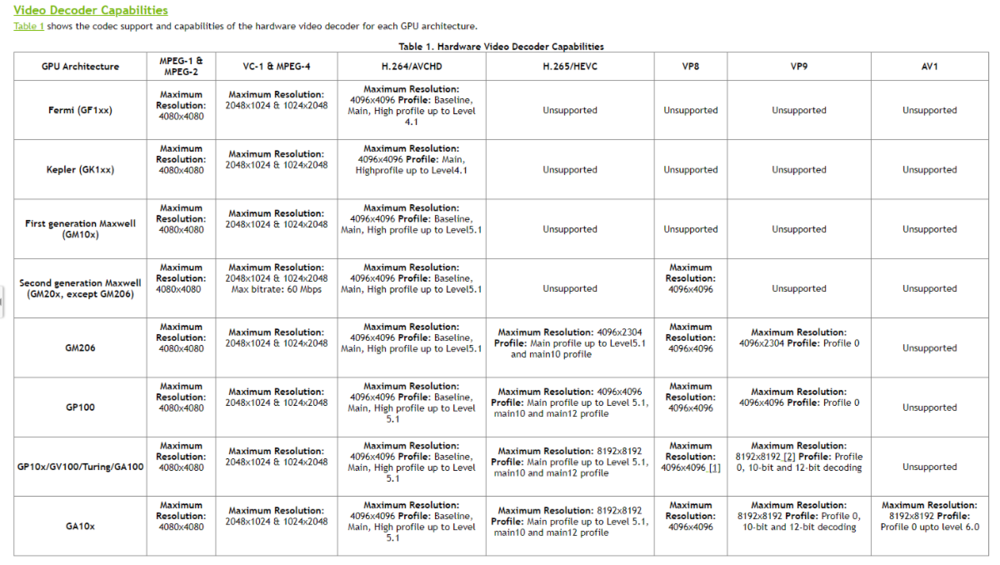 1 point
 -
Thanks Mate, much appreciated, will do.1 point
-
Update: I disconnected my phone from Android Auto so that music would only play through Bluetooth. Songs that had previously been garbled/muffled were playing fine.1 point
-
I did not. I did a metadata refresh on one playlist. This worked. Was not aware that i manually need to do that after updates. Seems to fix the problem.1 point
-
Thank you for the suggestion @speedingcheetah. I wanted to add: infuse has PIP, Emby does not, but switching the screen orientation still doesn’t work with either app.1 point
-
Hi Thanks for the response, it's not urgent so i shall quite happily wait until it's ready, just means i can stop editing all the metadata now lol was starting to convert the US ratings to UK1 point
-
Hi there, so this is an issue i have corrected and @crusher11 and @Arly (Sprinkles) have recently tested.. this will be out in next official release(working on home automation) however if you need the fix desperately, send me a message and i will supply it in PM. glad you’re enjoying it and thanks for all the feedback I’m out shearing my sheep today so please bear with me.1 point
-
As long as you have the MPV player enabled on Apple TV, otherwise you will not be able to play anything, because the native player has very limited features.1 point
-
IT WORKS! I now have ALL channels. And I have hardware acceleration re-enabled. Thanks so much! So now, the only issues I see are; - Version says 2.2.9 not 2.2.9a - Remote buttons mentioned in my post not working. - Channels load from 15 to 30 seconds each. All of which I can live with, just letting you know. Thanks again!1 point
-
ive switched to a neat app called Infuse as it does some wizardry and connects seemingly natively to Emby and other servers. it has no annoying bar on the bottom,1 point
-
Just clarify that it does not require any purchase using a web browser. Emby Theater for Windows requires Emby Premiere and cannot be unlocked with a purchase.1 point
-
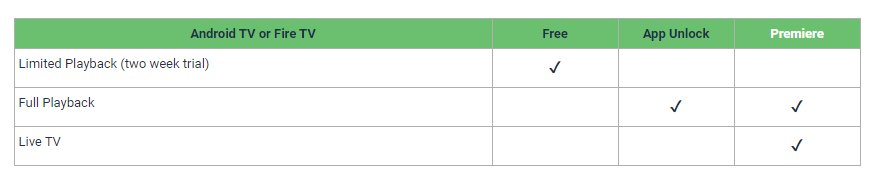
Emby on Roku does NOT require any purchase. Emby on Windows does not require any purchase. Emby on Fire and Android device requires a small one time payment after a short trial period. Fire and Android devices link to different accounts and therefore, if premier is not purchased, must be paid for separately. Unlock is what you do when you purchase on the Amazon or Android platforms. As long as you use the same account all devices of the same type are activated by one purchase. This really is simple so do not complicate it by overthinking.1 point
-
Yeah when I read "custom rating" I took it literally, thinking I could customize it. I added a rating to all the shows I want the kids to be able to see and it worked perfectly. All the help is appreciated, I'm all fixed up now. Thanks everyone.1 point
-
Hi. If you are not having any issues, I would not worry about it.1 point
-
Took me a minute to see as I had to clear my browser cache for my test build to see the change. Your color issue should be your var(--myblue), but yes overall code has changed and will look at it more later as it looks like the two boxes don't align like they use to and are different on for thumb and poster (at least on my system). You will/should see what I mean with this div.cardBox .cardContent { border: 4px white solid !important; border-radius: 1.8rem; } div.cardOverlayContainer { background: radial-gradient(farthest-corner at 50% 50%,rgba(30,30,30,0) 50%,#2c2c2c 100%); border: 4px blue solid; border-radius: 1.8rem; } You can see cardScalable has changed
 1 point
 -
Hey Cayars and Ebr, That does explain a few things! I tried with embedded SRT and external SRT, indeed the options change depending on which I select. I'll double check and confirm the direct play bit.1 point
-
Ok so this thread is going on 3 years. Is there any updates on this ? @Luke or even a work around to have it where Emby notices that the 5 concurrent connections has been used and goes to the next tuner instead of presenting that it cannot connect. Plus at the same time not having 2 exact same channels showing up in the guide. This being released would be amazing ! That being said the last few updates with modification to Live TV have been great, and the work on Favorites and Search are fantastic as well.1 point
-
Hi, I have never tried, this, but if you do, please let us know how you get on. Thanks.1 point
-
We have the packages built already but snap doesn't work well with the .NET core runtime as it blocks certain things from working. We had a back and forth dialog with snap about it but they kind of stopped responding to us about it and eventually I stopped bugging them. The packages only work when built in developer mode. When built using their strict mode, they're blocking the net core runtime from being able to load.1 point
-
What does ls -l look like from one of the media folders? I'd like to see if it did set an ACL and defaults for directories. If it does then new files and directories should inherit the permissions and the ownership should not matter when the ACLs are set recursively. Proper POSIX ACLs are a one time thing if defaults are defined, similar to setgid for the directory. If the OMV ACL did not setup ACLs on the filesystem you can do that manually from the command line then permissions for emby and ms would be all set going forward.1 point
-
I have Firewall turned off But I'll certainly look at the link just in case there's something there. I really appreciate you taking the time to help me! Have a good weekend.1 point
-
Found this on the Roku forum but for a different Roku version. Roku players only support the version of Dolby Atmos that is used by online streaming providers. This is a Dolby Digital+ lossy stream with Atmos metadata included. This is NOT the Atmos that is included on Blu Ray discs. That version is the Dolby TrueHD lossless codec, which Roku does NOT support via bitstreaming.1 point
-
Not sure, but I'll try it. I keep you updated1 point
-
Sorry for the late response, I was on a business trip. ... The log file reported an issue which probably prevents a sync. I'll try to fix it, but not sure if it solved the problem. It's really strange that a repair sync doesn't fix the issue (as a workaround).1 point
-
was just about to post about this. same issue all of a sudden with my iphone 12 pro max. annoying bar on the bottom of the screen at all times during playback of anything. does not happen on Android with my old Pixel 3.1 point
-
I've fixed it myself. I believe that the fault was in a (possible) corrupted download of the latest version (4.6.2.0) of EmbyServer. After several emails to the guide provider (and looking at the cache files) EmbyServer had the correct guide data but was unable to allocate the channels due to the inability of accessing the Channel Mapping function. The solution was to remove/download/reinstall EmbyServer 4.6.2.0 The (new) channel mapping page appeared and then I was able tp map the missing channels to the guide data. All good now.1 point
-
HI guys, I can't reproduce this on my devices, but it will be simple enough to fix so we'll get an update out to resolve it. Thanks.1 point
-
Probably not to useful for true external content but could be useful for people using strm with crossover episodes where the bif file likely already exists.1 point
-
If they are present then it would be nice to use them, yes. I think this is something that just has never been looked at before.1 point
-
so, I really like how simple the podcast plugin is, however it could use a few additional features. add podcast selection from within the podcast category from homescreen (maybe at the end of the list of podcasts) its pretty tedious adding podcasts from settings. save function so podcasts can be listened to during internet outages without having to be stored on the device, like for x amount of days if possible. the tile on the homescreen seems to be affected by that bug the tv and movies used to have, where there are doubles of the pictures in the tile, see attachment (at time of screenshot I had 5 podcasts added, all had pics and metadata) Also, it seems to have been untouched for so long it still refers to Emby as MB in the description. lol
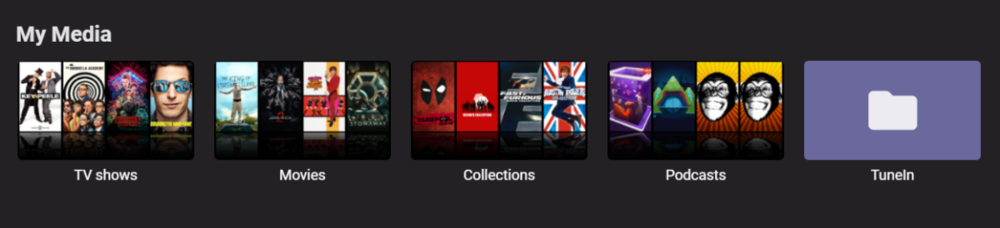 1 point
 -
I would appreciate the option to individually upload pictures as well. One of the recent android app updates killed the folder list in the camera upload feature and the camera uploads stopped. I am currently running version 3.1.73 the restore the folders and the uploads. It would be nice to have this as an addition, and also be able to use it to manually upload if the auto feature fails.1 point
-
A small update to our 4.6 release is currently rolling out to address a few minor issues that came up. Here are the highlights: Resolve sporadic database locked errors (may require an additional server restart) Various fixes related to non-standard episode naming Fix library options sometimes appearing to not save Fix regression in xmltv series identification (requires running the live tv guide refersh) Fix clicking see all on next up showing an empty list Fixes for GameBrowser Fix multi-select remove from playlist when removing the same track with multiple selections Improve metadata editor lock icon You can learn about the original 4.6 release here: View the full article1 point
-
For a long time, up until decades ago, it's been quite normal that humans with certain disabilities were publicly exposed and presented - on fairs or bustles allowing to watch these in exchange for just little money. Something like "woman without legs", small-grown men, a guy that doesn't feel pain.. etc. - a bit like a zoo with humans. This had eventually been superseded and replaced by afternoon TV talk shows with the focus shifting a bit from physical to mental shortcomings. The mechanism remained unchanged, though: humans are often fascinated by abnormal or cripple individuals, no matter whether physical or emotional. Eventually, after those talk shows, came the internet - again providing plenty of ways for spectating even more human weirdness. Again - same mechanisms in place. And so - here we are now, with our zoo having a new attraction1 point