Leaderboard




Popular Content
Showing content with the highest reputation on 06/14/21 in all areas
-
When playing videos on an iPhone 12 mini, the bottom of the screen is blurred with a grey bar. The bar has a high opacity making it impossible to read subtitles. It doesn’t matter what type of video is streamed, it happens with all videos. It’s driving me insane because I can’t find anything about this online. I’ll upload some pictures of the issue. If anytime can help, I’d appreciate it. I don’t even know where to begin. latest Emby server latest Emby app iOS 14.4.2 If anyone can point me in the right direction, I’d appreciate it

 3 points
 -
It's beta, nothing is guaranteed to work. That's the point!3 points
-
If you watch a movie and have to download a subtitle, often there is a required subset to make the playback with subtitle proper. The intention is now, that you setup the offset, but it will be kept per movie and downloaded subtitle (please note that new versions of a subtitlecould be downloaded). Expected function: Next time starting the same movie wiht the yame subtitle, the offset from last time is automatically applied.2 points
-
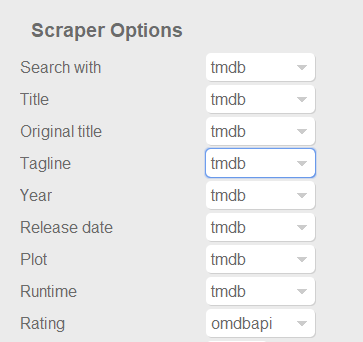
Dont know if this was already posted. For example something like the capture below at least for ratings, to use omdb or another scraper as first priority for this field, and similar for tvshows with the available scrapers for that library type of course. Also It would be nice and handy to have some language options per field, at least for Title, Tagline, Plot, Episode Title, Episode Plot and Genre fields. Handy if you want to have your tagline/plot/episode-title/episode-plot in spanish for example or your native speaking language but want to use the title of the movie or tvshow in english for english movies, or the title on the native language of the movie (spanish, french, german, etc). With the current setting you get absolutes, english: everything english, spanish: everything spanish. And would be nice to apply this language options to images too. I scrape my data with TMM before adding it to emby to have this type of settings, but I would be really good if emby could handle some of this variables. Update: Also, give the option for "None" to skip scraping for this field and "NFO Only" as @picotrain1 suggested.
 2 points
 -
Depending on your configured metadata providers, a pilot could be categorized as a special (s0e1, for example), rather than a regular episode. In cases like that, you name your pilot file to match the metadata provider listing, then use Emby's metadata manager to tell Emby to position that episode before the start of season 1. Here's a TVDB example where the pilot is considered a special and not part of the regular series: https://www.thetvdb.com/series/due-south/seasons/official/02 points
-
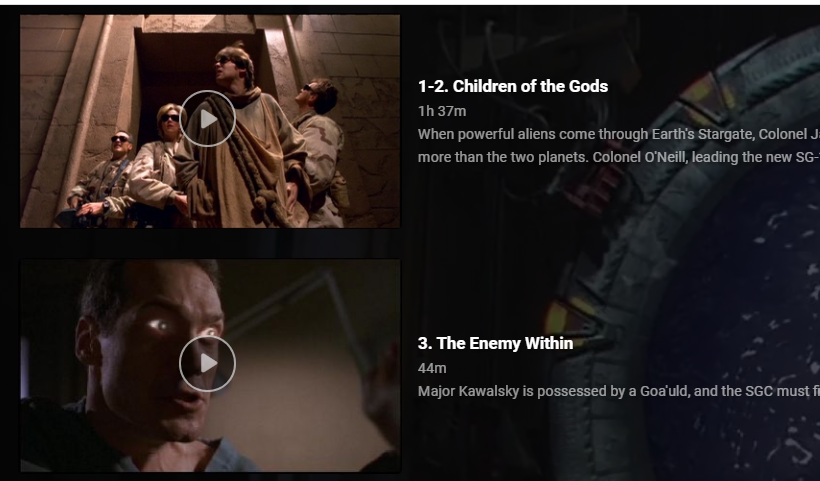
As far as I can tell, you can't do this from within Emby itself, but I add this line to the NFOs of all my multi-part episodes: <episodenumberend>2</episodenumberend>
 2 points
 -
Which client app are you referring to? Edit: Lemme rephrase that: uncheck "Play Next Episode Automatically" - For Web App, it'll be under your User profile, Playback tab - For AndroidTV app it'll be under Settings>Playback - For other apps I suppose it'll be similarly placed There's also an option to enable "Still watching?" prompt, which might suit your needs, as well.2 points
-
It could rotate or something, like in the theater Of coarse it would have to be able to be turned off I suppose for people who don't like the idea.1 point
-
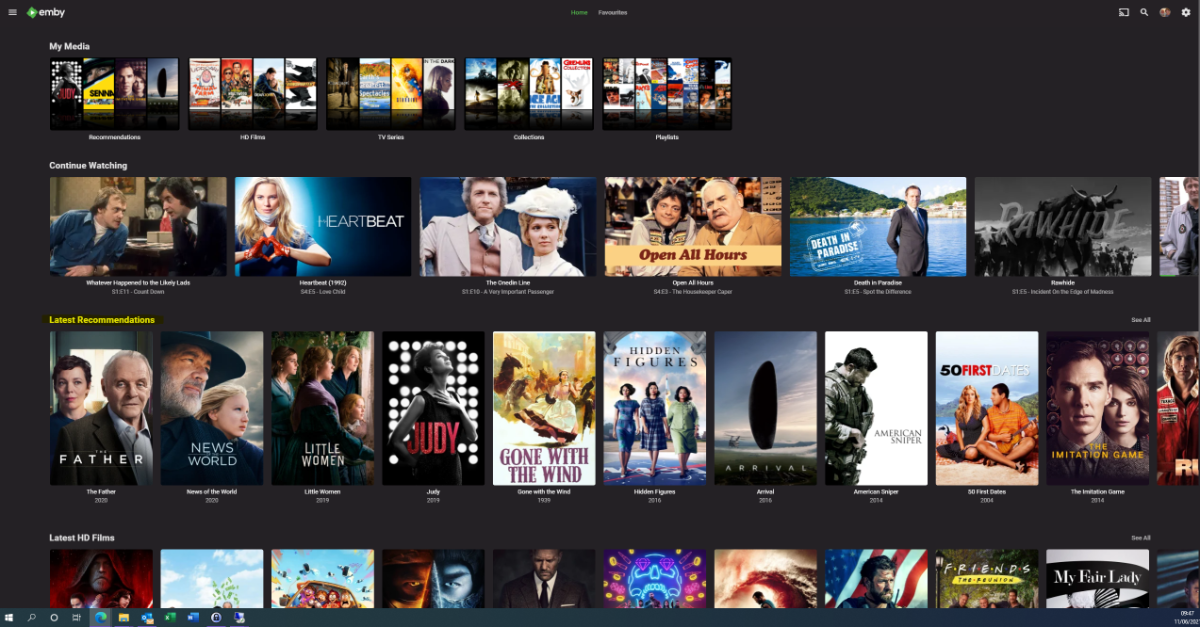
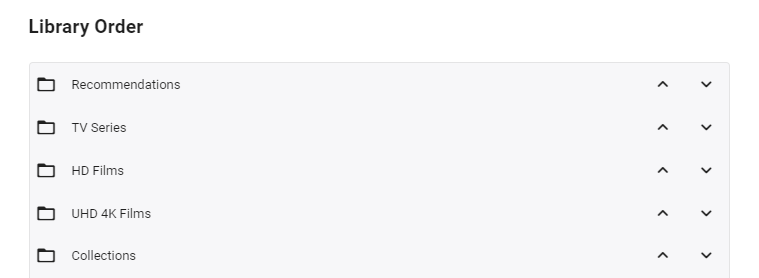
I'm posting here to gauge interest in this potential tool/utility - I use it for my parents and it works really well - but to be useful for the masses, it will need some more time spent on developing the code to make it more universal. However, before doing that, I wanted to see if this is useful as I don't want to waste my time.. What does it do ? It creates a 'Recommendations' library for each user based on items added to a Recommendations playlist. This library is then displayed in the usual 'Latest' list. As items are watched, they disappear off the list. Example (Actual) screen grab - (note 'Recommendations Row') How does it work ? A new library is setup and each user plus a global entry is given their own folder :- In these folders will be links (STRM files) to the real media. These are automatically created on a schedule via a standard playlist file (see below). Individual user based permissions can be applied to these folders - therefore, personalised recommendation lists can be created or globally set if added to the global recommendation playlist. So for this user - they will just see Recommendations for Rich and Global. The Recommendations 'library' needs to go to the top of the list for it to be easily visible :- Note - if there is nothing in the Recommendation library for that user (ie it is empty) - then the Row will not be shown. How do I flag an item as a Recommendation and to whom ? The script pulls the recommendation file locations from the XML playlist - thus you can just use the normal emby playlist functions to add or remove recommendations and add them to the relevant playlist. Anybody can add any entry to any playlist (as playlists are not permissioned), so be wary of that.. If you want everybody to see the Recommendation - then just add it to the Global Recommendation playlist. How often does it update ? Currently my script just runs every night and automatically creates any new entries added to the playlists. Now the initial library and playlist setup is done, this is now fully automated for me - I just add recommendations to the playlist and the following day it appears on those users screens. ... Of course, if emby allowed a playlist to have permissions and allowed it to be shown on the main screen in a row, then there would be no need for these scripts to hack a 'virtual' library... Any thoughts ? Is this worth progressing to make the initial setup more automated ?
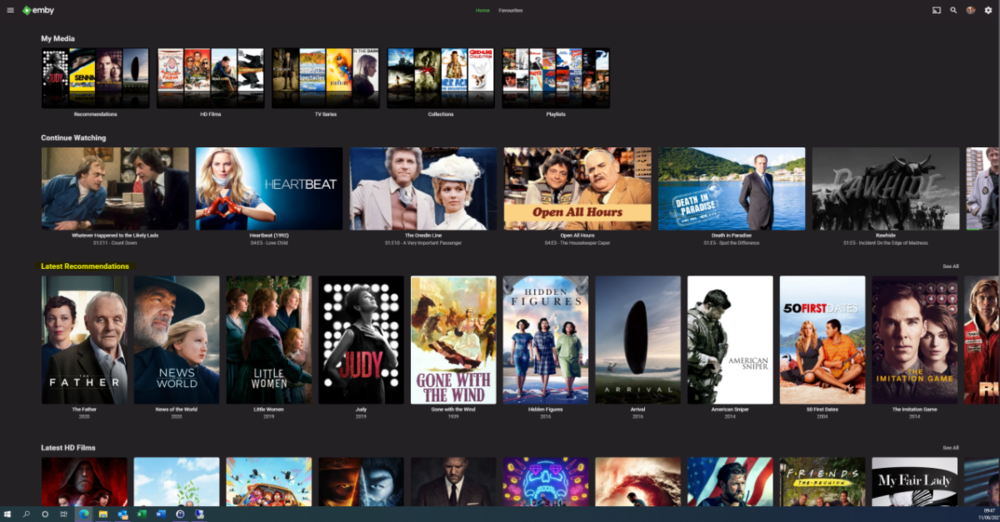
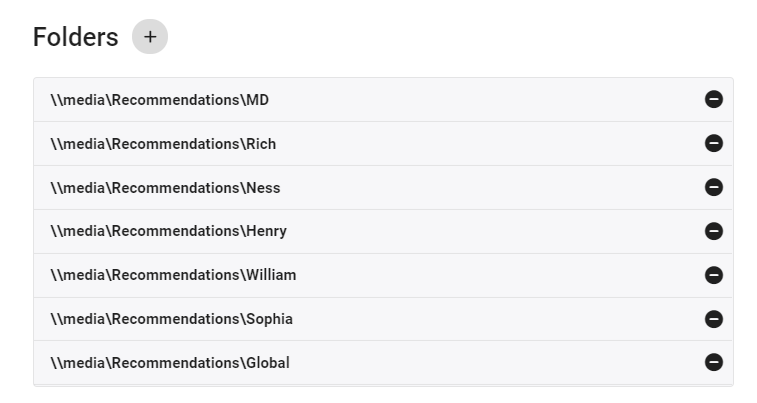
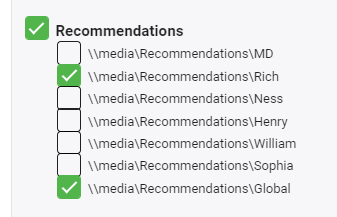
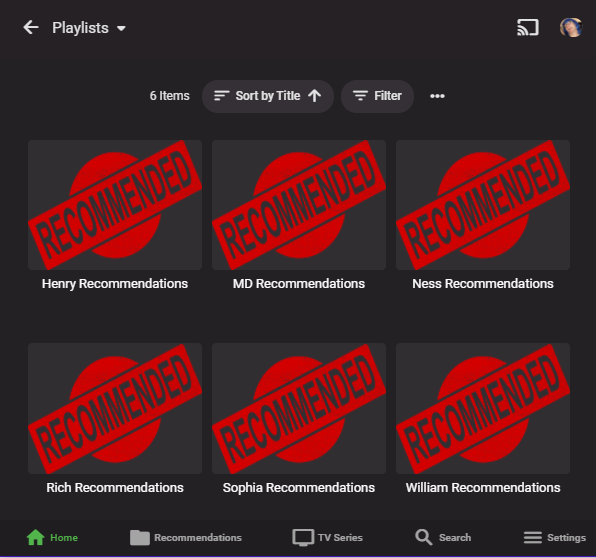
 1 point
 -
Make another admin account for test, see is it visible under that account?1 point
-
I use the latest Firefox browser and I also use the iOS app. Paths no longer show up on either of those.1 point
-
no worries - just when I get "A talking too" about a USERS comments - just rubs me the wrong way. Had users for over 30 years - they proved over and over that the "u" is silent. I did tweet about the page to have the owner update it or remove it because bad info is WORSE then no info - and its near the top of most searches1 point
-
I did this at the show level (from within the collection). I just tried doing a metadata refresh on a library. That led to a mass exodus of shows from the collections. I think I will have to manually add them back. However, I think once added back, they will then have the <set> tags, and the problem will go away. I'll let you know.1 point
-
No, transcoded to AC31 point
-
Did I get this right that everything with DTS doesn't direct play on iOS?1 point
-
Hi, yes this type of field level control is a good idea for future updates. thanks for the feedback.1 point
-
You can also name the file with the episode range in the name, like: s01e01-e02. Paul1 point
-
for Admin users, the path is still shown under Media Info ?1 point
-
I can't find any setting that would throttle local wifi while not also throttling internet throughput. Hopefully I can figure it out on Netgear site. I'm getting sick of consumer routers. Before it was wifi drops or router freezes until reboot on Asus. Then this netgear had constant wifi drops, RMA'd, now this local performance issue. Might be about time to try business grade with Ubiquiti.1 point
-
I live in BulkRenamer :). Thanks again!1 point
-
I guess this is a case of not being able to please all of the people all of the time, but as the admin I relied heavily on being able to see the path on an item detail page. The path has been gone now (for admin and regular uses alike) since the latest release, and now Emby is indeed more difficult for me to use, since I do almost all of my library maintenance and administration through the file system, and from the detail page I now get no hints about where on the file system the item lives. I have nine media libraries, and I also can't even tell what library an item is in from the detail page. Before, when I could see the path, I knew everything I needed to know about where it was and what library it is in, but now I'm lost. I wish I had known this change was coming so I could have given my feedback earlier. One of the nice things about opensource is that if the devs of a project remove a feature I need, I can add it back and compile it myself, but Emby has made that impossible too. I know I could do it with Jellyfin, but then I'd lose the Premiere features I've paid for. :sigh:1 point
-
For best measure rename the episode so it uses the same season/episode as well as title. BulkRenamer or Filebot would make quick work of this.1 point
-
On the contrary, the only thing that matters it the numbering, you need to use S01E01, as cayars mentioned above.1 point
-
It depends how you scrape your metadata and what metadata provider you use. Emby doesnt scrape metadata from IMDB, to use imdb you need to scrap it before adding them to emby with a third party app. If you use Emby to scrape you need to name your files according to thetvdb or themoviedb. themoviedb example Black Sheep Squadron: Season 1 (1976) — The Movie Database (TMDb) (themoviedb.org)1 point
-
So.. the macos Emby app, how similar is it to the tvos/ios one? Does it also use mpv? In other words, is this some little progress getting dts support on tvos?1 point
-
This is how it should have been from the beginning, I'm not sure why this wasn't done in the first place.1 point
-
Hi. It is true that we are not a simple file browser (like the interface on your TV). Emby is a much more intelligent system than that and, if you will follow a few naming and layout conventions, the functionality the system can provide is quite vast. If you really only want simple file browsing, then you should define all your libraries as "Home Vidoes" so that no metadata providers or special intelligence will be involved. But, instead, I highly suggest you try a sample with the proper structure and proper library types so you can see everything Emby can do for you.1 point
-
I first tested via web player where both subs playback. Next I tried on the FireStick 4K.with 2.0.26a and neither sub would play for me. @ebr let me know if there is anything specific you would like me to test.1 point
-
Thanks SamES, would definitely be a good feature for TV apps. Having too switch to a different device for Live Tv watching isn't ideal.1 point
-
Is it transcoding? Are you playing using web app or Emby Theater? I guess you are playing with web app and transcoding is required and your server is not powerful enough. Try Emby Theater instead: https://emby.media/emby-theater.html To confirm, please post your server and transcoding log:1 point
-
I think this is caused by the new version of the app that just came out (2.0.7). This update added some padding at the bottom of the screen on devices with notches/no home button, but that bar doesn’t disappear when playback starts. I’ve noticed it too, so this seems to be a bug that was introduced in that update.1 point
-
Don't see why but I would think it would that hard to go to the transcode folder a get the media info from the files themselves. But the log is clear on what is being sent to your reciever.1 point
-
strm files are the easiest way of linking to content through an ipfs gateway. from a bit of poking around, the .bif detection is the only missing piece. (though It seems like emby may not actually write metadata into a directory which contains only a strm file, but if that is the case then temporarily renaming it to "foo.mp4", scanning, and then returning the extension to ".strm" does work) no amount of hoodoo gets it to acknowledge the presence of .bif files, but if it did, emby would essentially be ipfs-compatible out of the box, in the presence of a local gateway. please prioritize!1 point
-
It is the FreeNAS/TrueNAS plugin that is using the generic Ffmpeg build. The issue is the git at: https://github.com/freenas/iocage-plugin-emby.git which I've put in a request to update to the ffmpeg build bundled with emby. I'm trying to get someone who can authorize the request to push the button to approve my change. I've got the plugin's updated to at least stop the error messages for everyone who updates using them but I haven't gotten a response yet from a maintainer of https://github.com/freenas/iocage-plugin-emby.git1 point
-
Yes, it was something on my list of things to look at that might be cool to add but i never got to it. The plugin has been stable and not updated for several months now mainly due to the fact it does everything i need it to, with no feedback or suggestions from users there is no point making unwanted or unneeded changes for no reason. I will look at your suggestion.1 point
-
Hey, sorry for the late response, I've been very busy since our Last talk. Well, I dont know what happened, I updated both my TVs to v1. 0.98 and now it's working properly on both of them. Thank you very much for that. =D1 point
-
That's not feasible for plugin developers. Emby developers aren't even guaranteeing *Emby* will work on a beta version. There's no way for plugin developers to keep up with the pace of change, preserve backwards compatibility, etc. Again, it comes down to people that shouldn't be running betas shouldn't run betas.1 point
-
Awhile ago when I was trying to set this security up the easiest way to get an SSL certificate was a self signed through IIS, (this self signed worked until around the beginning of the year when the app stopped working with it). I didn't want to pay for a domain either so am using a ddns from another product i bought. Since i don't own the domain the easiest way to validate the certificate is via http verification and with IIS that is a fairly easy step to make. i know it is not the neatest way to do stuff but it is working for now so i am happy. Thanks for the help.1 point
-
Hi, yes we'll take a look at it. Thanks.1 point
-
Perdona por tardar en responder. Voy a probar como me dices, usando el archivo m3u exportado de tvheadend. Gracias por tu ayuda @cayars1 point
-
Hi, yes that's something that will need to be looked at. Thanks for reporting.1 point
-
I don't understand what the problem is, since a lot of garbage apps end up in the LG content store anyway... There are a LOT of crappy IPTV apps that get approved full with bugs. Why is it so hard to get a professionally developed app like Emby updated in the LG content store ?1 point
-
If these are the SQLitePCL.pretty.SQLiteException errors you would want to follow the guide above as well. It may be a bit trickier to find the location holding the database files but the Paths box shown on the web dashboard should get you to the correct area to look for them.1 point
-
I'd like it to be a user option that each user could set in their settings area with a standard set by the server or just left to the Emby default.1 point
-
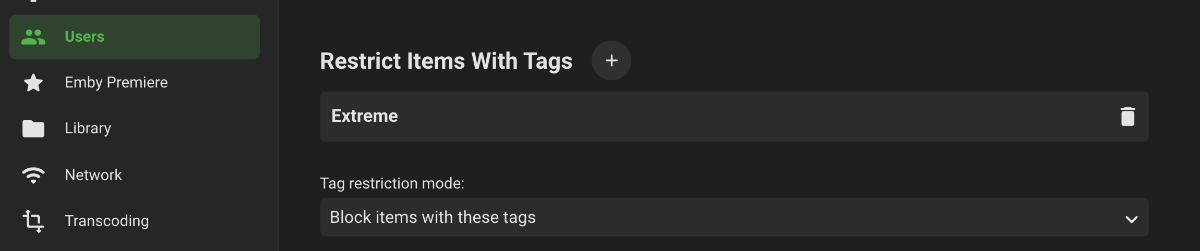
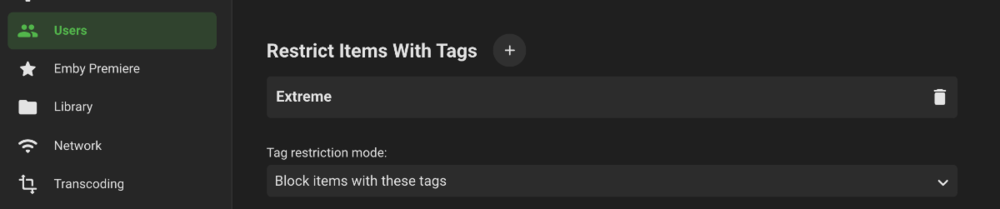
I know it's not the easiest solution for loads of files, but if your users are set up with their own logon, you could restrict certain items from being viewable by assigning a tag and then restricting access to that tag only. I used this to restirct access to certain films which are classed as extreme cinema. I assigned the tag extreme to the films in question, then under USERS, i select the users in question and under parental control, add the tag to the Restrict Items With Tags section, then select block items with these tags in the dropdown. No good for blanket banning films, but does achieve the goal on a film by film basis You could also restrict by Age Rating but that may be no good if the user is a family account as then they would be stuck with watching films like Frozen
 1 point
 -
Same problem using iPhone X.0 points