Leaderboard




Popular Content
Showing content with the highest reputation on 06/10/21 in all areas
-
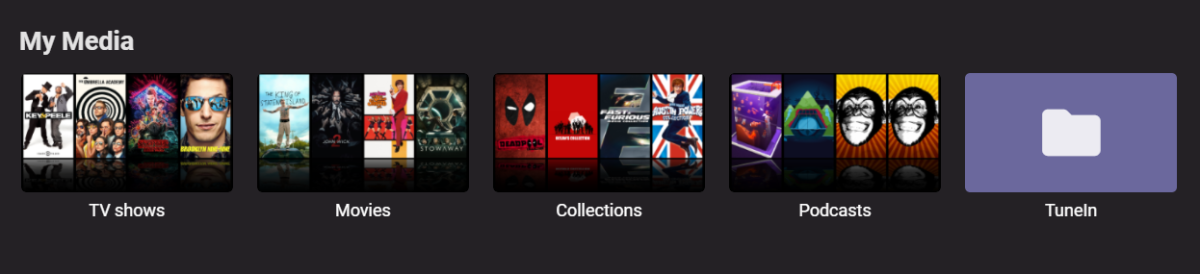
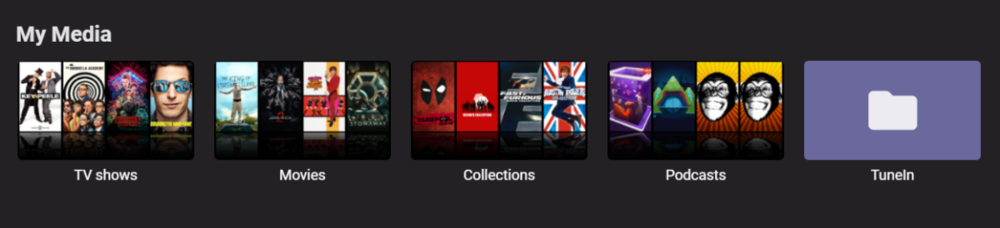
so, I really like how simple the podcast plugin is, however it could use a few additional features. add podcast selection from within the podcast category from homescreen (maybe at the end of the list of podcasts) its pretty tedious adding podcasts from settings. save function so podcasts can be listened to during internet outages without having to be stored on the device, like for x amount of days if possible. the tile on the homescreen seems to be affected by that bug the tv and movies used to have, where there are doubles of the pictures in the tile, see attachment (at time of screenshot I had 5 podcasts added, all had pics and metadata) Also, it seems to have been untouched for so long it still refers to Emby as MB in the description. lol
 3 points
 -
There's one thing I learned from this mess of a post: use 'e-mail once a week' when selecting a following option! My e-mail sucked up my monthly allowance of data!3 points
-
No, it's wrong. You're telling Emby that an episode(s) is part of season 2 (nfo) and that actually no, it's part of season 1 (folder structure). It was luck that Emby happened to react to this error in a way you liked in a previous version, not design.3 points
-
so you follow instructions from a blog posted over 3 years ago (with a comment at the end that it is no longer working) and are upset that it is no longer valid? and then threaten to "blast emby on every group" because of your incompetence? nice form. try the following and then kindly --purge yourself from thes forums. sudo apt-get --purge remove emby3 points
-
As you probably know already, it's not uncommon for cartoons and anime episodes on dvd or television that multiple episodes are broadcasted in sequence as one. Emby already recognizes those multi-part episodes if they follow the naming convention: https://github.com/MediaBrowser/Wiki/wiki/TV-naming#multi-episode-files But the content of the nfo's that are generated by Emby for those multi-part episodes is wrong! Emby concatenates the episode titles and the overviews into one single <episodedetails> tag where it should add a seperate <episodedetails> tag for every episode: https://kodi.wiki/view/NFO_files/TV_shows#TV_Episode_Tags In return, if a correct nfo with multiple <episodedetails> tags exist, Emby only reads the first <episodedetails> tag and thus only creates one episode in the tvshow library. Sample: Disneys Gummibärenbande\Season 01\S01E04E05.mkv nfo created by Emby: <?xml version="1.0" encoding="utf-8" standalone="yes"?> <episodedetails> <plot>Sunni kann das Fiepen von Cubbis Blechflöte nicht mehr hören und verbiegt sie. Daraufhin kommt ein Ton heraus, der eine riesige fliegende Schlange herbeiruft. Tummi und Zummi entdecken ein seltsames Gummi-Gefährt, das sich als Drachen-Aufspür-Gerät entpuppt. Prompt weckt Tummi einen Drachen auf: aber der ist nicht zum Fürchten, sondern nur einsam.</plot> <outline /> <lockdata>false</lockdata> <dateadded>2019-02-08 02:52:07</dateadded> <title>Die magische Flöte, Der einsame Drache</title> <rating>7.3</rating> <year>1985</year> <tvdbid>182544</tvdbid> <runtime>22</runtime> <episode>4</episode> <episodenumberend>5</episodenumberend> <season>1</season> <aired>1985-09-28</aired> <fileinfo> <streamdetails> <video> <codec>h264</codec> <micodec>h264</micodec> <bitrate>2421544</bitrate> <width>960</width> <height>720</height> <aspect>4:3</aspect> <aspectratio>4:3</aspectratio> <framerate>23.97602</framerate> <scantype>progressive</scantype> <default>True</default> <forced>False</forced> <duration>22</duration> <durationinseconds>1338</durationinseconds> </video> <audio> <codec>ac3</codec> <micodec>ac3</micodec> <bitrate>224000</bitrate> <language>ger</language> <scantype>progressive</scantype> <channels>2</channels> <samplingrate>48000</samplingrate> <default>True</default> <forced>False</forced> </audio> </streamdetails> </fileinfo> </episodedetails> nfo created by Kodi and other media managers: <?xml version="1.0" encoding="UTF-8" standalone="yes"?> <episodedetails> <imdbid></imdbid> <title>Die magische Flöte</title> <showtitle>Disneys Gummibärenbande</showtitle> <rating>7.3</rating> <votes>4</votes> <top250>0</top250> <season>1</season> <episode>4</episode> <plot>Sunni kann das Fiepen von Cubbis Blechflöte nicht mehr hören und verbiegt sie. Daraufhin kommt ein Ton heraus, der eine riesige fliegende Schlange herbeiruft.</plot> <outline>Sunni kann das Fiepen von Cubbis Blechflöte nicht mehr hören und verbiegt sie. Daraufhin kommt ein Ton heraus, der eine riesige fliegende Schlange herbeiruft.</outline> <mpaa>FSK 0</mpaa> <playcount>0</playcount> <lastplayed></lastplayed> <aired>1985-09-28</aired> <studio>Playhouse Disney</studio> <thumb>https://thetvdb.com/banners/episodes/76081/182544.jpg</thumb> <fileinfo> <streamdetails> <video> <durationinseconds>1338</durationinseconds> <codec>avc</codec> <aspect>1.333</aspect> <width>960</width> <height>720</height> <scantype>progressive</scantype> </video> <audio> <language>deu</language> <codec>AC-3</codec> <channels>2</channels> </audio> </streamdetails> </fileinfo> </episodedetails> <episodedetails> <imdbid></imdbid> <title>Der einsame Drache</title> <showtitle>Disneys Gummibärenbande</showtitle> <rating>7</rating> <votes>8</votes> <top250>0</top250> <season>1</season> <episode>5</episode> <plot>Tummi und Zummi entdecken ein seltsames Gummi-Gefährt, das sich als Drachen-Aufspür-Gerät entpuppt. Prompt weckt Tummi einen Drachen auf: aber der ist nicht zum Fürchten, sondern nur einsam.</plot> <outline>Tummi und Zummi entdecken ein seltsames Gummi-Gefährt, das sich als Drachen-Aufspür-Gerät entpuppt. Prompt weckt Tummi einen Drachen auf: aber der ist nicht zum Fürchten, sondern nur einsam.</outline> <mpaa>FSK 0</mpaa> <playcount>0</playcount> <lastplayed></lastplayed> <aired>1985-09-28</aired> <studio>Playhouse Disney</studio> <thumb>https://thetvdb.com/banners/episodes/76081/331216.jpg</thumb> <fileinfo> <streamdetails> <video> <durationinseconds>1338</durationinseconds> <codec>avc</codec> <aspect>1.333</aspect> <width>960</width> <height>720</height> <scantype>progressive</scantype> </video> <audio> <language>deu</language> <codec>AC-3</codec> <channels>2</channels> </audio> </streamdetails> </fileinfo> </episodedetails>2 points
-
Hi Guys, I recently moved from Kodi with MySQL for lack of proper multi user management and server side support, I have to say I'm impressed with Emby. Together with the Kodi Plugin it really takes the solution to a whole new level, count me in among the supporters! One feature I would like to see is the ability to recommend movies or shows to other users: I share my Library with close friends and family but it is a big library so they are always calling me to recommend them a movie to watch. It would be really cool if after watching a movie I can click a Recommend button and choose the users I think would like the movie, then it is displayed on their suggested movies at the top with the name of the user who recommended it... Sorry if there is something like this is already there, I am new to the interface and don't fully know it but could not find such feature... Thanks!2 points
-
I'm just a random forum person, not speaking for anyone but myself. Fix your metadata, though.2 points
-
I applaud everyone who wants to help but honestly, you're all just repeating yourselves because the person you're talking to is not listening to you. The solution was identified in the first handful of posts. Neither the suggested solutions nor the poster's refusal to listen to the solutions has changed in any way since the start of the thread. At this point I'd say just lock it. For future people reviewing this thread who do not like how TVDB and THEMOVIEDB handle anime, you have a couple solutions: Suck it up and live with their organization. Name your files to match what they've done, put them in a TV library, let Emby scrape the data, and just leave it be. Use their data as a starting point and then edit it. Name your files to match what they've done, put them in a TV library, let Emby scrape the data, and then use the Emby metadata editor to change anything you don't like. You can move things around to different seasons, change titles, whatever. Just do it in the metadata editor and be sure to save your metadata locally and back it up so you can't lose it. Don't use the metadata providers at all and do it all by hand. Name your files however you want. Either put them in a TV library with all metadata providers disabled or put them in a home video library. Enter your metadata by hand and make sure you save it locally. Back it up so you can't lose it. That's it. That's what you have to choose from unless 'do it contrary to the design of Emby and be perptually unhappy' counts as an option 4. You could also consider creating the metadata with third party tools but, as has been highlighted in this thread, those files may be full of garbage data that Emby can't predictably handle. Better to stick with the Emby editor if Emby is the tool that's going to actually play this stuff back.2 points
-
There's a regression for older versions of android. It's resolved in the next update to the app. Thanks.2 points
-
It's the perfect solution because you're changing the meta-data itself which is what instruct Emby the season/episode position to use. You can directly edit the NFO files or edit the meta-data in Emby which will cause the NFO to be re-written with the new season/episode info. Multiple people have said this throughout the thread as this is the method by design to handle this. It will work in this version, last version and next version as well as the version after that. Just follow the naming guide we have then adjust the meta-data to display the media the way you want. Instead of trying to fight Emby, use it the way it's designed to be used. Emby is a meta-driven platform, simple as that.2 points
-
Seems like we're good......took a LONG time to update the metadata! We'll see what happens at the next update. Thanks for your help.2 points
-
So basically this. I have TV Shows, Movies, and Anime libraries. For anime; I'd prefer to set the default to Japanese with Subtitles. For movies, English and no subs unless forced. For TV Shows, the same. However, Emby only allows one overall setting this for this, for all libraries, instead of just one. I think it'd be a pretty nice little feature.1 point
-
Hi I would really like to be able to send some custom notifications to my users For example, i would like to be able to send a notification like : -"What content would you like to see added on Emby this week ? https://www.strawpoll.me/#####" -"Blabla Season3 is coming next week !" -"Server will be down for maintenance tonight" A little notification icon on the top right corner would be awesome. I looked in the Feature Requests list but i did'nt find anything like that. Thanks for reading, and for this amazing software.1 point
-
Hi there, In browsing my collection of movies on my Apple TV, I noticed that if movies are grouped into collections I can’t tell if I’ve watched them without diving in deeper. Would it be possible to have it display the tick in the corner if all movies in the collection are marked as watched? Cheers, Brad1 point
-
I hope I'm not alone here, but maybe so. I don't have a huge 30tb nas, so my library is broken apart into multiple hard drives. I keep my 4k collection on it's own separate drive, then a drive for movies, tv, etc. I do this do try and not just throw a ton of different folders at Emby's library build. And to keep track of files locally. I'm going through converting my 4k movies to smaller, easier to manage files for network sharing, but the only options are to, overwrite, or place next to. My process is let it convert, then move the file to a completely different hard drive, create a folder for it and paste it, let Emby scan. Is there a possibility to add the option to convert to a different library and have Emby handle to conversion, and the moving of the new file? Just to help illustrate, Convert Media -Replace original file -Place next to original file -Add conversion to existing library -Library 1 -Library 2 -Library 3 As always, I did attempt to search for this request! Thanks for any consideration, links to previous requests, or current workarounds!1 point
-
I agree buddy, I temp remove it, I need to find if it a bug, if not, then tomorrow after like 2 to 3 cups of coffee I will fix that1 point
-
It's a great idea, though! Didn't you have different colors for best answer and group highlight?1 point
-
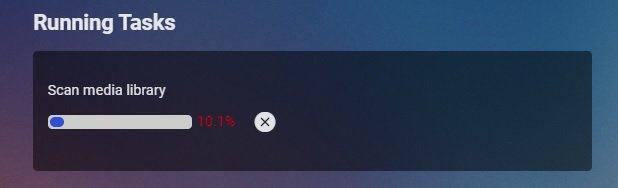
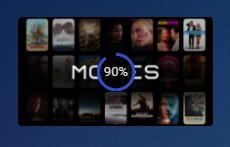
It does from when a full scan is done. Note if you are scanning a individual library, depending on the size of the library progress will be shown (done know if this applies to all clients though). This shows on each library during a full scan and if you do a individual library scan. Library size is relevant here though.
 1 point
 -
Thanks cayars, I really appreciate your help!1 point
-
Emby could technically save this screen grab as fanart/backdrop instead of Primary poster to get the same effect.1 point
-
Ok thanks, just wasn't sure about slashes1 point
-
Yes. It is pure luck that Emby used to pick Season folder metadata and ignore episode level nfo's Season number when they conflicted instead of doing any number of different things you wouldn't have liked. Developers have already been in this thread explaining to you that they're moving Emby to a model that will eventually completely ignore folder structure altogether and the process has already started. When that overhaul is complete, all you will have is your nfo metadata to tell Emby what season an episode belongs in. Tell me, does your nfo metadata for each of your episodes point to the Season number *you* want them to be in?1 point
-
You don't understand what you're doing. You've just lucked out so far that Emby choked the way you wanted when you told it "episode X was in season 2 (nfo), but actually, it's also in season 1 (folder), and by the way, here's the TVDB ID too, just to shake things up a bit (nfo again)".1 point
-
hi You'r right I did not see emby user were under internal users now All seems nice now1 point
-
Basically, when you customize the main menu you can also select plugins. Browse to next-gen plugin and go from there. I'll upload a how-to video in the next days if you cannot find a solution. Also, use the latest beta version 5.3.2 before you start customizing the skin. There are several node changes.1 point
-
Do you want to customize Kodi's menus/homescreen? This can only be done with custom skins and not with Kodi's default skin.1 point
-
You've agreed that one episode can't be part of two different seasons. You're also providing metadata to Emby that says one episode is part of season 2 and season 1. Fix your metadata.1 point
-
Your metadata is wrong. You should correct it. As you've agreed, a single episode can't be part of two different seasons. How Emby reacts to you telling it one episode is a part of two different seasons is irrelevant. Your metadata is wrong. You should correct it.1 point
-
We are not confused. I was going to post your own NFO back to show it here but you've removed them. Lucky I quoted parts of it here: This after you told us you don't use tvdb. That it's part of Season one. But here is what your NFO said: <uniqueid default="true" type="tvdb">86075</uniqueid> <season>2</season> <episode>1</episode> <displayseason>-1</displayseason> <displayepisode>-1</displayepisode> So you're telling Emby what the tvdb entry is. You're telling Emby to display this in Season 2 as Episode 1 but also giving other BAD data for season/episode right in the NFO file itself. This file was also name S02E01 but yet was in Season 1 folder. Your giving so much contradictory information it's amazing Emby could even display this show.1 point
-
No, your metadata is confused, regardless of what Emby version you run. You should correct it to represent exactly what you want and stop sending Emby conflicting information.1 point
-
Your metadata is currently wrong no matter how different versions of Emby react to it.1 point
-
Having two copies will always likely be the best solution if they were mastered that way. When you think about it what we are trying to achieve and do a great job is to process on the fly at faster than playback speed a lowering of resolution, a change of color space, color correction and adjustment as well typically of changing video codecs from a highly compressed HEVC version to an AVC version that roughly speaking has only 1/2 the compression of HEVC. All of that (just a brief overview) is taking place on a PC or NAS with a normal GPU assisting. There might actually be a couple of these taking place at the same time as well. Now compare that to a professional version prepared specifically for 1080 from film or high end video using equipment dedicated to these tasks. These often that takes months to engineer (often frame by frame) with both sound and color correction taking place as well as filtering to remove or bring out grain marks, etc. When you look at it that way it's remarkable how well many HDR->SDR 4K films tone-map to 1080 on the equipment we have available. But to try and hold onto the higher quality you can get from the 4K version you do need more bits than what would be needed by the profession version engineered specifically for 1080. Keep in mind this is the first server version to support tone-mapping so there is room for improvement down the road. One of the things that could be quite beneficial is delivering the media using HEVC vs AVC but that requires other substantial architectural changes that have already been started. So there is room for improvement but it's not simple and will take a bit of time to work out all the architectural changes needed.1 point
-
Running the file through MKVToolNix fixed any media issues in the file while retaining all elements so that would be my suggestion.1 point
-
Hi. This will be addressed in the next release of the app.1 point
-
Any status update on this topic? a month passed with no update1 point
-
Also to add - sometimes it is an HDMI handshake 'timing' issue that causes the issues. When emby plays back - it tries to match the playback to the device capabilities. So if emby is unaware that DV is available, then it will not play it. I always turn on the chain of the devices using CEC - ie turn on the Shield with the remote, which then turns on the Denon AVR, which then turns on the TV. That way, the correct device power up sequence is always used and emby is aware of all the device (TV and AVR) capabilities. By plugging in the new HDMI cable, you would have reset the HDMI handshakes, my theory is this is probably why it is now working. Try doing the same with the 'old' HDMI cable - it may now work - I would be interested if it didn't..1 point
-
Not currently. I've discovered that the issue is most likely not caused by Emby. I noticed that the ethernet connection on the host reaches speeds as low as 1 mbit/s randomly. After still seeing the issue after reinstalling windows, updating bios and network drivers I contacted HP support thinking this was a hardware issue. The technician remotely ran some diagnostic tool then a speed test and I haven't seen the issue since. I've been running speed tests every day to make sure the issue isn't happening. Its been about 2 weeks without a problem however I now believe this was an HP issue and not a problem with Emby.1 point
-
Of course not. I am just a long time user that tried to "do it my way" for several years (using Emby [starting when it was "Media Browser" ] and Plex) and then realized that I was spending way too much time just maintaining my library so I spent a little extra time and got my entire library if an approved format and now I spend very little time on maintenance and the time I save can be spent on watching my media and that is much more fun.1 point
-
The "downside" is: There was a bug. Emby fixed the bug. You want the bug reintroduced! While it is true that: “If debugging is the process of removing bugs, then programming must be the process of putting them in.” - Edsger W. Dijkstra. What we have now does not need reprogramming. Resistance is futile.1 point
-
This is in reference to what is now called "download to" but used to be called sync feature. Basically where you could do something like keep 5 unwatched episodes of a TV Series synced between the server and a mobile device for offline playback. The download to is pretty flexible in setup and above was just an example but it's this type of sync between client and Emby server being talked about here.1 point
-
Please, everyone; Keep this thread going. I have not had so much fun reading a pretty polite thread in years. It seems that there are tow or three people discussing quite different issues and they seem to agree when they disagree and disagree when they seem to agree. My 1.5 cents: (Not worth 2 cents) There is a difference in the handling of improperly structured files and directories between 4.5.4.0 and 4.6.x.x It has been clearly stated by the people that are most in the know that the behavior in 4.5.4.0 was wrong, hence the way it worked was a bug and that was fixed in 4.6.x.x. If anyone cannot accept that then they either need to move to another media manager or write their own that behaves exactly as they want. One more thing, it may have already been explained but I did not see it, why wound anyone want season 2 episodes to appear under season 1? Also Why does it matter?1 point
-
I have not run into this since updating to the latest beta (or whatever the latest beta after the one when this was posted... still not running into it though.) Thanks for following up.1 point
-
The company we get our data from is a large multi-million dollar company or division of one (hard to keep track of this anymore) but has the resources to do this type of thing with a large staff from sales to support to programming & hosting. How they internally do this or where they get their graphics from is likely a closely guarded secret but I'm sure they have contract(s) in place with other companies for this type of thing.1 point
-
Are you still running into this?1 point
-
It you made the playlist in Emby there are in \Emby-Server\programdata\data\playlists (path is relavent to platform, Dashboard will show general locatio), but if these are m3u playlists Emby is reading this they could be anywhere in your library. If you select Edit Metadata on the playlist is should show you its path.1 point
-
Don't get frustrated. If you can't figure it out send me a PM and I can remote in and give you a hand. We are here to help you. Carlo1 point
-
@Wavecrest Apologies for the disruption, but as the previous user pointed out, i think there is a good chance that refreshing the metadata on the playlist will bring the items back. Please let us know if this helps. Thanks !1 point
-
Hi there, did you try running a full library scan of all libraries?1 point
-
Interesting. Well, by default normally the OP, but we enable the option as the mod's team can make this as well, the reason, many solve answer made, and OP did not select the best answer, so to help the other whom looking to the same issue will find the answer. But good point, just notice that mod's public action do not apply to "best answer". I will see if we can solve this request.1 point
-
I understand a library can be sorted by date added. Sometimes I can add a large number of files. Would be nice to filter to added last 7 days, last 30 days, 90 days, or specified date range. In a large library, the filter would allow for a cleaner sort by title.1 point