Leaderboard




Popular Content
Showing content with the highest reputation on 06/09/21 in all areas
-
Hi Guys, I recently moved from Kodi with MySQL for lack of proper multi user management and server side support, I have to say I'm impressed with Emby. Together with the Kodi Plugin it really takes the solution to a whole new level, count me in among the supporters! One feature I would like to see is the ability to recommend movies or shows to other users: I share my Library with close friends and family but it is a big library so they are always calling me to recommend them a movie to watch. It would be really cool if after watching a movie I can click a Recommend button and choose the users I think would like the movie, then it is displayed on their suggested movies at the top with the name of the user who recommended it... Sorry if there is something like this is already there, I am new to the interface and don't fully know it but could not find such feature... Thanks!4 points
-
Please read this post first. I was wondering if it would be possible to add something that would allow you to skip the intro to shows automatically while binge watching. When watching Netflix it does this for some shows, and im not sure if thats a feature of Netflix itself or a Chrome extension i use called "Flix Assist" but it would be a nice feature to have within Emby as well. and possibly even create a custom timed skip for specific shows2 points
-
I let tmm scrape all possible ratings with IMDB set as default. This will be the community rating in Emby. The Rotten Tomatoes rating of the nfo is automatically recognized by Emby as critic rating. There's nothing special about it.2 points
-
But tmm can also scrape Rotten Tomatoes rating!2 points
-
I was having the forbidden issue in Firefox with the .local pseudo domain. Turning off ipv6 resolved the issue for that too.2 points
-
Hi. You are giving the system conflicting information. Just like HAL, it isn't surprising to me that it would behave unpredictably . That really is the bottom line here. Your file structure says one thing and your metadata says something else. Our intention has always been that local metadata should be king. Local images always trump any other source and information in an NFO should too. If the previous version wasn't behaving this way, then that was the bug I'm afraid.2 points
-
Pretty simple suggestion. I have multiple users for my Emby server. If I want to do continuous maintenance on the media, I have to tell everyone. some of them are harder to reach than others ( i.e. no Facebook or Skype chat etc. ) It would be great if say... on the admin panel, I could hit a check box that enables 'maintenance mode', where the server still runs does everything as normal, but instead of the login screen it displays a maintenance page saying the server is unavailable. Even better if I were able to directly put a reason in a text box that would then display on the login screen as well. Not really sure what others would think of this, but for me it would be quite helpful. mostly if I want to make sure no one is trying to access content I know won't work until I've done a full library scan again. Thanks for reading. -Kyle1 point
-
Hi, Some of us listen to classical music and maintain extensive collections of it. Unfortunately, proper classical music sorting requires different metadata fields than pop music. For example, the composer field is not very important with pop music, but is a big requirement with classical music. Currently, Emby supports a single content type for music, which is tailored for pop music. It has views to list Artists, Album artists, Albums, Songs and Genre. I propose to create a second content type dedicated to classical music. This would be a very coherent move since there already are distinct content types for movies, series, concerts or home movies, even if they all deal with video files. The views of this new content type would better fit classical music: for example, we would be able to list music by composer or by conductor, but not by song as this does not mean anything in classical music. Furthermore, audio metadata support should be improved. Currently, Emby supports the Composer tag. That's great, but not enough to deal properly with a classical music collection. We need to support a bunch of other tags, like the Conductor, Performer and Orchestra tags. Adding support for such tags should not be very difficult, as many of them are part of the official ID3 specifications and already supported by ffprobe. Classical music support is a very important feature for me and some other people. So important that I would even pay to have it added to Emby. If I can help to build it, I would do it very happily. If developers do not wish to add those features, maybe it could be implemented by a 3rd-party plugin. In that case, could someone point me towards some kind of guide or tutorial to get started ? I know C# and .Net but have no idea about how Emby works with plugins, and how to extend the metadata schema. Thanks! Marin.1 point
-
Maybe there could be an option to show only unwatched media in the "Because you watched..." and "Because you liked..." sections of the Suggestions Tab? Or is there already? Anyway, I'm using the web client via Firefox on a Windows 7 Ultimate machine...1 point
-
Hello all, it would be really helpful to have a data field at the metadata, which contain the original film name. on my HD the file name corresponds to the name of the film as it was released here in Germany. That means, i have to search the orginal name to get the right info from imdb. But if I do that, then I lose the connection between file name and metadata. In this context, it would be great if the sortname is automatically filled greeting Taurec1 point
-
Ok, stop me if you've heard this one and I just can't find the option. I use the emby app on my android tv. I also have a ton of files/folders that have internal subtitles on things. The only weird thing is when it was initially transcoded for some reason they were lazy and the english sub isn't labeled as eng, its just labeled as UND (undeclared obviously) it would be great to set it to play this as well as english (which I have it set for) automatically. Am I missing it?1 point
-
Actually @Luke I should take that back - it's possible that I'm not seeing it any more. I may have been confusing the freezups one gets when one fast-forward/fast rev's too much with the "it was just playing" freeze-ups. I'll let you know if I see it again.1 point
-
Music Library - Real Time Monitoring should see the change and update Emby. I went to a album in my library that had a m3u and renamed it and waited about 2 minutes and RTM saw the change and refreshed the item in Emby.1 point
-
Someone probably tried to add "Kate" to their system using Emby Connect, but you have that username reserved so they have actually added the wrong person is all. You can ignore that.1 point
-
Peace be upon you. We have a guide for setting up NextPVR in Emby https://support.emby.media/support/solutions/articles/44002060568-nextpvr-tuner That guide is only needed if using m3u files. If using NextPVR version 5 you can also use the plugin from this thread which is probably a lot easier:1 point
-
Update: @cayars was able to solve my issue by making a minor edit to my playlist files, which I gather were tagged incorrectly. For reference, I'm attaching the newly edited copy of one of the playlists I posted earlier in this thread. I believe the only difference was to append ".\" to the beginning of the first track listing. After that, and refreshing libraries, the tracks magically reappeared. Pineal.m3u8 Thanks again to @cayars and all the rest of the terrific Emby support staff.1 point
-
Yes that's the one - works perfectly now - Thank you!1 point
-
Hi, please try shutting down Emby Server and then installing the update manually from our website on top of your existing version. Please see if that helps. Thanks.1 point
-
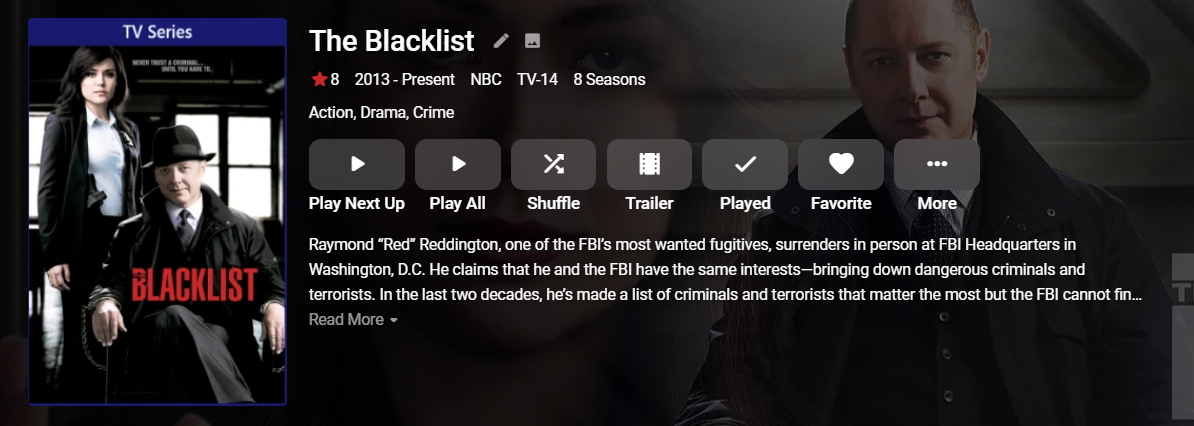
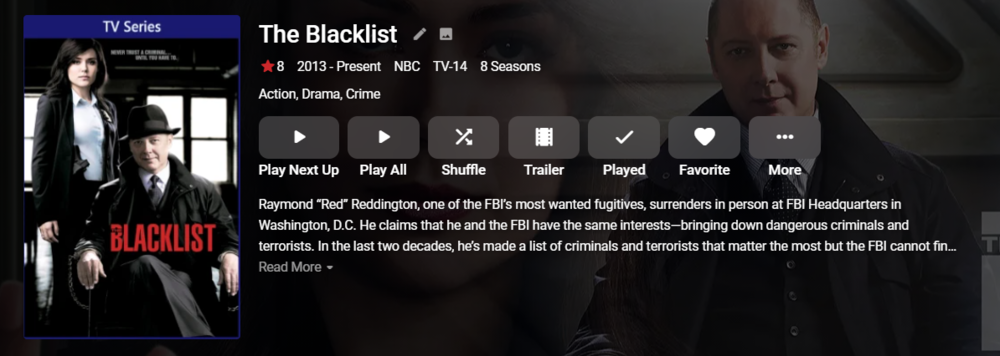
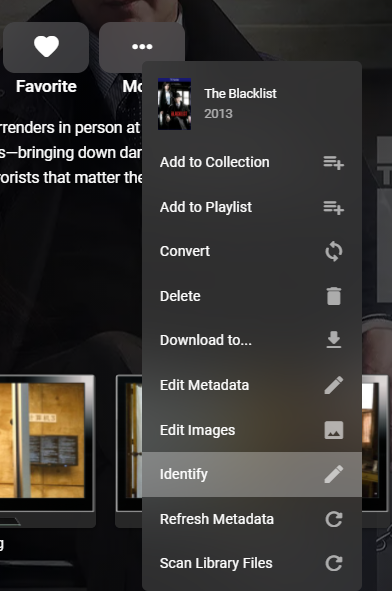
Hi, is this the series? If you want this to match automatically try having the folder labeled The Blacklist (2013) That worked for me. However Emby has other things you can do as well to help "force" the choice. Emby supports meta-data ID tags in the file or folder names. Here's an example for a movie: Alone (2020) [tmdbid=509635] Besides handling this with a folder ID tag you can also do this right from the UI. Click on the "More" button shown above and choose the Identify option. From here you can search by Title and Year or you could supply a meta-data ID if you know what it is. Hopefully that helps you out for ID purposes. Let us know how you make out.
 1 point
 -
OK. Thanks for answering.1 point
-
Seems like we are going in circles. We are trying to make it clear we do not want folder structure to dictate position and we are trying to move away from this entirely to only use meta-data. This meta-data can come from a 3rd party provider, can be read from a NFO or can be edited directly in the database. These methods are always in agreement with each other as NFO are optional but when active get written when you make database changes to meta-data. They take precedence over other methods of identification. This makes the local meta-data king. We really do not want it's folder/location to have any bearing on this past the ID stage if at all possible. Ideally we want you to be able to pickup your media and move it, but it will load the same exact way no matter where it's at if part of the same library type. You could wipe your library and recreate it and it will load exactly the same. You can pick up media from one file server and move it to a NAS or from a NAS to something like Google Drive and the same local meta-data written in the NFO file is going to dictate what it is as well as a lot of the info about the media. These types of things are important for people using remotely mounted media where scanning takes place across the Internet. It's much faster to read a text file then have to fetch/analyze the media. So there are lots of reasons why we don't want the media tied to a folder or directory and each new release will likely move us further from any folder dependency when at all possible. 4.6 just did this for music as well as collection. This simplifies their use once migrated and stops issues we've had in the past with folder locations causing issues. With music if you don't like how Emby displays the data you edit the tracks so it has the proper information and then Emby will use that. No more having to worry about what folder it's in of having multiple albums show up because tracks are split between folders. Collections became virtual or completely meta-data driven as well. This means now that collections won't break when you move a movie or part of the collection like it used to. These types of folder based things used to cause support issues that we are slowly getting rid of. So hopefully it's clear we don't want folder path to play into their location because we already provide an elegant way to control this via meta-data. This is the supported method to change season/episode order and will be tested in future updates to make sure this functionality is intact. Meanwhile folder location will play less and less role.1 point
-
Same problem happened to me today, followed the instructions posted by cayars and is fixed, thank you very much.1 point
-
I have been looking at emby for a possible replacement for plex Everything works very well mostly except for an issue of a series called The Blacklist Emby keeps labeling it as Blacklist - a Japanese series I think and shows all the artwork for that series. Plex has a feature to correct this by changing the key information and having it search the database again - I cannot find such a feature in emby - am I missing something? Thank you for your help I found the solution - it's called Identify - and works perfectly! Great product!!!1 point
-
Deleting the old one from the Library dashboard fixed the duplicate and view issue for me as well, thanks! However, now all my custom collections are all messed up. For instance I had one for the Marvel MCU with all 22 movies, but now most of those movies are removed and placed into separate collections, like 'Captain America Collection', etc. Another custom one for Disney movies seems to just be gone all together, and now there seems to be random new collections based on the movies in my library. Is there a way to restore my old ones and prevent the automatic creation of ones in the future? I appreciate the frequent server updates with improved features, but I spent a lot of time organizing my collections of which a lot of that now seems to be undone. Updates are great, but ones that mess things up that took a lot of work are not so much.1 point
-
I was having a look through the settings, and I saw the note about enabling GPU possibly leading to OSD issues so I switched it from Auto to libmpv and that seems to have solved the issue.1 point
-
That did it, thank you very much for the superb support. Gerrit1 point
-
Yeah, that is probably the problem. I don't think the device supports over 448. I was hoping our internal renderer would take over but it doesn't so I'll have to put back the server conversion in that case for now. Please try again with the next beta. Thanks.1 point
-
Headers in the file are corrupt. However a simple remux fixes this right up and allows it to play properly. Many a tool can be used to fix this up but I did the following: ffmpeg -i "Dragon.Ball.Z.S03E17.SDTV.x264-(DBNL).mkv" -c copy "Dragon.Ball.Z.S03E17.SDTV.x264-(DBNL).mp4" Hope that helps!1 point
-
No works great. Appreciate the help1 point
-
okay. Thank you very much for the help.1 point
-
Exus, ti ringrazio perché hai proprio ragione. Ho messo la tv in home e ripercorso la bar e avevo proprio l'applicazione dedicata di Embyc che avevo effettivamente scaricato. Ma andavo a caricare dalla parte sbagliata. Morale ho tutto e perfettamente funzionante. W EMBY. E grazie ancora a te che hai saputo cogliere la magagna, per la quale, diversamente, sarei diventato scemo.
 1 point
 -
Hi, you have a locked database. Please follow the first set of instructions here to fix this for you.: https://support.emby.media/support/solutions/articles/44002210894-corrupt-database Let us know how you make out.1 point
-
Nicely done. At least you know your local firewall is working well. LOL1 point
-
Thanks for the 2 new ffmpeg logs. They both show similar results to what we saw before. I don't think there is anything I can do to assist you but think one of the devs will need to look at your logs @Luke @softworkz to see what they might think.1 point
-
Chiming in to say I'm doing the same thing right now... have installed Emby in a Debian container with an NGINX reverse proxy, setup a Roku client, transferred my media over (which is still being scanned), setup my SiliconDust HDHomeRun-Flex tuner and recording schedule, and so far Emby is fantastic. The UI is *FAST* (which Plex is not), it's easy to navigate, and there's no clutter of crap that I didn't put there. Emby is fantastic, so far Like the OP, the world of Emby plugins will take some time to research and decide what I want to use, but the 'default' plugins seem to be working well for me (library includes TV series, movies, photos, music, and home videos).1 point
-
Well, I'll check that. I have an idea, why it's not syncing1 point
-
It might have... honestly haven't been to the main TV to watch it, so I have yet to give that last tip a go... Tonight for sure1 point
-
Emby 2.0.25.apk solved my issue............. thanks1 point
-
Lassen Sie uns wissen, wie es Ihnen geht. Vielen Dank !1 point
-
@altramarine Thank you.1 point
-
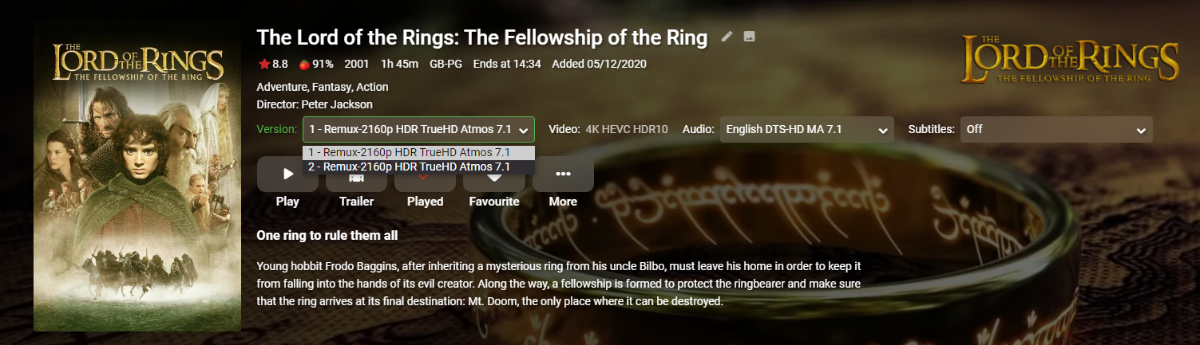
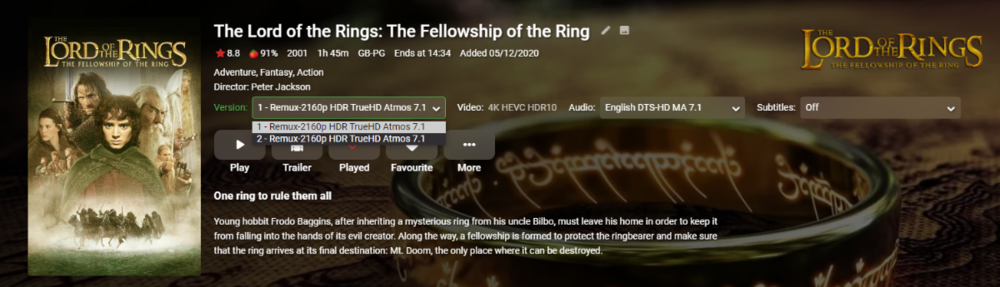
I have never had great success merging the LOTR remux's via MKVToolNix - it seems to screw up the timing and as a consequence, your ff/rw doesn't work as you have found out. On the 1080p versions I successfully managed to do it by demuxing the streams using EAC3TO, then merging the streams using ffmpeg and then remuxing back together again using MKvtoolnix. For the 4K extended remux however, I didn't bother as frankly nobody is going to watch a 6hr film without a break anyway so I left them as two parts.. I just used the multi-resolution 'feature' to name then Part 1 and Part 2 and you just select the part you want to play (to avoid duplicate entries in the dB/display)
 1 point
 -
Q60A is the new 2021 series. Samsung are currently testing the latest app version so it should be in the store for this model when v1.0.97 is released. Based on experience, I would expect that this will be relatively quick.1 point
-
Some of these files are converting at under 1% real-time and I do see an error in one "[AVHWFramesContext @ 00000189cea8aec0] Could not create the staging texture (887a0005)" where the conversion is aborted. Let's see if @softworkz has any good info to add.1 point
-
This is super!! Is there possible to generate collections instead? i.e. smart collections1 point
-
Would love to see my soundtrack albums listed on the corresponding movie and tv-show pages, as well as seeing the movies and tv-shows listed on the corresponding soundtrack album page. That way it’s easy for an user to see whether the soundtrack can be listened to.1 point
-
In general I would say no. I would stick to the specific decoder and only use DXVA11 variants in case of problems. What happens under the hood varies by vendor and may even vary by codec. As DXVA is what's being used by platform video applications (e.g. WMP) one could speculate that it might be handled more conservatively (=better not touch it when it's working) because it would affect a huge audience, while the audience using the vendor-specific audience is much smaller, which means less impact and so higher acceptable risk, which in turn means that it might get updated and improved more frequently. In many cases you may just get the same results, though. What I said so far was just about possible differences of the pure decoding operations. The parsing is an additional factor, and in that regard, the combination of ffmpeg parsing and DXVA decoding will be able to playback some files that otherwise wouldn't work. But that depends again on the codec. So far, I've only seen problems with MP2Video and HEVC with QuickSync decoders. Feel free to compare performance - again, that can vary, so everybody should do this on his own system and not listen what somebody might say, as you can never be sure whether it applies to your setup as well.1 point
-
Just curious.. What would you have them change on the Web Interface? It seems to follow the same layout/flow of most Streaming Services (at least that I am familiar with). NetFlix pops into mind first. Would you want a choice to turn off all horizontal scrolling and just create wrapped lists that can be vertically scrolled? On the Home screen, folks are not required to use the horizontal scroll - if the "Latest" row heading is clicked off the Home Page - it will take them to a full page view, which horizontal vertical scrolling can be used on. Though I guess that defeats the "Latest" abbreviated list of items as they are just in the full library at that point. Some of the deeper items like "Upcoming on TV" off of a TV Series or such, yep - we are locked into horizontal scrolling. But, I'd never thought twice about it - as NetFlix, Youtube and others also have Horizontal Scrolling for many screens/items. Maybe I'm in the minority - but I actually really like the simplicity, organization and cleanliness of the Web Interface. (Which is why i get ruffled when stuff gets added to it - like the recent additional blue links, or the Settings bar across the bottom a while back.. LOL..)1 point
-
Possibly disable ipv6 in Firefox Firefox can't load websites but other browsers can | Firefox Help (mozilla.org)1 point
-
I've tried to make this easy for windows users. Attached is a zip file that contains 3 files: sqlite3.exe - This is a database editor that runs from the command line FixTrailers.bat - This is a windows batch file that will run this for you in one click FixTrailers.sql - This contains the sql that runs 1. Unzip this file into your main Emby folder. For me this is C:\Users\Administrator\AppData\Roaming\Emby-Server on windows 2. Shutdown Emby 3. Run the batch file. This will likely be very fast and seem like it didn't do anything but it did NOTE: As always it's a good idea to make a copy of the library.db which will be in the programdata\data library.. I would do this at least for the first run to make sure everything is working correctly. Contents of the sql file: UPDATE MediaItems SET Path = replace( Path, 'h480p.mov', 'h1080p.mov') where type=10 and Path like '%h480p%'; This changes the url of trailers that are 480 to 1080. It only adjusts type 10 data which are trailers. Contents of batch file sqlite3.exe .\programdata\data\library.db ".read FixTrailers.sql" This runs the sqlite3 program directing it to edit the library.db and executes the sql mentioned above. It's important to place these files in the proper spot so the script can find the files. If you have your own favorite sqlite editor and know how to run SQL simply use the sql contained in the FixTrailers.sql file. You will need to run this from time to time to update any new URLs that get added to your system. Let me know if you have any questions, Carlo FixTrailers.zip1 point
-
Is there any update to this? Trailers are still streaming in 480p quality. Just upgraded to a better projector and they're unwatchable. Is there a setting or anything we can do?1 point