Leaderboard




Popular Content
Showing content with the highest reputation on 05/22/21 in all areas
-
Emby Server 4.6 is currently rolling out. Here are the highlights. Rewritten Music Scanning This 4.6 release will rescan your music library. We apologize if this causes any inconvenience. This solves a lot of our previous music-related shortcomings, specifically: Any folder structure now accepted, no matter how clean or dirty Albums are now fully tag driven and are no longer tied to folders Local metadata for albums will still be supported, and local metadata for artists will be back as well. This will be the only feature of a music library that will require a predictable folder structure. If you enable these options you'll need to have an artist\album\track folder structure, otherwise you'll likely end up seeing nfo files and images in unexpected places. You'll need to use your music library options to indicate your music folder structure if you'd like to use local artwork. Preserve original order of tagged genres, artists, album artists, tags, etc. Support multiple musicbrainz id's tagged on songs and albums Support for composers Library metadata options for artists now working again (and still working for albums) The Folders tab is now an actual folder view and will work properly as such Music Composer Support This was mentioned above, but if your audio files are tagged with composer values, then you'll now see a new Composers tab in your music library: Improved Database and User Interface Performance All Emby apps should feel snappier than ever thanks to a plethora of new improvements in your Emby server database. Reworked Collection Storage Model Collections have now been reworked to be based on the set tag in your nfo files (if you use nfo). The popular AutoBoxSets plugin is now a built-in feature: HDR Tone Mapping When Transcoding Check out the new options in the server transcoding menu! If you have a server machine powerful enough, you can now enjoy tone mapping when transcoding. No more washed out colors ! Combined Next Up and Continue Watching Hopefully this is not a controversial one, but our out of box behavior is now a Netflix-style Continue Watching list, with everything together: If you prefer the old Next Up section, you can use your Emby user home screen settings to add it back as a configuration section. New Live TV Channel Management Screen This is a new WMC-inspired channel management screen that will allow you to quickly disable channels you don't want, drag and drop re-order, edit channel names, channel numbers, and map channels to guide data. Just click on a channel to edit the options: Support for Live TV Channel Groups (via Tags) Use the above editor to add tags to channels, and now you'll see a new Tags tab in your Live TV section. Automatic importing of groups in m3u tuners is also supported. You can even group your channel display into Tags if desired: Improved Performance of Live TV Guide Refresh The live tv guide refresh process for all live tv should be slightly improved (5-10% faster). But if you're using xmltv guide data, you can expect major, dramatic improvements in the neighborhood of about 70% faster. To give you an example of the improvement, on a guide with 4000 channels, the guide data refresh has gone from roughly 2.5 hours to 45 minutes. Multiple Channel Logo Support Using Emby Guide Data, the server now downloads multiple logos per channel in different colors. This way our apps can choose the most appropriate logo based on your chosen color scheme in the user interface. If you don't use Emby Guide Data, you can still configure these logos manually using the image editor. Multi-Select List Items Lists now have the same multi-select management features that you've already grown accustomed to in poster views. Multi-Select Filtering When you filter by genres, tags, studios and other criteria, you can now select multiple. New User Profile Options to Control Remembering Track Selections For both audio and subtitles, you can now control whether or not track selections are remembered, as well as clear your remembered tracks anytime you wish. New Field Display Options The 3-dot menu above lists has been enhanced to allow new fields to be displayed: This allows you to see ratings in lists if desired. New and Improved Image Editor It comes with the following improvements: Dedicated options to set an image from a url All image slots visible in the editor to allow you to easily see what can be customized Easy drag and drop backdrop reordering New Live Button in Live TV Guide As you scroll ahead in time, now you can easily jump back to the live time with the press of a button. Live TV Programs Grouped in Suggestions and Search You'll now see Shows and Movies grouped as one single entry, rather than separate entries for every single airing. When you click on a show, you'll then see all of the showing for it: This will make it easier to find shows and movies that you'd like to watch and record. Improved Single Channel Screen Display The single channel listings not only perform better, but now also display much more information than before. Remove from Continue Watching Would you like to get something out of continue watching, but without having to lose your watch progress? Now you can: This will remove it from the Continue Watching menu, and it will reappear if you start watching again. Context Menu Improvements The addition of the title and poster should help make the menus a little more fun to use. Improved DLNA Support DLNA fans will appreciate the following enhancements: Improved device discovery Improved ability for other devices to discover your Emby Server Greater compatibility with more devices More efficient communications, less chatter on your network between Emby Server and your devices Auto-detection of supported audio and photo formats. No profiles needed if your device is also a digital media renderer (DMR) ! Supporting this for video playback is a much more complex task but we plan to incorporate this in future updates. Other Improvements Support multi-select remove from playlist/collection Improve Linux QuickSync support Adjust extracted images for HDR videos Add favorites to context menu Add mark played to context menu Run sqlite optimize on server shutdown Unify live tv channel sorting options in all places (guide, channels tab, on now, etc) Rework display of locked fields in metadata editor Support special episodes in Continue Watching & Play All Add hidden config switch to optimize databases on shutdown Improve detection of supported formats for Dlna devices Include all subtitle streams with conversion and download features, when possible Prefer D3D11 QuickSync codecs by priority Add h264_mmal decoder Improve 3D detection from file names Support SXXEXX episode numbers in xml tv guide data Ensure proper handling of yuv422p10 color format Improve Dlna device detection Significantly reduce Dlna message chatter with devices on the network Support series-id tags from xmltv Support discnumber audio tag in addition to disc Make determination of series recording path a little smarter about finding existing series in the library Restore death date on person detail screen Default folder browsing to list when all items are audio tracks Improve dynamic data refreshing on detail screen Add adult metadata library option Move option to save metadata as hidden files to per-library option Sanitize data from metadata editor to prevent accidental user error such as trailing spaces Update scheduled task logging to try and avoid preventing Synology NAS servers from being able to sleep Improve MMAL codec support Improve Roku remote control support Rework device access with new user permission to hide users from login screens on devices they've never signed into before Support episode backdrops in season folder Support extras in playlists Add HDR info to video stream titles Check first IP address of x-forwarded-for Have real-time monitor ignore .DS_Store Prefer Artist tag over Artists when there is only one artist Improve handling of invalid content-type header when downloading images Add home videos landing screen option Support clicking individual text items in list items Add profile checking for MP2Video hardware decoders Support playback speed control during audio playback Add button to clear filters when no results are returned Add Nvidia NVDEC decoder variant for HEVC VAAPI: Use color formats from detection Prevent ffmpeg hw processing of 10bit when device doesn't support it Support EP.01 episode naming Resolve slow file read/write performance on Windows Improve recovery from invalid configuration in the lan networks setting Improve detail screen backdrop display Make media info visible accessible in TV display mode Reduce messaging from server to android and iOS apps causing the app background processes to run Show songs on artist detail screen Add delete, download and preview functions to external subtitle tracks in media info section Support downloading subtitles during video playback Support manipulating the play queue of remote controlled players Update same time recording threshold to 15 minutes Improve local network address detection Block windows 8 & 2012 from using http2 Add http version to server log Improve subtitle track selection when always show subtitles is selected Expand artist split whitelist Improve ability of other devices to discover emby server New search interface for mobile and desktop Add top results section to search Improve searching for songs using album name Bug Fixes Fix rare case of tuner being left open following a recording with a series whose name ends in a dot Fix episode images being saved with incorrect file name Fix custom collection images reverting to default auto-generated images Fix repeated unzipping in xmltv provider, causing excess disk space to be consumed Fix genre screen occasionally being empty depending on where you came from Add additional fixes for downloading txt format subtitles Fix odd, alternating behavior when refreshing metadata while replacing images Fix incorrect conversion job status being reported when converting Various fixes for codec level detection Fix key presses affecting video OSD while popup dialogs are open and have focus Fix remote control restarting playback in some cases Fix custom genre images being replaced Fix play all/shuffle on collections comprised of folders Fix successful audio conversions misinterpreted as failures Fix Nvidia HEVC level detection Fix interlaced video being incorrectly stream copied with HLS Fix remote play of playlists being sorted by name Fix webp image support not being used in certain cases Fix repeated subtitle downloads of .sub format Fix undefined dlna display name Fix channel logos intermittently disappearing while scrolling the guide in Firefox Fix incorrect iOS scroll after cancelling context menu Fix artists added to collections not showing View the full article6 points
-
Emby Server 4.6 is currently rolling out. Here are the highlights. Rewritten Music Scanning This 4.6 release will rescan your music library. We apologize if this causes any inconvenience. This solves a lot of our previous music-related shortcomings, specifically: Any folder structure now accepted, no matter how clean or dirty Albums are now fully tag driven and are no longer tied to folders Local metadata for albums will still be supported, and local metadata for artists will be back as well. This will be the only feature of a music library that will require a predictable folder structure. If you enable these options you'll need to have an artist\album\track folder structure, otherwise you'll likely end up seeing nfo files and images in unexpected places. You'll need to use your music library options to indicate your music folder structure if you'd like to use local artwork. Preserve original order of tagged genres, artists, album artists, tags, etc. Support multiple musicbrainz id's tagged on songs and albums Support for composers Library metadata options for artists now working again (and still working for albums) The Folders tab is now an actual folder view and will work properly as such Music Composer Support This was mentioned above, but if your audio files are tagged with composer values, then you'll now see a new Composers tab in your music library: Improved Database and User Interface Performance All Emby apps should feel snappier than ever thanks to a plethora of new improvements in your Emby server database. Reworked Collection Storage Model Collections have now been reworked to be based on the set tag in your nfo files (if you use nfo). The popular AutoBoxSets plugin is now a built-in feature: HDR Tone Mapping When Transcoding Check out the new options in the server transcoding menu! If you have a server machine powerful enough, you can now enjoy tone mapping when transcoding. No more washed out colors ! Combined Next Up and Continue Watching Hopefully this is not a controversial one, but our out of box behavior is now a Netflix-style Continue Watching list, with everything together: If you prefer the old Next Up section, you can use your Emby user home screen settings to add it back as a configuration section. New Live TV Channel Management Screen This is a new WMC-inspired channel management screen that will allow you to quickly disable channels you don't want, drag and drop re-order, edit channel names, channel numbers, and map channels to guide data. Just click on a channel to edit the options: Support for Live TV Channel Groups (via Tags) Use the above editor to add tags to channels, and now you'll see a new Tags tab in your Live TV section. Automatic importing of groups in m3u tuners is also supported. You can even group your channel display into Tags if desired: Improved Performance of Live TV Guide Refresh The live tv guide refresh process for all live tv should be slightly improved (5-10% faster). But if you're using xmltv guide data, you can expect major, dramatic improvements in the neighborhood of about 70% faster. To give you an example of the improvement, on a guide with 4000 channels, the guide data refresh has gone from roughly 2.5 hours to 45 minutes. Multiple Channel Logo Support Using Emby Guide Data, the server now downloads multiple logos per channel in different colors. This way our apps can choose the most appropriate logo based on your chosen color scheme in the user interface. If you don't use Emby Guide Data, you can still configure these logos manually using the image editor. Multi-Select List Items Lists now have the same multi-select management features that you've already grown accustomed to in poster views. Multi-Select Filtering When you filter by genres, tags, studios and other criteria, you can now select multiple. New User Profile Options to Control Remembering Track Selections For both audio and subtitles, you can now control whether or not track selections are remembered, as well as clear your remembered tracks anytime you wish. New Field Display Options The 3-dot menu above lists has been enhanced to allow new fields to be displayed: This allows you to see ratings in lists if desired. New and Improved Image Editor It comes with the following improvements: Dedicated options to set an image from a url All image slots visible in the editor to allow you to easily see what can be customized Easy drag and drop backdrop reordering New Live Button in Live TV Guide As you scroll ahead in time, now you can easily jump back to the live time with the press of a button. Live TV Programs Grouped in Suggestions and Search You'll now see Shows and Movies grouped as one single entry, rather than separate entries for every single airing. When you click on a show, you'll then see all of the showing for it: This will make it easier to find shows and movies that you'd like to watch and record. Improved Single Channel Screen Display The single channel listings not only perform better, but now also display much more information than before. Remove from Continue Watching Would you like to get something out of continue watching, but without having to lose your watch progress? Now you can: This will remove it from the Continue Watching menu, and it will reappear if you start watching again. Context Menu Improvements The addition of the title and poster should help make the menus a little more fun to use. Improved DLNA Support DLNA fans will appreciate the following enhancements: Improved device discovery Improved ability for other devices to discover your Emby Server Greater compatibility with more devices More efficient communications, less chatter on your network between Emby Server and your devices Auto-detection of supported audio and photo formats. No profiles needed if your device is also a digital media renderer (DMR) ! Supporting this for video playback is a much more complex task but we plan to incorporate this in future updates. Other Improvements Support multi-select remove from playlist/collection Improve Linux QuickSync support Adjust extracted images for HDR videos Add favorites to context menu Add mark played to context menu Run sqlite optimize on server shutdown Unify live tv channel sorting options in all places (guide, channels tab, on now, etc) Rework display of locked fields in metadata editor Support special episodes in Continue Watching & Play All Add hidden config switch to optimize databases on shutdown Improve detection of supported formats for Dlna devices Include all subtitle streams with conversion and download features, when possible Prefer D3D11 QuickSync codecs by priority Add h264_mmal decoder Improve 3D detection from file names Support SXXEXX episode numbers in xml tv guide data Ensure proper handling of yuv422p10 color format Improve Dlna device detection Significantly reduce Dlna message chatter with devices on the network Support series-id tags from xmltv Support discnumber audio tag in addition to disc Make determination of series recording path a little smarter about finding existing series in the library Restore death date on person detail screen Default folder browsing to list when all items are audio tracks Improve dynamic data refreshing on detail screen Add adult metadata library option Move option to save metadata as hidden files to per-library option Sanitize data from metadata editor to prevent accidental user error such as trailing spaces Update scheduled task logging to try and avoid preventing Synology NAS servers from being able to sleep Improve MMAL codec support Improve Roku remote control support Rework device access with new user permission to hide users from login screens on devices they've never signed into before Support episode backdrops in season folder Support extras in playlists Add HDR info to video stream titles Check first IP address of x-forwarded-for Have real-time monitor ignore .DS_Store Prefer Artist tag over Artists when there is only one artist Improve handling of invalid content-type header when downloading images Add home videos landing screen option Support clicking individual text items in list items Add profile checking for MP2Video hardware decoders Support playback speed control during audio playback Add button to clear filters when no results are returned Add Nvidia NVDEC decoder variant for HEVC VAAPI: Use color formats from detection Prevent ffmpeg hw processing of 10bit when device doesn't support it Support EP.01 episode naming Resolve slow file read/write performance on Windows Improve recovery from invalid configuration in the lan networks setting Improve detail screen backdrop display Make media info visible accessible in TV display mode Reduce messaging from server to android and iOS apps causing the app background processes to run Show songs on artist detail screen Add delete, download and preview functions to external subtitle tracks in media info section Support downloading subtitles during video playback Support manipulating the play queue of remote controlled players Update same time recording threshold to 15 minutes Improve local network address detection Block windows 8 & 2012 from using http2 Add http version to server log Improve subtitle track selection when always show subtitles is selected Expand artist split whitelist Improve ability of other devices to discover emby server New search interface for mobile and desktop Add top results section to search Improve searching for songs using album name Bug Fixes Fix rare case of tuner being left open following a recording with a series whose name ends in a dot Fix episode images being saved with incorrect file name Fix custom collection images reverting to default auto-generated images Fix repeated unzipping in xmltv provider, causing excess disk space to be consumed Fix genre screen occasionally being empty depending on where you came from Add additional fixes for downloading txt format subtitles Fix odd, alternating behavior when refreshing metadata while replacing images Fix incorrect conversion job status being reported when converting Various fixes for codec level detection Fix key presses affecting video OSD while popup dialogs are open and have focus Fix remote control restarting playback in some cases Fix custom genre images being replaced Fix play all/shuffle on collections comprised of folders Fix successful audio conversions misinterpreted as failures Fix Nvidia HEVC level detection Fix interlaced video being incorrectly stream copied with HLS Fix remote play of playlists being sorted by name Fix webp image support not being used in certain cases Fix repeated subtitle downloads of .sub format Fix undefined dlna display name Fix channel logos intermittently disappearing while scrolling the guide in Firefox Fix incorrect iOS scroll after cancelling context menu Fix artists added to collections not showing5 points
-
Army of the Dead. What to say most of the movie was mess of stupidity and illogical things. Few scenes was good but for that long movie it is little.2 points
-
I had the same issue and, in my case, it was consistently caused by bad tagging. The most common issue was different musicbrainz album IDs on different tracks in the same album. I exported an album report to excel, highlighted duplicates, popped those open in MP3tag, and updated the Album and MUSICBRAINZ_ALBUMID tags to be consistent on my problem albums. One library scan later and all is well.2 points
-
No hace falta pararlo, se para automáticamente al actualizar, pero si quieres pararlo: sudo service emby-server stop Las opciones son stop, start, restart, status. Para más información: Start, Stop & Restart Services in Ubuntu and Other Linux (itsfoss.com) Pero repito, no es necesario hacerlo, yo nunca lo he hecho y nunca he tenido problemas2 points
-
What i ended up doing is a fresh install of Emby. Libraries are rebuilding as we speak and i now see Emby creates auto collections which is awesome!2 points
-
@cayars, @Happy2Play, @ebr all sorted now, thank you for the help guys. I dropped the library, let it finish the scan it starts right after, then i restarted emby and had it do a vacuum of the database on restart. Re-added the music library and all its folders, it then took a good 6+hrs to rescan everything back in but all is good on the music side of things, now to fix the pesky devices problem i am having lol2 points
-
2 points
-
Interesting. Well, by default normally the OP, but we enable the option as the mod's team can make this as well, the reason, many solve answer made, and OP did not select the best answer, so to help the other whom looking to the same issue will find the answer. But good point, just notice that mod's public action do not apply to "best answer". I will see if we can solve this request.2 points
-
@pwhodgeslooks like you will have some testing to do when Luke's patch comes out also. No matter how you look at it is a unsupported method that the dev will provide you with a solution this time. Now be warned this may not be the case in the future.2 points
-
I suggested in a totally different thread a bit ago about possibly adding Discogs as a meta fetcher... https://emby.media/community/index.php?/topic/79280-duplicate-music-artists-entries-how-to-get-rid-of-them/ That thread has had a few +1 reply posts. As such i figured adding it to the feature requests was the proper way to gauge interest. If you have used MP3tag you should be familiar with Discogs. Its a GREAT alternative to Musicbrainz.1 point
-
I made some default library images for those who like a clean, simple interface. The idea is to put the content in first place. Just in case anyone wants to use them. I used the green from the default Emby theme, the icons are from the google material icon set, style set to rounded, to match the recent Emby style. (Although I do not like that everything needs to be round nowadays). Images are 16:9 / 1920x1080px png-files. Movies: TV: Music: Home Videos: Playlists: All.zip






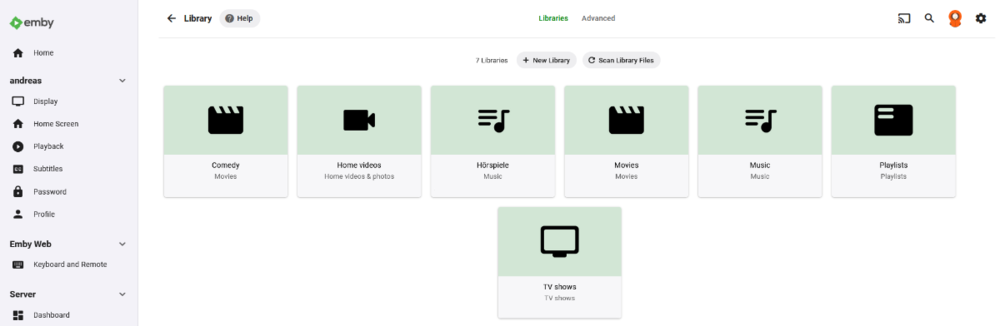 1 point
 -
Sounds like a plan.1 point
-
Hi there, have you explored your emby user home screen settings?1 point
-
In this case that's not a valid argument because there is a difference - you do still have other ways to ignore folders, albeit not your desired way, but there are still ways. If we blindly ignore, then those users do not have any way to get that content imported into their server.1 point
-
Can we please look at an example? Thanks !1 point
-
You need to ensure that your server is directly accessible from outside your network; Connect only points the user at your server - it doesn't transfer any data. Check out the steps in the Connectivity article: https://support.emby.media/support/solutions/articles/44001849007-connectivity For more detail, check out the Remote Setup article: https://support.emby.media/support/solutions/articles/44002137137-remote-setup If those don't enable you to fix it, ask here again. Paul1 point
-
@LukeBeta 4.6.0.51 has fixed this for me. Thanks!!!1 point
-
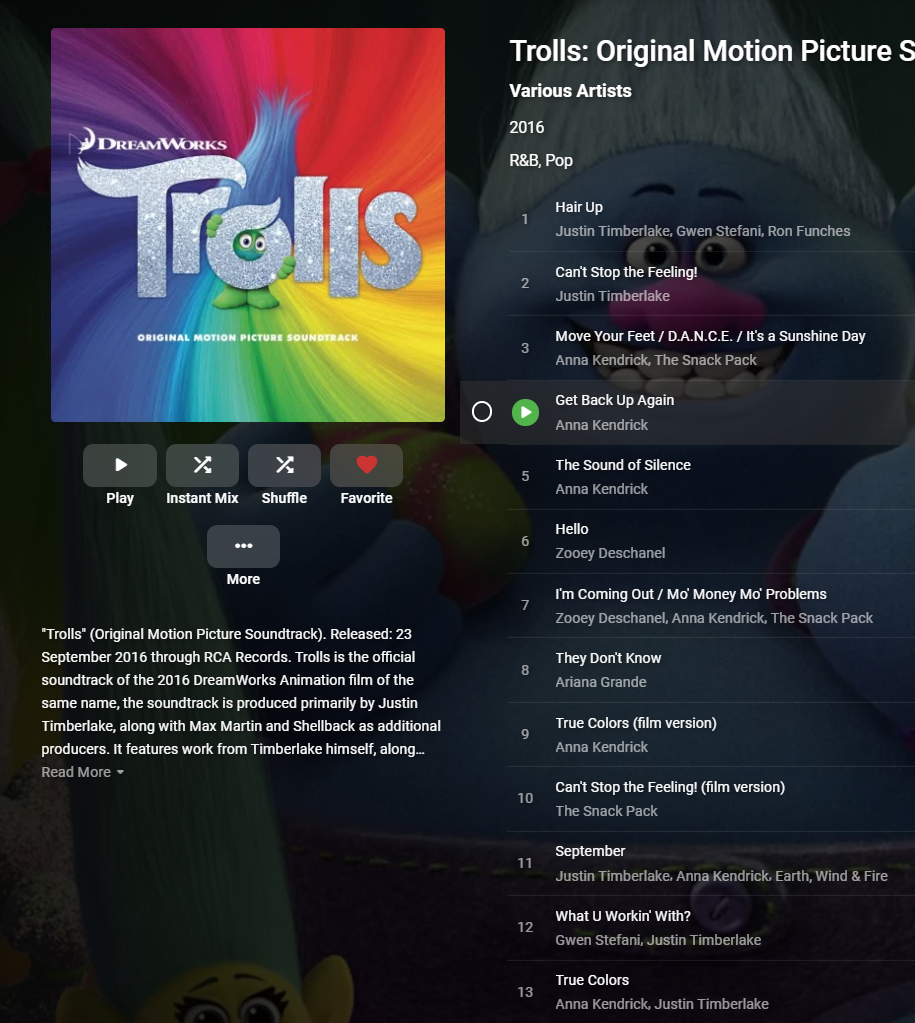
When an album is composed of tracks from different artists, this is what you do: Album - consistent album title AlbumArtist - consistent album artist (maybe Various Artists?) Artist - can be different for every track in the album For example, consider a soundtrack album. Different artists on each track:
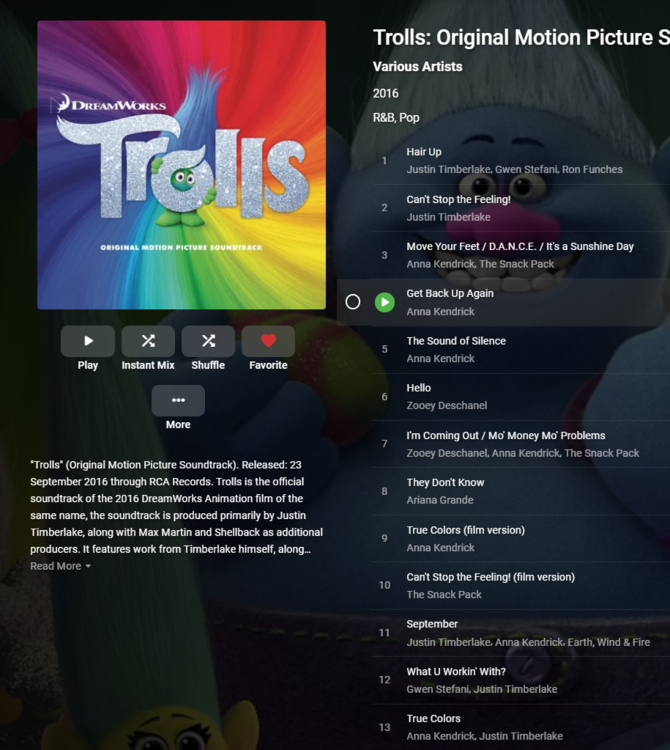 1 point
 -
OK so yes it should probably only use certain specials.1 point
-
Thanks @hackthis02. It's good to have it back!1 point
-
I needed to refresh the metadata... that fixed it1 point
-
Ok thanks for the help I will refresh the metadata and @cayars I'm not using any local just online. I will report back thanks again.1 point
-
Hi, the album artist tag should be the same for all tracks. That's how you know they're from the same album. 4.6 is using the embedded information in your audio files in conjunction with standard industry practices. 4.5 did not do this. It incorrectly lumped them all together as one album just because they were in the same folder.1 point
-
Yep, working now, thanks1 point
-
New test version that replaces dictionaries with queues. Hopefully should not crash and should always send the rich data notifications. This is a significant change so consider that a beta version. Debug log if there are any issues please. Emby.Notifications.Discord1200.dll.zip1 point
-
I can see why this might happen in some cases. We'll take a look at it. THanks.1 point
-
Hi, Can you explain a bit more your problem? Are you just trying to get Emby to work outside your home network? Is so you need to set it up for remote access. https://support.emby.media/support/solutions/articles/44002137137-remote-setup Let us know how you make out.1 point
-
Thanks for the feedback and apologies for the disruption. We plan to revamp playlist permissions in an upcoming update.1 point
-
Ahh, ok, so I need to refresh metadata. thanks1 point
-
You can't get it directly from musicbrainz. Nobody can. They don't allow projects of our size to use them directly. Instead they provide you with the tools to setup your own musicbrainz server. That's how it works for everyone using musicbrainz.1 point
-
It will use the metadata providers setup for each library type you have. But in some cases in order to use a meta-data provider it has to be through a mirror server as to not put undue stress on the providers servers.1 point
-
Hi, try refreshing the metadata of a music album. See if this helps for that album. If it does, then you can do it on multiple in bulk. Please let us know if this helps. Thanks.1 point
-
All set up. It was relatively easy. Thanks guys1 point
-
Hi, yes of course we should do this. Just be advised that any work for this plugin outside of compatibility updates is always at the bottom of the to do list, so I would suggest uninstalling it and switching to nfo.1 point
-
Yes, so you'd have to make sure to move and rename the nfo as needed.1 point
-
You will likely want to use one of the "perfect" music types in music library setup for the layout. You may also need to check to make sure you have tagged graphics in your music tracks.1 point
-
To follow up on my issue, the server had a custom set of cipher suites enabled that was causing the SSL error. Turns out the musicbrainz.emby.tv only has 4 cipher suites enabled, and apparently there was no overlap between those 4 and the set I had enabled. Once I turned on a matching cipher suite, it was able to (slowly) complete the scan, and now runs fast as it used to:
 1 point
 -
Muchas gracias @vdatanet actualizado y sin problemas tal y como me dijiste.1 point
-
The Breakdown view of the plug-in gets close to that showing you media sorted by plays and time. You can click on the media items in the same view to list who watched them and when. The tricky part of getting a list of media watched by all users is that all means ALL. The more users you have the less likely you are to get a hit unless you start looking for a subset of users. For example, if you have an Admin account you may or may not want to include it.1 point
-
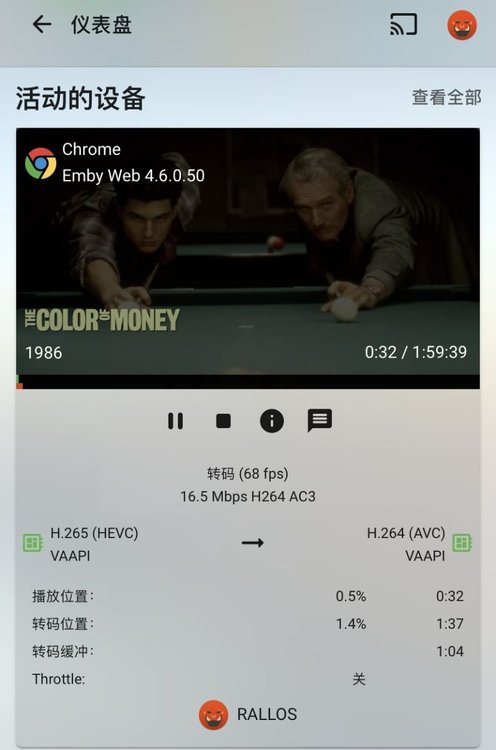
thanks for your hard work. now emby can hw h265 video with ryzen APU in Unraid doeck.
 1 point
 -
My WAN connection stopped working with this update..... Nevermind, i fixed it1 point
-
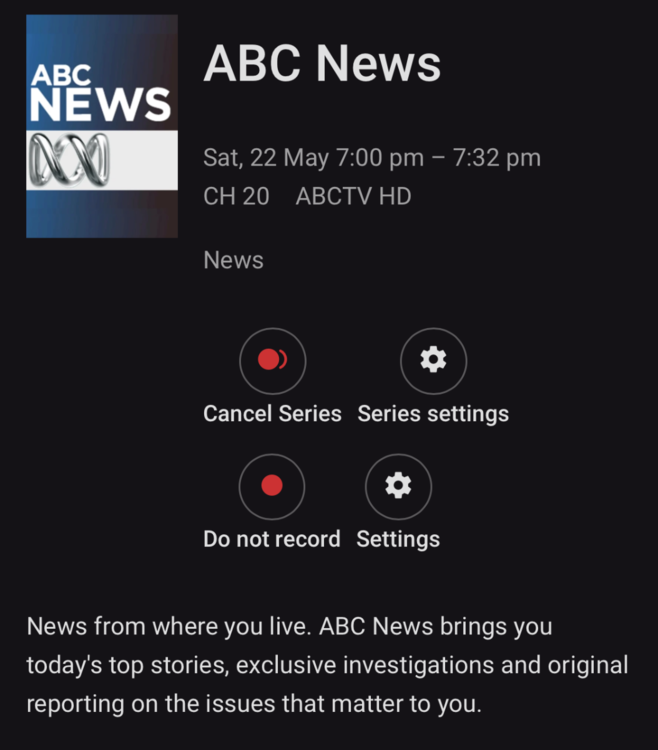
That looks fine now, thanks
 1 point
 -
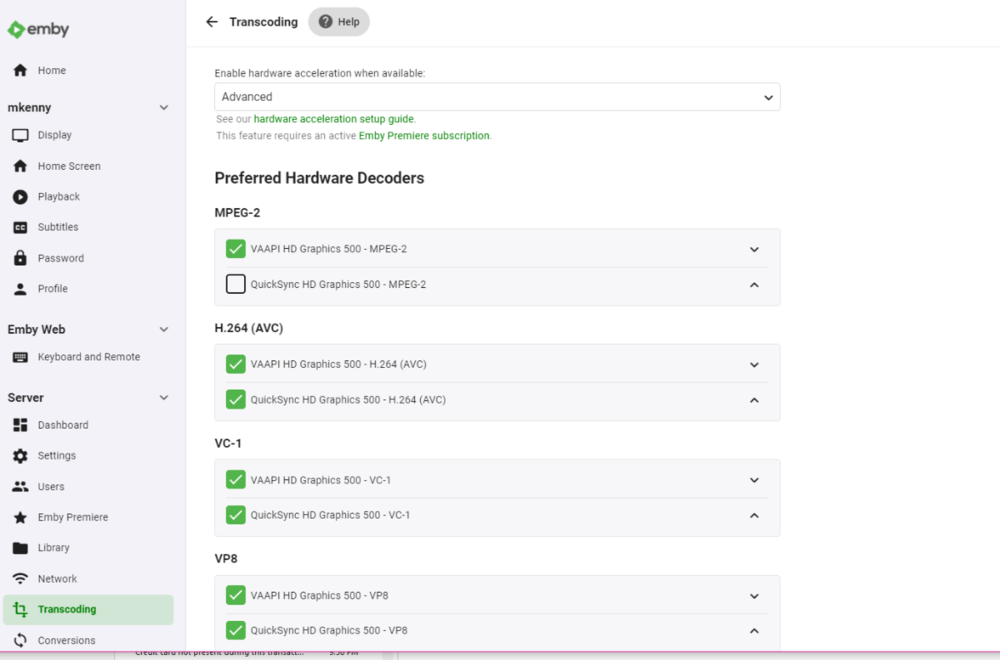
I've waited patiently for an answer and received none. I know you were getting a release out but a note saying that you expected it to be fixed in 4.6 would have been appreciated. At any rate, I see the transcoding options back (see below) and I can play a TV channel without interruption. CPU usage is down and ffmpeg is only using about 6% of CPU. I guess that fixed the problem.
 1 point
 -
cayars, you are correct. I am in the same satellite footprint as you, just my signal levels will be a bit fainter. And thank you for your honesty.1 point
-
I'm near Philadelphia or the eastern part of the US and can tell you we probably share the same view of the sky for the most part. Unlike the UK, our "free to use" satellite choices really don't exist. I'd love for someone to speak up and say I'm wrong but that's been my experience. With that said with some monster size dishes and the right equipment you can get some channels but it's not worth it and not in the league of what the UK guys get.1 point
-
Alright, I just pushed an update for 4.6.0.50. You can grab it in the catalog or just wait for it to get pushed to your sever. @magelo @jordy @David Patt @DarWun1 point
-
Also, fwiw, just buy the Shield.. its so much better than the TV and it doesn't lose 1/3 of the screen with ads from other streaming services like the X90J does! I am very happy I decided to buy it.1 point
-
A few days ago Montellese uploaded new test builds at Downloads / Changelog which can greatly improve the performance of retrieving and passing media items from Python-based media importers to Kodi. For the performance improvements to become visible you also need to update the media importer add-on to the latest version which was just released: mediaimporter.emby: v0.0.12 The performance improvement is very noticeable especially for the initial sync. Please provide feedback on your experience. @alscaldas The corresponding Rockchip build is attached. LibreELEC-RK3399.arm-10.0-devel-20210518023526-78a6331-rockpro64.img.gz1 point
-
After my various attempts, I found the problem. I have ten mobile hard disks to store my video, but I found that when I built the media library and pulled out the hard disk, all the cached images are not displayed. I found out in "cache\images\resized-images" The cached images are created, but they are not displayed on the server, so what is the use of these caches? I tried to add a cover image to the video, then found them in "metadata\library", they are displayed normally when the hard drive is removed, but I have more than 4,000 videos, I can't add them one by one. . . All of my videos can't find information on IMDB, but the folder has a corresponding cover image, background image and NFO. EMBY is the best, it can easily recognize these and display, PLEX will only take pictures from the video, and does not load the existing cover image, but it will always exist, even if you remove the hard drive. I don't know if this request is difficult. Can we add an option to create a cover and background image for the local media when I create a new media library? Maybe it will take up more storage space and scan time, but we can give it to User selection. Or call a cache of resized thumbnails for clients in "cache\images\resized-images", I don't know if it takes up hard disk space but it doesn't work. . . What are the conditions for adding new features, it’s been a year. . . I don't know if anyone is experiencing this problem, but it is really troublesome.1 point



















.thumb.png.37e06834c19463b58f381d68d482eb51.png)