Leaderboard




Popular Content
Showing content with the highest reputation on 05/10/21 in all areas
-
Yes, that is the problem. Some of these non-standard boxes report an incorrect DPI because they are running a phone OS. I'm glad you found a setting for it but the next release of the app will hopefully handle this as well. Thanks.2 points
-
Perhaps I did, but your original post was a bit confusing Never mind, you have supplied logs now.2 points
-
I'd like a way to set the primary thumbnail image to the current frame during playback in the web interface. I have a library set to content type "Home Videos & Photos". Emby does a pretty nice job choosing a frame from each video to use for its primary thumbnail image, but sometimes I'd like to choose a different frame. I can do this manually by playing the video, taking a screenshot, choosing "Edit images" from the "..." menu, clicking the "+" button, uploading the image, and selecting "Primary" as the type, which replaces the existing image. If I want the image to be a full frame then I need to wait a few seconds for the web interface to disappear before taking my screenshot, as there doesn't seem to be a way to dismiss it. And then the image I save is in a different resolution than the automatically generated ones. So although it's possible to generate my own thumbnails, it's a bit of a hassle. Since Emby Server obviously already has the capability to generate a primary thumbnail from a frame of video, it would be really nice to have a way to tell it to do this from a frame chosen manually during playback. I'm thinking a little snapshot button could be added to the playback interface. Or if that's too obtrusive, hide it behind a "..." menu. A related request: It would be great to be able to pick which of the items inside a folder would be used for the folder's thumbnail. These are small issues but would be really nice for organizing collections of home videos and other media that can't be easily looked up in databases.1 point
-
Hello all i am kind of desperate here. I cant find any valid information anywhere regarding this issue (for me is an issue) How can i Clear / Remove All Download Queue. Mean, i use Emby Theater from MS App Store. I got to my profile and under "Manage Downloads" i have some dozens of files... Because of this my Emby is hanging and seems stalled in a endless refreshing circle... I tried to remove one by one, but because its too big, it hangs. Any proper way to clear this at once? instead of "one by one"? Can it be implemented please? I think it will benefit other user as well. Thx in advance1 point
-
Depending on your configuration you may need to do the Next Up row if you use the legacy Next Up option.1 point
-
I went to the OMDB website for the example above but technically you can look at what is returned in you cache folder. You can also look at the log when items are processed to see the call that is made and click on it to look at the data also.1 point
-
Now after changing the DPI its working without any issues.1 point
-
What i miss in Android Auto is a pure offline support of downloaded media. If i open the Emby app normally while being offline, i'm presented with a selection screen for the Server and for Downloads. Within Android Auto -> Emby -> then Browse, only the server is listed. Downloads is missing here!1 point
-
Thank you for all answers! I inserted key to shield tv and put at the car! Works fine.1 point
-
Any chance to make fanart backgrounds offline? Thanks.1 point
-
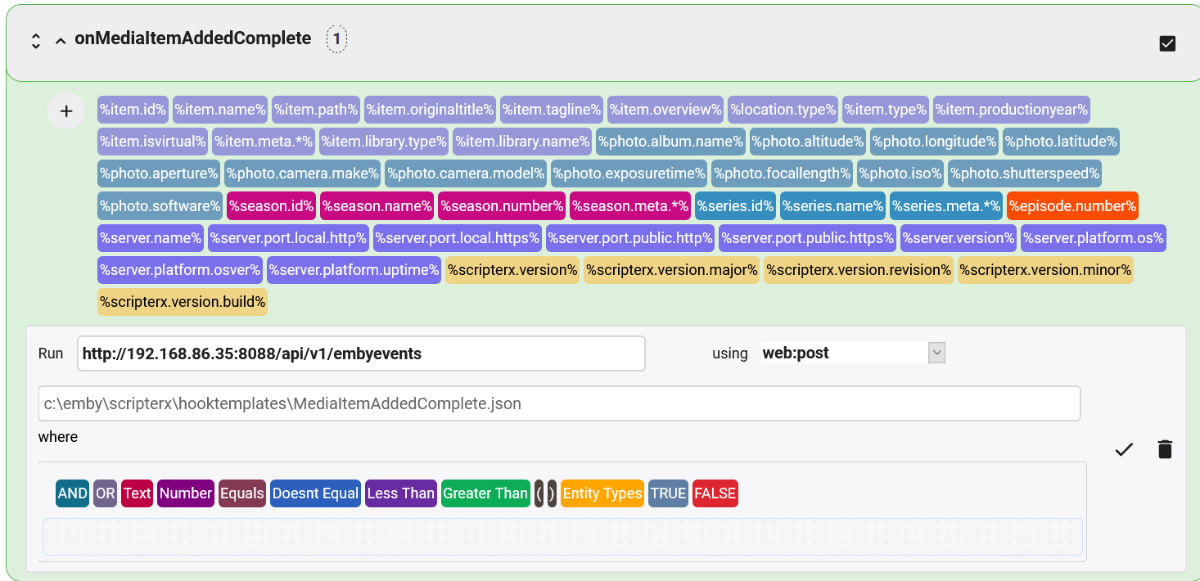
Yes, I see at least one problem, and maybe three. A web post requires a payload template, and you haven't specified one. The template is a text file that contains whatever you want to be posted to your web hook. It has variables in it that correspond to the data Scripter-X knows how to resolve for the event. Here is what mine looks like for onMediaItemAddedComplete (which is more useful than onMediaItemAdded assuming you want to take some action when something is actually done being added and not just when something new is detected but has not finished adding yet): { "Event": "scripterx.mediaitem.added.complete", "item.id": "%item.id%", "item.name": "%item.name%", "item.originaltitle": "%item.originaltitle%", "item.tagline": "%item.tagline%", "item.overview": "%item.overview%", "item.type": "%item.type%", "item.productionyear": "%item.productionyear%", "item.isvirtual": "%item.isvirtual%", "item.library.type": "%item.library.type%", "item.library.name": "%item.library.name%", "season.id": "%season.id%", "season.name": "%season.name%", "season.number": "%season.number%", "series.id": "%series.id%", "series.name": "%series.name%", "episode.number": "%episode.number%", "embyServer": { "id": "%server.id%", "name": "%server.name%", "version": "%server.version%", "platform": { "os": "%server.platform.os%", "osVersion": "%server.platform.osver%", "upTime": "%server.platform.uptime%" } }, "scripterx": { "version": { "full": "%scripterx.version%", "major": "%scripterx.version.major%", "minor": "%scripterx.version.minor%", "build": "%scripterx.version.build%", "revision": "%scripterx.version.revision%" } } } I saved that file as MediaItemAddedComplete.json on my Emby server and then when I configured Scripter-X for that event I specified the full path to that template file in the field immediately below the run field. Potential problem #2: Notice that I don't use a where clause. That's because I want to use this same config for all onMediaItemAddedComplete events. You only need a where clause if you want to filter the events based on something in a variable. For example, if I wanted to have different templates or call a different web hook depending on whether it is a movie or a TV episode being added, I would use a where clause for that. I see that you have a where clause, and that it doesn't make much sense. I assume you were trying to use it to specify what you want to be posted, but you need to use a payload template for that, as described above. Potential problem #3: You specifically mentioned the onMediaItemAdded event, but your screenshot shows that you configured the onPlaybackStart event. I will assume that this isn't a problem and that you are actually configuring both events and happened to post a screenshot of onPlaybackStart rather than onMediaItemAdded. I hope this helps!
 1 point
 -
Well that's a little closer at least.1 point
-
Are you still working on this? The post is now open for 4 years, it would be nice to have that basic function in a new version now very soon. Jumping 30 sec in the middle of a movie is a pain in the ass.1 point
-
true, i ended up disabling the gdm from bootup so number of processes gone down and the transcoding still working as needed for AAC_LATM at moment until fix is out. I'm running 3 different apps at the moment plex, channels dvr and emby, so reason why doing the install the way i was But it all running now, which is the main thing thanks for advice1 point
-
This just isn't the same thing at all. "within emby" is inside your own personal system - so it is secured in that systems access. We don't have a central place where this information is stored such that it could be accessed by anyone other than the users of your own system. In that way we are completely different from something like Netflix. But, if you think your viewing habits are private on Netflix, you've got another thing coming... as that is not considered "personal" information. The bottom line is nothing like GDPR applies to this issue in any conceivable way.1 point
-
Yes, but it's useful for us an for others to understand the implications. OK, thanks for clarifying - I wasn't sure about this. Now I understand your trouble and dissatisfaction. But the conclusion is simple: Follow our instructions then it will work as expected. Thanks a lot for your feedback!1 point
-
Thought I'll give another update as checked the server when had to change to live seek and it looks to be the audio that is being transcoded Transcoding (25 fps) 21.0 Mbps H264 AAC_LATM1 point
-
You have to follow the naming conventions: Emby Movie Naming : Emby1 point
-
Please reply to Ebr question at the PM, thanks.1 point
-
Nicely done. You could have also just mapped the channels in Emby to the same guide source as well so they all show the same schedule. However your way "may" have an advantage if your record shows/series/events as it would only be able to use the main channel this way since it's the only channel with true EPG info.1 point
-
What I ended up doing just for Emby was to use a feature of IPTVBoss (xTeVe has this concept as well) called Dummy EPG entries for the 19 other channels. The first channel has the actual guide (race) data and schedule. And the Dummies have "See the main race guide for dates, times, and details.". Good enough for now and at least allows the channels to be visible in the Emby guide.1 point
-
You need to take a look at the regulation as it doesn't apply here. Emby does not store any personal identifiable information. The closest to this would be a username which could be set by the admin to anything at all. Emby does not store ANY information that could be used to trace back to a user short of an email address which doesn't apply here.1 point
-
I would suggest trying again when the upcoming 4.6 server is released this week and then we can reevaluate. Thanks.1 point
-
Hi. If this is still the situation of CC in interlaced content then it will require the next server release (4.6) to correct. Thanks.1 point
-
I tried changing my DPI and that fixed my problem. My DPI was 160. Switched it to 320 which should be default for 1080p.1 point
-
Hi, You should try the normal Android version (non TV) on this box which will likely perform as expected.1 point
-
Good morning everyone, I've been waiting for this update for quite a while now and at times I've even thought about dumping my LG for a Samsung just outta Spite! My thoughts reflect back on all the updates that could have been pushed to the application since the last revision submission to LG by the Emby Dev-Team (back in February of 2020); the whole process at LG is shoddy at best and I whole-heartedly believe that it's NOT the Emby development team that's dragging its' bun's. That being said, is there a help-line where all of us from this forum can crowd-source and submit constructive criticism to LG and let them know about our frustrations? I'm thinking if they keep getting inundated with calls, emails, and etc from LG owner's they are more likely to do something about it. Are there any moderator's/user's that know of a way for us to do this? I also had another question, will this update that we are all eagerly waiting for be able to play DTS-HD MA(7.1)? Or just DTS(5.1)? Many of my rips are DTS-HD MA, so, I've been muxing them to EAC3 with ffmpeg; however, without Dolby's DTS-HD Master Audio Suite I can only mux them to 5.1 channel's, keeping the 7.1 format would be ideal and save me lots of aggravation. Thanks for hearing me out.1 point
-
Thx cayars That's interesting, I did not know about servers on Greenland, and I am from Denmark. Happy day1 point
-
thanks for the openness - shame it's one of those issues but i'd rather have it confirmed as such so we know for the future. just an fyi incase it helps in the future: unless i've not understood correctly, i record to BTRFS (transcodes are on XFS) which checksums blocks as it writes. This should ensure bitflips on the recording storage do no occur and the data is consistent. all storage is SSD. emby hardware is desktop teir so no ECC ram which i know bitflips could occur in but i'd expect that to be solved by retrying the playback. The same with my transcode storage; temporary XFS space which would be recreated on a new transcode job. i would agree the symptoms do feel like corruption somewhere though that gets resolved somehow after the recording finishes.1 point
-
Sadly, you will find mpv works better for some content, and worse for other content as mpv option doesn't support frame rate matching for example. Someone that had been using the Plex client will likely think it's a lot worse.1 point
-
I had installed correctly for the build i was using, the fact is that your install instructions on the download page for linux do not advise you have to install certain particular drivers Yes the nvidia driver from nvidia installed the graphical interface to login on reboot, i then also had to change some settings to prevent it from going to sleep. the system is setup initially using keyboard and screen, then i switch to using remote access to it via ssh TBH I think this post has gone past what I was initially querying1 point
-
To edit out a great video, I often use the powerdirector mod apk techbigs. This is the top video editing app available today!1 point
-
I would even pay extra for this one to help with development was too good. Even if the dev team could implement it into the standard release1 point
-
I had a mibox, tivo4k, and new Chromecast on the bedroom tv. They all worked "great at the price point". But ultimately "good enough" was not for me, and I ended up with the shield tube. In this case honestly, you get what you pay for.1 point
-
Hi, that's strange. I've seen other users with lots of folders before. @Happy2Play are you able to reproduce?1 point
-
Yes I'm logged in properly now, thanks for the help.1 point
-
https://support.emby.media/support/solutions/articles/44001848795-m3u-tuners Yes, you need a tuner, but it's a virtual tuner. Just select add m3u tuner and set your m3u playlist. No physical tuner needed.1 point
-
I too have seen this happen on long recordings but have never figured out a cause or fix for it but find that once it's done recording it is fine. It almost seems like one "bit" flipped wrong will cause issues if you catch it just right doing a FF. Of course the longer the recording the more chance of something like this happening. I wish I had something better to tell you but I don't other than just try and "play" without pause/ff as much as possible during playback of long recordings while it's recording. Of course the other thing is just record and watch later but with live events that's not always desirable.1 point
-
https://community.roku.com/t5/Roku-Device-Features-Settings-Updates/Roku-OS-10-0-Update-Breaks-Surround-Sound/m-p/679620 There are also reports that firmware OS 10 gives problems with surround sound. You might be able to downgrade your Roku firmware from 10.x to 9.4 and get back acceptable playback until Roku delivers the next firmware.1 point
-
In my (fairly simple) testing, changing the SRT file resulted in a new VTT file being generated. However the old VTT file is not deleted and the new one is retained. I don't know when/if Emby ever cleans up these cache entries. As @rbjtech said, for something like this where the VTT file can be generated in a fraction of a second I don't really see the point of caching it to be honest and that would avoid any potential issues with using a stale file by accident (i.e. due to some bug).1 point
-
This is exactly what I did. If my wife isn't confused by it, your mother won't be!1 point
-
How many do you have? Yes i agree we should add a way to remove them all. We will look at improving this. Thanks for the feedback.1 point
-
I have the same issue with TCL 4 series. Only thing that I notice it on is an old cartoon from the 80s I have in AAC/mkv. Most of the rest of what I watch is transcoded ... due to subtitle support also sucking on Roku. Remind me why I thought integrated Roku was a good idea again?1 point
-
To take a screenshot, press and hold down the HOME button for a couple of seconds (instead of pressing and immediately releasing) and you will see the Twitch menu pop up on the screen, which is used to allow users to record videos and broadcast to Twitch. Regardless of whether you are a Twitch user or not, the added benefit of this menu is that you can also take simple screenshots from any app on the Shield device. Select the last option in the on-screen menu, the 'screenshot' option. Once navigated to and pressed, a screenshot of the current screen is captured, which you can then save using the 'save to gallery' option. A confirmation that the screenshot has been saved, will be displayed in a pop up message at the bottom of the screen. The screenshot is saved to the sdcard\Pictures\Screenshots folder on the Shield. Use a file manager app, such as X-Plore, to navigate to the screenshot file. From there, you can copy/move etc., like any other file. Make sure to enable Nvidia Share in the system settings.1 point
-
For those with the DTS problem, the best solution is to simply add a non DTS track to the original media. That way, the issues goes away and you now have a file that can be played by any system - you can opt to play the DTS Audio if you can - this script does not replace it. Go to your emby server system directory and find ffmpeg Then at a command window use the following to ADD an AC3 track and make it the default track :- ffmpeg.exe -i input.mkv -map 0:v -map 0:a:0 -map 0:a -map 0:s? -c:v copy -c:s copy -c:a copy -c:a:0 ac3 -disposition:a:0 default -disposition:a:1 0 output.mkv It copies all the existing tracks (original quality) and just adds an AC3 track, derived from the 1st Audio track. This will work on any mkv file incl 4K - it will not touch the original 'input.mkv' file.1 point
-
Alguém pode me indicar algum bom gerenciador de usuário? pode ser um script em php. preciso que gerencie vencimentos e envie avisos para mim, para bloquear ou cobrar tal usuário... claro tudo que for integrado com o embody seria melhor mas estou aberto a opções obrigado.1 point
-
Já viu ess git? https://github.com/tidusjar/Ombi acredito que seja o que você quer, pois ele emite alerta para o usuários. e também conta com gestor de usuários, ainda não implementei, mas através de sua pergunta fui curioso pesquisar haha1 point
-
Eu ja tenho um beta e estou emm um novo projeto! assim que sair irei avisar!1 point
-
Alguém pode ajudar por favor?1 point
-
Hello Com, i have buyed Premiere and will use the inbuild live tv feature, for this i have a m3u list this will work in other players, but here i can see nothing, i can make channel mapping for epg but i cant see channels or epg in live tv section.. Here is the log and an example for the m3u file Log.txt #EXTM3U #EXTINF:-1,RTL DE http://magiptv.123tv.to:8080/xxxxx/xxxxx/81 #EXTINF:-1,RTL FHD DE http://magiptv.123tv.to:8080/xxxxx/xxxxx/4184 #EXTINF:-1,RTL II DE http://magiptv.123tv.to:8080/xxxxxxx/xxxxx/9348 #EXTINF:-1,RTL II HD DE http://magiptv.123tv.to:8080/xxxxxx/xxxxx/79 #EXTINF:-1,RTL II FHD DE http://magiptv.123tv.to:8080/xxxxx/xxxxx/3932 #EXTINF:-1,ProSieben DE http://magiptv.123tv.to:8080/xxxxx/xxxxx/3180 Greet's1 point