Leaderboard




Popular Content
Showing content with the highest reputation on 04/27/21 in all areas
-
Hi, This has been talked about a lot on the Apple TV forums, but there is no formal request for it. So I do it here, please add support for MKV HEVC HDR playback using Apple TV (without tone mapping). I don't care what technique you use. Either adding HLS fPM4 support to the server or improving the MPV player. I anticipate that I am not satisfied with you saying that Apple TV does not support that, since most players on the market support it. Thanks6 points
-
I'm pushing an update to resolve these. Thanks for reporting.3 points
-
Well guess what? I uninstalled everything that I had installed that had to do with video encoding (codecs, utilities, etc,) and now it's working like a charm. Carlo thanks SO MUCH for your help and sorry I wasted your time. Emby is the best!2 points
-
Yes, thanks to everyone2 points
-
شكرا انحلت المشكلة2 points
-
I would like to be able to mark individual media items or even perhaps entire libraries to be excluded from media scans. If I have retrieved all the metadata and images I want for a particular TV series or Music collection and I know that the files will never change and the metadata should never change, I would like to be able to exclude it from scans to a ) reduce scan time b ) decrease the likelihood of unwanted changes being made c ) reduce network utilization I've noticed that even with series that have not had any new episodes in years (and no changes have been made in my filesystem) there is still information being downloaded from metadata providers. I suppose that is to check to make sure it is current/complete, but it is a waste of my network resources which are not plentiful. Perhaps this could be implemented by adding the option to not rescan media that has been marked as locked.1 point
-
Just for more info, the linking process accepts both username and email, and they were probably trying to grant access to someone they know named Larry, not realizing it would go to your username Larry. We're planning on changing that to be by email only to avoid that from happening.1 point
-
ChannelsDVR merely authenticates as a TVEverywhere user to stream content from the various apps.1 point
-
For use with CDVR no you do not need a tuner. But to get some of the channels you get with Spectrum you would use your spectrum login credentials. Most cable companies give you 5 to 10 accounts (email, remote tv viewing) so any of those logins should work. Doesn't cost you anything to try it.1 point
-
Can you please try the macOS 11.3 update with the Emby app? It appears to have resolved many of the issues that had been blocking us. If you'd like a newer version of the Emby app and don't mind sideloading, you can participate in testing here: Thanks.1 point
-
Hi, we're pushing an update out today. Once you have it, please try it and let me know how that compares. thanks.1 point
-
Hi it works well under the build in player. You can see a video footage from it working on the TV done my self here: https://drive.google.com/file/d/1koReVWU9MOm04gEVufa-GuUBaQaTmUWl/view?usp=sharing ``` ffmpeg info when making the sample. I will try also others movies to check this out. there is the sample file for Zack Snyder's Justice League (2021).mp4 from the ffmpeg info above. its around 800mb https://drive.google.com/file/d/1JJSxF-K-VhUfUTQXEJcuRNqZ0WFRtERz/view?usp=sharing1 point
-
Open a command prompt on Clarence PC and type tracert 8.8.8.8 Take a look at this and tell us after the first line if any of the next 4 lines have an IP that starts with 10, 192, or 172?1 point
-
How you do this I think depends on if you have the space to add the NEW drive without removing the old drive first. In that case you can add the new drive letter and path to an Emby library and MOVE the data. Emby will then remove the old link and create the new link as content is moved. If you can't have both drives in the system but need to copy the data adhoc I would shut Emby down and copy all the data to the new drive, remove the old and configure it for the same drive letter. Kind of depends how you need to replace the drive.1 point
-
Ah. Interesting... We'll take a look.1 point
-
It's resolved for the next update to the app which will have the server convert the audio. Thanks.1 point
-
Hi the tags are missing on the android tv app Sent from my HD1905 using Tapatalk1 point
-
lol - thanks - just posted the same in my edit. Thanks for extracting the detail.1 point
-
No, Channels DVR is a seperate DVR product but is very complimentary to Emby as most people use it to combine and pull content this is not cleanly available otherwise. They sort of have a niche use for many people. It can for example integrate with Locast.org if you have an account to pull down your local OTA channels via Internet. If you have a cable subscription it can manage and pull down many of the network channels (ie Hallmark, CNN, Fox News, TBS, etc) as if it were a tuner. Same with Pluto and Stir. Then it can export this info as both an m3u file and xml file for easy import into Emby which has far nicer features and clients. It's popular for many people because of it's integration with TV Everywhere (network cable channels). But if you can record directly from a local tuner be it OTA or Cable you are better off doing this of course.1 point
-
1 point
-
We tried a few things and narrowed down the problem to AVC/h.264 encoding. HEVC decoding is fine but whenever either intel or nvidia HW is used this pausing issue happens. Disabling the Intel adapter made no difference. Remuxing source files from mp4 to mkv (rewrite headers) made no difference For now we left it using software avc encoding so it's functional. @twalker294 is going to look at a couple of other things and update the thread later.1 point
-
Hi. Already in the current beta.1 point
-
I tried this plugin, it's not bad, but it seems take tens of seconds to if you want to quit from screensaver.1 point
-
Can you explain this? What are you expecting? We can only support the codecs supported by the TV, we can't make it play something it doesn't support. In this case, we covert the audio and/or video as required to a supported format. We can't do more than that.1 point
-
So have you reported these issues so that we can investigate?1 point
-
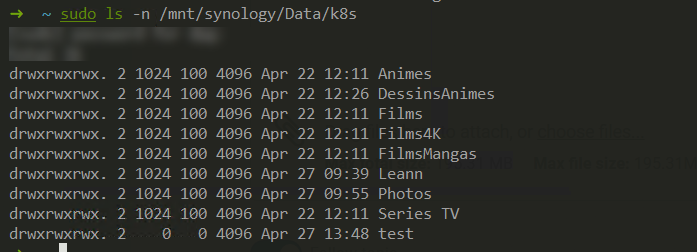
Ok i found the problem... this is a permission problem! I mount the volume and check the permission, here it's 1024 forthe user and 100 for the group Now i need to update the deployment like this: apiVersion: apps/v1 kind: Deployment metadata: labels: argocd.argoproj.io/instance: media name: emby-server namespace: media spec: replicas: 1 selector: matchLabels: app: emby-server template: metadata: labels: app: emby-server spec: containers: - env: - name: UID value: '1024' - name: GID value: '100' image: 'emby/embyserver:latest' imagePullPolicy: IfNotPresent livenessProbe: httpGet: path: /web/index.html port: 8096 timeoutSeconds: 30 name: emby-server ports: - containerPort: 8096 - containerPort: 8920 readinessProbe: httpGet: path: /web/index.html port: 8096 timeoutSeconds: 30 volumeMounts: - mountPath: /mnt/library name: media-library volumes: - name: media-library nfs: path: /volume1/Data/k8s server: 192.168.x.x
 1 point
 -
I guess since you're not using that Samsung TV of yours you could just give it to me1 point
-
The LG TV will play the first supported audio track, so with TrueHD, DTS, AC3, if you select the DTS track it will always play the AC3 track. It doesn't report this change so Emby will report that it is playing DTS, but the TV will actually play the next supported track, AC3 in this case. And to prove this, play a file with a DTS track and an AC3 audio commentary, or just a DTS track (in which case you will get no audio)1 point
-
Unless you use Trakt, or want to save you playstates, you might (if not already doing so) want to run Emby backup, so that you can just restore the playstates after the scan1 point
-
Depending on your setup, you will probably need to point Emby to the new location for your library, and then wait for the library scan to re-import your media into Emby1 point
-
Hi, Not sure why this happened but the upcoming 4.6 will be handling Collections differently so hopefully you won't have this problem in the near future. I've found once you remove the dupes, they don't come back so keep an eye on this and report back if any of these do come back. Thanks EDIT: Was originally thinking this was a 4.6 server but it isn't so I edited the post.1 point
-
So lets get down to the bottom of this problem. Everyone is asking that we have a way to disable the camera feature completely on server side. Which i also agree should be an option. I live in Canada but my family is down in NJ. But its not like i can drive there and show them how to disable that feature on their phone or tablets. And my dad is not very tech savvy at all. It would make it very easy to have this feature server side. Yet i still don't know why in 2 years of yes we will add that it still hasn't been put in. Seems like a very easy feature to add/or maybe even remove completely. Please feel free to explain.1 point
-
He's already told you that it plays with the different audio, and the screenshot shows picture breakup and not that it doesn't play. He's remuxing HDR HEVC media.... How do you guys still not understand this stuff? It's the same stupid remux issue that is now years old! The container that the server uses to remux this content into DOESN'T SUPPORT IT!1 point
-
Hi. Looks like a problem with either file access or the library setup pointing to the wrong place. 10:52:55.015 /volume2/video/Films/Films UHD/Le Hobbit - La Bataille des cinq armées (2014)/Le Hobbit - La Bataille des cinq armées - 2160.hevc.dtshd_ma.mkv: No such file or directory1 point
-
The problems of HEVC streaming that remux requires would end and we could have support for MKV HEVC direct streaming in the native Apple TV player.1 point
-
The titles are there. He appears to have some custom css turning them white.1 point
-
Looks great, thanks for sharing.1 point
-
i thought that the folder based access might be the way, was hoping there was a simpler way but im sure ill get there, thanks1 point
-
There is an app called Shuttle S2 Music player (Android Only), there is plans to push out an iOS version of it in the future. It has a really good UI and a great support team. It supports Emby & Jellyfin. Find it here on the google play store. S2 Music Player - Apps on Google Play. Feel free to give the developer a good rating if you like it.1 point
-
@t123thomas I could probably do a video of how to do it. Finding time to make it is the hard part.1 point
-
Some people? AFAIR it's only available in US, UK and maybe Canada, am I right? That's seems to be just a typically american sight, everything that is not USA is an exception. Europe alone has more then double the population of the USA + Canada, so getting the app to the european store would most likedly also get some new users, who get curious when seeing the app in the store. And of course, only some people are using the USB installation, because it's a pain in the a** with that pointless time limit in the app or they simply do not know about it. I have not seen a single post here, that the app stopped working afer xx days (I admit, I could have overseen it, so please correct me). It seems, only the installation is not possible anymore after the 28/30 days, then you need a newer version if you want to install it. But already installed versions seems to be running fine for a pretty long time. Am I right? Ciao, Alfred0 points