Leaderboard




Popular Content
Showing content with the highest reputation on 04/13/21 in all areas
-
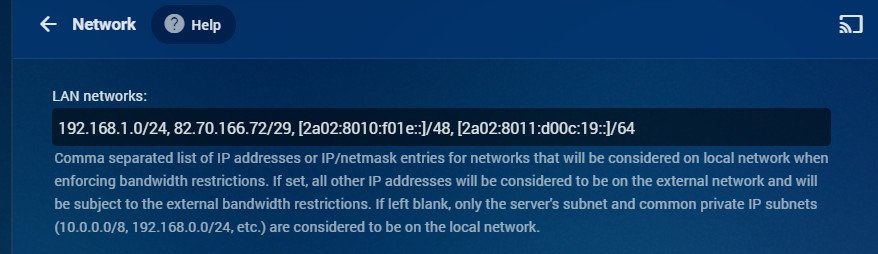
I wonder what's going on here, then... My iPhone always uses IPv6 to connect to my Emby, both locally and remote. Paul
 2 points
 -
Ok so my request is to be able to search each library separate as it stands when you search it searches everything, and if like me you have 30k music tracks 10k books/comics 10k episodes and 10k+ movies, searching is slow so is it possible to have a search section for each library individually1 point
-
-= PLEASE UP VOTE & PROMOTE THIS REQUEST IF YOU WOULD LIKE THIS FEATURE =- DO THIS BY CLICKING THE "LIKE" BUTTON ON THIS POST REQUEST: Properly pool multiple M3u IPTV sources, so when adding more than one with the exact same M3u emby treats them as one source with however many "Concurrent Streams" you set for each. https://emby.media/community/index.php?/topic/63725-multiple-iptv-tuners-double-channels/?p=636718 https://emby.media/community/index.php?/topic/59607-duplicate-channels-one-tuner/?p=607031 https://emby.media/community/index.php?/topic/57420-multiple-identical-m3u-tuners-without-duplicate-channels/?p=560949 Basically once M3u #1 has used all 5 of its tuners, I then need to start using the login info that is within M3u #2... once those 5 tuners are used (now all 10 tuners), then emby issues "no tuners available". This is how emby treats HDhomeruns today, so it can't be to difficult. @@snodrog742 @@manolodf @@robrhedrick @@cayars1 point
-
There are a number of shows that I frequently "Shuffle" with... since I've seen all the episodes, don't intend to acquire more (or if I do I don't care about highlighting them beyond the latest added section), and episodes stand alone well enough to not want/need to watch it in order. Just want to watch a random episode during dinner or something. When I start doing this too much, the Next Up gets very cluttered. If shuffle randomly gives me S04 E05 for a show, I'm not terribly concerned about making sure I watch S04 E06 next. I've tried setting the entire series to Played, as I was hoping if all the "next episodes" were already Played it'd keep it off of Next Up, but no such luck. Would it be possible to disable Next Up for individual shows upfront so they stop showing altogether? By User possibly? Or maybe if I Shuffle specifically, it won't show but playing an episode normally does? Sorry if this is a duplicate, I searched a bit but the closest I could find was "forgetting" a series... which didn't really apply since I never want these shows to come back no matter how much I watch of it.1 point
-
Unless I'm totally missing something, there's no way to add a row to the homescreen that displays the newest releases of movie library(ies). Would be a great, useful addition to latest media to have an option that sorts by release date instead of date added.1 point
-
I would like the ability to disable the camera upload feature, both per-user and globally. It seems odd to me that that isn't already there as far as I can find... Sure I could just not use it, but that depends on trust that your other users wont decide to enable it, as the only on/off is in each users personal preferences.1 point
-
Is it possible to add a bitrate for users that are direct(whatever) something? It's good info, and readily available. Thanks1 point
-
I was recently playing around with the ScripterX plugin and realized BASH wasn't installed on my Asustor 5304, it uses SH as it's default shell interpreter. Here are the steps I followed to install BASH and get it working with ScripterX /bin/bash selected as the in ScripterX interpreter: 1. Install Entware 1.0 from Asustor App Central 2. From SSH console session to the NAS: opkg update && opkg upgrade opkg install bash 3.cd /opt/bin sudo cp ./bash /bin/ Note that after a reboot of the NAS, you will have to repeat step 3 to recopy the bash file to the /bin folder ------------------ Update: Replace step 3 for a persistent solution (recreates symlink on startup): sudo echo /bin/ln -s /opt/bin/bash /bin/bash > /usr/local/etc/init.d/S76bash.sh Tested on an Asustor AS5304T, ADM ver 3.5.5.RFC31 point
-
Hi cayars, Yes, BT is working generally on the device. I can playback with BT through the Emby Web Client. It is just the Playstore client for Emby that doesn't playback with BT audio.1 point
-
Thank you for using the remote session to take care of the issue for me. It was very quick, and I learned a lot! Thanks again!1 point
-
I see, it was weird because never happened to me before, but it's true that all the troubling videos are the those that the subtitle stream is the first. Maybe the app I use to join the subtitle with the video started doing things wrong. Thanks to you too.1 point
-
So habe mich hier im forum weiter umgesehen und hab das hier gefunden was vielleicht die Lösung ist. Hier hatte der User vorher einen DS Lite Tunnel. meine fritzbox zeigt genau das gleiche an ( kein dual stack) werde morgen mal meinen provider anrufen und nachfragen ob es möglich sei das auf Dual Stack umzustellen. Vielleicht bringt das den erfolg. werde es euch mitteilen1 point
-
Not a speedtest of internet on the client. But a speedtest on a client to the server they are being hosted from. This could help basic users understand network limitations when deciding quality profiles.1 point
-
You have to do all the naming and metadata but putting the files in season 00 folder or creating strm files in season 00 folder is the best method as specials will be honored in 4.6. https://emby.media/community/index.php?/topic/93004-cross-series-naming-and-playing/&do=findComment&comment=9738951 point
-
The HDHomerun quatro combined with Emby works very well, and has made normal tv seem very old fashioned. I did note in the log that 192.168.2.45 was active fairly late on. That didn't make much sense, as it is a FireTV 4k stick on the kitchen tv and I hadn't been in there for an hour or two. I rebooted that firestick just in case.1 point
-
Thanks @cayars - I wasn't sure, hence needing confirmation.1 point
-
Emby works with IPv61 point
-
Cayars, I can’t thank you enough for the information. I’ll take a look at it tomorrow morning and see if I can get it done. I’ll let you know. thanks again!1 point
-
I know there are a bunch of different topics/help request threads going on in here as well as this forum for the E4KNG - just wanted to say that the latest beta seems to have fixed all of the lingering issues I was having with the addon not kicking off when I start kodi on my shield and my N2, so thanks for the hard work in getting bugs constantly ironed out.1 point
-
Thanks everyone for help / suggestions. Creating a unique channel ID per channel solved this problem.1 point
-
Hi, this is resolved in the next update to the app. Thanks.1 point
-
This should be resolved for the next update to the app. Thanks.1 point
-
Yeah, basically you want a way to mark a series as "non-sequential" because next up doesn't really make sense with some series.1 point
-
Hi, yes we plan to look for more sources for trailers in future updates. thanks for the feedback.1 point
-
Apologies, the problem indeed hasn’t been fixed. My wife watched on the IPad which doesn’t have the issue. Everything I watch shows up twice still, as long as it’s through Kodi.1 point
-
For me it happened with tv series (not tested with movies), one kodi box and one user. Watched the episodes from start to finish. I might have paused sometimes for a coffee break. The double watched status happened in 80% of the cases. Sometimes only one watched was reported, no clear reason why it was going ok sometimes.1 point
-
Hi, it's there, but not in TV display mode, given that it's not a typical TV app feature. You'd have to change the app display mode to desktop, but given your desire to use a remote control, you probably don't want to do that. An option to use this feature in TV mode is possible for the future.1 point
-
If you have the option of connecting the Roku directly into the receiver - then my view is this is the better option as it eliminates any eARC/ARC issues. Video is then passed through to the TV and (if necessary) you can usually delay the audio on the receiver itself. Turn on the Roku first, and CEC will then turn on the Receiver, which in turn will then turn on the TV.1 point
-
I'm now in hotel quarantine in Sydney. Carried my NAS as hand luggage and now all setup and ready in my room. Ended up being very easy to setup a private wireless network in my room with Emby. I just used my router I brought with me, having made sure before leaving home that everything worked on the network when I unplugged the internet. Started the modem here, connected the NAS with Ethernet and all good. Obviously no internet for the NAS, but the private wifi network means all devices can connect to Emby.1 point
-
J'ai réinstallé manuellement la même version . Toutes mes collections, fichiers, configuration n'ont pas changé.1 point
-
@Lukethanks for reply. Hard to imagine people liking it, as it's the only Library that shows this way on Homescreen making it look 'messier' than all the other Libraries grouped content / poster view. Has there been a poll or something I missed, because I've only found others asking for it to be changed from the individual episode Thumbnails to a grouped Poster view (Reddit). Perhaps another way around it is adding a specific 'Documentaries' Library category for mixed media that displays in Poster view on Homescreen? I'd remove and rebuild my Documentaries library in a flash if that was added. Thanks again for your time1 point
-
We apologize for the issue. We are aware of the reports of crashing and once we have it narrowed down can give a solution. Please stay tuned. We will have something soon and once again apologies you have to suffer this problem. We didn't do this intentionally but it was our fault (ANY time there is a crash it is our fault even if it isn't). You can feel free to throw some heat our way. This isn't something we do often.1 point
-
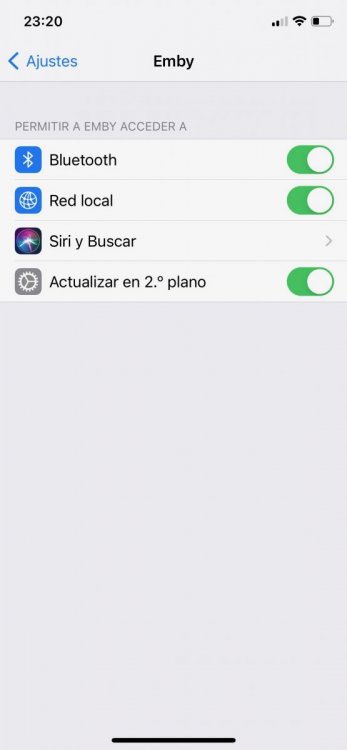
After upgrade to iOS 14 or padOS 14, you have to go to Settings - Emby - Enable Local Network Access Permission. If that setting is not enabled, then you are stuck in loop, no compatible streams are found.
 1 point