Leaderboard




Popular Content
Showing content with the highest reputation on 03/14/21 in all areas
-
LG generally takes about 4-6 weeks to review (which is fine), however, they will fail submissions for the most minor of reasons - for example, imagine a minor defect that only occurs on one model year, that sort of thing. And other times they won't take the time to understand how things work and they'll fail the submission because they think something isn't working. On top of that they also have a policy that after a certain number of consecutive rejections, they will remove your app from the store altogether. So it's that threat that makes it a stressful and delicate process and it is the primary reason why there are sometimes gaps in updates. But I an assure, we are working on it.4 points
-
Mostly pertains to m4b but I have seen tags on mp3 files that have time stamps you can jump around in too. Can pm if example needed.3 points
-
Right now there is no scraping for Audiobook content. If a user adds a book to their library, the have to fill out metadata by hand. With that said, it is possible to scrape Audible.com for most types of metadata that are relevant to Audiobooks. This is already implemented by the community for Plex: https://github.com/macr0dev/Audiobooks.bundle Since Emby will officially support Audiobooks, it would be nice to see that implemented here as well.3 points
-
Thanks, yes I know. There are also additional issues in the experimental version.2 points
-
How to Contribute https://translate.emby.media1 point
-
I love listening to my music using my android phone with Emby android app, but currently the app lacks support for internal equalizers, my phone has one and I would like to take advantage of it.1 point
-
Hello Here is my request. I created a home page with a link that redirects to my server emby. And I would have liked to know if there would be a method to simply add a link in the logo at the top left of the server? I would like that as soon as a user clicks on it, it will be redirected to my external site. would you have a simple idea to incorporate this into the system files please? I thank you in advance1 point
-
Currently because the Audiobooks section of Emby is mirrored after Music, there are two headings on the Audiobooks Page for "Album Artists" and "Artists". Please replace these with a heading for "Authors".1 point
-
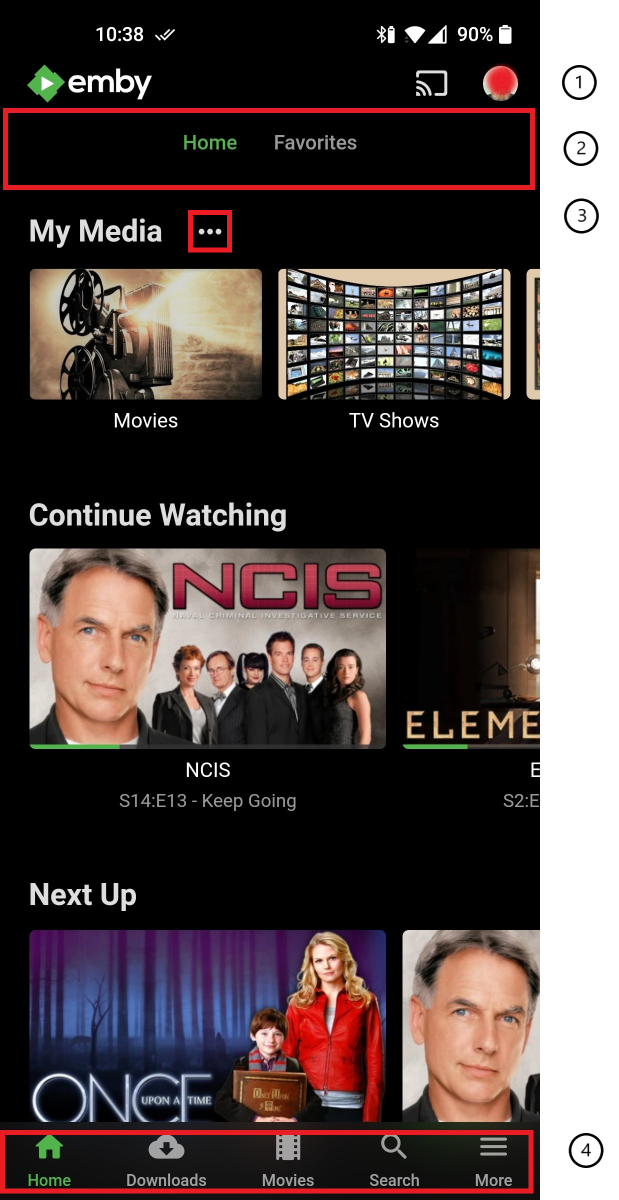
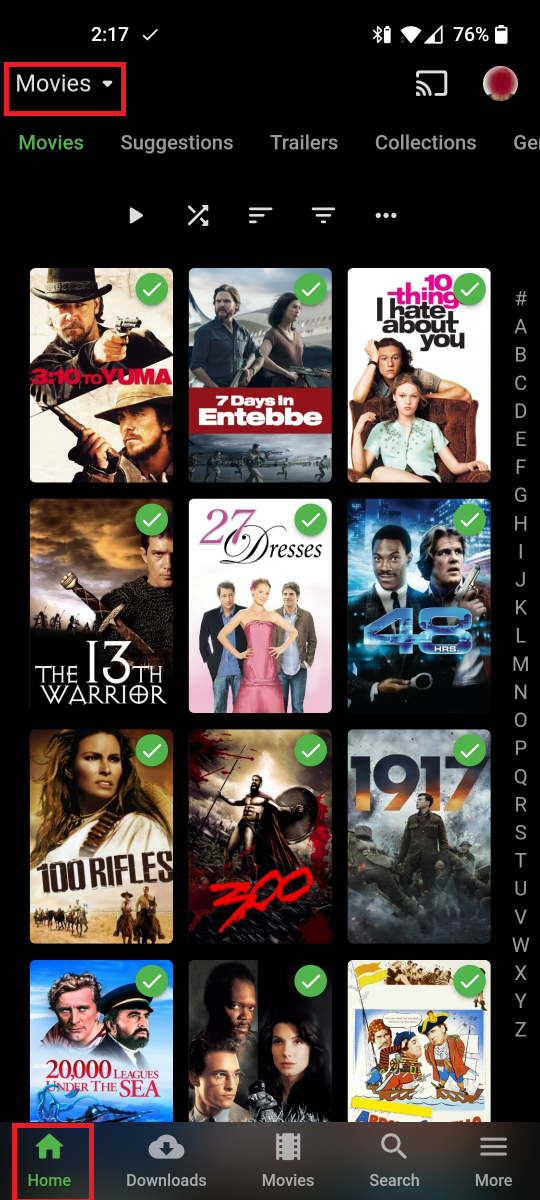
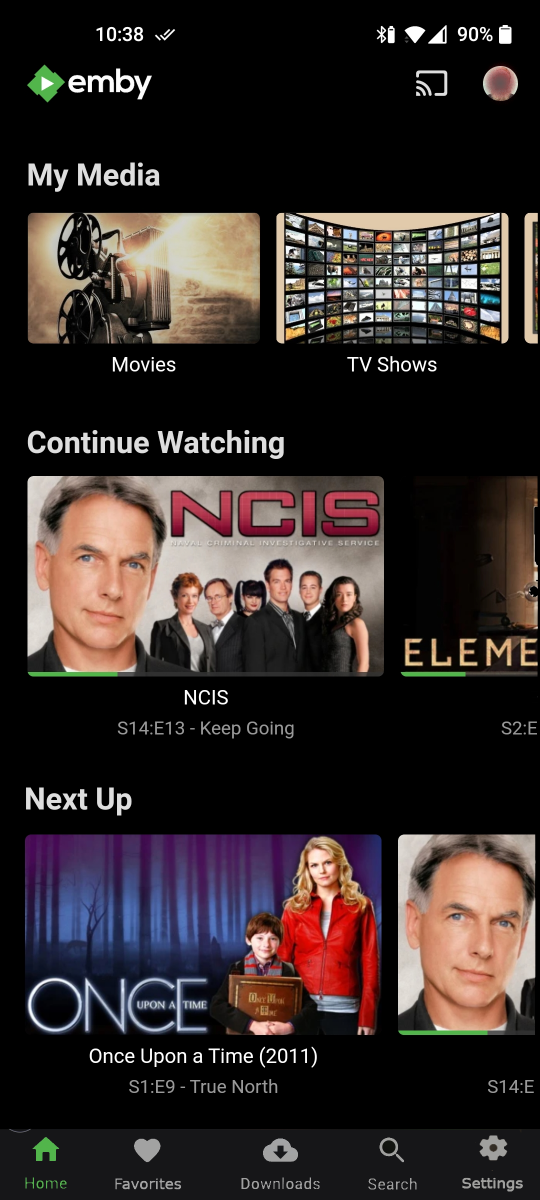
I recently installed the Emby Android Mobile app on a 10 years old and 12 years old phones and a shared tablet. While trying to teach them how to use the app several issues came up that I thought I would share here. The first image here of the home screen highlights the sections where issues where identified. Section 2 did not come from the kids but is a minor squick of mine that seemed to fit in with my suggestions later. The first issue deals with items in sections 3 and 4, Shortly after I had given them a short tutorial and then left them to explore the app they came back and told me there must be something wrong with the setup because they kept getting sent to the settings screen and they figured that meant something wasn't right. After having them show me exactly what they meant I realized there was nothing wrong but their expectations and some confusing navigation indicators. They thought that the three dots after 'My Media' indicated that there was more content available. The same was true of the 'More' item in the bottom navigation bar. I explained that these were just different ways of getting to settings and the 10 yo commented that this must need lots of setup because they sure want you to do that a lot, I would like to see the three dots removed and the 'More' item renamed to 'Settings', They also had several questions about navigation. The first was how come there was only 'Movies' in the bottom bar and if they were in the movies how did they switch to tv shows. I would prefer that library navigation was not part of that bottom bar. From the 'Movies' library screen I was showing them how to navigate through the libraries using the library name at the top of the screen. When one asked how come the 'Home' item in the bottom bar was green instead of the 'Movies' icon. Told them it was a bug and don't worry about it. Navigating through the libraries was fine on all except for 'Live TV' which did not allow you to pick a different library to navigate to. The second section from the home screen image with the 'Home' and 'Favorites' links has always kind bugged me. So much screen real-estate to let me know I'm on the home screen and a link I seldom use. I would like to see that removed and the 'Favorites' put in the bottom bar, With the various things I mentioned above the bottom bar would look like this: and the changed home screen something like this: The final thing I want to mention deals with item 1 on the original screen image and it isn't specifically an Android item. When we setup the android tablet they were not really thrilled with the user switching process. I've never found it particularly difficult but they seemed to feel that they should be able to just tap the picture, tap the other user and be done. In other words - they want to skip the sign out stuff and just show the user selection screen.
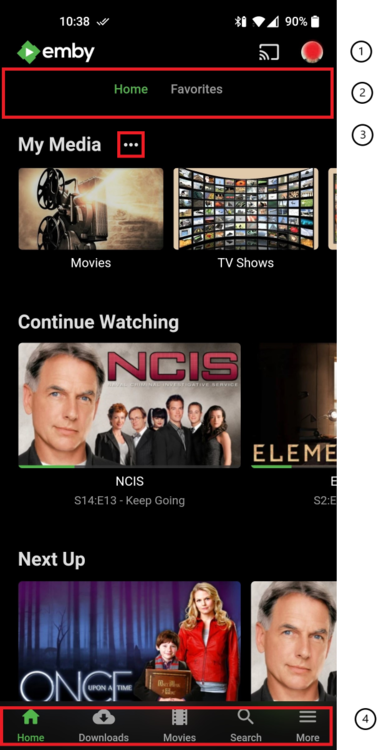
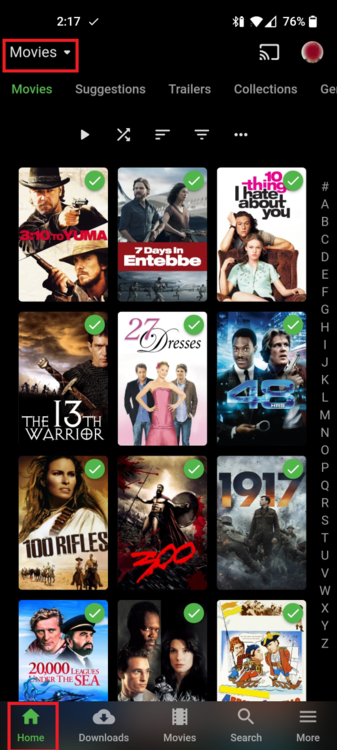

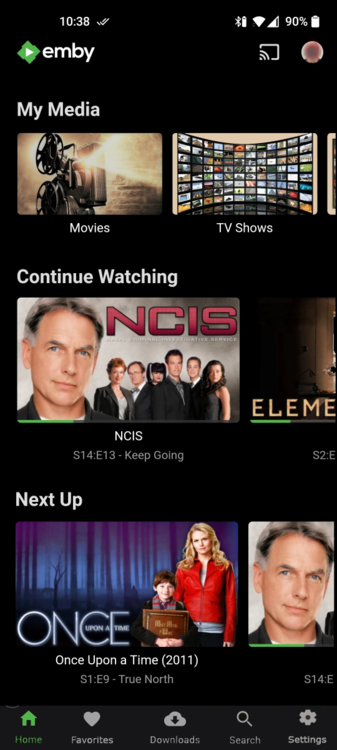 1 point
 -
Thanks for the feedback !1 point
-
@t123thomas I could probably do a video of how to do it. Finding time to make it is the hard part.1 point
-
New issue in 5.2.02 build 89: Selecting the 'Emby options' item in the context menu when selecting a media item will throw an error. I'll send the log in DMs.1 point
-
beta is fine, stable has an older version. edit: comment removed, wrong topic1 point
-
1 point
-
@kikinjo I think it will work fine, I checked the code and the fallback logic supports dots instead of spaces just fine. I really don't think you will have any issues with your chosen naming convention.1 point
-
The login problem is fixed with that build, I sent you a log file via PM, in case you can use it for further development. Thank you very much!1 point
-
For Matrix you must install "emby-next-gen" and for Embruary skin there is a manual hack required. Check the Embruary support thread here in the forum.1 point
-
hi @danlat1415 great news. We've built an OS5 package for this model. It will be up on our website shortly. Please try it out and report your experience. Thanks.1 point
-
didnt even last till tomorrow turns out the Athlon (2c,4t) is a bit too budget for sw decoding. Seeing it hit 100% on all 4 threads and causing issue with seeking with 1080i recorded tv transcoding. I've also spent a bit of the day looking at moving to an official amd driver supported distro but even on current ubuntu server it's having what appears to be issues with the current kernel version - same as others on the amd forums. While it works, DKMS is broken/has to be disabled and i'm really not interested in reinstalling every time with kernel update. based on that, i've pulled the plug on quadro P400, ATX case&mobo and will move existing components across. Still happy to continue this thread and help where i can but it's become much less of a problem for me now!1 point
-
My hacking is still working and has preserved across over 20 beta server updates without breaking or needing action on my part. We will need someone who knows a heck of a lot more about scripting and the jail creation process to ever make a "patch" that doesn't require some server admin action. Passing the GPU into the jail isn't something that has a easy check box that I know and that is the hardest part. Following that is knowing the correct drivers to get into the jail. Maybe once the port away from mono is completed by the FreeBSD dev that Emby uses they might have time to work on this. So it is going to be years unless the community pitches in to help.1 point
-
This sounds you are using Kodi with python version 3.9. Currently I'm working on a bugfix.1 point
-
This front/back localisation is partly learned - we learn as infants to associate the subtlest audio clues to specified occurrences in the real world. We have but two ears, and still find ways to localise all around. One mechanism involves head movement, which reduces ambiguity, but another uses subtle changes in tonality caused by filtering which comes from the pinnae, and from shoulder reflections. These are highly personal, but can be measured (it's called HRTF - head-related transfer function) and applied to sounds from different directions in processing for binaural (headphone) listening. It is possible to use an average HRTF for a less certain result, which works better for some people than others, and it's possible to fudge some of its effects into loudspeaker listening. If it works for you, great - but don't be surprised if the results are poor or variable. Paul1 point
-
I had my x-55 rhino joystick plugged in, this was causing the issue, also caused an issue where jellyfin would constantly scrub to the end of the video.1 point
-
New experimental version: This version fixed the login issue (NOT TESTED WITH KODI 18)! Don't use it, for Kodi 18, it could break the settings files. The problem was the settings file reading was broken at least in python 3.9 Due to that issue it also broke the sync file reading. All users who experienced that issue had also a sync issue on Kodi startup. This should be fixed too. ALSO DON'T UPLOAD LOG FILES to forum with this version! The masking of confidential data is disabled! Send me logfiles via PM. Tested with Arch Linux python 3.9 plugin.video.emby-next-gen-5.2.02-build 89 (ex8).zip1 point
-
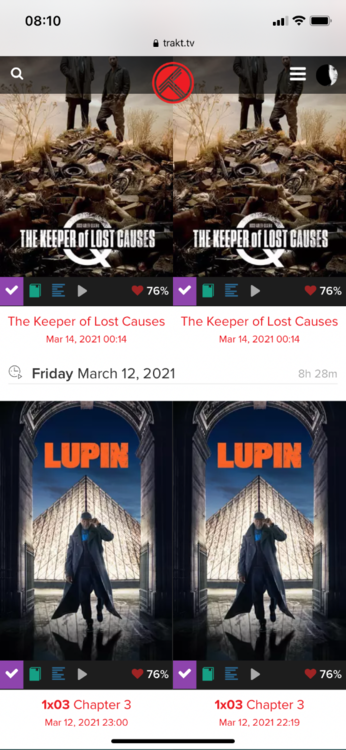
It does also happen with movies, yes.
 1 point
 -
just tested, no problems on networked destination or apostrophies/backticks in usernames.1 point
-
To be completely specific: what Emby has is a combination of auto-queue and auto-play. Plex actually uses auto-queue-only as default (and that's what I'm asking for)...after playing one episode (with the auto-play option turned off) Plex goes back to the dashboard and shows you the next episode to play ("Next in Queue"). Then you can decide wether you want to play it or not. Or: you can use the skip-to-next-item button while still playing that episode. That's auto-queue. Only if you turn on the auto-play-option, it doesn't go back to the dashboard but plays the next episode automatically. And giving the user that choice is what I think is ideal...every user can choose the player behaviour s/he likes. Jellyfin (which is a fork of Emby as far as I know) does it in a similar way. At least you can turn off autoplay but still have a "skip to next item" button all the time giving you the option to skip but not running into a "damn, I fell asleep and my Mediaplayer went on for hours, let's figure out which episode to play next without missing something"-situation.1 point
-
Problem SOLVED I programmed a simple HLS client to fetch the m3u8 from Emby, followed by parsing the file to separate out all of the fragment URLs, and finally with the URLs it fetched each of the files one after the other until I had the entire movie. To my surprise Emby provided every file and thereby debunked my theory that the HLS server was failing. Knowing that the problem was not in Emby, I started to look much closer into HLS.js. I now had an idea about what to look for. Removing the mp4 typing on the HTML5 source element tag in the DOM solved the problem. Problems are always simple once you discover what they are. I am not sure why this works, but it did. Vic1 point
-
The Equalizer is one thing I use on almost every audiobook I listen to (listening on Android's "Smart Audiobook Player" -- which, as an aside, is by far the best player on Android if you're looking for general feature/usability inspiration) It just has a super basic 5-frequency equalizer that you can save your setting as a general preference in 1 book, and then load into any other book later on. I usually increase the lows and decrease the highs because the balance of audiobooks makes it fatiguing to listen to for extended periods.1 point
-
Update: if i add the same folder as a "series" folder in emby, all the folders show up....fml1 point
-
I did! (and why do i find this now??) And to be honest i think i am struggling with the same or at least similar issue, maybe its a codepage thing or something, let me explain and maybe we can find the root cause of my issue, here is a recap; Installed emby-server-deb_4.5.4.0_amd64.deb on linux Debian 10.8 Didnt want emby's home folder in /var/lib/emby so, stopped emby (systemctl stop emby blabla), moved the folder to where i wanted it (permissions unchanged), symlinked /var/lib/emby to the new location, restarted emby, emby seems to be happy. (just including all these details to be complete, dont suspect it to be related). Ok so i did the initial setup through the webbrowser when it was time to add libs. Here is my problem; i have two huge folders /btrfs/media/series and /btrfs/media/movies one is scanned perfectly (series) the other is not. However if i change the path of the movies library to one of the movie subbfolders e.g /btrfs/media/movies/a movie, that works and for any movie in that movies folder. Also works for collections like tens of movies in a James Bond Collection folder (which in turn are all in their own separate folder under /btrfs/media/movies/James Bond Collection. Since /btrfs/media/movies is actually a symlink to /btrfs/media/-=MOVIES=-, a legacy from ntfs period which i didnt like anymore, i tried to add that folder instead, no cigar. btw i can browse to that folder in the webinterface just fine, and see all the subfolder with the collections and individual movies. The series folder is actually the same story and works fine on the first attempt via the symlink like mentioned here (/btrfs/media/series is actually a symlink to /btrfs/media/-=SERIES=-). Anyway so i figured it must be some kind of permissions issue (no reason to believe the series and movies folders are different, but hell it must be!) so i checked. Same perms. I tried removing and adding, accessing the folder via an alternative path (/btrfs/media is mounted on /mnt/media for legacy purposes), no luck. Gave the emby user a shell (usermod -s /bin/bash emby), su to emby, was able to browse the movies folder just fine. That was all a couple of days ago, i gave up. So today i thought'd try again. dpkg -r embyblabla dpkg -P (purge) embyblabla. Started over. Same issue. Series added fine. Movies are not. Manually triggering a scan seems to be occupied a while with series and doesnt seem to bother with movies. So again i started googling on my subject, searched the forum and found this thread where you mention this particular behavior (which is a big surprise) so it MUST be a permissions issue still! (at least thats what i told myself 30 mins ago), so: i did a chmod "chmod u=rwX,g=rwX,o=rX /btrfs/media/movies/ -R" and "chown daanmageddon.media /btrfs/media/movies/ -R" (yes emby is not a member of "media", on the earlier attempt i made the mistake of adding emby to the media group and it had messed up all my 60K+ .nfo files and mediacompanion wasnt happy, thank god for btrfs and snapper). So i am now at the point where i am convinced emby can access and read all those movie files and folders just fine, just like with the series folder, however it doesnt seem to work. I have a hunch. On the earlier attempt i found some IOexception errors on some folders. I dont have the exact error anymore since i did a dpkg purge so no logs from the earlier attempt...actually thats not true, i looked at my google history and recall i was searching for "emby System.IO.DirectoryNotFoundException: System.IO.DirectoryNotFoundException" Now, lets see if that same issue applies again, systemctl restart embyblabla, embyserver.txt is rotated and empty. Now i try to add the same movies folder, cant find any such error in the log, even after (manually) triggering an update of the movies lib. Actually there isnt any error in the log at all and emby reports its watching (if i enable real time montoring).....but no scan seems to take place, no errors either, lib is still empty. I am quite lost. The only hunch i had was that IOexecption error which was something in the lines of "cant find part of path", but with the new attempt those errors seem to be absent anyway. Before you start asking the obvious: no i am not adding a subfolder to the same or different library, yes of course the type of the library is movies. In the meantime i will try to add the /btrfs/media/movies folder as a series, see if that raises anything. However i am quite lost. Cant imagine this to be a permissions issue, but possibly some codepage issue, i remember the IOexecption errors all were about folders with special signs in their name, like a dash (-) an ampesand (&) or whatever, ill keep an eye out for them and share here if i find them. I really like its potential, and everything works for the series which is a start but you can imagine i really want this fixed, cant stand myself for messing up something so sorry until i am proven wrong i have to blame emby (haha sorry bad joke).1 point
-
I really liked "The Jacket (2005)" when I watched that when it came out. Always thought there should be a sequel. How much time do we have? ... we have all.. the time.. in the world.. *begin credits*1 point
-
Thanks, that's good news. I see the issue in the log and it's surly not the only problem with this version. e.g. don't try context menu. It's just a test version addressing the sleep mode problem.1 point
-
e.g. Play next episode etc, playlist shuffle with external addons, wrong item labels in playlists. Kodi should be in charge of playlists. If the plugin manipulates playlists, it's not following Kodi (playlist)-settings due to "manual" injections. ...I see what I can do.1 point
-
Yes, I have a specific reason for not using add-on mode. I use the Extras add-on in Kodi that requires a direct path to the media. The caveat is I also have several movies with multiple versions (Extend Cut, Directors Cut, etc) that I would like to be able to choose from. What were some of the issues happening in 4.x that were caused by that feature?1 point
-
Like the top post to vote. They cannot scrape but if something surfaces they will see that there is interest in building support for whatever comes to exist.1 point
-
The proverbial "iron fist in a velvet glove" described her quite well, although with me, it was all velvet. (she must have helped me with 100 issues) Million thanks again if you're reading this incognito somewhere1 point
-
PS: Anybody who can answer that question with 'YES', feel free to contact me via PM if you like. For all others, I still got some great news: we will soon have some significant performance improvements for large SqLite databases!1 point
-
Definitely would love this I do use Emby for my audiobook library (just to store for offline downloading to play in a different audiobook app) ... but I feel like I spend more time curating/cleaning my audiobooks than everything else on my server combined1 point
-
request: have Emby be able to read m4b chapters About half of the audiobooks I have do have chapters. I used to use $5 mp3 audiobook player pro but no need anymore on iOS since BookPlayer ($free) does everything. Only three things BookPlayer doesn't have that mp3 audiobook player pro does have are: 1) search (titles of book library). Not such a big deal since you can sort them various ways. 2) doesn't list size of m4b book 3) statistics shows last 30 days and average listening time, etc. None of those are deal breakers so I'm using the free BookPlayer even though I paid for the $5 one. Ok so from emby server if you use the iOS emby app you can download the m4b audio book and listen to it offline. Also supports streaming and resuming no problem. However, it doesn't show chapters even when fully downloaded. So a workaround is to connect via safari or any browser and navigate to the m4b audiobook on the emby server then click the ... (3 dots) and choose Download. It says view or Download. Choose download then save it to Files then open that up and open it up in BookPlayer and then I got chapters. Flacbox ($4 in-app) also can stream from wedDAV or SMB or cloud services but no m4b chapter support. So not sure if it has to read the entire file but I know it's not part of the metadata since I've stripped out all metadata and all hundreds of m4b audiobooks and the ones that have chapters still show. I strip out all metadata with MusicBrainz Picard so I can use folder based navigation and seems to work semi-decently. Anyway book player you can view the open source and see the code and see their implementation on how they read chapters for m4b https://github.com/TortugaPower/BookPlayer I'm not a coder so no idea if this is relevant or not 41A1B111226F88C500EA0400 /* Chapter+CoreDataClass.swift */, 41A1B112226F88C500EA0400 /* Chapter+CoreDataProperties.swift */, 41B2AC8D1D43CCE8005382A9 /* ChaptersViewController.swift */, 4140EA76227289B50009F794 /* Chapter+CoreDataClass.swift in Sources */, 4140EA77227289B90009F794 /* Chapter+CoreDataProperties.swift in Sources */, 41A1B139226FEDAD00EA0400 /* Chapter+AVFoundation.swift in Sources */, oops didn't see this thread. Mod: merge my post into this thread please.1 point
-
You can update your email by clicking your user name at the top of the forum and click Account settings. Editing original post.1 point
-
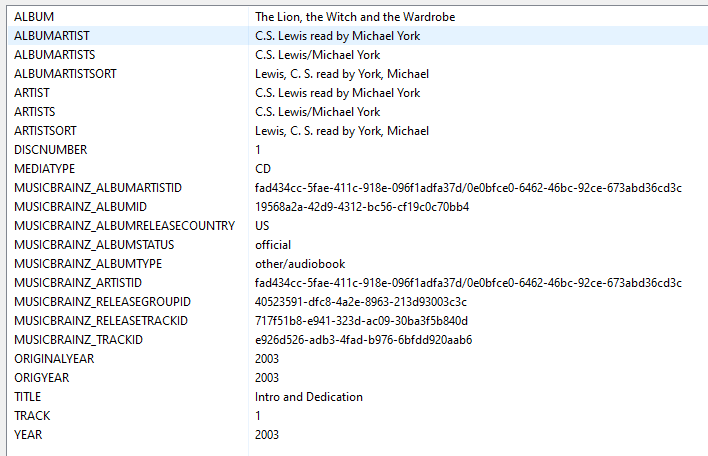
musicbrainz has had a stab at at a standard for audiobooks https://musicbrainz.org/doc/Style/Specific_types_of_releases/Audiobook but its a bit of a moot point as there is no plugin to interpret the data into a set of standardised tags, albeit some guidance on how the standard tags (title, artist etc) which picard does write out are declared. this is how picard writes out an audiobook as standard in the mean time maybe its a case of emby just declaring what audiobook tags it will prefer when present, for people who want to conform and get ideal presentation in emby a starter for 10 for 'advanced' audiobook tags which if present are preferred author narrator album = "the name of the book" alternatively Emby might be said to conform to mbz and provide an improved standard if it just treated the 1st artistS/albumartistS as the author and the subsequent as narrator(s).
 1 point
 -
Looks like Google Books also has an API that could be exactly what we're looking for: https://developers.google.com/books/docs/overview1 point
-
Ok, I found something that could be a start. LibriVox is a lister of free public domain audiobooks. And they do have an API. Definitely not all-inclusive, but could still be a source. https://librivox.org/api/info1 point
-
Currently, on the main screen, when you see latest audiobooks it is a random track. Request is to show and be routed to the album screen.1 point
-
The snapshot already exists is a pain in the ass issue. Before updating the plugin, it creates a snapshot of the jail. If it fails for any reason, you won't be able to update it until you go and remove any snapshots that exist for that jail. Which can sometimes be 30-40 snapshots. Then you can try updating again and potentially fail again. To me the simpler way would be to go into the shell of the jail and run these commands. service emby-server stop pkg update pkg upgrade pkg install -f emby-server service emby-server start you may not need the pkg install line depending on how it was originally installed, but it won't hurt to have it in there. It's also completely normal not to be able to click the update button in emby itself, this does not work on FreeNAS. And yes, you're on an extremely old version 4.1.0.26 released on April 19, 2019... almost 2 years old now. The latest stable is 4.5.4.0 and 4.6 is in beta. To prevent future issues, I'd recommend you stay on top of your updating.1 point
-
Morning. Thanks for all the hard work on Emby for Kodi. It's a great product that I rely heavily on for all my couch potatoing! On the previous version of Emby for Kodi, there was an option to prompt to delete TV shows once you finished watching. Could I request this feature be reimplemented? Thanks!1 point
-
Sorry, maybe I forgot. There is no "correct" mode. Addon mode works in any case, native only if you have direct file access. kodi db files are always used. The "sync" syncs the kodi db(s) with emby server. The difference is, in native mode kodi db(s) are loaded with (direct) filepathes (that's why file access is necessary). Addon mode loads "virtual http" pathes (piped through socketserver) and redirects it to Emby server. Native mode has only one benefit. If an external plugin is related to native file pathes (which are very very few), addon mode will not work for them. On the other hand, if you use native filepathes, several features (multivideo, transcoding and several more) are not supported. Addon-mode manipulates/injects some modifications when queries those "virtual http" pathes. The manipulations are required, due a lag of Kodi native support for those features.1 point
-
It should be much better with the next update to the LG app. Thanks.1 point
-
I'd also very much like this feature. This is the main reason I still use Kodi and can't swap entirely to Emby, as I like to watch both foreign movies and english movies with foreign subtitles....1 point