Leaderboard




Popular Content
Showing content with the highest reputation on 03/07/21 in all areas
-
CURRENT STABLE VERSION: Changelog: https://github.com/MediaBrowser/plugin.video.emby/releases/tag/6.2.11 Introduction: Emby team is glad to present a new addon for Kodi media center. It's available in our Kodi repository labeled as "emby-next-gen". The new plugin is not just an evolution of the previous "Emby" plugin version, it's a complete (70%) rewritten code. Design flaws of the previous version are now fixed and covers a lot of issues and incompatibilities. Most 3rd party Kodi plugins are supported by default. System requirements: Emby server: 4.2.0.23 or higher Kodi: 18 or higher Migration: The old "Emby" plugin supports up to Kodi 18.X. "Emby-next-gen" plugin supports Kodi 18.X and higher. Migration mode is available in "emby-next-gen". It keeps the "Emby" settings for "Emby-next-gen" however, a full database resync is still mandatory and not reversable after migration was initiated! Recommendation is a complete wipe of Kodi and its addons and begin with a clean installation. Kodi backups are recommended before migration. Limitations: Even if "emby-next-gen" is declared as stable there are still some limitations. - Sleep mode/hibernate is not supported - Multi (Emby) server not supported - Playlist (Dynamic) Artwork not supported - Distributed TV Shows over multiple Folders/Hard drives not supported We are still working on those limitations and will be fixed in the next releases... Installation: There are two options available: Native and Addon mode Addon-mode is highly recommended! Even if you used native mode in past, don't use it with "emby-next-gen" unless you have a very special case. Most of the drawbacks of native mode with the "old" plugin are covered. Addon-mode supports all "emby-next-gen" features, while native mode doesn't. e.g., multi-video, trailer, 3D, transcoding support etc. Finally: If you still use Kodi 18, you can choose between "Emby" or "Emby-next-gen". Kodi 19 requires "Emby-next-gen". If you are happy with "Emby", keep it a bit longer and wait a few weeks. Even lots of people participated in testing (many thanks for all the feedback), it's still quite new.6 points
-
You have critic ratings and tomato meter, it would be be nice to see a Common Sense Media age rating. Or an option to turn it on or a plugin to enable it. Thanks!3 points
-
New Version available 5.2.01: You can load from here, or wait till repo is synced. http://embydata.com/downloads/addons/xbmb3c/multi-repo/beta-leia/plugin.video.emby-next-gen/plugin.video.emby-next-gen-5.2.01.zip Fixes: sleep/hibernate fixed backup fixed New: alphabet/first letter nodes Icon(s) in rootfolder Remove artwork optional when DB reset Known issues: Multiserver not working Dynamic lists slow/artwork Distributed TV-Shows not synced correctly Review Artwork/Backdrops Changelog not working Feature requests: PVE support Remove TV-Shows etc after fully watched Boost initial sync Audiobook support Autodetect Speed for Transcoding Improve Subtitle selection Boost Repair sync New content notifications Add Playcount option for musicvideos General info: Most of the changes are under the hood. Exception handlings are replaced (in sync modules and server connect modules). minimize xbmc API usage Thread/queue handling modified (remove timeouts) ...and lot's more3 points
-
Hi! Currently the subrip subtitles are extrated on the fly when playing from, for example, an MKV container. the process is slow, don't show the subtitles from start, and if the file is 4k/1080p on a slow server (ej Rpi) it could timeout and leave us without subtitles. What I am thinking about: - When searching for subtitles on open subtitles, etc, if there is no standard (srt) file found extract it using something like this: mkvextract tracks video.mkv 3:video.srt I'm currently manually running this for each file with subrip embedded subtitles and it works like charm, and I'm sure that the subtitles are correct. There are multiple tools that get the job done, I choose this because it's open source and currently maintained. https://mkvtoolnix.download/ Thanks!2 points
-
That would be sweet, but for now i was able to do it using @GrimReaper76 suggestion. thnks guys!2 points
-
[removed]2 points
-
I would love to see an addon for this as well. Too often I get incorrect parental ratings on newly added movies. I just had to update the last thee movies added to CA-14 where TMDB had them as CA-G or CA-PG. I've been going to filmratings.com to manually correct but I don't know the ratings are incorrect until I see them show up on my 6yr old daughters Emby account. I'm considering changing my default country to USA because it seems that the TMDB community US values are more often correct but anyone can change them and that's a little worrisome. Common Sense Media is dedicated to this and I don't think just anyone with an account can override what is there. I might have a couple years off what they say but I'd be less worried about an R rated movie showing up in my kids list using them.2 points
-
I mentioned it in another thread, but thought I'd put it here since this looks like a new section--just for posterity. Would like to have a bulk meta data editor function. For example, if I have 750 videos whose producing studio is the same, I want to select those videos and apply the name of the studio to those videos. Similarly, if there is a custom tag I want to apply to a subset of those movies, I want to be able to select them in bulk and apply the tag to those videos (instead of selecting them one by one).1 point
-
Hi, I would like to have an option to choose H265 instead of H264 in the Transcode option. It will be smaller for all bad bandwidth (2~5Mbit ADSL), but will have a great quality. Mobile phone can benefit of it greatly too with the 4G and the limitation of download.1 point
-
Hi, Thank you for the great product. It is a pleasure to use it. I have seen some posts but they are years ago regarding my request. Is there a plan to have notification (when adding movies, shows, live tv etc.) from the emby app ? This means to get a push message on my android phone, iphone, windows app, etc. With 3rd party software its not so cool. Thank you.1 point
-
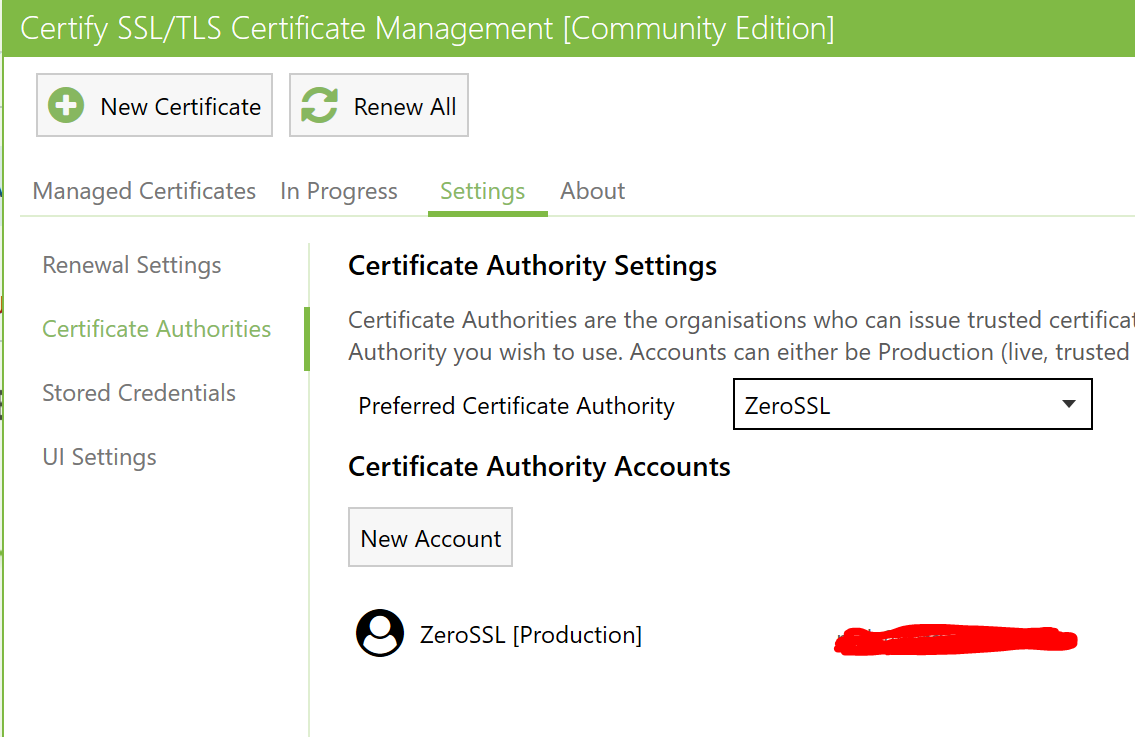
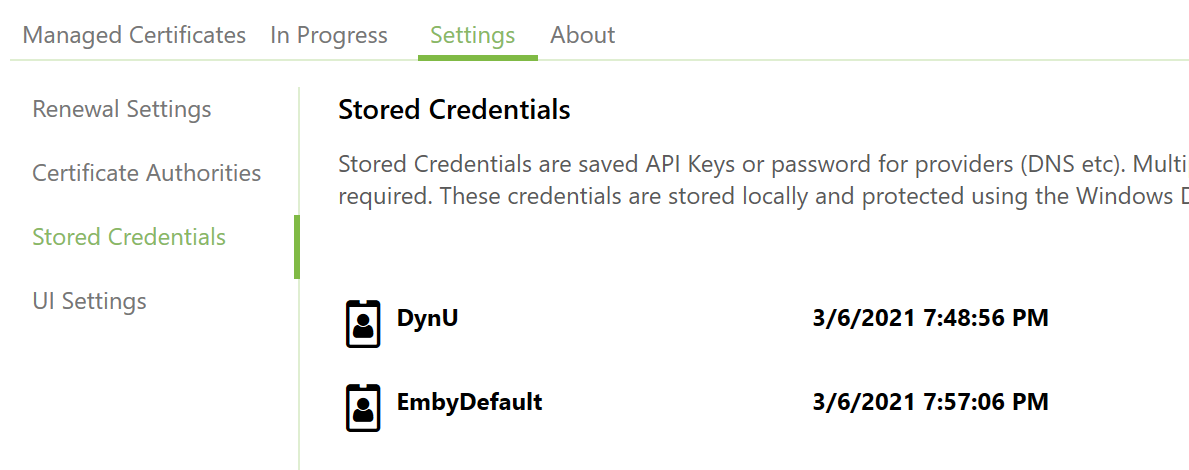
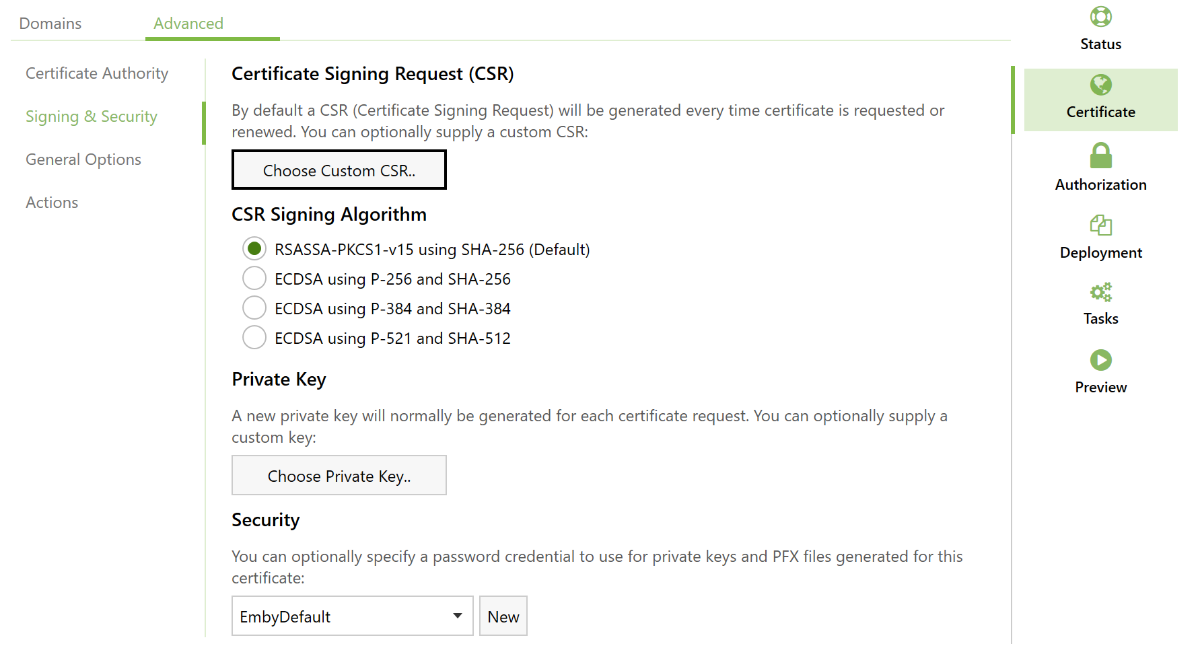
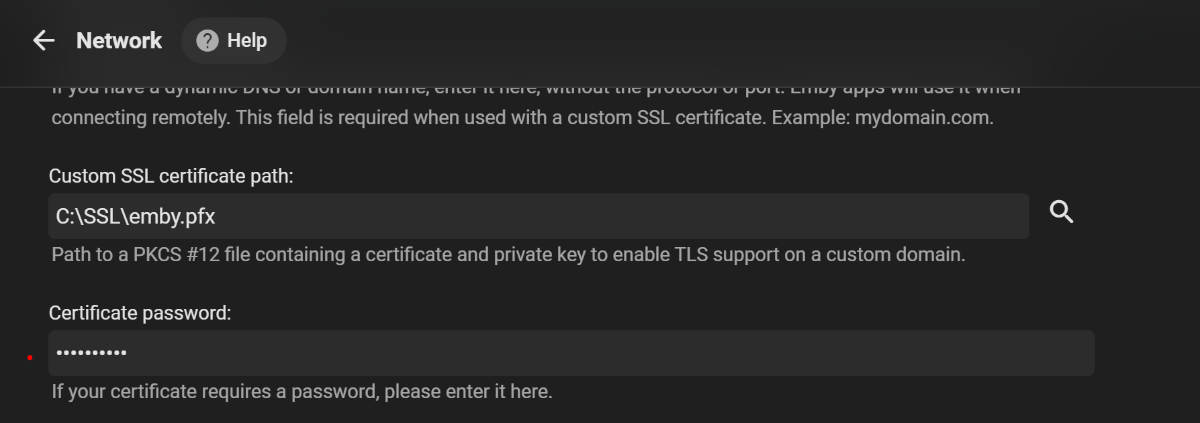
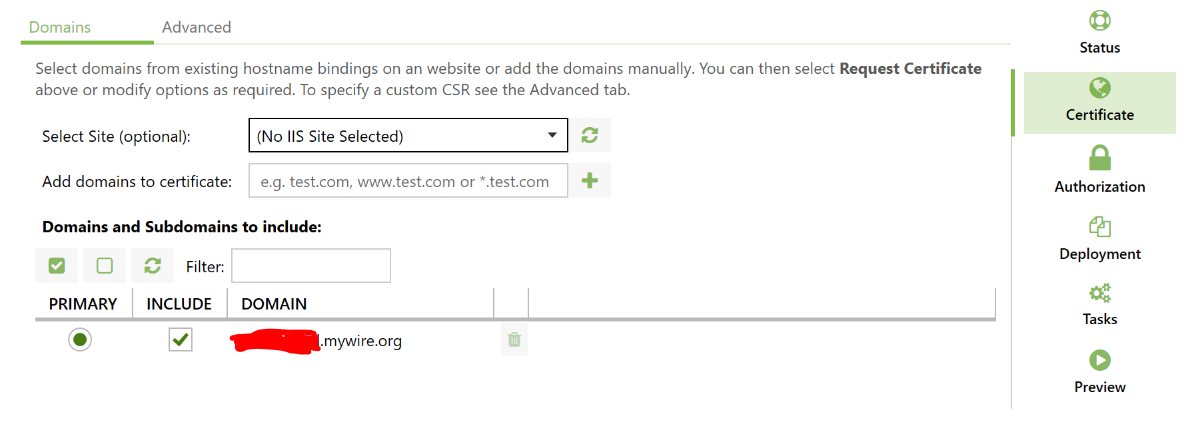
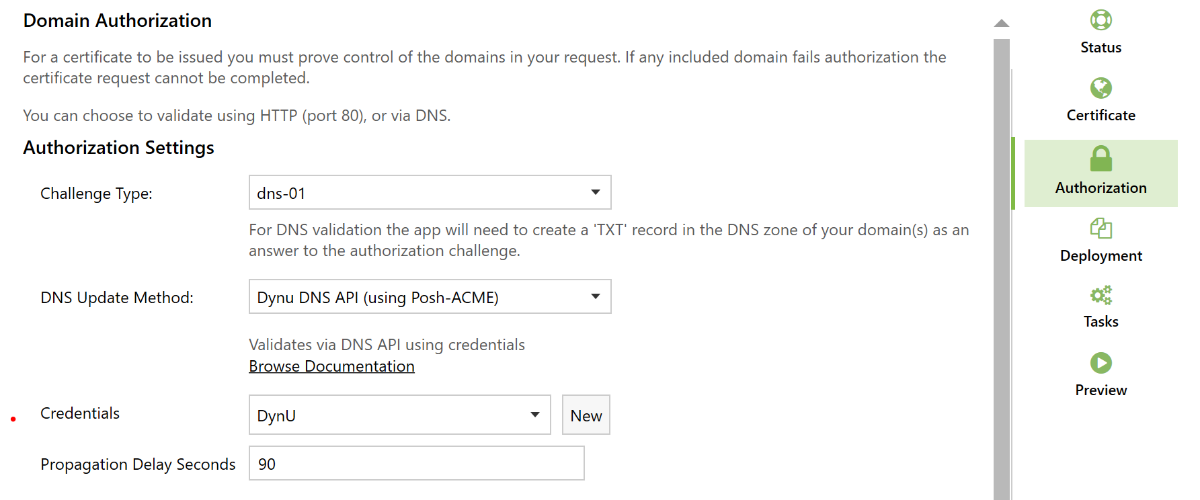
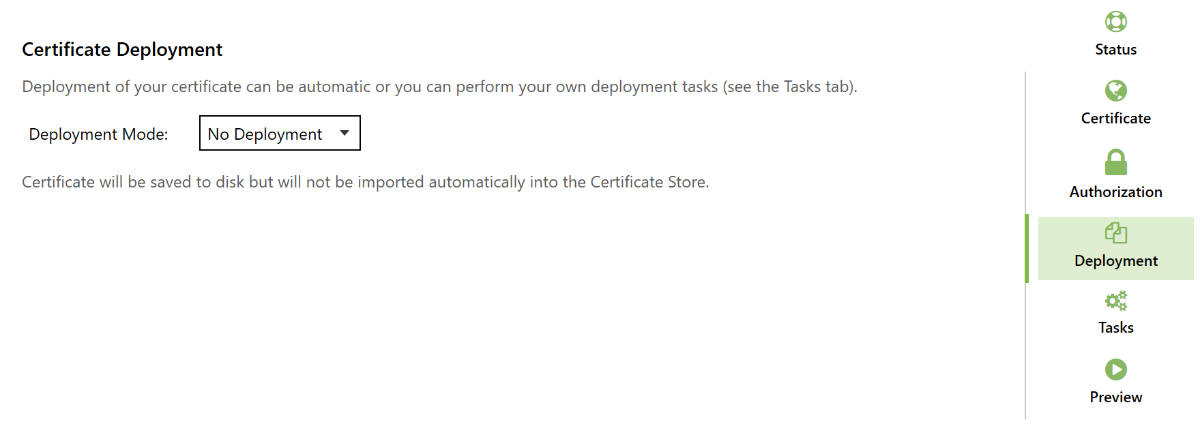
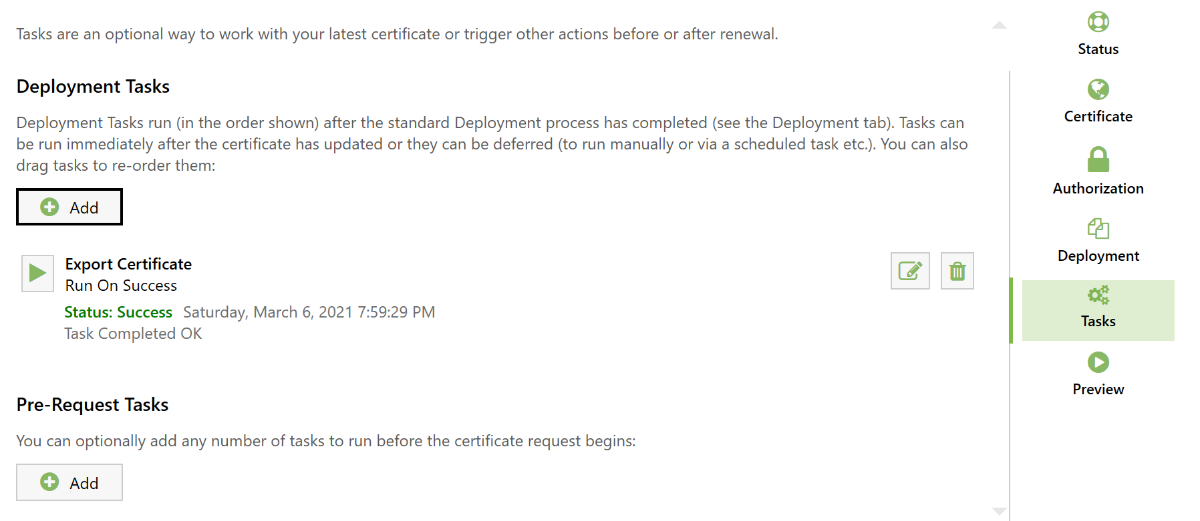
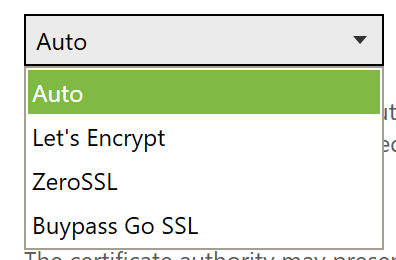
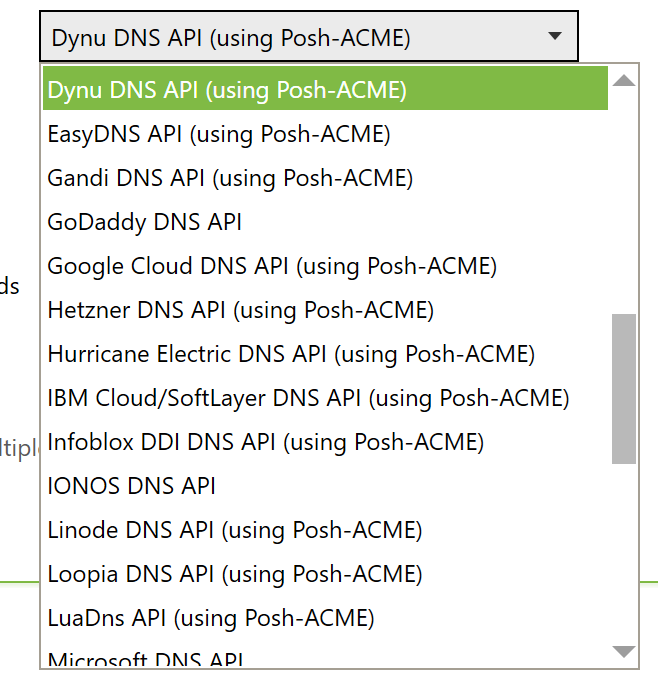
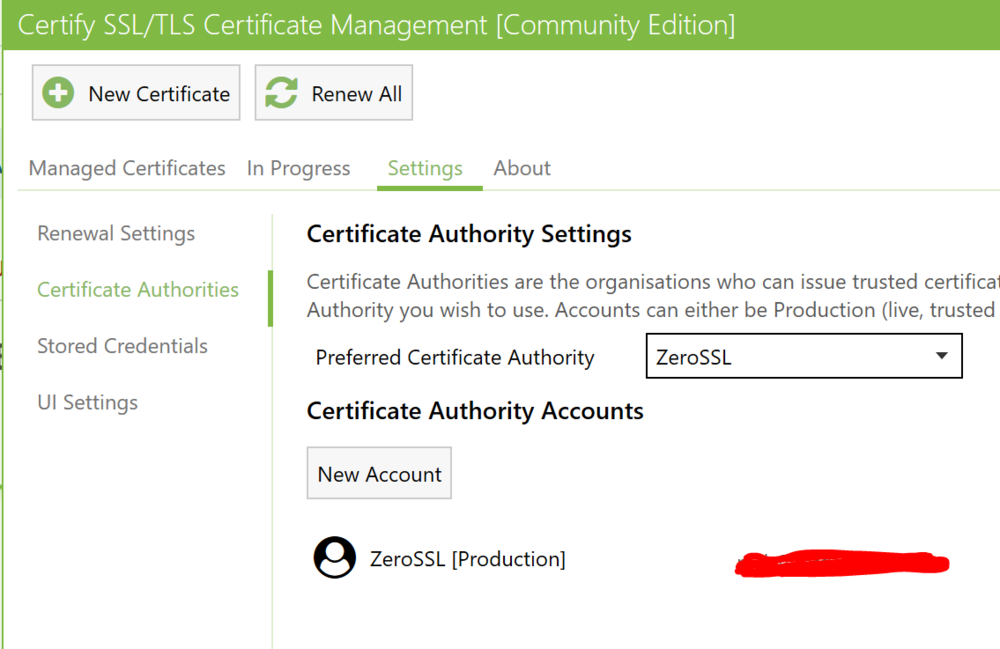
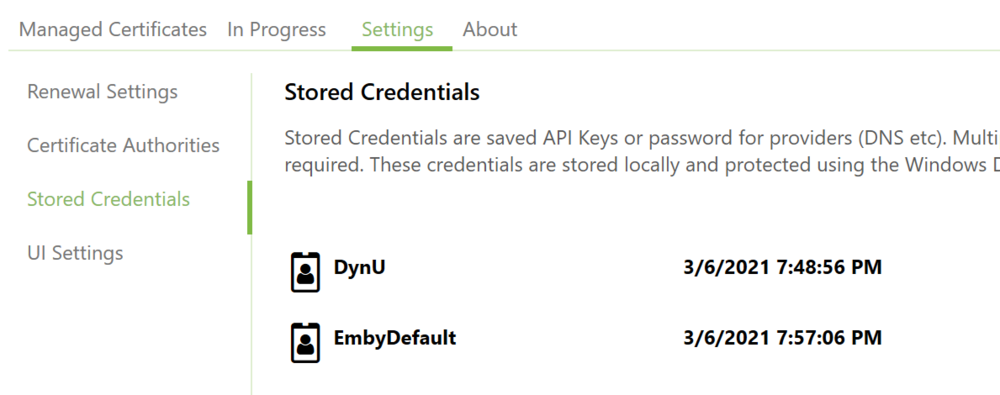
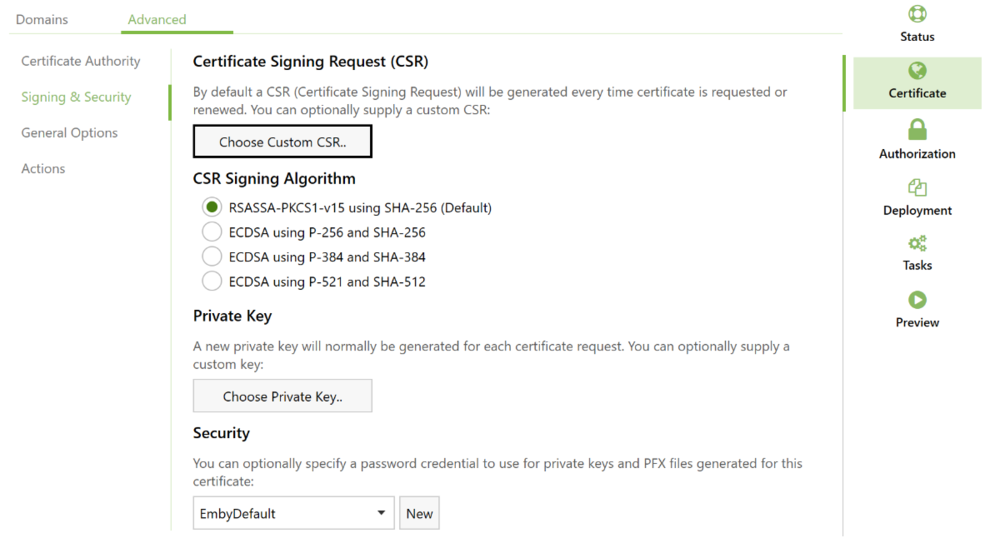
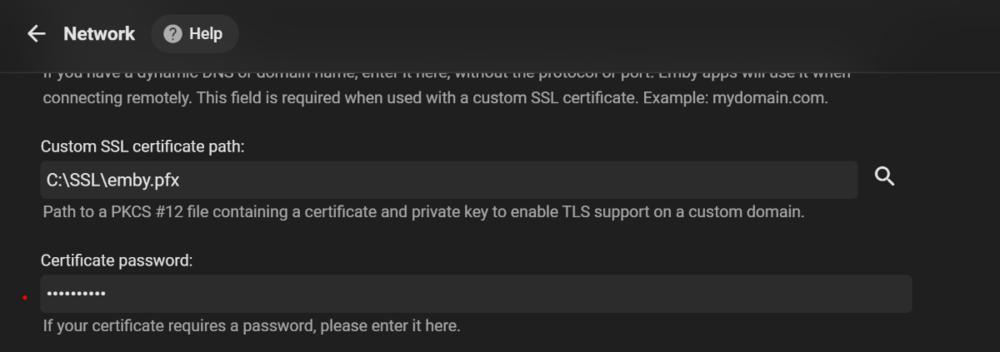
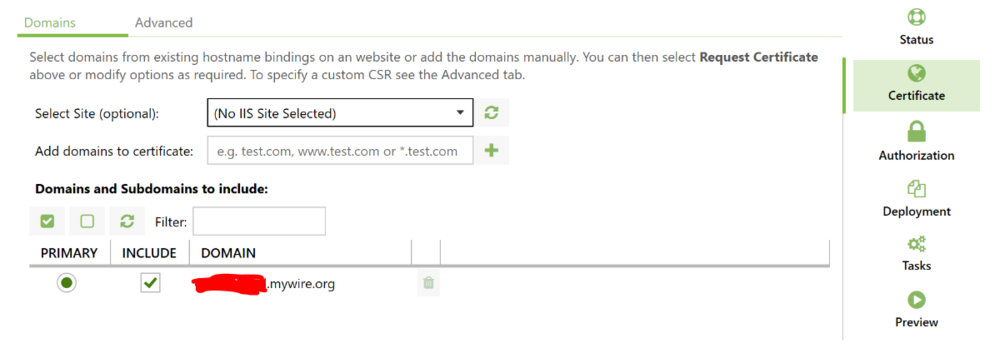
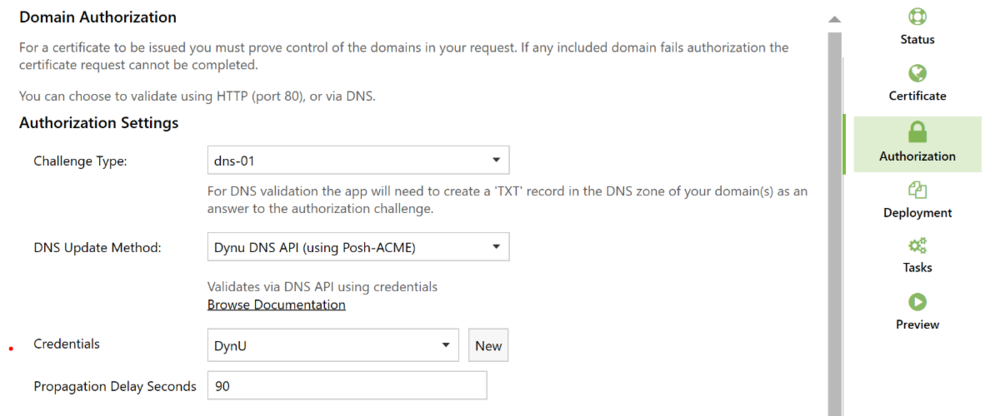
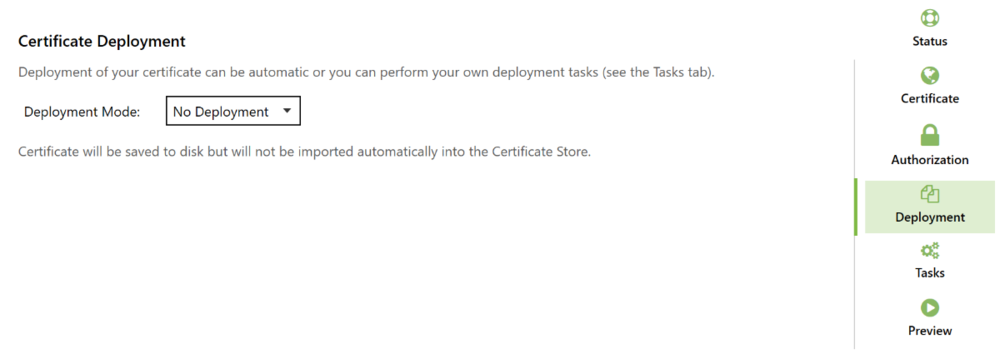
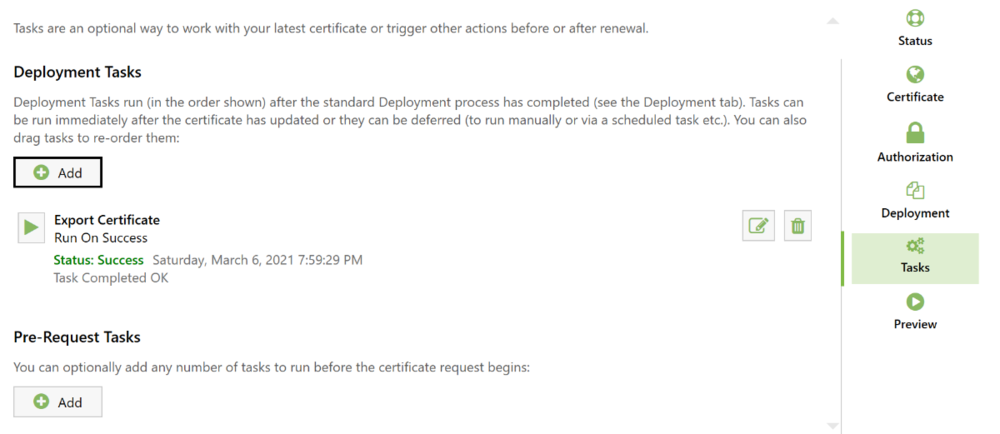
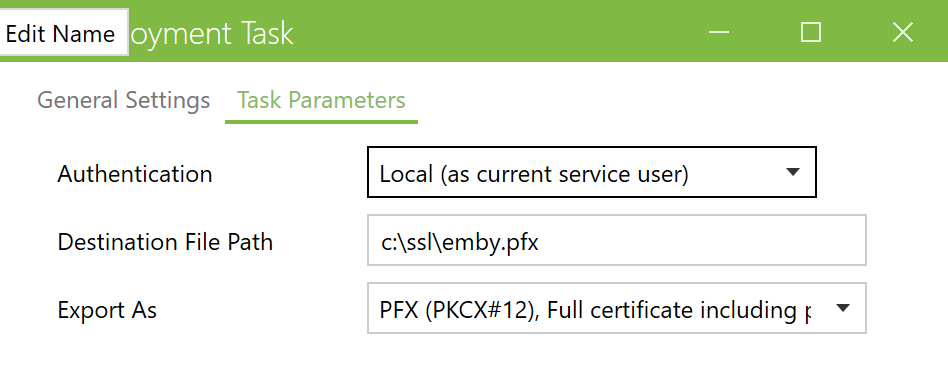
Couldnt find guidance for configuring auto SSL renewal without a webservice/reverse proxy, so this experience may help,. its not step by step but does show whats possible, to prevent early throw in of towel. The certifytheweb client seems very robust and flexible and supports export in Embys PKCS#12 format with a few authorities and a multitude of dynamics dns providors (for validating certificate requests on domains). I used Dynu DDNS and ZeroSSL. and this guide for getting started The linked guide and other posts left me thinking that free certificates with 90 day expiry are a ball ache to manage without a webservice; the certifytheweb client (CTW) makes certificate autorenewal and export in an Emby compatible format much more appetising even without a webservice.. General Considerations Dynu and ZeroSSL provide api keys in their respective UI which need to be added to CTW. add your dynamics dns domain here Specify Password for pfx here and here add you ddns credentials for domain validation here no deployment necessary export tasks can export in Emby's preferred PKCS#12 format and use the password from above note the above is more about getting it to work than any "recommendation on best certificate / security practice" - i cant speak to that.
 1 point
 -
Moved topic. But with your router providing DHCP to your devices this should not be a issue. Only issues may be Emby Premiere if you do not have internet access.1 point
-
Beside the Websocket issue, there could be also a subtitle issue. I'll also check that too. You can switch to stable repo (5.1.17) if it worked yesterday.1 point
-
The reason I preferred native mode over addon mode in the past is that it worked even when the Emby4Kodi addon was having problems or hanging in a sync loop. I could still play my media files. If I remember correctly, I could even disable the addon after a full sync and work with the existing links in the database. I have now moved to addon mode, but run into the issue that while the addon is busy doing something on startup, I can't play my files. Will test with the latest build next week.1 point
-
Sorry, maybe I forgot. There is no "correct" mode. Addon mode works in any case, native only if you have direct file access. kodi db files are always used. The "sync" syncs the kodi db(s) with emby server. The difference is, in native mode kodi db(s) are loaded with (direct) filepathes (that's why file access is necessary). Addon mode loads "virtual http" pathes (piped through socketserver) and redirects it to Emby server. Native mode has only one benefit. If an external plugin is related to native file pathes (which are very very few), addon mode will not work for them. On the other hand, if you use native filepathes, several features (multivideo, transcoding and several more) are not supported. Addon-mode manipulates/injects some modifications when queries those "virtual http" pathes. The manipulations are required, due a lag of Kodi native support for those features.1 point
-
You are using a very new python 3.9 version. I think that's the core of the issue. I'll perform some tests with python 3.9, probably a command, websocket used, is deprecated.1 point
-
That's interesting, the websocket has a problem. I will investigate.1 point
-
https://pastebin.com/m8G65VNG1 point
-
Please upload full log. This seems like an invalid websocket request.1 point
-
Thanks, this was also reported by another user. I'll fix it in the next version.1 point
-
I get the following error when trying to refresh an item in Kodi: 2021-03-07 20:00:46.195 T:309551 INFO <general>: EMBY.dialogs.context.ContextMenu -> options: ['Add to favorites', 'Refresh this item', 'Delete from Emby', 'Settings'] 2021-03-07 20:00:47.186 T:309551 INFO <general>: EMBY.dialogs.context.ContextMenu -> option selected: Refresh this item 2021-03-07 20:00:47.232 T:309551 ERROR <general>: EXCEPTION Thrown (PythonToCppException) : -->Python callback/script returned the following error<-- - NOTE: IGNORING THIS CAN LEAD TO MEMORY LEAKS! Error Type: <class 'TypeError'> Error Contents: 'bool' object is not subscriptable Traceback (most recent call last): File "/home/zjeffer/.kodi/addons/plugin.video.emby-next-gen/context.py", line 140, in <module> Context() File "/home/zjeffer/.kodi/addons/plugin.video.emby-next-gen/context.py", line 69, in __init__ self.action_menu() File "/home/zjeffer/.kodi/addons/plugin.video.emby-next-gen/context.py", line 114, in action_menu self.server['api'].refresh_item(self.item['Id']) TypeError: 'bool' object is not subscriptable -->End of Python script error report<-- 2021-03-07 20:00:47.262 T:309551 INFO <general>: Python interpreter stopped1 point
-
Sorry for my stupidity, but thank you for the awesome work.1 point
-
Thanks for the feedback.1 point
-
Works just fine with Key:Codec and Value:srt.1 point
-
Look like a collateral damage in the last version. Shouldn't be hard to fix.1 point
-
I have reviewed this matter, but not fixed yet. I'll focus in the next version(s) on this.1 point
-
@kaledi Is your situation caused by growing size of library? I used to experience this every 3rd months or so, until I discovered Stablebit DrivePool. Since then, not an issue anymore.1 point
-
I just tested this on my side, first making a copy of a specific movie folder, and pasting it out of monitored folder. So in Kodi, on said movie, Emby Options/Delete from Emby = It instantly disappear from win file explorer. (perfect) 50-60 seconds later, it disappear from Emby (normal delay) But 15 minutes+ hours later, its still listed in Kodi. As OP suggested, unless we force a manual Kodi refresh, its not updating as expected. (not so great)1 point
-
Hi, yes this idea has come up before and it's possible for the future. Thanks.1 point
-
Unless you have opened up your network to the internet (ie opened ports) then your biggest threat is actually from the inside out - and by this I mean ransomware. The only real protection against this is OFFLINE periodic tested backups. Yes there are products out there which detect ransomware - but in all honesty, if you did get 'caught' would you really want to trust any part of your system ever again ? My view is no - I would wipe the lot and restore from a known good backup. Good advice on replacing the ISP router - but then you get into the world of proper firewalls (all traffic in and out), threat management (IPS/IDS), VLAN network segmentation etc - the list goes on - but it goes back to the main point, if you have no 'holes' in your firewall/NAT in the first place - then there is little point doing this as the risk is extremely low to begin with. To answer your question - 1) Ensure you have good backup's, they are tested(restored) and work, ensure they are offline. 2) I would do an scan of your network via the likes of a free port scanner (grc.com etc) and see what it can find. If it finds nothing, then your perimeter defence is in good shape. 3) Chill knowing you have done more than 99% of the users on the internet ...1 point
-
That would be great. I would welcome it.1 point
-
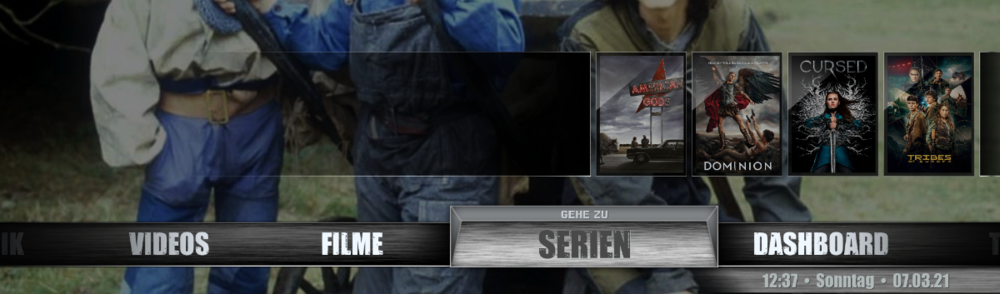
Many thanks for the great addon and the further development of the integration in Kodi. It really runs very well. What bothers me a bit, however, is the skin rebuild that your addon initiates... I mean, you said that you had solved some problem with it. It's not a big deal, but I can't keep the set focus (on FILMS) this way. For example, I want the main menu to be set to "FILMS" at the beginning. Kodi is also there. But then EmbyNextGen starts and immediately jumps to the menu item "SERIES". It practically jumps once to the right. (In reality, WHEREVER I AM, it always jumps to "SERIES". This is just a hint or constructive criticism. It would therefore be nice if you could somehow avoid this "skin rebuild". Then something about your predecessor @Angelblue05: I would like to thank you here as well, because without her/him this addon would probably not exist, right? Besides, it's kind of strange that he/she has disappeared so secretly... Well... Kind regards Tommy
 1 point
 -
Worked it out. was disabled for some reason Had to enable it1 point
-
The Users endpoint is correct, but the UserId is not. It has to be the GUID without hyphens, not the Long InternalId. If you edit a user profile you can see the id in the browser's adress bar.1 point
-
Die ganze Codierung findet auf der Synology statt. Die Apps auf den Geräten wo man schaut, ist nur zum abspielen da.1 point
-
I've tried via USB on an LG C8 and it plays single and double layer Dolby Vison MKV's as HDR10 only. Given DoVi via MKV is only recently possible, it's not surprising. Maybe worth trying .MP4 ?1 point
-
Sorry but I am confused as [boxset] is not a item path library. So I have to ask what is this library path we are looking at? These are Folders not collection, How did you get to the image? As it should only exist in Movies-Folders tab. To me there is a Library content type issue here for the images provided.1 point
-
Hi. I'm not sure I follow exactly what you are asking. But does the below help? Emby Premiere1 point
-
It would make sense if the conversion preserved all audio and subtitle streams, so that the same choice is available after converting. Or at least an option to do that. Paul1 point
-
And its not going to get better with time, as we see more and more reboots, and identically named, though unrelated movie and tv show titles (all the good titles are already taken). I have somewhere in my movies library 5 different movies with exact same name, fortunately with different (yyyy) I even have a couple with identical name and yyyy, that kept being displayed as dupe; Movie name convention article has provision even for those corner case (adding provider id# in folder name)1 point
-
Does it ? I would expect this to be true if you're deleting from a Kodi installed on the same computer as Emby server. Not sure it holds true if Kodi is on computer 1 and Emby on computer 2 If I'm not mistaken the later acts as a SHIFT-DELETE (no recycle bin) EDIT: Then again, you might be right, as Kodi on the remote side does not delete file thru share, instead it request Emby to do it, straight from file host.1 point
-
that would be awesome...i don't know if many people delete items from Kodi/Emby using this procedure, but it works well for me...i also like the fact the item's folder gets sent to the Recycle Bin, so a deleted item can be restored if need be...thanks for your explanation and help1 point
-
As far as I recall, current implementation just sends the delete command to emby server. Kodi is not aware of the removal till server pushes a notification back to Kodi. Not sure how log it takes, and also depends on Emby server performance etc. Maybe I can improve it like: Send delete command to Emby server and immediately remove if from Kodi DB.1 point
-
My preferred method for handling podcasts is to add the episodes that I'm interested in to a playlist and at the same time download those episodes to my phone. The playlist removes the clutter of the other episodes that I'm not interested in and downloading them allows me listen to those episodes while offline. The problem I've found is that none of the downloaded podcast episodes show up when navigating the Downloads section in the Emby app. So there's no way to start playing these downloaded episodes if already offline. If I start playing that playlist while still connected to the server, I can then disconnect and everything still works fine. The currently playing episode will continue to play. The other episodes still appear in the queue and I can skip around them just fine. I have to assume that the whole episode is downloaded and not just the streaming link for that episode, since well, they work fine without any sort of data connection. I tried to poke around the Android file system a bit (hoping I could just play them from there, whether in Emby or another app), but couldn't figure out where these downloaded podcasts are stored. That means, though, that the only barrier to being able to play these episodes while already offline is that they simply aren't listed anywhere in the app. I'm just speculating of course, but if the episodes are already stored on my phone somewhere, I can't imagine it would be too large an effort to list them under Downloads. I understand the focus on personal media, it just seems to me like most of the pieces are already there. Perhaps I'm over simplifying the effort, but listing them somewhere seems to be the only piece of the puzzle that's missing. I guess the alternative is if someone can tell where they're stored in the file system. I did also look around at other podcast apps before deciding to give Emby a try. Most had something that turned me off, so I decided to try Emby. Other than this issue, I think it's serving my need pretty well. This also isn't a deal breaker since it's not terribly often that I'm without a data connection. Would just be nice to have an option when I am.1 point
-
@softworkz, I will send you a (verbose) log from a channel that only showed a spinning circle on Emby and at the same time played just fine on VLC (both on my PC). I don't see anything special in that log but maybe you could have a look in a spare minute (or two).1 point
-
It would be great if we could have HEVC hardware transcoding. Most modern GPUs have a HEVC encoder. It would be especially great for AMD gpus since their h264 hardware encoder is low quality but their HEVC is fine.1 point
-
A plugin that would enable to watch streams of crunchyroll on emby client.1 point
-
Great question, i know nothing about API integration but here is their API info - https://www.commonsensemedia.org/developers/api Does that help at all?1 point
-
Yes obviously I can, but sometimes your WiFi disconnects (for whatever reasons) and you continue to stream over LTE and that's where the option to stream only on WiFi would be appreciated.1 point
-
playback, Emby for android TV with Shield with a poor connexion could use it. If you put an option on Client side "Use H265" Server side "Allow users to use H265" like that you don't care if devices are compatible or not, User have the choice.1 point