Leaderboard




Popular Content
Showing content with the highest reputation on 02/24/21 in all areas
-
I think it'd be nice if there was an option to bookmark parts of videos so I could quickly jump to my favourite parts.4 points
-
Initial tests look really good. I'm getting about 300 fps transcoding to 1080p 40 Mb. After about 4 minutes, I had already transcoded a 30 minute buffer! Still testing out the settings, but it seems I can even get past the errors in my files with HW transcoding only. I'll keep testing though as what I saw so far might have been a fluke. Colors look good too. On par with actual 1080p versions. Looks just about ready for stable!3 points
-
As soon as it's ready2 points
-
Just so you guys are aware, this has been reported to our guide provider.2 points
-
I just wanted to say thanks to the EMBY team on their timely response to my issues. This had made transferring from those who shall not be named, easy. Making such a wonderful experience for any user (noob/old hat). Seriously, thank you for all your hard work. All of you make this platform the best!2 points
-
Makes sense. Are there any plans to publish the MD5/SHA256 checksums on the download page for the file so that it is easily compared and verfied in situations such as these?2 points
-
I would love the option to store Emby's database in MySQL - I have a setup that serves around 30 people and I feel that there would be real performance gains by using a proper relational backend over SQLite (I'm presuming). On top of this it would make life easier for me when reporting on watched status a cross users.1 point
-
Hola a todos, les traigo un aporte y espero sea permitido por la comunidad Emby. Se trata de cambiar el favicon.ico, pero principalmente de cambiar el título "Emby", esto debido a que hay muchos usuarios reportando o preguntando como se hace esto, y la verdad hay varias soluciones en la comunidad, pero practicamente a todas les falta siempre algún detalle. Por este motivo les traigo la solución definitiva y la que estoy utilizando actualmente. Lo más sencillo primero, Cambiar favicon.ico Lógicamente lo primero es tener nuestro nuevo ícono a mano. (extensión .ico) Bien copiamos nuestro nuevo favicon.ico, y nos vamos al directorio /system/dashboard-ui/ allí damos clic derecho Pegar nos pedirá confirmación para reescribir, damos Sí. Cambiar el título "Emby" por el nombre de nuestro servicio o servidor ejemplo "Server-multimedia" Lo primero que tienes que tener en cuenta es que necesitas editar 3 archivos y dentro de cada uno de ellos, debes buscar la palabra Emby varias veces, yo te indido... Nota: Realizar una salva de cada archivo que edites por si te equivocas, volver al original. 1er archivo a editar: /system/dashboard-ui/index.html dentro de este archivo index.html debemos buscar la línea: <meta name="application-name" content="Emby"> y reemplazarla por: (Server-Multimedia es el nombre que quieres poner) <meta name="application-name" content="Server-Multimedia"> Buscamos la línea: <meta property="og:title" content="Emby"> y la reemplazamos por: <meta property="og:title" content="Server-Multimedia"> Buscamos la línea: <meta property="og:site_name" content="Emby"> y la reemplazamos por: <meta property="og:site_name" content="Server-Multimedia"> Por último buscamos la línea: <title>Emby</title> y la reemplazamos por: <title>Server-Multimedia</title> Guardamos los cambios. 2do archivo a editar: /system/dashboard-ui/manifest.json Buscamos la línea: "name": "Emby", y la reemplazamos por: "name": "Server-Multimedia", Buscamos la línea: "short_name": "Emby", y la reemplazamos por: "short_name": "Server-Multimedia", Guardamos los cambios. 3er archivo a editar: /system/dashboard-ui/modules/appheader.js Buscamos el parámetro: document.title="Emby"}, y lo reemplazamos por: document.title="Server-Multimedia"}, Hay que tener cuidado con este archivo appheader.js debido a que no es por líneas sino que parece todo un párrafo, por eso debemos buscar bien el texto citado. Guardamos los cambios. En la mayoría de los casos debes, limpiar los datos del sitio en el navegador que usas, y reiniciar el servidor Emby. Al actualizar de versión, debemos realizar nuevamente los pasos, y es posible que cambien las ubicaciones o nombres de los archivos editados. (ya ha sucedido) Saludos y espero les resulte útil. Probado en Emby server 4.4.3.1 point
-
There is an update for DSM 6.2.4-25554 After running this update I noticed that RTM was no longer working. Checking inotify showed that inotify/max_user_watches has been reset to 8192, hence RTM not working. I have had to run the echo 's2s_watches_max=262144' >> /etc/synoinfo.conf echo 's2s_watches_max=262144' >> /etc.defaults/synoinfo.conf commands again, manually, then reboot the NAS to successfully restore RTM1 point
-
That's strange. I updated to DSM 6.2.4-25554 yesterday on my DS918+. RTM is working as it did prior to the update without any action being required by me. Having said that, there was some wonkiness with the GUI on first startup after the DSM update. Emby and Home Assistant Docker icons were no longer pinned to the desktop like they were pre-update, Emby and Docker weren't displayed in the Main Menu, and the status of running programs in the Package Center was not reported correctly. I was able to open Emby using the URL in Package Center, so I know it was running. In frustration I rebooted the server. After doing so, everything was back to normal. I didn't add any media to my server before rebooting it. Maybe if I had I would have seen the same issue with RTM.1 point
-
No, the GPU doesn't do this. It doesn't actually do anything on its own. ffmpeg does all that. It manages data flow from system to GPU memory, tells the GPU what to do on a frame-by-frame basis. Finally, ffmpeg retrieves the encoded video frames back into system memory and multiplexes the hw-encoded video stream together with audio and subtitle streams, cuts it into segments and writes those segments to disk. Then, the client requests those segments via http, and Emby Server transmits them to the client. Well - if all content is on a single HD and more than like 6 users are watching videos with high bandwidths simultaneously, then (and only then) it might be a bottleneck when it has a really low performance. But consider the following: All you need (per user) is to load the data from HD in Playback Speed. That means for example: When you have a 90 minute movie of 30 GB, then it would be sufficient when the HD would take 90 min to copy that movie. Now let's assume those 6 simultaneous users Makes 6 * 30 = 180 GB => When your HD is able to copy(read!) 180 GB within 90 min, then it's sufficient for those 6 simultaneous users (a HD that can't do this would be so old that you'd have to wonder that it's still running ) The bottlenecks are where I said above. Usually not at the storage side.1 point
-
@softworkzjust described the setup that I use with 3 SSD drives.1 point
-
It seems to be working well, thank you!1 point
-
That's difficult to answer without having a clearly defined usage profile. But for getting the maximum performance I would do the following (in that order): Add a dedicated SSD for the transcoding-temp folder (and nothing else) => This is where most of the IO happens Add a dedicated SSD for the Emby Cache folder (and nothing else) => is for images and other metadata Add a dedicated SSD to which Emby is installed (instead of installing it onto the OS HD) => The Emby Database and logs are stored here For the library content itself, I would never use SSDs. When you have a huge library you'll have many HDs and the IO will naturally distribute between these (simultaneous users would unlikely all watch something that is on the same HD)1 point
-
It's very doable. It's just a question of what we think the demand for this is compared to other features. Given enough demand there's no reason we can't do this.1 point
-
It's buffered as HLS segments in the transcoding-temp folder.1 point
-
Yes, I use MariaDB and OpenJDK. Boo Oracle. Boo.1 point
-
Emby uses SQLlite, which is open source, whereas Microsoft SQL Server is very much not. Both implement the SQL specification.1 point
-
Looking at the logs - your clients are on a 192.168.0.0/24 network - meaning the IP you have added is likely not even on the same network .. I would remove it, restart emby and - it should then show a 192.168.0.x address.1 point
-
Yep, agreed! After about 15 minutes I could have close to a full 2 hour movie in buffer! It's amazing how well this works. I've got it set to HW transcoding only and even my error prone files don't skip a beat. Incredible!1 point
-
Version 1.0.28 was the last version I recall which had chapter skipping. After that the >| and |< buttons on both the remote and the OSD were remapped to skip to next/previous video. But nothing was ever added back in to replace those other functions Heck you could just make up two new icons and add them to the OSD which do chapter back and forward and then add the code back in that was there before before. This would be a nice start until something better can be done. It's a lot better than clicking 30 seconds forward a thousand times1 point
-
@PuffyToesToo Thanks, you absolute legend1 point
-
I've come up with a workaround: I use a program called SmartPower that provides a GUI for configuring sleep and wake times The SmartPower GUI allows you to name services that can be stopped right before going to sleep, and then started again upon wake; since I installed Emby as a service (using the NSSM freeware program), I found that stopping & starting the service is equivalent to a reboot, and that this fixes the sleep issue with the delayed recording timers1 point
-
That sounds exactly the capability. Will wait for an update it is not urgent from my side. Thanks again.1 point
-
Is the bif the reason this is being so delayed ? If yes, then as you say just release it without ! It's frankly embarrassing that a 'media player' doesn't have chapter ff/rw in 2021 - mind you, the web player doesn't either but at least it has the ability to quickly scroll. The TV clients (well LG & Samsung..) have not had updates for what seems like years - so 'anything' at the moment would be most welcome .. edit - lol, infact the DLNA functionality on the Samsung TV surpasses the native client - on that you have 3 speed ff/rwd, subtitle size etc. So your choice is eye candy from emby or functionality of DLNA - seems you can't have both ...1 point
-
server and theater on desktop windows are both designed as portable programs, that just ran from what ever folder they are extracted in, if not using the installer here u get the archives for desktop theater: https://github.com/MediaBrowser/emby-theater-windows/releases1 point
-
@Abobader1 point
-
Hi, I'm interested in being able to run multiple instances of Emby in my k8s cluster. This doesn't seem to be possible because the sqlite database becomes locked when one instance is running. Without offense, this seems like a generally outdated data storage method, and is inherently unfriendly to modern scalable architectures (even when those are scaling on small home pcs). Is there any plan to allow a better database such as SQL or Postgres in the future? I'm aware that the codebase is not open source any more, or not completely? Is a fork of this utilizing a remote database possible? As kubernetes grows in popularity for simple HA, I think this is definitely going to be of interest for many people and would love to help support it. Thanks.1 point
-
And there isn't for me: I like to have it to un-screw-up posts when the editor gets in a mess (which it can, you know!). Paul
 1 point
 -
awesome information - thanks!1 point
-
I see it in the configuration menu but it doesn’t do anything. Never mind, guess it just fixed itself. Was sort of corrupted maybe. edit: for future reference: reinstalling emby next gen fixed the problem.1 point
-
Post there, bump it up, it might get some visibility - and subsequently traction.1 point
-
If it's that hard why not give us at least the chapter skip part back until the timeline slider which uses the bifs/thumbs can be implemented? The code is already written We already had chapter skip in this app about 3 years ago until it was taken away and replaced with a skip to next video option (not that I use that very often when watching movies). Just assign chapter skip to which ever key you plan on using for the rest (I assume the up arrow like ATV and the other apps use since both down and up arrow do the same thing) temporarily until you get the bif thing working1 point
-
Thank you! Amazing tool he created there.1 point
-
For batch-tagging, you might wanna try @chef's work-in-progress. Cheers1 point
-
Hi, thanks for the kind words and feedback !1 point
-
@mbarylski This is what it does depending on your settings. You need to choose the option to use both hardware and software tone mapping.1 point
-
Thank you so much! @cayars1 point
-
Just bumping this up for visibility. Thanks for considering.1 point
-
Hi @quickmic, I wanted to say that I have a similar issue as the one described by @wanderjarra, however in my case, the shows are empty on Kodi side. I tried with both native mode and add-on mode, the results are the same. The folder setup is similar to wanderjarra's, but both "library" folders are on the same drive. I also noticed that I'm having the issue for one show that is split in 2 folders located next to each other, in the same "library" folder. Hopefully, this could help you to reproduce the issue a bit more easily for your test case.1 point
-
I've got all this working well now. For anyone from the future. Automatic port mapping was not working running Emby 4.5 on a QNAP TS-128. Setting up port forwarding did the trick.1 point
-
Ok, thanks, good to know! That's definately an enhancement that would be nice, at least for those of us with limited upstream bandwidth!1 point
-
Anybody who is using AMD on Windows already knows that video processing (scaling, deinterlacing, color conversion w/o TM) doesn't work in hardware on Windows. That's nothing new.1 point
-
LOL, yes this is one of the standout differences between the two platforms. In this short thread you had and Admin, a Moderator, a Support person and a Dev trying to assist you.1 point
-
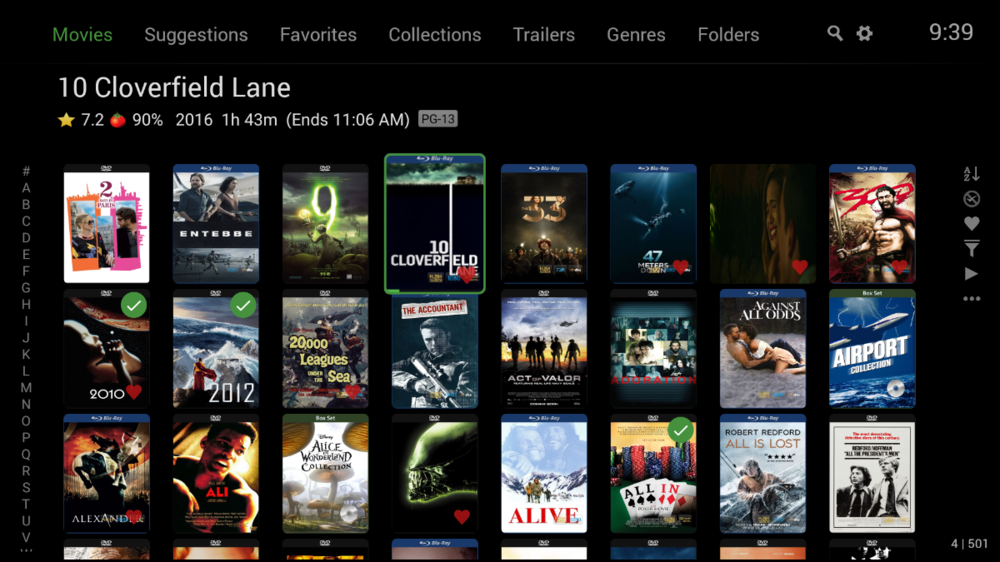
Hi. There is currently no way to do that. Most modern UIs are going the opposite direction and presenting screens where it is much easier to take in the information at a glance. The Shield app, however, does have an Image Size option in each grid screen that you could set to "Small" which will give you more posters and then de-select the option to show the titles underneath:
 1 point
 -
I added this to my web-app loading screen. The loading screen happens pretty fast so, it isn't always great. But I thought I'd share it anyway. In the index.html you'd have to edit the '.app-splash' class style options to use this emby gif. I used this... .app-splash { background-image: url(embyLogo.gif); background-position: center; background-repeat: no-repeat; background-size: contain; position: fixed; width:100vw; height:100vh; left:0; background-color:rgb(152, 160, 172); } Also, save the above .gif file into your "Emby-Server\system\dashboard-ui" folder. It looks okay... feel free to add to the css to fix it up, or comment on how it could be better.1 point
-
A dropdown or check box, whatever, to view the dashboard "Active Devices" in a condensed manor would be great... Like maybe just a user icon media icon, and a few other icons in a row to show info about their stream, ill make an example below... You can see in my second image that its hard to keep up with a busy server, you only get 6 or so tiles on the main screen. Don't mind the "Corona" users lol, I may or may not be sharing my collection with people so they can save money on tv/netflix temporarily. So after you select "summary view" or whatever, maybe you see a display like this:1 point
-
This will be in Emby Server 4.3. You'll be able to set a total number of allowed simultaneous streams as well as per-user.1 point
-
Obteve sucesso? pode me ajudar amigo pois os desenvolvedores não dão atenção a esse "BUG" que me tras muita dor de cabeça trocando senhas e desabilitando usuarios, causando transtornos a mim e aos meus clientes. já estou me cansando se esses desenvolvedores do emby continuarem assim e não conseguir pelo menos sanar esse problema vou migrar para o PLEX.1 point
-
I'm taking it as ignored. This thread is 5 years old with no attempt being made to add this basic feature, one that users who migrate from Plex expect1 point