Leaderboard




Popular Content
Showing content with the highest reputation on 02/08/21 in all areas
-
This extra NAT is known as cgNAT (carrier grade...). The only things to do are to ask your ISP nicely to turn it off for you, so you get a known fixed address (they may charge), or to use a VPN that allows port-mapping so that the ISP assigned IP address becomes irrelevant. Paul2 points
-
... as I was tired of manually grouping all my movie versions into groups after each recreation of the db, I created a plugin to help with that. The use case is having movies, that belong together spread around and not being able to easily match the emby naming conventions, but still having the desire to present them as one item with multiple versions. The plugin works similar to the auto boxsets, but does the "movie versions grouping" - it will group all movies based on their TMDB id into one item, regardless of where they're placed and how they're named. I made that for myself - however, if anybody is interested, attached is a plugin that solves this issue. Attached version is for current 3.6.0.49 beta Server, do NOT use it with stable release! Plugin is alpha state, you should only use it, if you are willing to backup your db (there is no way to revert the changes otherwise!) and manually put the dll in the server plugin directory. Do not use it in your production environment before having tested in a test environment that you're fine with what it does - seriously! ;-). Note: There is a known bug in the web GUI presentation which is described here, which needs to be fixed on emby side. Edit: the mentioned display bug in BoxSets is fixed in Emby now, thanks Luke. AutoCollections-for3-6-0-49-betaServer.zip AutoCollections-for3-6-0-75-betaServer.zip AutoCollections-for-4.1.0.15-betaServer.zip AutoCollections-for-4.2.0.17-betaServer.zip (4.6.0.10 and before) 4.6.4.0 and above (does not require beta server as version number has been surpassed) AutoCollections-for-4.6.0.22-betaServer.zip Note: Original version will cause issue with other new plugins like Top Picks. Updates by community members: v.1.0.0.4 New update thanks to @Cheesegeezer Looks like we've managed to update the plugin, to be current Emby Server 4.7.7 (minimum). Some Changes to be aware of Automatic Library scan and updates are disabled, too many things are triggering library scans at the moment and entering into an endless loop which will crash the server. Moved to a Scheduled task now. Fully Locked item Metadata can be ignored in the Plugin Settings for grouping. (Partial field may have worked before but you need to Lock the item itself now) ".strm" files are ignored from any processing New plugin Graphics with a big nod to MikePlanet This is always Mikes plugin and the work he has done is fantastic. - We only did essential maintenance to keep this alive for you peeps. AutoCollections_1.0.0.4.zip v1.0.0.5 Removed Top Pick Items from the available item list re introduced the auto scanning... this will take place 1 min after an item event is detected re introduced auto run after a library scan tested against top pick plugin and there is no endless looping... but please test fixed the locked items bug. Good luck and let me know how the testing goes. AutoCollections.v1.0.0.5.zip v.1.0.0.9 New update thanks to @Hoptional Added option whether to Merge items across different libraries Compatible with nested folder structures, the "Top Picks", and the "New Releases" plugin Improved logging AutoCollections_1.0.0.9-libraryoption.dll1 point
-
** UPDATE ** There are two seperate plugins on this page - you will need to read the thread to see which one (or both) is best for you. The original plugin (Actor Web Scraper) works at the server dashboard, it cannot be used or accessed by clients. This is my first proper working attempt at this. Its a bit clumsy but works. I may revisit this one and update it, but for now it is what it is. The newer plugin (Custom Person Provider) is internal and works when you click an Actor card, it is also triggered by clients. (but configured from the dashboard which they cannot access). This plugin can quickly be turned on/off in the config page. ----------------------------------------------------- This is the first working beta release - special thanks to @roaku for their help getting the javascript on the webui working It only scrapes one actor at a time, im not going to do one that hits these websites continuously for the whole lot in one go so don't ask. Please feel free to try it, test it whatever. Built with net standard 2.0, so should be compatible with most emby releases. I have added linux support but have no way to test it - so let me know if it works Feel free to suggest anything it lack or improvements that could be made. Enjoy There is another plugin lower down in this thread, "custompersonprovider" which uses the internal Actor image system, its in Alpa stage, and it works seperately from this one. Please read the blub if you are going to try it. As always the blurb: I accept no liability for anything - use at your own risk Custom Poster Provider ** Updated 5 feb 2021 *** Added a few more scrapers, but also added the ability to pull images from other Emby servers ** UPDATE 25 JAN 2021 WITH FIXES ** *** NEW 3rd Feb 2021 *** Added Internal Image Search Scraper Plugin. This is seperate to the Actor Web Scraper. This is Called Custom Person Provider because it works when you click the actor image inside Emby. Try not to use all the scrapers as it will actually slow down load times for your clients who click on Actors that DO NOT have an image already. I have added a config page so that scrapers can be turned on /off. Trakt images are webp , they work well but may cause image processing error in the log from emby when it tries to resize it as it acesses it. I am currently not sure if all "client" app support it either, all of my tests do, but thats not all devices. ActorWebScraper.zip ActorWebScraper-server 4.6.0.20.zip CustomPersonProvider.zip
.thumb.png.cb53c1371d991ad20af7d0f079169261.png)
.png.9166297e244c1890d029d1d82ca9a6f6.png)
.thumb.png.6cb9880f042f4e910b35029e52faf997.png)
.thumb.png.c70ea02b6794b681fa810e37688aba41.png)
.thumb.png.319417685fb83dc7af37c76436395b5a.png)
.thumb.png.0cd3bb536bed155dddec60ddea97c840.png)
.png.41015b52e97ef688ee401ad8a5643b7c.png) 1 point
1 point -
So I've been working on updating my server CSS to make my web client feel more like Emby Theater. I'm not done with everything quite yet, and still have some final layout decisions to make. If there's interest I can upload the CSS for it -- and I can leave out the dark theme CSS if desired. Let me know what you guys think! The changes are only showing for browsers with >1450px resolution and reverts back to the regular style in smaller browser windows. Home page Resume Latest Items Next Up Movie Details TV Show Details TV Season Details TV Episode Details1 point
-
The main reason the vaccine came quickly is that it turned out the preexisting mrna delivery mechanism was effective for covid19.1 point
-
I've been running it since you posted it and have had no issues so far. Seems to be working well.1 point
-
Thanks for the feedback. Glad you were able to find it.1 point
-
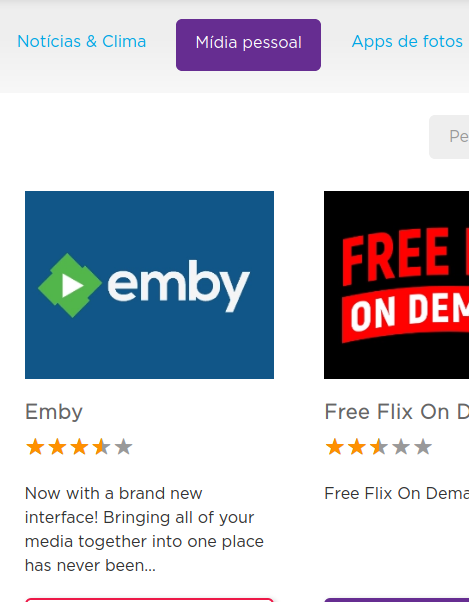
Hello, Guys. Roku support never answered back my questions about emby. But I kept sending them several emails. (I think that worked lol) But today I found this in the Personal Media section on roku website. Also, the emby can be found by typing it in the search bar. Also, I just tested on my tv. It is fully functional. Thank you all for all the support.
 1 point
 -
I'm not 100% with you on the objective here - but if you already have the files stripped of a 'title and/or recap sequence' - then yes you can simply insert a 'special' to play at the start of the SEASON and then just play the others in sequence. You could do per episode yes, but a lot of work and fairly pointless imo as you may as well just use the full recording in the first place ? To note - the 'Special Airs' wording is corrected in the latest Beta - it how reads as it functions1 point
-
You mean the video output pipeline, correct? i can see a lot of potential for trouble with that as well .1 point
-
You could just store users and userdata on the new installation, as you will have to redo libraries. If you have playlists you will have to remap everything in the playlist.xml's. Pretty much any area the you manually assigned a path to also. I would take some time and look through most of the files in a backup. But overall you should not have any real issues.1 point
-
Hi, it's currently not possible, but perhaps in the future with smart views/playlists.1 point
-
In terms of Iconic, I think the user creating a MediaStream Rule for each subtitle language could already accommodate this. The catch is that a different icon from the predefined set would need to be associated with each rule to signify the different languages. I'll think about either adding a specialized Subtitle Rule that could identify subtitles and their language and then add a badge+user config-ed icon+lang abbrv or a more generalized Rule option to add some user defined characters on top of a badge when a Rule matches, but opening this door likely has several cans of worms behind it.1 point
-
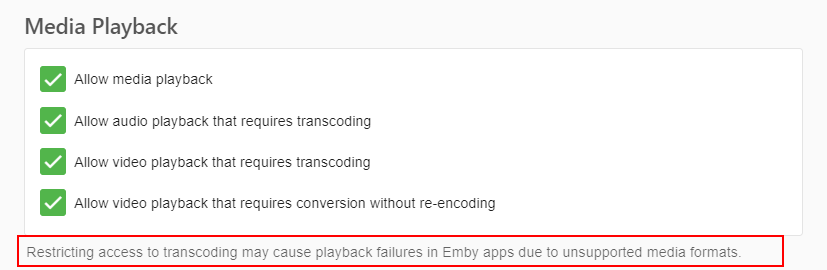
You enabled PGS format subtitles, which the browser does not support.
 1 point
 -
Maybe show the first 5 or so and a "..." to indicate there are more.1 point
-
Seems to be working in the beta....thanks!1 point
-
yes, im sure hes right. I think ive only seen this with chromecast....1 point
-
No. Of course keyword recordings have been requested many years ago1 point
-
Hi, there is no such thing currently, but always possible for the future. I don't expect it would be a quick throw-in though.1 point
-
Hi, yes you're right. These three are missing. We will add them. Thanks.1 point
-
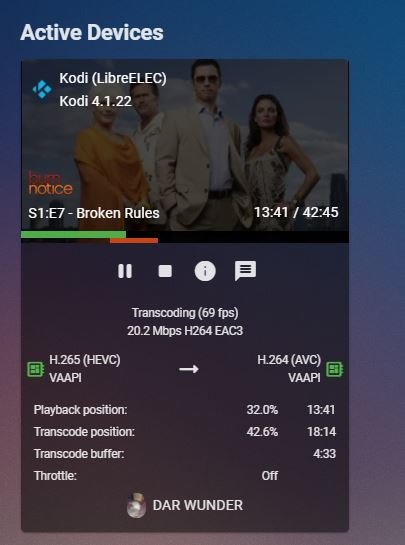
One last post before I disappear for a bit. I turned off the force transcode setting for HEVC content and played the video that had "choppiness" issues with the option enabled. It "Direct Played" flawlessly with video playback quality set at max. There is no ffmpeg_transcode log (I did a directory refresh this time to make sure ), so I'm fairly certain transcoding did not kick in. Thanks for your help. Have a good night! Edited to add: I reverted back to Emby for Kodi 4.x to get a screen capture of what the Emby server GUI shows when transcoding HEVC content.
 1 point
 -
You can make a Special episode out of it (rename it to S00Exx), put it in "Season 0" folder and in metadata editor set it to play before episode 1. Edit: Come to think of it, if you ain't too lazy, you can make as many copies as you like, assign different episode numbers and edit metadata for each to play before each episode in main seasons. Edit2: Another afterthought: @Luke, maybe Special episode metadata could contain a single tick box "Play before each episode", which would then respect Season it was directed into few fields above or apply to all seasons if none set?1 point
-
Have a look at OMBI.1 point
-
I apoligize for my late reply, I ran this command and I am now able to grant "read" and "write" access to the home folder with all its subfolders: setfacl -m user:emby:rxw /home/myusername or to grant "read only" access to specific folders: setfacl -m user:emby:rx /home/myusername/Music setfacl -m user:emby:rx /home/myusername/Videos setfacl -m user:emby:rx /home/myusername/Pictures Since Live TV must be read and written, then it's neccesary to grant "read" and "write" permissions: setfacl -m user:emby:rxw /home/myusername/LiveTV1 point
-
Since this is only in beta it is still in-progress from our standpoint. Thanks.0 points
-
Hi, no it doesn't.0 points


.png.fcf8e6f34a3ba4b4aa03c647343d2353.png)
.png.50b9f3b8d82cc36d56ab656cf7a72625.png)
.png.93b11e0d91c2bde645fcfd5de83e4bfb.png)
.png.07e8150d68ec98c7db334dda8fcf2d5e.png)
.png.a5cf24dcb5c9f922d8ed05c0ad9179be.png)