Leaderboard




Popular Content
Showing content with the highest reputation on 02/03/21 in all areas
-
Yes, this is not a problem at all. Correct, the license count is unique devices per license key. The same 5 devices hitting your main, beta and "util server" is still just 5 licenses not 15.2 points
-
Man, it’s such a shame we can’t get @ebrto even consider adding the ability to pull up the guide during video playback. It’s really all that’s keeping me from coming back from Kodi and the PseudoTV plug-in (which is coming along really nicely itself).and using the native Emby app full time2 points
-
Here is the latest list of versions for Emby software across the server and clients. Emby Server Stable: v4.9.5.0 (2026/05/18) Release Notes Beta: v4.10.0.14 (2026/06/04) Release Notes For other platforms, please refer to the download page. Emby for Android TV Google Devices Stable: v2.1.23 (2025/12/27) Beta: v2.1.46 (2026/04/15) Amazon Devices Stable: v2.1.23 (2025/12/27) Beta: v2.1.46 (2026/04/15) Stable Release Notes Beta Release Notes Universal Android app Stable: v3.5.16 (2026/01/26) Beta: v3.5.36 (2026/05/10) Release Notes Download the latest Beta here. Emby for Kodi See here for the latest information. Emby for Roku Stable: v4.1.63 (2026/05/04) Release Notes Beta: v4.1.64 (2026/05/13) Release Notes Emby for Windows (Windows Store for PC & Xbox One) Stable Release Notes Beta release notes Emby for Linux Beta Release Notes Emby for Samsung Smart TV (Orsay) E-series to H-series TVs only Release Notes Emby Theatre for Samsung Smart TV (Tizen) Release Notes Emby Theatre for LG Smart TV Stable: 1.0.50 (2026/01/19) Emby for iOS Stable: v2.2.53 (2026/05/16) Stable Release Notes Beta: v2.2.52 (2025/04/11) Beta Release Notes Emby for Apple TV Stable: v2.0.3 (2025/12/26) Announcement Beta: v2.0.6 (2026/04/11) Release Notes Emby for tvOS (Apple TV) Stable: 2.1.6 (2022/12/23) Release Notes - TBA Beta: 1.5.1 (10) (2021/03/02) Beta Release Notes Emby For MacOS Stable: 2.1.6 (2022/05/09) Details here. I will keep this post up-to-date as much as possible, but please send me a PM about anything I haven't updated, or is missing. Special thanks to @Borskfor supplying a lot of the updated information. Thanks.1 point
-
I've been dying to know if this has garnered enough interest to be worked on. I found Emby (MediaBrowser 3 at the time) and its bookshelf plugin while I was searching for something that was like Plex for comics. Plex doesn't do this (and probably never will), Kodi doesn't have what I'm looking for either, and ComicRack seems to be dead at the moment. Unfortunately the bookshelf plugin doesn't work the way I had hoped. I was dissappointed to see it only offer a download to the file to which I can open it to the program of my choosing. Even browsing through the books I only had the option of going through folder-like directories and couldn't browse by author like the people section in the other media types. I would love for it to be fully integrated into Emby where I can open and read a comic right on my phone and tablet or even my web browser as I could with my movies and tv shows. Also, I hope to god somone is working on the "Games launching in android" feature you mentioned on your up-for-grabs blog post. That would be awesome!1 point
-
I hit "play all" on a collection and it doesn't show the next film in "Next Up" after I quit out of it. This is apparently intended behaviour, and the same applies to playlists. This is absurd. Why even have the "play all" option? Who's sitting down to watch a full collection's worth of films, or a full playlist? I have playlists for The Prisoner for its various episode orders, and there's no way I'm getting through them in one sitting. I was going to make that my next show to watch but if I'm going to have to keep track manually of my progress through the playlist it makes the playlist fairly pointless TBH. There's no reason playlists or collections shouldn't show up in Next Up.1 point
-
A checkbox in the server settings somewhere to hide the domain and IP address in log files so they can be uploaded for troubleshooting without needing to be edited.1 point
-
Unless I'm totally missing something, there's no way to add a row to the homescreen that displays the newest releases of movie library(ies). Would be a great, useful addition to latest media to have an option that sorts by release date instead of date added.1 point
-
Please read this post first. I was wondering if it would be possible to add something that would allow you to skip the intro to shows automatically while binge watching. When watching Netflix it does this for some shows, and im not sure if thats a feature of Netflix itself or a Chrome extension i use called "Flix Assist" but it would be a nice feature to have within Emby as well. and possibly even create a custom timed skip for specific shows1 point
-
The donuts are being iced as we speak:
 1 point
 -
I have clients that can play VC1 but just to avoid any issues have been converting my VC1 stuff to H264 at the same bitrate. Using handbrake on a box with hardware encoding it takes about 20 minutes per movie on average. I've got through about 300 titles without much effort. Still about 100 left though.1 point
-
HI, thanks for the reply! The thread link provided by EBR is a pretty extensive discussion of exactly what I was looking for - namely to have on the home page/easily found a 'New Releases' list (i.e. the actual release date of the movie) . As with the OP in that thread, it's about making it 'easy' for my family that isn't quite so computer literate. Thanks for pointing out the default settings - I am still wading through the settings & advanced settings. It's really about putting it front and center on the home page for other people. it looks like Chef has written a plugin that will do what I want.1 point
-
Yes it's something that we're going to look at adding. Thanks for the feedback.1 point
-
Yes it will, but as it's a scheduled task that repeats until it's complete, it will eventually complete them all using a standard (free) account. I believe the quota resets every 24 hrs.1 point
-
AFAIK, Refresh Metadata->Search for missing metadata on Series level should do that.1 point
-
@ebr @Luke Any updates on when we can have both TimeShifting (Pause/Play/FFW/RWD) AND Closed Captions working simultaneously?1 point
-
I'm already at 53% TV library scanned on a new Emby instance Thanks for your help though. I had considered a few different options but thought a second instance of Emby on the Dedi server would be the cleanest since I already had a read write mount.1 point
-
I just never saw it and I have been using Avidemux for years so that is a nice addition to my arsenal of software choices....thanks1 point
-
The Hue plugin for Emby should make things a lot easier for you. Create a native Hue scene, associate it with a playback event (play-pause-stop). Done.1 point
-
This is the actual solution, along with ensuring u are in direct play, this is, passing directly the stream to the TV, so u can't select an audio channel not passthrough-compatible with the LG smart tv. That's what I did, and no more problems at all, even with 1:1 digital copies of my 4k blu rays. Just plug this in a USB3.0 on the TV, I don't remember if u have to swith it off, and the back on, and u're ready to go. However, not all adapters are compatible with the LG, and I heard there can be differences even with the year the TV is from. There's a forum where they talk about this and checked some of them in differents TVs, but it's in spanish.... it seems I can't paste it here so google avpasion + "he comprado el adaptador usb" if u are interested or look for something in english. I bought this one for my C7, and it's working https://www.amazon.es/Nano-Cable-10-03-0401-Adaptador-portatiles/dp/B0714FYFVX/ref=sr_1_1?__mk_es_ES=ÅMÅŽÕÑ&dchild=1&keywords=Nano+Cable+10.03.0401+-+Ethernet+Adaptador+de+Red+USB+3.0+(Gigabit+10%2F100%2F1000+Mbps%2C+Nintendo+Switch%2C+PC%2C+portatiles%2C+Windows+10%2C8%2C7%2CXP%2CVista%2C+Mac+OS+y+Linux)&qid=1594122756&s=computers&sr=1-1&tag=avpasion-211 point
-
I hope work has been done for this feature because it would help me with the multi language setup that I have. A folder for TV in english and a folder for TV in french. Thanks super devs!1 point
-
I only get is the smoke. It is terrible what is happening first we are in lockdown and now the fires so far no deaths or major injuries hopefully it stays that way.1 point
-
as an aside, i set my tagger to copy 'originalyear' tag to the standard year tag, so albums show in more meaningful order. (by original year).1 point
-
AAC is a universal format that works on every device I know of. I limit it to 2 channel only at a max of 256KB. I'll copy over other English tracks but the 2 channel track is for compatibility. This allows all clients to have an audio track that doesn't require transcoding.1 point
-
That did it. Thanks!1 point
-
You just combine the videos together using append and then edit as normal. You only need one instance and you can cut on keyframes easily as you have 2 buttons for moving back or forward to the keyframe before marking. I've been doing this for 5 to 7 years so append has been there "forever" or so it seems.1 point
-
Emby support HEVC fully when both video and audio codecs are supported (Direct Play). If audio needs converted Emby is forced to transcode both video and audio as HEVC is not supported in the current HLS protocol. Emby currently does not transcode in H265. You would need to go over a specific example but I suspect it will be do to audio. But there are different variables per client as most browsers do not support HEVC also.1 point
-
I have been having trouble lately with subs from certain channels I record movies from being out of sync and it is frustrating. I encode and store all my movies so I extract the CCs from the video and convert to SRT automatically. I found a great tool called SubSync that actually listens to the audio and then will automatically sync the subtitles by saving a new SRT file. It takes a few minutes but so far it has been extremely accurate for me. You can use the subtitle offset function in Emby but instead of fiddling with that and then having to deal with helping others watching my files in the house I prefer to use SubSync to make a permanent solution that is portable and will work on any player you use anywhere because you have corrected the core sub file.1 point
-
1 point
-
Personally don't agree about Seagate (can't say never had a problem, but pretty rare). Not going to say anymore in case they hear me. Having said that, I'm going for these https://www.bhphotovideo.com/c/product/1532285-REG/wd_wdbwlg0120hbk_nesn_12tb_elements_desktop_hd.html?sts=pi&pim=Y at the moment, as you can shuck them, and they're not, apparently, SMR. See I've been beaten to it...1 point
-
Thanks for reporting @Hankster we’ll get this fixed up in beta channel.1 point
-
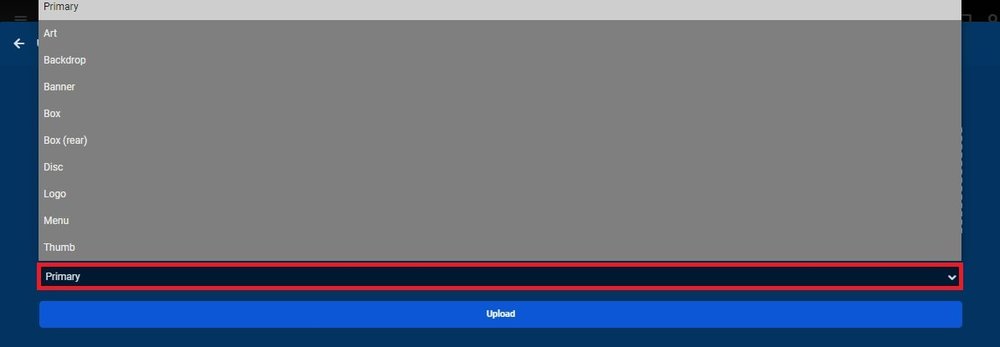
No the issue is there are NO episode images and the inherited Poster is shown in Episode placeholder. Now if Series has a Landscape/Thumb image it would be used. As ebr mentioned there is a option for these images though. When you upload a image there is a type selector right above the upload button. I series has landscape/thumb it is used in the absents of a episode image. I can only guess Episode Screen Grabber is disabled.
 1 point
 -
1 point
-
Yes, agreed, but only if I can sort in chronological order.1 point
-
Slight update to the Regex now actually as I noticed that this was no longer capturing failed remote login attempts. It appears the log format has changed slightly - it was 'Warn HttpServer:' but has now been changed to 'Warn Server:' (no Http) So the config file is now - <LogFile> <Source>Emby</Source> <PathAndMask>C:\Users\USER\AppData\Roaming\Emby-Server\programdata\logs\embyserver.txt</PathAndMask> <Recursive>true</Recursive> <FailedLoginRegex> <![CDATA[ Warn\sServer:\sAUTH-ERROR:\s(?<ipaddress>.+?)?\s-\sInvalid* ]]> </FailedLoginRegex> <PlatformRegex>Windows</PlatformRegex> <PingInterval>10000</PingInterval> <MaxFileSize>16777216</MaxFileSize> </LogFile> example - from my embyserver.txt file - Warn Server: AUTH-ERROR: 85.255.237.217 - Invalid username or password entered After 5 tries - IPBan now blocks that remote IP on the Windows firewall until I restart IPBan. 2021-02-02 18:43:25.4747|WARN|DigitalRuby.IPBan.IPBanLog|Login failure: 85.255.237.217, , Emby, 2 2021-02-02 18:43:55.6663|WARN|DigitalRuby.IPBan.IPBanLog|Login failure: 85.255.237.217, , Emby, 4 2021-02-02 18:44:10.7715|WARN|DigitalRuby.IPBan.IPBanLog|Login failure: 85.255.237.217, , Emby, 5 2021-02-02 18:44:10.7878|WARN|DigitalRuby.IPBan.IPBanLog|Banning ip address: 85.255.237.217, user name: , config black listed: False, count: 5, extra info: 2021-02-02 18:44:10.8565|WARN|DigitalRuby.IPBan.IPBanLog|Updating firewall with 1 entries... 2021-02-02 18:44:25.9790|WARN|DigitalRuby.IPBan.IPBanLog|Login failure: 85.255.237.217, , Emby, 5 2021-02-02 18:44:25.9885|WARN|DigitalRuby.IPBan.IPBanLog|IP 85.255.237.217, , Emby ban pending. Now working again.1 point
-
Hello, if you have secured the rights to legally stream content, please send a PM (private message) to ebr for information on commercial use of our product.1 point
-
You are right, I disabled specific transcode options. If you need that, I can re-enable this feature. For the moment, only option to force transcode is to set the network bandwidh below the bitrate of the movie. as far as I know, RPI4 still have very poor GPU support. I also have a RPI4 with libreelec and it's worse that my vero4k which is CPU wise much slower than RPI4. I hope it become better in future. Your issues with 4.6.0.20+ should be also addressed. @Luke1 point
-
New version 0.9.5 in the starting post: General: Two versions, one for Emby stable, one for Emby beta Export API: Made "User" parameter mandatory Added new parameter "StopMode" for client disconnect recognition Channels: Advanced channel number to two decimal places Added new rule that allows to exclude movies or tv shows by name Splittet "Watched" state filter to seperate selections for movies and tv shows Added button to sort channels by their number Playback: Moved "AutoMarkWatched" function to channel specific selection, seperated for movies and tv shows Added global option to hide shows from "Continue Watching" (only in beta server, needs testing)1 point
-
@Luke You just need to allow the audio to transcode independently of the video to get 4k to work. I've been asking for this for more than a year. I know you have a new "merged" app for Windows and Xbox, but can't you at least just add a fix to separate out the audio and video transcodes so we can watch 4k on the xbox?1 point
-
Alles wieder okay, es lag an der Festplatte, WD hat die Platte getauscht.1 point
-
This situation is kind of weird and difficult to understand at first sight. Actually, there wouldn't be any problem for that system to do both, server-side transcoding and browser-playback at the same time. There are plenty of resources available for this. And there's also no limit of resources being hit, which would require to use smaller video resolutions for playback ---- in theory! The problem is not about limited resources, the problem is that both operations (server-transcoding and client-playback) are competing against each other. And the advantage lies at the side of the GPU (operating on the PCI-bus, etc). This is a problem that Emby is supposed to manage in some way. And that way is called "Throttling" ( @mbarylski - you still haven't enabled it!) Our throttling isn't perfect. We have no "smooth throttling". Instead it works just like an oven or a refrigerator: there's a thermostat that is switching it on of off based on a value on a linear scale and stabilized by a hysteresis range. The on/off throttling doesn't matter for the server operation, as the server is usually a bit ahead of time. But local playback (video decoding) happens in real-time, and when another process suddenly shoots up CPU usage to 100%, the local playback may easily get interrupted.1 point
-
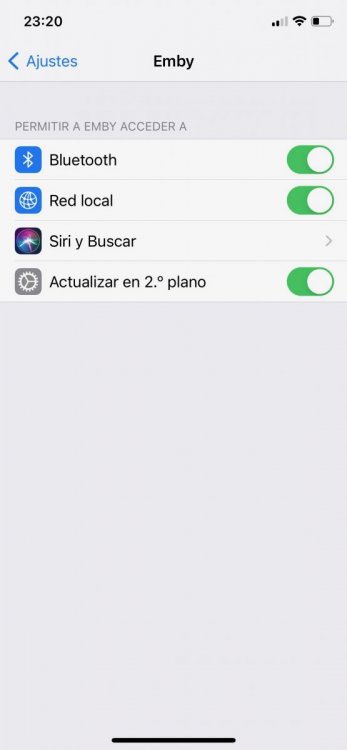
After upgrade to iOS 14 or padOS 14, you have to go to Settings - Emby - Enable Local Network Access Permission. If that setting is not enabled, then you are stuck in loop, no compatible streams are found.
 1 point
 -
hebergeur d image1 point