Leaderboard




Popular Content
Showing content with the highest reputation on 01/17/21 in all areas
-
Okay. New layout. There is a select box with collection types. If you choose movies, for example, then a table is created with movies, and most of the data pertaining to the baseItem, and media info. Note: feel free to create a list of data points which should populate the table rows. Each table item has a check box, which can be selected for bulk tag editing. And a button which writes the tags to the items. There is a lot of code there already, so if we can get to this point and have it working, we can start adding extra abilities to the plugin (whatever they maybe).3 points
-
This is a smaller extras request that I haven't seen posted yet. While it's being decided how extras are advanced, can we get a sorting order for the various extras folders? Right now, I can sort them into Interviews, Deleted Scenes, Specials, etc. However, once uploaded to Emby they just mash together alphabetically, leaving you with this: Deleted Scene, Interview, Deleted Scene, Special, Featurette, Interview, Behind the Scenes, Featurette, Featurette, Deleted Scene, Special. It would be great if each Extras folder had a numbered value. That way the line in Emby looked more like: Interview, Interview, Deleted Scene, Deleted Scene, Deleted Scene, Behind the Scenes, Featurette, Featurette, Featurette, Special, Special. This would go a long way in making the Extras look much neater in their current state.2 points
-
Not sure if this is the right spot where to request this. .. Nevertheless can we please add the feature for embyserver. Pretty much ro setup a pause timeout limit . so if a user put a video/movie on pause for more than xyz timeout limit would kick them back to the video/movie home page... Thanks Sent from my LG-US996 using Tapatalk2 points
-
Hello, I would like to have an Icon in the OSD (on client apps that have it), that indicates the playback of the current item as "Direct Play", "Direct Stream" or "Transcode". Why have this when there is "Stats for nerds"? Well I use a wide variety of clients and it's sometmes hard to predict what item is going to be supported so I always check. Going into "stats for nerds" gets tiresome if you do it often since it's so many clicks, so having this icon would show this little information right away. Maybe a number behind that icon that indicates the stream bitrate could be added as well so it says "Transcode 8" for 8 mbits or "Direct Play 52" for 52 mbits and so on. I could understand if someone could feel this would become too cluttered so I'd be fine with just the Icon. Cheers.2 points
-
Progress report for anyone interested... I've now got 'Iconic' running on my main library and most behaviors are configurable. Users can select icons (I just need to build a cool selector) from Google's Material Design icon set and apply them to their movies (other types soon) based on a Rules system. Other things that need to happen here are adding more than one Property through the UI (the back end already supports it), making the options more user friendly and validated. I'm also going to add a Tag based rule type so users can generate badges from whatever they're doing with Tags. The 'badge' containing the icon is also configurable with a nifty svg based live preview. I'm going to add more shape options and a preview of the badge in the context of an item image. I'm probably also going to convert Badge Size to be a small/medium/large type set up. I also want to add options for positioning of the icons beyond their relative spacing to each other (left/right align, top/bottom positioning). Still a bit to do, but I think this opens up a lot of possibilities for users to surface details about their library in ways that make sense to them.
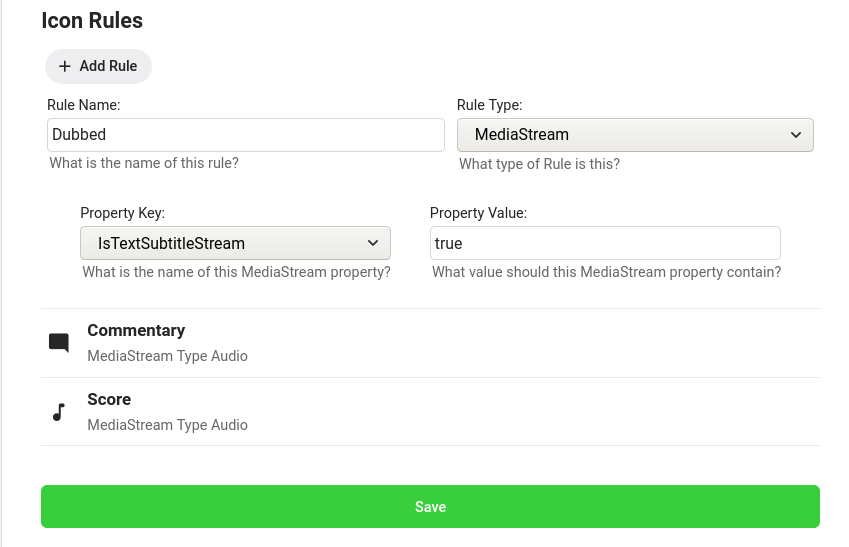
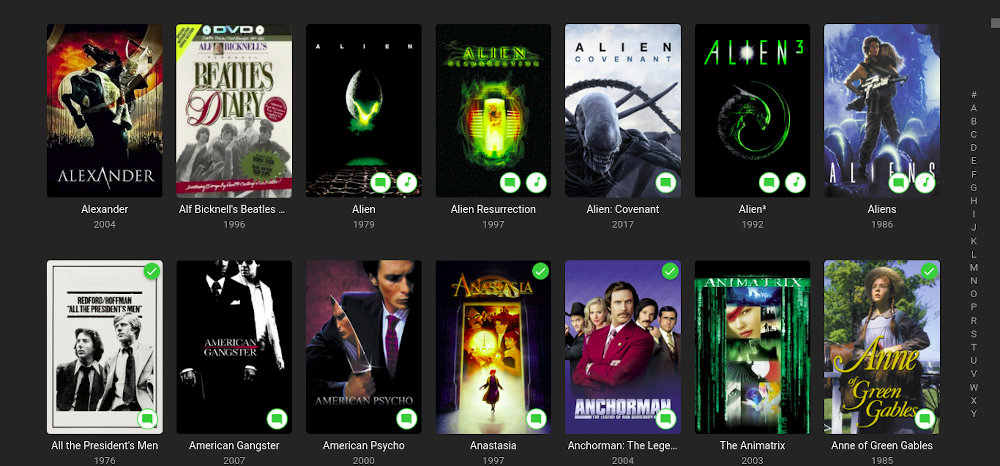
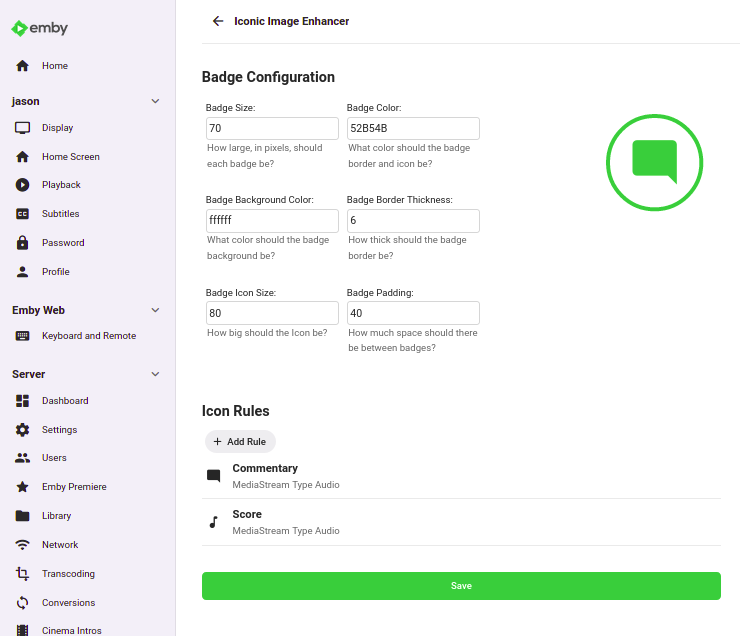 2 points
 -
https://torguard.net/article/205/how-to-add-your-dedicated-ip-to-the-torguard-desktop-client.html2 points
-
Bumping this rather than starting a new thread. My expectation when I saw that Emby supported multiple folders for special features was that each supported folder name would have its own strip under the movie in the client app. If you just did the main 'extras' folder, that's all you'd see, but if you took the time to break your special features down by type and put them in a corresponding folder, you'd see the results of that effort in the client app. After I didn't see what I expected, I looked into it more, and it seems like the alternative folder names are just there to accommodate content generators with their own established folder structures. But..I'd really like to see special features get that grouped presentation I originally envisioned. And maybe someday, their own dedicated tab where you can watch special features by type across movies and other fancy playback options.2 points
-
Hi, I would like to have an option to choose H265 instead of H264 in the Transcode option. It will be smaller for all bad bandwidth (2~5Mbit ADSL), but will have a great quality. Mobile phone can benefit of it greatly too with the 4G and the limitation of download.1 point
-
Hi, I’d love that audio and subtitles choice would be saved per show, according to what you select on the last episode you watched. The main audio/subtitles parameters is a good point but there are many cases it is not enough and you need to adjust audio and subtitles at the beginning of every episodes. For example i like to watch Casa de Pale in Spanish with french subtitles, The Big Bang Theory in English with french subtitles, French TV shows in french without subtitles, ....1 point
-
Is there a way to correct the sort order of actors (cast & crew) so that main actors appear before supporting cast? An example below:
 1 point
 -
Please read this post first. I was wondering if it would be possible to add something that would allow you to skip the intro to shows automatically while binge watching. When watching Netflix it does this for some shows, and im not sure if thats a feature of Netflix itself or a Chrome extension i use called "Flix Assist" but it would be a nice feature to have within Emby as well. and possibly even create a custom timed skip for specific shows1 point
-
Anime4K Anime4K is a set of open-source, high-quality real-time anime upscaling/denoising algorithms that can be implemented in any programming language. The simplicity and speed of Anime4K allows the user to watch upscaled anime in real time, as we believe in preserving original content and promoting freedom of choice for all anime fans. Re-encoding anime into 4K should be avoided as it is non-reversible, potentially damages original content by introducing artifacts, takes up to O(n2) more disk space and more importantly, does so without any meaningful decrease in entropy (lost information is lost). Disclaimer: All art assets used are for demonstration and educational purposes. All rights are reserved to their original owners. If you (as a person or a company) own the art and do not wish it to be associated with this project, please contact us at anime4k.upscale@gmail.com and we will gladly take it down. v3 The monolithic Anime4K shader is broken into modular components, allowing customization for specific types of anime and/or personal taste. What's new: A complete overhaul of the algorithm(s) for speed, quality and efficiency. Real-time, high quality line art CNN upscalers. (6 variants) Line art deblurring shaders. ("blind deconvolution" and DTD shader) Denoising algorithms. (Bilateral Mode and CNN variants) Blind resampling artifact reduction algorithms. (For badly resampled anime.) Experimental line darkening and line thinning algorithm. (For perceptual quality. We perceive thinner/darker lines as perceptually higher quality, even if it might not be the case.) Installation Instructions for GLSL/MPV More information about each shader. Real-Time Denoising (Experimental, WIP) The upcoming version 3.2 will focus on denoising. One version (Heavy-CNN-L) of the experimental denoiser is released for preview. This version is for heavily compressed video. Note that it will likely change/improve upon release. The main focus will be speed, while also keeping a good quality. The new denoisers are/will be trained using a mix of the SYNLA Dataset, DIV2K Dataset, In-The-Wild Images and a tiny subset of the Danbooru2019 Dataset. *Note: Here it is evident that PSNR is not always the best indicator of perceived image quality. The waifu2x denoiser looks shaper, but hallucinates many artifacts, especially near line edges. Real-Time Upscalers Comparison The new Anime4K upscalers were trained using the SYNLA Dataset. They were designed to be extremely efficient at using GPU shader cores (extremely thin, densely connected CNNs). All three versions outperform NGU and FSRCNNX both in upscale quality and speed while also keeping the number of parameters low, as seen in the test image below. This test image was not part of the training dataset, nor is it used as validation for hyperparameter tuning. Performance benchmarks are based on 1080p->4K upscaling and were performed using an AMD Vega 64 GPU. The low resolution (LR) images are generated using the average area downscaling operation, which is the correct downscaling operation when we want to avoid using low pass filtering. Low pass filtering with bicubic/lanczos downscaling works well for natural images, but will destroy fine details in line art. The operation used is equivalent to interpolation = INTER_AREA in OpenCV and -sws_flags area in FFmpeg. Note that this operation is only equivalent to bilinear if and only if the downscaling ratio is exactly 2. The correctness of average area downscaling is especially apparent as Anime4K-L was trained on average area downscaling only, and it generalizes well on unseen bicubic/lanczos degradation (24.94->24.81dB), while FSRCNNX-8-LineArt and waifu2x-CUNet were trained on bicubic/lanczos degradation only and do not generalize well for the unseen average area downscaling. PSNR of (24.93->24.47dB) and (26.02->25.61dB) respectively. Bicubic/lanczos downscaling preserves edge sharpess better than average area downscaling. This artificial sharpness does not represent well the distribution of true LR images (images that were originally low resolution and did not pass through a bicubic/lanczos filter). Link to results file. It has also come to our attention that many anime might have been suboptimally downscaled using the aforementioned low pass + bicubic method, as it is the default operation of FFmpeg. We will tackle this problem in v3.3 (after the v3.2 denoising update) by training the neural network with many different downscaling operations. Comparison Table First in each category is highlighted in brackets. Algorithm x2 PSNR (dB) ↑ Runtime @4K (ms) ↓ Parameters ↓ Bilinear 23.03 0 0 ravu-r4 24.09 3.6 41.4k FSRCNNX-16 24.57 30.4 10.5k NGU-Sharp-High 24.69 11 ? Anime4K-M 24.73 [1.5] [1.6k] Anime4K-L 24.94 2.5 2.9k Anime4K-UL [25.14] 10.7 15.9k waifu2x-CUNet [25.61]* >1000 1283.3k Link to results file *waifu2x is technically first in PSNR, but it is not a realtime algorithm and is 80 times larger than Anime4K-UL. It is included only for comparison purposes. The complete images from this comparison can be found under results/Comparisons/Bird. *FSRCNNX-56 failed to launch when playing back 1080p video. Projects that use Anime4K Note that they might be using an outdated version of Anime4K. There have been significant quality improvements since v3. https://github.com/yeataro/TD-Anime4K (Anime4K for TouchDesigner) https://github.com/keijiro/UnityAnime4K (Anime4K for Unity) https://github.com/net2cn/Anime4KSharp (Anime4K Re-Implemented in C#) https://github.com/andraantariksa/Anime4K-rs (Anime4K Re-Implemented in Rust) https://github.com/TianZerL/Anime4KCPP (Anime4K & more algorithms implemented in C++) https://github.com/k4yt3x/video2x (Anime Video Upscaling Pipeline)1 point
-
When multi-selecting (movies, for example), I would like to see "Tags" in the menu items list so that I can tag multiple [movies] with the same tag at once. Please and thank you.1 point
-
Note the plugin will become obsolete in 4.6+. But yes collections are currently only created by the plugin automatically from required metadata. Do you have TMDB enabled as a metadata provider? Does your media have the TMDBCollectionid?1 point
-
Collections are 'built' either manually, or by using the Auto Box Sets plugin. Once you create some collections, you will see that view populated.1 point
-
No, i didn't tried this. If it doesn't work then it's a bug, because otherwise the setting "Display specials within seasons they aired in" is useless.1 point
-
Put the strm file that points to The Flash into a Season 00 folder of Arrow and name it to a special episode that doesn't exist yet, eg. S00E20. If you use nfo files, also copy over the nfo of The Flash, so you have the description also. Than in the metadata editor, correct the season and episode numbers, fill in the needed values for Airs before season or Airs after season and Airs before episode.1 point
-
I responded to his question, and at this point we don't know if we're talking about the same thing as your issue so the answer may or may not apply to your case. But VLC has been around forever and it's had lots of workarounds added over the years to deal with poorly or improperly muxed files, whereas the player we're embedding on android doesn't have as much of that yet. It just takes time and troubleshooting to build that sort of resilience into the player. But this is a very common question. People say, oh my file plays with VLC, so it must be perfectly good and it's the other player's fault. Well often times, the bug was actually in the software that created the video file, and Vlc just happened to add a workaround to handle it.1 point
-
I should note that the same thing does not happen with movies. If I partially watch an already watched movie it does no get marked as unwatched.1 point
-
This is something that we should add, but no we currently do not have it.1 point
-
I too would like to see the extras further sub-divided into displayed categories according to their folders. If I had know previously that I could have the Extras section, I would have ripped those too along with the main features. As it is, I will be selective and cherry-pick among my 3500 movies to add Extras. While we're on the subject, Extras are usually included in various series. I've tried to see if an Extras folder would do the same thing, but to no avail. At present, any extras that I have ripped, appear at the beginning of the episodes. It would be nice to sub-categorize those also.1 point
-
thanks.. I too searched.. So this morning i did the big finger and reset the PC. Windows (current and up to date), Office, VS set up and it's working again.... I've made a HD image of this state and will try to figure out what is going on moving forward... weirdest thing I've ever seen..1 point
-
Your a star mate works spot on... your a credit to this community thank u so much!1 point
-
The value I gave you above is a guess. To find out if it's high enough do this and adjust the max_user_watches if needed. find /home/judgey/rclone/gmedia -type d | wc -l And if you expect /home/judgey/torrents/rtorrent/download to also have a high number of subdirectories then add those to the count.1 point
-
Check to see what it is now - it should be 8192 cat /proc/sys/fs/inotify/max_user_watches Update /etc/sysctl.conf to increase the value (add or change the entry): fs.inotify.max_user_watches=65536 Since the new values have to be in effect for the services before they start the easiest thing to do is reboot and check the value again after reboot. Keep in mind that the inotify watchers are monitoring directories so the limit would be tied to the number of subdirectories in your trees, not the file count.1 point
-
Nvidia Shield 2019 Pro Latest OS/FW Kodi 19 RC1 Addon Default1 point
-
Odroid N2 Coreelec 9.2.5 Kodi 18.9 Native1 point
-
If an ISP is throttling that hard, I doubt that changing port or using a VPN will help. Changing ISP would almost certainly be more effective! But if that means, for instance, moving from a cable supplier to one using ADSL/VDSL, then there may be an associated loss of other services, such as phone or TV even (which a cable supplier probably prioritises over Internet use of any kind), so the answer may not be simple. The problem may also be geographical, in that an old cable infrastructure in a certain area may be bandwidth-limited overall compared with more recent installations. Paul1 point
-
There's no way to do the things you ask, that I'm aware of. Note that the next release of Emby will have a largely rewritten support of music libraries. This is present in the current beta, but is still being worked on. As it stands, I'm not sure it yet meets your requirements, but I think there's more to come. If you want to look at the changes by trying the beta, I would recommend that you made it a separate installation - at present some of the changes are not working right, and would quite possibly interfere with your established usage. If you do try it, I'm sure your comments in the beta forum would be welcomed. Paul1 point
-
this looks really nice, thanks for sharing!1 point
-
That would likely be a network issue but hard to say without diving deeper. This might be easier with a remote session to look over a few things and talk this through. Would this be something you would like to do?1 point
-
1. PC2. Windows 103. Kodi 19 b1 & 19 RC-14. Addon 1. Android2. Fire TV (Cube, Gen 2)3. Kodi 19 RC-14. Addon1 point
-
3600 channels is painful! I've stripped my channels down to about 200 in total from m3u, OTA and Cable and that represents at least 15 different OTA markets as well. Way too much noise for me in that many channels.1 point
-
Correct, love the work that you are doing here @chef and am standing by with excitement. I also agree with @rbjtech in that for my use case examples, drop down box of 'Movie Name' would probably not be the best method to apply bulk tags. An example I can think of is to tag all my 80's movies. I would be looking for a way to filter out all movies with a production/release year between 1980 - 1989 and then be able to tag them with the same tag "1980s" or similar. Again, as others have mentioned - maybe the method used by Smart Playlists with various conditions should form the basis for this tool. Great work so far, I have been waiting far too long for this functionality to make it into Emby core.1 point
-
I have never had FileBot make a mistake if the original name was anywhere close. There have been cases where several choices were presented and, sometimes, the correct choice was down the list some ways. However the correct choice has always been in the list. Even some very badly named TV shows were correctly renamed. I have found that the key for TV shows is that the directory they are in is named mostly correctly from the start. It seem that FileBot will use the directory name as the key when the files in it are badly misnamed. Just recently it handled a file where there was a directory called "Family Affair" and all the files under it were simply named: 1.avi 2.avi 3.avi ... 70.avi and so on. FileBot correctly changed the files into the format "Family Affair - SxxEyy with each file attributed to the correct season. I believe FileBot could have even made the season folders and correctly placed the correct files into the correct season folder but I do not bother with having FileBot do that as it is simple for me to do. I have seen a movie file so badly named to start that FileBot could not handle it but that is an extreme rarity for me.1 point
-
That might be true and the Roku itself is downmix and we could change this by forcing this to Dolby AC3. Seeing the logs would verify. I hate when it says the codec is supported in 5.1 and then on the device turns it into 2.0. That isn't supported then. We will work together to solve this in the best way. This is something Roku is doing in that case and we have to work around it. The logs will verify if this is the case.1 point
-
Pretty sure the Roku itself is doing the downmixing. FLAC 5.1 sends DD 2.0 via Direct Playing - Roku - Emby Community @speechlesis this correct? How would this apply? Are you saying you know they are using the exact same container and audio and video codecs?1 point
-
TCP 8096, remember the port auth you use. You'll need it to configure the VPN app1 point
-
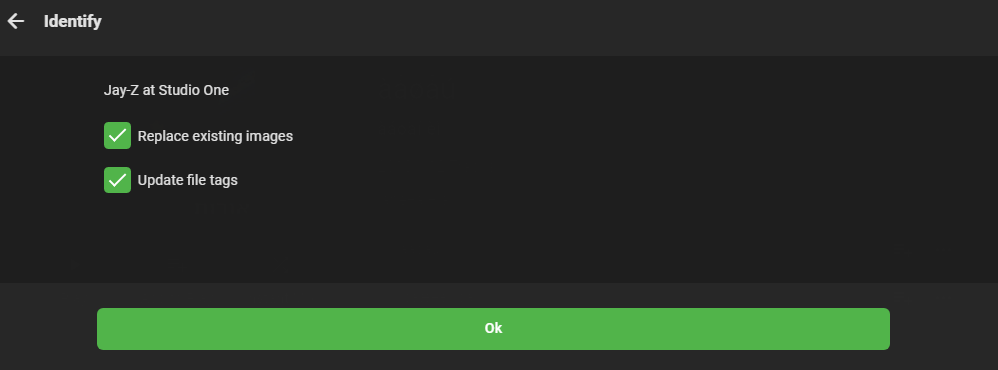
It would be amazing if emby updated file tags when identifying an album/song. Maybe there could be a checkbox under "Replace existing images" saying "Update file tags"
 1 point
 -
One little addition: Group, Country and Language fields from M3U are automatically imported as channel tags, so that information won't get lost and you can easily use that information for creating your own groups as desired.1 point
-
Or the autoclean would not activate if there is more than x% difference. or give some kind of warning 'are you sure ....'1 point
-
Sent you the info for the guest account. I might try and run the docker container and spin that up with the latest image to see if those issues still persist. Edit: I'm pretty sure it's related to my apache2 config. I have tried updating to the beta, and a fresh run at it through docker in a new environment without all of my old data in it. The only thing I didn't change was the apache2 configuration. Edit#2: It is for sure something to do with my apache2 configuration. I setup NGINX with the config from pir8radio and it works. Now the question goes, should I switch my reverse proxy and re-write/build all of my configs or is there a solution to get apache2 working? I'm still shocked that if this is really the case there are are not others with this issue.1 point
-
Hi, cool stuff, thanks for doing this !1 point
-
I'm going to add my support for this feature as well. While Extras may be able to go into Specials for most series, cracks start to show with a series like Doctor Who (1963). This series has multiple DVD releases per season each with a handful of features, and each with a multitude of Extras relating specifically to those episodes. One four-episode story may have ten or more extras, with sometimes close to ten stories in a season. It just becomes completely unmanageable. This is compounded with a DVD release like the TV Movie - a special which is listed as S00E60 on the TV database. As it is already a special, there is no way to associate the extras with the episode in Emby. The solution seems obvious to me. Have each episode in its own folder that acts like a Movie folder: Doctor Who (1963)\Season 00\Doctor Who (1963) S00E60\Doctor Who (1963) S00E60.mkv Doctor Who (1963)\Season 00\Doctor Who (1963) S00E60\Extras\Paul McGann Interview.mkv Now on the episodes information page, the extras will be displayed just as they would be in movies. Additionally, you need to be able to be able to add extras to Seasons: Doctor Who (1963)\Season 01\Extras\Theme Music Video.mkv These could be displayed at the bottom of the season. Something like the mockup attached.
.thumb.png.d6b8bc6ce8e3a6d910fd04ba5b5a5a25.png) 1 point
1 point -
Be sure to like the first post so the Devs can see how much this feature is requested.1 point
-
Hey, I understand that it might be a smaller user base that uses extras, which is why my original request was just to have a sort order for the special features folders. That way, even if they are all still in one line, it at least looks much more organized. Do you think something smaller like this is possible?1 point
-
Ok, fair enough. Is this something that could be accomplished through the plugin architecture? I'd be happy to take this on myself if it's possible.1 point
-
Hi, it's always possible for the future. As of now, very few users have this amount of extras so it's just hard to prioritize this. Thanks for the feedback.1 point
-
You could take it a step further and create a Emby Transcode Client" that monitors resources on each client and the server could send work to each client based on what it is capable of and what resources are being used. I have 3 Nvidia Shields and two are asleep most of the time, My main server is OK but does not have hardware transcoding capability and uses a lot more power than my two shields. I could install the "Emby Transcode Client" on each shield and the server could send the jobs as required.1 point
-
Deathsquirrel, I dont run services there because I only need the muscle sometimes. My plan is to send WOL commands to wake my Muscle at 6pm and a scheduled task to shutdown the muscle at midnight. Doing this will cover 80% of my watching needs, but I want my Emby server on 24/7.1 point



























.png.f2500dbaa32d2b8415f7be138d6bfadd.png)