Leaderboard




Popular Content
Showing content with the highest reputation on 01/12/21 in all areas
-
Good things are happening4 points
-
Hi guys, I actually open-sourced the code for a graduation project where the goal was exactly to detect recaps, previews and opening&closing credits. You can check it out here: https://github.com/nielstenboom/recurring-content-detector I figured maybe it can be of use! Would have to port it somehow, as it is python based. Cheers!2 points
-
As I'm transitioning from Volumio and Plex to Emby to centralize my usage to one app, the one thing I'm missing the most is gapless playback. This is particulary annoying when listening to albums like "Dark Side of the Moon" by Pink Floyd. I'm experiencing a buffer of about 1 second in between songs, which really ruins the immersion. Would be awesome if this would be implemented in both the Chromecast, and web player.1 point
-
Hi, I've seen a few discussions on this before but will the ability to download original photos directly to the phones native photo app, ie Camera Roll in IOS be supported at some stage? Really missing this option to enable easy sharing of my photo library via other platforms, messenger, Whatsapp, iMessage etc which this would allow. I currently have to do this manually via other mechanisms while at home on the network or copy to other cloud platforms, being able to do it from anywhere via Emby would be awesome! Thanks!1 point
-
Id like to request the ability to have a library or collection volume leveled both so there arent wild swings in volume between different videos as well as smoothing out the volume changes within a single video. I have quite a few movies/epps that are really quiet compared to the rest of the content and would like to fix this. Most of my users have requested this of me at some point or another.1 point
-
My trans-coding temp folder is not on the C drive. Just over the past few days or so, I've noticed my C drive filling up and it's these massive log files. Please advise. embyserver.txt

 1 point
 -
For the time being, what I've done is basically use the Emby app on my phone to Remote Control the TV session. Connect to the session that the TV is using, and then you can drag the seek bar on the phone to jump around. Not a "built-in" solution, but it works pretty well.1 point
-
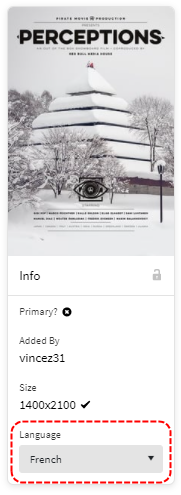
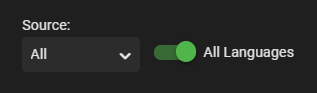
I had a similar issue not long ago, and it turned out that it was because the image on themoviedb was set to another language than my default The preview image would appear when you performed an 'Identify' but it simply would not download the primary image. In your instance, the primary image is set to 'French' and that's probably why You'll need to perform an 'Edit Images' and then select All Languages to reveal this poster You should be able to fetch it after that. I just tested this.
 1 point
 -
This should be resolved for the next update to the app. Thanks.1 point
-
add div.detailImage .details-additionalContent-withbackdrop button.defaultCardBackground, div.detailImage1 point
-
[deleted]1 point
-
Created and Modified you would assume.1 point
-
@LukeGot it figured out! I just had trouble figuring out how to capture the download link many thanks!1 point
-
Once you've searched them both, you'll know the answer! Paul1 point
-
I can confirm that the issue I had with the external srt subtitles and their language displayed in Kodi is already fixed. I used the 5.1.5 version to test it. Thanks! Good job!1 point
-
@Jason'sEmby I did bang on Roku about not giving us any way to give the server a warning the Roku is going to terminate the application. https://community.roku.com/t5/Roku-Developer-Program/Please-give-us-onDestroy-as-an-event/td-p/515902 Because they do not offer us the ability to do anything once a user presses the home button. You are just whisked away. The application has no way to tell the server anything except the progress reports (aka keep-alive heartbeats) stop getting sent. Wish there was a better way. I made a Star Wars joke in the URL above hoping that would at least get laughs and bump the thread. Didn't happen. Not every Astromech has a hero listening.1 point
-
Hi. Sorry this is a false alarm. Everything works perfectly with NO internet connection. I can't reproduce the problem. The only change is this morning I upgraded the server from 4.6.0.6 beta from 4.6.0.10 beta (Synology). To confirm, I disconnected my ISP modem from the network then power cycled the server, the Xbox One and the FireTV Lite. With ISP still DISconnected the Emby client on XBox One plays all my media no problems. The FireTV Lite won't display it's Home screen at all but that's an Amazon issue (deliberate?) and nothing to do with Emby. Cheers.1 point
-
Le top du top en rapport/qualité prix imbattable c'est le FireTV d'Amazon. Comment c'est trop bien !! Mais oui il faut Emby Première Mais Plex c'est exactement pareil donc je sais pas où est le problème... Faut payer aussi pour l'avoir sur le téléphone. Puis Plex c'est chiant l'app est bourré de merde de TV et potcast anglais. Faut tout nettoyer. J'aime l'app épurée de Emby.1 point
-
yea so that docker container is a prebuilt nginx, with their config.. You first need to understand how the configs work in order to just slap a new config in one of these pre-built containers. Usually the best thing is to get rid of their 10 different linked configs, and go with one nginx master config.1 point
-
This should be resolved for the next release. If you need an immediate workaround you could disable the Dlna server features in Emby Server, and then restart the server.1 point
-
Well done.1 point
-
We should have a new update out soon. Thanks.1 point
-
I'd also like to see discogs as a data source. Since they have data for "Credits" that I brought up in another thread, this would be a nice alternative source. The discogs API is available. A plugin would be great.1 point
-
Just curious but if you know the screen save won't kick in then why not exit instead of pause and you'll get your screen saver.1 point
-
It's a Shield TV thing, so you would not have needed this step on the HTPC.1 point
-
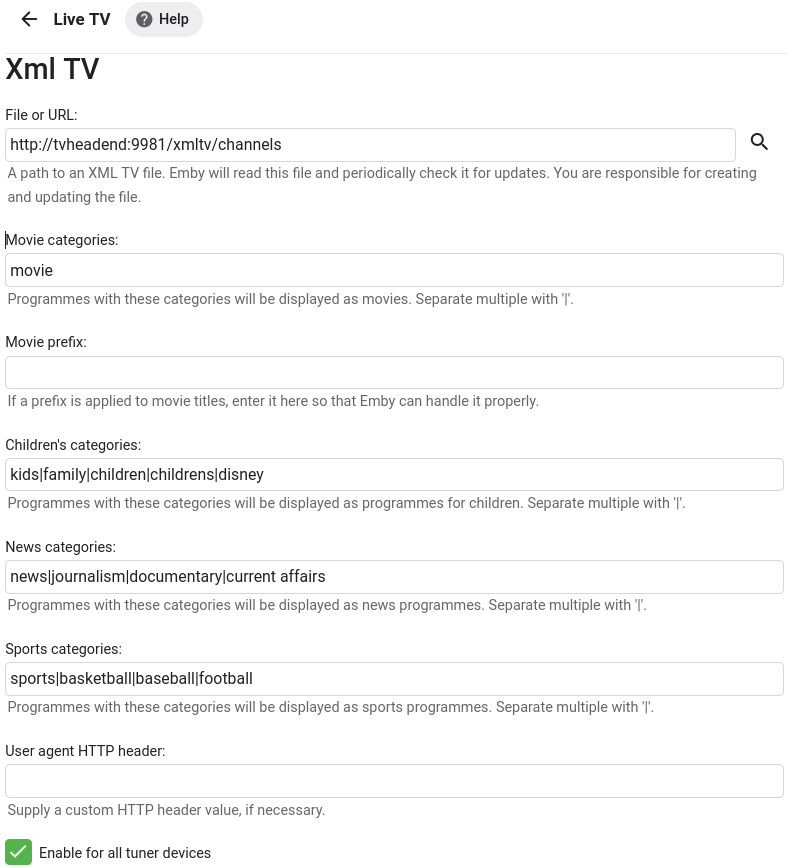
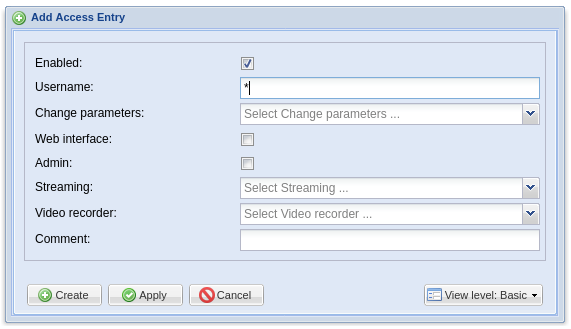
Hi, I have created this in the hope it helps others. It isn't very detailed but hopefully enough information to be helpful. Thank you. My setup: Ubuntu 20.04.1 LTS (I would prefer if this said CEntOS but that's another story) TurboSight TBS 6280 DVB-T/T2/C (SAA716x dvb adapter) Docker (I don't think this effects my guide much below but worth mentioning) Emby (emby/embyserver:latest version on as of 9th January 2021) Tvheadend (linuxserver/tvheadend:latest version on as of 9th January 2021) docker-compose.yml Install required software (Ubuntu, TBS drivers, docker, docker-compose) Check DVB adapter exists $ ls /dev/dvb/ Install required Docker images/containers (see attached docker-compose.yml) $ docker-compose up -d http://tvheadend:9981 (setup Tvheadend) Configuration > Start wizard > Language (save and next) > Access control details (either on this screen or after the wizard create a user with the username * and no password (see attached User login.png) Tuners and network (configure as required) Assign Predefined Muxes to Networks (configure as required) > Scanning (save and next) > Map services to channels (configure as required) > Finish http://emby:8096 (setup Emby) Settings > Live TV > Live TV > TV Sources > M3U Tuner (http://tvheadend:9981/playlist/channels.m3u) Settings > Live TV > Live TV > TV Guide Data Providers > Guide Data Setup (configure country as required) and Guide source: XmlTV > File or URL (http://tvheadend:9981/xmltv/channels) Settings > Users > Access > Recordings Notes: Recordings made through the Tvheadend interface are separate to recordings made through the Emby interface. If I haven't mentioned a setting, chances are I haven't changed from the default. Multiple screen shots are attached to help clarify some steps. The M3U link can be tested in VLC media player: Media > Open Network Stream > network URL: http://tvheadend:9981/playlist/channels.m3u The channels link can be tested in an internet browser by pasting the link into the address bar. http://tvheadend:9981/xmltv/channels I hope this helps someone docker-compose.yml
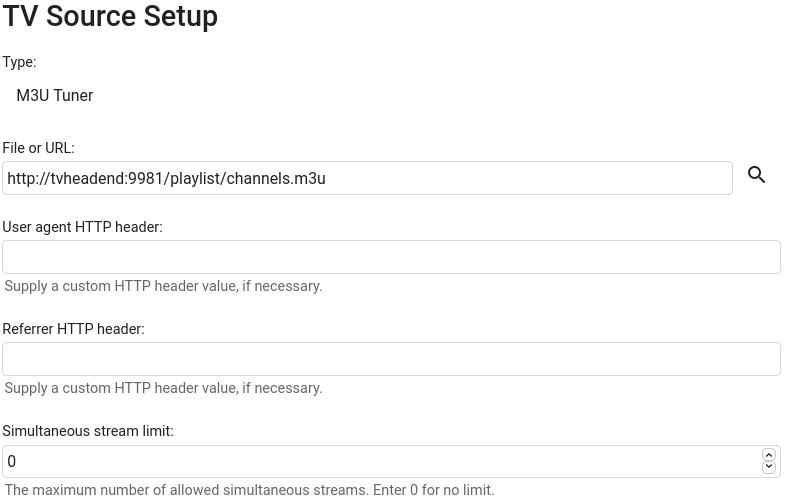
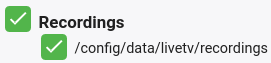
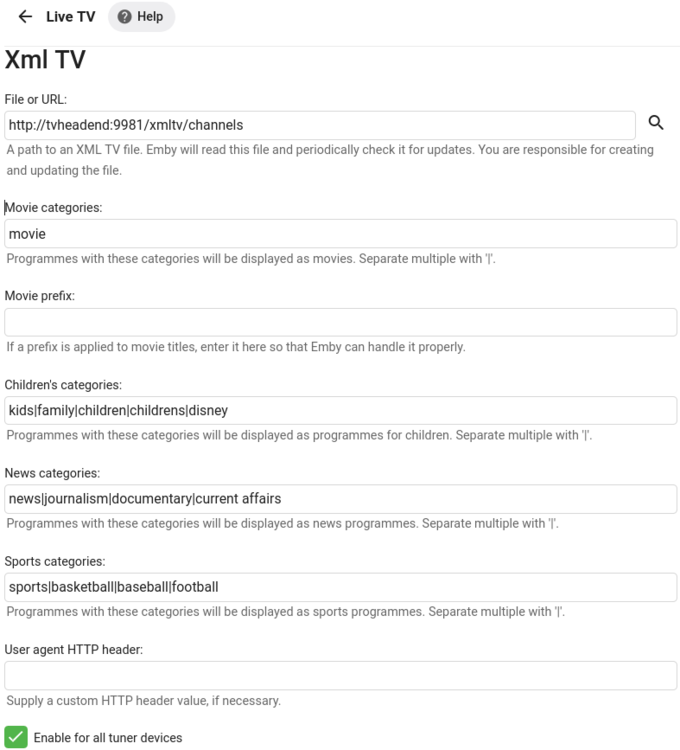
 1 point
 -
Let us know how you get on. Thanks !1 point
-
You are asking the dev team if they will support a format that is not supported, which has no real TV support, and has an unknown future. Why don't you just ask them for lottery numbers instead, it would be far easier.1 point
-
Your Wetek 2 comes with an S905 Amilogic chip. It's extremely underpowered and is not a great idea to be using it as a server, especially if you are trying to feed a media unfriendly Apple TV. I would strongly recommend you replace your Wetek 2 with a Larkbox or even a refurbished PC.1 point
-
Try using the url from the download button in the web app.1 point
-
Thanks for the feedback !1 point
-
Hi, it's planned for the future. Thanks.1 point
-
Hey @@Angelblue05, i have finished german translation (internal strings), now all shoulld be translated. Gave my best, but i think there could be some quirks when not knowing how the words are used. Nevermind, maybe some german can look over it. Here are the links: Alexa: http://oshotim.oneskyapp.com/admin/project/dashboard/project/147181 internal strings: http://oshotim.oneskyapp.com/admin/project/dashboard/project/147183 Any chance of getting an german skill soon? Thanks a lot pOpY1 point
-
Unless this is just a blip - I'm now getting a lot of my 'thetvdb.com' requests 'cancelled' - causing all sorts of nasty blank graphics in emby ... MediaBrowser.Model.Net.HttpException: MediaBrowser.Model.Net.HttpException: Cancelling connection to https://www.thetvdb.com/api/**** I've now removed it as a metadata source from the library, (and promoted TMDB, then OMDB) - refreshed those items and all is well again. I guess it was only a matter of time ...0 points