Leaderboard




Popular Content
Showing content with the highest reputation on 01/06/21 in all areas
-
No, I know why it happened. Thanks.2 points
-
As I'm transitioning from Volumio and Plex to Emby to centralize my usage to one app, the one thing I'm missing the most is gapless playback. This is particulary annoying when listening to albums like "Dark Side of the Moon" by Pink Floyd. I'm experiencing a buffer of about 1 second in between songs, which really ruins the immersion. Would be awesome if this would be implemented in both the Chromecast, and web player.1 point
-
Would be nice if the server could serve a custom logo to the clients, i.e replace the emby logo with something relevent to the server. This would look really neat.1 point
-
One thing that I would like to see implemented is the abilty to display lyrics in all of the apps. For those of us who have libraries with lyrics embedded in the actual files, it would be trivial. Simply scrape the lyrics from the lyrics tag and display them. As far as scraping from online lyrics databases, I don't see that working very well as just about every app that I have seen use it either doesn't get the correct lyrics or they are truncated with an add for the website.1 point
-
What about adding new option to link calibre to emby as the plugin to link emby to kodi so we can have all our books ready to download via interface of emby .If we want, we can link the calibre libraries to emby, so we can use all the abilities of calibre of conversion and cover fetching etc then display the resultant libraries in emby I think this can be added by one of three ways: 1-Connect to calibre content server 2-use the db file found in every calibre library and read it to present the book without interfacing with calibre at all but using ready made libraries directly 3-parse the opf files of books to create the database of books of Emby1 point
-
As I mention in a related post, I love the additional subfolders for Movie Extras (eg, Shorts, Scenes, Interviews, etc.)! It would be awesome to extend this functionality to TV Series as well. Specifically to add support for many/all of the same folders supported for Movie Extras, eg, extras specials shorts scenes featurettes behind the scenes deleted scenes interviews trailers As well as any additional folders that get added in the future (eg, hopefully Galleries). Support Placement of "Extras" Folders Within Each Season Folder, Plus A Naming Scheme to Link A Particular Extras Folder with a Specific Episode (eg, "\Season 1\E1 - Deleted Scenes\" for episode 1 deleted scenes): I want to clarify that it would be great if these various "extras" folder types could reside within each Season folder. So for example, within a Season 1 folder we could then have an "Extras" folder, a "Deleted Scenes" folder, a "Featurettes" folder, etc. And furthermore, that we could designate a particular folder to refer to a specific episode (eg, "\Season 1\E1 - Deleted Scenes\" for episode 1 deleted scenes). See more below, particularly why I think this would be so useful: https://emby.media/community/index.php?/topic/55915-emby-server-theater-additional-extrasspecial-folder-types-for-tv-series-similar-to-movies/&do=findComment&comment=587195 Thanks for your consideration! PS - If this is something you might like to see implemented, be sure to "Like" this top/first post (as well as any subsequent posts in this thread that highlight particular aspects of what you are interested in) -- "Liking" the top/first post helps the Devs to know how much interest there is in a given Feature Request.1 point
-
A checkbox in the server settings somewhere to hide the domain and IP address in log files so they can be uploaded for troubleshooting without needing to be edited.1 point
-
I like listening to my music through my roku/emby setup. However, I don't need to know how the artist is while listening. I was wondering if there is some way to set up a virtualization like on windows media player? I can wait and my roku will go to it's screen saver, but I would like to make a choice. Or even display the lyrics on screen, all of my music files have the lyrics embedded.1 point
-
While Emby already has recommendations built in based on previously watched items I find they are not all that helpful. They seem to be based on genre only, for example, because you watched a comedy here are other comedies in your library. I do like how the also directed by/appear in recommendations work though. What would be great is if Emby could incorporate Trakt's recommendations as they are much more sophisticated. Trakt's recommendations are not only based off of what you have previously watched but also what your Trakt friends and other Trakt users have watched. It takes user ratings and trending/popular media into account. Ideally Emby would include full Trakt integration allowing users to rate media after watching, view lists and recommendations, and view upcoming media all from within Emby but for now I think recommendations would be a nice addition. Trakt has the potential to give Emby that community feel and allow users to discover new media, find something to watch, and recommend media to other users. http://docs.trakt.apiary.io/#reference/recommendations1 point
-
While setting up a new device or just searching for the next hiccup it would sometimes be useful to be able to jump to the currently playing media which is shown in the server dashboard. Maybe just by clicking on the image of the active device. ATM now, I have to search for the item in the search field (which sometimes work and sometimes not) or need to manually browse through the library to see the media details.1 point
-
Upon adding a new library, Emby generates a thumbnail using four images from the pool of artwork within the library. I think it would be nice if after a minute or so, the apps could begin scrolling through some the different artwork in that library. Add some toggles so users who may not want the feature aren't forced and perhaps some settings to enable things like delays and animation, like slide up and down or sideways, that type of thing... I think it would make the home screen a bit more appealing. Sorry if this has been requested before...1 point
-
Dynamic images should be updating weekly.1 point
-
Why not rename the device in the server dashboard and assign a name you would like to see?1 point
-
Evidence in this log suggests your issue is transcoding - and for that, a separate 'ffmpeg' log(s) should be created and it's those we likely need to see. The problem could simply be that the format you chose to covert in MakeMKV is not compatible with your 'player', thus emby is transcoding it but your emby server cannot keep up with the transcode, thus the pauses. As a rule of thumb, unless you converted the Blu-Rays to another codec, they should be h264 with AC3/DTS sound - which 'should' play without issues on most streamers. The ffmpeg log will reveal all ...1 point
-
You can't do this. You need to remove one.1 point
-
Options are always possible for the future. Thanks for the feedback.1 point
-
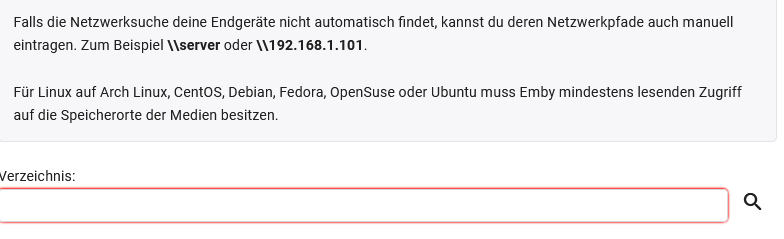
Hallo quickmic, nein, nein ich verstehe nicht falsch. Netzwerk/Nativ System Bis jetzt habe ich emby in Localen HTPC I3 benutzt mit Server Nativ Mode.Deswegen habe ich nie dieser nfs Verbindungsprobleme oder Folder Problem gehabt. Diesmal mit emby Server auf syno + vero4k, dann alles über Netzwerk zu laufen lassen und zwar kein SMB sondern NFS.Dieser NFS geschichte habe ich noch nie ausprobiert, geschweige davon SMB auch nicht ausprobiert weil ich immer LOCAL Emby Server und Client auf ein Computer benutzt habe, damit habe ich path anpassen oder irgend welche probleme nicht gehabt.Das war auch mein Ursprüngliches Problem.Damit wollte ich emby nur als Datenbank benutzen, kein Codier Software oder etwas ähnliches das sich emby irgend wie sich nicht einmischt.Nur als Datenbank Software vorbereiten für Kodi local Datenbank. Natürlich es läuft alles auf synology und ich habe sehr viel über synology+NFS gelesen das die leute nicht hingekriegt haben das es so läuft, weil das meistens mit Benutzer Rechte zutun. Seltsame weise bei mir hat es ohne probleme geklappt.Allerdings sync von emby Datenbank zu Kodi Datenbank unter Kodi hat es nicht geklappt Volume usw.. Problem. Bibliothek Erstellen Maske Meine Kodi hat es gefunden ohne den Netzwerk Path einzugeben Wenn ich unter Kodi Dateimanager geschaut habe. Natürlich müsste ich unter Kodi noch die NFS Quelle einfügen.Übrigens Kodi Datenbank ohne Emby hat es ohne Probleme Synronisiert !. Direkt Kodi zu Syno Filme path. Emby Server Ich wusste das nicht oder ich habe es überlesen.Das man bei der Bibliothek erstellung steht ja oben FETT das man für Netzwerke den path anpassen sollte. Aber es ist eingabeart von SMB !!!. Normales Netzwerk path eingabe nicht NFS ! Wo NFS Steht habe ich einfach /volume2/WDR2 ... das gleiche unten angegeben, das mein fehler.Ich kann mir vorstellen Du hast es nicht verstanden.Weil das hat mit mir zutun, Welche Mensch kommt auf die Idee das ich den path nicht richtig eingegeben habe.Allerdings das war falsch oder besser gesagt hat etwas gefehlt. Damit ist das Problem gelöst.Ich kann ohne Probleme Emby mit Kodi Datenbank Syncro halten.Das ist Anfänger fehler von mir.Weil ich habe dieser Problem im Internet wieklich unter Lupe genommen 90% war das Problem das die Leute unter Syno die NFS Rechte nicht richtig erfasst haben.Ich dachte auch das es bei mir sowas ist. Das andere ist folgendes.Was mich auch irritiert hat. Ich gehe ins Kodi rein.Unter Dateien dann habe ich auch meine NFS was ich schonmal als Quelle eingefügt habe.Ich kann direkt die Filme von hier aus starten (Dateimanager) von Kodi. Das heisst ich habe kein Problem auf NFS zu zugreifen.Emby Server Läuft auf Syno.Ich installiere Plugin oder Addon für Kodi für Emby Server. Es kommt ein Login Maske (EmbyConnect), wo ich Server (IP Adresse) auch manuell eingeben kann + Port steht schon auf der Maske.Dann Logge ich mich ein. Die verbindung von Plugin Kodi zu Emby Server an Synology besteht.Ich sehe ja die Verzeichnisse (Bibliothek) unter Emby Addon aus Kodi von Emby Server. Jetzt versuche ich zu Syncro zu Kodi Datenbank Local !.Kam immer Fehler /volume/wd2.... datei kann nicht gefunden werden.Ist ja klar weil ich unter Emby Server nicht den path für netzwerk definiert habe oder falsch definiert habe. Allerdings ich bin davon ausgegangen immer bei der embyConnect gebe ich die IP Adresse wo das ganze Bibliothek liegt.Also die IP Adresse hat bereits Kodi Emby Addon,Ja die Bibliothek Verzeichnisse sind ja auch definiert.Kann er doch zugreifen.Das war die falsche gedanke von mir.Dennoch wurde der Path nicht gefunden. Das ganze Nativ und NFS hier. Emby Plugin Kodi mit Addon Konfiguration. Ich habe zufällige weise dieser Variante ausprobiert.Danach konnte ich ohne Probleme und ohne große path definieren, syncronisieren. Dann dachte ich mir auch hey irgend was stimmt mit emby nativ nicht weil so geht das einfach.Aber dann hat ein oder andere Film angefangen zu ruckeln.Bis ich auf Beta gewechselt habe.Na ja es hat mich nicht in ruhe gelassen warum nativ nicht ging.Am ende habe ich das gesehen das ich den path falsch definiert habe. Zum Schluss Ich benutze Emby nur als Datenbank.Natürlich Emby Stärke ist oder Fokus Codierung von Dateien, das wollte ich sowieso nicht dazu habe ich ja vero4+.Übrigens ich habe kein Kernel Update auf 4.9 gemacht ich warte lieber.Ich finde wirklich sehr bemerkenswert das man Emby Datenbank benutzen kann oder darf ohne was zum Zahlen. ich denke Nativ Mode ist einfache als Addon mode,Das ist meine meinung weil wenn unter Addon Konfig die Probleme anfangen mit Codierungen usw.. dann hat man hier wirklich ein Problem.Ich kann mir vorstellen jemand der vero4+ hat und ein bezahltes Emby system hat oder etwas anderes Stream Software wenn alle sich hier einmischen mit der Codierungen, ja Dann wird es richtig Probleme geben denke ich. Wie geschrieben bei der EmbyConnect maske hat mich irritiert das ich IP Adresse manuel eingebe und der path unter Bibliothek /volume2/wdr2... steht das es dennoch keine sync stattgefunden hat.Na ja das eine hat mit Login und der andere hat mit Config zutun.Veilleicht kann kan man etwas einbauen bei der EmbyConnect wo ich den Verzeichnis samt mit untermenus auswählen kann.Nach dem die Connect zu Emby Server stattgefunden hat.Viele Menschen wie ich für das erste wissen garnicht das man unter Bibliothek nfs://ipadrese/volume... definieren muss denke ich. Ich weiss nicht, es ist ein tolle Software ich kenne auch XBNE (Gibt es nicht mehr aus FR war das) ich komme nicht von Kodi sondern von XMBC, Ich habe viele Datenbank Software oder Tools für Kodi benutzt, vor paar jahren habe ich den Tipp bei der Nerds bekommen mit der Emby, Ich war echt überwältigt damit. Natürlich die Software kostet nichts es sei den mann will die Komplette umfang benutzen.Kostet auch nicht viel.Will mich in Vertrieb nicht einmischen. Allerdings wenn es davon 3x Varianten geben würde. 1.Variante emby Server nur für LAN und WAN Funktion.Rein für Intern Netzte ohne Codierung das man hier keine Codierungsmenu s sieht. (Nur Nativ Mode) Abgespeckt. 2.Variante emby Server für LAN und WAN und ausserhalt seines Netztes wie jetzt.(Addon+Nativ Mode) 3. Addon für das erste variante (Addon für Nativ mode) später wenn jemand das braucht. Damit kann man auch gur Preisgestalltungen und Staffelungen machen, denke ich.Jetzt gehe ich zuweit sorry. Danke Mit freundlichen Grüßen

 1 point
 -
I have been doing some troubleshooting. I think the problem might be in the audio streams on the channel that I get this error in the Emby conversion log: 16:42:57.790 Too many packets buffered for output stream 0:2 When I run ffmpeg from a command prompt with minimal options, it converts fine to mkv. When I add a delay parameter (-itsoffset), it fails. It appears to be failing because the french audio stream is empty, see attached log. Stream #1:1[0x64](eng): Audio: ac3 (AC-3 / 0x332D4341), 48000 Hz, stereo, fltp, 192 kb/s Stream #1:2[0x65](spa): Audio: ac3 (AC-3 / 0x332D4341), 48000 Hz, stereo, fltp, 96 kb/s Stream #1:3[0x66](fre): Audio: ac3 (AC-3 / 0x332D4341), 0 channels, fltp [matroska @ 000001dd62bef400] sample rate not set Could not write header for output file #0 (incorrect codec parameters ?): Invalid argument Error initializing output stream 0:3 -- Maybe this is why the Emby conversion is failing on recordings from this channel? When I have (-itsoffset) parameter and have it only include the eng stream (-map 1:a:1), it converts successfully. I am just passing along what information I have found so far. ffmpeg-cmdline-01.txt1 point
-
The value is manifested in other ways. There are lots of situations where the media is physically separated into different folders and we interpret that to mean something else (e.g. each movie in its own folder or movies in sub-folders). The user may have this structure either because they had a different system previously or just thought they needed to do that or want it to show up that way when they do use a file browser. But, when using Emby, we can intelligently treat them differently. As we've said multiple times now. This is a possible feature for the future.1 point
-
I have downloaded and installed v87 from 16g USB formatted in Fat16, onto my samsung TV with no issues at all. V86 in all its various forms continued to give me errors everytime regardless of the size or format on the USB Drive glad i now have a fix thanks to the developers for you efforts.1 point
-
you keep badgering about Profile 7 in all your comments, not 5. You constantly ask about remuxing Profile 7 to Profile 5 (a dual layer to a single layer) which is not currently possible in Emby or Plex and can only be done currently by MakeMKV. Even the Plex employee says it SHOULD be possible, not it will. There is also the fact that very little of this is actually documented so the server software won't know if the TV has support for Profile 5 or 7 and the dev team would need to learn how to poll the TV to get that information. As for me being rude, I'm not the one here being confrontational with the Dev team and getting upset when the answer they give you is not the one you demand. Sorry.1 point
-
Disregard, I checked a different server running on a different device and had the same issue. So the problem is somewhere in my network.1 point
-
Here is a tutorial I found: https://www.reddit.com/r/freenas/comments/ko9pit/freenas_emby_jail_hardware_acceleration_guide/1 point
-
Do you have your own Emby server? Emby is not an online service, it’s a software to manage your media.1 point
-
I was using version 4.5.4.0 from the emby/embyserver docker repo since the first post. Prior to that I briefly reverted back to 4.5.2.0 to check if updating to 4.5.4.0 was the issue. I don't have any auto-updating enabled, and neither did docker container restart between nonworking and working conditions. The roku and apache server process were restarted several times testing various configurations, but ultimately what I had initially seems to work fine.1 point
-
My problem is not that (because arbitrary names do actually work as expected), it is that the names that you do support (Specials and Extras for instance) are handled by merging them as well as any other processing you do (looking up an image for them, I guess). However, for my part, while that is irritating, I would be satisfied just to know that the use of undefined folder names will continue to cause them to be used and displayed as they are now. It would then be up to me/us to use them our way, in the confidence that you won't break them in the future. Just saying that other names are "unsupported" rather than defining the (existing) minimal behaviour is what takes away that confidence. Paul1 point
-
this topic can be closed problem solved, i tried different installations conclusion the arm32v7 version is the right one1 point
-
The one named just "emby" is the old community plug in. This one is set to use NAT and have you access http://nasip:8096/ The one named "emby server' is the old offical plug in and I updated it two weeks ago based upon someone's error here who found it wasn't installing all the secondary packages. I've set this one up with dhcp so you get a separate IP from your NAS. If you have the knowledge and time to create a jail manually I echo MRobi's comment but if you don't then I suggest trying the other plug in and reporting back.1 point
-
Amazing, Misom23, that worked on my GT King Pro...........1 point
-
It's been added for the next release. thanks.1 point
-
New version just uploaded. You'll have to download and install manually from https://www.ballingtons.com/products/1 point
-
Your Beeelink box can CoreElec which is much better than Android when it comes to playback. If you search for 'GT King corelec' you will find many guides/youtube videos. Once you are running it, get Embuary skin + Embycon (which is easier to use than Emby addon) and you will have a great experience IMO.1 point
-
If you really want the best out of that powerful device, just use an inexpensive microSD card and install CoreELEC. CoreELEC will play everything that you throw at it............ Install the Emby for Kodi addon (https://emby.media/community/index.php?/topic/90781-embyforkodi-500-preview/ and then use the Embruary skin, this is the ultimate media player..1 point
-
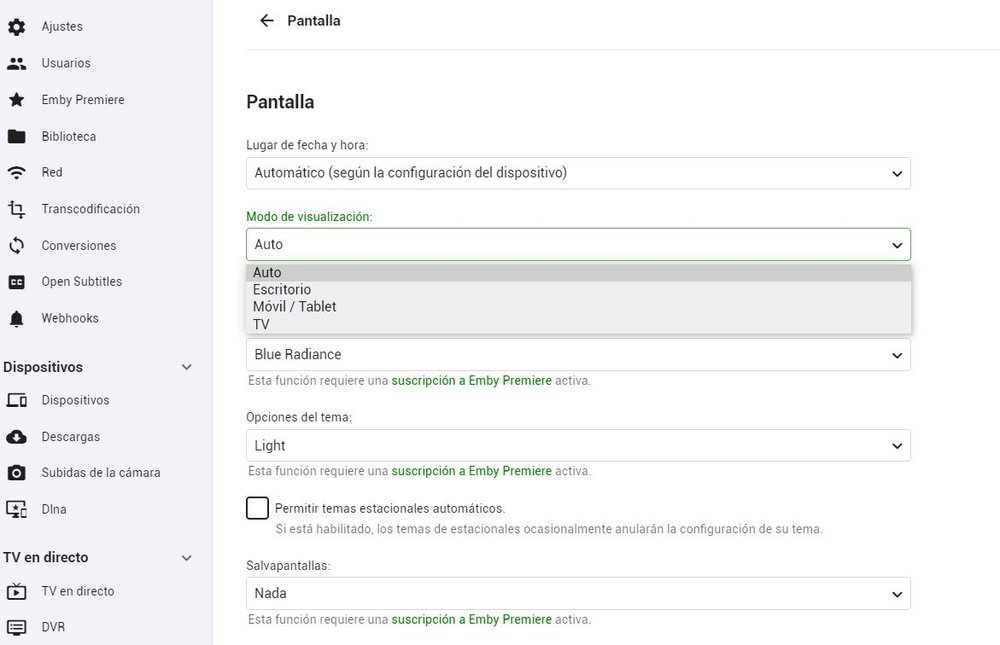
That device runs Android Mobile with a custom launcher. Android TV is a different OS: Differences between Android TV and pure Android (linkedin.com) You can change that setting here:
 1 point
 -
The app should be able to detect or know if a device supports h.265 and simply request that if it's configured. You need h.265 hardware on both ends, but many people have this now or are not too far away from it considering that the last 3 generations of quicksync do it and as many nvidia generations as well. I would very very very much prefer h.265 streaming to my clients because many are not on my LAN. 1/2 the bitrate is really enticing.1 point
-
For those interested in trying out a test build: Please leave feedback in that topic. Thanks. Thanks.1 point
-
For those with the DTS problem, the best solution is to simply add a non DTS track to the original media. That way, the issues goes away and you now have a file that can be played by any system - you can opt to play the DTS Audio if you can - this script does not replace it. Go to your emby server system directory and find ffmpeg Then at a command window use the following to ADD an AC3 track and make it the default track :- ffmpeg.exe -i input.mkv -map 0:v -map 0:a:0 -map 0:a -map 0:s? -c:v copy -c:s copy -c:a copy -c:a:0 ac3 -disposition:a:0 default -disposition:a:1 0 output.mkv It copies all the existing tracks (original quality) and just adds an AC3 track, derived from the 1st Audio track. This will work on any mkv file incl 4K - it will not touch the original 'input.mkv' file.1 point
-
Personally my only reason to still use Kodi with the Emby plugin and not the Emby App is the lack of the ability to select "download subtitle" during playback. This is a killer feature in Kodi, and I hope you guys can consider bringing it to Emby, I do have my Admin area set to automatically download subtitles, but many times (even so I have the option to only download exact matches) the subtitle is not the right one to the video file version, and the ability to just download a new subtitle on the fly is very welcome. Hope you guys can consider this Null1 point
-
It's possible for the future, but improving our existing features comes first.1 point
-
+1 sub section like favorites for example?1 point
-
If your source files are 29.976 and UI is 60p then your TV is not switching form 60 Hz.0 points