Leaderboard




Popular Content
Showing content with the highest reputation on 01/02/21 in all areas
-
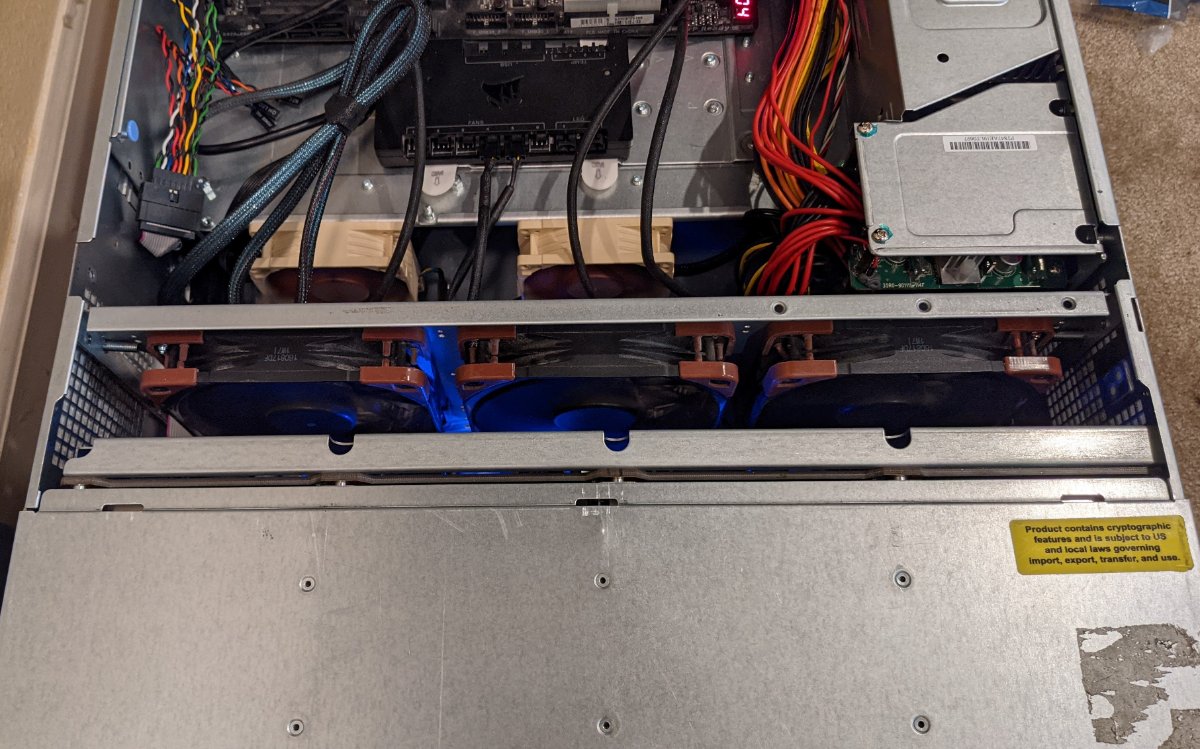
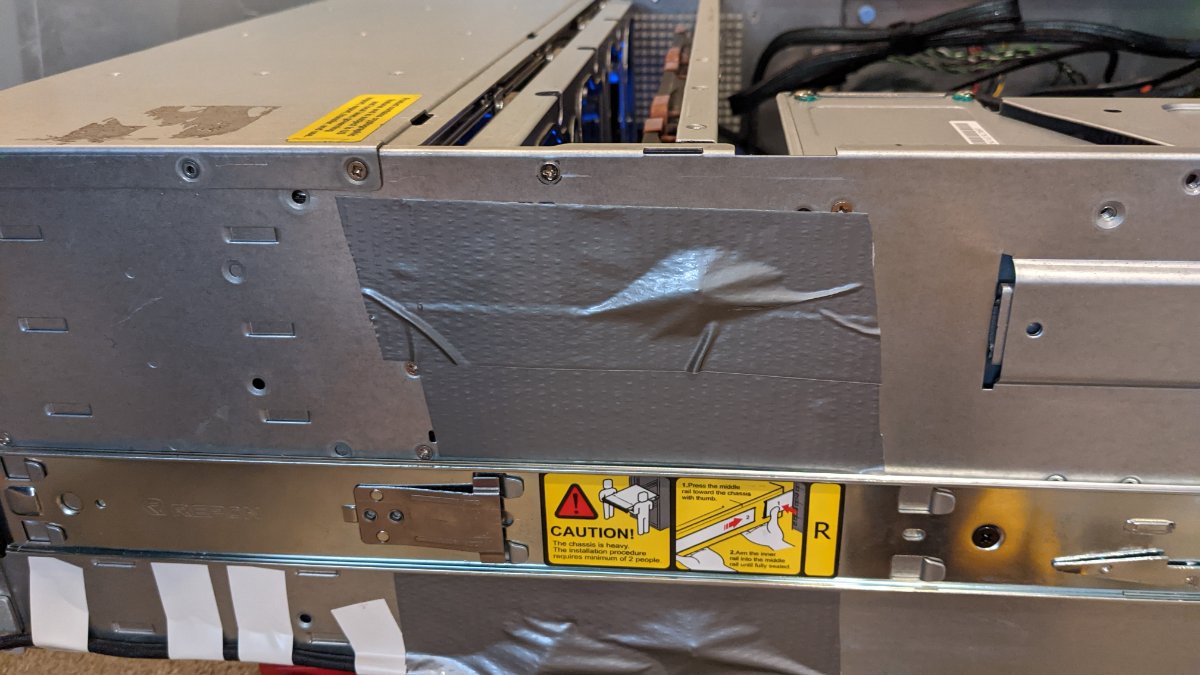
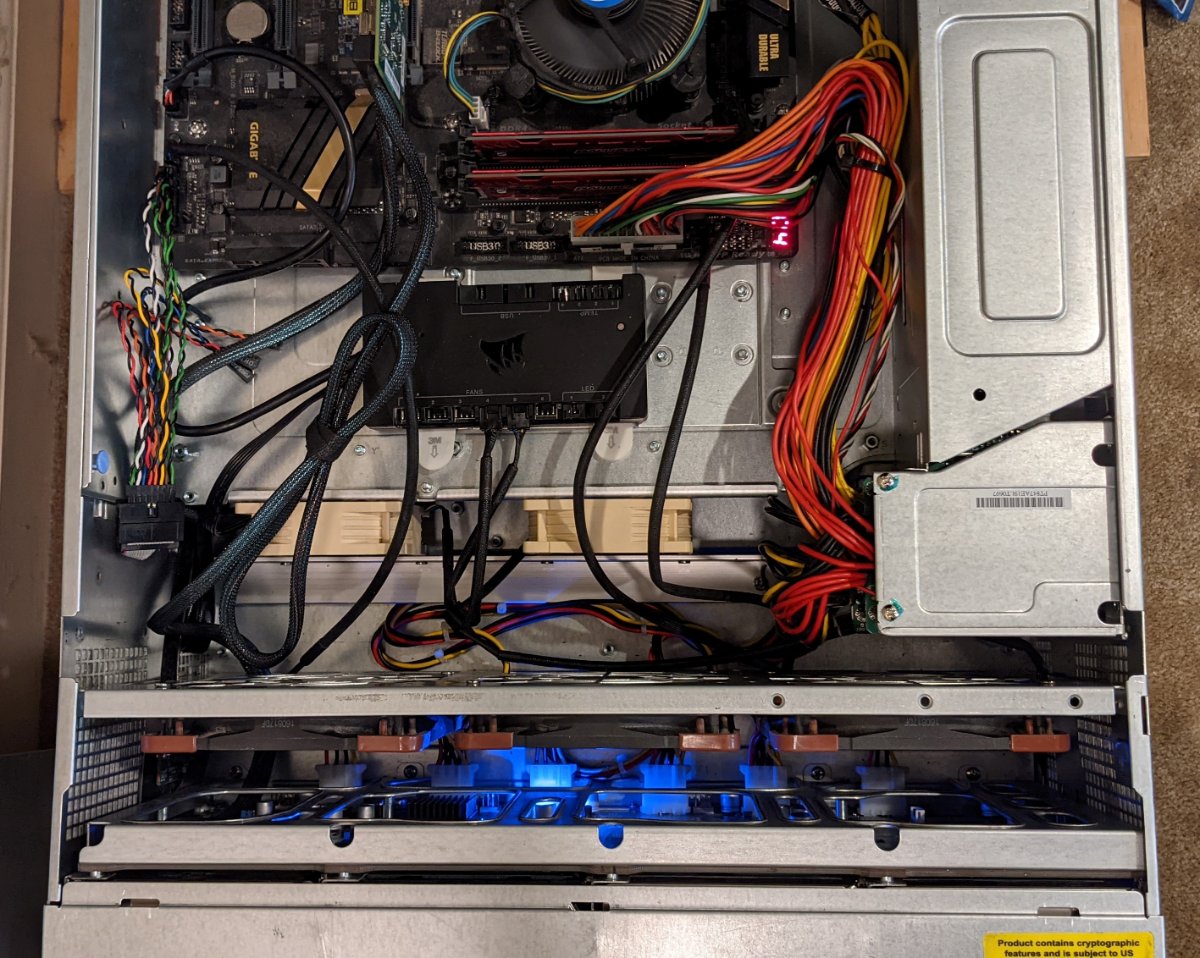
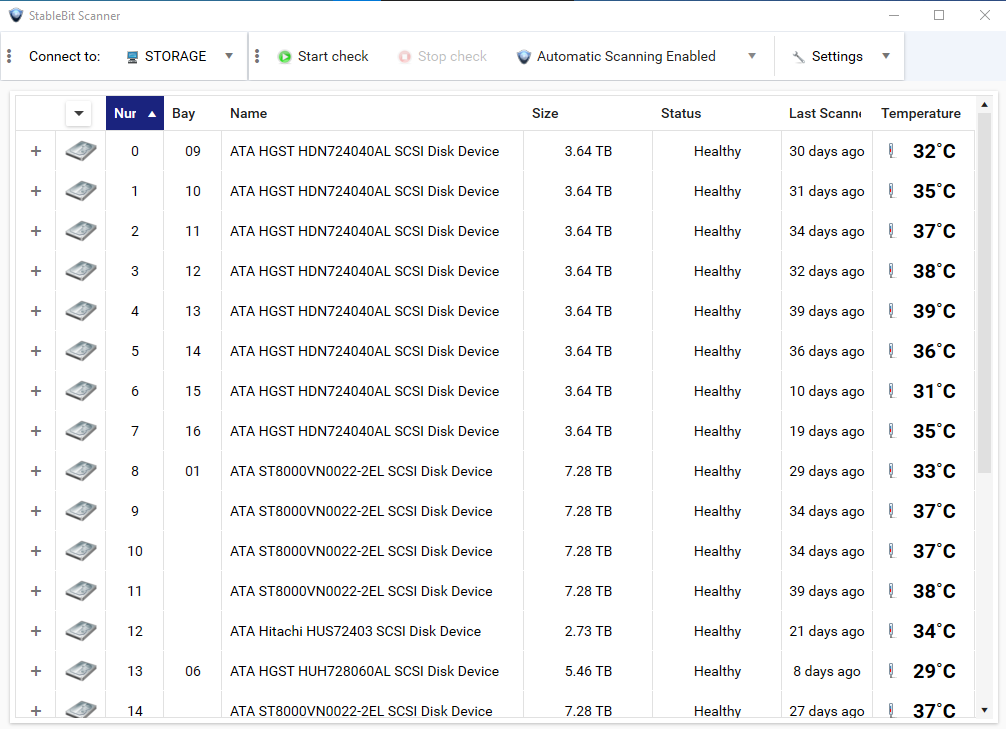
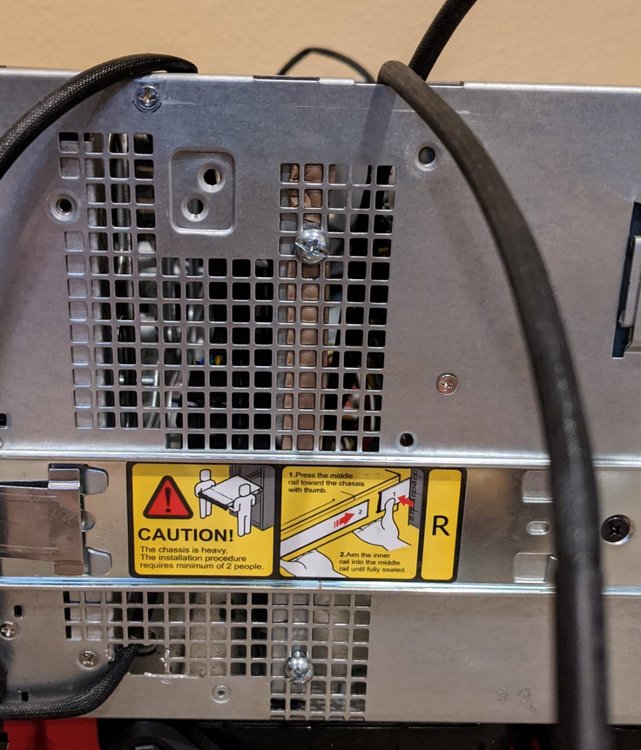
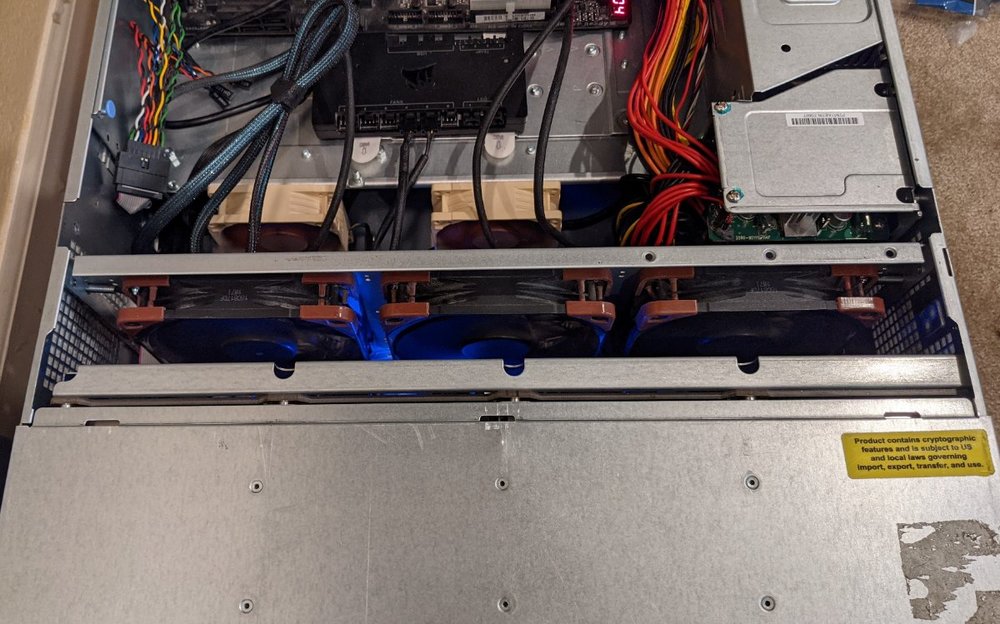
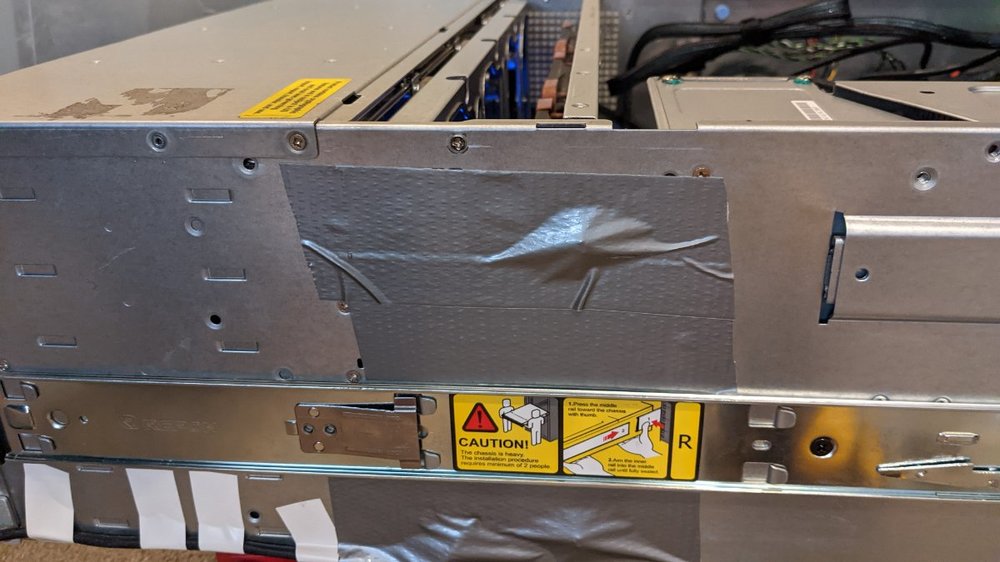
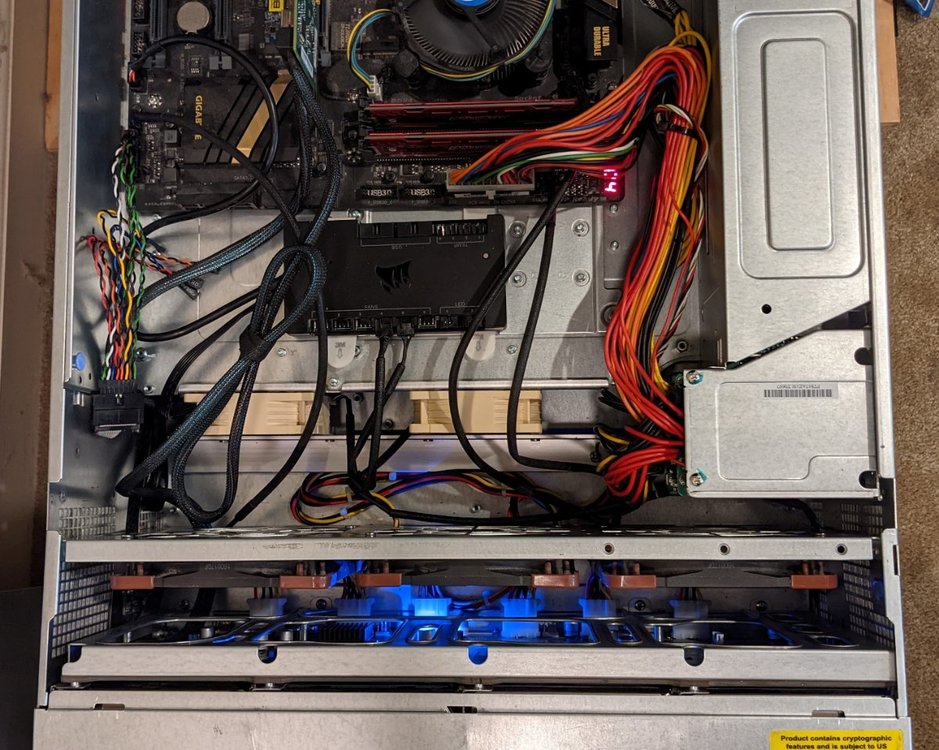
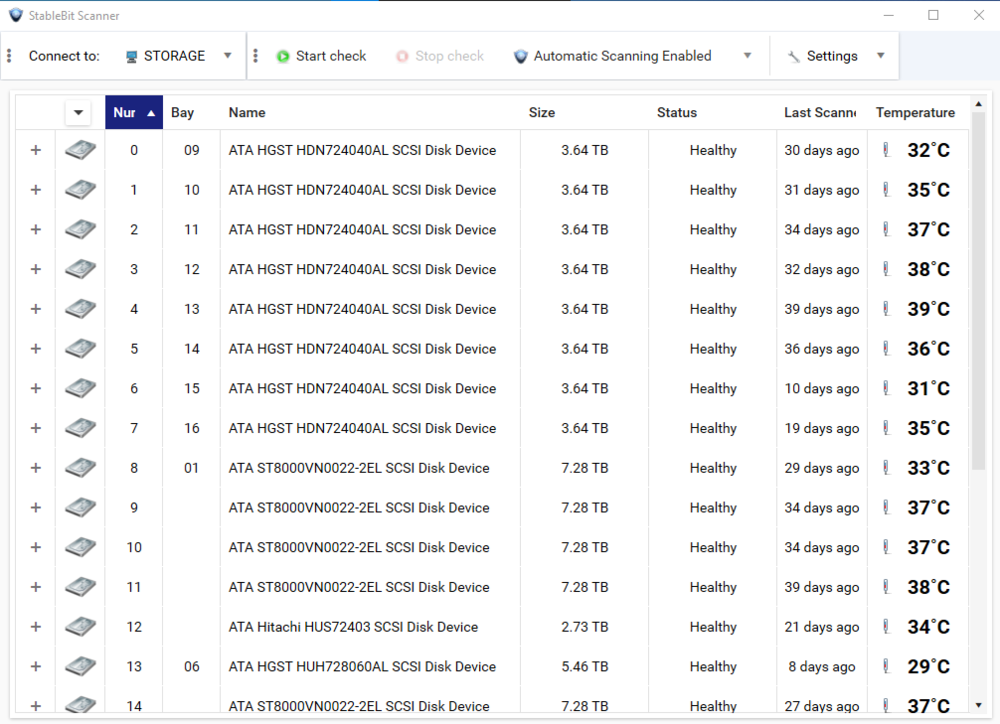
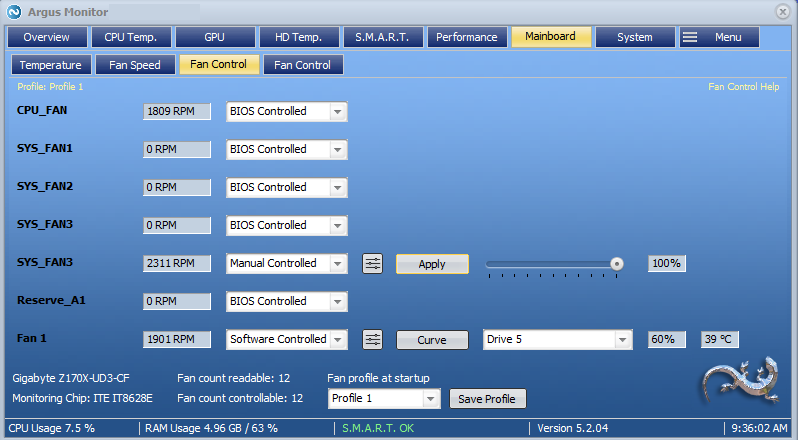
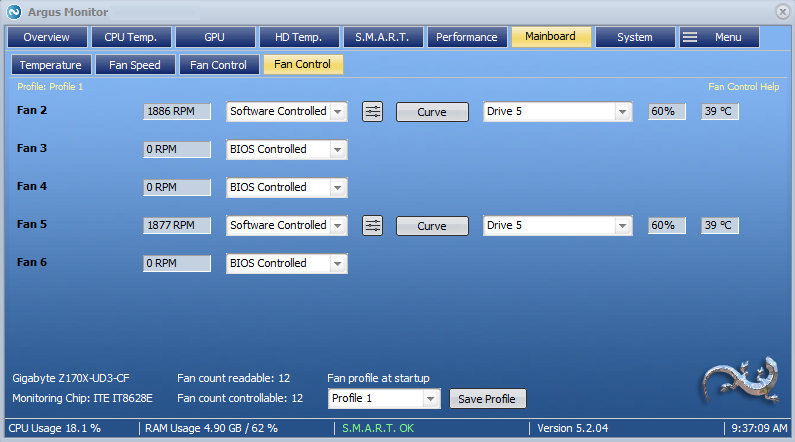
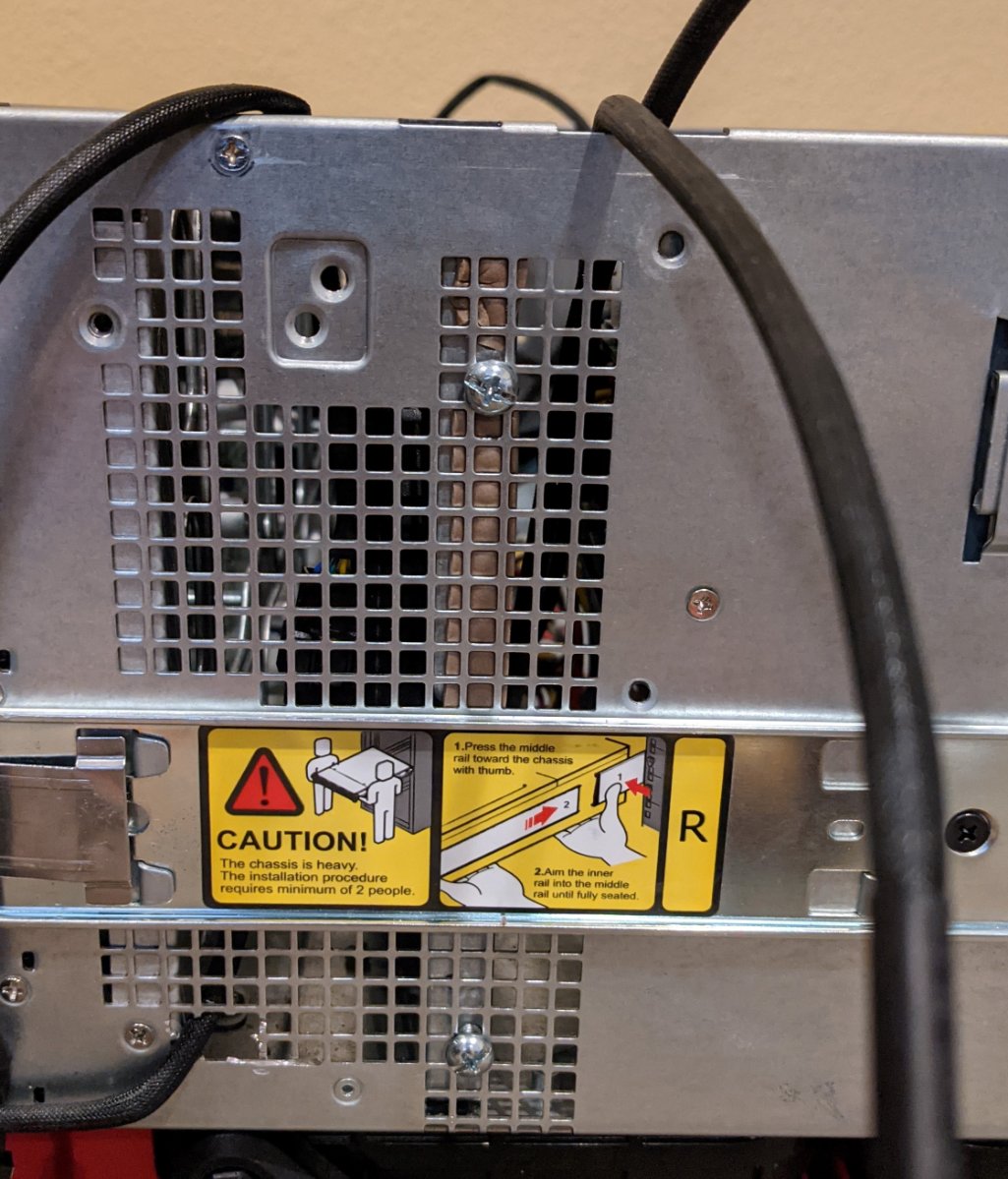
OK, project finally finished. And the results are good. I'll start by saying that the system always worked, but the noise of the main fans and what I later discovered, the PSU fan, was intolerable. So the goal was to reduce noise but maintain proper cooling. The first thing that needed to be done was remove the existing fan wall(s) and all of the fans. A little fiddly, but not difficult. The Supermicro case (847) has rear drives, so there are two levels inside the case. The top one is where the motherboard sits, and it slides back to allow access below it. Air obviously needs to pass through the rear drive bays, too. But the air is pulled through the front and pushed out the back. There is plenty of space to work with, so I mounted two 80mm fans to a piece of aluminum angle, and screwed that to the available mounting posts on the bottom of the chassis. This will direct air flow to the back drives. The top of the fans align with the edge of the motherboard tray. Next, we need fans to pull air through the front drives. I am using Noctua NF-F12 iPPC 3000 PWM fans, three of them. And I mounted them to a Norco fan wall I was previously using. The height dimension of the fan wall is perfect, but the length is ~10mm shorter than the inside dimension of the Supermicro chassis. So I just lined it with some foam weather stripping. The chassis has side ventilation where the fan wall sits. So I used those to screw the fan wall in place. I drilled and tapped the fan wall to screw into. It's secure and doesn't vibrate. Once you have the power cables etc hooked up, you can slide the motherboard back into place and complete the rest of the connections. NOTE: I am not using passively cooled Xeon processors. I am using a standard ATX board with an i7 that has active cooling (a fan). If you are using passively cooled Xeons, sealing off the side vents might not be a good idea. You could try, but monitor the CPU temps. Argus will monitor that, too. You also need to seal off the side vents, to create more negative pressure. Just use duct tape. The 80mm fans are connected to the motherboard with a 'Y', and the front 120mm fans are connected to the Corsair Command Pro. I connected them this way because I wanted control of the fans. I wanted to connect all of the fans to the Command Pro and control the fans through that, but my motherboard BIOS only sees four fans, and on boot only four fans in a particular configuration will spin up. And this seemed the best way. I wanted to control the fans with a curve based on the hard drive temps. The Command Pro won't do this as it doesn't read the drives. So I found Argus Monitor. It monitors all parts of the system and each drive using the S.M.A.R.T data. With this I can specify which drives I can apply a fan control curve it is based on. I simply looked for the hottest drive(s) and applied the same curve to all three 120mm fans. And I run the 80mm fans at max. It's been running for several hours now, and the temps are on par with what I had in the Norco case. A little better actually, as the curve I made is running the fans at a slightly lower RPM (see below pics) Now, as I mentioned in the beginning, the PSU fan is also noisy. I was originally going to replace the fans, but after a little research there is a replacement PSU that is quiet. The Supermicro PWS-920P-SQ 920W 80 Plus Platinum. Just replace, and all good. The end result is a very nice. I am content.
.thumb.jpg.06a93e898fca88385e253caba8335331.jpg)
.thumb.jpg.c11a57f996fef2495239ce5649caa13b.jpg)
 2 points
 -
Apologies. This is caused by Roku. They have altered their playback engine on certain models because of their architecture. The newer models will have issues because they are updating the playback engine for those models in the firmware. Certain older models will playback MKV with MPEG2 just fine. Others will cause the issue you describe. Roku will fix the issue eventually but until they do you can fix this during playback using playback correction. Press down to open the Video Player OSD. On the bottom will be a row of icons. The cog/gear icon will be the one you want to click. This will open the Playback Menu. Inside that menu will be the "Attempt Playback Correction" option you want to use. Click that once and it should solve the problem. You can use playback correction multiple times. Each time you use it will change the playback method to the next type. Let us know if this solves the problem. Apologies for the issue. We will be looking to improve this situation if Roku does not push firmware updates soon to address this issue. We will have to do something more than we are. Time will tell. But until then keep using playback correction. It will solve the problem. Roku forum with users having similar issues: https://community.roku.com/t5/Playback-Issues-Audio-Video-Power/Issues-with-MPEG2-after-9-3-Update-on-Roku-TV/td-p/582234 https://community.roku.com/t5/Playback-Issues-Audio-Video-Power/Roku-Ultra-4800X-Frames-Dropping/m-p/637265 https://community.roku.com/t5/Playback-Issues-Audio-Video-Power/Roku-ultra-2020-SD-mkv-playback-aspect-ratio-issues/m-p/635271 You can post on Roku forums and make a new thread or post a follow up into the first thread I posted above with the mpeg2 issue on Roku TV. Roku TV has the exact same chipset as the Roku Ultra and the two share so many similar issues.2 points
-
Only solution I found was remove the Mrs. hah (Though seriously, this is why you strive for a basement or bonus room you can call yours and she keeps her opinions out).2 points
-
I've been dying to know if this has garnered enough interest to be worked on. I found Emby (MediaBrowser 3 at the time) and its bookshelf plugin while I was searching for something that was like Plex for comics. Plex doesn't do this (and probably never will), Kodi doesn't have what I'm looking for either, and ComicRack seems to be dead at the moment. Unfortunately the bookshelf plugin doesn't work the way I had hoped. I was dissappointed to see it only offer a download to the file to which I can open it to the program of my choosing. Even browsing through the books I only had the option of going through folder-like directories and couldn't browse by author like the people section in the other media types. I would love for it to be fully integrated into Emby where I can open and read a comic right on my phone and tablet or even my web browser as I could with my movies and tv shows. Also, I hope to god somone is working on the "Games launching in android" feature you mentioned on your up-for-grabs blog post. That would be awesome!1 point
-
The default sort order is set to 'Folders'. I would prefer to have all libraries I select to default to release date. I know I can manually set it, but I have to do that for every folder in the library. I would like to see the ability to have it automatically set the default sort order for all new folders I create.1 point
-
Guys, The ebook side of Emby/MediaBrowser has been long stalled or rather stagnated. I would like to offer up a couple of suggestions. Many people use calibre as an ebook/comic book tool for scraping data and general management of their collection already. This program is absolutely astonishing in its ability to pull metadata from post calibre scans, as well as draw in metadata from the file source and/or directory structure. http://vaemendis.net/ubooquity/ Its a self contained .jar server/reader combination. And honestly I am very impressed by it's small footprint and wide range of abilities. The other option is COPS , which was written specifically with calibre in mind. It is open source, so making it work with emby I would think would be fairly easy. https://blog.slucas.fr/projects/calibre-opds-php-server/ Ever since the original release of MediaBrowser's bookshelf I have always wanted something that would allow me to 'read' my collection, rather than being basically nothing more than a place-set for images of books I own. I am sure that those who mainly have audiobooks are thrilled with bookshelf , but it's nothing more than an extension of the music library IMHO, not new features. We can have both right? Here I give you two suggestions free of charge.. Just because I love you, and Emby Personally I plan on running the Ubooquity Server along side of Emby from now on, just because of it's massive functionality and tiny footprint. But I sure hope that someone decides -- "yeah, ebook support should be in here too" and do something about it - rather than allow this now very very ancient issue to continue to remain an issue. And so I don't have to have 20 different ports open, some with SSL support - some not, because Emby isn't delivering the 'complete package'. (Please take some of this with humor, I know you have your hands full with improvements/bugs/suggestions/requests)1 point
-
I was able to install Emby on Docker with NVIDIA hardware acceleration without too much fuss, though I had to rely on a few different instructionals. Below are the steps I took get it to work (assuming you already have docker installed) on Ubuntu 19.04, for any other noobs trying to piece this all together: Step 1: Install container directly from Docker Hub (assuming Docker is already installed) docker pull emby/embyserver:latest Step 2: Install nvidia-container-toolkit and nvidia-container-runtime curl -s -L https://nvidia.github.io/nvidia-docker/gpgkey | sudo apt-key add - curl -s -L https://nvidia.github.io/nvidia-docker/ubuntu18.04/nvidia-docker.list | sudo tee /etc/apt/sources.list.d/nvidia-docker.list sudo apt update sudo apt install nvidia-container-toolkit nvidia-container-runtime Step 3: Register the nvidia runtime with docker sudo tee /etc/docker/daemon.json <<EOF { "runtimes": { "nvidia": { "path": "/usr/bin/nvidia-container-runtime", "runtimeArgs": [] } } } EOF Step 4: Restart Docker daemon configuration sudo pkill -SIGHUP dockerd Step 5: Create directories that will host the Emby container's directories sudo mkdir -p /opt/docker/volumes/emby/config Step 6: Create Emby container docker container create \ --name="emby-server" \ --network="host" \ --volume /opt/docker/volumes/emby/config:/config \ --volume /mnt/media:/mnt/media \ --device /dev/dri:/dev/dri \ --runtime=nvidia \ --publish 8096:8096 \ --publish 8920:8920 \ --env UID=997 \ --env GID=997 \ --env GIDLIST=997 \ --env NVIDIA_VISIBLE_DEVICES=all \ --env NVIDIA_DRIVER_CAPABILITIES=compute,utility,video \ emby/embyserver:latest Step 7: Start the Emby container docker start emby Step 8: Create /etc/systemd/system/docker-emby-server.service file with the following text: [Unit] Description=Docker Emby Container Requires=docker.service After=docker.service [Service] ExecStart=/usr/bin/docker start -a emby-server ExecStop=/usr/bin/docker stop -t 2 emby-server Restart=always RestartSec=2 [Install] WantedBy=default.target Step 9: Give the docker-emby-server.service file execute permission: sudo chmod +x /etc/systemd/system/docker-emby-server.service Step 10: Enable docker-emby-server.service sudo systemctl enable docker-emby-server Notes: Step 2: curl -s -L https://nvidia.github.io/nvidia-docker/ubuntu18.04/nvidia-docker.list |sudo tee /etc/apt/sources.list.d/nvidia-docker.list 'ubuntu18.04' was originally $(. /etc/os-release;echo $ID$VERSION_ID), but ubuntu19.04 is a no-go, so I forced it to ubuntu18.04. Step 5: You can create this directory wherever you want, it doesn't have to be exactly what I used Step 6: --name="emby-server" This names the container on the host for easy identification. You can call it whatever you want. --volume /opt/docker/volumes/emby/config:/configThis maps the directory (on the physical system) on the left side of the ":" to the directory (on the docker container) on the right side. This is the same directory you created in Step 5, and is absolutely required. --volume /mnt/media:/mnt/mediaSame concept as above. In my case, this is where all my media is stored. --env UID=997This is the UID of the 'emby' user on my system --env GID=997This is the GID of the 'emby' group on my system --env GIDLIST=997Same as above Steps 8-10: These are optional and only used to ensure my emby-server container starts on boot. I decided to go the route of a systemd service because for all intents and purposes, Emby provides a service and is therefore a service. If you don't want to go this route, you can instead add --restart unless-stopped \ somewhere into Step 6.1 point
-
I was a hardcore fan of emby but now I've decided to move to plex. The client support on emby is not cool! You shouldn't put trial limit on you Firetv emby. Except that, everything else is gold.1 point
-
Hi, Maybe I'm blind but I did not found anywhere (ios app, web app and theather pc) a button which allows to skip playing chapter to next one, if they are defined. I see chapters all listed before I start the movie, but there is no way to choose or skip them while playing.1 point
-
Today my login and password continually fail... I know my user name and password (have it clearly written down old school) and used it only last night to get my daughters Ipad up and running and it worked fine. Today (the past couple of hours) emby refuses to let me log in, saying my user name and or password are incorrect (this is not the case) Any feedback?1 point
-
I have Calibre as my primary ebook management software. It is very common that I'll get an ebook in one format and need to have Calibre translate it to another format, like: title.pdf title.epub I've changed ebook readers several times over the years, so it's not uncommon for there to be 3 or more versions of one title. In Calibre, these are merged into one listing, and when I want to do anything with them I specify which version - and Calibre knows what ereader I'm using, so if I want it to sync ebooks to my ereader it knows which one to default to. Similarly, in Emby, when I have the same video in two different formats, like: title (1980) - 720p.mp4 title (1980) - 1080p.mp4 I can group them and they're treated as one listing, and I can use a dropdown to select which version I want to watch. However, I also have my ebooks library linked to Emby, and I find that I am unable to group books, so in the above example both versions are listed as separate books. This is highly annoying - above and beyond the difficulty of determining what format I'm looking at, I have to wade through a lot of repetitive listings to try to find what I want. I am not asking for Emby to automagically detect multiple copies and group them together for me (although if they have the same title and are in the same folder this should be easily possible - and indeed, Calibre is open source so it should be possible to read its metadata), I am just asking for the "Group items" option to be enabled for ebook titles so I can do it manually. I really love that in Emby I can create a Collection containing ebooks, video games, music videos, tv shows, and movies, and see all related content together. It becomes a real pain in the neck, however, when I get multiple listings for each ebook to wade through before I even get to the videos.1 point
-
Found a handy way to change the volume of the pi, without needing to open up a window. amixer -q -M sset Headphone {volume}% This will adjust the volume for the device Headphone, but use PCM for the HDMI port. 85% is the max, before the audio becomes distorted. public async Task<string> SetVolume(string ip, int volume) { string retval; retval = ""; using (var client = new SshClient(ip, 22, "pi", "raspberry")) { client.Connect(); try { client.RunCommand($"amixer -q -M sset Headphone {volume}%"); } catch (SshConnectionException) { retval = "Disconnected"; } } return retval; }1 point
-
I'll wait then... for a change I don't have any complaints! I'm very happy1 point
-
No, just replace the dll. But if you currently don't experience any problems, better wait for an official anouncement from me.1 point
-
Most don't including mine which is why the instructions are worded the way they are. The ones who can upgrade are lucky. I suppose I could try to reword the instructions though so people can try upgrading if they wish1 point
-
This does not work for all Samsung TV. For example my 2017 Tizen TV will not install any new version of an USB-installed App unless it is completely deleted. Which of course also deletes all settings.1 point
-
So, basically you want everything for free? Or did I get it wrong?1 point
-
Ok, I understand my mistake. Thanks. It's ok now ... except for movies in subfolders, it says I have no right !?1 point
-
Follow up: https://community.roku.com/t5/Roku-Device-Features-Settings-Updates/Roku-v9-4-broke-HDHomeRun-Playback-Recordings/m-p/627196 Seems the HD Homerun people do indeed have the same problem. They also expect Roku to be doing their due diligence and fixing this on their side. Lets hope they do.1 point
-
Hi, I tried the first time to allow a user to access the server only with one device, but i saw it lists all devices, not just the device the user was connecting. This will make problems as a lot users just use "Kodi" or may have the same TV Model or lets say a raspberry pi. It would be good, to see only the devices this user has used to log in. The limitation of a Device or Model Name seems not to be a clear ID to make this restrictions. Maybe i missed something as i never used it before, but if there is no better way, it would be great to improve that. Thanks.1 point
-
I understand that there's an option to play a video from, say, my Movie library at random. But would it be possible to shuffle the content in the library, so I can browse in a random fashion rather than trying to apply various filters?1 point
-
1 point
-
Thank you very much @FrostByte , it was very easy to migrate to the new version, as long as you shut down the process then reboot, then update with the .spk. i highly recommend this should be stuck to the top somewhere so that people can search for it easily, because this was a very smooth transition @Luke,1 point
-
Can you give me a copy of the external srt and some times in it that you know should be on two lines? I have an idea how we might be able to fix this1 point
-
I'll check that.1 point
-
also cuts quite a bit of the actual movie film edges off. But to each their own.1 point
-
Hi, currently no, but you can expect there will be options in future updates. thanks.1 point
-
New version just uploaded. You'll have to download and install manually from https://www.ballingtons.com/products/1 point
-
I think I figured it out. I added the channel number to the beginning of the channel name and it seems to then do exactly what I want.1 point
-
Hi, what version of qts do you have?1 point
-
Kid's & Children's TV Shows have been added to all libraries! Thanks again for pointing out the missing files and for being patient while I got them uploaded!

 1 point
 -
Hi, hopefully soon.1 point
-
For those interested in trying out a test build: Please leave feedback in that topic. Thanks. Thanks.1 point
-
HI, embedded chapters are supported, we just haven't yet added functions in the video player to select chapters. It's planned for the future. thanks.1 point
-
FYI, docker 19.03 has an integrated gpu option. https://github.com/NVIDIA/nvidia-docker switch out --env NVIDIA_VISIBLE_DEVICES=all \ --env NVIDIA_DRIVER_CAPABILITIES=compute,utility,video \ with --gpus all \ See usage and install instructions in link above.1 point
-
Another interesting API, this time for yfiysubtitles.com https://github.com/vankasteelj/yifysubtitles-api/blob/master/README.md#search-a-subtitle1 point
-
You can use an m3u playlist with Emby. You need to set it up under Live TV in the dashboard, and set up your URL as an M3U Tuner. You can then also add your EPG URL as an XML TV guide source.1 point
.jpg.5bc23470b4469af74a5a59f8cf4a4344.jpg)
.jpg.ee7db11dd6ce9d15525d2799c0009e22.jpg)