Leaderboard




Popular Content
Showing content with the highest reputation on 12/24/20 in all areas
-
Not going to have the same audio support I don't think... The easy answer is the Shield.2 points
-
Another version, if native path mode has issues while sync. No changes for addon mode. https://kodi.emby.media/Public testing/next-gen-ALPHA-build839.zip2 points
-
Merry Christmas New version available: https://kodi.emby.media/Public testing/next-gen-ALPHA-build838.zip Fixes: LiveTV Native mode sync issues TV-Show cast not shown New: Multipart Videos support Known issues: - Pending: Changelog Local Trailers Up-Next Review Comments: This version requires a full DB re-sync. It will NOT trigger automatically. Please trigger manually.2 points
-
I was thinking more like the booger you can't flick off you finger, but devil works I suppose2 points
-
@sooty234 Remember that "best hardware" (aka HTPC) thread? Are you blushing?2 points
-
@rechigo, welcome back and Merry Christmas!2 points
-
Apologies for my complete lack of activity, my Docker installation got corrupted (along with all my volumes) and I lost mostly everything besides my Emby which is the only service that doesn't reside on docker due to hardware transcoding limitations (I'm on Windows), and I didn't have the time nor motivation to fix everything up. Hopefully after Christmas I'll upgrade my hardware, get all of my Emby mods and services working again, and finally take a look at the issues people are having and help to resolve them. I haven't added any media besides music which has been working fine, so maybe something changed in the new betas that broke some stuff. I might end up rewriting this plugin entirely since the code is quite a mess.2 points
-
The good news is that after a lot of research into chroma-printing audio, and some magical comparison algorithms, we may be seeing this feature in emby sooner then you'd think. Very cool stuff!2 points
-
"SQLitePCL.pretty.SQLiteException: Corrupt: database disk image is malformed" usually means you have a corrupt library.db. With Emby shut down make sure you don't have any rouge "library.db-shm" or "library.db-wal". If so delete and attempt to start Emby and see if you get the same error, otherwise you will need to delete/rename the db and allow to rebuild. 2020-12-24 17:11:28.618 Error TaskManager: Error *** Error Report *** Version: 4.5.4.0 Command line: F:\App Data\Emby\system\EmbyServer.dll Operating system: Microsoft Windows 10.0.19042 Framework: .NET Core 3.1.9 OS/Process: x64/x64 Runtime: F:/App Data/Emby/system/System.Private.CoreLib.dll Processor count: 8 Data path: F:\App Data\Emby\programdata Application path: F:\App Data\Emby\system SQLitePCL.pretty.SQLiteException: Corrupt: database disk image is malformed SQLitePCL.pretty.SQLiteException: Exception of type 'SQLitePCL.pretty.SQLiteException' was thrown. at SQLitePCL.pretty.SQLiteException.CheckOk(sqlite3 db, Int32 rc) at SQLitePCL.pretty.StatementImpl.MoveNext() at Emby.Sqlite.SqliteExtensions.ExecuteQuery(IStatement This)+MoveNext() at Emby.Server.Implementations.Data.SqliteItemRepository.QueryItemsInTransaction[T](InternalItemsQuery query, IDatabaseConnection db, String[] columnsToSelect, Func`5 rowReaderFn, Boolean singleResult, String methodName) at Emby.Server.Implementations.Data.SqliteItemRepository.GetItemList(InternalItemsQuery query) at Emby.Server.Implementations.Library.LibraryManager.GetItemList(InternalItemsQuery query) at MediaBrowser.Controller.Entities.Folder.GetRecursiveChildren() at Emby.Server.Implementations.Library.LibraryManager.DeleteItem(BaseItem item, DeleteOptions options, BaseItem parent, Boolean notifyParentItem) at MediaBrowser.Controller.Entities.Folder.ValidateChildrenInternal(IProgress`1 progress, CancellationToken cancellationToken, Boolean recursive, Boolean refreshChildMetadata, MetadataRefreshOptions refreshOptions, IDirectoryService directoryService) at MediaBrowser.Controller.Entities.UserRootFolder.ValidateChildrenInternal(IProgress`1 progress, CancellationToken cancellationToken, Boolean recursive, Boolean refreshChildMetadata, MetadataRefreshOptions refreshOptions, IDirectoryService directoryService) at Emby.Server.Implementations.Library.LibraryManager.ValidateTopLibraryFolders(Boolean refreshMetadatas, CancellationToken cancellationToken) at Emby.Server.Implementations.Library.LibraryManager.PerformLibraryValidation(IProgress`1 progress, CancellationToken cancellationToken) at Emby.Server.Implementations.Library.LibraryManager.ValidateMediaLibraryInternal(IProgress`1 progress, CancellationToken cancellationToken) at Emby.Server.Implementations.ScheduledTasks.ScheduledTaskWorker.ExecuteInternal(TaskOptions options) Source: SQLitePCL.pretty TargetSite: Void CheckOk(SQLitePCLEx.sqlite3, Int32)1 point
-
Looks like possibly a ffmpeg issue on this system, errors at startup and later. 2020-12-24 12:41:40.320 Error FfmpegManager: ProcessRun 'ffmpeg -hide_banner -version' Output: ffmpeg version 4.3.0-emby_2020_05_23 Copyright (c) 2000-2019 the FFmpeg developers and softworkz for Emby LLC built with gcc 8.3.0 (crosstool-NG 1.24.0) configuration: --cc=x86_64-emby-linux-gnu-gcc --prefix=/home/embybuilder/Buildbot/x64/ffmpeg-x64/staging --disable-amf --disable-debug --disable-doc --disable-ffplay --disable-vdpau --disable-xlib --enable-fontconfig --enable-gnutls --enable-gpl --enable-iconv --enable-libass --enable-libdav1d --enable-libfreetype --enable-libfribidi --enable-libmp3lame --enable-libopus --enable-libtheora --enable-libvorbis --enable-libvpx --enable-libwebp --enable-libx264 --enable-libx265 --enable-libzvbi --enable-pic --enable-version3 --enable-cuda-llvm --enable-cuvid --enable-libmfx --enable-nvdec --enable-nvenc --enable-vaapi --extra-libs='-ldrm -lva-drm' --enable-cross-compile --cross-prefix=x86_64-emby-linux-gnu- --arch=x86_64 --target-os=linux --pkg-config=pkg-config --pkg-config-flags=--static --enable-shared --disable-static libavutil 56. 36.100 / 56. 36.100 libavcodec 58. 62.100 / 58. 62.100 libavformat 58. 35.100 / 58. 35.100 libavdevice 58. 9.101 / 58. 9.101 libavfilter 7. 67.100 / 7. 67.100 libswscale 5. 6.100 / 5. 6.100 libswresample 3. 6.100 / 3. 6.100 libpostproc 55. 6.100 / 55. 6.100 2020-12-24 12:41:40.320 Error FfmpegManager: ProcessRun 'ffmpeg -hide_banner -version' Error Output: Execution Date: 2020-12-24 12:41:40 2020-12-24 17:30:28.438 Error Server: Error processing request *** Error Report *** Version: 4.5.4.0 Command line: /share/CACHEDEV1_DATA/.qpkg/EmbyServer/system/EmbyServer.dll -programdata /share/CACHEDEV1_DATA/.qpkg/EmbyServer/programdata -ffdetect /share/CACHEDEV1_DATA/.qpkg/EmbyServer/bin/ffdetect -ffmpeg /share/CACHEDEV1_DATA/.qpkg/EmbyServer/bin/ffmpeg -ffprobe /share/CACHEDEV1_DATA/.qpkg/EmbyServer/bin/ffprobe -defaultdirectory /share/CACHEDEV1_DATA -updatepackage emby-server-qnap_{version}_x86_64.qpkg -noautorunwebapp Operating system: Linux version 4.2.8 (root@U16BuildServer116) (gcc version 4.9.2 (toolchain config: [gcc-4.9.2 binutils-2.25 glibc-2.21]) ) #1 SMP Fri May 31 00:59:55 Framework: .NET Core 3.1.8 OS/Process: x64/x64 Runtime: share/CACHEDEV1_DATA/.qpkg/EmbyServer/system/System.Private.CoreLib.dll Processor count: 4 Data path: /share/CACHEDEV1_DATA/.qpkg/EmbyServer/programdata Application path: /share/CACHEDEV1_DATA/.qpkg/EmbyServer/system System.Exception: System.Exception: Error starting ffmpeg at Emby.Server.MediaEncoding.Api.BaseStreamingService.StartFfMpeg(StreamState state, String outputPath, CancellationTokenSource cancellationTokenSource, Boolean acquireResources) at Emby.Server.MediaEncoding.Api.Hls.DynamicHlsService.GetDynamicSegment(StreamRequest request, String playlistId, String segmentId, Int32 subtitleStreamIndex) at Emby.Server.Implementations.Services.ServiceController.GetTaskResult(Task task) at Emby.Server.Implementations.Services.ServiceHandler.ProcessRequestAsync(HttpListenerHost appHost, IRequest httpReq, IResponse httpRes, RestPath restPath, String responseContentType, CancellationToken cancellationToken) at Emby.Server.Implementations.HttpServer.HttpListenerHost.RequestHandler(IRequest httpReq, ReadOnlyMemory`1 urlString, ReadOnlyMemory`1 localPath, CancellationToken cancellationToken) Source: Emby.Server.MediaEncoding TargetSite: Void MoveNext()1 point
-
Just noticed when drilling into an episode that none of the info is there, like it hasnt even been scraped. So maybe that is part of the problem I refreshed the metadata and selected "search for missing metadata" and now its showing as one show with all the episode info. That was really weird1 point
-
i think it would be helpful if you could set a number of episodes to auto play before it stops, or, like netflix, could ask if youre still watching. but unlike netflix, you could set the threshold yourself or turn it on/off when needed.1 point
-
Depends upon the OS that the Android box is running.1 point
-
I didn't realize there was a fully exposed API with full documentation. Kudos to you guys. In about 5 minutes I was forcing my phone to play songs from postman on my desktop. I'm going to have a great deal of fun with this! Now to get an arduino to do all of the calls from a button push. I'll be automating storms in my tiki bar in no time!1 point
-
Correct, there is no GO HOME option in the LG ET app. There is in the Android TV app so hopefully it will make it to all apps at some point.1 point
-
Had another looks at the Webhook feature and found some other drawbacks: 1. It is only available for Emby Premiere, i dont know why. 2. There is only a small subset Webhook Notifications available, newly added content is none of it.1 point
-
Nvidia Shield does all that - highish price but worth it if you have a new android tv (Sony etc) less than a year or so old then they can do the same my new Sony A85 is snappier then my 2017 shield and works the same1 point
-
Now, it's ok. I tried to change usb with verbatim and it is installed.. Thanks1 point
-
Hello, I just wanted to post an update....about an hour after I posted last night, I noticed Emby started working remotely. I waited about 24 hours to post the update incase there were any issues again. So far everything is good. I think when the ports were open on my modem/router it took a bit of time for it to update before working. If there are anymore issues I will post in this topic again and we can take it from there. But I want to say thanks so far to everyone who responded on here. As @Cayars mentioned, I think my router/modem was updated by my internet provider and it blocked the ports....but now they seem open. But as I mentioned earlier if there are any further issues about remote connections I will post them again. Thanks again for the assistance.1 point
-
SUOMI35 Let me know if I can provide any assistance. I believe this portable solution with Emby server is un-matched in the market today. Wish much more people knew about it.1 point
-
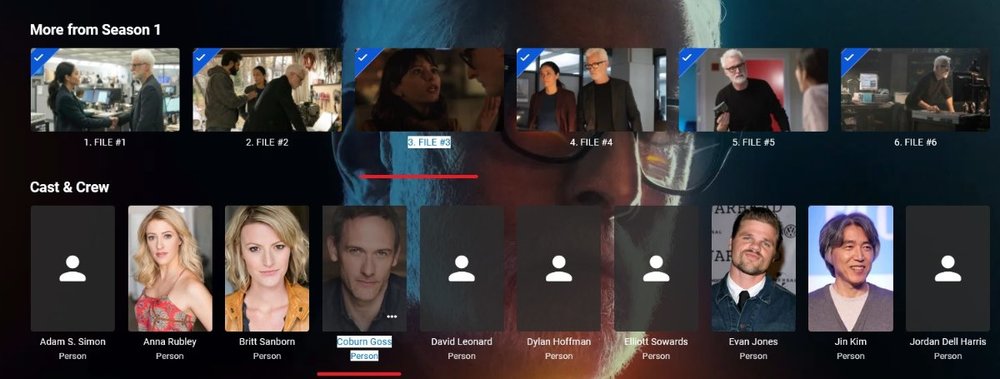
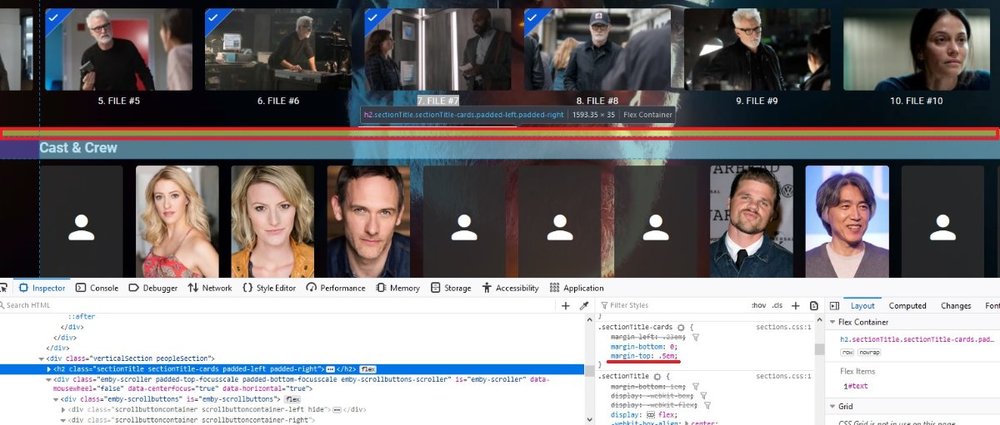
episode cards are a pain as they are Draggable but they work, just have to actually find the bottom edge of the card to drag up and catch the text. With the limited padding between the two sections you have a very limited drag select area as Firefox acts differently then Edge/Chrome. .emby-button, .cardTextActionButton { -webkit-user-select: all; -moz-user-select: all; user-select: all; } FF 85
 1 point
 -
FYI home screen only all cards div.homeSectionsContainer .cardScalable1 point
-
Thanks for the reply @rechigo, It appears that whatever has happened in the near recent future has resolved the inability to see new posts and is now working. I'm not sure if anything changed or not, but I"ll let you know if it starts acting up again.1 point
-
Your response pointed me in the correct spot - xmltv, not m3u. My thinking is since the channels were not showing up, the issue was with the m3u - thought that channels would appear even with missing or invalid tv guide data. You are correct, it was the xmltv. Found out the provider had changed things up, and now you have to have the password included. The URL ended in "?username=123456&password=" was fine. Now it requires a password instead of leaving the value blank. Makes since since the M3u loaded fine. Never even looked at the xmltv. Thanks for catching what I missed.1 point
-
Something like this ::-moz-selection { /* Code for Firefox */ background: transparent; } ::selection { background: transparent; } or * { -webkit-user-select: none; -moz-user-select: none; user-select: none; }1 point
-
I use the minimum age of 1 minute. I have it set to delete the files. I stage my recordings so once mcebuddy is done with them they are moved to a different location. If I watch something right away and MCEBuddy is processing it while I'm watching it then there will be a problem because it can't delete it. So once a week or so I look through recording and delete anything manually that should not there anymore.1 point
-
Sorry, I have been out the last 4 hours doing last minute Christmas stocking shopping... OK. I am sorry about earlier. I didn't pay close enough attention to the dialog box you posted. I don't monitor locations and allow MCEBuddy to automatically process my files because I manually edit all my TS files to remove padding and commercials....but I checked it out and you are correct, you can use that setting to delete the TS files upon successful conversion. If you disable the "Minimum Age" then the TS files will be processed immediately upon completion of recording so in your case since your wife likes to watch as soon as she has enough buffer to time shift backwards and forwards I suggest you set the "Minimum Age" to 6-10 hours or whatever time you know your wife will be asleep or no longer watching TV, that way you free up your computer resources as well as prevent the situation you describe. Windows locks any file in use from being deleted, but that does not mean that what MCEBuddy in trying to do in the background may not cause some kind of system issue resulting in your system becoming unresponsive, or the issue could be unrelated to MCEBuddy wanting to delete the file. I don't know how MCEBuddy works under the hood so my best suggestion is to set your "Minimum Age" as I just stated above. So I suggest you only choose letting MCEBuddy delete the original TS file if you adjust your "Minimum Age" accordingly. That is a decent system and video card so I would definitely set it to use Hardware Transcoding if your files need transcoding to play, or encode your files as I do to avoid needing to be transcoded and only watch your compressed files....but with TS files you shouldn't need transcoding unless you're watching them remotely on a device that doesn't support the audio or video. If your files require transcoding to play correctly and MCEBuddy is running in the background then both are competing for resources because I have found recently that even choosing "Hardware Acceleration" doesn't fully use the GPU to it's capacity and you will be using more CPU than necessary to encode. I am currently working on a custom profile to avoid this and use the GPU to it's fullest capacity which should not only reduce system resources necessary but also the time needed by almost half .....when I get it working I will share it with you. For now I suggest setting MCEBuddy to delete your TS files but adjust the "Minimum Age" to avoid the conflict and if you still have conversions running the next night when it's time to watch TV just pause MCEBuddy during that time. I used to have to pause MCEBuddy whenever I watched anything from Emby on my Xbox 360 because it always needed to transcode and the competition for resources led to issues with playback. Let me know what you find out testing and if you still have an issue I'll do my best to help.1 point
-
I'm going to add my support for this feature as well. While Extras may be able to go into Specials for most series, cracks start to show with a series like Doctor Who (1963). This series has multiple DVD releases per season each with a handful of features, and each with a multitude of Extras relating specifically to those episodes. One four-episode story may have ten or more extras, with sometimes close to ten stories in a season. It just becomes completely unmanageable. This is compounded with a DVD release like the TV Movie - a special which is listed as S00E60 on the TV database. As it is already a special, there is no way to associate the extras with the episode in Emby. The solution seems obvious to me. Have each episode in its own folder that acts like a Movie folder: Doctor Who (1963)\Season 00\Doctor Who (1963) S00E60\Doctor Who (1963) S00E60.mkv Doctor Who (1963)\Season 00\Doctor Who (1963) S00E60\Extras\Paul McGann Interview.mkv Now on the episodes information page, the extras will be displayed just as they would be in movies. Additionally, you need to be able to be able to add extras to Seasons: Doctor Who (1963)\Season 01\Extras\Theme Music Video.mkv These could be displayed at the bottom of the season. Something like the mockup attached.
.thumb.png.d6b8bc6ce8e3a6d910fd04ba5b5a5a25.png) 1 point
1 point -
Have you explored the "Home Screen" configuration in the different apps? Much of what you want to do can be done.1 point
-
G'day Luke, I am happy to report that I have now tried my setup with Emby Server 4.5.2. I have not done much testing yet, and will, but so far it seems to be running wonderfully. I am using a Samsung S10 with Android 10. Connected to that is a USB C Hub with PD capability, and to that a 20000mAh Portable Charger and 2 WD portable Passport drives, formatted exFAT (3TB and 4TB.) I have access and play capabilities from multiple Emby clients on the LAN. The Emby server was able to scan the 7TB of Movie and TV Series directories pretty fast and to get 99.9% of the poster art etc with one scan. My files do have nfo and artwork locally available. I intend to test how many clients I can attach, how long the portable system will last running without external power, that it can play my multiple file types/resolutions e.t.c and transcoding. Congratulations to the EMBY team. I believe this must be a unique and very useful solution for the portable video server market.1 point
-
Could we please have a mini player option for the Windows Theater Emby Theater app so that the app can have a much smaller mode (footprint), but still show the most important items, much like the iTunes MiniPlayer: Normal ... Track Title, Album Title, Album Artist, Play Progress Bar, Track Time, Track Time Left, Album Cover thumbnail, etc. When moused over ... Play/Pause, Next Track, Previous Track, Volume Control, Play List/History, Play Progress Bar interactive, etc. Thank you! James1 point
-
This was it. There was some sort of embyserver.exe entry in the firewall settings which had it blocked. I deleted those entries and it now works. thank you very much!1 point



















.png.f2500dbaa32d2b8415f7be138d6bfadd.png)