Leaderboard




Popular Content
Showing content with the highest reputation on 12/22/20 in all areas
-
After adding the genre to the movie, remember to lock the genre modification, otherwise when updating the metadata, the manual genre is lost.3 points
-
Do you have movies with the Holiday genre assigned? You have to assign the Holiday genre, that information is not obtained from any data scrapper.2 points
-
For maximum compatibility I have been told it is best to keep all the audio tracks you want for options plus make an AAC Stereo audio track to set as the default, that way the file plays directly on everything and for those with the ability to use multi-channel audio up to 8 channels can select their audio from the menu upon playing.2 points
-
I'd really like to have 2 Factor Authentication added to the login screen. It's just this (optional) extra layer of security to help secure the server (which, especially if people use camera uploads) contains pretty private data. There are for every type of programming language quite a few libraries available, so implementation on a server shouldn't be too hard to realise1 point
-
When setting up a new user I think it would be great if I could copy an existing user. Even better if you could copy certain aspects of a user like views , library access , parental settings1 point
-
It would be great to be able to configure channel groups in LiveTV, which can be selected in the guide view (maybe as tabs) so that we can more quickly navigate to preferred channels using the d-pad. Perhaps start with Favorites by default, but be able to add custom groups (similar to collections) which we can add channels to (Network, Premium, Basic Cable, Kids, News etc.).1 point
-
As I mention in a related post, I love the additional subfolders for Movie Extras (eg, Shorts, Scenes, Interviews, etc.)! It would be awesome to extend this functionality to TV Series as well. Specifically to add support for many/all of the same folders supported for Movie Extras, eg, extras specials shorts scenes featurettes behind the scenes deleted scenes interviews trailers As well as any additional folders that get added in the future (eg, hopefully Galleries). Support Placement of "Extras" Folders Within Each Season Folder, Plus A Naming Scheme to Link A Particular Extras Folder with a Specific Episode (eg, "\Season 1\E1 - Deleted Scenes\" for episode 1 deleted scenes): I want to clarify that it would be great if these various "extras" folder types could reside within each Season folder. So for example, within a Season 1 folder we could then have an "Extras" folder, a "Deleted Scenes" folder, a "Featurettes" folder, etc. And furthermore, that we could designate a particular folder to refer to a specific episode (eg, "\Season 1\E1 - Deleted Scenes\" for episode 1 deleted scenes). See more below, particularly why I think this would be so useful: https://emby.media/community/index.php?/topic/55915-emby-server-theater-additional-extrasspecial-folder-types-for-tv-series-similar-to-movies/&do=findComment&comment=587195 Thanks for your consideration! PS - If this is something you might like to see implemented, be sure to "Like" this top/first post (as well as any subsequent posts in this thread that highlight particular aspects of what you are interested in) -- "Liking" the top/first post helps the Devs to know how much interest there is in a given Feature Request.1 point
-
The above screenshot from Emby for Android TV shows two audio options that only appear when I connect my device to a TV, HDMI audio extractor or AV receiver with DTS decoding, and we should turn them on or off depending on their decoding capabilities. The same should apply to multichannel PCM/AAC, the option to transcode them to Dolby Digital should only appear when I connect my device to a TV, HDMI audio extractor or AV receiver with Dolby Digital decoding, to still be able to enjoy 5.1 audio from videos with those two codecs. It's important to clarify, this should work only with multichannel PCM/AAC streams, PCM 2.0 and AAC 2.0 should be played directly. THE OPTION SHOULD BE TURNED ON WHEN: - The device is connected to a TV with Dolby Digital decoding by HDMI, where the transcoded stream can be passed-through to the optical/HDMI-ARC of the TV to a home theater. - The device is connected to an HDMI audio extractor with the switch set to "5.1", where multichannel PCM is supported but the extracted PCM audio sent to the optical audio port is NEVER converted to Dolby Digital or downmixed to stereo (only the discrete left channel and the discrete right channel is heard through the speakers). - The device is connected to a cheap AV receiver like the RCA RT2781HB which only supports PCM 2.0 and Dolby Digital by HDMI, so the transcoded stream can be decoded directly by the receiver. THE OPTION SHOULD BE TURNED OFF WHEN: - The device is connected to an AV receiver with multichannel PCM support by HDMI. - The device is connected to a future TV with the new Extended Audio Return Channel feature (eARC) which supports multichannel PCM. - A user wants to avoid transcoding.1 point
-
Thanks, I'll check with the isp1 point
-
It does. I forgot I added that I added that plugin about 3 weeks ago. I started looking through the log myself and seen it in there. Once I removed it, all live tv data disappeared, and I am now able to add the updated list.1 point
-
OK did a remote with shdwkeeper and saw exactly what he was talking about. Any new mapping taking place on a guide other than the first guide to map it doesn't work. The mapping shows in the config but is not used in the grid and the log file shows it loading data from the original mapping and not the last mapping (exactly what was stated by users). I most definitely get different results on my system then he does. I wonder if it's a difference in builds on NAS vs Windows but I'll investigate further. Good news is this functionality changes for the good in the version in development so hopefully the pain of mapping with multiple guides will be short lived! shdwkeeper PM me the livetv.xml file when you get a chance. Thanks, Carlo1 point
-
So for anyone with the duplicate Libraries issue on a clean install then a restore, I found that if I delete ALL the libraries and then do another restore, upon restart of the server service the libraries are properly listed only once.1 point
-
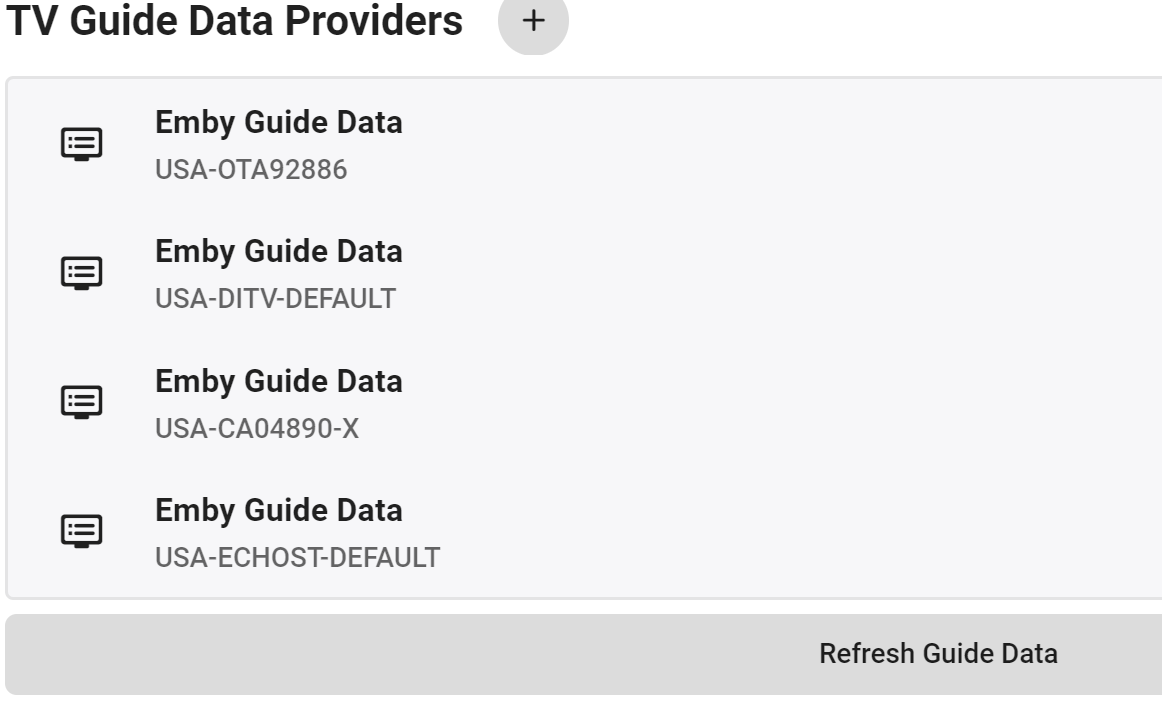
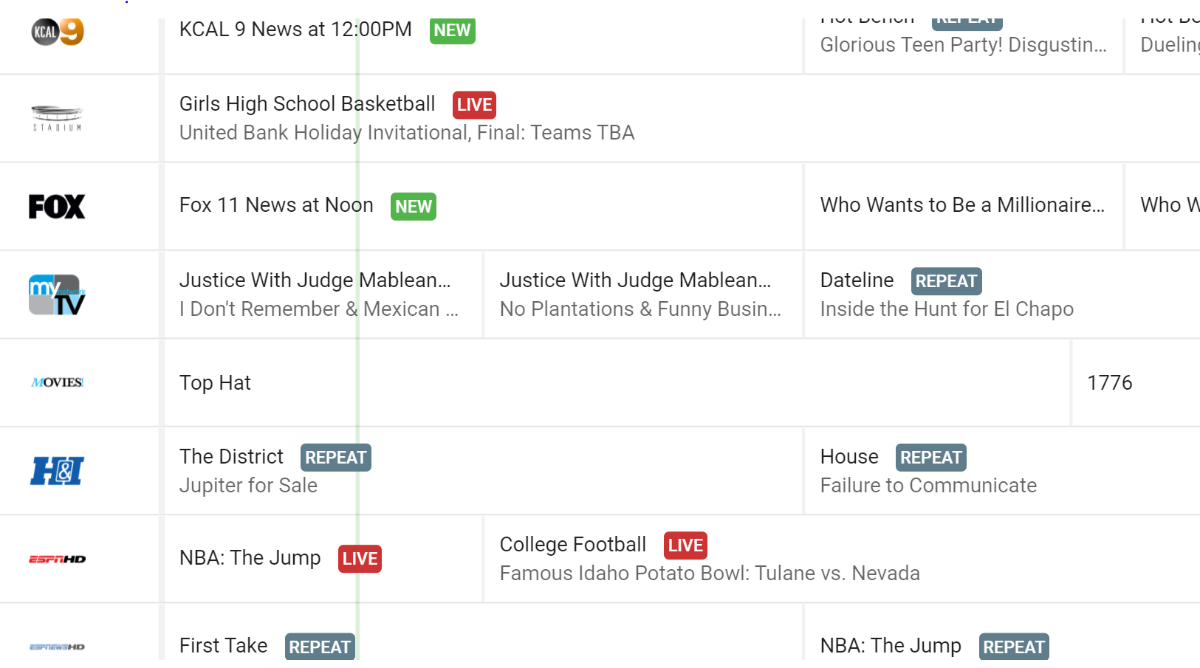
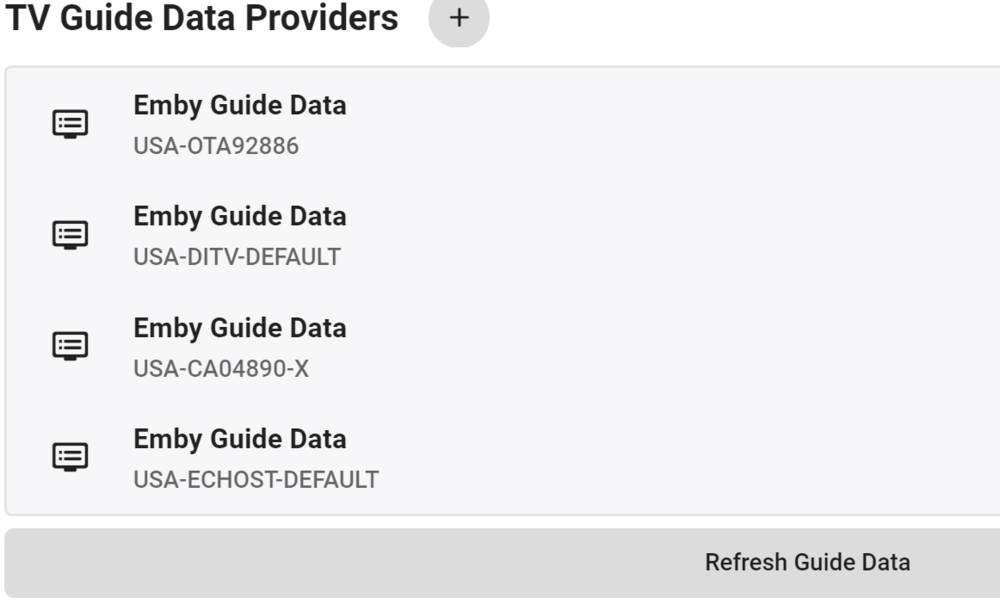
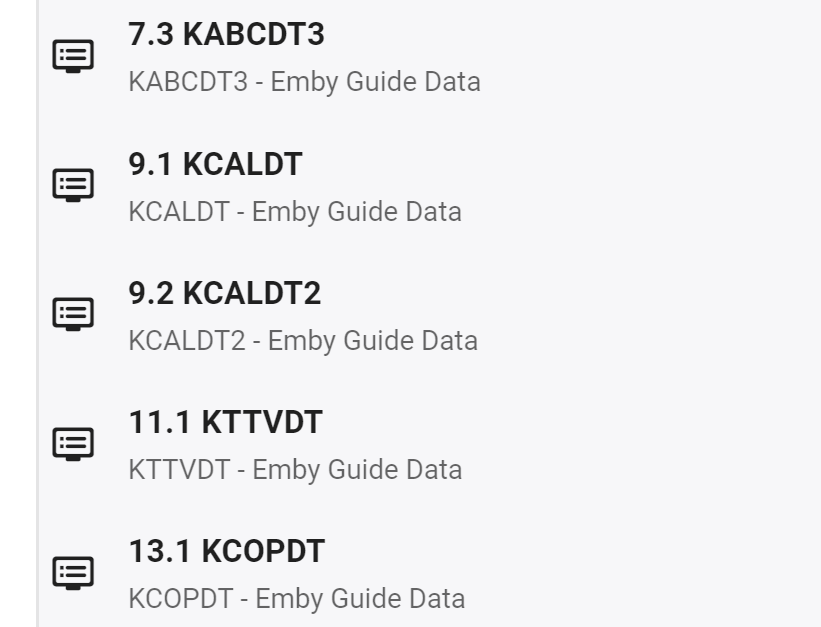
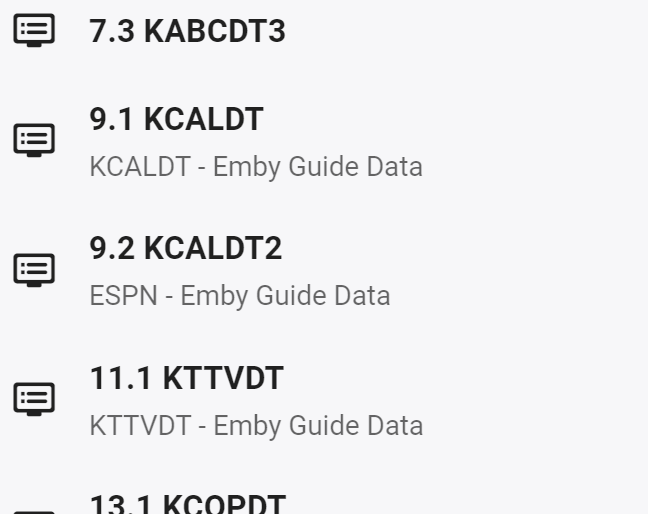
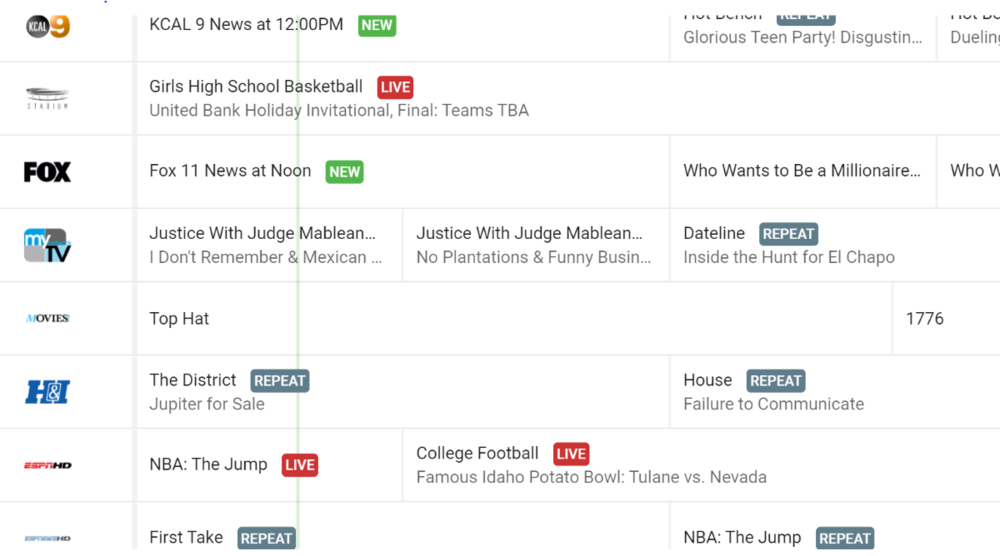
@cayars Ok, I tried this and it didn't work. I have 4 data providers. I tried to manually map channel 9.2 to ESPN using guide #3 (USA-CA04890-X), refreshed guide and its still the same data that the OTA for 9.2 supplies. It should look just like the ESPN guide now, according to your post. 9.2 still says Girls High School Basketball and not what ESPN is saying. Here are screenshots.
 1 point
 -
Fixed in beta 1.8.60. Thanks!1 point
-
If you set an Internet Video bitrate that is lower than what it would direct play then it will transcode. This isn't a flaw but a design. That is the point of the internet bandwidth settings. But it won't always force a transcode as it's a bit more complex and functional. For example you can have multiple versions of a movies/shows. For example you could have a 1080/8Mbs version and a 720/3Mbps version of a movie. When playing this back if there is no bandwidth limit or other constraints the 1080/8Mbps version will get used. If you have a limit on the user as 5Mbps as an example then instead of transcoding the higher bitrate version the system will use the 720/3Mbps version and direct play/stream that version. It will fall back to transcoding if it has to. If you have a tuner in use to ABC which is mpeg2 in the USA and playing this back in the house to an Android ATV app, it will likely direct play/stream and not transcode because the device can play the codecs and there isn't a bandwidth limit. This stream for ABC will likely be 12 to 15Mbps or even slightly higher depending on what's playing. If you have a remote user that is also watching ABC via Emby then Emby will share the tuner, HOWEVER because you have a 5Mbps limit on this user the stream will get transcoded for that user down to the limit or under it. Again this is by design. The 2nd user does not affect the 1st user, nor does the streaming rate of the 1st user affect the 2nd user. It will NOT stream this as direct play as it's higher than the bandwidth setting. I'm not sure how you performed your test but you should try it again. If there was a bug like this it would show up all the time as many OTA broadcasts are over 10Mbps but many Emby Servers in the USA only have 10Mbps TOTAL upload bandwidth (Comcast/Xfinity for example) and these remote users would have this issue all the time.1 point
-
That sounds pretty great! I know nothing about split tunneling, however, so I'll have to look into whether my VPN allows that.1 point
-
Yes, because the major metadata providers don't usually assign holiday or Christmas genres to items.1 point
-
Maybe something like this to allow buttons selection. .emby-button { -webkit-user-select: all; -moz-user-select: all; user-select: all; }1 point
-
No, I got one 220+, and same problem . When it happens, I hear the HD making an impressive noise. It's even hard to be able to log on Synology as the processor is overcharged.1 point
-
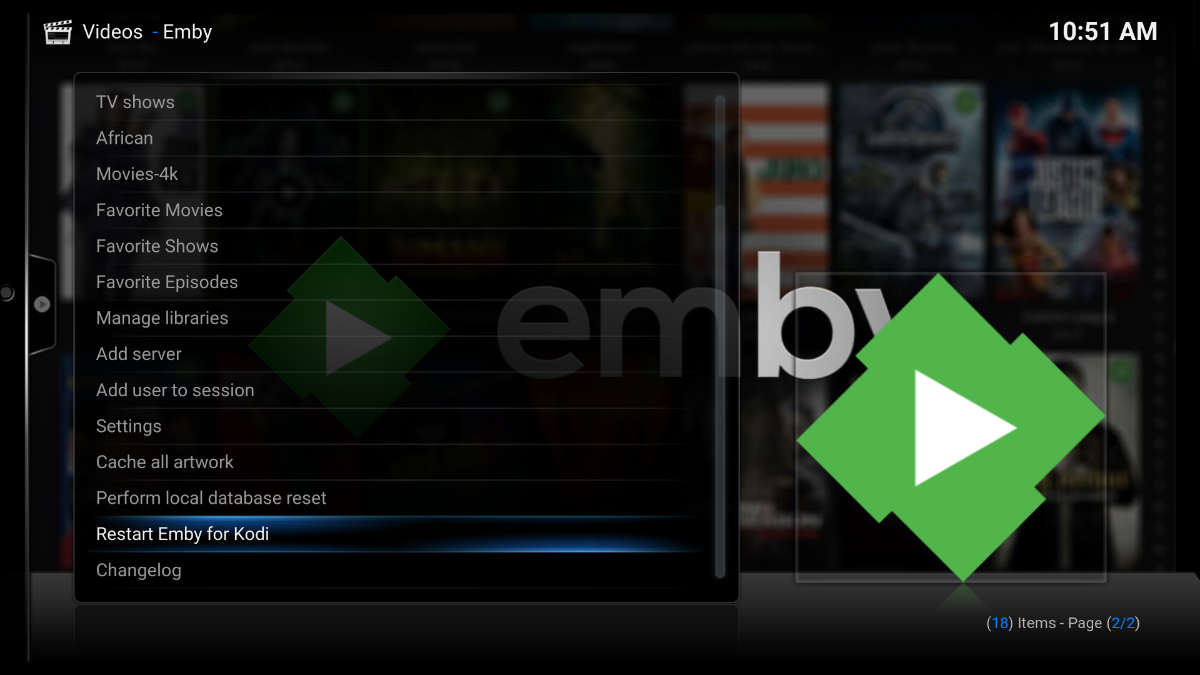
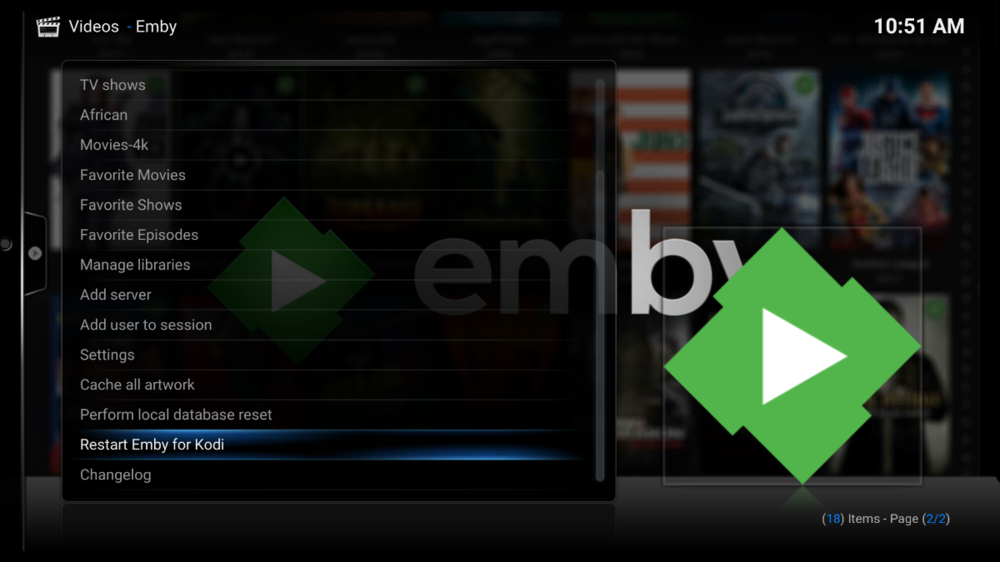
Another observation, restart kodi and add user to the session are not working, although I dont use these features but I thought I should let you know.
 1 point
 -
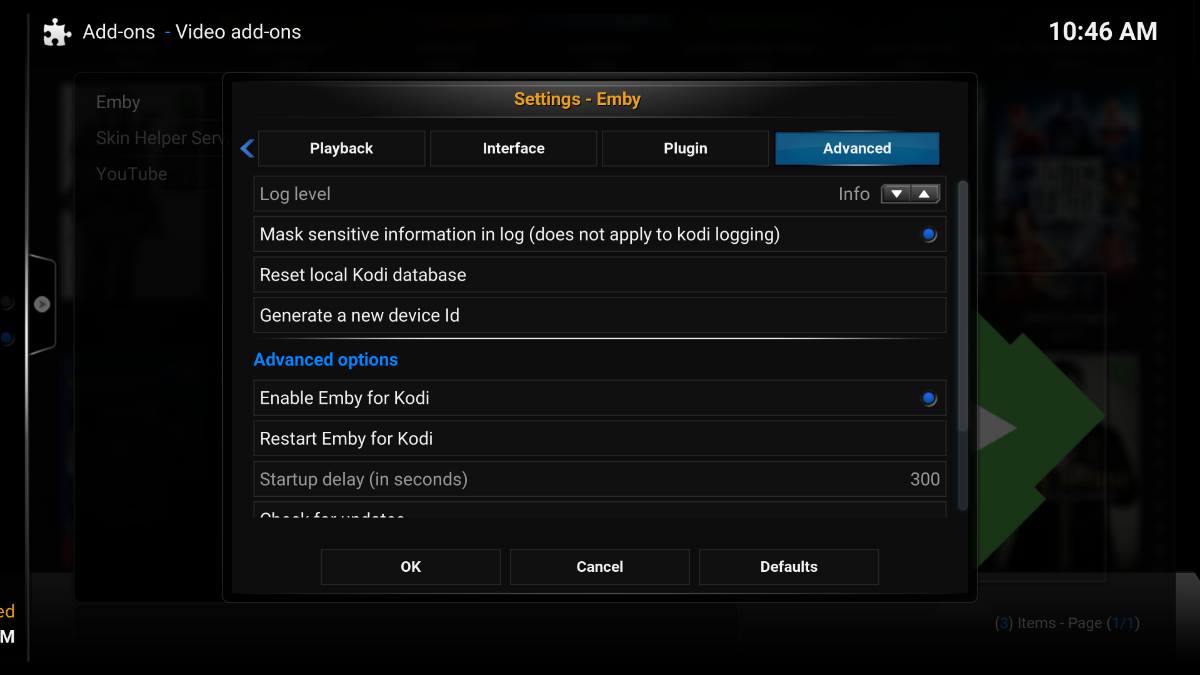
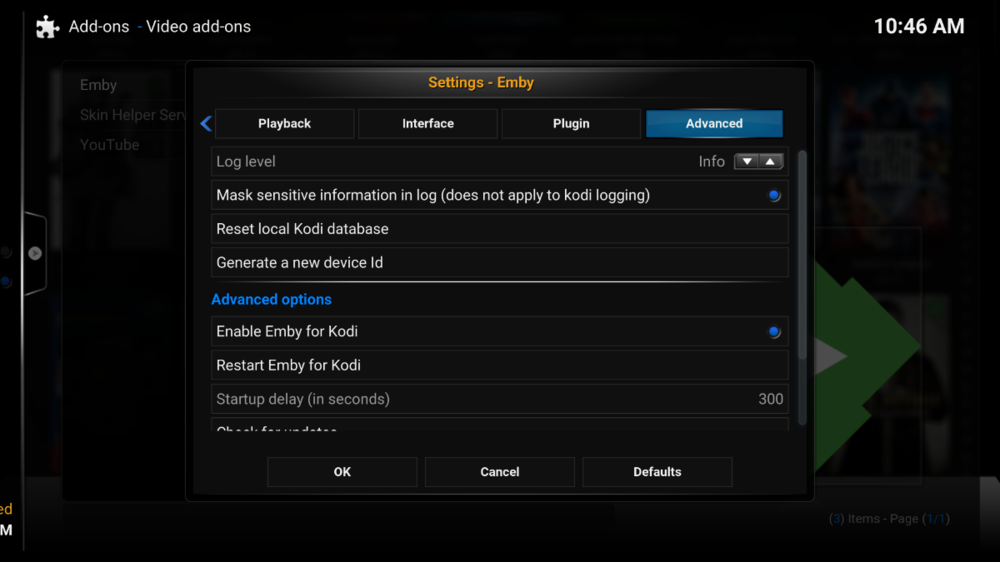
Hi Thanks for identifying the bug and fixing it, I spotted few other issues, I am not sure if you have already identified them and plan to fixed. In the attached Start up delay doesn't seem to work, when I my system start first the IPTV will load the guide which take about 10 seconds a times due to internet network delay or remote server of the IPTV provided. Hence I set e4k to delay for 20 seconds, which should allow sufficient time for the IPTV guide to complete it refresh, BUT it appear that the delay logic is not working as it disrupt the guide process which don't allow it fully update. I varied the setting with diff timing but it seems not to work.
 1 point
 -
Ok, I will try this in a little bit. Thanks for explaining this. I don't think this is documented anywhere and that is why folks have no idea that this mapping is working, or how it works. When does the NEW mapping system come out, so we can try this?1 point
-
Yes, it should use the guide in this case from the 2nd guide since that's the last mapping to be performed. Yes, it will allow you to unmap channels. It also does mapping differently so it's much easier to understand what things are mapped to. It does unless you add/remove additional guides. That's when things get a bit strange and sometimes you can overwrite your existing work. So if possible load all your channels and guides before doing any manual mapping. If you want to try a simple test add a brand new guide source from anywhere then map your existing ABC, NBC, CBS stations to the exact same FOX station from the 3rd (new guide). After you refresh the guide and go and look at your lineup the ABC, NBC & CBS stations should all show the same thing which is the FOX guide. But something simple like that will show that the manually mapped channels from the last guide added do in fact work. You can then remove the "test guide" and map those 3 channels back to their proper source and again take a look at they will be back to what they should be since you've manually mapped them again.1 point
-
Just uninstalled Microsoft Windows Desktop Runtime - 3.1.10 (x86 & x64). Restarted Emby Server - still working. So, I have issue with executable, which downloaded automatically. Installation, downloaded manually on December 19 - works fine.1 point
-
Simply put - if the end users are playing on their Stereo only TV, then why does it matter what multi-channel sound format you choose - it will be converted to Stereo by the internals of the TV anyway ... Thus as your Audio 'default' where the majority of your users (on TV's, Phones, Tablets etc) will be playing Stereo - then imo AAC Stereo as the default Audio track is the obvious choice. I pre-convert mine making the dialogue channel a little louder - which normally sounds better from a TV than what the internal conversion does. For those that have multi-channel sound systems (likely your more knowledgeable users) - then simply have those as alternative tracks which they can select - AC3, DTS etc - or both for maximum compatibility.1 point
-
It might meant that yes. If you're going to use SSL with Alexa, and then you'll need to use a certificate that Alexa trusts.1 point
-
With stereo audio track, yes. But if people want 5.1 I think DD is pretty universally supported now.1 point
-
This should not be necessary with the latest release of the app (.54)1 point
-
Ok, my fault. I wasn’t reading the chart correctly. I get it now. Thanks.1 point
-
The Shield with firmware Experience 8.2 can even tone map HDR to SDR.1 point
-
MKV has much better general support so unless you have a specific need for the M2TS contain I'd avoid it. The only thing I've personally ever used M2TS containers for is 3D video as the Samsung TV has the ability to auto switch 3D modes for that container. If the 3D video was in an MKV I have to hit the 3D button to select the 3D mode (not a big deal).1 point
-
That is fixed in the current beta. For your other issue, it sounds like a problem with the data. Did you try the same thing in the web app? Never mind. I think I see what is going on there.1 point
-
I’ve noticed everything is in a grid type view, which is nice sometimes, but I have 600+ playlists, who knows how many artists, albums and songs. It would be nice to have a list view to scroll faster and get to things quicker. TVs aren’t terrible but the smaller screens like phones are a challenge sometimes. Sent from my iPhone using Tapatalk1 point
-
If you enable the setting for the movie library that displays movies within their collection, then you can get it so that the collection appears in the movie library, but its contents are only visible within the collection. Paul1 point
-
Seriously? You obviously don't know how it works. If you have multiple feeds, and it gets mapped to the first feed, for whatever reason, you can't remap it. It's stuck to the first feed in order. I can remap it all day long but all the feeds below that 1st one get ignored, because the feeds take priority in order from top down.1 point
-
Can you go into the app's video settings and set the video renderer to gpu? Please see if that helps. Thanks.1 point
-
For collections this will be in Emby Server 4.6.1 point
-
Think you mean this one. All 7 seasons sorted into Season 1. - General/Windows - Emby Community1 point
-
Hi, yes regarding the watch state, we are looking into improving this. Thanks for the feedback. Regarding freezing Kodi, what version of Emby Server and Kodi are you using?1 point
-
Nostalgia. The good 'ol VCD and SVCD days. When 55 minutes was about what you could get on a disc. There was a good reason for doing this as it made spanning media onto spindles of CD's very convenient. But in the era of hard drives and solid state drives using them is like using a horse and buggy to get to and from the market. There is not much use in keeping them separate anymore unless you are still burning these onto CD-R and watching them on your DVD player from the bygone era. The gain in merge them is chapters, full resume points, ability to see the full runtime, and easily access versions. None of these work correctly with spanned media any longer. Times are changing. You need to change with them.1 point
-
From what I saw in the video, OMV supports docker. You could always use jc21's container for nginx reverse proxy manager which has a pretty simple to use GUI and tons of youtube guides on how to do it. This will make the nginx/let's encrypt side of things very simple and then you just need to follow the video for changing the emby settings. https://github.com/jc21/nginx-proxy-manager1 point
-
I consider the "ThrottleByStreamBufferSize" as the preferable mechanism. Its "drawback" is that it requires client applications to properly and regularly report the current playback position. But this is something that all Emby clients are normally doing. The other method, "ThrottleBySegmentRequest" works based on the segments that a client is requesting (trying to always be a few segments ahead of the most recently requested segment). As such, it doesn't need to know the playback position. The drawback of that method is, that the throttling behavior is no longer "predictable" and might appear confusing or "non-functional" to users because in that case, it is completely controlled by the clients. Each client has a different byte-size or number of segments that it will pre-load and cache. Especially in cases where you have a high-bandwidth video at the server and a small-screen client like a phone, the client may choose to completely download all segments without pause because the transcoded version is just like less than a few dozen megabytes in total, while the server would need to run at full power to produce the small-size video from the original video (of course, that's an extreme example for illustration). In those latter cases, users will come and report that "throttling doesn't work". That's why I think the former method is better for default - it provides predictable behavior and leaves control at the server side.1 point
-
This an Emby core problem. You always have to leave live tv with the return button. Never go straight to the Roku homescreen or use the Netflix button to leave the Emby app!1 point
-
@GWTPqZp6b @ozi83 @wondermouse @cTurtle98 @Radhi @Devdroid If this is still relevant to you guys, be sure to like the first post so that this feature will go up in priority, thanks!1 point
-
To gauge interest... What if you had the ability to "Forget" a series for the purposes of Next Up display. That is, it would no longer show in Next Up - unless you watched another episode. Sometimes you maybe watch a series for a while and, even though there is more of it or more is made later, maybe it isn't as good as the earlier seasons or maybe you just don't have time for it anymore. So you'd like it to quit showing up in your Next Up list so it is less cluttered and you can focus on the series you are actually watching now. If you start watching it again, the "forget" would be forgotten and it would start to show up in Next Up again.1 point
-
Is it possible to code Emby for tizen the way it is on android tv and lg? There you can jump to the timeline of a movie and fast forward to every place during the movie you want. The 30 sec. jumps on Tizen are really annoying... It is nearly impossible to move 1h forward since it really takes forever to get there.. Thanks in advance1 point
-
What you are doing is completely fine. Ports and Pkg are 2 ways to manually install plugins in FreeBSD. In a nutshell... Pkg is a basic pre-configured way to install something. Building from ports walks you through each configurable option and lets you fully customize everything in the setup. What he's saying is that when you try to mix the 2 together, you could end up with all kinds of issues. For example, an option you customized while setting something up using ports could be conflicting with one of the pre-configured options in pkg.1 point
-
you can edit the file, just shutdown the server first.1 point