Leaderboard




Popular Content
Showing content with the highest reputation on 12/05/20 in all areas
-
Emby Server 4.5.3 is currently rolling out. Here are the highlights. New Search Experience New search for mobile and desktop layouts. Improvements over previous search: There's now a Top Results section which provides a truly global search, something we didn't have before You can see all the different types of items that matched the search, and filter by type The type categories are now ordered by search relevance, whereas previously they were just hard-coded Mobile version: Download Subtitles During Video Playback There's a new search for subtitles option in the subtitles menu of the video player: Click that and you'll get the subtitle search dialog that you're already accustomed to: Select one to download and the dialog will close, and your new subtitles will show up immediately and also embedded into the subtitle menu: Add to Playlists and Collections with Drag and Drop This should make adding to collections and playlists a little more fun. You'll notice that collections and playlists are now in the sidebar: If you pin the sidebar to make it always visible, now you can drag and drop content to add them to your collections and playlists: You can drag just about anything, from posters, to list items, to individual text links such as the artist name underneath a song: And this will add everything for that artist. This should help make building your holiday playlists and collections more fun than ever, and it all works with touch input as well. Add to Play Queue with Drag and Drop Just drag something onto the now playing bar such as a poster: As soon as you hover over, you'll see this: But you can drag logs of other things too, such as list items: Or even text links from posters or list items. For example, drag the whole item to queue that item, or drag one of the text links to queue the artist, album, etc.: And most important of all, it works with touch input. Other Improvements Support clicking individual text items in list items Support add to play queue with drag and drop Support add to playlists and collections with drag and drop Add profile checking for MP2Video hardware decoders Improve subtitle track selection when always show subtitles is selected Prevent ffmpeg hw processing of 10bit when device doesn't support it Add Nvidia NVDEC decoder variant for HEVC VAAPI: Use color formats from detection Improve detail screen backdrop display Reduce messaging from server to android and iOS apps causing the app background processes to run Show songs on artist detail screen Support downloading subtitles during video playback Update same time recording threshold to 15 minutes Improve ability of other devices to discover emby server New search interface for mobile and desktop Add top results section to search Improve searching for songs using album name Expand artist split whitelist Add http version to server log Bug Fixes Fix play all/shuffle on collections comprised of folders Various fixes for codec level detection Fix interlaced video being incorrectly stream copied with HLS Fix remote play of playlists being sorted by name Fix webp image support not being used in certain cases Fix repeated subtitle downloads of .sub format Fix undefined dlna display name Fix channel logos intermittently disappearing while scrolling the guide in Firefox Fix incorrect iOS scroll after cancelling context menu Fix artists added to collections not showing View the full article7 points
-
Emby Server 4.5.3 is currently rolling out. Here are the highlights. New Search Experience New search for mobile and desktop layouts. Improvements over previous search: There's now a Top Results section which provides a truly global search, something we didn't have before You can see all the different types of items that matched the search, and filter by type The type categories are now ordered by search relevance, whereas previously they were just hard-coded Mobile version: Download Subtitles During Video Playback There's a new search for subtitles option in the subtitles menu of the video player: Click that and you'll get the subtitle search dialog that you're already accustomed to: Select one to download and the dialog will close, and your new subtitles will show up immediately and also embedded into the subtitle menu: Add to Playlists and Collections with Drag and Drop This should make adding to collections and playlists a little more fun. You'll notice that collections and playlists are now in the sidebar: If you pin the sidebar to make it always visible, now you can drag and drop content to add them to your collections and playlists: You can drag just about anything, from posters, to list items, to individual text links such as the artist name underneath a song: And this will add everything for that artist. This should help make building your holiday playlists and collections more fun than ever, and it all works with touch input as well. Add to Play Queue with Drag and Drop Just drag something onto the now playing bar such as a poster: As soon as you hover over, you'll see this: But you can drag logs of other things too, such as list items: Or even text links from posters or list items. For example, drag the whole item to queue that item, or drag one of the text links to queue the artist, album, etc.: And most important of all, it works with touch input. Other Improvements Support clicking individual text items in list items Support add to play queue with drag and drop Support add to playlists and collections with drag and drop Add profile checking for MP2Video hardware decoders Improve subtitle track selection when always show subtitles is selected Prevent ffmpeg hw processing of 10bit when device doesn't support it Add Nvidia NVDEC decoder variant for HEVC VAAPI: Use color formats from detection Improve detail screen backdrop display Reduce messaging from server to android and iOS apps causing the app background processes to run Show songs on artist detail screen Support downloading subtitles during video playback Update same time recording threshold to 15 minutes Improve ability of other devices to discover emby server New search interface for mobile and desktop Add top results section to search Improve searching for songs using album name Expand artist split whitelist Add http version to server log Bug Fixes Fix play all/shuffle on collections comprised of folders Various fixes for codec level detection Fix interlaced video being incorrectly stream copied with HLS Fix remote play of playlists being sorted by name Fix webp image support not being used in certain cases Fix repeated subtitle downloads of .sub format Fix undefined dlna display name Fix channel logos intermittently disappearing while scrolling the guide in Firefox Fix incorrect iOS scroll after cancelling context menu Fix artists added to collections not showing4 points
-
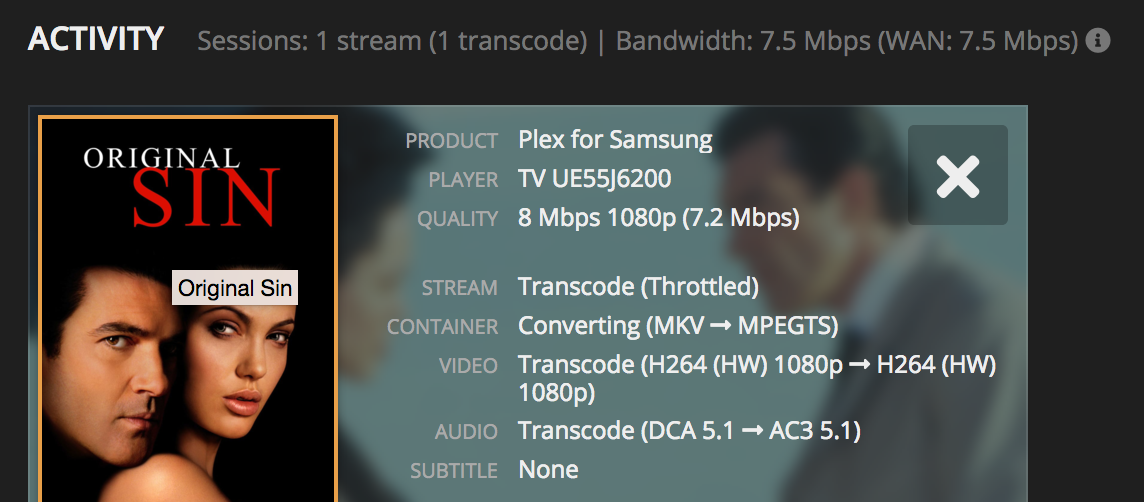
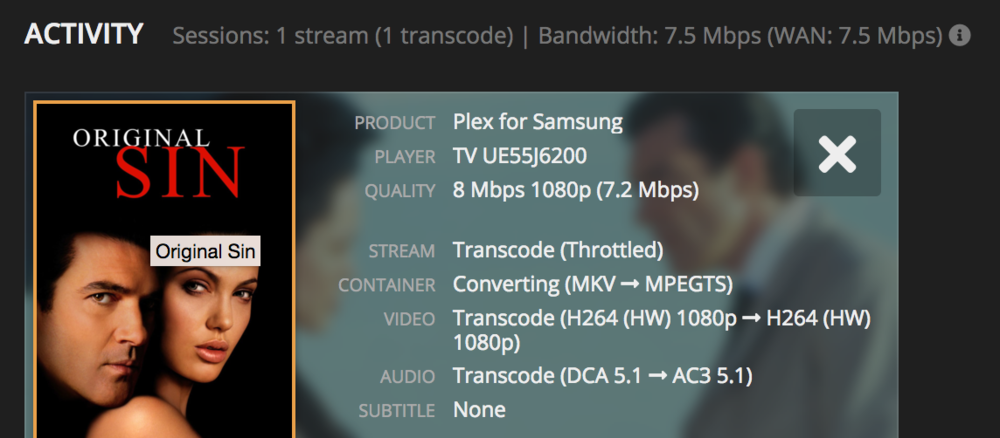
can't we get a more detailed overview in the next update? Actually we can only click on info and see ether direct play, direct stream and transcoding, but we never see what exactly is happening. It doesn't matter if it is transcoding, reencoding, remux, or what else if we have a more detailed overview in the next version. This is what we can see in plex or tautully, maybe you can take this as an idea, i think this makes much more easier to the people and it doesn't matter how it is called.
 3 points
 -
The first beta should be out later today.3 points
-
Reminder: all files play flawlessly on my Nvidia Shield 2017's. Also, I just followed your link, downloaded rndware Metadata Mover and ran it on one of the problem HEVC files. It made no difference when trying to play it again after the modification.2 points
-
This is also wrong. "Remux" is copying video and audio to the same or other container. It should be "Transcode Audio", "Transcode Video" and "Transcode Video and Audio" or just "Transcode" when it's a full convert.2 points
-
@Jason'sEmby The issue with Live TV is you do not know why the error occured. With normal media with a runtime you know why it errors. There is a problem with the file if it is direct playing. We then fallback to direct stream and play it in a new container. That usually solves it. But it might not since it copies the video stream. If there is still an error when playing then you must use a new container AND fallback to transcode the video stream. Once you get to transcoding the next error is going to error out. Because there is nowhere to go from there. But with Live TV there is somewhere to go from there. Every error you just continue with full transcoding. Since Live TV is based on real-time conditions when you start at the beginning over again it will not get the same error. It will not be the same beginning. Live TV is based on time. Time always moves forward. Recovery will always work. Since Live TV is based on time and never runs out you can have endless error recovery for Live TV which is what we should be doing (or at least Live TV should be a much larger error count). Once it gets to full transcoding it just stays there and recovers when it needs to. The error count is meaningless for Live TV as it can have endless errors and just keep going. This would work much better for users. We can look at making Live TV better for users in more than this one area. Stay tuned(pun intended!) to see what improves with Live TV.2 points
-
Hi, Since I am using more and more TMDb, (since tvdb is more and more a mess), I am missing a very important feature. tvdb had the feature of grouping stuff into aired, DVD and absolute, which is supported by emby. TMDb had also this feature. See this example for "La casa de papel" (Money Heist, Haus des Geldes): The Original Order is allways the "aired order" of the original country. "La casa de papel" was originaly released by "Antena 3" and was taken over by Netflix, which results in different episodes ordering, which is a mess. They solved it in episode grouping. This feature is missing from emby, but it's integrated in their API and is allready supported in other apps, like kodi. At least, Banana a TMDb Mod claims it, that it's supported by Kodi: https://www.themoviedb.org/tv/71446-la-casa-de-papel/discuss/5e7032d84f9a99001152704f?page=1#5eb76872ca7ec6001f7c53cb Is it possible to add this feature into emby? It is the last scraping feature, I really really miss for TMDb on emby. It adds much flexibility and is overall a much better solution, than on tvdb with their aired, dvd and absolute order. Another great example is Dragonball Super: As you see, it adds much more flexibility for different regions over the world. It's in my own eyes a must have for emby!

 1 point
 -
I am switching over from a Win7 box running MBC to Chromecast dongles. With the Win7 box I had a HDMI to Cat6 setup that allowed me to stream to up to 4 displays/TVs simultaneously. It was great while it lasted, but involved stapling cables to the ceiling to run it from room to room - plus it has borked Can there be an option to multi-cast to several receivers at once? i.e. simultaneously play to Chromecast dongles in my office and living room and kitchen simultaneously so i can walk from room to room without stopping and restarting the movie or show all the time? I realize that bandwidth could POTENTIALLY be an issue, but i have a fill gigabit network and a multi-port NAS so that really is the least of my worries... Thank you!1 point
-
Feature request for Auto Box Sets & the Emby server to show missing collection items / placeholder images for what we don't have that is part of a collection. http://emby.media/community/index.php?/topic/22732-auto-box-sets-show-missing-collection-items/ Thanks, hoping to see it worked out.1 point
-
Request that Emby server store Dolby Vision (including profile), Dolby Atmos, DTS:X, HDR10+ (smpte2094) and HLG for appropriate video in the db and use it for display in the media info and track selection sections of movie/episode details screen. This information once in the db can then also be used in numerous other areas like: Mediainfo Cover Art, Stats for Nerds, Distinguishing different DV profiles for hardware support and tone mapping Example Mediainfo app display of HDR10+ ffmpeg patch for HDR10+ https://patchwork.ffmpeg.org/patch/11491/ Related requested that may require DV profile information in order to prevent unneeded TM1 point
-
It would be useful if the server (or perhaps clients) could cache most (if not all) content images (posters, backdrops, logos, etc) for movies, TV series and seasons. This would mainly be of benefit when a portion of someone's content is offline but the users would still like to view the content to know what exists. I think caching on the server would be preferable, then all clients could make use of the same cached images. if you think this would be a useful feature, please click the "Like This" button on this post.1 point
-
Please read this post first. I was wondering if it would be possible to add something that would allow you to skip the intro to shows automatically while binge watching. When watching Netflix it does this for some shows, and im not sure if thats a feature of Netflix itself or a Chrome extension i use called "Flix Assist" but it would be a nice feature to have within Emby as well. and possibly even create a custom timed skip for specific shows1 point
-
Just a simple feature request, is it possible for a loading symbol to be added, for example when skipping through a movie the buffering/ loading animation of some sort shows up?1 point
-
This is a pretty big deal. I'm sad for Theaters - even given our business... Warner Bros Releasing All 2021 Movies on HBO MAX1 point
-
Hi all, Just a request for the tvOS app to respect the logged in user on the Apple TV. The ideal behaviour would be to have an option to ‘remember me’ per TV user, so when changing user in control centre, the emby user would change also to reflect that. Cheers!1 point
-
Thank you so much for the help. Yeah did it earlier to add the relevant guides and mapped accordingly but you're right, the other guide did sorta take over some and muddled them all up. Got some interesting recordings of channels! Think what I have is the best I can do for now until the re-write goes live, so hopefully won't be too long. Thank you again1 point
-
I went back for the first time this past week. My daughter and I were the only ones in a large Dolby Vision theater. It was a Tuesday night but I don't see how Theaters can survive like this. The biggest problem is the lack of any new content and that is now a bit of a chicken/egg situation. Hopefully, in six months if the vaccine(s) come to fruition, things will move back to more like normal. Honestly, I don't understand the severe targeting of theaters with huge reclining seats. Certainly more distanced than any of the several airplanes I've been on in the past few months.1 point
-
No, you would not be.1 point
-
Didn't knew that is possible ! Just change my TV to US and it's work great !1 point
-
Thanks for all of the tips! A more reliable provider has improved things dramatically. I think any remaining sluggishness is most likely due to my ISP throttling my bandwidth & giving me 1/2 the speed I'm paying for, running Emby server on the old computer AND the bulk of my library stored on an external HD.1 point
-
@Happy2Play I forgot that for some reason under Arch that that folder for Emby is always marked private. In one thread here I have instructions on how to access it, but I don't want to take the chance of copying over the files and find out there are permission issues with some of the files. So I'm just going to resetup Emby from scratch. It's not like in Plex where it's a true pain to fix metadata if needed. After all Emby has the one metadata editor that makes it so easy to fix anything that needs it. Thanks again for the help though.1 point
-
I don't think that is correct at all.1 point
-
Sounds great you guys have truly done something amazing on Android TV. It runs pretty much flawless. Been testing on Nvidia shield and mi boxes ( version 8.1 as 9.0 has a video shutter problem with live TV)1 point
-
Do you have seek mode (timeshift) enabled in the app? Then it's probably because of this change in the release notes: Fix interlaced video being incorrectly stream copied with HLS1 point
-
It's planned for the future. I hope they add that option soon.1 point
-
Just pay for emby premier should unlock everything that youre logged into.1 point
-
That data path is all the configs and data for that Emby install.1 point
-
Not really as there can be differences. But you would want to copy the Emby programdata from one system to the other. You can see the path via the Dashboard or in the top section of a server log. Note this would be a exact mirror asuming everything lines up so both server will contain the same serverid if you attempt to run both servers.1 point
-
This is my setup as well.1 point
-
Hi again @SamES thanks für all the imput and ideas. The internal media player shows exactly the same behavior Even removing all streams (audio & subtitles) out of the mkv has also shown no difference. I think the problem is now clear... It seems to be a problem of LG's C7 OLED Series. Both of my LG C7's are having the same problem, but I found out that my third LG (LED Model) does not have this problem (anymore?) So doesn't seem to be emby's prob Maybe I try to contact LG Support and describe my problem there Thanx anyway1 point
-
That seems an unnecessary complication. If your router does loopback, you simply use the external address, or maybe name if you have a DNS entry for it. No other manipulation required. If you can't do loopback, you can define two servers, one having the internal address or name and the other having the external address or name - the idea of having one server entry with a choice of addresses adds no benefit over this simpler approach that is already possible. Alternatively, if you're able to set up in internal DNS server, only visible within your network, you can make that return the Emby server's internal address. You can then have one entry in the client, defined by name, and the client will get the internal address from your DNS server when at home, and the external address from Internet DNS servers when away. In my experience with the Android and iOS clients they can even handle going in or out of the house and changing network while playing without even a glitch. Paul1 point
-
The best way is to see what your preferred metadata provider does, and follow that scheme. Paul1 point
-
Not yet, I'm working on it but it will take a couple of weeks.1 point
-
As others have said, if you have a full home theatre setup, you are going to need a Shield. Until mfg's realize that people want all the bells and whistles and actually update their software from time to time, an external dedicated box is your best bet for maximum enjoyment. The Shield is miles better than any device, and I say that as someone with a Roku TV, several Android boxes, and an Apple TV 4 (biggest mistake ever).1 point
-
Not sure I agree with it. Say you have a 50 devices and 25 users And you want each user to have access to only their own devices (which isn't too unreasonable of a request) And then you add your own 51st device and have to MANUALLY go to each user to deny that new device for each one of them. It adds unnecessary additional work on the admin side. The reason I use emby is because it's mostly automatic, - fetches metadata automatically - different scheduled tasks - backups - etc. and as a user I wouldn't want to and with the solution proposed by me you can still register new users and devices. Now I'm not fully familiar with Emby's source code so I don't know how difficult a feature like this would be but as a user this how I'd like it to be.1 point
-
I tried accessing Emby from an old WD TV (running custom wdlxtv firmware). It shows as a media server device and i could access the Emby library. After picking a media file from the "Next Up" view and watching it entirely, Emby did not detect that media had been played. The next time i went back in to the "Next Up" view, the same media file was still showing. When you playback over DLNA, does that mean no updates to playback status on Emby?1 point
-
I can confirm DLNA still does not mark videos as watched when I use VLC on Windows.1 point