Leaderboard




Popular Content
Showing content with the highest reputation on 11/19/20 in all areas
-
I feel that. In fact it is one of our priorities is to fix this issue. I like that you hit the nail squarely on the head. The slow scrolling on Live TV Guide is at the top of priorities. Fixing this issue is what all focus is on presently. Glad you feel the same way. BTW.. Has scrolling too quickly on the guide ever broken for you? You need to exit and restart the app to fix. This will also be corrected.2 points
-
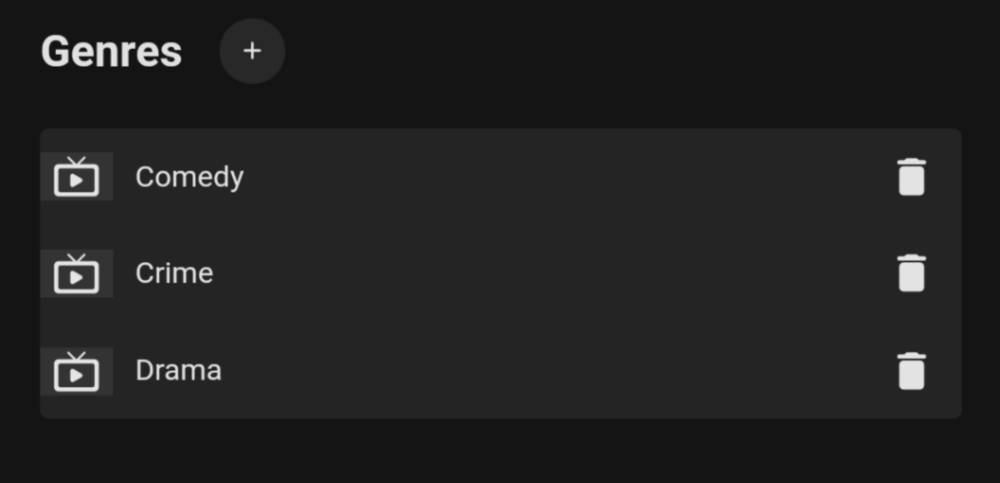
Metadata is fine.
 2 points
 -
Hi, Since I am using more and more TMDb, (since tvdb is more and more a mess), I am missing a very important feature. tvdb had the feature of grouping stuff into aired, DVD and absolute, which is supported by emby. TMDb had also this feature. See this example for "La casa de papel" (Money Heist, Haus des Geldes): The Original Order is allways the "aired order" of the original country. "La casa de papel" was originaly released by "Antena 3" and was taken over by Netflix, which results in different episodes ordering, which is a mess. They solved it in episode grouping. This feature is missing from emby, but it's integrated in their API and is allready supported in other apps, like kodi. At least, Banana a TMDb Mod claims it, that it's supported by Kodi: https://www.themoviedb.org/tv/71446-la-casa-de-papel/discuss/5e7032d84f9a99001152704f?page=1#5eb76872ca7ec6001f7c53cb Is it possible to add this feature into emby? It is the last scraping feature, I really really miss for TMDb on emby. It adds much flexibility and is overall a much better solution, than on tvdb with their aired, dvd and absolute order. Another great example is Dragonball Super: As you see, it adds much more flexibility for different regions over the world. It's in my own eyes a must have for emby!

 1 point
 -
I know the answer to this is probably going to be no..... ...but.... A standalone music player for iOS would be very useful. Trying to get the wife to use the full client for music is just not happening. Something that was simple and intuative and quick and easy to use would be killer, something like spotify. The simpler the app is to use, the better. If all else fails, I have a project that's on the back burner that was an iOS music player for subsonic, but I could always target emby as well. It had an spotify a-like interface. Screenshot from as far as I got with the UI, it was playing back music from the server.1 point
-
As I mention in a related post, I love the additional subfolders for Movie Extras (eg, Shorts, Scenes, Interviews, etc.)! It would be awesome to extend this functionality to TV Series as well. Specifically to add support for many/all of the same folders supported for Movie Extras, eg, extras specials shorts scenes featurettes behind the scenes deleted scenes interviews trailers As well as any additional folders that get added in the future (eg, hopefully Galleries). Support Placement of "Extras" Folders Within Each Season Folder, Plus A Naming Scheme to Link A Particular Extras Folder with a Specific Episode (eg, "\Season 1\E1 - Deleted Scenes\" for episode 1 deleted scenes): I want to clarify that it would be great if these various "extras" folder types could reside within each Season folder. So for example, within a Season 1 folder we could then have an "Extras" folder, a "Deleted Scenes" folder, a "Featurettes" folder, etc. And furthermore, that we could designate a particular folder to refer to a specific episode (eg, "\Season 1\E1 - Deleted Scenes\" for episode 1 deleted scenes). See more below, particularly why I think this would be so useful: https://emby.media/community/index.php?/topic/55915-emby-server-theater-additional-extrasspecial-folder-types-for-tv-series-similar-to-movies/&do=findComment&comment=587195 Thanks for your consideration! PS - If this is something you might like to see implemented, be sure to "Like" this top/first post (as well as any subsequent posts in this thread that highlight particular aspects of what you are interested in) -- "Liking" the top/first post helps the Devs to know how much interest there is in a given Feature Request.1 point
-
Well the errors are gone now, but the log looks normal. Not knowing exactly how you are testing, but can you create a new folder (with no spaces in name) and create a new library, then place a few items in it. Other than that only other thing maybe media permission.1 point
-
yep that was it. my hotas was sending inputs. thats a strange one to figure out. thanks for your help1 point
-
I am pretty sure this is the closest way of getting this feature to work with a scan. I am currently doing some more testing with ffmpeg to see how close I can get with random episodes from random series. I'll definitely put my results here and if it works enough to implement, then yeah.1 point
-
The issue will be it is only targetable via section number. So is Next Up set to the same section on all users? /*Change Next Up text*/ div.verticalSection.section4 h2 {text-indent: -9999px; line-height: 0; } div.verticalSection.section4 h2:after { content: "Next Episode"; text-indent: 0; display: block; line-height: initial; } The section will be 1 less then Home Screen section number, since code start with 0 and UI starts with 1. So this example would have Next Up in section 5.1 point
-
According to the first couple logs it looks like an issue with watches still set at the default.1 point
-
Please post another server log. If you did scripts for both Watches and Instances only instances is working as 8192 is default for watches. But is currently irrelevant unless we are seeing that error in the log.1 point
-
You mean something like this? #dashboardPage div.dashboardColumn.dashboardColumn-2-60.dashboardColumn-3-46 div:first-child {order: 1;}1 point
-
Multiple locations mentioned here and possibly others.1 point
-
Great stuff, Thanks FrostByte. Did not see that in the thread Real time monitoring seems broken Will do that now and post back.1 point
-
@FrostByte is there a separate script for instances vs watches inotify issue? System.IO.IOException: System.IO.IOException: The configured user limit (128) on the number of inotify instances has been reached, or the per-process limit on the number of open file descriptors has been reached.1 point
-
May be related?1 point
-
That makes sense I guess, because I believe that some movie remakes are identified as a remake by including the year. Thanks for taking a look!1 point
-
That's my question. It displays the single artist just fine on 3 different Android devices I'll check the extended tag as suggested in the other comment and see what happens1 point
-
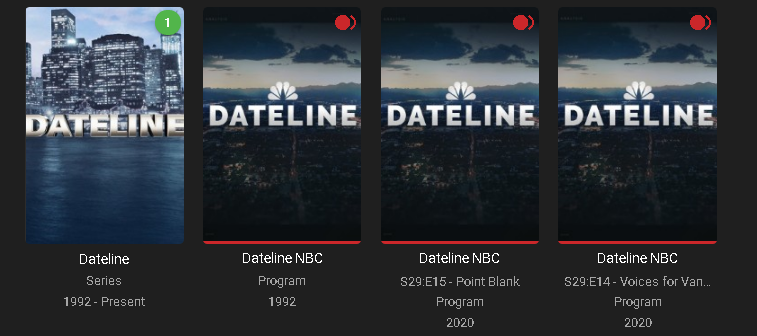
Had a look and believe it's because of the guide data. These likely appear to be different shows to Emby as even the dates are different ie 1992 & 2020.
 1 point
 -
This does work for Game of Thrones as well. It will find the end of the HBO TV static logo, and then again it will find the end of the intro.1 point
-
I can confirm, that on shows like "Mr. Robot" which doesn't have an intro sequence, only a recap, that it works. Shows like "Rick and Morty" will pin point the end of the intro perfectly for each episode. I'm about to test Game of Thrones because they have a recap and a really long into.1 point
-
I works, this version was installed via usb pen drive fat32, Model: UE55MU7005. Thank you for your hard work and magnificent support!1 point
-
It is LG OLED CX9, so yes ist supports DV. But if i play content from my Synology NAS, the TV do not switch to Dolby Vision display mode. HDR is working fine.1 point
-
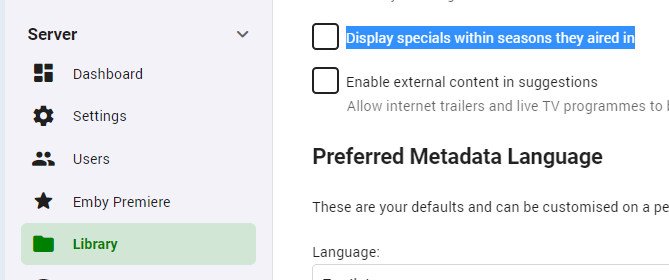
In the Libraries page of the dashboard, on the Advanced tab, have you set "Display specials within seasons they aired in"? Paul
 1 point
 -
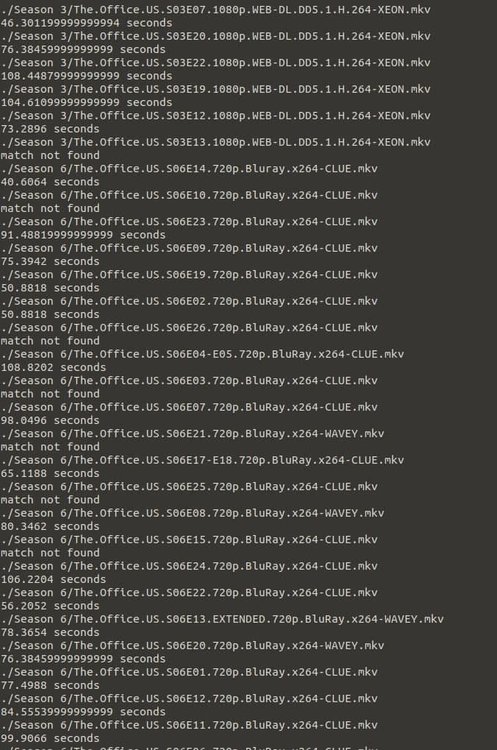
I attached an example from the office with my cobbled together script, it isn't perfect and can be refined but does do the trick. You run this like so: `python3 finger.py bad.mp3 epsidodeTitle.mkv` bad.mp3 finger.py
 1 point
 -
This version works for me too. FAT32 USB drive Thanks!1 point
-
see my dm1 point
-
I checked the actual stream, and found the closest one. LOL!1 point
-
this is prob why plex went with a fingerprint match?1 point
-
what i am seeing is that even a very brief pause in dialog is getting picked up as a "silence" any way to mave a minimum duration or similar? also not getting much of a match or so many silences not sure at moment how you would pick out the intro - or you would have so many markers as it would get kind of pointless1 point
-
To get you started. They are the same as the Emby remote control API. "MoveUp" "MoveRight" "MoveLeft" "MoveDown" "Select" "GoHome" "Back" "GoToSettings" "GoToSearch" "SendString" "ShowNowPlaying" "Ping" "ServerRestarting" "ServerShuttingDown" "RestartRequired" "Stop" "Pause" "PlayPause" "Unpause" "NextTrack" "PreviousTrack" "Seek" "Rewind" "FastForward" "DisplayContent" "DisplayMessage" "LibraryChanged" "PlayNow" "PlayNext" "PlayLast" "SetAudioStreamIndex" "SetSubtitleStreamIndex" Not all of these presently will work. Some of these are stubbed in the Roku app. They have not been fully extended to support all of these commands. But the Roku app will interpret these commands. The PlayNow and/or DisplayContent command will work for the purposes you need. PlayNow can attach to it a list of itemIds. DisplayContent needs a single itemIds. The parameter must always be ItemIds even if you just have one item id. Using: "curl -v -XPOST http://{ipaddress}:8060/launch/43157?ControlCommand=PlayNow&ItemIds=1,2,..." attached to the URL used to start the ECP process with the Roku. That "should" be all you need. But I could be wrong. Let me know if that works or doesn't. It should. Once the Roku app is up and running you can grab the session ID and use the remote control API to control everything. The Roku ECP is really only used to launch the app into something. Not to control it once launched. https://github.com/MediaBrowser/Emby/wiki/Remote-control Please hold us accountable. If we forget.. rattle the chains. Bang on the pipes. Make some noise. Do not be afraid to get loud if we miss a reply. I didn't forget about this. It is just incomplete information and I was afraid you would get upset. But since I cannot know more at this time. Best to give you what I have so far. Apologies for the late reply. Happy Holidays.1 point
-
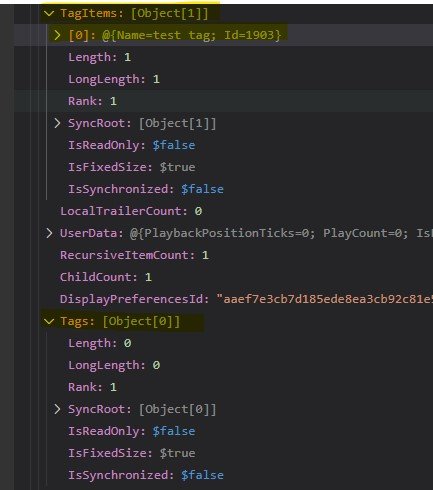
if i understand what you are saying then code in the web client is adding Tags to the TAGS array prior to the post sending the json back to the client? If so then i was right there is a difference and Luke needs to fix this mess1 point
-
The json coming back from the web client's api request to /Items/{item id} comes back with TagItems populated but Tags as an empty array. ..."TagItems":[{"Name":"no-kids","Id":11187}],..."Tags":[]... Here's an excerpt of the request parameters in the web app's POST to /emby/Items/{item id}: TagItems […] 0 {…} 1 {…} Taglines […] 0 "What's slower than a speeding bullet, and able to hit tall buildings at a single bound?" Tags […] 0 "no-kids" 1 "test" Looks like the web app populates the 'Tags' property itself with a string array derived from the TagItem values sometime between getting the Item json but before POSTing the updated metadata. So, what happens if someone POSTs an update to the api but *doesn't* manually generate a string array for Tags first? Does the API see the empty array for Tags and make it so?1 point
-
Nevermind I see from another post I will need to do manual update1 point
-
Well, I hadn't until now. Sorry, I didn't know any of that was even there. I'm still in learning mode. It appears my request was instantly granted.... Thanks Luke1 point
-
7 hours and no response. I think you've stumped him1 point
-
That buffer is when the Roku gets the m3u8. It then goes to play the first segment. Which may not have arrived yet. So it does this odd rebuffer. Doesn't do it every single time depends on the bitrate of that channel. We can also look into this since it happens with Live TV and the other work is Live TV focused. Going to do an entire walk-around on the Live TV parts and see where we can improve. But for sure that scrolling issue is going to get solved. It makes using the guide difficult and painful. Then it locks up. You cant scroll it anymore. Need to exit and restart the app. You scream the F-Word. Then go back to watching Live TV until it happens again scrolling that guide. I completely understand the problem. If it is buffering during playback at 30 seconds or 45 seconds for a second or so. Doing this often it is because the signal strength for that channel might be low. This will lag ffmpeg as it has to correct those bad bits. When Emby is playing Live TV it cannot go beyond real time. So if you are playing at the real-time point this might happen often. You can pause for just a bit. I know it is a hassle. But pause for just 5-6 seconds. Then play. That will smooth out the ride and stop those interval buffering because now there is a read-ahead buffer. You are not playing right at the real-time point. You are behind 5-6 seconds. This is honestly what the problem is.1 point
-
Again emby apps will already direct play whenever possible. If it's transcoding is because there is a reason. Knowing that do you still feel that you need an option?1 point
-
Does it work with the mobile beta?1 point
-
Almost at the top of the forum is the Feature Requests section. You should check for existing requests similar to yours which you could add support to before adding another of your own; the amount of support for each suggestion is gauged from the number of replies, I think. Paul1 point
-
SOLVED! I have been using a software called "Playlist Creator" to generate my .m3u playlists. These are basically textfiles, but are ANSI coded. I converted them to UTF-8 (which is standard when creating textfiles e.g in Notepad) using Notepad++. After a library scan all songs are detected.1 point
-
This version works for me too. Model UE55MU6675 . Fat32 USB 2 drive. Thanks1 point
-
any folder which contains a music file in is considered an album so 01_Genesis and 02_Exodus are considered as two albums - Bible is ignored unless there is a music file in the folder As for why they all have the same image and name - that will be down to your metadata within the files and/or what emby gets from online providers depending on your library settings1 point
-
ok - let me try and lay it out so its clear to you what the issue is # requesting the item 2020-11-19 05:01:53.861 Info Server: http/1.1 GET http://192.168.0.56:8096/emby/users/736ea8cea7124fc6a68917a1574d5a40/items/278 2020-11-19 05:05:35.994 Info Server: http/1.1 Response 200 to 192.168.0.56. Time: 2ms. http://192.168.0.56:8096/emby/users/736ea8cea7124fc6a68917a1574d5a40/items/278 # which should pull back all data for the item - as you need this for editing as emby can only update a whole record not partial But - as we have discussed Tags is returned empty with the tag info just provided in Taglines - see below I then update another field and post back the json to Emby 2020-11-19 05:13:12.036 Info Server: http/1.1 POST http://192.168.0.56:8096/emby/Items/278. UserAgent: Mozilla/5.0 (Windows NT 10.0; Microsoft Windows 10.0.19041; en-GB) PowerShell/7.1.0 2020-11-19 05:13:12.039 Debug ProviderManager: Saving F:\EmbyCore\programdata\data\collections\47 Ronin Collection [boxset] to Emby Xml. ... 2020-11-19 05:13:12.043 Info Server: http/1.1 Response 204 to 192.168.0.56. Time: 6ms. http://192.168.0.56:8096/emby/Items/278 # So emby is happy with what was returned - 204 However - the Tag "Test Tag" has been removed from the item on import ==== I tried adding Fields=Tags to the full record request and it had no effect in that no Tags data was returned - so the result was the same as above. ==== Doing the same via the metadata editor - in this case just opening the item and saving 020-11-19 05:17:59.486 Info Server: http/1.1 GET http://localhost:8096/emby/Users/736ea8cea7124fc6a68917a1574d5a40/Items/278 ... 2020-11-19 05:17:59.490 Info Server: http/1.1 Response 200 to ::1. Time: 4ms. http://localhost:8096/emby/Users/736ea8cea7124fc6a68917a1574d5a40/Items/278 ... 020-11-19 05:18:07.244 Info Server: http/1.1 POST http://localhost:8096/emby/Items/278 2020-11-19 05:18:07.246 Debug ProviderManager: Saving F:\EmbyCore\programdata\data\collections\47 Ronin Collection [boxset] to Emby Xml. ... 2020-11-19 05:18:07.249 Info Server: http/1.1 Response 204 to ::1. Time: 4ms. http://localhost:8096/emby/Items/278 This maintains the tags I also tried editing the item and then saving - this also maintained the Tags ==== attached are a pre edit json file and a post edit json file - only diff is the the Studio data has been removed the post json file being returned as the Body of the post Post.jsonPre.json ==== It looks to me that there is some difference in how the post is handled. - or something else is going on - but currently dont have any ideas on that The json returned is not malformed (as you can see in the attached files) or the rest of the item metadata would be corrupt and its not. So do you have any ideas why there would be a difference?
 1 point
 -
I'd like to throw my vote in for: store album position (not just track position) and when starting the album, go to that track/position instead of track 1 When resuming an audiobook this would be extremely helpful. Has there been any progress on these requests?1 point
-
Hi Speechles, its been awhile! So far it looks like it's night and day. Couple things I've noticed so far. It's been running extremely well. Still have a second buffer after the initial startup buffer on live tv. But live TV is actually playing without airing out over a couple hours so far!!!!, thats huge.. Movies so far have not transcoded like they used to. Errors within the past couple hours of testing on roku, If pausing the movie or TV show recording too long it gets Frozen on that screen and when trying to click resume a tries to start live TV. Christmas wish list , PS5 native app Faster Roku tv guide scrolling, as its really Remove the second buffer and just increase the initial buffer when streaming live TV channel on roku Android TV live TV channel tuning if at all possible increase initial load time Option to separate live TV verse movies disabling transcoding option Favorite Channel icon option on Emby home screen I'll update as the time goes on as I love testing!! I was a Plex Alpha and beta tester until they started releasing known issues on public buildings which didn't sit with me right.1 point
-
Can you try this version? https://emby.media/download Thanks.1 point
-
@teddybear75 Thanks for the tip, I did all your steps but when connecting externally it still uses http and not https. How can I fix this? When looking at the dashboards it shows th ddns on external acces but with the https port at the end, not the https port1 point
-
A friendly bump! I installed Pl*xAmp on my wife and eldests phone, and they love it. She just can't handle the full app, it just behaves as you'd expect a music player to work, no getting lost in a video section or somewhere, it's intuitive as a music app because it's just a music app. Luckily I had an unused lifetime pass, so I set up a server which is purely used for music. I've now been able to dump Apple Music and my wife is extremely happy and in love with the music app. For a phone, a standalone music option definitely makes sense in my eyes, something that's set up with the sole purpose of playing music, I'm sure there are plenty of people out there who themselves or who have family members who just don't need the entire app. I've got to say, I'm impressed with it as well, it's installed on my phone as well as my music player.1 point
-
Any news on Android TV etc gapless (crossfade) music playback?1 point