Leaderboard




Popular Content
Showing content with the highest reputation on 11/13/20 in all areas
-
There's still a bit more work to be done with this. Thanks for the feedback.3 points
-
WOW! I found this article which goes into detail about Title sequences, and the algorithms which are used to find these time stamps in each episode (/Netflix). It looks like they have a computer scan the stream. crazy man! They use Machine Learning. Awesome! https://www.diva-portal.org/smash/get/diva2:1412560/FULLTEXT01.pdf2 points
-
New version 0.9.1 in the starting post: Export API: Fixed a rare exception that can occur with the m3u playlist export function Channels: Fixed again some of the sort options in conjunction with tv shows Make amount of guide data dependent of the DVR option "Number of days of guide data to download". @pmac Auto is the previous behaviour, otherwise the guide data building is repeated until the specified number of days is filled with program items Playback: Fixed playback progress for playlist mode with "Set items watched at playback stop after percent" set to zero2 points
-
When setting up a new user I think it would be great if I could copy an existing user. Even better if you could copy certain aspects of a user like views , library access , parental settings1 point
-
I feel the following filter & sort options are lacking the following: * filter by HDR * sort by video bitrate * sort by audio bitrate * sort by filesize * filter by subtitle language * filter by audio channels * filter by audio language Anybody have anything they would like to add to this list?1 point
-
At present you can only set it on or off for "movies" and "episodes". It'd be good to be able to set it on a per-library basis, so I could have trailers before my actual movies, but not before, say, wrestling events.1 point
-
My Samsung TV cannot directly play PGS Sub format subtitles (commonly used in blu-ray media), but it can directly play the video and audio. In this scenario the server re-encodes the video track with hard subs... I might be watching a 4K H265 video and just because the subs aren't compatible, the entire video has to be transcoded. From my point of view, that's a load of unnecessary work that we can potentially avoid. Wouldn't it make a lot more sense to try converting the subtitle track to VobSub format, or at least have an checkbox option in the user profile to "Convert incompatible subtitle track to VobSub" if the incompatible subtitle track is the only reason for transcoding? VobSub has much wider support on devices, as is the case with my particular brand of TV. Implementing this would be great for those of us using who enjoy direct streaming blu-ray content to Samsung TVs and other devices that don't support PGSSub subtitles. There might be other subtitle formats I'm not familiar with that could also be converted with this method. It should be very easy to implement, here's a quick example of an ffmpeg command converting pgssub to vobsub: ffmpeg -fix_sub_duration -i "input.mkv" -c copy -c:s dvd_subtitle out.mkv The '-fix_sub_duration' argument is necessary for some reason. Without it, subtitles don't display at all or they display and never disappear.1 point
-
So this is a double nat? If so you just need to get your forward ips correct. https://portforward.com/help/doublerouterportforwarding.htm But still don't know if ISP is a CG-NAT. But this ip assignment does really make since to me.1 point
-
We removed the samba lib from both the beta and the current version as it wasn't needed anymore. We'll add it back in the stable release in a few minutes. The PR is being built now. lol. Seems we both posted at the same time1 point
-
But yes comparing the Roku to the Web Client they do display different test so I can only assume this came from Android as web client has alway been Unaired. So to me all other clients would be wrong.1 point
-
The Web Client has shown Unaired for all Future episodes your years. Unaired to me is Future not aired yet episodes.1 point
-
Having a double firewall isn't a bad idea, though. I do that. You just need to forward the port on the front router to the IP of the back router. Then from the back router to the server IP. You just have to remember what you've done if you need to troubleshoot. But in your case, you need to make sure that your linksys doesn't NAT. That needs to be disabled. What Carlo is saying by bridging, does make it easier.1 point
-
I figured it had to be something like that. Perhaps this can be adjusted in future versions?1 point
-
wow...that's seems shady but sure worse thing you can do is delete all my data i suppose. give me a min to set that up.1 point
-
But I'm really thinking of getting a Qnap NAS and use it as a server. That would be quite a good shortcut to solve the problem, isn't it?1 point
-
That's the post I was taking about... , it is more than possible that my English tricked me and I missunderstood it, if it is the case, I apologise for that.1 point
-
We do, when the metadata comes from MovieDb. But tvdb & omdb do not provide this information, so with them it's just a by name match.1 point
-
Unfortunately this is just one of those things where you will have to read the options along with the help text and then make your own decision. There is no single default that will please everyone. We've had our default both ways over the years, and in both cases there were users who agreed with it, and others who thought it was wrong.1 point
-
quiese decir que no tengo ya problemas de las portadas todo se restauro menos usuarios y los plugins algo inpidio que funcionara bien restaurar el backup y tube que ir a esta segunda opcion1 point
-
The Synology package has been undergoing a lot of changes over the last couple months, so there must have been an issue at the time you installed your current version.1 point
-
it works fine again, thanks for the support.1 point
-
The year behind the folder worked great. Thank you very much Rolf1 point
-
Maintenance Window: 11pm Eastern Time on Nov 16 - 2am Eastern Time on Nov 17 It is time for another back-end system upgrade to keep up with software that we use. All Emby back end systems may be unavailable during the window above. We hope for the actual downtime to be less than one hour but want to provide warning for a larger time frame just in case. This may affect Emby Connect and initial Premiere validations. Most operations will be unaffected. Thanks.1 point
-
Does the IP on the dashboard match the IP you are forwarding in your router?1 point
-
Of course, thanks for actually responding when real issues arise. Based on all the disk activity Emby is doing during a LiveTV recording + playback I don't think this is really a problem once you know why and where things are happening (as a user), but it's nice to know the experts are lurking regardless. Somewhat related - I had no reservations signing up for lifetime Premiere. It was a no-brainer.1 point
-
Updating to the beta version of Emby 4.6.0.5 seems to have resolved the issue.1 point
-
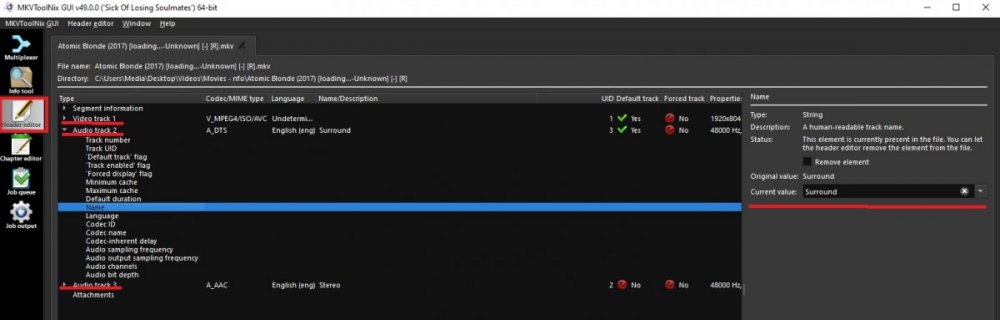
Easiest way is with MKVTookNIX, edit Name on each track.
 1 point
 -
Yes, usually those errors would be thrown away, but just in case they could tell us something about the issues with ausstie, I logged them.1 point
-
Hi not yet, sorry.1 point
-
Ok - this is a version of DB issue (not the first and probably wont be the last) i made a new db with 4.6.0.5 and now i cant reproduce the issue - i get the same result as H2P So Luke fixed or changed something he did not document (not the first or the last time) in the last month or so - that causes this problem with a very slightly older db and before potentially Deleting the AB library might give you the same result - but you would have to test that1 point
-
No News about it.. .. But hopefully sort By Country (or by language At least) will appear before the year ends....1 point
-
I found out what the problem was. There was a single song in the head folder. The song was right tagged. But the song was the problem. I moved the song into a folder an emby sorted the rest right.1 point
-
I really don't think we could (or should, rather) do that. Right now we send absolutely no information about your media anywhere outside of your network. Even as an "opt-in" feature, this would just open the door for people to think we're doing malevolent things with knowledge of their media. I don't really want to crack that door open.1 point
-
@ebr Would you mind adding GMT/UTC to these posts? I honestly have no idea what the Eastern time zone is...1 point
-
Thanks Jorr. I was looking for an option to enable app without digital signature but could not find anything. I can now confirm that going into Qboost and clicking on the 3 dots under Top 5 applications by memory usage, finding emby and clicking start changes emby to always enabled. Thank you very much for the assistance. I thought maybe I would have to use plex or the built in media server but no more! Also as an aside I just noticed that emby still cannot be started or stopped from QNAP app center There is still an error message about no digital signature. It can be restarted or shutdown from the web interface1 point
-
Paul, I too just update my QNAP and got the same message. However, I was able to start Qboost, then click on Application Management and you should see Emby Server listed. It will be enabled, so click Enable and it will start. After starting, it will once again appear in the Main Menu and you can Open the application. I quess PLEX has paid-off QNAP in order to have their app "favored", but I use both media server platforms and emby is the only one of the two that lets me play .mkv files without issues.1 point
-
Don't know if I should have created a new topic but here are some filter that would be interesting : * filter by movie runtime * filter by audio language * filter by audio channels (5.1, 7.1, ...) and maybe by technologies ? (Dolby Atmos, Dolby Digital, ...) * filter by file size ? Don't know if it's possible, but also add a filter that only shows medias that don't need any transcoding for the current device.1 point
-
This is one of my least liked features about kodi1 point