Leaderboard




Popular Content
Showing content with the highest reputation on 11/10/20 in all areas
-
So, i needed to enable remote connections for Emby server, and i wanted to secure it with https. I have seen quite a few guides on how to enable https on emby server, but i find this to be an easier way if you own an asus router that supports Lets Encrypt. Im not sure which models that support this, but my AC-86U did. All i did to get a hold of the ssl ceritifactes was to enable this in the WAN-DDNS section in the router, then export files like this: Then i converted the cert and key file to a pfx file with "Win64OpenSSL_Light-1_1_0L" https://slproweb.com/products/Win32OpenSSL.html and imported this in to Emby: I used this command: "openssl pkcs12 -inkey key.pem -in cert.pem -export -out output.pfx" Of course you also have to port forward the needed ports to make this work. Thats it, so if you own an ASUS router with this option you can save a lot of time, and a bonus, the router also automaticly renews the certificates. If this already has been posted i apologize, and feel free to leave comments if there are things i have missed or if this method seems like a bad idea.1 point
-
We now have packages for twelve Western Digital NAS models, where previously we had just four. The supported models are now: My Cloud DL2100 My Cloud DL4100 My Cloud PR2100 My Cloud PR4100 My Cloud EX2 My Cloud EX2100 My Cloud EX2 Ultra My Cloud EX4100 My Cloud Mirror Gen 1 My Cloud Mirror Gen 2 My Cloud Gen 1 My Cloud Gen 2 Download https://emby.media/western-digital-server.html Everything is self-contained within the package so there are no dependencies. We use the .NET core runtime on models that support it, otherwise we use the mono runtime. Enjoy !1 point
-
This is a known issue with the Samsung app when converting HD audio or DTS with 4K. For best results you will want an alternate audio track in all your 4K which your TV supports so that it Direct Plays. I.e. no HD audio, or DTS at all if your TV is 2018 or newer1 point
-
Probably the best thing to do is turn off real-time bif generation for the recording library and let those bif files be generated during the nightly process after any commercial cutting has been completed.1 point
-
Thanks for the detailed explanation. We'll take a look.1 point
-
Don't know if you use Remote Desktop, but that one difference.1 point
-
Pro, it gives you more functionality.1 point
-
there are no scripts involved, i simply add the new content to the emby server & my sync software (resilio sync) synchronises the content to each location & requires no interaction. Yes but i have multiple devices at each location, each accessing the content at that location from a central samba share. if i was to only rely on kodi's internal database i would loose all the benefits of a of a centralised database e.g. shared watched and unwatched status of media on all devices. - to stop watching a movie in one room then finish watching it in another room etc. I used to do this with mysql but i find emby to be far more stable & as you know emby still utilises kodi's local database so it is multiples faster than mysql.1 point
-
As @cayars has said - a wifi range extender should just extend the wifi-range using the EXISTING wifi/lan setup that is already in place. So as your LAN/wifi is 192.168.1.x - so should all the traffic passing via the extender. You may have it set to an 'AP' mode (Access Point) or something like that - you basically need it in 'Extender' mode where all you need to set, is the existing Wifi details. Then your previous Emby port forwarding on your normal router will work just fine.1 point
-
Hopefully soon. We're going as fast as we can.1 point
-
You need to create a new devfs ruleset that exposes the /dev/dri and /dev/drm of the host in the jail. [devfsrules_drm=10] add include $devfsrules_jail add path dri unhide add path dri/* unhide add path drm unhide add path drm/* unhide This is at /etc/devfs.rules, then you point the jail to use number 10 devfs ruleset. Obviously this assumes you have the drm driver loaded on the host for your iGPU.1 point
-
-Marking it as watched via context menu does not remove the thumbnail -Watching the video from start to finish does remove the thumbnail -Watching the video for 15 seconds and stopping removes the thumbnail -Resuming the video and finishing it adds the thumbnail back -Watching it again (even if I fast forward through it) adds the thumbnail back -Using Estuary skin -Emby is installed on a laptop with wifi off, no managed networks on there, directly connected to LAN with windows server installed -Kodi is installed on Nvidia Shield also connected to LAN1 point
-
Hi. We are very close to a new release but the current beta has this fix in it. Thanks.1 point
-
I have set a fixed IP for the server only as per your advice. So far so good it works well. I am really grateful for the guidance .1 point
-
@quickmic Ok good to know mate! Will just stay on dev in 4.x and await your 5.x release. Feel free to ping when you need a Guinea pig for 5.x!1 point
-
Not sure if you ever got it to work or not but I was having the same trouble. Open emby on your Samsung TV go in to your settings, sound, expert settings, change digital output audio to PCM. Hope this helps1 point
-
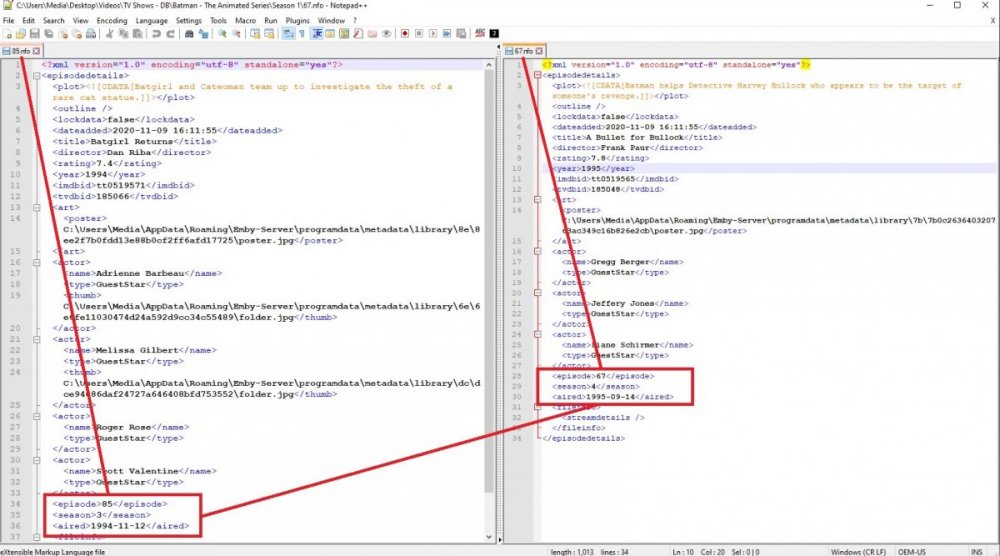
@Luke Should the aired season number be overwritten with 1 when changing to Absolute. Or are there behind the scenes sorting that should only apply to episode number.
 1 point
 -
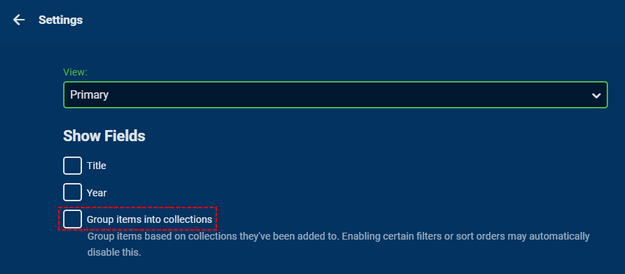
What do you have this option set to under the 3 dots (...) at the top of your Movies library view?
 1 point
 -
Yes, as mentioned above it is like the Season number is affecting the sort order, each season is still grouped instead of going in sequential episode number order. Same example from above Absolute number 85 has metadata season 3 episode 85, and Absolute number 67 has metadata season 4 episode 67. So season 3 episodes are before season 4 episodes instead of sequential episodes.1 point
-
gracias hermano lo checare1 point
-
Hi, yes it's planned for the future. Thanks for the feedback.1 point
-
ya la encontre gracias https://support.emby.media/support/solutions/articles/44001159936-backup1 point
-
That's crazy and will just cause you grief. You only need to create a "fixed" IP for your servers, not every device. Some people pre-assign IPs to different devices so they know by IP if it's a server, NAS, client, computer, etc. BUT you need your Emby server to be unchanging so assign it a reserved IP in your router which takes a minute or so to do.1 point
-
In case anyone else needs it, the API is horrible, IDs are GUIDs, but then other things use the IDs as strings w/no dashes. Just ridiculous. But you can set the users visibility to a channel on/off this way. var users = UserManager.Users; var channels = LibraryManager.GetItemList(new InternalItemsQuery() { Recursive = true, IncludeItemTypes = new []{ "Channel" } }).Where(x => !string.IsNullOrEmpty(x.Name)).ToList(); var currentChannel = channels.First(x => x.Name == Plugin.Instance.PluginConfiguration.ChannelName).Id.ToString().Replace("-", string.Empty); if (!Plugin.Instance.PluginConfiguration.Enabled) { foreach (var user in users) { user.Policy.EnableAllChannels = false; var enabledChannels = user.Policy.EnabledChannels != null ? user.Policy.EnabledChannels.ToList() : new List<string>(); var disabledChannels = user.Policy.BlockedChannels != null ? user.Policy.BlockedChannels.ToList() : new List<string>(); //Logger.Info("Enabled " + string.Join(",", enabledChannels.Select(x => x.ToString()).ToArray())); //Logger.Info("Blocked " + string.Join(",", disabledChannels.Select(x => x.ToString()).ToArray())); if (!disabledChannels.Contains(currentChannel)) { disabledChannels.Add(currentChannel); //Logger.Info("Added To Disabled " + currentChannel); } if (enabledChannels.Any()) { if (enabledChannels.Contains(currentChannel)) { enabledChannels.Remove(currentChannel); } } else { foreach (var channel in channels.Where(x => x.Name != Plugin.Instance.PluginConfiguration.ChannelName)) { enabledChannels.Add(channel.Id.ToString().Replace("-", string.Empty)); } } user.Policy.EnabledChannels = enabledChannels.ToArray(); user.Policy.BlockedChannels = disabledChannels.ToArray(); //Logger.Info("Enabled " + string.Join(",", enabledChannels.Select(x => x.ToString()).ToArray())); //Logger.Info("Blocked " + string.Join(",", disabledChannels.Select(x => x.ToString()).ToArray())); UserManager.UpdateUser(user); } } else { foreach (var user in users) { user.Policy.EnableAllChannels = false; var enabledChannels = user.Policy.EnabledChannels != null ? user.Policy.EnabledChannels.ToList() : new List<string>(); var disabledChannels = user.Policy.BlockedChannels != null ? user.Policy.BlockedChannels.ToList() : new List<string>(); //Logger.Info("Enabled " + string.Join(",", enabledChannels.Select(x => x.ToString()).ToArray())); //Logger.Info("Blocked " + string.Join(",", disabledChannels.Select(x => x.ToString()).ToArray())); if (disabledChannels.Contains(currentChannel)) { disabledChannels.Remove(currentChannel); } if (enabledChannels.Any()) { if (enabledChannels.Contains(currentChannel)) { continue; } enabledChannels.Add(currentChannel); } else { foreach (var channel in channels) { enabledChannels.Add(channel.Id.ToString().Replace("-", string.Empty)); } } user.Policy.EnabledChannels = enabledChannels.ToArray(); user.Policy.BlockedChannels = disabledChannels.ToArray(); //Logger.Info("Enabled " + string.Join(",", enabledChannels.Select(x => x.ToString()).ToArray())); //Logger.Info("Blocked " + string.Join(",", disabledChannels.Select(x => x.ToString()).ToArray())); UserManager.UpdateUser(user); } }1 point
-
Hi Luke, Where their any updates recently on the android app ? I have encountered the problem yes, i'm thinking maybe it was a file format the chromecast doesn't support? Anyway.. I sold the chromecast 3 and ultra. I'm waiting on the new google tv. Hopefully the problem will be solved.1 point
-
Intenta con el plugin de Server Backup, es con lo que yo he migrado mi servidor sin problemas. Me respalda usuarios, bibliotecas y configuraciones sin problemas. Con respecto a las portadas, te recomiendo guardarlas en las carpetas de medios, junto a las películas. De esa manera los metadatos y portadas no dependeran de tu servidor y al reescanear se mostraran automáticamente.1 point
-
Hey @chef , any time for updates for this plugin maybe ? Cheers1 point
-
The /dev/pci doesn't matter for now. Do you have a /dev/drm directory in the jail? /dev/dri are just symlinks to /dev/drm. If both do not exist you need to alter your devfs ruleset for that particular jail to "reveal" those device nodes in the jail.1 point
-
Ich konnte es selbst fixen. 1. Sämtliche Portfreigaben (sowohl Router als auch Synology) gelöscht und neu eingerichtet. 2. Synology neu gestartet 3. Emby Bibliothek Einstellungen überprüft und alle "Scrapper" ausgewählt 4. Emby Neustart 5. Bibliothek scannen 6. Metadaten der Bibliothek scannen Es wird nun alles wieder abgefragt. Ob etwas dabei war, was zur Lösung geführt hat weiß ich nicht. Jedenfalls läuft es bei mir nach den durchgeführten Schritten wieder einwandfrei.1 point
-
5.1. This is what the original Fire TV devices are still on.1 point
-
Emby for iOS 1.9.9 has been released. Here are the highlights. New Apple CarPlay Support This is a treat for our Emby Premiere users. Now you can take advantage of Apple CarPlay while you're on the road. Other Improvements Improved HDR playback Support in-app AV1 decoding Added camera upload photo folder selection Support playback speed and subtitle offset selection Media Info display is now TV mode friendly Brighter detail screen backdrop when used on larger screens Support downloading subtitles during video playback (requires Emby Server 4.5.1+) View the full article1 point
-
Hi. It looks like Emby is updating the library again. I have no idea why it suddenly works again, but the main thing is that it works again. I'll keep watching it anyway.1 point
-
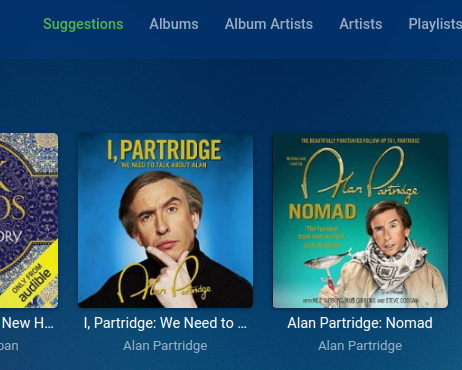
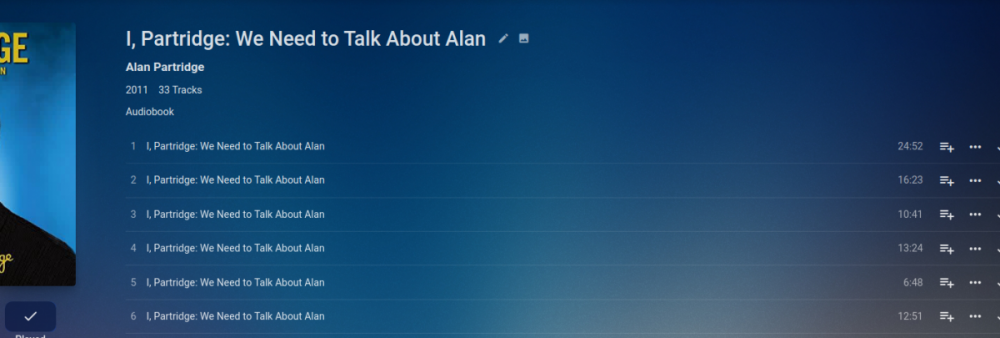
One of the big things for me at the moment is that clicking the Audiobooks library takes you to "Suggestions" (I can't seem to find a way to change this?). Suggestions has a list of books but if you click one, rather than take you to the start, it takes you straight to a random chapter with no obvious way to get to the start of the book. It would also be nice if "Albums" could be renamed to "books" or a default view set - ie My collection is organised in Folders which my users find to be the most usable view. Another quirk I don't seem to be able to solve is that even though the filenames have the chapter number in them, they all show up with the same name in Album (I use OpenAudible to split the books in to a file per chapter)

 1 point
 -
Collega il server emby e il TV al router con dei cavi ethernet e vedi se il problema sparisce. Se sparisce, il problema è il collegamento wifi.1 point
-
https://www.qnap.com/en/security-advisory/QSA-20-09 Mainly for info - but considering some of the bugs introduced recently with firmware upgrades ensure you have adequate backup of you config etc Also unless you are experienced in securing systems against attack dont expose you QNAP NAS to the internet - they are not secure and hardened for this task - no matter what QNAP may say.1 point
-
You are shouting into the void the dev started this thread and has not logged in since then.1 point
-
More goodies for subtitle fans:1 point
-
This will be in Emby Server 4.5. You'll be able to use the controls in the video player to adjust the subtitle offset.1 point
-
This was a good idea in 2016 and it still is in 2020. What happened to it? Could we have an update? Is it no longer on the road map for some technical reason or have it been such a low priority that we haven't heard more about it for 3+ years. As a nonnative English speaker, with a lot of users that use subtitles this is one of those killer features that simplifies fixing subtitles a lot.1 point
-
It would be very beneficial for dvr users for the detail screen to have the channel name and the time of the recording. If you ask why I want the time that it is recorded the time that it has been recorded tells me the later the show is screened the chances of being taken off air are very high and don't get too hooked on it. In WMC each library displays the information that is relevant for that library so if you go to movies library it will not have the channel name and the time so each screen has the information that is relevant for that library when I requested this before the argument was that every screen should be the same but it shouldn't. It would also be helpful if the pre playback row can be taken off it just makes the screen too busy. In android tv client there is an option and it should be across the board so no one is disadvantaged.1 point
-
Just an update after spending hours getting Emby+LetsEncrypt on FreeBSD running. https://app.emby.media is connecting properly as long as I'm in Chrome. Firefox still gives the error, but seems LetsEncrypt root won't be trusted by Mozilla until Firefox 50. So no worries there. Here's the steps taken in FreeNAS 9.10.1 / FreeBSD 10.3-RELEASE jail: If you haven’t already, fetch the ports: (or just run: pkg install py27-certbot) # portsnap fetch extract # cd /usr/ports/security/py-certbot && make install clean When running the above install I received a warning from testing other LetsEncrypt scripts I had installed LibreSSL: /!\ WARNING /!\ You have security/libressl installed but do not have DEFAULT_VERSIONS+=ssl=libressl set in your make.conf So I added DEFAULT_VERSIONS+=ssl=libressl to /usr/ports/security/py-certbot/Makefile. Then reran make install clean. If it reports its already installed run make deinstall then make install clean again. Opened port 80 and 443 to NAT to the FreeNAS jail LAN IP. Then ran certbot: # certbot certonly --standalone -d emby.mydomain.com Entered email address and accepted ToS. This generated the certs in .pem format and placed them in /usr/local/etc/letsencrypt/live/emby.mydomain.com/ Now to convert .pem to .pfx: # openssl pkcs12 -export -out emby.mydomain.com.pfx -inkey privkey.pem -in cert.pem -certfile fullchain.pem Then moved the resulting .pfx file to emby's install directory. # mv emby.mydomain.com.pfx /usr/local/lib/emby-server/ Finally, back in emby's "Manage Server" Web UI -> Expert -> Advanced added /usr/local/lib/emby-server/emby.mydomain.com.pfx to the "Custom certificate path" and added emby.mydomain.com to "External domain". Restart emby-server and remove the port 80/443 NAT holes I created in the firewall. Leaving only port 8920 open for emby's default SSL port. More info including Auto-renew can be found at https://certbot.eff.org Thanks, that was fun.1 point
-
Because not everybody has the time to rip originals, we sometime get content from other sources and it can happen that subtitles are offbeat. It is much faster and easier to adjust offset while watching the movie than looking for other subtitles. Finally, I am sure devs are big boys and know where to put the priority. Thanks1 point
-
Yes, I tried that and it still gets transcoded to Dolby Digital.0 points