Leaderboard




Popular Content
Showing content with the highest reputation on 11/06/20 in all areas
-
Hi Folks, My first post, so be gentle :-) So, after 5 years of using Plex and being a pretty busy Plex Pass member, I am uninstalling Plex for good. I just want to watch my stuff, that's all. The latest update is very broken and after hours of wasted time, I am done with it. I am hoping that Emby can stand up to the challenge... just give me my stuff at home, even when the internet is down. That's all. Here we go... "The king is dead. Long live the king."3 points
-
Isn't downloading from YouTube against their T&C's?2 points
-
so follow up to anyone who has been following the saga and/or cares, tech came out and tested/replaced the ONT. I spent hours on the phone with support not because I wanted to, I requested a van to replace the ONT 2 weeks ago, they *made* me do the troubleshooting steps *in order to get a van*. 2+ hours with an idiot from a foreign country just to get a van. Anyway, ONT upgraded, now I can decide if I want Gb internet since an upgraded ONT was a requirement Cheers guys, thanks for all the suggestions. Going to call them and get a refund for last month's service, and a refund for wasting my last 3 Saturdays.2 points
-
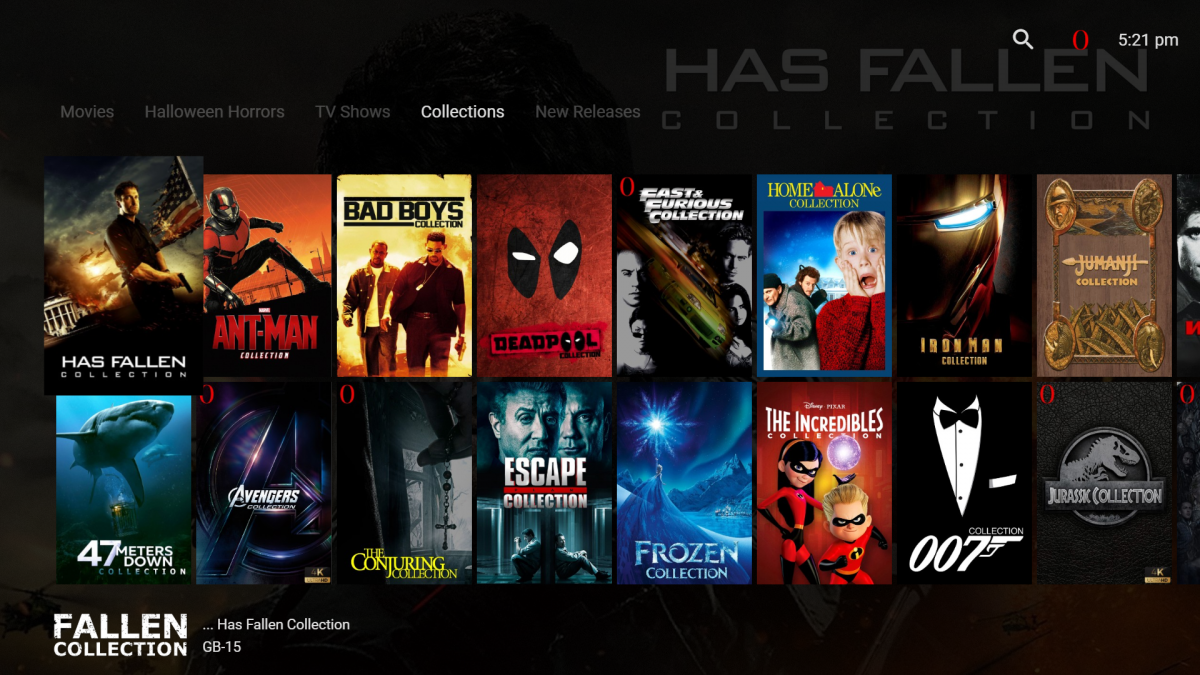
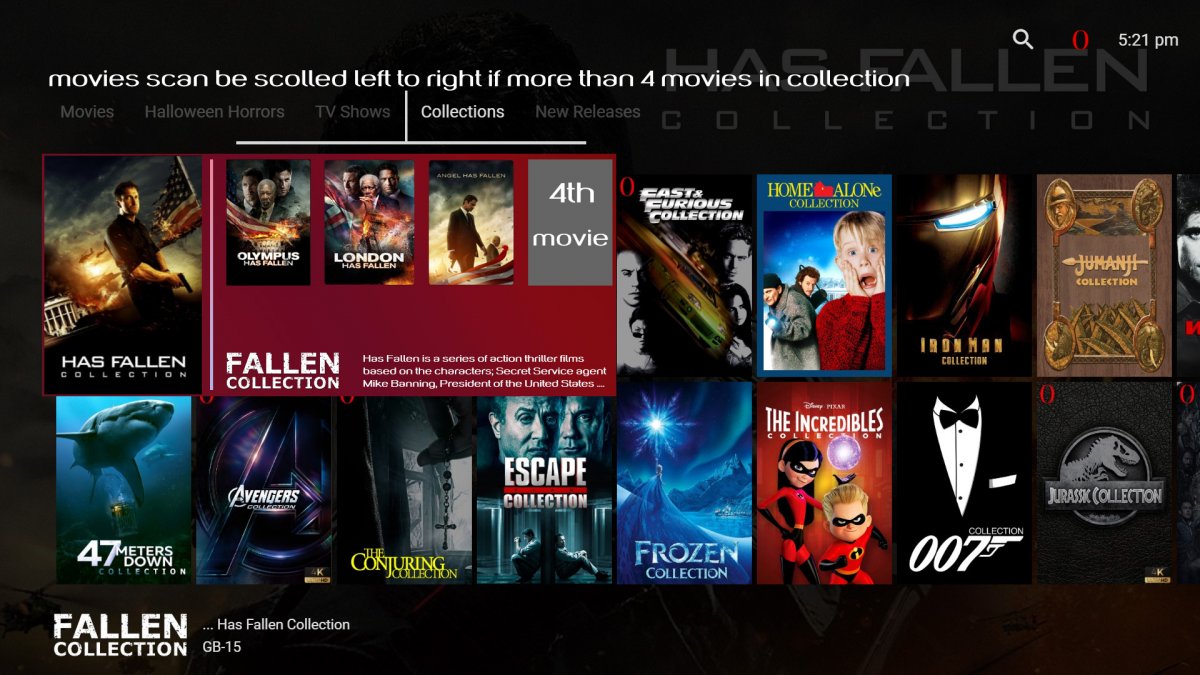
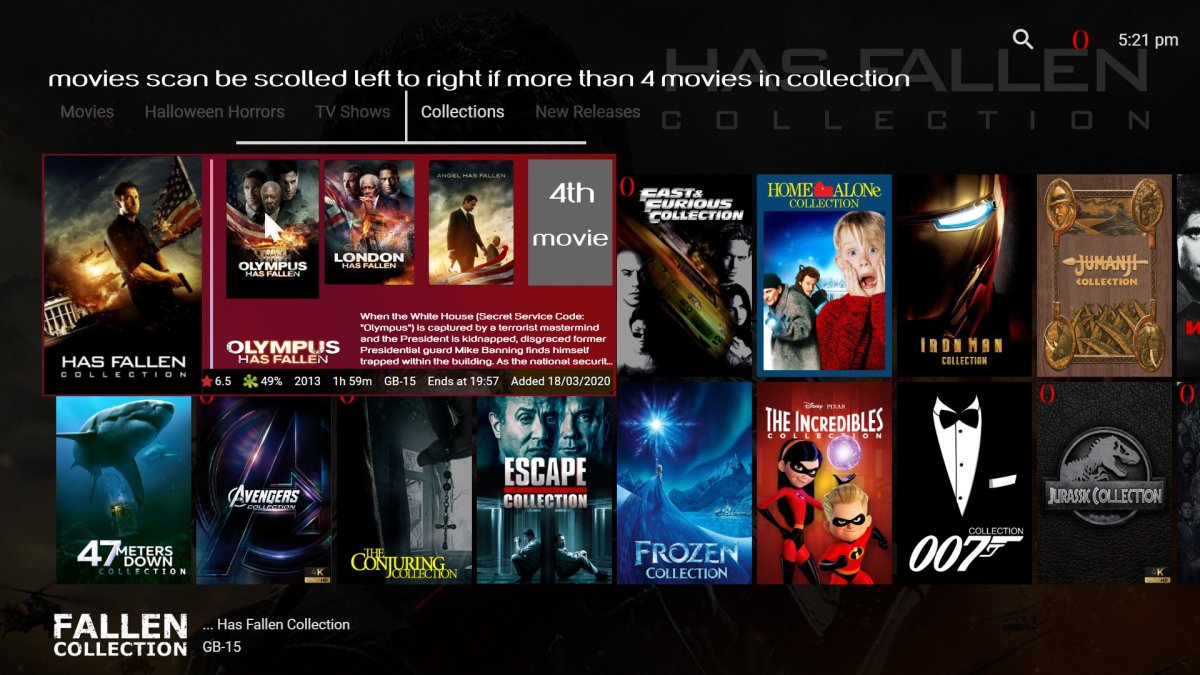
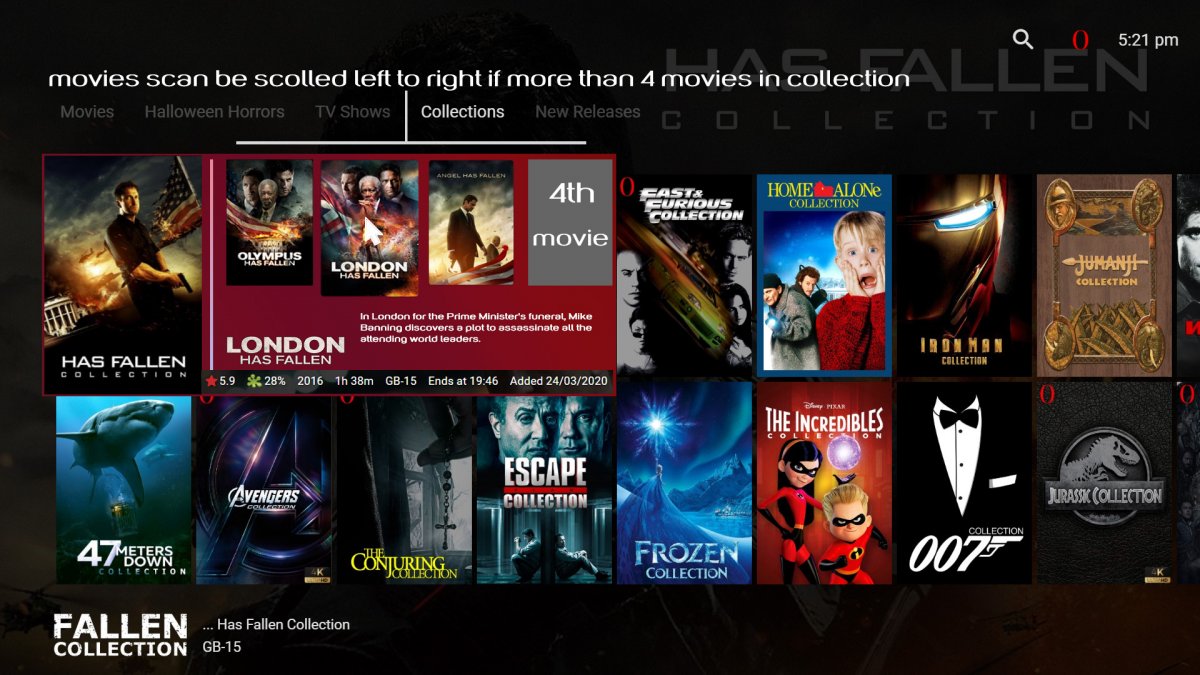
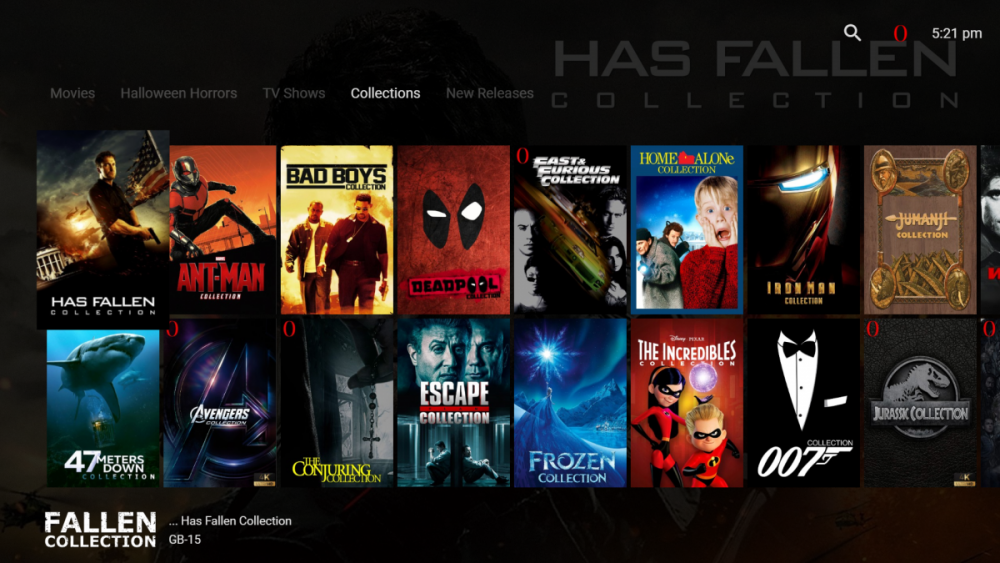
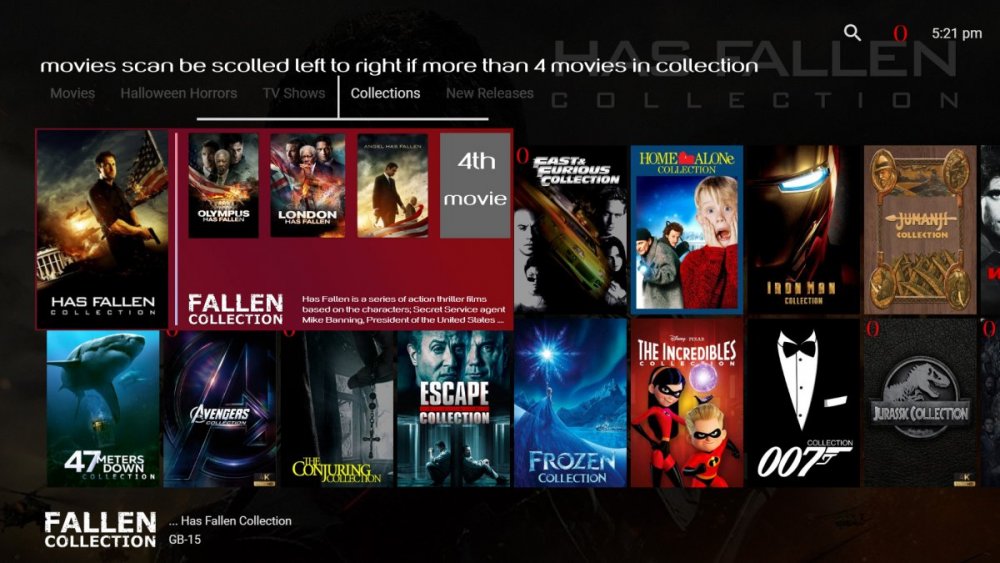
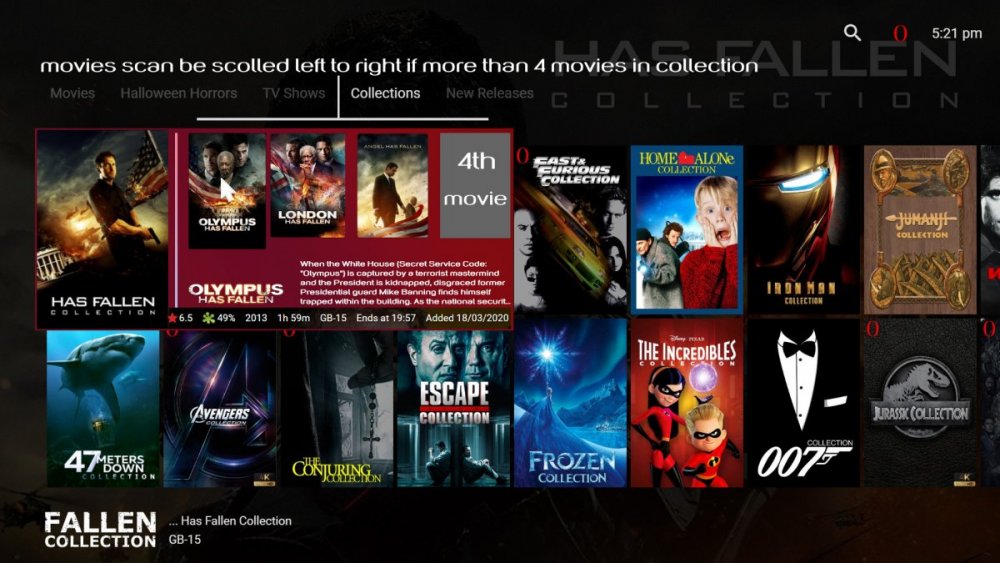
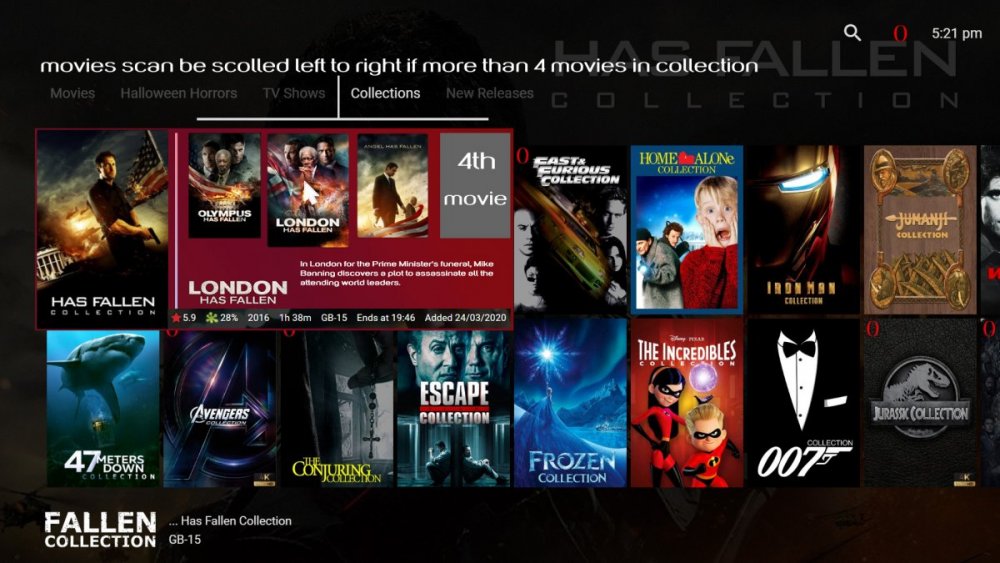
Hey all i have had a bit of an idea and would like to share with the devs to see if this would be possible. as you can see from the first photo this is how the collections column looks like now and i would like to talk you through the new design idea i have had with the following pictures. second photo : Okay so as you can kinda see i have extended the view panel for what would be available in the selected collection when being hovered over by mouse or keyboard, this would then show what movies our available in that current collection that uploaded to your server. along with its collection logo and information. if there is more than 4 movies in you collection you would then be able to scroll from left to right to show the 5th 6th etc movies. also just to note when closing this panel to see the next collection you could press your back button on your keyboard or mouse to show other collection under the view panel. Photo 3: So in this photo, i am showing you that when hovering over one of the selected films it will in-large the same as emby currently when hovering over films along with the movie logo and information and metadata information ie date added, ratings, length etc. once clicked it will then redirect to the movies page then being able to press play from there. Photo 4: The last photo is just showing when hovering to the next film it is showing its in-large image and information. I hope you guys like this idea and same for the devs as well. not sure if it would be feasible or even a good idea but just thought i would share with you and hope you liked it haha.
 1 point
 -
Emby for iOS 1.9.9 has been released. Here are the highlights. New Apple CarPlay Support This is a treat for our Emby Premiere users. Now you can take advantage of Apple CarPlay while you're on the road. Other Improvements Improved HDR playback Support in-app AV1 decoding Added camera upload photo folder selection Support playback speed and subtitle offset selection Media Info display is now TV mode friendly Brighter detail screen backdrop when used on larger screens Support downloading subtitles during video playback (requires Emby Server 4.5.1+)1 point
-
Hi there, have you explored advanced library settings in the server?1 point
-
I actually used the app and SCROLLED Down to see where to unlock it. Doi I am really liking the EMBY on this device. I have a local movie I think will tell me more about the hardware. As usual, EMBY is darn near perfect!1 point
-
Yes, but you need to make that case to the developers of ffmpeg/probe. It being an open source project, even if someone takes it up it may take a while. Therefore, the advice we're giving you is that your best solution is most likely going to be to modify the paths.1 point
-
My cheap phone has a 4.7-inch display with 540 x 960 pixels. On the Android player I can read the text like artist, album and song title fine from a foot or so away, but when the device is mounted on the dash about 2.5 feet or so, I have more difficulty reading the text. Would it be possible to include a font or text size setting? I just need it for artist, album, and song, but more customization is better. I'm fine with more space between objects, cut-off text, or wonky screen effects due to this, but it would mostly improve usability for me and I'm sure those people who want to use it as a car player. Android TV app is not an option as I can't mount the phone horizontally, plus that interface is not optimized for touch. Thanks as usual for the impressive and ongoing development.1 point
-
Yes, it's been a much smoother experience so far... in fact, I've just bought a month's Premiere to test out the remote access and mobile apps. #impressed1 point
-
Thanks. I am finding my way easily so far - have set up a Let's Encrypt cert, handled DNS, and will be testing a remote connection later tonight I am very impressed with the web interface, the speed and features of Emby Server. I do not need Emby Connect but just a way for a few friends to use their TV app to connect directly to my server and log in. That's it! Paully1 point
-
The issue appears to be in ffmpeg, not emby.1 point
-
I began using Plex about 5 years ago, when I wanted a way to view my video files in different rooms in my house. It didn't take long to get it all up-and-running very well indeed. I could use all manner of devices to view my movies and the whole experience was simple and polished. Then, about a year later, Plex HQ started to "bloat" the server software with the ability to view Live TV, they changed the way remote access worked and things started to get fiddly. I stuck with it, constantly fixing moving goal posts and convincing friends to use it too. To cut a long story short, 2 major events pushed me to jump ship - one was the week when Plex HQ went down and nobody could do anything (because all requests and server lookups go through plex.tv servers first) and the second was 3 days ago - when the latest update kicked people out of their own servers and the software constantly looped in a restart then crash scenario. I spent 5 hours trying to fix it but then suddenly realised "why am I bothering with this nonsense anymore?!" So, I looked up alternatives - found Emby and gave it a go. So far, so good. ALL I need, and I must stress ALL I need is:- local access to my files without internet (just in case) the ability to add a few friends as local users and specify a direct connection to my server That's it. I am looking forward to a fresh start with non bloat software and enthusiastic help from the Community. Thanks for reading this post. Regards, Paul Littlefield Linux Systems Administrator Maidstone, Kent, UK1 point
-
Yeah.. Having @Roku fix their documents is the equivalent of "The NeverEnding Story" and always an adventure. You get to ride on Falkor. The giant rock guy becomes your friend. But they never update the document. I have asked them to update things so many times and for small things. Updating documentation that isn't full of advertising that makes them money isn't high on priorities. I even left a message inside an old r2d2 unit in the hope they would find it. https://community.roku.com/t5/Roku-Developer-Program/Please-give-us-onDestroy-as-an-event/td-p/515902 See the bottom part of my post. In some universes the message inside the r2d2 unit never gets to the Princess. We always hope she might hear it.1 point
-
We can probably update our profile to add support for DTS in MP4 on newer device. That may indeed be possible. That was your problem with DTS being coverted to AC3. We might be able to solve 2 problems here. 1) Add DTS to MP4 (direct play only - non HLS) since technically it does work when supported. 2) Solve the direct play always plays default audio track issue Thank you for bringing this to our attention and both of these problems will be corrected. We appreciate the help. Any other issues you find, inconsistencies, missing features, etc.. We would love to hear what about them. Thanks again.1 point
-
As you appear to be the first to hit this issue - perhaps rather than going down the route of asking for a software modification (which, with respect is not going to happen quickly..), why not fix the source of the issue ? Having a path this long must be an absolute nightmare to manage and I suspect you are trying to organise files by file structure, rather than let metadata and a database do it for you. That's why @cayars asked to see an example. 'UNC Shares' may also be an alternative to keep things more manageable. For example c:\grgdfgddfhghkgkhgh\g\kgkgkgkgkg\kg\kggkgkgk\gk\kgkgkg\\files1\kgkgkgkgk\klhkhikhiuguigyigigiygiy\yigigigigig\igigigigi\igigigigigig\igigigigi\gi\g\igi\files2 Can simply be shared as '\\computername\files2' at the very top level or \\computername\files1 at a much lower level as required, thus sharing all files 'above' it (but effectively halving the file path length)1 point
-
No. It's exactly where you said. I don't know how I missed it. Thanks again.1 point
-
Hi, @SamES as I said in previous post it works now. I have to check auto option. I use Emby Server on Raspberry Pi 4B and there's no problem with 1080p video. There was problem only on TV but now works. Regards, Przemek1 point
-
Probably not the first to mention this, but Emby could really need to possibility to add multiple preferred subtitle languages listed in priority.1 point
-
My library was consistently wiped every night. Hasn't happened since.1 point
-
Yesterday my recordings did appear almost right away so I will keep track of that if this continues that way. Live TV with Emby for Kodi is working just fine for me on my two Shield TV devices.1 point
-
@varmandra sorry for the late reply. It is not a feature that will be forgotten in EmbyStat. I will have to take some more time to implement that feature again and also update to the tvdb V2 API asap.1 point
-
I'm sure you're not going to like this answer, but the best thing would actually be to get some kind of error log from the Bigscreen side. The reason you don't see an error in the emby server log is because the server thinks it's doing everything correctly, it's just that there's something about our xml responses that Bigscreen doesn't like. Without that help from Bigscreen, we're essentially going to be guessing. On the emby server side of things, if you want to enable both debug logging in the server, as well as dlna debug logging in the dlna plugin options, then that will help me see how far Bigscreen gets before it gets into that error state. Sometimes that will have some clues.1 point
-
That's a log from either the convert or download feature, which will preserve all audio tracks.1 point
-
@softworkz is looking into this. Thanks.1 point
-
Thanks for the info.1 point
-
I just closed the browser and restarted the server from the tray and the update worked....now I have to post another thread about the update.1 point
-
Glad you got it working. That is what the full server log suggested as the errors referenced NextPVR not shown in the snippets above.1 point
-
We can try and do better as well. We will see if there is anything we can do to make this more seamless and automatic. Give things a little bit more intelligence.1 point
-
I don't think anybody is debating that the LG TV's support Tru-HD internally - my C8 certainly does, but it can only play it from the TV speakers. ie pretty useless. The problem is the decoder does not appear to be coupled to the external outputs (HDMI). Even the CX with eARC STILL cannot pass Tru-HD back from an internal App. So as per the wiki document pointed out earlier, the ONLY way to get Tru-HD (with/without Atmos) is via an external source device, going direct to your Atmos enabled receiver or soundbar and then onto the TV - ie bypassing the need for eARC/ARC. https://support.emby.media/support/solutions/articles/44001984861-why-does-the-emby-app-for-my-lg-tv-not-play-the-dolby-atmos-truehd-audio-without-transcoding-1 point
-
never be able to use inotify, I use MEDIAMON for years, it works with my old DS412+ and my 916+, I automatised the install that I forget that I have it https://github.com/carljm/synology-mediamon THINGS YOU NEED TO KNOW : you may have to change the path to the MEDIAMON.PY file in the S99MEDIAMON.SH file, edit S99MEDIAMON.SH file and next to #start the monitoring daemon, change the path to you MEDIAMON.PY file, to me it's : python3 /volume1/Docker/mediamon.py paths are in the MEDIAMON.PY file watched_paths = ["/volume1/music", "/volume1/photo", "/volume1/video"] followed by "allowed exts", if you want mediamon to scan specific extension you have to add it here here are my notes : ## MEDIAMONITOR python3 -m ensurepip python3 -m pip install pyinotify # test python3 -m pyinotify -v /tmp # copy S99mediamon.sh to /usr/local/etc/rc.d avec 0755 sur le fichier cp /volume1/Docker/S99mediamon.sh /usr/local/etc/rc.d/ && chmod 755 /usr/local/etc/rc.d/S99mediamon.sh /usr/local/etc/rc.d/S99mediamon.sh start # log @ /var/log/mediamon.log copy MEDIAMON.PY and S99MEDIAMON.SH somewhere on your synology (to me /volume1/Docker) edit those files to change your paths install python3 from package manager install pip and pyinotify you can do a test copy le script to /usr/local/etc/rc.d start it (you do not have to reboot) you can show logs on /var/log/mediamon.log be carefull, the script will be erased if your syno is updated, so I add a scheduled task at syno's starting that do all the tasks, I created a script MediaMon.sh #!/bin/sh export LANG=fr_FR.utf8 python3 -m ensurepip python3 -m pip install pyinotify cp /volume1/Docker/S99mediamon.sh /usr/local/etc/rc.d/ && chmod 755 /usr/local/etc/rc.d/S99mediamon.sh && /usr/local/etc/rc.d/S99mediamon.sh start the schedule is : name : MediaMon user : root event : start script : bash /volume1/Docker/Scripts/MediaMon.sh you can do a tail -f /var/log/mediamon.log while you had / remove files1 point
-
Using a soundbar - the only way Atmos channels can get 'height' is to literally bounce them off the ceiling and back down. This 'works' but vs a real Atmos speaker setup (with height speakers) the effects are underwhelming. You will also get limited location awareness - as the soundwaves bounce around the room from the 'central' soundbar. In this sense, a standard discreet 5.1 system will normally outperform an Atmos soundbar. Unless you have a mid/high end audio system - the difference between Tru-HD Atmos (Uncompressed) and DD+ Atmos (Compressed) will not be perceivable imo.1 point
-
If I could put one thing in to a future release - the 'missing shows' I would like to be a setting either on/off. I have a load of series in my system that I ONLY maintain the last season, or the last few, and delete many old ones. This looks real bad on my stats page.......1 point
-
This has been released today as part of Emby for iOS 1.9.9. Stay tuned to the blog this week for the release announcement. Thanks.1 point
-
In the absence of publicly available data to this effect, somebody, somewhere is going to have to start with a contributor-network style plugin that scrapes data back from clients as they set the correct values in their servers, and with people bailing on Plex, nobody on earth is in a better position to do that than you are, luke.1 point
-
Aaand that was it. Sorry for taking up so much of your time in order to fix something that was my fault. Thanks for your help!1 point
-
While this would be (and is for Plex) a very flashy feature I suspect strongly that it is only a VERY tiny minority that would take advantage of it. For me the only benefit I see would be if I wanted to have the same thing playing on more than one TV in my home. That would be a tiny benefit and really get used only when my granddaughters visit. (About two or three times a year.) I understand that Emby's developer time is pretty limited and I would much rather see other things, like audiobook support, be fully implemented. Even just the ability to resume an audiobook should be extended to all clients. There are many other things I would like to see implemented WAY before fancy features like this. Plex made the decision to implement "Watch Together" but I think they did it for the advertising value and not because there was much of any real demand for it. It could be, I guess, of value to heavy social media users or to people that like to talk over movies or shows but I see little value beyond that. To me watching something with others is only of value if they are present. I guess with the lockdowns and theater closings this "seems" very needed but I really doubt it would really get much use after the novelty phase wears off.1 point