Leaderboard




Popular Content
Showing content with the highest reputation on 11/03/20 in all areas
-
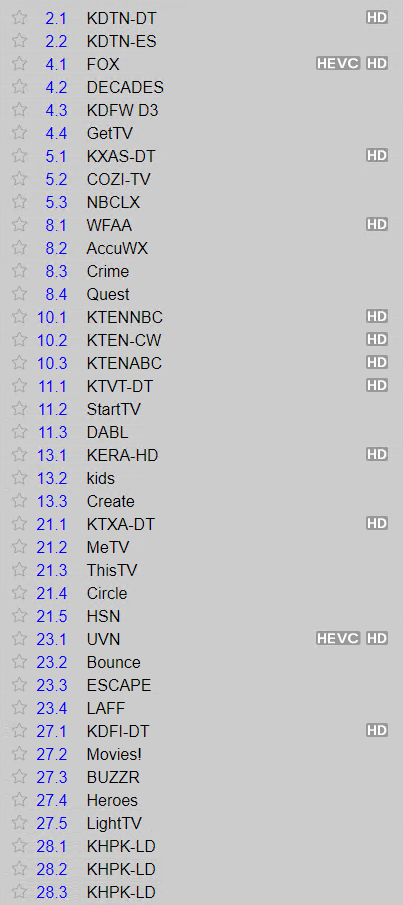
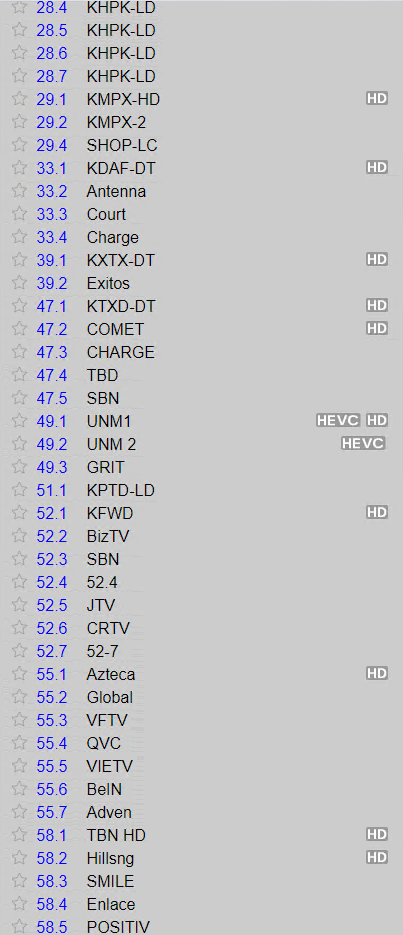
I now have 3 channels using HEVC HD and FOX4 KDFW is one of them. Looks to be working great!!2 points
-
@cayars I will build up a list of examples tonight for the knowledge base. I don't want to paraphrase those Roku documents. Those should be referenced. Users should use those to understand how this works so none of that has to be explained just referenced. The Emby App-ID's for both the regular Store and the private Beta are needed. Then how to create a URL to send containing the Type and ID together with a resume point or bare. In both forms: To launch and play, and to just play. I will create examples for all those to show how to make them. Sharing is caring. ^_~ This will only work on a local LAN it does not work across the internet. Edit: Did not have time yesterday to complete this. Will try to get this done today.2 points
-
We should get a kb article for these @cayars2 points
-
-= PLEASE UP VOTE & PROMOTE THIS REQUEST IF YOU WOULD LIKE THIS FEATURE =- DO THIS BY CLICKING THE "LIKE" BUTTON ON THIS POST REQUEST: Properly pool multiple M3u IPTV sources, so when adding more than one with the exact same M3u emby treats them as one source with however many "Concurrent Streams" you set for each. https://emby.media/community/index.php?/topic/63725-multiple-iptv-tuners-double-channels/?p=636718 https://emby.media/community/index.php?/topic/59607-duplicate-channels-one-tuner/?p=607031 https://emby.media/community/index.php?/topic/57420-multiple-identical-m3u-tuners-without-duplicate-channels/?p=560949 Basically once M3u #1 has used all 5 of its tuners, I then need to start using the login info that is within M3u #2... once those 5 tuners are used (now all 10 tuners), then emby issues "no tuners available". This is how emby treats HDhomeruns today, so it can't be to difficult. @@snodrog742 @@manolodf @@robrhedrick @@cayars1 point
-
So basically this. I have TV Shows, Movies, and Anime libraries. For anime; I'd prefer to set the default to Japanese with Subtitles. For movies, English and no subs unless forced. For TV Shows, the same. However, Emby only allows one overall setting this for this, for all libraries, instead of just one. I think it'd be a pretty nice little feature.1 point
-
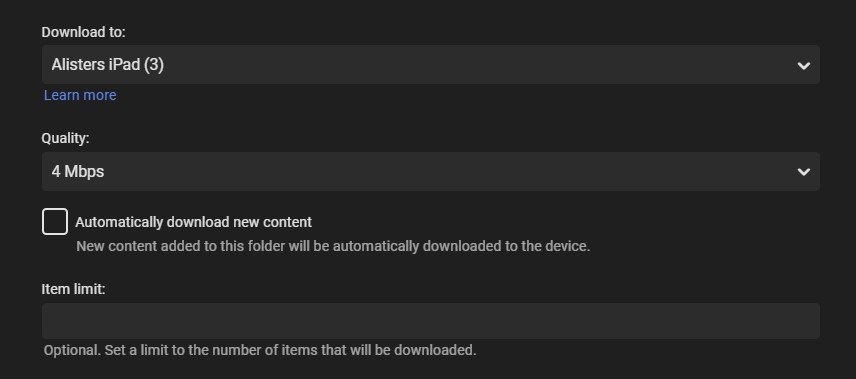
Having started using the download to... option one thing thats a major PIA is having to pick the options you want everytime you use it i.e. it looks like this everytime when i would like this We dont have any settings to control this - unless i missed it somewhere But if it could save the user preference at least for the browser session that would be an improvement or save it to user preferences
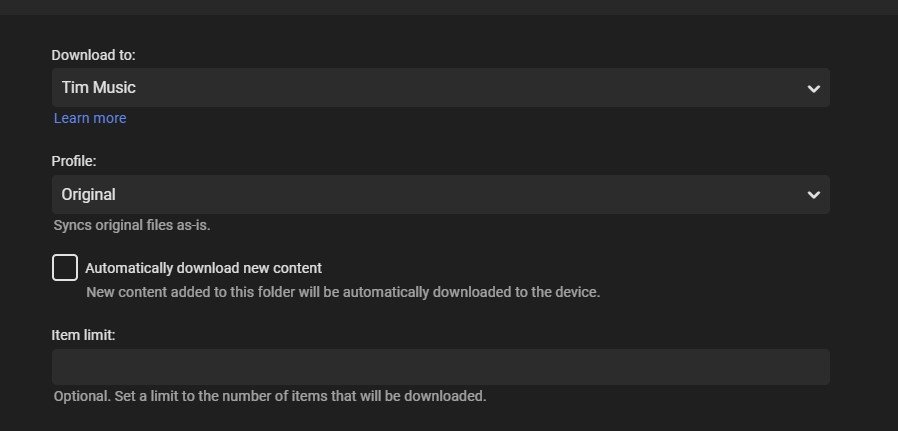 1 point
 -
Request: Add a visual seeking method with progress bar using thumbnails from chapter markers or the 10 second thumbnail generator (as defined by the users server options) for skipping. Now that the >> << are remapped to next and previous items in a list there is no way to conveniently skip chapters during playback. Exiting and going back to the details page to select the next chapter is inconvenient and so is clicking skip forward 50 times at 30 seconds a pop to get to where you want to be. The ATV chapter skipping and visual seeking methods are good examples of a way to advance/reverse on the progress bar using thumbnails . Click the UP key could bring up a slider where you can select chapter images and/or the newer bif images. Then you can use the left and right arrow to scroll through the images Currently the UP and DOWN keys are both mapped to bring up the OSD, so the UP should be free for other things like a chapter skipping slider1 point
-
Hi, Is it just me or trailers max quality is 480p 4mbps? I think I once saw 1080p trailer..?1 point
-
I'm looking for a way to select songs from my Emby Server using voice commands on a Google Home device such as the Google Home Mini or the Google Nest. I want to play the music directly on the Google Home device that issues the voice command, rather than routing it to my phone or a DLNA-compatible "player." However, there doesn't seem to be an option to simply play the selected music directly on the Google Home device's speaker. Am I overlooking something? I have successfully installed and configured the Emby for Android app and linked it to my Emby Server using Emby Connect. I can start a session by saying "Hey Google, talk to Emby Home." I can then say "Play <a song title> by <artist name>. Google finds the song on my Emby Server and asks which player I want to use. (Right now there are only two choices—my android phone or a DLNA device that I never use.) To test the feature, I selected my phone and it does play the song as expected, but not on the speaker I would like to use. (If the Emby team wants to pursue improving Emby for Google Home, you might take a look at a product called MyMedia, which is an Amazon Echo "skill." Their approach is elegant and it works flawlessly. The software "watches" and indexes local music folders on a PC to create a lightweight music server that is compatible with Alexa. I wish something similar existed for use with Google Home products.)1 point
-
hey what I'm really missing is support for audiobooks. Simply saving the resume point for those mp3s would be absolutely enough, no need to fetch metadata etc.1 point
-
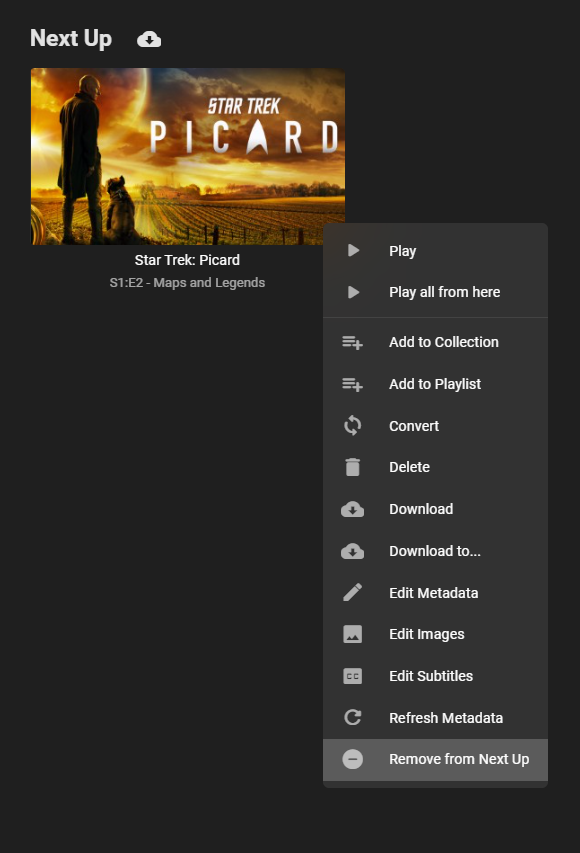
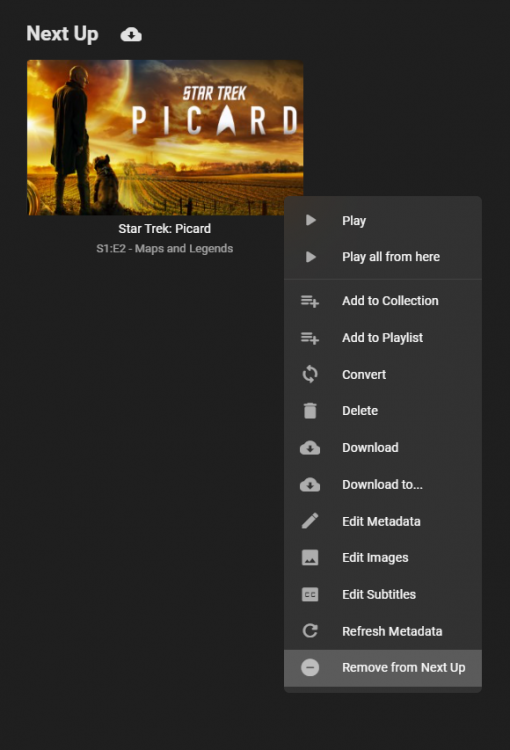
To gauge interest... What if you had the ability to "Forget" a series for the purposes of Next Up display. That is, it would no longer show in Next Up - unless you watched another episode. Sometimes you maybe watch a series for a while and, even though there is more of it or more is made later, maybe it isn't as good as the earlier seasons or maybe you just don't have time for it anymore. So you'd like it to quit showing up in your Next Up list so it is less cluttered and you can focus on the series you are actually watching now. If you start watching it again, the "forget" would be forgotten and it would start to show up in Next Up again.1 point
-
May be (but only when each part is in its own named title folder as in the example below).1 point
-
Wow that's a really bazar way to label problem channels.1 point
-
SD informed me that: HEVC HD = Ready to rock n roll HEVC = Signal incoming, but not transcoding yet so results in black screen1 point
-
Sorry about the delay, I was hands deep in toolchain woes to get the armv7 docker up to speed. I've added the needed libraries and am currently pushing our docker images, they should make ffmpeg work again.1 point
-
They must have the same problem. But how you work around it is entirely individual. This is a common annoying problem with Roku and Live TV. I apologize we cannot do better than we are. We are trying hard. Roku makes this very difficult and our pleas fall on deaf ears. Unfortunately even HD-Homerun app on Roku has the same problem if it transcodes on the unit. It will lock the tuner. It is a problem Roku isn't interested in solving because it isn't making them revenue. They aren't shoveling advertising into your Live TV streams done through Emby. There is less incentive to help.1 point
-
Since there is date data present for most person's births and deaths as well as for movies release dates it would be great to have daily picks based on those anniversary dates on home screen (or could be under suggestions page).1 point
-
I can also see that he wasn't trying the latest version available and the one he was trying had issues. Also, why would he need 4.4.3 when that's the one which isn't working for him.? Try to keep up, or at least try to help1 point
-
We're looking into it. Thanks for reporting.1 point
-
Hi there, I would suggest updating to 4.5.2 and then you might not have to customize the option anymore.1 point
-
We're not keeping it a secret, but we'd like to know what the issue is so that we can help resolve it.1 point
-
How are you exit the Roku application? If you use the "home" button to exit while a stream is playing the Roku has no way to tell the server it has left. Roku does not give developers an OnDestroy event which would link to the OnDestroy() routine if the application had one. All Android apps work this way. Why Roku decided to eliminate the normal protocol of having the app get a few seconds to cleanup before being exited is beyond me. When you press HOME the Roku rudely exits the application without letting the application signal the server it has left or anything else. Basically the Roku starves the application process then kills it whenever you press the HOME button. The server should be cleaning up these left over files once it notices the Roku has left. But sometimes if you start the application up again within 60 seconds after exit it might think you still need that stream. When you exit the Roku application I assume you press HOME. Once you have done this do you open the Emby app again within 60 seconds? I've tried to beg and plead with Roku to give us onDestroy. Even made a Star Wars R2D2 reference in the post below and never got a reply back from Roku. see here: https://community.roku.com/t5/Roku-Developer-Program/Please-give-us-onDestroy-as-an-event/td-p/515902 The Roku has problems with LiveTV when using HOME to exit the video player rather than pressing back.1 point
-
Hi Runtimesandbox. Welcome to the audiobook discussion! A few things to reply to your comments: You can change the default tab a library opens to by (oddly) accessing the setting under "Home Screen" settings. Down at the bottom, you can choose what each library opens to by default. You're right. The suggestions screen is currently not very useful for audiobooks. It suggest tracks (i.e. chapters) instead of suggesting albums (i.e. books). If these were music, that would make sense, as most of the time certain songs are easier to recommend than entire albums. With audiobooks, suggesting tracks makes no sense. I currently don't use the "Suggestions" tab at all for audiobooks. As for the numbers in your filenames not appearing, that's because Emby is configured to use the metadata that's been embedded in each file. Specifically, it's looking at the album, artist, album artist, title, track, and (maybe) cover art tags. To change what shows up in Emby you'll need to use a program (I use free MP3Tag) to edit the details in the tags. If nothing else, in Windows you can edit some of the basic information tags by right clicking a file, selecting "Properties" and then switching to the Details tab. Whatever is in the "Title" field is what Emby will show as the chapter or track name. I'm not sure if/what you'd need to do to get Emby to recognize changes to existing files, but at the very least it will show up correctly for new files added with the correct tag information. Hope that helps.1 point
-
1 point
-
2. If you setup RTM you should see the watchers start for each library you are monitoring. They will be very close to the top of your log and look something like this 2020-10-15 01:38:00.774 Info LibraryMonitor: Watching directory /volume1/MyEmbyMedia/TV You could also search your log for the word "inotify" 3. You can use the inotify tools. In Terminal type the following using one of your watched folders. Then copy something new into that folder and you "should" see where inotify sees the new file. You may need to wait for about 60 seconds inotifywait -mr "/volume1/MyEmbyMedia/TV" Turn debugging on and post a log from the time you're doing the above1 point
-
Confirmed, it worked on DS214play1 point
-
One single exposed device on the network can be an attack vector for the entire network. If a malicious actor is able to gain control of an exposed device, they may be able to compromise all devices on the network. I worked for many years managing networks and this is a valid concern. Note that I am NOT making any comments specifically on Emby, but the concern in general is valid. The steps outlined by Cayars are excellent actions to take to safeguard your network regardless of the application / device you are exposing to the Internet. A VLAN will help, but don't rely on it as a solo solution, make sure to use SSL, a reverse proxy, and a service like Cloudflare. Of course private VPNs are an excellent solution.1 point
-
Hi, yes it's something we can add in future updates. thanks for the feedback.1 point
-
Something to add to this feature that would be awesome is that the playback speed remains the same between episodes of a TV Show or like if i am playing multiple movies in a playlist.1 point
-
I’m not all the way familiar with the terms or how to go about doing those things but I’ll try to research Them and figure it out I appreciate all of the info1 point
-
Thank you for all the help and support. I have now finished interviews and will be working on the next phase of my research!1 point
-
Emby for macOS 1.9.9 has been released. Here are the highlights: Fix screen turning off during video playback Fix fuzzy app icon Support subtitle offset control during video playback Support playback speed control during video playback Support downloading subtitles during video playback Improve HDR video support Support decoding AV1 video in-app Media Info display is now TV mode friendly Brighter detail screen backdrops1 point
-
Hi. The app unlock is purchased in the app itself. It is an option on the same screen as the Emby Premiere purchase.1 point
-
Thanks for the effort. I guess it will be developed sometime in near future. Till such feature is developed, I'll have to continue using PotPlayer (ad-free version) on my laptop and wirelessly cast it to my Samsung Tizen TV. PotPlayer allows upto 12x playback speed. And the audio is comprehensible without sounding like chipmunks for speeds upto 4x depending on video. Great for training videos.1 point
-
I really like this script. I have modified it to start a youtube-dl-server container in docker, download the file and the stop/rm the container. I have started to get it to work but it stops after the first successful trailer download. I don't see why though as there is the for i in "${PATHS[@]}" Also it seems to read the name of the movie from the name of the nfo file. My nfo files are "movie.nfo" but the folder names (the movie names) have (year) in them. Any ideas for another way to name the trailer appropriately? Really cool and thanks for the effort. If I get the re-write working I will post it for here for peeps. I have gotten a script that mostly works for me. I was not able to figure out how to use youtube-dl in a docker container as it stops after the first action. I left it in the comments though in case anyone wants to tinker with it. I am reading the name of the movie from the contents of the first nfo file it encounters in the directory instead of taking the name from the title of the *.nfo file itself. As I have multiple .nfo files in some directories and some are named movie.nfo, due to diffferent programs with their fingers in the metadata, I needed to make some adjustments. Another thing is I can't figure out how to format this string properly at line 89: if ! [ -f "$DIR/$OUTFILENAME-trailer.mp4" ] || [ $OVERWRITE = "true" ]; then I would like to have it proceed ONLY if it doesn't find ANY files in the current target $DIR that have *trailer* in the name. As there are spaces in the directory structure names, I am not quite sure how to format that with the variable and the glob. The script still works though as it will just take the next steps and then tell you there is already a file there by that name. It adds unnecessary run time to the script though. So I am posting this here in case anyone is interested in taking it to the next level. https://raw.githubusercontent.com/Plaidstallion/Personal-Scripts/main/youtube-trailer-downloader.sh1 point
-
That's a great idea for a new feature request topic.1 point
-
Once the "forget" action is created, can we have an "autoforget" action after x days of inactivity?1 point
-
This will be in Emby Server 4.6: Thanks and enjoy.
 1 point
 -
Hi, That's not going to work with Emby. Please remember Emby is designed for family/friend use, so you control the accounts locally and have control over permissions and what each user has access to. LDAP is there for business customers to connect to their directories for easy login for PR/training video, etc that a business might use for those purposes. Also keep in mind one way or another an account need be setup in Emby because it's not just web apps but clients that run on many different devices. Why do you need oauth? What type of use will this be fore?1 point
-
Hi, yes it's planned for the future. Thanks.1 point
-
Being able to change playback speed will be highly useful for me as well. I like to to watch Do-It-Yourself (DIY) videos on servicing washing machine, reverse osmosis water purifier, bike etc. as well as kitchen recipes. Even if I watch a video at normal speed during first viewing, increasing playback speed during subsequent/ later viewings saves a lot of time - especially when I have to cover a large no. of videos. Youtube android app allows to speed up videos upto 2x, which is great - but allowing upto 4x speed would be better. To increase playback speed of downloaded videos, I use - On Windows: Daum PotPlayer (older version without adware), which has handy shortcut keys 'c' and 'x' to increase and decrease playback speed. Sometimes I watch videos at 4x speed with it. It may seem unbelievable, but some training videos are so slow that they can be viewed and listened with full comprehension even at more than 4x speed. Allows upto 12x. On Android Mobile/Tab: MX Player (using ES Explorer to access network shared folder containing training videos). It also has facility to increase and decrease playback speed. Allows upto 4x. It would be great if I could use my much bigger Samsung Tizen Smart TV to view/ review these training videos at increased speed. I'm eagerly waiting for it to be implemented. Hope it gets released soon. Thanks.1 point
-
I would also strongly support the implementation of a good audiobook support! An argument which might be important to emby: There is no good audiobook server out there. I tested some - all of them lack substantial criteria. Emby could become the home of all these costumers! My personal wishlist: Distinguish audiobooks from music Distinguish between the book-author (equivalent to composer (classical music)) and narrator (equivalent to artist) make metadata for narrator ready for multiple entries (if it's a reading: yes most likely its one person - BUT - if its a play you have several people speaking) also important: make metadata for book-author ready for multiple entries (some books do have more than one author) nice to have: include additional roles: for example "director" (if it's a play you usually have a director) nice to have: include a field "part of a series" (like books, audiobooks can be part of a series "Harry Potter"; Miss Marple; ....), if a field for "part of a series": also "no" within this series nice would also be: Field "Date of record"; Field "Date (year) of Field "first publishing of the original book" (in the original language) I do support wishes from others: especially bookmark handling Yours Henning1 point
-
Hi there, we plan to add chapter skipping support in future updates. thanks for the feedback.1 point
-
I've put together a list of thoughts I've gathered from my own experience and from other users' input. Some thoughts about what audiobook support is missing in Emby: Top priority features: store album position (not just track position) and when starting the album, go to that track/position instead of track 1 adjustable playback speed (a dealbreaker for me, but some might disagree) when "continue listening" is used, queue up entire album into "now playing" "Nice to have" features (in no particular order): Finish distinguishing media type from Music (still says "latest music" in web, and when downloading on mobile, it puts audiobooks in the "Music" folder, and other similar relics) limit saved progress to one track per album. (That way when you resume an album, there's clearly one place you mean for it to resume from. If you play a few minutes of chapter one, then realize you already finished that chapter and start the next track, you want it to save the progress in track 2, and forget that you played half of chapter 1.) metadata agent for matching artwork and descriptions separate metadata fields for author AND narrator multiple author tags that can allow books to appear under both authors handling of non-square cover art keep track of "in progress" or "continue watching" audiobook albums (add to home screen similar to movies, and create "recently listened books/albums" and "Recently added books/albums" in "Audiobooks" library type, instead of recently added/played tracks as it is now) skip ahead/back in larger (or custom) increments (e.g. 1 minute; currently an app-wide setting) and perhaps separate buttons for small and large jumps (keep 10 second button, but add a new 1 minute or 3 minute button) apply skipping ahead/back to progress in the album, not just the track, i.e. if you're ten seconds into a track and you press "skip back 1 minute" then allow it to go back to before the end of the previous track. Sometimes track boundaries are arbitrary. go back a few seconds automatically when resuming, especially after a long pause or being stopped (restart the word/phrase; could be an optional setting; would be nice for video as well...) sleep timer to stop playback after a given amount of inactivity remember furthest played position in book/album (similar to furthest read position on Kindle) so that if you accidentally start over, or have to jump back for something, you can jump forward to the autosaved furthest location again enable resetting of furthest played position, if you want to start a book over, or accidentally jumped to the end display album duration on album info page show album progress/total duration in playback screen, not just track progress/duration allow shuffling albums, not just tracks somehow account for series of books, perhaps a new tag to account for being in a series and what number in the series. Thus when you finish book one, it can suggest book 2. Perhaps add a "series" view similar to collections. Somehow also account for some books being in multiple series (e.g. book 12 of series A is also book 2 of the spinoff series). Somehow also account for different books in a series having different authors. Just my thoughts, but those top three or four would be enough for me to switch to Emby full time for my audiobook needs. And the rest would take it from "workable" to awesome. Many of these could be summed up as: treat audiobook albums as a single media item for most purposes (showing progress/duration, storing resume position, marking as complete, jumping forward/backward, showing recommendations of albums instead of random tracks, shuffling albums instead of tracks, recently played albums instead of tracks, queue up album instead of track when resuming, etc.)1 point
-
Hi, yes we'll need to find a better source for trailers. Thanks for the feedback.1 point
-
Hi all, I can't seem to find this feature in Emby, so I thought I'd ask to make sure it doesn't exist. I would like to be able to browse a complete list of all the tags that are on my media files. Then when I click on a tag in the list, the videos with that tag are displayed. Possible? Thank you1 point