Leaderboard




Popular Content
Showing content with the highest reputation on 10/19/20 in all areas
-
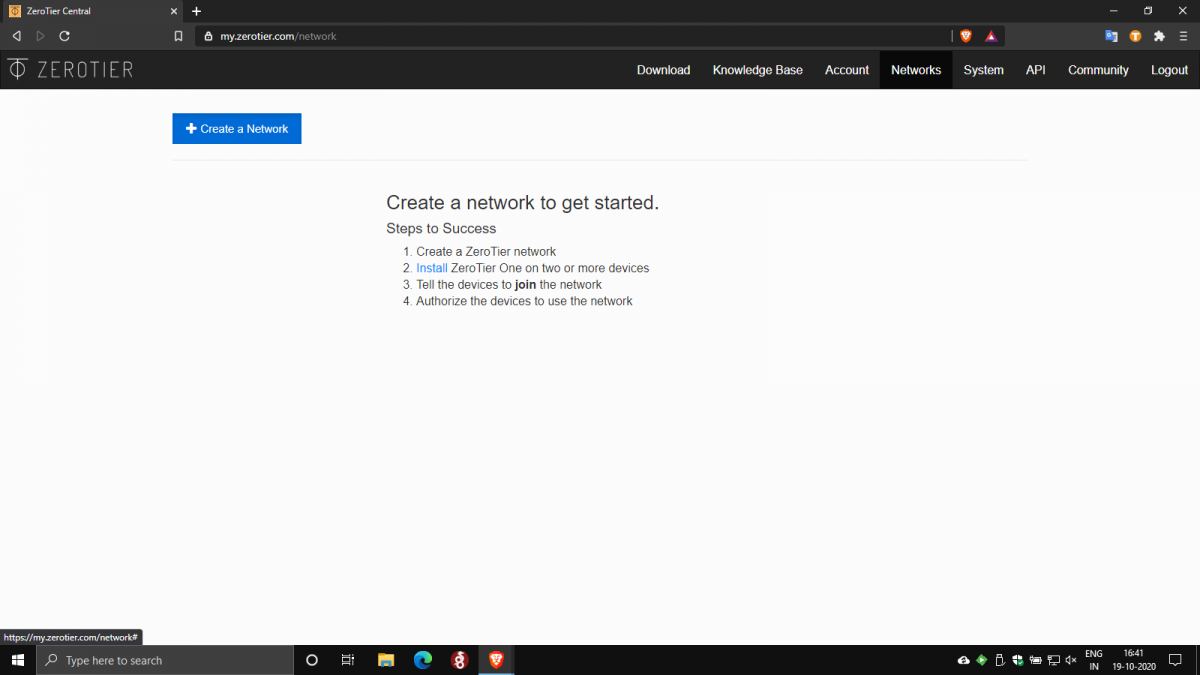
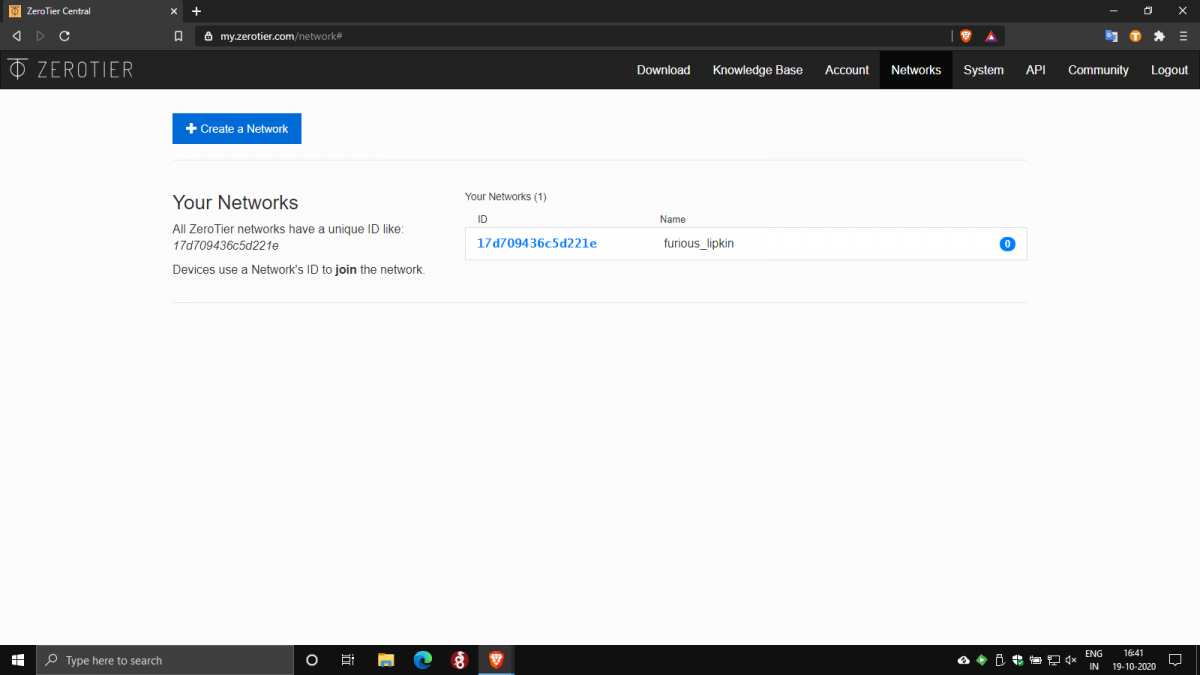
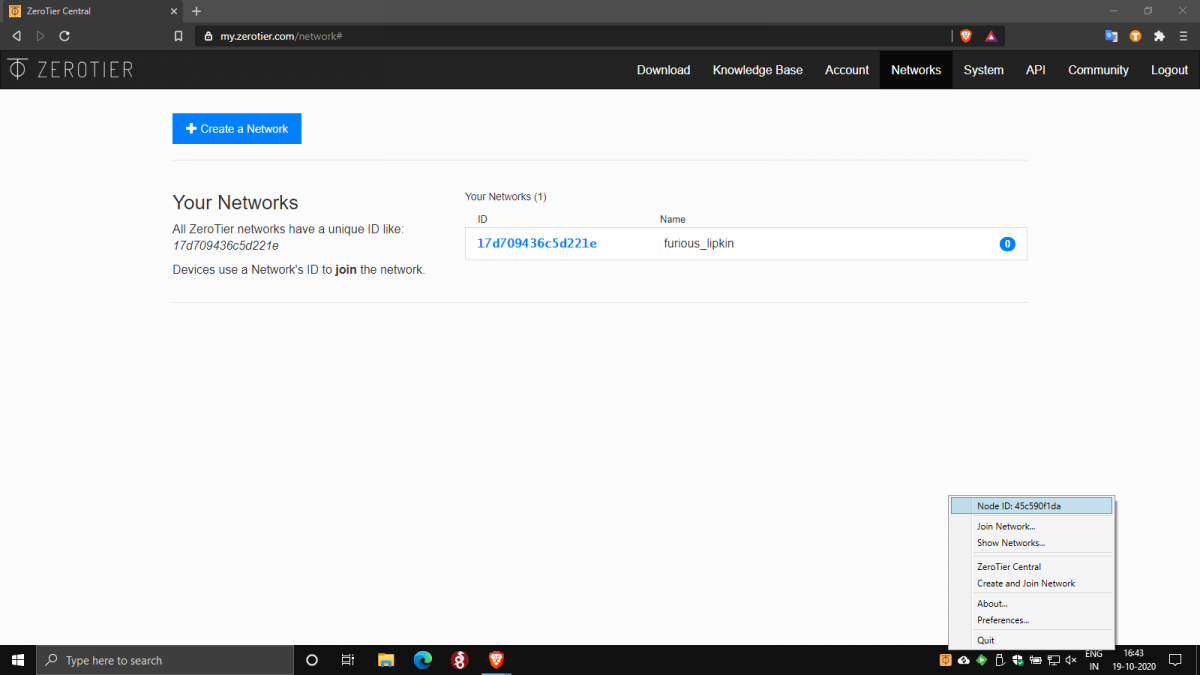
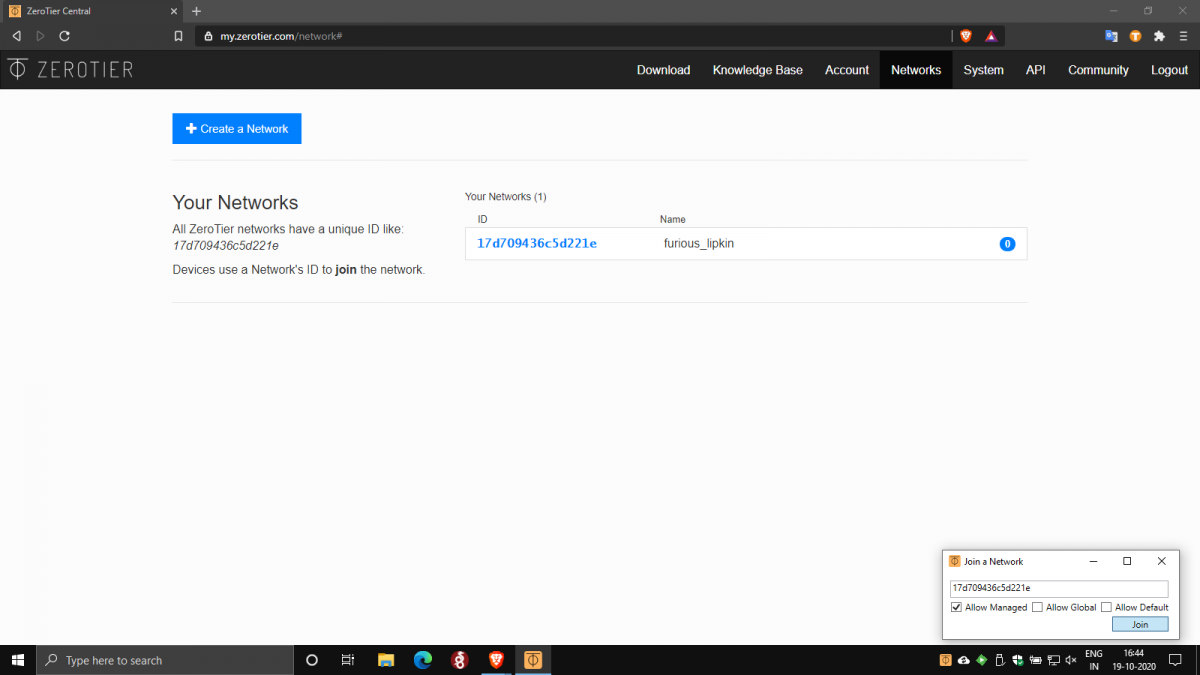
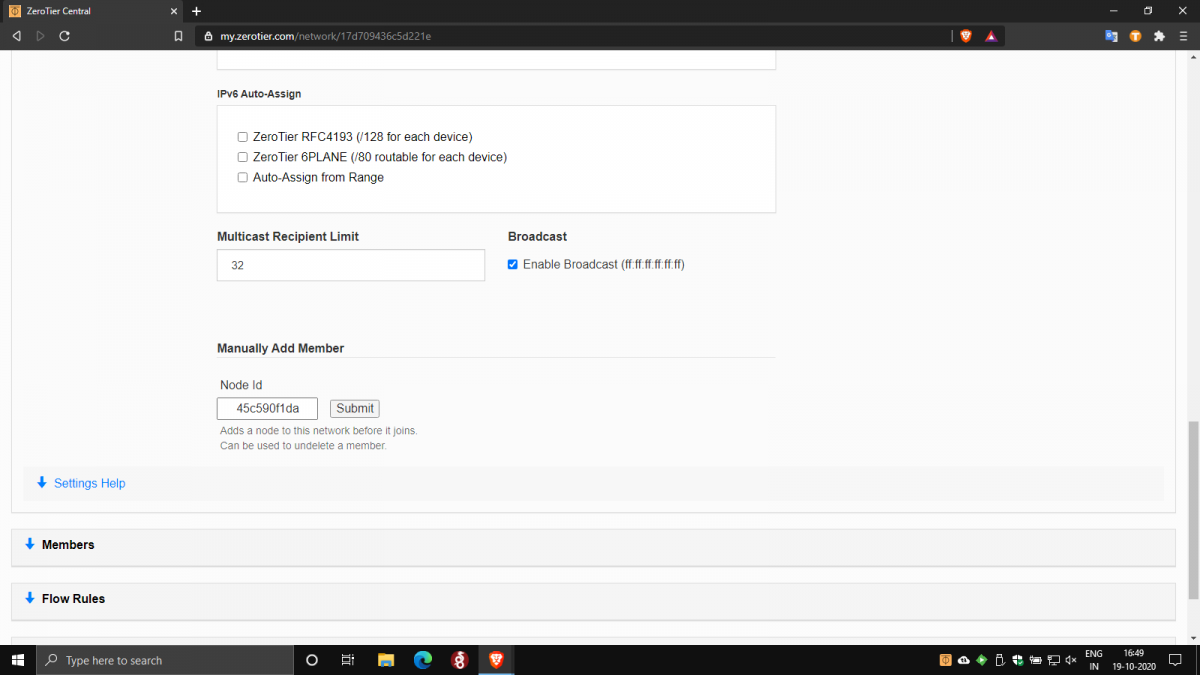
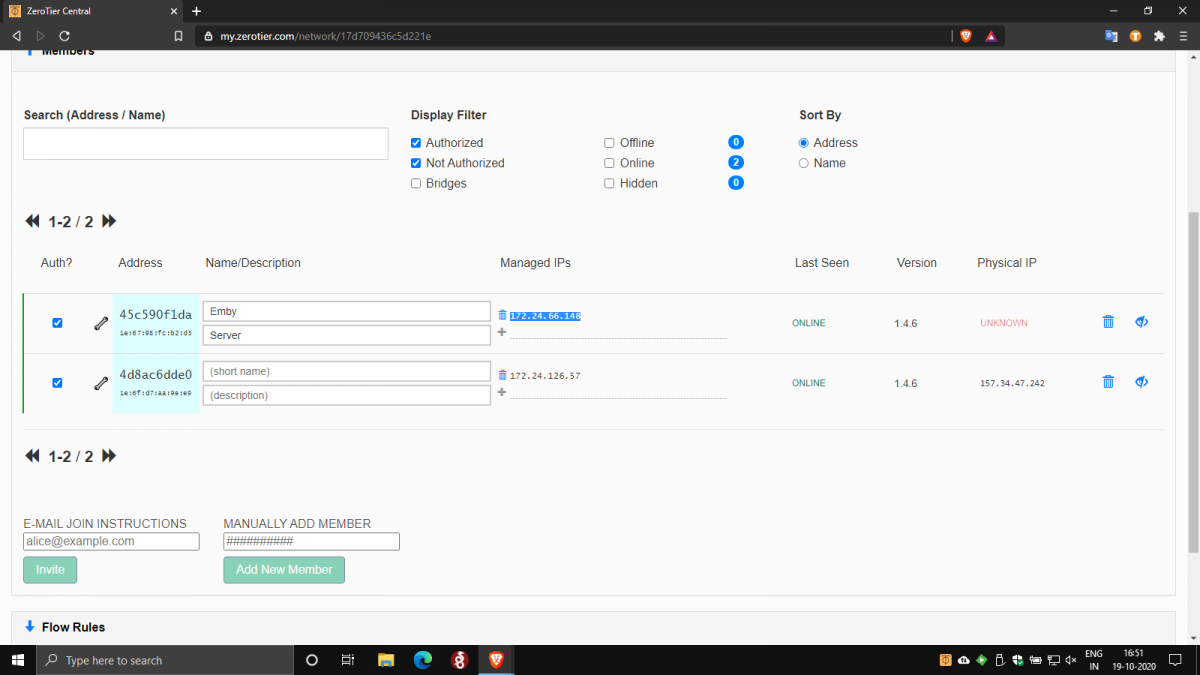
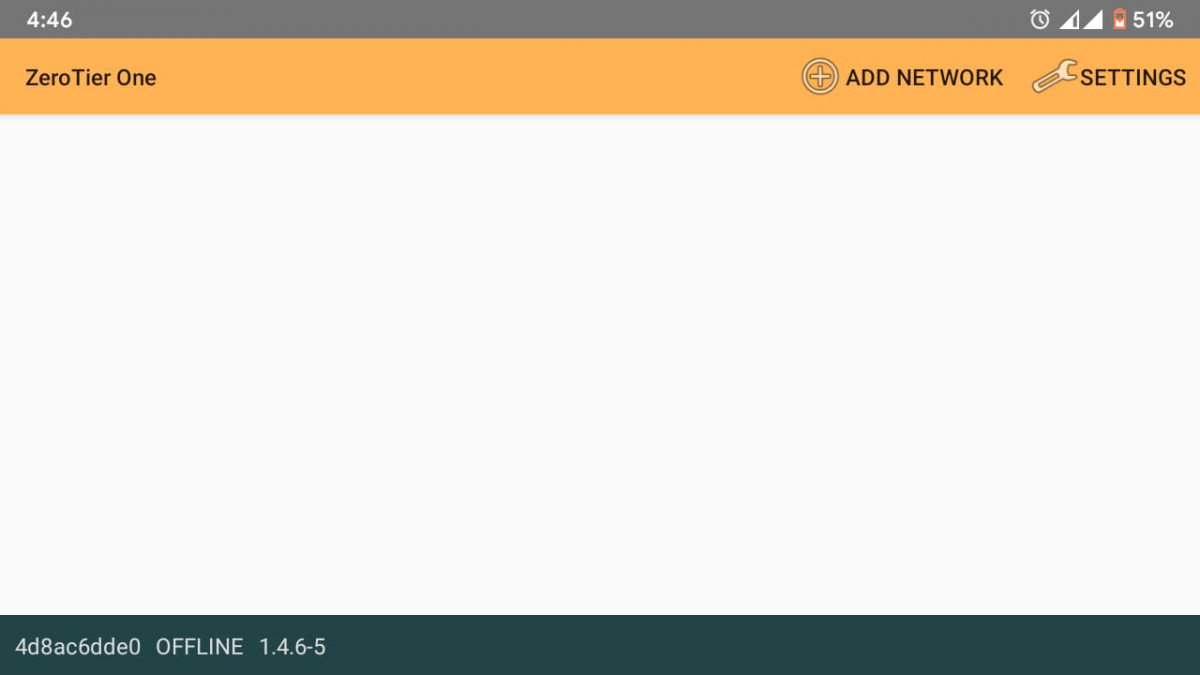
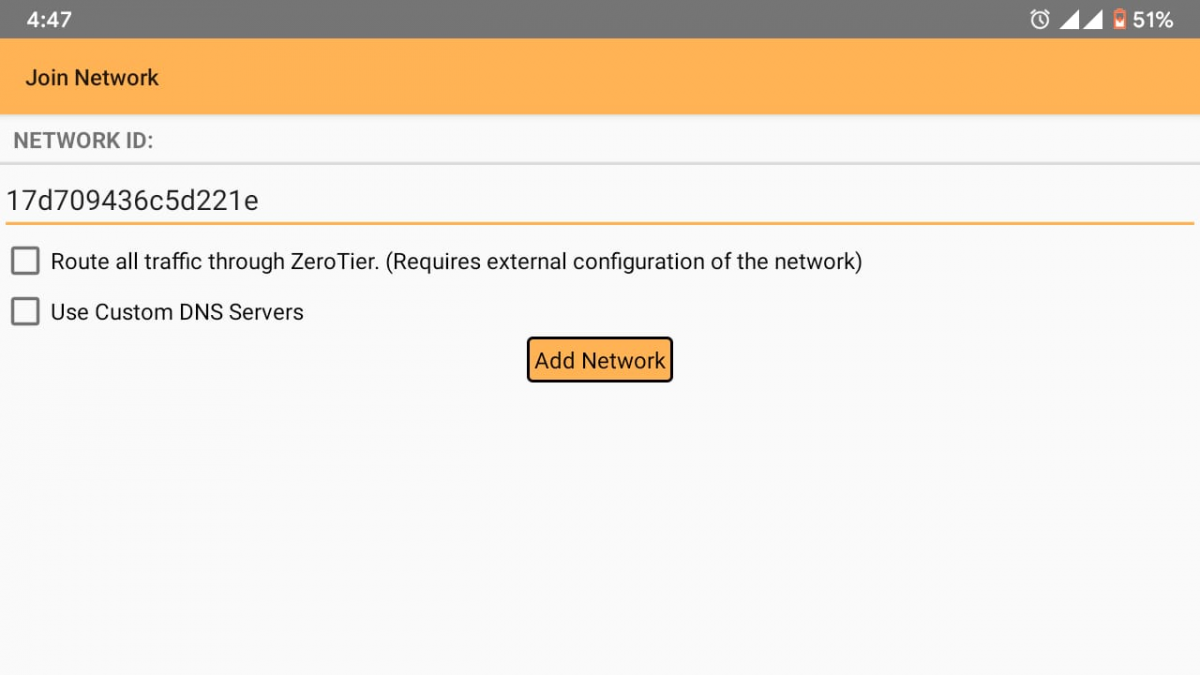
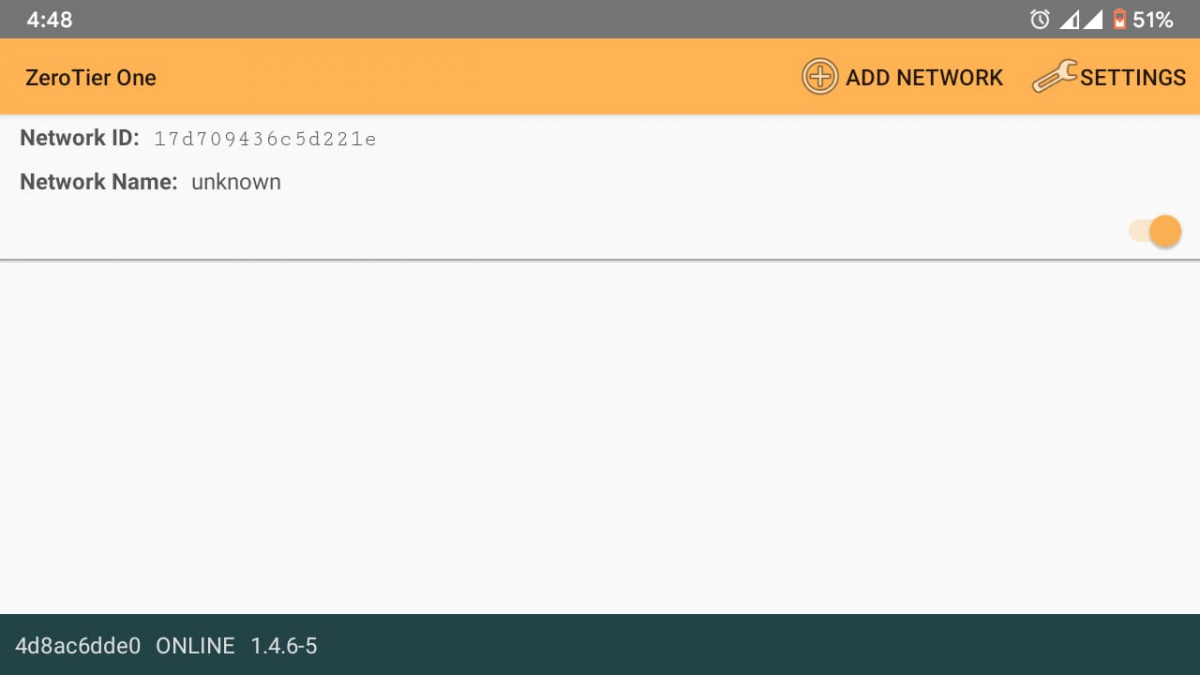
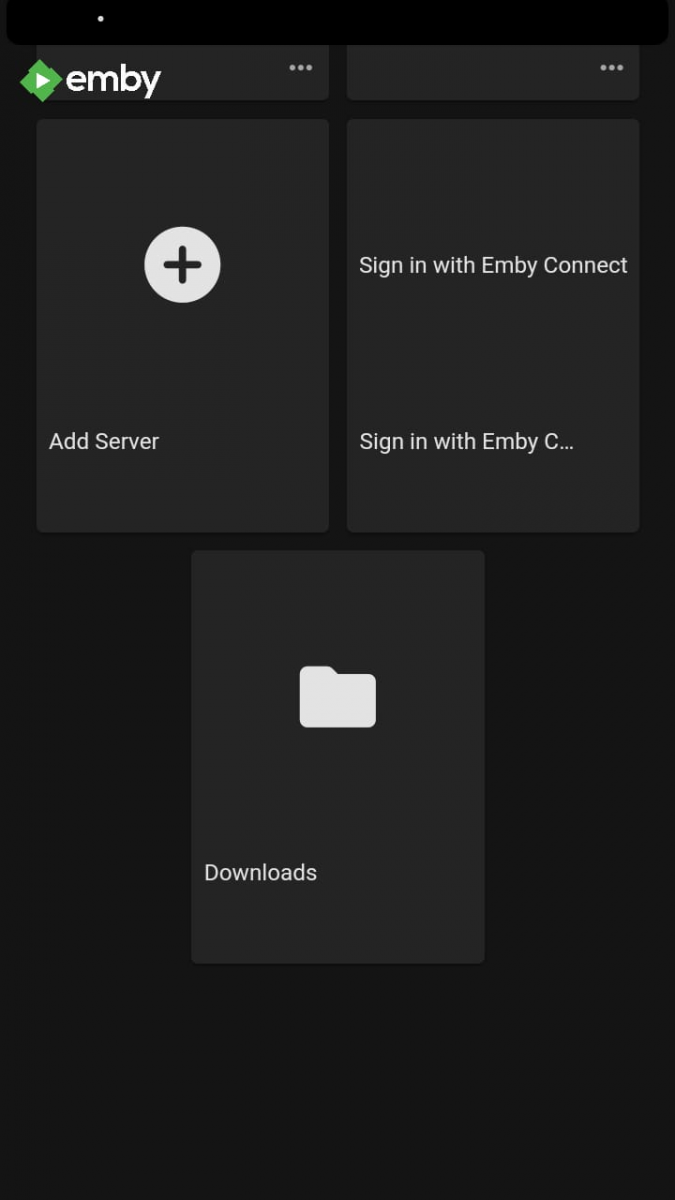
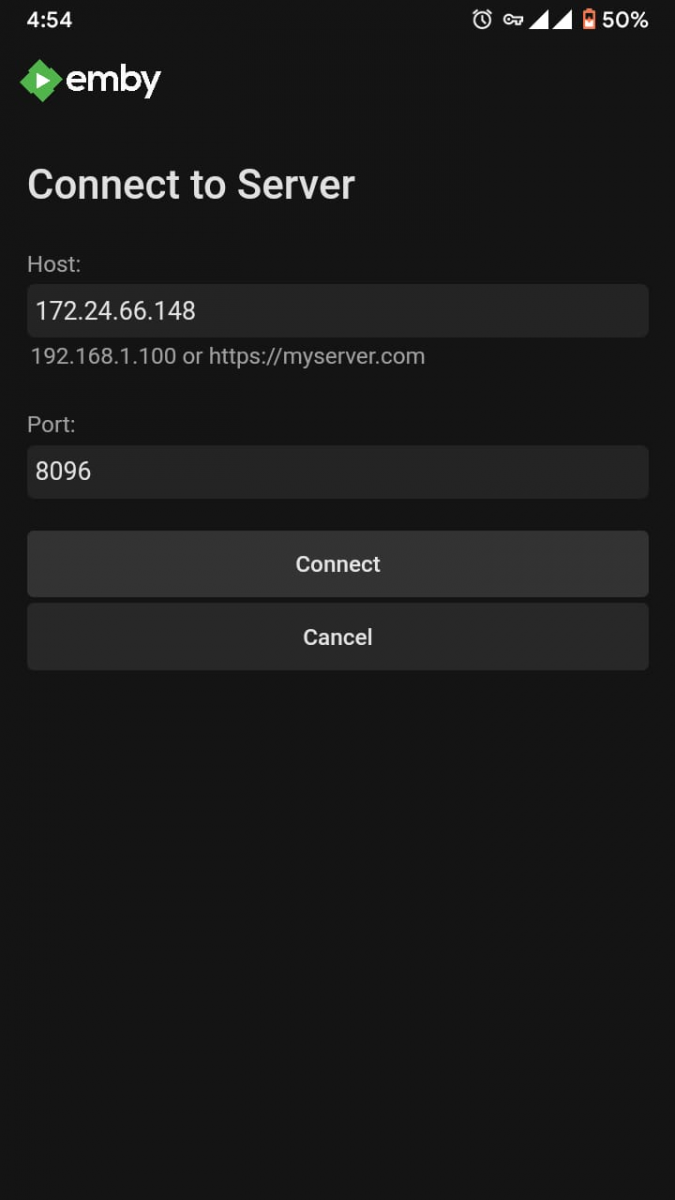
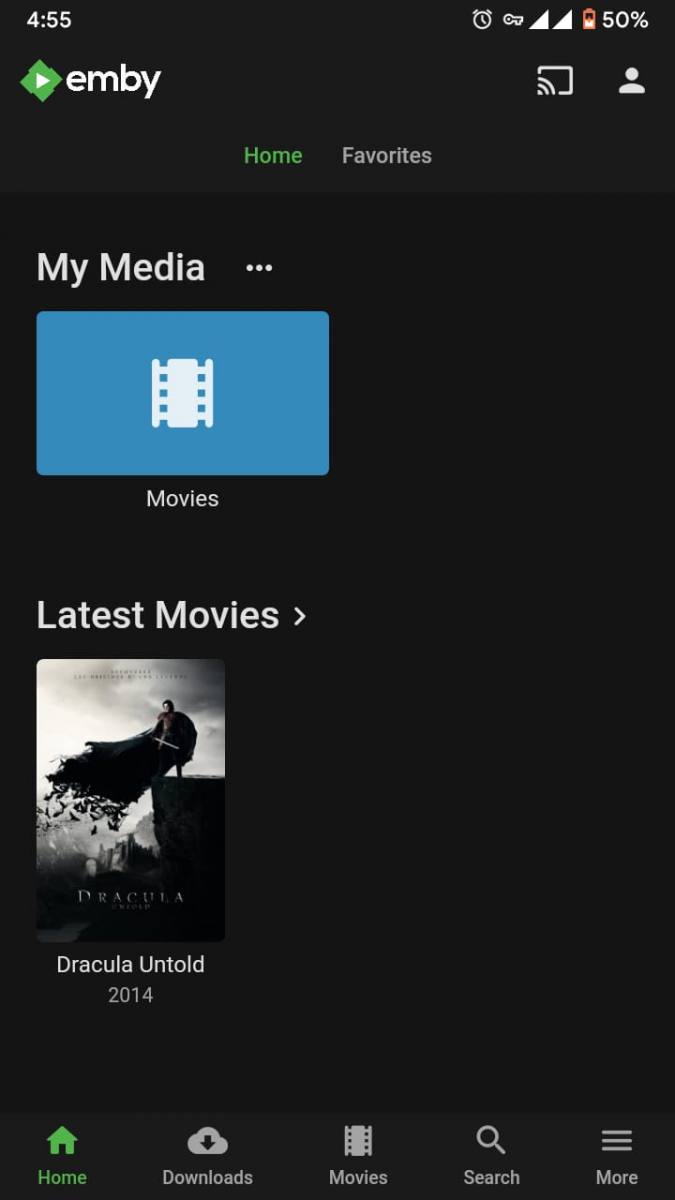
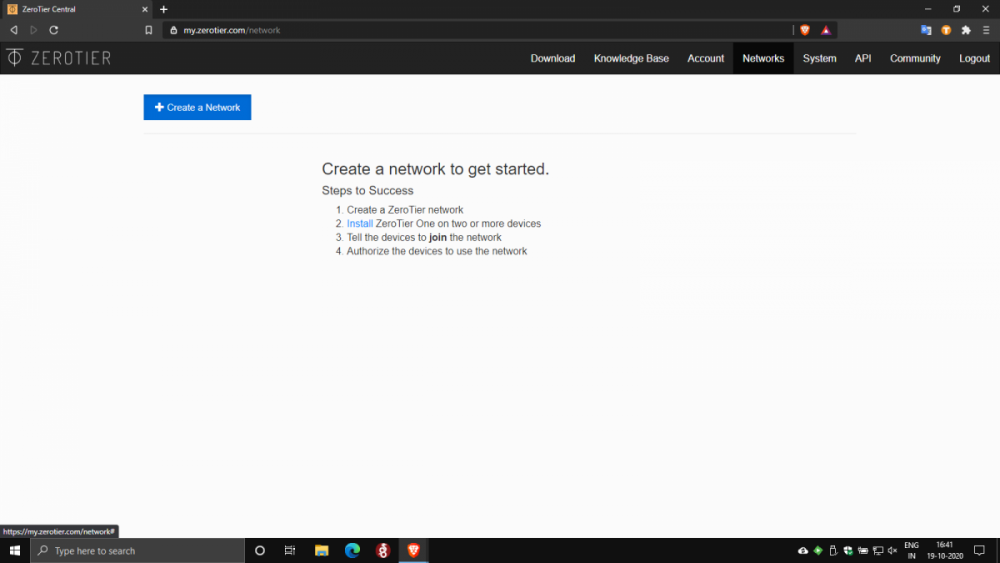
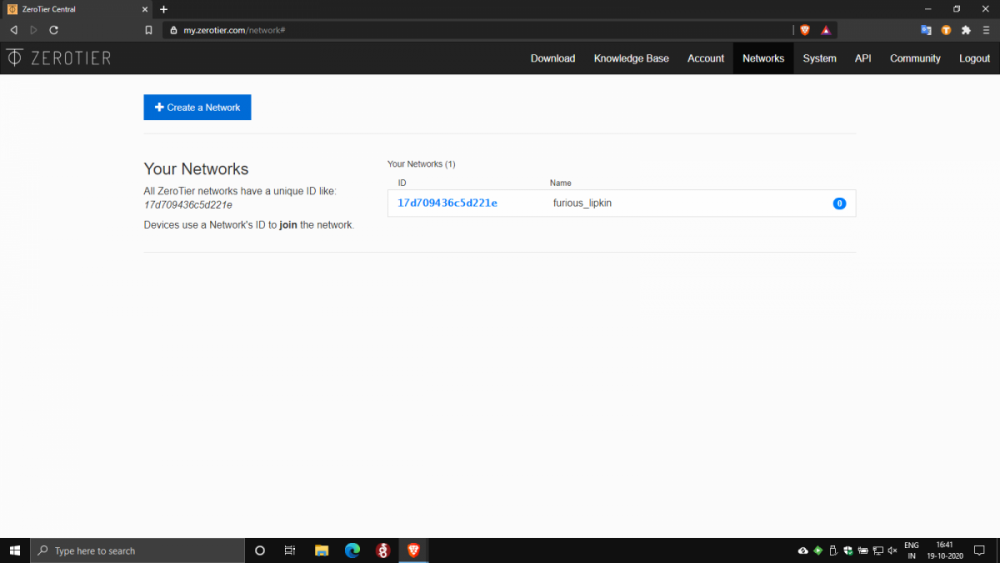
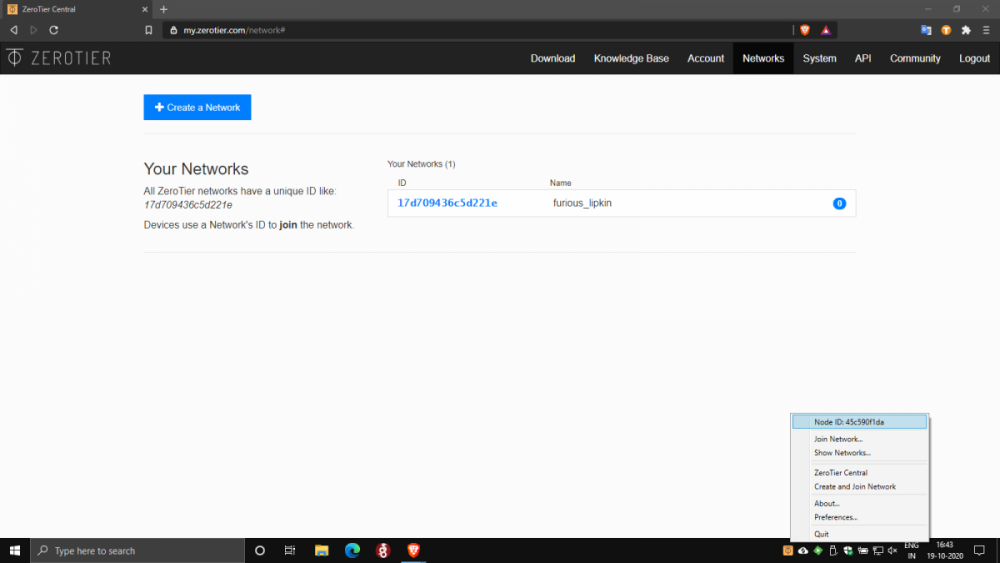
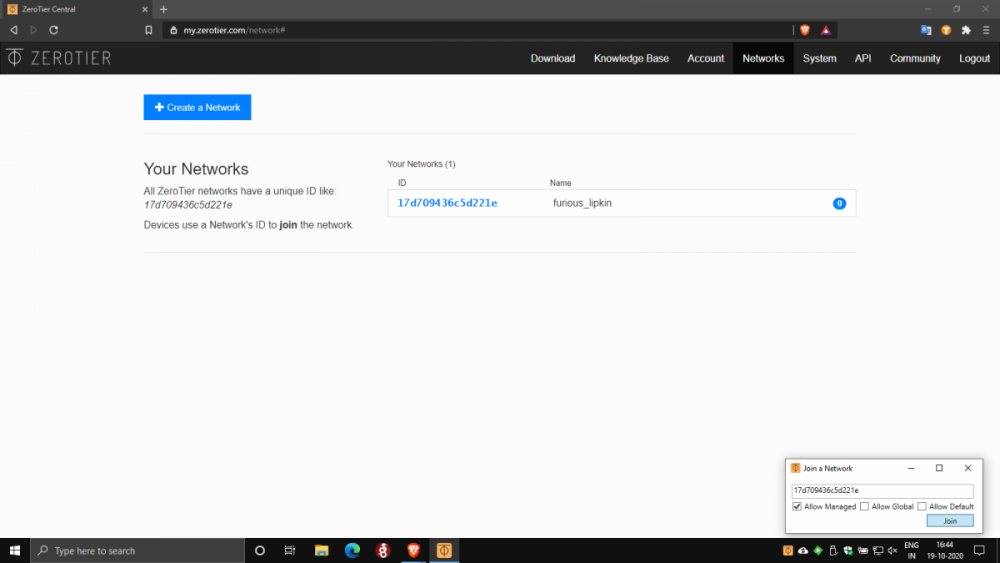
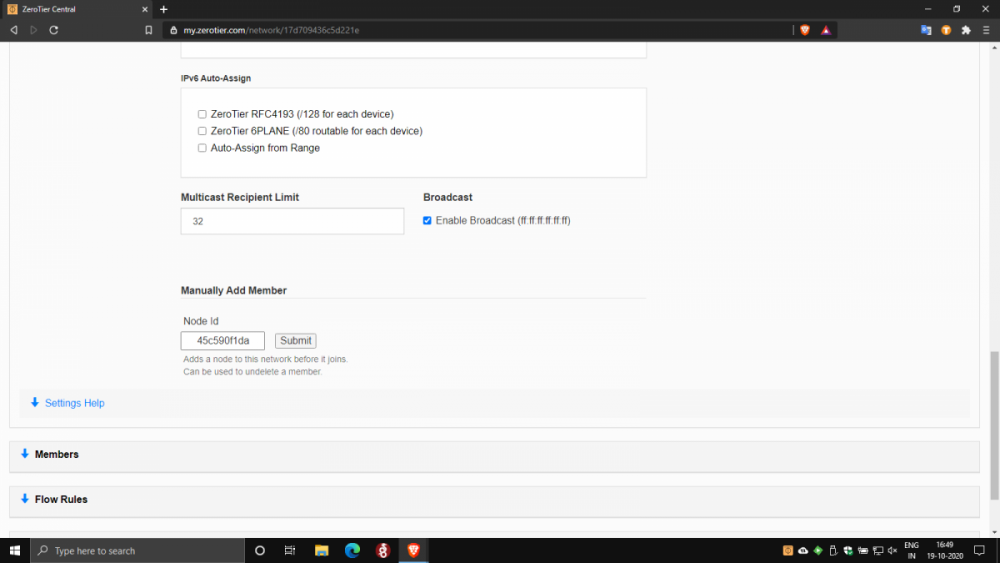
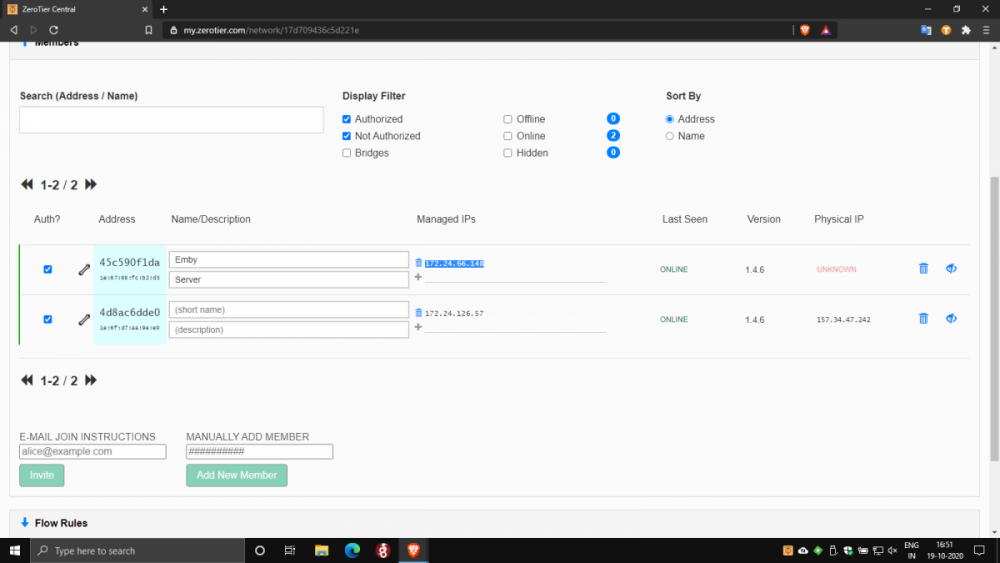
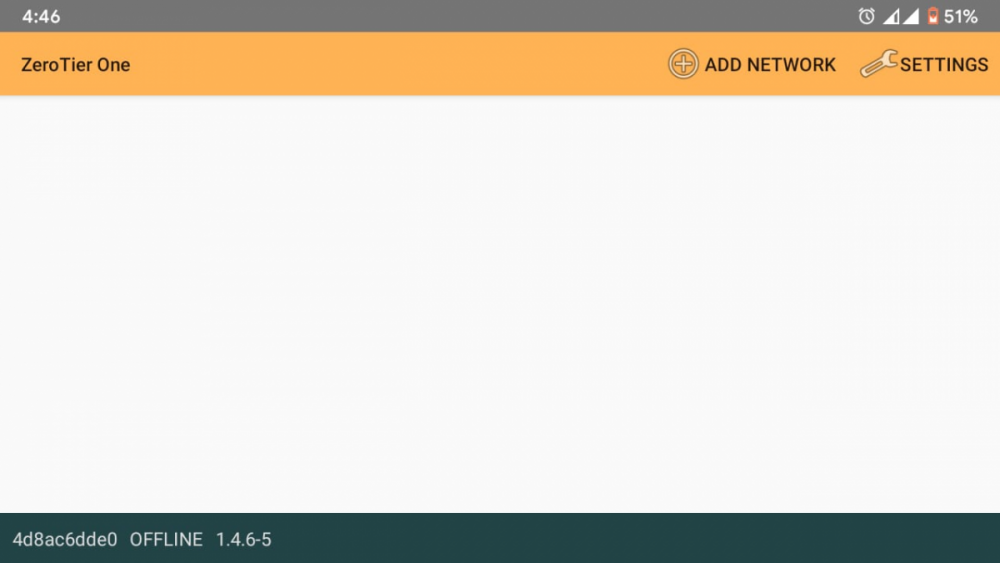
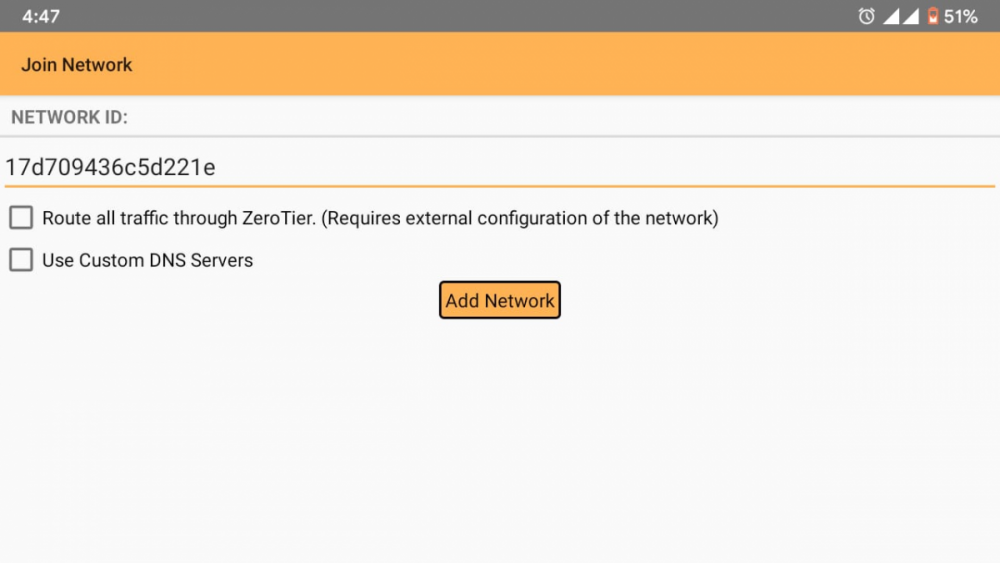
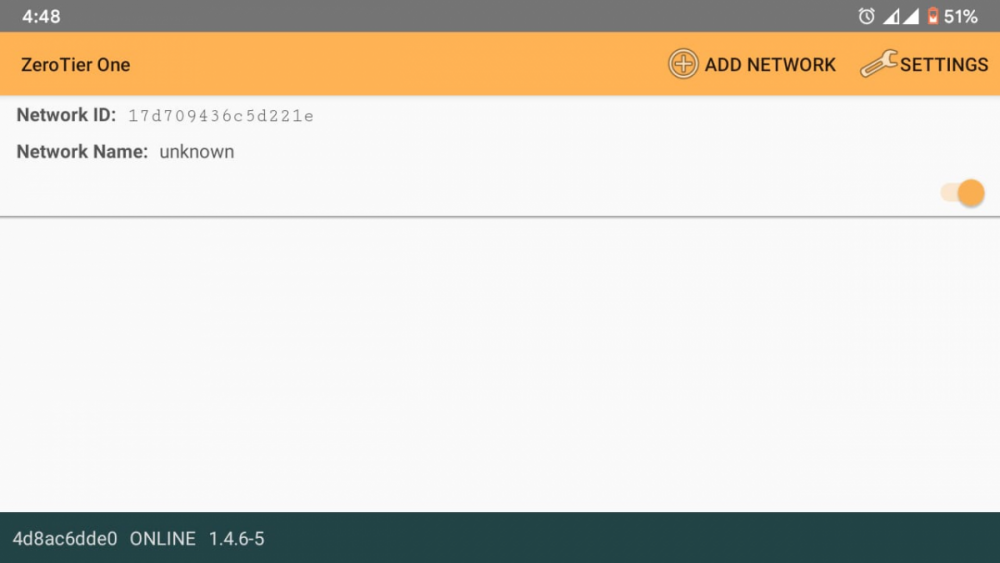
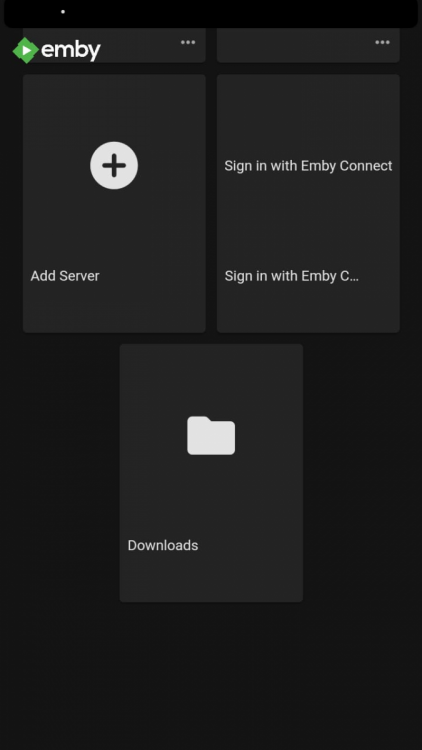
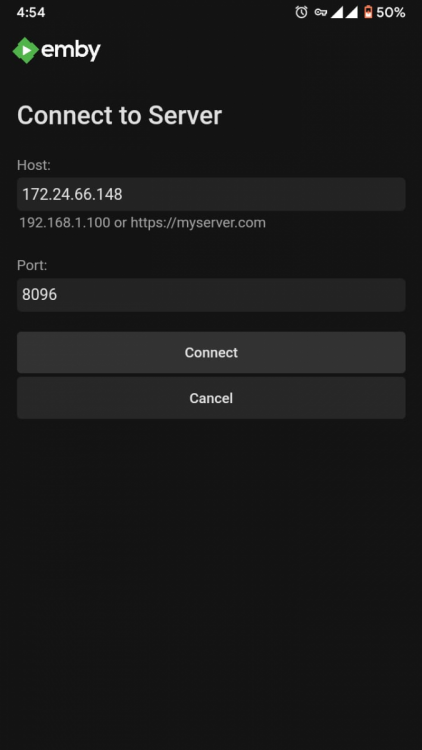
Of course. For anyone in a similar situation to mine looking for a solution to CG NAT 1) Download Zerotier on your Emby Server Platform here: https://www.zerotier.com/download/. I downloaded the Windows installer and installed zerotier on my PC. Setup is pretty straightforward and self explanatory. 2) Download Zerotier on your clients too. I needed remote access on my smartphone, so I downloaded the android app here: https://play.google.com/store/apps/details?id=com.zerotier.one. Apps for all clients are here: https://www.zerotier.com/download/ 3) Create a ZeroTier account. It's free. Activate your account with the activation link in the email ID you used to register. 4) Go to https://my.zerotier.com/ and log in to zerotier using your account credentials. 5) In the top right, click on the networks tab. Click on create a network. A network is automatically created and added to the Your Networks list. Note the network ID(16 digit). 6) Open the Zerotier application on your server PC. Click on the icon in the taskbar. Note the first Node ID(10 digit) here. Click Join network. Enter the network ID(16 digit) and click join. Similarly open the Zerotier app on your client device. Note the second Node ID(10 digit bottom left) here. Click on the Add Network icon in the top right, and enter the network ID, then press Add Network. Flip the slider to connect. 7) Back in the browser, click on the network ID to open the network configuration. In the Settings section under the Advanced subsection, under 'Manually Add Member' enter the 2 Node IDs noted in step 6 one by one, clicking submit after each entry. 8) At this point Zerotier setup is complete. In the browser under the Members section note down the IP address of the server PC, then open the emby app on your client and click on Add Server. Enter the IP address in the host text box, port should be 8096 by default, press connect. Log in to your user account and you are good to go.
 2 points
 -
Alright I can finally connect to Emby remotely. Thank you so much for all the help2 points
-
You do now.2 points
-
https://kodi.emby.media/Public testing/next-gen-ALPHA-build214.zip Kodi shutdown should work Changing the network speed settings is now working on the fly Progress update should work Improve webservice Improve Event callbacks2 points
-
I have searched the Feature Requests thread, and I know similar requests have been made, but only for general karaoke support with people requesting support for old depreciated formats as .mid and .kar. CDG+MP3 is by far the most common file format in Karaoke, and also the format used by most professionals. The sound and music quality is by far superior to the midi based file formats. CDG+MP3 is also directly supported in Ffmpeg, and can be transcoded on the fly using a simple command. The video format is only 300x216 (304x224 buffer dimension) so transcoding it would be very cpu friendly. The Ffmpeg command to convert the file is as follows: ffmpeg -copyts -i "01 - Rihanna - Russian Roulette.cdg" -i "01 - Rihanna - Russian Roulette.mp3" -b:v 1M -y "01 - Rihanna - Russian Roulette.MP4" This will force a 1meg video.. I don't know if that is a necessity, as it will produce a larger file than if you omit the -b:v 1M -y option.. The -copyts is there to ignore timestamps in the files, as sometimes this will induce a sync issue with the lyrics shown. Works flawlessly. Now, cdg+mp3 files are normally stored in .zip files to keep them together and for easy management. If there is a problem unzipping and using the files then deleting them after use, I see no problem unzipping the files and leaving them as pairs on the server.. The zipping is purely for ease of use and does not offer much of a space requirement reduction. Please consider this, as a Karaoke Jockey as a side gig, I know a lot of people enjoy this, and in these covid times, no shows are held, and people need entertaining. I serve my immediate family and friends with content, and to be able to add karaoke singing on the fly with emby would be a valuable addition. Best regards, dexus.1 point
-
Sorry if this is on another thread. Was wondering if there could be an option for watched media to not have a green check. Just an eye candy issue but I'd like the media cover art not to be covered with it. I'd just prefer to use the filter to see what is watched and unwatched. Thanks for all you do! I switched from Plex to Emby and found it to be a more beautiful and stable client!1 point
-
Hey guys, Is there any way to disable the Emby volume slider? I use HTPC's and desktop WebGUI 99% of the time, it's incredibly annoying when your keyboard/remote volume buttons control both OS and Emby volumes. For example, if you turn the volume down, windows and Emby goes down, then when you turn it up they both go back up. However, if the Emby volume is already at max, just the OS changes. This means the 2 audio controls are competing and mostly just annoying what little OCD I have. Constantly setting Emby back to max volume with a mouse. Or rather, unbind the Emby slider from VOL + and VOL -.1 point
-
Hello pals, I'm using short term Emby server to serve my Movie and Music collection and I'm fully satisfied. After installed XMLTV server plugin I can watch and my TVHeadend IPTV received TV programs. Now I've though (just an idea because don't look at server plugins in depth) - if the XMLTV plugin uses ffmpeg or avconv to cast TV channels is it possible to make choose second channel and produce resultant stream from both channels with Picture in Picture. I know with FFMpeg is relatively easily like ffmpeg -i pipInput1.flv -i pipInput2.flv -filter_complex "[1]scale=iw/5:ih/5 [pip]; [0][pip] overlay=main_w-overlay_w-10:main_h-overlay_h-10" -profile:v main -level 3.1 -b:v 440k -ar 44100 -ab 128k -s 720x400 -vcodec h264 -acodec libfaac PIP_output1.mp4 or more simple ffmpeg -i master_video.mp4 -vf "movie=second_video.mp4, scale=800:-1 [inner]; [in][inner] overlay=70:70 [out]" completed.mp4 ffmpeg -i rtsp://serer/mp4:1.mov -i http://serer2/sample-video2.mp4 -filter_complex “[1]scale=iw/4:ih/4 [pip]; [0][pip] overlay=main_w-overlay_w-10:main_h-overlay_h-10″ -ar 44100 -f flv rtmp://localhost:1935/Stream etc more variants. Could be possible to be created such PiP IPTV plugin server side ? Thanks to anyone in advance.1 point
-
Feature Request. A present I have several user accounts setup for family members. When we sit down together to watch a movie we currently log into one account (Mostly mine), so obviously only this account gets the watched status. What happens then is everyone uses my account because there's isn't up-to date and it's "just easier". This results in my account telling me I've watched something when I haven't... I would like the ability to log into my account and select/deselect which other users are present so that when a movie/TV episode is watched together, their watched statuses are updated accordingly? The next time you log in again all other users would have been deselected. It could be implemented so each user account can do this, or only select user accounts can. Even a special "Family" user account, or multiple viewers button as long as everyone's watched status is correct. Even just ticking the users present on the login screen before login into an account.1 point
-
Don't know how many of you know what PseudoTV is on Kodi but basically it is a plugin that allows you to create an EPG full of your own custom TV channels using your entire media library into one big channel surfing experience on your library. Emby, I believe, would be amazing for this and really make it stand out if something like this was official supported as the only support for something like this is a little plugin on Kodi. Features: Create custom TV channels using smart filters (e.g. 500 random movies that are from 2010 and newer and genre is Horror, 25 random tv episodes that are from Fox network). Allow creation of an unlimited number of channels using these filters and assign them channel numbers Automatically generate an EPG/TV Guide using all of these custom channels and randomly assign the scheduled program at a specific time Allow sorting of the channel shows (random, in order, asc, desc) Allow channels like FX to play both TV shows from FX but also incorporate movies at specific time periods like primetime movies Allow trailers to play in between shows as well as Channel Bumpers/intro videos Allow integration with Live TV using PVR Allow YouTube channels, USTVNOW, Playon perhaps? Ability to add a logo to your custom channels Background updating that would auto generate / update all the channels and shows after a specific period of time And so on1 point
-
While setting up a new device or just searching for the next hiccup it would sometimes be useful to be able to jump to the currently playing media which is shown in the server dashboard. Maybe just by clicking on the image of the active device. ATM now, I have to search for the item in the search field (which sometimes work and sometimes not) or need to manually browse through the library to see the media details.1 point
-
VERSION 6.2.22: Download link for manual update: https://github.com/MediaBrowser/plugin.video.emby/archive/refs/tags/6.2.22.zip Release Notes: https://github.com/MediaBrowser/plugin.video.emby/releases/tag/6.2.221 point
-
Please read this post first. I was wondering if it would be possible to add something that would allow you to skip the intro to shows automatically while binge watching. When watching Netflix it does this for some shows, and im not sure if thats a feature of Netflix itself or a Chrome extension i use called "Flix Assist" but it would be a nice feature to have within Emby as well. and possibly even create a custom timed skip for specific shows1 point
-
It would be cool to allow Emby server users to comment what they think about a media piece. This could be shown on the top portion of a media info's page. Perhaps right under description, to encourage more user engagement.1 point
-
Hi Guys, I recently moved from Kodi with MySQL for lack of proper multi user management and server side support, I have to say I'm impressed with Emby. Together with the Kodi Plugin it really takes the solution to a whole new level, count me in among the supporters! One feature I would like to see is the ability to recommend movies or shows to other users: I share my Library with close friends and family but it is a big library so they are always calling me to recommend them a movie to watch. It would be really cool if after watching a movie I can click a Recommend button and choose the users I think would like the movie, then it is displayed on their suggested movies at the top with the name of the user who recommended it... Sorry if there is something like this is already there, I am new to the interface and don't fully know it but could not find such feature... Thanks!1 point
-
Often times when I see "Reason for transcodng: Media bitrate exceeds limit." in the info I wonder, what kind of internet connection do they have? I know this can cover multiple scenarios like bandwidth limit set for user, server, client side quality setting, as well as AUTO bandwidth detection... Can you PLEASE add to the dashboard the returned client bandwidth capabilities? The value you are getting from the client that tells emby its bandwidth abilities. While you are at it tighten up the spaces between lines on the transcode items, and align the results to the right instead of center.. MAYBE SOMETHING LIKE THIS :1 point
-
A new release of Emby Server is currently rolling out to address a few small issues with the 4.5 release. Here are the changes: Resolve slow file read/write performance on Windows1 point
-
To gauge interest... What if you had the ability to "Forget" a series for the purposes of Next Up display. That is, it would no longer show in Next Up - unless you watched another episode. Sometimes you maybe watch a series for a while and, even though there is more of it or more is made later, maybe it isn't as good as the earlier seasons or maybe you just don't have time for it anymore. So you'd like it to quit showing up in your Next Up list so it is less cluttered and you can focus on the series you are actually watching now. If you start watching it again, the "forget" would be forgotten and it would start to show up in Next Up again.1 point
-
I sense evil ISP magic.1 point
-
Hi, and yes correct. Over a month I would say. Okay,I will grab the log and share. Thanks!1 point
-
Thanks for the info. We're hoping to get to this soon.1 point
-
I personally only am interested in what I haven't watched.1 point
-
Just post the transcode logs, not the video sample.1 point
-
Hi. I cannot give you an exact date but we will get it done.1 point
-
Yes this is also my impression. But where should this folder be? As mentioned I checked the iocage jails for something pointing to an unsuccesfully destroyed emby jail. But there are just the ones that still work. I searched with putty and winscp. Will FreeNas create something like an initial folder on the systems partition before creating and continung from in the jail itself? I don't find anything named "Emby" on the Systemdrive on wich FreeNAS is installed...? Where could this folder be that I could remove it manually? I made several tests during which I installed the emby plugin without above mentioned error several time yesterday. After figuring out everything I wanted to install the plugin and keeping it the issue occured. The name of the Emy jail was "emby_1", only the plugin name is 'emby' (as in the error message) . My assumption woud be that this is still an entry somewhere. Does anybody where this could be, an where the entry could be removed? Help is really appreciated Solved! As stated by MRobi the jail was removed but a dir named emby still reside in the root folder - and I did not recognize it although I searched for it... After deletion the plugin gets installed again, thanks!1 point
-
Hi Luke, It works !!! Thank you so much for the help.1 point
-
Nice ! I think you can post a tutorial1 point
-
It's normally simple. You install hamachi on the server where emby is running. Thanks to him you could create a virtual network with dedicated ip. Then with other device, you must use a client to connect to your virtual ip and you could access to your server. You just need to open correct ports to access to emby1 point
-
HI, yes right now this is a cosmetic issue that we are looking into, but Emby Server should still be running even when it says this.1 point
-
Got this to work i was behind double nat. What i did was download zerotier on my emby server pc and on my phone. Connect both networks then i could just connect passing this bullshit all together1 point
-
And what app / device ?1 point
-
MY EYES THANK YOU FOLKS! Found it! \o/1 point
-
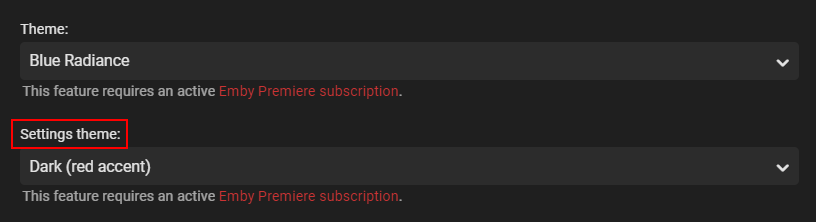
Do you have a Premiere subscription? Display Settings on your User Profile:
 1 point
 -
Thanks for that. I think I had the password wrong. I recreated the certs and pfx, then the server was able to use it. I had a second issue. I have two routers to portforward through. My initial thought was I had reconfigured them incorrectly, so I had tried various combinations. Of course nothing would work because of the wrong password. With that resolved, I reconfigured both firewalls, and hey presto....encrypted Groovy1 point
-
WHAT does not work? No guide data, no playback, no sugar in your coffee?1 point
-
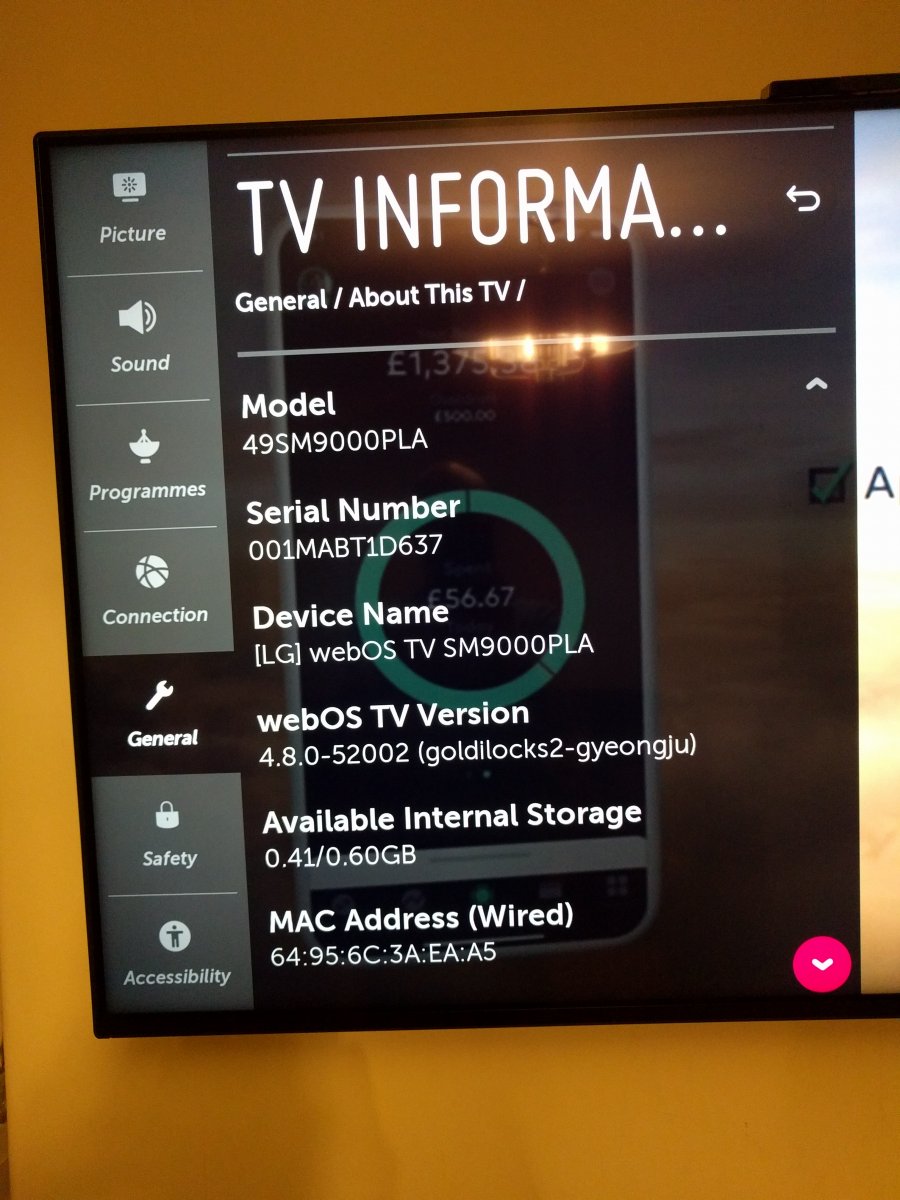
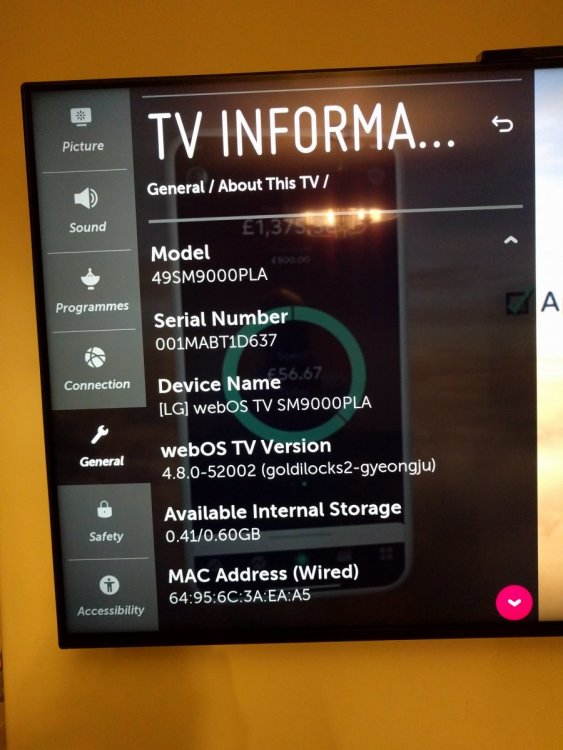
Hey @SamES Here's the info you asked for. It's a 2019 model 49SM9000PLA. Emby app version is 1.0.24
 1 point
 -
Yes it dose, I can add one, but when we upgrade, it will have that within the core of the software, so if you need it now, I can add it.1 point
-
It's coming so stay tuned.1 point
-
Just chiming in to say this happens with my Roku as well. Also, the guide issue.1 point
-
What has worked successfully is: 1. When upgrading from versions prior to 4.5.X.X, if you had previously created a user called Emby you will need to rename this user first, as from 4.5.X.X the installation will create a user called Emby 2. Download 4.5.2.0 from the Download Section of the Emby Website 3. Shutdown the server using the Dashboard within Emby (not Package Center) 4. Go to Package Center and check the Emby is now stopped. If not try from there. You can always also check in the Resource Monitor Synology app. 5. Install the .spk file you downloaded in point 1. using the Manuel Install option in Package Center. Emby should start automatically. If not start it. 6. Wait 5 to 10 minutes, at least. It can take time the first time with the new version. Edited: updated after feedback from @SwanStream1 point
-
This does not seem to be a rampage... it feels more like a tantrum1 point
-
Upvote. Would rather see an indicator for unwatched media rather than watched.1 point