Leaderboard




Popular Content
Showing content with the highest reputation on 10/16/20 in all areas
-
If you bought an Amazon Fire HD and visited the emby.media website, would it be fair to assume, what with both Amazon Fire TV and Android listed, that my device would be "supported"? Turns out it isn't "supported" (for reasons still unclear, even after asking what is being done to resolve the issue) but can be made to work without too much effort if you know where to look. I'd stick to the system architecture as clearly customer support isn't really your forte.3 points
-
A first alpha version is available. Before you even think about testing, BACKUP THE COMPLETE KODI folder! e.g. /home/quickmic/.kodi/ If you don't know, how to do that and possibly restore it manually, STOP HERE! Next step, wipe the complete Kodi folder (we start from scratch as a test!) rm /home/quickmic/.kodi/* -R Now you can sideload the alpha version from here: https://kodi.emby.media/Public testing/next-gen-ALPHA-build192.zip When you sync you database, DON'T USE ARTWORKCACHE! This feature was and is still broken. What is working: regular filestreams Transcoding (with limited options) No audiostream selection, not subtitle selection. What is not working: Almost all Playbackoptions in the settings menu are ignored beside network speed adjustment (based on that setting) Transcoding will be enabled Multiserver support (most likely not working) Contextmenu not working (even if available, don't use it!) What is not tested: Kodi 17 Apple TV Multiprocessing is disabled for Android and Windows: For Android (low power CPUs): Don't use autoplay next movie. Actually you can use it, but it's a problem if Kodi generates playlist over a certain amount of recordsets. e.g. several thousands recordsets will stall Kodi and the local websocket will also stall! For Windows it's quite likely that it will work too. Actually it depends on the CPU performance for Android and Windows. If you are using custom skins, don't preview Photos on mainmenu Widgets. It works, but at the moment unstable. This first version should only verify, if the Database sync and the regular filestreams are working. Please, no feature requests at the moment, only bugreports. I'll add all the features after the playback modes are working perfectly.2 points
-
firefox here. but more to avoid google tracking everything that i do2 points
-
Good evening all, I am extremely happy to present to you - Emby Scripter-X version 3.0 (up on the catalog now!) The major change in this version is -- Packages -- ! This gives you the opportunity to develop packages for Scripter X for others to install and use. And very soon, there will be a Packages catalog available that you'll be able to search for, and install community packages, straight from your Emby Administration Console. A package is written in Javascript. A Package requires 3 things - 1) a PackageInfo.json file, 2) a Package.js file, and 3) both these files zipped up together in a .ZIP file. PackageInfo.json provides vital information about your package to ScripterX. It's format is as follows :- { "Id": "scripterx.package.example", "Name": "Example Package", "Description": "An example package for the ScripterX package system.", "Author": "Anthony Musgrove", "Email": "anthony@emby-scripterx.info" } Package.js is the javascript file for your package - where all your code exists. This is the fun bit. Some important things to know about your script: - When your package is initialised by ScripterX (on installation, and on server startup), a function in your Package.js is executed. It is called _package_init(): function _package_init() { //do something here on package startup } - Your script can subscribe to ANY of the ScripterX events, by adding a function with the name _EventName, for example, if you wish to subscribe your package to the onAuthenticationFailed event, you'd simply enter: function _onAuthenticationFailed(context) { //do something here when someone fails to authenticate to emby. } *** Note, the parameter for these functions is context, which is the context of the event call. It contains all the information regarding token values, etc, that you have full access to. For example, to get the username of the attempted failed authentication, you could use :- function _onAuthenticationFailed(context) { var attempted_username = context.Token("%username%").value; } - Same goes for any of the other events, events being: onAuthenticationFailed, onAuthenticationSuccess, onLibraryScanComplete, onMediaItemAdded, onMediaItemRemoved, onMediaItemUpdated, onPlaybackStart, onPlaybackStopped, onScheduledTask, onSessionEnded, onSessionStarted, onCameraImageUploaded, onLiveTVRecordingStart, onLiveTVRecordingEnded, onScheduledTaskStart, onScheduledTaskEnded, onMediaItemAddedComplete, onPlaybackProgress - To log output from your package to the Emby server log, you can utilise the ScripterX.Log functions, they are :- ScripterX.Log.Info("Add an Info log entry to emby server log."); ScripterX.Log.Error("Add an Error log entry to emby server log."); - If you need timers, ScripterX has timers. You can simply create, delete, start, restart or stop a timer by using the following Timers commands : Create a timer that only elapses once, but can be restarted manually after its elapsed, by using .createOnce: ScripterX.Timers.createOnce("myTimer", 5000, "tmrMyTimer_Elapsed", null); or, create a timer that elapses every interval, without having to be restarted, by using .createRepeating: ScripterX.Timers.createRepeating("myRepeatingTimer", 10000, "tmrMyRepeatingTimer_Elapsed", null); - When your timer elapses, it will call the function set in as your callback. For example, when my timer elapses, it will call the following function: function tmrMyTimer_Elapsed(timer_name, timer_interval, objects) { //do something here when my timer elapses, the timer's name is given here too. //timer name is needed to start, stop, restart, delete etc. } - ScripterX supports webhook posts right from your javascript, you can perform a webhook post by using the ScripterX.Web functions, for example, in my _onPlaybackStart function, I want to post to a webhook every time someone starts playing a movie or TV show on my server, I can do this by: function _onPlaybackStart(context) { /* Send a webhook when (someone) plays (something) */ var api_url = "https://myapi.url.com"; var playback_info = {}; playback_info.itemId = context.Token("%item.id%").value; playback_info.itemName = context.Token("%item.name%").value; playback_info.userName = context.Token("%username%").value; playback_info.deviceName = context.Token("%device.name%").value; playback_info.serverName = context.Token("%server.name%").value; playback_info.memo = playback_info.userName + " is playing " + playback_info.itemName + " on device " + playback_info.deviceName + " from server " + playback_info.serverName; ScripterX.Web.Post(api_url, JSON.stringify(playback_info)); } - Once you've created your Package zip file for distribution, you can install it on your Emby server by using the Emby Scripter-X package installer interface, as shown below: - While you're testing your package, you don't have to keep uninstalling and reinstalling your package to test and debug. Simply install your package ONCE, then navigate to your Emby data directory, find ScripterX, then find Packages, then find the folder labelled with your package's assigned installationId. Inside this directory, you'll notice Package.js. Make changes directly to this file, then go back into your Emby administration panel and click the 'Reload' icon next to your package listed in your 'Installed Packages' panel. The reload icon is next to the uninstall/delete icon. If you wish to uninstall a package, simply click the trashbin, then confirm by clicking 'Really Uninstall?' There is MUCH, MUCH more to come, but for now this will get people going. There are other function groups that I am going to implement including Library searching and Item manipulation, User manipulation and searching, among many, many other functionality. Please enjoy, and as always, any comments, feedback, suggestions are MUCH MUCH appreciated. Emby ScripterX (github: https://github.com/AnthonyMusgrove/Emby-ScripterX) Project/Product Website: https://www.emby-scripterx.info/ Version v2.3.4 now up on the Emby Plugin Catalog & GitHub with changes. Events supported: On Authentication Failed, On Authentication Success, On Playback Start, On Playback Stopped, On Session Started, On Session Ended, On Media Item Added, On Media Item Updated, On Media Item Removed, on Scripter-X Scheduled Task, on Library Scan Completed, On Camera Image Uploaded, on Live TV Recording Start, on Live TV Recording Ended, onScheduledTaskStart, onScheduledTaskEnded, onPlaybackProgress, onMediaItemAddedComplete For tokens available, please see GitHub readme, or check out the Actions interface in the plugin - you can find the plugin in the Emby Server Catalog, under 'General'. ChangeLog Changes for 2.3.4: Major core rewrite Added conditions (drag and drop) Rewrote token parser and added contexts Added event onPlaybackProgress (which supports transcoding detection) Added event onMediaItemAddedComplete which is called virtually, after an onMediaItemAdded + Meta Data (or timeout of 40 seconds, whichever comes first) Added IP address tokens for Authentication events Various other modifications and changes Changes for 2.3.1: %item.library.name%, %item.library.type% issue resolved Added confirmation on delete for actions (theme friendly) Remove 'Global Tokens' section in Actions interface (they're listed now for each event) Changes for 2.3.0: Variables are now case-insensitive, refactoring a lot of the interface code (Prototype-to-production), cleaning interface, addressed various GitHub issues. Changes for 2.2.9: Progressively from v2.2.6, functionality to enable or disable events individually, many more tokens (please see GitHub tokens list or the Actions interface), global tokens (server version, uptime, etc), more item tokens (for example, season number, episode number, item meta (imdb id, tmdb id, whatever you wish), season meta, series meta, plus plenty more! Changes for 2.2.5: Aesthetics on Actions Interface (enlarged textboxes for script and interpreter, better alignment of add buttons) Changes for 2.2.4: Progessively from v2.2.0 to v2.2.4, integration with a sortable library, actions user interface customisation and remembering custom order within browser local storage. Changes for 2.2.0: Now theme friendly and compatible, changes with theme selection correctly. Changes for 2.1.9: Redesign Events/Actions interface for less clutter Please ignore the 'Advanced' tab, It won't be there in the next catalog release, its just used for debug at this stage. Changes for 2.1.7, 2.1.6, 2.1.5, 2.1.4: Progressive changes to implement Live TV Recording Events. 'Emby Scripter-X DVR Manager' was implemented in the codebase to handle all Live TV events, tokens and logging. Changes for 2.1.3: Addressed bug with %item.library.*% tokens with respect to onItemRemoved event. (see https://github.com/AnthonyMusgrove/Emby-ScripterX/issues/2 for info!) Changes for 2.1.2: Added new event - onCameraImageUploaded. This event is triggered when a user uploads an image to the Emby Server via the 'Camera Upload' functionality within the various Emby Apps. Tokens supported are as above. Below is an image of the event on the Actions page, along with an image of a sample batch script and output: Changes for 2.1.1: Actions now utilises the entire available interface space; so editing and viewing are much easier. Some input validation added for Interpreter and Script Some cosmetic modifications :- on adding new action, delete/trash button is now changed to 'X' so it indicates 'remove this unsaved action'. Once a new action is saved, the 'X' icon will change to a 'trash/delete' icon, signifying 'delete this action from the server'. Changes for 2.1.0: Bug fix for " in script name, parameters, interpreter. various other bugs, interface bug fixes very stable at this stage. Changes for 2.0.0: Redesign Interfaces, add Actions interface, Community interface (as tabs) Redesign core Allow multiple script actions for each event Changes for 1.0.0.8 - Various updates/changes: Addressed issues with having to supply entire path to interpreter. Implemented better way to detect OS platform (IsWindows() IsLinux() IsOSX()) Powershell.exe, cmd.exe, /bin/bash or a custom executable is now supported Examples now: using powershell.exe as interpreter: -File "D:\embyscripts\ScripterX-test.ps1" -Name %item.name% -ID %item.id% -Type %item.type% -LibName %item.library.name% using cmd.exe as interpreter: /s /c D:\embyscripts\test.bat AuthFail %username% %user.id% %device.id% %device.name% using /bin/bash /home/medius/scripts/test.sh AuthOK %username% Changes for 1.0.0.7: on Library Scan Completed : D:\embyscripts\test.bat Library Scan Complete! Library Scan Complete! Changes for 1.0.0.6: %item.update.reason% : Media Item Updated "1917" "D:\Media\Movies\1917.2019.1080p.BluRay.x264.AAC5.1-[YTS.MX] - Copy.mp4" (Update Reason: MetadataEdit) D:\embyscripts\test.bat Media Item Updated "%item.name%" "%item.path%" (Update Reason: %item.update.reason%) 1.0.0.5 additions: %series.id%, %series.name%, %season.id%, %season.name% : PlaybackStart ItemID: 593 - Name: "Brian: Portrait of a Dog" - Path: "D:\Media\TV\Family Guy\S01\S01E07 - Brian - Portrait Of A Dog.avi" - Username: Anthony - DeviceName: Firefox - ItemType: item type: Episode - LibraryName: TV - LibraryContentType: tvshows (seriesname: Family Guy) (season: Season 1) D:\embyscripts\test.bat PlaybackStart ItemID: %item.id% - Name: "%item.name%" - Path: "%item.path%" - Username: %username% - DeviceName: %device.name% - ItemType: item type: %item.type% - LibraryName: %item.library.name% - LibraryContentType: %item.library.type% (seriesname: %series.name%) (season: %season.name%) README is on Github. Comments/Feedback/Suggestions are GREATLY appreciated. On Scheduled Task: A field now exists to specify a script to run as a scheduled task - you'll now see under 'Scheduled Tasks -> Application' an Emby ScripterX Scheduled Task. No tokens are yet available to this field - need feedback/suggestions/comments on what should be available to specify as parameters/tokens.1 point
-
You've grown up with watching live tv but on television only runs garbage? You have a big library but don't know what to watch next? Then this for you: "VirtualTV" - my new live tv plugin that allows you to create custom channels based on conditions of your Emby library content. What's missing: Maybe codec conditions Known problems: Needs Emby Premier to work (Playback) Emby's live tv and playback api is very limited, so i've had to make some detours to get things working. The plugin has two general playback modes: "continous" and "playlist" playback. With "continous" mode you can also choose between "live", which bahaves like real live tv or "archive", which plays the videos from the start. In "Continuous" mode multiple videos are queued and concatenated to one big file with the help of ffmpeg. To make this happen every video in the queue has to have some common features (video and audio codec). That's why it often happens that the video also has to be transcoded by ffmpeg. For transcoding the plugin relies on Emby's internal transcoding engine. If there's a problem, not uncommon with hardware acceleration enabled, the plugin also has a problem. Nothing i can do about it. The availability of subtitle tracks is mostly dependant of the Emby user playback settings. In continous playback mode only one (the default) subtitle track can be used and this one has to be burnded into the video (transcoding takes place). In "Playlist" playback mode the videos are pushed as a playlist to the Emby clients. It's like you would play your videos directly from your libraries. This way you get all the features you are used to. Audio and subtitle selection, pause, skipping around and similar things. "Native" playback method was created by the Emby Devs. Similar to Playlist playback it will play the real library videos, but with the big difference that playback is purely initiated by the client app, without any remote command execution. This is why it also works for Roku devices on a WAN network. And although the real videos are played, the whole thing is treated like live TV. This means that channel zapping is possible and no dialogs for playing the next episode are displayed. Unfortunately, the new playback method does not yet support all features. As the name "Archive" suggests, it will currently always start all videos from the beginning. In addition, only very few Emby apps automatically advance to the next video. If you want it to be improved even further, each of you should raise your voice in this thread. To get things started install the plugin via Emby's plugin catalog and restart Emby. Setup your channels with a name and number and choose your playback mode. In the channel conditions you'll have to select an Emby account. This account is used to get library access, respect parental rating, reading watched states and selecting the stream language. At least one textual input field of the conditions has to be filled to get some program data. Fields with an asterisk are either evaluated with an "AND" or "OR" condition among each other. Finally, if you've chosen "Continous Playback" for one of you channels, take a look at the transcoding settings. Save your channel line up and manually trigger a "Guide Refresh". Now have fun! Version History: After a plugin update, always clear your browser cache. If your settings still don't load in the config screen, you have to move the "VirtualTV.xml" out of ...\plugins\configurations and restart Emby. Start from scratch. 2.0.0.0 Unlimited number of channels; New playback method "Native (Archive)"; New security concept for the Export API 2.0.2.0 Performance improvements to Guide Refresh; Preview for Add/Edit Channels; Option to disable Program indicators 2.0.3.0 Fixed missing Playlist sort order for some Content Types; Added support for Seasons with Content Source Collections 2.1.0.0 Selectively enable channels for specific users; Create copies of existing channels; Ordered unwatched episode playback 2.1.5.0 Added option to (auto)enable channels on a specific date range; Bug fixing1 point
-
Install The Emby Discord plugin can be installed using the Emby Server plugin catalog. It requires Emby Server version 4.8+. Contribute https://github.com/MediaBrowser/Emby.Notifications.Discord1 point
-
Feature Request: Have User Groups and all settings applied at the Group Level That way you can just assign users to the appropriate Group and all settings will be inheritated.1 point
-
I have five DLNA severs on my network and the Emby DLNA server is the only one that is not always there. I have to restart Emby to get it to appear. I noticed there was many users complaining about this in a thread in January 2019. You have had multiple Windows server releases since then and it still isn't fixed. Given how stable my others servers are it can't be that difficult.1 point
-
I would love the ability to increase the size of subtitles on the different platforms, specially android, chrome and roku... One additional thing that would be great would be the ability to change font color, outline, drop shadow, font background... Thank you1 point
-
Please read this post first. I was wondering if it would be possible to add something that would allow you to skip the intro to shows automatically while binge watching. When watching Netflix it does this for some shows, and im not sure if thats a feature of Netflix itself or a Chrome extension i use called "Flix Assist" but it would be a nice feature to have within Emby as well. and possibly even create a custom timed skip for specific shows1 point
-
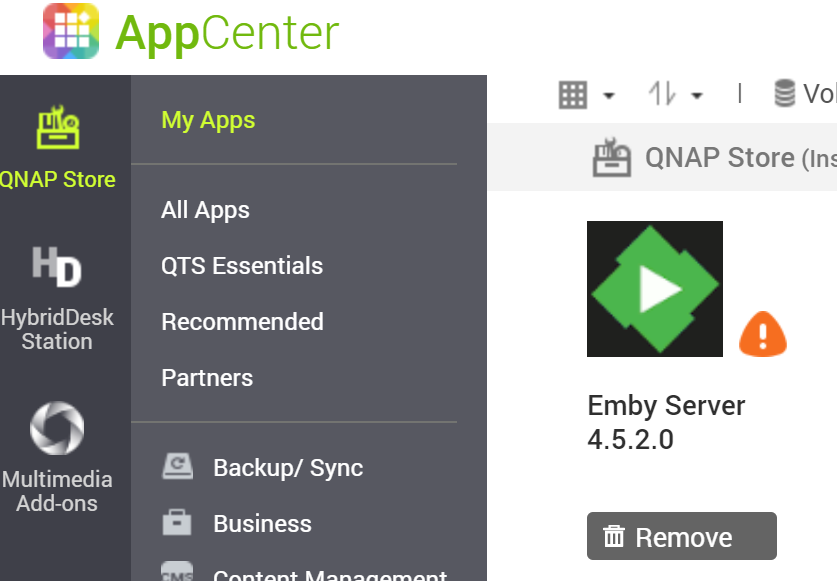
Apter updating my QNAP NAS (TS-673) to firmware version 4.5.1.1456 the APP Center shows Emby as an unsigned app with the only option as Remove. Emby can no longer be started or stopped. Has anyone else seen this and is there a solution? I've attached an image to show the issue in the app center.
 1 point
 -
Hi Guys, I recently moved from Kodi with MySQL for lack of proper multi user management and server side support, I have to say I'm impressed with Emby. Together with the Kodi Plugin it really takes the solution to a whole new level, count me in among the supporters! One feature I would like to see is the ability to recommend movies or shows to other users: I share my Library with close friends and family but it is a big library so they are always calling me to recommend them a movie to watch. It would be really cool if after watching a movie I can click a Recommend button and choose the users I think would like the movie, then it is displayed on their suggested movies at the top with the name of the user who recommended it... Sorry if there is something like this is already there, I am new to the interface and don't fully know it but could not find such feature... Thanks!1 point
-
We're pleased to announce our Emby Theater app is now available in the Mac App Store: https://itunes.apple.com/us/app/emby/id992180193?ls=1&mt=8 The app works very well as a desktop app for your Mac as well as an HTPC connected to your TV. Enjoy these screens below and check it out in the app store !1 point
-
This is a request, but not really a feature. Not sure where else to put it. I’m a long time plex user and I intend to stick with and become an EMBY premiere member. I noticed that the EMBY app on Roku is severely behind and not in sync with the app on my latest Samsung 4K tv. For instance, it is slow, laggy and not very user friendly. The drop down menu for file versions does not always register when trying to change versions. Opening files seem to take a while. I think you get the idea here. the experience on my Samsung EMBY app is much improved over the Roku option. I know Plex recently brought all of their apps in line with each other. Same layout and design. is this something that the EMBY team is currently working on? Or something that you plan on working on in the near future? thnaks!!1 point
-
Exactly my thinking. I think that little things like that will make so many people jump from Plex to Emby full time. The usability right off the bat with the power features that Emby offers for those of us that want to use them. Just my opinions obviously.... but from a growth standpoint makes a lot of sense!1 point
-
Ok, I got the older version of EmbyStat working finally and it is great for my needs. I hope the author decides to put the ability to see duplicates back into the newer version as it is definitely much nicer than this version.1 point
-
Hi, yes this should be an easy enough option to add.1 point
-
What was reported months ago? This is a new issue that just happened with QTS 4.5.1.1456 and Emby Server being unable to run because of no digital signature1 point
-
Oops. Glad you got it working!1 point
-
The process appears to be going fast enough based on your log. avi's can be tricky, you may consider using our convert feature to convert them to mp4. What makes this more difficult to troubleshoot though is that the libreelec package is not put together by us, so therefore it doesn't have our ffmpeg build. One way you could get that would be by using Docker instead.1 point
-
Thanks Jorr. I was looking for an option to enable app without digital signature but could not find anything. I can now confirm that going into Qboost and clicking on the 3 dots under Top 5 applications by memory usage, finding emby and clicking start changes emby to always enabled. Thank you very much for the assistance. I thought maybe I would have to use plex or the built in media server but no more! Also as an aside I just noticed that emby still cannot be started or stopped from QNAP app center There is still an error message about no digital signature. It can be restarted or shutdown from the web interface1 point
-
Paul, I too just update my QNAP and got the same message. However, I was able to start Qboost, then click on Application Management and you should see Emby Server listed. It will be enabled, so click Enable and it will start. After starting, it will once again appear in the Main Menu and you can Open the application. I quess PLEX has paid-off QNAP in order to have their app "favored", but I use both media server platforms and emby is the only one of the two that lets me play .mkv files without issues.1 point
-
Hi, yes we can look at improving it. Thanks for the feedback !1 point
-
at full chat!
 1 point
 -
Old bus - no. Devine - yes yes yes
 1 point
 -
As mentioned before audio sync is a very time consuming process. I only do this when I am absolutely certain that I have the only available copies of video and audio and they can't be gotten anywhere else globally because they were broadcast and never made it to the physical media market. I have spent days on some episodes to correct bad cuts to remove commercials and therefore introduce sync loss. In addition reencoded audio tracks using EAC3to.exe to different frame rates just to get the sync started and then corrected the audio track anytime it got out of sync again. VERY, VERY time consuming and only worth it if the content is valuable to you. Versions of shows that are not available here in the US can be obtained in other English speaking countries and their streaming services or optical media outlets. It is far quicker to obtain the copies and replace what you have unless the copies you have are unique and not available anywhere else. There are sites that deal in Out Of Print media as well as very rare copies of video content but very hard to get into. Did just a quick check at my favorite source for TV shows Lone Ranger all 5 seasons are available and ripped from DVD in MPEG-4 video format to MP4 containers size is 60GB but only available in SD format. Dragnet all 4 seasons h.264 video encodes in MKV containers from WebRips size is 12GB. I am on a constant monitoring lookout on some of my favorite old shows just in case a better quality is being released. I replaced several of them. Also I regard the binary groups on USENET as a personal backup solution in case some of my drives die and the parity drives can't fix it. Premium Usenet servers have retention now of 12 years. Finally in addition I do have streaming services where some of the TV shows are available on demand. The Twilight Zone on Peacock is just one of those examples.1 point
-
Thanks. Does look like the item I linked to includes cables. They seem to look the same and everything says SFF-8087, so unless they're particularly bed examples, should be OK I guess.1 point
-
Thanks for that (and I was just coming back here to say I didn't even notice the one I linked to said it was in IT mode, which I guess means already flashed)1 point
-
I got one pre-flashed in IT Mode like this from this seller. https://www.ebay.com/itm/353063990958 Don't forget the breakout cables to go from SAS to SATA.1 point
-
My bad! @Happy2Play nailed it! Fails on my default browser, Firefox Developer Edition (Firefox 82.0b9). Works fine on Firefox 81.0.2, Safari 14.0, Chrome 86.0.4240.80, and Edge 86.0.622.43.... all on MacOS 10.14.6. I was going to file a bug on Mozilla's bugzilla, however that appears unnecessary as it works on today's release of Firefox Nightly 83.0a1.
 1 point
 -
I just discovered this extremely useful plugin! And coming here, I see that its creator, Anthony, hasn't been heard from for a while. I hope he's OK! Even though I know @ltek and @PenkethBoy had the conversation I quoted above about six weeks ago, I wanted to reply in case this info is still useful to either of them. More than three months before you discussed it here, seemingly unaware of this feature, Anthony did indeed give the Scripter-X plugin the ability to natively call a webhook, without needing to write any script. I've tried it and it works great. See this post for details: To use the feature, all you need to do is create a JSON file that will act as a template for the webhook payload. Within the template you use the same data field names (like %username%) that are shown in the plugin UI for that event. Then, in the UI, you click the plus (+) for the event you want to send a webhook for, and instead of pointing to a script you give it the URL of your webhook receiver and instead of "cmd" or "bash" you use "web:post" and then the parameter is the path to your JSON template file (which must be accessible from your Emby server). Simple, flexible, and works great.1 point
-
It might be helpful for users if it stated which devices are supported within each of the sections, or even a Unsupported section where people might expect to find a device supported. It might also help if your responses weren't always so defensive, but I suspect neither will change. Thanks for your help.1 point
-
Hi, How big is your system file wise (media)? If it not too big you might be best off starting clean using the Portable version which will let you run it from any drive.1 point
-
Emby home does not currently support direct playback on the Google home. We plan on supporting this in the near future.1 point
-
I have the very same problem as william. In the past days I tried out several DLNA servers. The setup is as follows: - Two servers (Plex and Emby) were installed on my Windows PC. Another server is provided by my Router (AVM Fritzbox). - The client is a Samsung BD-J7500 BluRay player. A 2015 or 2016 model. - All equipment is connected via Ethernet. The results are as follows: - The Samsung shows the Plex server as well as the AVM Fritzbox server in the list of DLNA servers but not Emby. - On the other hand I can reach the Emby web interface from the Samsung using its built-in web browser. It is also possible to remote control the playback on the Samsung from the Emby server that is installed on the PC. - The Emby server is also visible for another DLNA device, my AV receiver Yamaha RX-A880, a 2018 model. I already tried to reduce the "blast alive" interval significantly (from 600 to 20) but to no avail. What else can I do? It would be a pity if I could not use Emby because it seems that Emvy presents the media on the client exactly in the way I want it (unline Plex that bothers with many subfolders). I am using Emby 4.5.2.0. My PC runs on Windows 10 version 1909. The Samsung has the latest firmware. Of course I followed the usual tips like updating, restarting, etc. Thank you in advance for your help. Harald1 point
-
I can't even update the nuget package. What you changed was the JS code, surely I need a minimum emby version for that no? @chef1 point
-
Of course I did. I've been developing this plugin and most of my changes were related to fixing the plugin because changes in Emby broke the plugin, and now it's gotten to the point where absolutely nothing was working. It's not fair on plugin developers; it is quite frustrating when changes done by other people break code that was working. Yes, debugging would go a long way, you see without being able to debug and without knowing what changes were done in Emby, it would be quite a bit of a trial-and-error and two bottles of whiskey.1 point
-
Thanks for the pull request; what is the minimum Emby version for it? The problem with the pull request is that this won't fix BlurN... it will just make the configuration page work again. It won't get the scheduled tasks to work; that's the real problem, that there's three scheduled tasks which used to work and they're all broken now. Also, logged in at the mb3admin portal again, but there's no packages section anymore. Where do I make new releases from? Last but not least, where's the new NuGet repository?1 point
-
Point you to what please? Here is the source: https://github.com/MarkCiliaVincenti/MediaBrowser.Channels.BlurN Some things changed and I can't find the problem because I'm unable to debug properly. Can you please make a pull request? I will remain actively working on this project if we can get it working again.1 point
-
I got my GTX 1060 6GB from @Doofus for $80 shipped so I'm not complaining. Wish he would have stuck around.. He was pig headed but also had a wealth of information too.1 point
-
Niiice! I've been dying for something like this for ages1 point
-
Very cool. Pseudo TV for Emby! Thanks very much!1 point
-
Excellent! Great work @punktchen1 point
-
If the original/alternate source is available, then I wholeheartedly agree with you - just re-rip from the new source - job done. Video 'editing' is a time intensive process and of course you won't know if you are fully successful until you watched the entire thing in real time ...0 points