Leaderboard




Popular Content
Showing content with the highest reputation on 10/15/20 in all areas
-
This is a simple one line script to highlight duplicate files - By NAME How to use the script Very briefly - I am assuming you know how to run a PS Script - if you dont Google it. Run this script from the root of say your movies directory via the powershell console window (not the Powershell ISE if using PS5) - script is recursive so will find all movies It may take a few seconds or minutes to look through all directories - depending on the number of files and speed of the pc. File types searched for mkv, mp4, avi and ts - but if necessary you can add others It will produce a txt file called ... drum roll ...Duplicates.txt - the file will be located in the same location as the script file and will get overwritten with each run. If the file is empty after the script completes - then no duplicates found - otherwise it will contain the duplicate movies (by name) example output of a duplicate with a duplicate "count" will be 2 or higher etc - "Group" will attempt to list the paths to each duplicate but if you have many files it will get truncated eventually. If like me you have numerous extras - some are likely to be named the same - e.g. Behind the Scenes - so you will get false positives. I have not filtered the search to exclude trailers, extras directories as you could have genuine duplicates there or misplaced files etc but it can easily be done. Also the search is case insensitive Duplicates.zip Unzip the above and find your duplicates! Have Fun PenkethBoy 15/10/2020

 3 points
 -
i was trying to make it for the unwashed to be able to do it2 points
-
Hi everyone, and thank for the support. This is resolved. PenkethBoy actually called it - apparently I had some nfo files in my collection that contained the incorrect metadata. It didn't affect all movies, but it affected enough that it was causing big issues. I'm not sure where those files came from - Radarr isn't setup to create them, but I think at one point I had an old Kodi setup that created .nfo files, and this was probably a relic of that. They're gone now. Thanks again for the fantastic and quick assistance. I'd never have thought to look for .nfo files without being pointed in the right direction. What an amazing community!2 points
-
I have searched the Feature Requests thread, and I know similar requests have been made, but only for general karaoke support with people requesting support for old depreciated formats as .mid and .kar. CDG+MP3 is by far the most common file format in Karaoke, and also the format used by most professionals. The sound and music quality is by far superior to the midi based file formats. CDG+MP3 is also directly supported in Ffmpeg, and can be transcoded on the fly using a simple command. The video format is only 300x216 (304x224 buffer dimension) so transcoding it would be very cpu friendly. The Ffmpeg command to convert the file is as follows: ffmpeg -copyts -i "01 - Rihanna - Russian Roulette.cdg" -i "01 - Rihanna - Russian Roulette.mp3" -b:v 1M -y "01 - Rihanna - Russian Roulette.MP4" This will force a 1meg video.. I don't know if that is a necessity, as it will produce a larger file than if you omit the -b:v 1M -y option.. The -copyts is there to ignore timestamps in the files, as sometimes this will induce a sync issue with the lyrics shown. Works flawlessly. Now, cdg+mp3 files are normally stored in .zip files to keep them together and for easy management. If there is a problem unzipping and using the files then deleting them after use, I see no problem unzipping the files and leaving them as pairs on the server.. The zipping is purely for ease of use and does not offer much of a space requirement reduction. Please consider this, as a Karaoke Jockey as a side gig, I know a lot of people enjoy this, and in these covid times, no shows are held, and people need entertaining. I serve my immediate family and friends with content, and to be able to add karaoke singing on the fly with emby would be a valuable addition. Best regards, dexus.1 point
-
... as I was tired of manually grouping all my movie versions into groups after each recreation of the db, I created a plugin to help with that. The use case is having movies, that belong together spread around and not being able to easily match the emby naming conventions, but still having the desire to present them as one item with multiple versions. The plugin works similar to the auto boxsets, but does the "movie versions grouping" - it will group all movies based on their TMDB id into one item, regardless of where they're placed and how they're named. I made that for myself - however, if anybody is interested, attached is a plugin that solves this issue. Attached version is for current 3.6.0.49 beta Server, do NOT use it with stable release! Plugin is alpha state, you should only use it, if you are willing to backup your db (there is no way to revert the changes otherwise!) and manually put the dll in the server plugin directory. Do not use it in your production environment before having tested in a test environment that you're fine with what it does - seriously! ;-). Note: There is a known bug in the web GUI presentation which is described here, which needs to be fixed on emby side. Edit: the mentioned display bug in BoxSets is fixed in Emby now, thanks Luke. AutoCollections-for3-6-0-49-betaServer.zip AutoCollections-for3-6-0-75-betaServer.zip AutoCollections-for-4.1.0.15-betaServer.zip AutoCollections-for-4.2.0.17-betaServer.zip (4.6.0.10 and before) 4.6.4.0 and above (does not require beta server as version number has been surpassed) AutoCollections-for-4.6.0.22-betaServer.zip Note: Original version will cause issue with other new plugins like Top Picks. Updates by community members: v.1.0.0.4 New update thanks to @Cheesegeezer Looks like we've managed to update the plugin, to be current Emby Server 4.7.7 (minimum). Some Changes to be aware of Automatic Library scan and updates are disabled, too many things are triggering library scans at the moment and entering into an endless loop which will crash the server. Moved to a Scheduled task now. Fully Locked item Metadata can be ignored in the Plugin Settings for grouping. (Partial field may have worked before but you need to Lock the item itself now) ".strm" files are ignored from any processing New plugin Graphics with a big nod to MikePlanet This is always Mikes plugin and the work he has done is fantastic. - We only did essential maintenance to keep this alive for you peeps. AutoCollections_1.0.0.4.zip v1.0.0.5 Removed Top Pick Items from the available item list re introduced the auto scanning... this will take place 1 min after an item event is detected re introduced auto run after a library scan tested against top pick plugin and there is no endless looping... but please test fixed the locked items bug. Good luck and let me know how the testing goes. AutoCollections.v1.0.0.5.zip v.1.0.0.9 New update thanks to @Hoptional Added option whether to Merge items across different libraries Compatible with nested folder structures, the "Top Picks", and the "New Releases" plugin Improved logging AutoCollections_1.0.0.9-libraryoption.dll1 point
-
Hi guys, I just thought I'd introduce the latest feature of Emby Scripter-X (v2.3.5+) out now on the catalog. Emby Scripter-X Webhooks Why? I notice that a lot of Scripter-X users use the plugin to perform some type of webhook(s) based on certain events, so why not natively support it? So how does it work? Pretty much as-per-usual with the Actions interface. The interface will eventually change input field labels based on the selection in the interpreter box, but it is as above: Run [script], where [script] is the URL of your webhook script (webhook endpoint/api endpoint, etc), in my example above, I have a php script running on my local webserver at http://192.168.1.10/hook.php. [interpreter] should be set to web:post (to post data), web:get is also available, however it does exactly that - doesn't post data. [Parameters] instead of listing parameters to send over the command-line, this is the path to your json content template - where your data is formatted from. Here I specify d:\embyscripts\hooktemplates\authenticationfailed.json, and in this file is the following content: { "user": { "username": "%username%", "password": "%password%" }, "device": { "id": "%device.id%", "name": "%device.name%", "ip_address": "%device.remote.ipaddress%" }, "scripterx_version": "%scripterx.version%", "emby_server_version": "%server.version%" } It should be self explanatory from here. So ScripterX will read in your template, substitute for the token values, and post it to the specified URL. So my PHP script simply takes $_POST['data'], casts it as a JSON object, and outputs to a file on my webserver: Array ( [user] => Array ( [username] => Anthony [password] => asdfasdfasdffasgfsasgasdfasdf ) [device] => Array ( [id] => 427a7309-5fc2-489d-9a83-0664c619c779 [name] => Firefox [ip_address] => 192.168.1.124 ) [scripterx_version] => 2.3.4.0 [emby_server_version] => 4.4.2.0 But as you can see --- these templates are entirely customisable, so you can adjust these templates to suit whatever you're posting your data to. The only thing currently that I haven't made customisable is the POST variable that contains the json data, which is set to 'data'. I will eventually extend the functionality such that the JSON data can be submitted without the need for POST variables. Any comments/feedback/suggestions are greatly appreciated as always.1 point
-
They are both authorized naming schemes (see Video images), but there is a hidden switch for Legacy/Compatible for <ImageSavingConvention> in the system.xml, only for saving. But I know my Windows systems reads both formats. Legacy save backdrop Compatible saves Fanart1 point
-
I am not seeing this issue on Windows, but it would appear your browser is not redirecting as that is the url that is displayed when hovering over it but should redirect to http://yourip:8096/web/index.html#!/dashboard/releasenotes.html?version=4.5.2.0 Possibly browser related.1 point
-
Yes, it did display the 10.0.6.3 as internal address, after I forced this to 10.32.6.3 in the config it's displaying that. But both does not respect that the main connectivity should be done to my proxy with the URL "https://media.mydomain.de" ... so whatever LAN address is displayed, there will always be one of my two networks where this does not work. 10.0.0.0/12 and 10.32.0.0/16 are absolutely not overlapping! These are two fully independent subnets.1 point
-
cela m'intéresse aussi car j'ai le même problème avec mon synology DS 916+ et effectivement videostation le fait très bien mais pas emby... comment doit on procéder pour lire les films 4K ?1 point
-
Hi there, if you're still seeing this issue, can you please try again? I've just pushed an update to our Chromecast receiver to resolve a similar issue, so it may resolve yours if it's the same thing. Thanks !1 point
-
1 point
-
Are there any news or hopes for Panasonic Owners? Regards1 point
-
I may have discovered the issue. My files were off server attached with sftp rclone mount. The mount had the dir-cache-time set to 1m which meant that the emby docker container would get the scan request immediately after completion from sonarr whicb triggers a scan. However, since the rclone mount on the emby server has yet to refresh new files and directories it ends up scanning a non-existent location and fails. It would be nice if the emby debug logs would give information regarding the status of the scan such as whether file exists, etc.1 point
-
Yep - for the washed with added brain cells
1 point
-
It does not like classic spanish films1 point
-
Yes this was definitely fixed as I reported this issue a little while ago and I tested it myself. be sure you’re using the latest version of emby server. Edit: just tested this in case latest version introduced a bug and it still works as expected. Blocked myself access to my 4K movies folder and after only get access to 1080p stuff.1 point
-
You have three options - in reducing complexity 1 Directly modding the db - complex and fiddly to do - very easy to mess up - i did it this way as i had hundreds of files that were "corrupted" by rouge entries that were left behind where a file had a multi version at some point - i did it this way because i did not want to nuke the library/db and start again - way too much work invested over time to do this. I'm not going to explain the way to do it as unless you are familiar with db, sql and how the emby db is setup and the implications of doing stuff in the wrong order - you are going to almost always stuff up and it would be a long convoluted post - that i dont want "ambitious" users trying it and then complaining it broke their db. 2 You have the option of selectively removing a library > let emby delete all the entries for it > do a full lib scan after its deleted the library - let each fully complete otherwise you will have orphaned entries and have more of a mess - so be patient especially if you have a large library. Once thats done recreate the library - and let emby do its thing to completion - watched statuses will return etc - then try creating a new collection with files that did not add before - and they will now. Effectively you have created a "new" db for the library without the issue and the problem should not come back - unless Luke messes around again! 3. Nuke whole library and start again as the issue has been fixed in new versions of emby - or at least 4.6.0.2 from some very limited testing. But with the obvious downside of time and lost modifications to metadata etc etc I would go with option 2! @cayars- Carlo the basis of another tips & tricks KB article. Hope you can keep up1 point
-
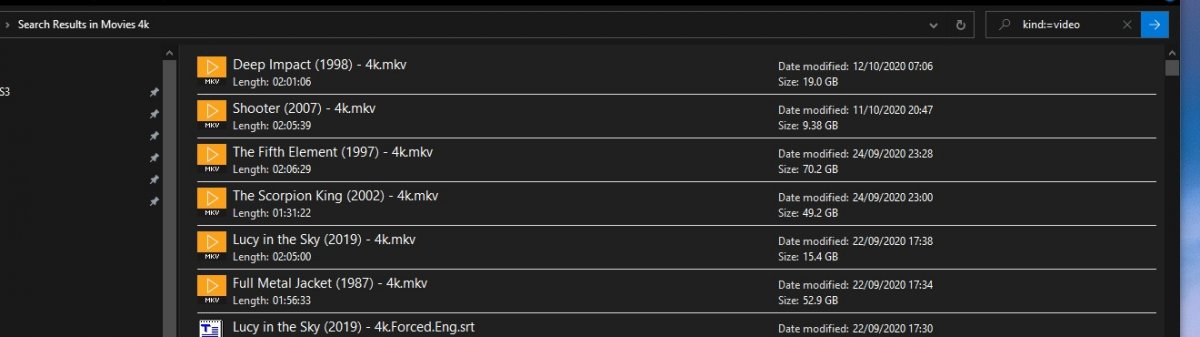
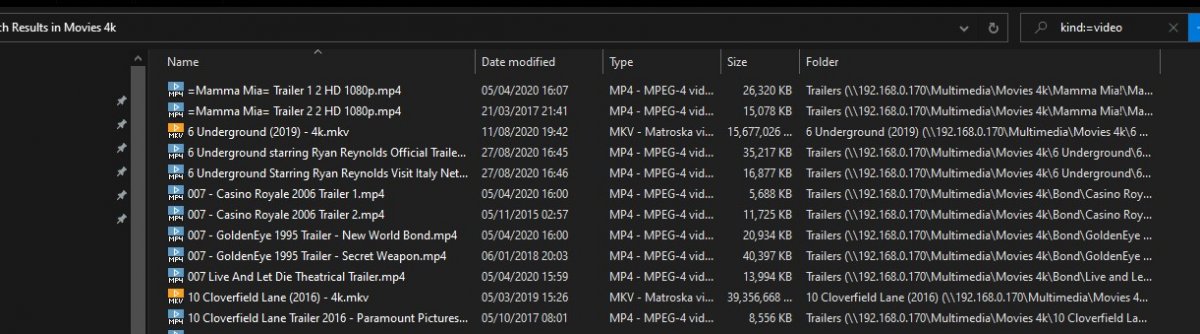
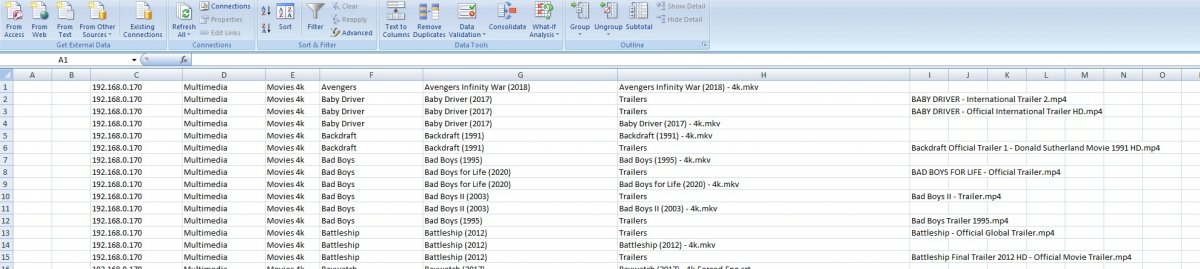
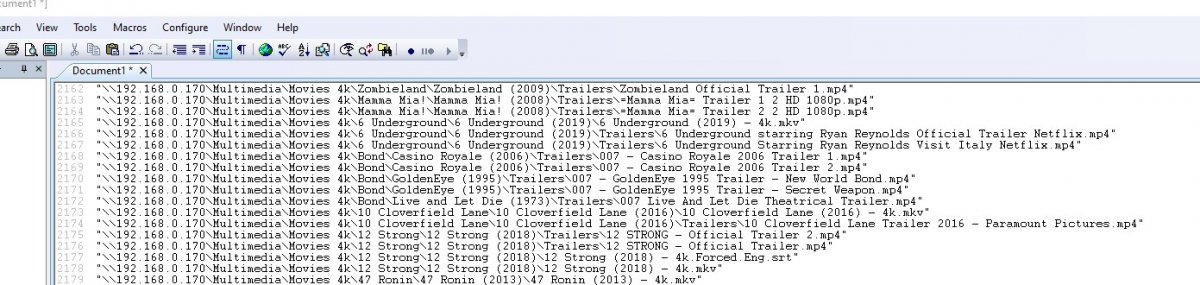
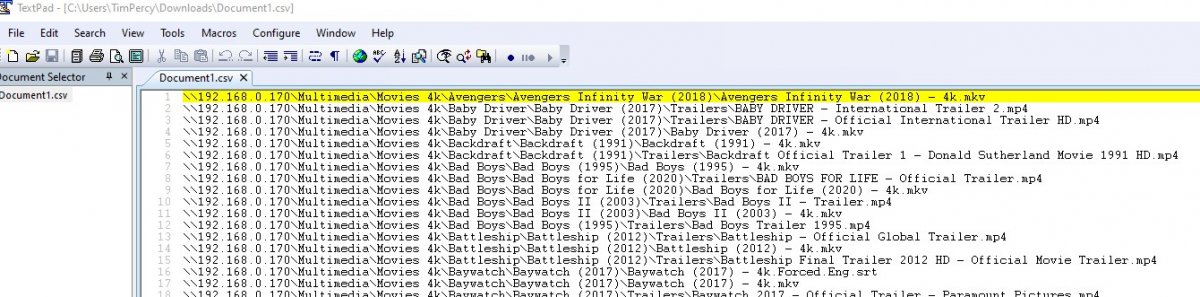
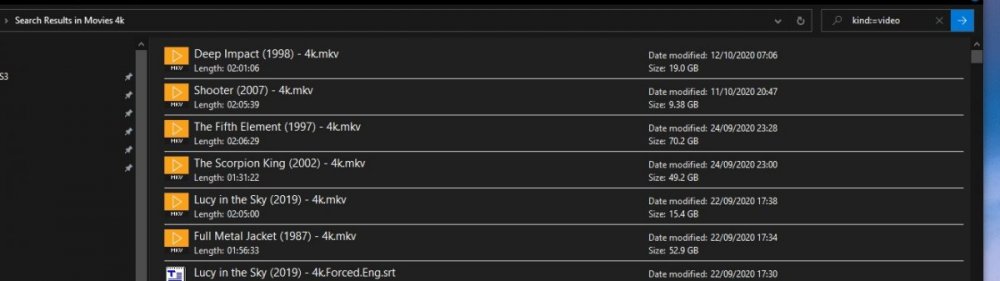
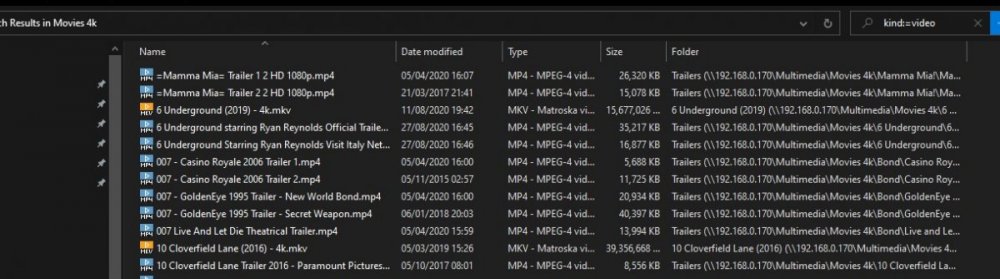
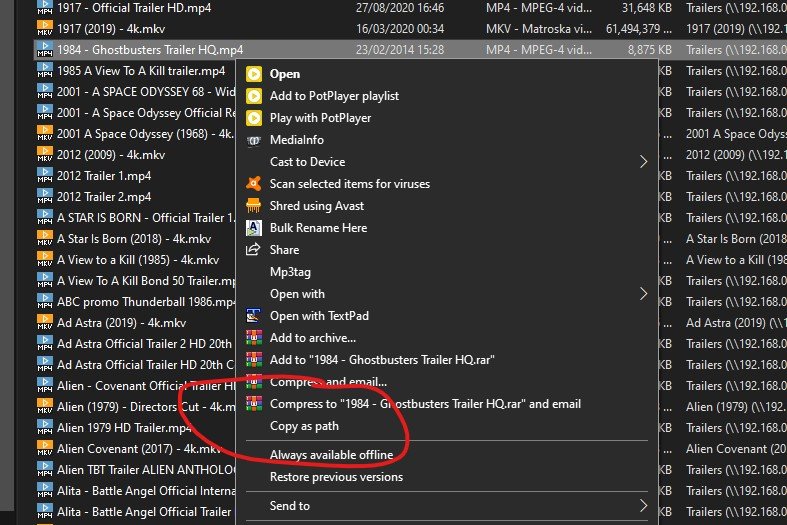
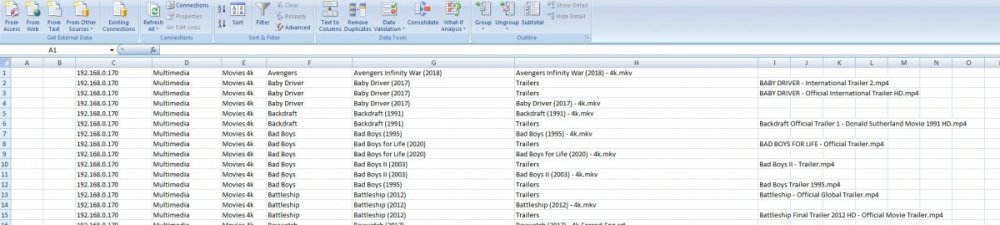
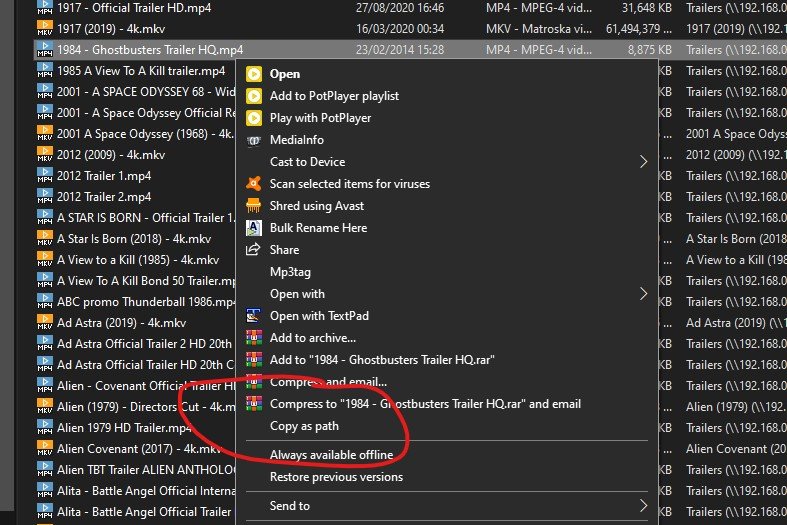
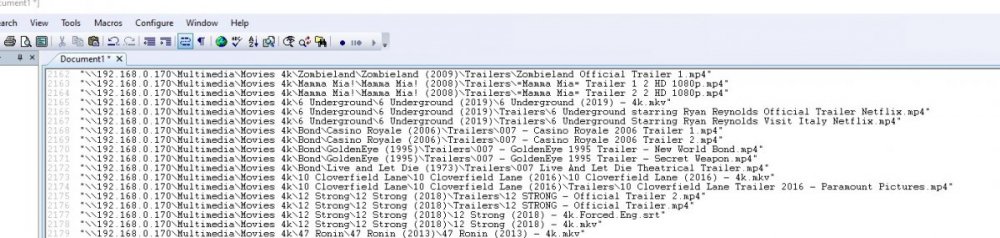
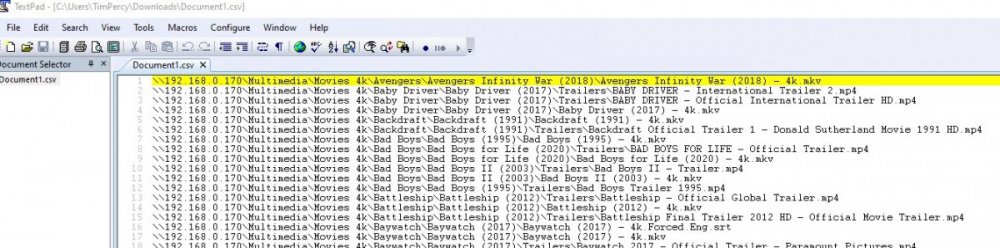
You have the tools to do this already with a small amount of work - till its added to emby or somebody does a plugin etc - but i dont think its necessary To do this simply and quickly without having to do too much faffing about - you have two options or basic approaches depending on what you want to compare or accomplish. 1. You want to compare the "movie names" that appear in emby 2. Or you want to compare movie paths\filenames =============================== For 1 - i'm using Excel 2007 so options might be in a different place on newer versions. Use the Emby report plugin - and export the movie list to a csv (ignore the excel option as it complicates things) - either in chunks if you have a huge collection (append them in a text editor) or as one list open the csv in excel (or other similar prog) then select column A, find "text to columns" on the data tab in excel - choose delimited text - click next and choose ";" then click finish - and OK in the dialog that will pop up. Now you have a series of columns with the data in a more readable and useful format. Final step - select column E -> "Name" column and on the excel Home tab - pick "Conditional format" - pick New Rule -> "Format only unique or duplicate values" (by default it will pick duplicates) -> click the format option -> Fill Tab and pick a highlight colour - say Yellow as it will stand out. Ok a couple of times and you are done. So if you see no yellow highlighting you have no duplicates. You can obviously do this for the paths - but i would suggest you split the paths down using the above text to column function so you can target directories etc. see below. ======================= For 2 You can use the Path from the csv above and do the same as for 1 - but there is an alternative way outside of emby go the windows explorer and navigate to the root of your movies folder structure - e.g. m:\movies in the search box top right type - "kind:=video" press return and wait - windows will now search for any file it considers a video - depending on the speed of your machine and number of videos it might take a few minutes to get the list. - Wait! Next in explorer click "view" and change to "details" and sort by name as it will be a random list by default ( order in which windows found the files) Select all - Ctrl+A and then hold down the shift key and right click on the files - you will now find that you have a new option "copy as path" Open a text editor (not Word!!!!) and paste in the data use the find and replace option and remove e the double quotes around the paths - then save as a csv file then follow 1 above to split the file paths up and use a "\" as the delimiter via the "other" option and compare the elements of the path as you need This takes a lot longer to read than do - its simple data manipulation - not difficult or time consuming for the few times you are going to do this you could setup a template in excel to deal with the data to streamline the process a bit - but for me its not worth the effort. So simples!!!!! Have Fun @cayars another KB article for you to do - copy away old boy!

 1 point
 -
yep effectively you have a new db for Movies - hence why it now works for you1 point
-
You can use MKVToolnix to remux files without re-encoding. One of the parameters you can set for each stream is a delay (-ve for advance) which can adjust this. If your file is already MKV, it may be possible to set this without even remuxing, using the header editor - but I'm not sure. To determine the adjustment needed, I use VLC to play the file and use the synchronisation tool to tweak it while playing - when it's right I read off the delay currently set and us that in MKVToolnix. Remember that each stream (if you have multiple audio and maybe subs) will need the delay setting - usually IME by the same amount. Paul1 point
-
Hi. This error is totally kodi not emby or addons for emby. A "solution" would be for you to disable the service it only serves to check the version of the kodi that is being executed1 point
-
No, in the Google Home app where you manage your Chromecast devices. Then reboot your Chromecast device and restart the Emby app. Please see if that helps. Thanks.1 point
-
Ruby is a modern programming language, much better designed than many of its competitors. Paul1 point
-
TRANSLATION: it's not happening anytime soon!1 point
-
Hi, is this your issue?1 point
-
@frk1337 the next update to our iOS and Apple TV apps will have built-in support for av1. Actually for iOS it will be two updates from now because we already have one in apple review. Thanks.1 point
-
Sorry, we are trying to get the update pushed through, but the LG review process can be really difficult at times. Hopefully it will be available soon.0 points