Leaderboard




Popular Content
Showing content with the highest reputation on 10/12/20 in all areas
-
But that is totally against the intended use. The plugin is not for managing your media, but enjoying them.2 points
-
I would try armv8 as that is what the other RTD1296 models use.2 points
-
Did someone say, "Off topic?" LOL2 points
-
Same here. 1969 is the best year ever. IMO. America landed on the moon and I landed on Earth.2 points
-
Hello, softworkz is offline. My name is Mr. Dolby. I just wanted to express how incredibly happy I am that I was able to control the ATSC 3.0 spec authoring process in a way that it includes some of my latest (as always) practically useless but extremely value-gaining patents. And when those millions of households do not have the required amount of speakers set up at defined positions with a receiver that can really calculate and deal with the required 3D sound model - I don't care. I'll find a vendor who will pay me crazy amounts of money for selling him an "Atmos" sticker that he can put on the mono speaker he is selling (calling it 'sound bar').. Damn how lucky am I? It's almost as great as in the 80ies where I could force tape recorder vendors to increase the white noise in the trebles unless the user presses a button with my name on it. Things are just running for me.... Mr. Dolby PS: The one thing that I really regret is that I came a little bit too late to file a patent on volume fader controls.2 points
-
You've grown up with watching live tv but on television only runs garbage? You have a big library but don't know what to watch next? Then this for you: "VirtualTV" - my new live tv plugin that allows you to create custom channels based on conditions of your Emby library content. What's missing: Maybe codec conditions Known problems: Needs Emby Premier to work (Playback) Emby's live tv and playback api is very limited, so i've had to make some detours to get things working. The plugin has two general playback modes: "continous" and "playlist" playback. With "continous" mode you can also choose between "live", which bahaves like real live tv or "archive", which plays the videos from the start. In "Continuous" mode multiple videos are queued and concatenated to one big file with the help of ffmpeg. To make this happen every video in the queue has to have some common features (video and audio codec). That's why it often happens that the video also has to be transcoded by ffmpeg. For transcoding the plugin relies on Emby's internal transcoding engine. If there's a problem, not uncommon with hardware acceleration enabled, the plugin also has a problem. Nothing i can do about it. The availability of subtitle tracks is mostly dependant of the Emby user playback settings. In continous playback mode only one (the default) subtitle track can be used and this one has to be burnded into the video (transcoding takes place). In "Playlist" playback mode the videos are pushed as a playlist to the Emby clients. It's like you would play your videos directly from your libraries. This way you get all the features you are used to. Audio and subtitle selection, pause, skipping around and similar things. "Native" playback method was created by the Emby Devs. Similar to Playlist playback it will play the real library videos, but with the big difference that playback is purely initiated by the client app, without any remote command execution. This is why it also works for Roku devices on a WAN network. And although the real videos are played, the whole thing is treated like live TV. This means that channel zapping is possible and no dialogs for playing the next episode are displayed. Unfortunately, the new playback method does not yet support all features. As the name "Archive" suggests, it will currently always start all videos from the beginning. In addition, only very few Emby apps automatically advance to the next video. If you want it to be improved even further, each of you should raise your voice in this thread. To get things started install the plugin via Emby's plugin catalog and restart Emby. Setup your channels with a name and number and choose your playback mode. In the channel conditions you'll have to select an Emby account. This account is used to get library access, respect parental rating, reading watched states and selecting the stream language. At least one textual input field of the conditions has to be filled to get some program data. Fields with an asterisk are either evaluated with an "AND" or "OR" condition among each other. Finally, if you've chosen "Continous Playback" for one of you channels, take a look at the transcoding settings. Save your channel line up and manually trigger a "Guide Refresh". Now have fun! Version History: After a plugin update, always clear your browser cache. If your settings still don't load in the config screen, you have to move the "VirtualTV.xml" out of ...\plugins\configurations and restart Emby. Start from scratch. 2.0.0.0 Unlimited number of channels; New playback method "Native (Archive)"; New security concept for the Export API 2.0.2.0 Performance improvements to Guide Refresh; Preview for Add/Edit Channels; Option to disable Program indicators 2.0.3.0 Fixed missing Playlist sort order for some Content Types; Added support for Seasons with Content Source Collections 2.1.0.0 Selectively enable channels for specific users; Create copies of existing channels; Ordered unwatched episode playback 2.1.5.0 Added option to (auto)enable channels on a specific date range; Bug fixing1 point
-
I have searched the Feature Requests thread, and I know similar requests have been made, but only for general karaoke support with people requesting support for old depreciated formats as .mid and .kar. CDG+MP3 is by far the most common file format in Karaoke, and also the format used by most professionals. The sound and music quality is by far superior to the midi based file formats. CDG+MP3 is also directly supported in Ffmpeg, and can be transcoded on the fly using a simple command. The video format is only 300x216 (304x224 buffer dimension) so transcoding it would be very cpu friendly. The Ffmpeg command to convert the file is as follows: ffmpeg -copyts -i "01 - Rihanna - Russian Roulette.cdg" -i "01 - Rihanna - Russian Roulette.mp3" -b:v 1M -y "01 - Rihanna - Russian Roulette.MP4" This will force a 1meg video.. I don't know if that is a necessity, as it will produce a larger file than if you omit the -b:v 1M -y option.. The -copyts is there to ignore timestamps in the files, as sometimes this will induce a sync issue with the lyrics shown. Works flawlessly. Now, cdg+mp3 files are normally stored in .zip files to keep them together and for easy management. If there is a problem unzipping and using the files then deleting them after use, I see no problem unzipping the files and leaving them as pairs on the server.. The zipping is purely for ease of use and does not offer much of a space requirement reduction. Please consider this, as a Karaoke Jockey as a side gig, I know a lot of people enjoy this, and in these covid times, no shows are held, and people need entertaining. I serve my immediate family and friends with content, and to be able to add karaoke singing on the fly with emby would be a valuable addition. Best regards, dexus.1 point
-
Hey this is a problem that I see allot. Can you give the option to delete everywhere. Some menus don't give you the option. Example. From main screen on shield I have latest tv shows. When I click on the show and say play next when the show is done if you click the ... There is no option to delete the show. I have to go back and then long press the show to delete. Version 1.6.65 thanks. The whole delete system needs to be worked on. When a show is done it should ask to delete it.1 point
-
Hi Guys, I recently moved from Kodi with MySQL for lack of proper multi user management and server side support, I have to say I'm impressed with Emby. Together with the Kodi Plugin it really takes the solution to a whole new level, count me in among the supporters! One feature I would like to see is the ability to recommend movies or shows to other users: I share my Library with close friends and family but it is a big library so they are always calling me to recommend them a movie to watch. It would be really cool if after watching a movie I can click a Recommend button and choose the users I think would like the movie, then it is displayed on their suggested movies at the top with the name of the user who recommended it... Sorry if there is something like this is already there, I am new to the interface and don't fully know it but could not find such feature... Thanks!1 point
-
It would be great if we could open the on screen live tv guide by the dedicated guide action with every video, not only when we watch live tv. With dedicated guide action i don't mean the "Up" button, but the "Options" or "Guide" button we can already use on some remotes or in case of Amazon devices the "Menu" button. Currently these buttons will open the standard osd when playing library items. That's redundant because we can do this already by pressing "Down" or "Info". So when we get the possibility to open the osd guide we won't loose but gain a feature. And for people that don't have those extra buttons on their remote, they won't miss anything.1 point
-
SO this is something I really miss from Kodi. In kodi, it's possible to go into a tv show, and select "All seasons" all the way at the beginning of the season listings. This would then bring up a playlist comprised of every episode in every season in order. What I would then use this for, is to "sort by IMDB rating" or "sort by TheTVDB rating" and then scroll through the highest rated episodes of the entire series. A super super useful feature that I used every day. And one I miss dearly in Emby. Of course I could just use Kodi and do DLNA from Emby, but it's just not as aesthetically pleasing or as stable. I much prefer Emby for every single thing EXCEPT this. Is this possible in the Emby metadata framework? Is there an option to do this somewhere already that I just can't find?? Would anyone else use this? Is it just me? Bueler?1 point
-
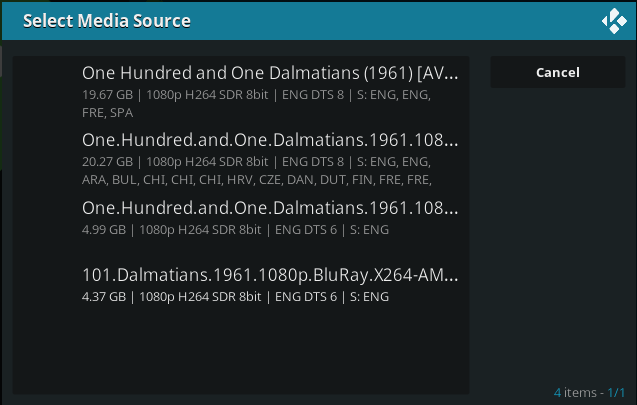
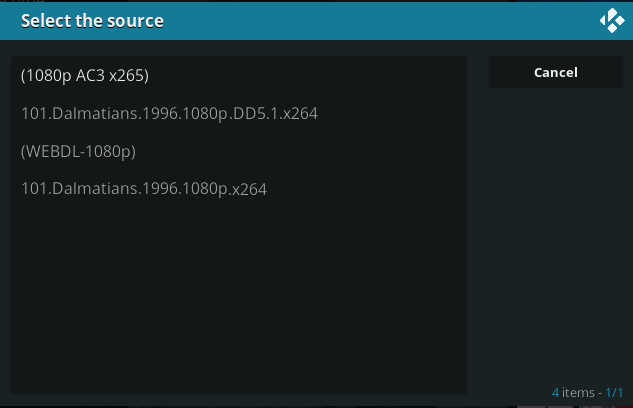
Hi, I noticed that Embycon shows file sizes and some other information in the 'Select Media Source' list. This is very useful as some movies in my library have different source files, and not all of my devices have access to fast internet. The Emby for Android addon does not show this info by default. Is there a way to still do this? I'd like to be able to use both addons. The inability to see more information the file sizes is the main reason why I cannot use the default Android TV app. Embycon source selection screen: includes info about file sizes (screenshot above) Emby for Kodi source selection screen: does not include info about file sizes (screenshot above)
 1 point
 -
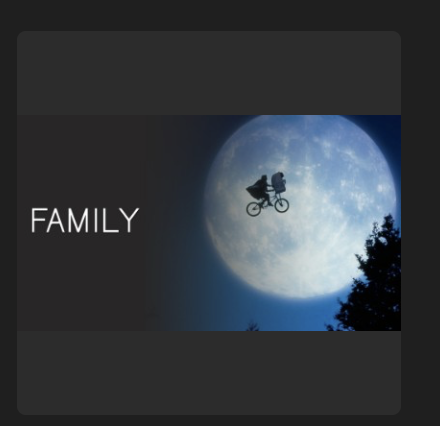
Hi, would it be possible to add the possibility to choose the Movies Genre picture Format like it can be done for Movies or TV shows, I'd like to be able to choose the Thumbnails mode in order to use Hulu Style Library Icons made by atomicmoon. For the moment it only appears in a square format with black bars. Thanks in advance.
 1 point
 -
We'll push an update to the plugin to resolve this. Thanks.1 point
-
This was my comment to the Emby guys back in the day... https://forums.nextpvr.com/showthread.php?tid=52306&pid=451569#pid4515691 point
-
Sorry I messed up the code for child 7 missed a :after in copy and pasting. 7 applied to the setting disabled and 9 applies to the setting enabled. /*Replace Emby Web Header on User Settings*/ div.dynamicRoutes h3:nth-child(7), div.dynamicRoutes h3:nth-child(9) { visibility: hidden; position: relative; } div.dynamicRoutes h3:nth-child(7):after, div.dynamicRoutes h3:nth-child(9):after { content:'My text'; visibility: visible; position: absolute; } No css applies to all or none, user is irrelevant. These setting lead to the same place for admin and users. The admin just has more options. But if disable the user option "Allow this user to change their password and profile image", the options is removed.1 point
-
this sounds about right, i did have multiple versions of Thor ragnorok1 point
-
That's very helpful. We'll investigate whether there's anything we can do about this. Thanks.1 point
-
Yes! I'm so happy that someone else recognizes Bose for the bozos they are. Overpriced rubbish that breaks easily!1 point
-
The difference is that Emby allows you to set it up the way you want to suit your needs and requirements vs a canned setup. Emby let's you access your server via IP, ddns, domain name, Emby Connect, with or without SSL or just used internally only on your LAN. With that freedom of setup comes a bit of setup which can be as simple as checking a checkbox to allow remote access and allowing Emby to open ports on your router to very advanced setup using CDNs and Reverse Proxy Servers. Your media, your way! What a lot of Plex users don't know or understand is that Plex often TUNNELS your media and the amount of tunnel space given for remote access can be as low a 1Mb for non Plex Pass users or 2MB for Plex Pass users. Emby on the other hand NEVER does anything with tunnels and never limits your ability to use the pipe size you want.1 point
-
In an upcoming beta we'll have that resolved so that the workaround is no longer needed1 point
-
These are my personal views. First the NextPVR license isn't just non commercial, it is not commercial person use. The Emby premiere "device" license is already is in potential conflict with the personal use license. Second, I have seen users and Emby support promoting the m3u interface as a means to address Emby limitations and enhance their product . Does that mean Emby could profit from this interface and does Emby charge for access to this service? I believe the answer to both questions are obvious "Yeses" which makes the server-to-server communication a "commercial" connection. I am not saying it is big money it is still a fact. Martin1 point
-
"Playlist" playback mode.1 point
-
yes. no issues playing the first show in the guide and transitioning to the next1 point
-
When a photo is open I’m not able to go back and forth to next photo anymore on my remote. Only autoplay. Same buttons works when jumping back and forth in a video. Samsung series 7 It worked before.1 point
-
@Emby Tower another one:1 point
-
https://support.emby.media/support/solutions/articles/44002065569-apple-tv-device-name Let me know if you'd like to see anything changed or added.1 point
-
@Emby Tower please try this one:1 point
-
If you give me permission to use those images and posts we might.1 point
-
Thanks PenkethBoy for your answer !! I changed all the pictures as you said and it changed to thumb format !!1 point
-
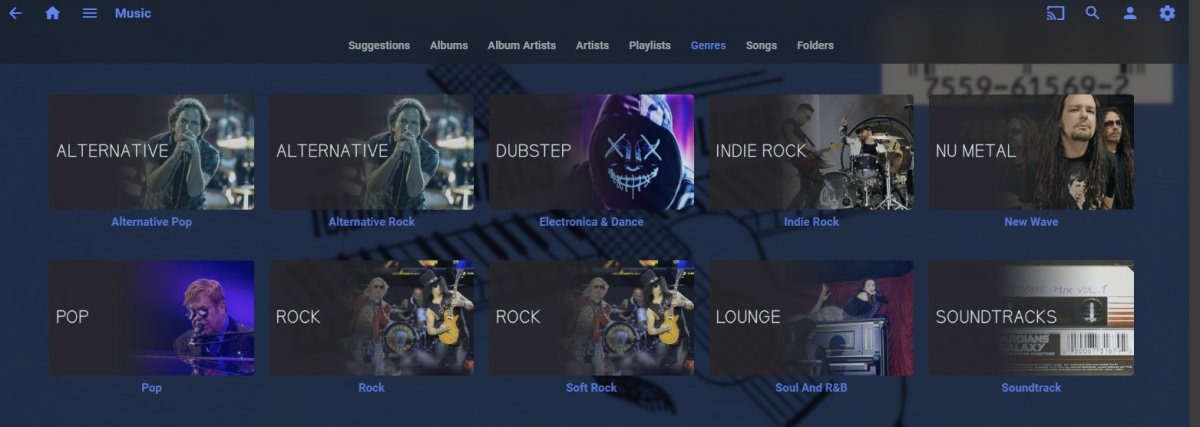
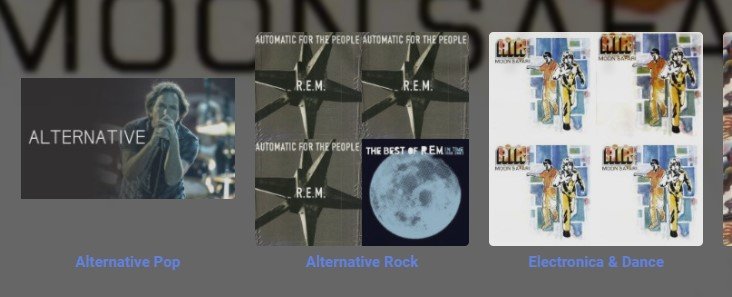
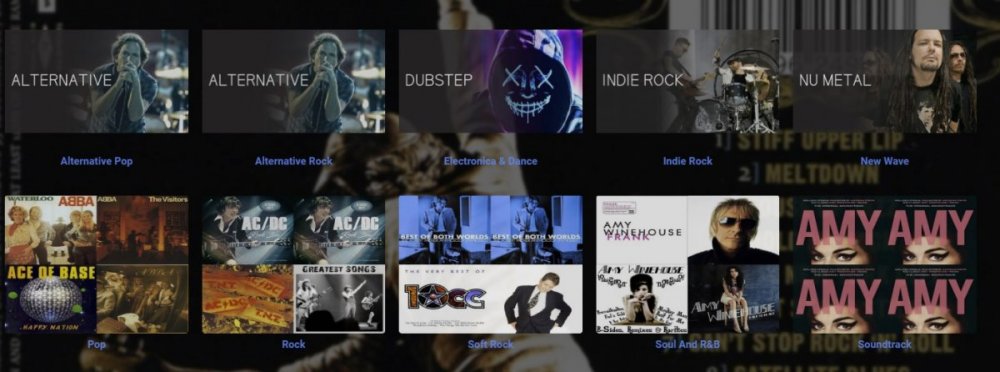
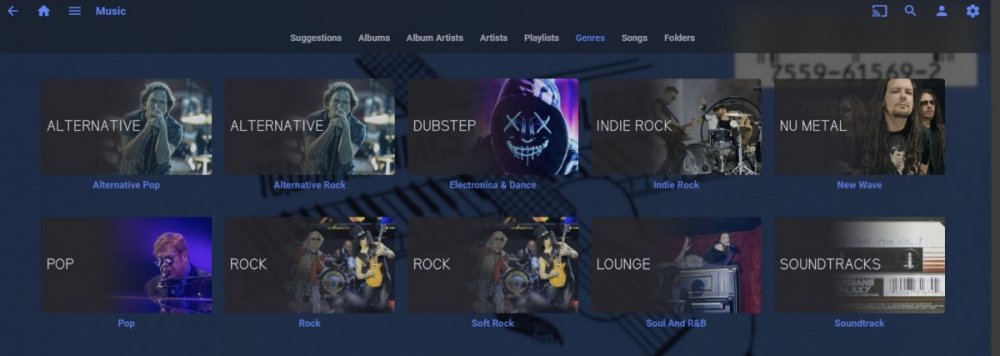
Ok - you can have thumbs trick is that emby will change to thumb format once you have enough thumb images loaded i'm using Music Genres but the same happens for Genres if you add just one image then you see the above (i have a heavily css customised web app so dont get black bars) - this is probably what you get but your screenshot is to small to tell for sure However - adding a few random landscape images - ta dah! add enough (5 out of 10 in this case) and magic happens - notice the last 5 are now stretched and the first five are not replace them all and ...... same trick applies to portrait images Have Fun
 1 point
 -
1 point
-
One is just perception. There is more than one of everything.1 point
-
I don't understand the question - in order to get rich, I'd even sue myself of course!1 point
-
Liar! I have patents! I'll sue you and everybody else who will dare to leave out Dolby buttons, Dolby stickers or Dolbý-Video-Intros. I'll sue every vendor to death until he does what I say. I will catch them, I will throw them into my "Laboratories" where I have never developed anything, instead those are made to torture my enemies: before, during and after we are suing them for patent infringement. In my latest project I am filing a patent about innovative methods for summing up 2 and 2.. Nobody will anymore be allowed to say that it's '4' without paying me. What a great world...1 point
-
OK I'll take the bait and wait 5 years for your reply. LOL I don't see it as a conceptional failure at all. ATSC 3 has higher performance, lower latency and better error correction that any other OTA standard. It also has the most efficient use of bandwidth (DVB-T is close). OTA signals will be stronger with ATSC 3 than today’s digital ATSC 1 broadcasts and will propagate over greater distances and deeper into buildings which will be welcomed by consumers. ATSC 3.0 of course is multicast by nature so it is suited to live broadcasts and multiple TV viewing using a "single stream" vs a stream per viewing station. Running over IP has several benefits. First besides being streamed OTA the same feeds can be transmitted over cable/internet which would allow reception over 5G mobile without an antenna or subscribe over the Internet in your broadcast area without worry of OTA obstructions. ATSC 3.0 can simultaneously work over both OTA and 5G or Internet. TV reception in cars should be trivial as well via OTA. If you don't mind watching over a 5 to 10 second delay you can have virtually perfect reception as any bad packets received over OTA can be fetched over IP/Internet. The International Telecommunications Union (ITU) has adopted ATSC 3.0 as THE WORLDWIDE recommended digital IP broadcast standard, paving the way for countries around the world to evaluate and use the IP-based digital ATSC 3.0 system, so it's likely going to expand globally. At present there are several different standards including European DVB-T, Japanese/ Brazilian ISDB-T, and Chinese DTMB platforms. Of course ATSC isn't just USA. South Korea even did terrestrial UHD format broadcast in 4K of the 2018 Winter Olympics in Pyeongchang using ATSC 3.0 which it adopted as the first country on board with ATSC 3.01 point
-
@Emby Tower Sort by PremiereDate is working fine here, so make sure all your single episodes really have a release date and not only a release year.1 point
-
This is not right as adding another audio track wouldn't even change the overall file size that much, so the overall conversion you are doing is inflating the video track also. But have you adjusted this setting in the Emby Roku channel?1 point
-
If you only have one of these, you could do it the usual way and then use the Identify feature if the correct one is not picked. Or in the folder or file name you could do Alone (2020) [tmdbid=xxxx] We should probably look at supporting imdb id's with that as well.1 point
-
The text is applied by script pointing to translations so no. All you can do is edit your language json in \system\dashboard-ui\modules\common\strings. "HeaderPlayNextUp": "Play Next Up" "ResumeAt": "Resume from {0}", But needs edited with every server update.1 point
-
Thanks for reporting. I’ll take a look when I have a chance and reach out to you if I need anything.1 point
-
Purchase is tied to the store and the account. You can unlock as many devices as you want, as long you are in the same platform and logged with the same store account.1 point
-
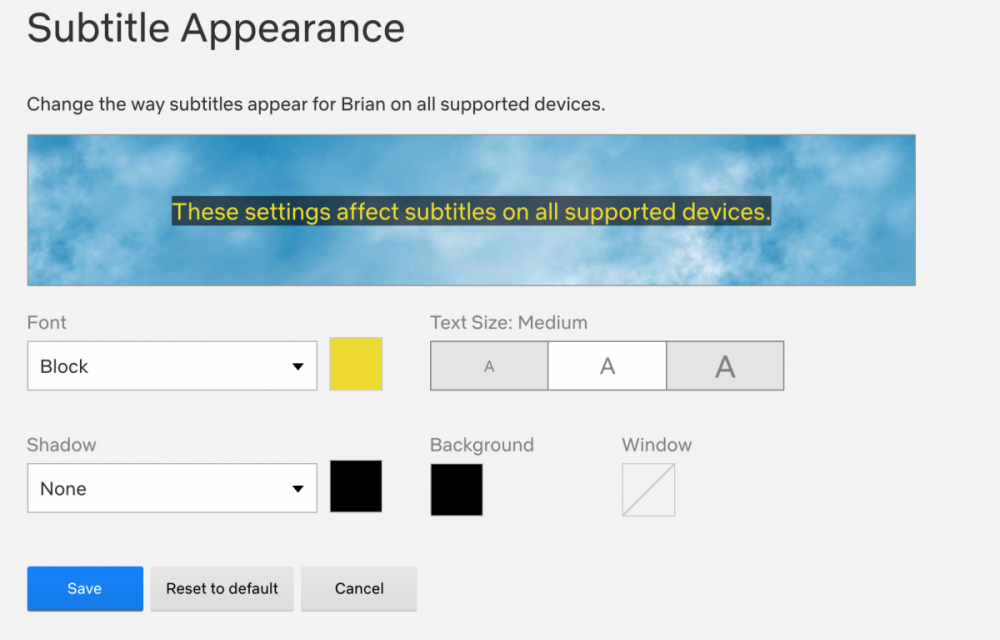
Feature Request Permit subtitle backgrounds for better visibility. It would be good to allow subtitle backgrounds with variable opacity so that the sub text can overlay any existing text. There might be issues where the subtitle is in the same color as the background that might cause viewing issues. I understand that you can change the text color, but this is inconvenient to change the subtitle color to avoid the issue. Let's say I'm watching a video with white hardsubs, and it conflicts with my external subs. Having sub backgrounds would permit a more enjoyable viewing experience and prevent the need to change the color. Example Netflix has a subtitle appearance that permits subtitle backgrounds.
 1 point
 -
Hi, this should be resolved for the next update to the app. thanks.1 point
-
That shouldnt be the correct answer lol. Plex handles it, emby should too1 point
-
Geiz ist halt noch immer geil...1 point
-
Hi, will be awesome to have a top 5 "Top Tracks" on artist page, on the right side below artist logo? Last.fm have the info for top10/5 tracks of artist. Upcoming events as extra will be great too.1 point
-
The delete option on the screen you are describing would delete the Entire Series not the episode you just watched so its probably a good thing it isn't there. So, I gather what you are actually asking for here is a dialog right after playback offering you the option to delete the item you just finished - correct?1 point