Leaderboard




Popular Content
Showing content with the highest reputation on 10/11/20 in all areas
-
You've grown up with watching live tv but on television only runs garbage? You have a big library but don't know what to watch next? Then this for you: "VirtualTV" - my new live tv plugin that allows you to create custom channels based on conditions of your Emby library content. What's missing: Maybe codec conditions Known problems: Needs Emby Premier to work (Playback) Emby's live tv and playback api is very limited, so i've had to make some detours to get things working. The plugin has two general playback modes: "continous" and "playlist" playback. With "continous" mode you can also choose between "live", which bahaves like real live tv or "archive", which plays the videos from the start. In "Continuous" mode multiple videos are queued and concatenated to one big file with the help of ffmpeg. To make this happen every video in the queue has to have some common features (video and audio codec). That's why it often happens that the video also has to be transcoded by ffmpeg. For transcoding the plugin relies on Emby's internal transcoding engine. If there's a problem, not uncommon with hardware acceleration enabled, the plugin also has a problem. Nothing i can do about it. The availability of subtitle tracks is mostly dependant of the Emby user playback settings. In continous playback mode only one (the default) subtitle track can be used and this one has to be burnded into the video (transcoding takes place). In "Playlist" playback mode the videos are pushed as a playlist to the Emby clients. It's like you would play your videos directly from your libraries. This way you get all the features you are used to. Audio and subtitle selection, pause, skipping around and similar things. "Native" playback method was created by the Emby Devs. Similar to Playlist playback it will play the real library videos, but with the big difference that playback is purely initiated by the client app, without any remote command execution. This is why it also works for Roku devices on a WAN network. And although the real videos are played, the whole thing is treated like live TV. This means that channel zapping is possible and no dialogs for playing the next episode are displayed. Unfortunately, the new playback method does not yet support all features. As the name "Archive" suggests, it will currently always start all videos from the beginning. In addition, only very few Emby apps automatically advance to the next video. If you want it to be improved even further, each of you should raise your voice in this thread. To get things started install the plugin via Emby's plugin catalog and restart Emby. Setup your channels with a name and number and choose your playback mode. In the channel conditions you'll have to select an Emby account. This account is used to get library access, respect parental rating, reading watched states and selecting the stream language. At least one textual input field of the conditions has to be filled to get some program data. Fields with an asterisk are either evaluated with an "AND" or "OR" condition among each other. Finally, if you've chosen "Continous Playback" for one of you channels, take a look at the transcoding settings. Save your channel line up and manually trigger a "Guide Refresh". Now have fun! Version History: After a plugin update, always clear your browser cache. If your settings still don't load in the config screen, you have to move the "VirtualTV.xml" out of ...\plugins\configurations and restart Emby. Start from scratch. 2.0.0.0 Unlimited number of channels; New playback method "Native (Archive)"; New security concept for the Export API 2.0.2.0 Performance improvements to Guide Refresh; Preview for Add/Edit Channels; Option to disable Program indicators 2.0.3.0 Fixed missing Playlist sort order for some Content Types; Added support for Seasons with Content Source Collections 2.1.0.0 Selectively enable channels for specific users; Create copies of existing channels; Ordered unwatched episode playback 2.1.5.0 Added option to (auto)enable channels on a specific date range; Bug fixing1 point
-
Request No. 1: Implement Metascore rating for movies, from Metacritic.com, in Emby. OMDb api provides this information. Request No. 2: Also, fix an option in settings to enable or disable a ratings source according to the user's choice.1 point
-
Is there a reason why animated gifs dont work as a poster for ex a movie? Can we have support for them please? Thx1 point
-
Hello, I think it would be great to have a HA option to have 2 emby server totally redundancy. What do you think about that?1 point
-
Would be great if you could adjust the volume using the mouse wheel in the Emby Theater client for Windows. I am a long time Emby for WMC user and normally use the remote control for volume. Recently I have been using Emby Theater on another PC without a remote and notice how cumbersome it is to click on the volume slider with the mouse pointer. I have previously got used to using the mouse wheel for volume control using Potplayer which is much simpler, faster and more precise.1 point
-
VERSION 6.2.22: Download link for manual update: https://github.com/MediaBrowser/plugin.video.emby/archive/refs/tags/6.2.22.zip Release Notes: https://github.com/MediaBrowser/plugin.video.emby/releases/tag/6.2.221 point
-
It would be great if we could open the on screen live tv guide by the dedicated guide action with every video, not only when we watch live tv. With dedicated guide action i don't mean the "Up" button, but the "Options" or "Guide" button we can already use on some remotes or in case of Amazon devices the "Menu" button. Currently these buttons will open the standard osd when playing library items. That's redundant because we can do this already by pressing "Down" or "Info". So when we get the possibility to open the osd guide we won't loose but gain a feature. And for people that don't have those extra buttons on their remote, they won't miss anything.1 point
-
@emby_fan @Emby Tower Maybe a bug. I'll take a look.1 point
-
Try turning on the option "Download images in advance" in each library for movies and TV Shows, then refresh metadata. Don't mess with the cache directory.1 point
-
See post 2 above1 point
-
I figured it out... here is what I did in case someone else has the same problem: I had in the config.ini file my ip and port (ie: 127.0.0.1:6077), but it just needed the ip, no port (ie: 127.0.0.1), all works now in both Plex and Emby.1 point
-
@skidmarks The Roku will get this. It is already in the pipeline. It is already committed. Once the next release cycle for the Roku Beta comes it will get sucked in. Other things will get sucked in at that same time. Consistency. If this were a major bug or some show stopper a "special bugfix" release would be issued rather than wait for the regular store/beta release cycles.1 point
-
Back when the NFL first starting to broadcast in HD (720p or 1080i), I believe there were only three teams at the time, I had cable and they wanted $10 more a month (they still do) to provide HD channels. Anyway, that made me angry at the idea they were going to charge me for what should have been a FREE service. I also read that Cable compressed their signal, but the over the air broadcast was a raw signal around the 19 Mb limit. I had my brand new 65" rear projection TV that did 1080i and 720p and I wanted to watch the NFL games in all of it's glory. I purchased and installed a roof top mounted antenna, purchased Dish Network DTV Pal DVR for around $250. Everything cost me around $400 just to watch the few NFL games that were broadcast in HD. All this just to keep from paying cable $10 a month for the privilege of watching the games in HD. That was probably about 8 or 10 years ago, but don't quote me on that. Bottom line, I purchased the HDHR 4k tuner so I will be ready when they start broadcasting the NFL games in 4k. I did it before and I will do it again......... 10 years from now, I will be looking for hardware to watch the NFL games broadcast in 8K.1 point
-
The above page has a link to " Index of Setup Guides" that is broken.1 point
-
Hi there, I've fixed it. Thanks for reporting.1 point
-
Thanks for reporting. We'll take a look.1 point
-
Someone would need a TV license and be using that same TV they are using for BBC with Emby. In that way the license extends to cover Emby when it streams airs/streams shows from the UK. The plugin itself wouldn't need the license as broadcasters don't need the license. Just receivers do. (ie.. the plugin would only be legal in the UK with UK users who purchased TV licenses.. everyone else using it would be illegal).1 point
-
Hopefully some one here can help with it as for tv licence in the UK we have to pay to watch TV over the air but as I said this is for all websites to be loaded and controlled via TV remote and for no mouse to be seen1 point
-
Hi everyone so what I was talking about wasn't particularly for bbc just to make any website we choose to load full screen and be navigated by tv remote and no mouse so this I believe does not break any rules etc as it would merely load a website like an app1 point
-
https://www.tvlicensing.co.uk/check-if-you-need-one Live TV means any programme you watch or record as it’s being shown on TV or live on any online TV service. It’s not just live events like sport, news and music. It covers all programmes on any channel, including soaps, series, documentaries and even movies. If you’re watching live TV, you need to be covered by a TV Licence: if you’re watching on TV or on an online TV service for all channels, not just the BBC if you record a programme and watch it later if you watch a programme on a delay to watch or record repeats to watch or record programmes on +1, +2 and +24 channels to watch live programmes on Red Button services even if you already pay for cable, satellite or other TV services That is how they handle TV hookups in the UK. You buy a TV. Well you cannot use it legally until you purchase a license. I am sure there are a significant amount not paying for silly licensing to watch any "programmes". It's quite different than in America where we have no such thing.1 point
-
I deleted my Cache today before I started as it was very old. Still getting lots of blanks until i go into the bio or go into the bio and delete the image.1 point
-
Technically you can use regexp and a browser user agent. If their robots.txt allows indexing they are fair game. If it says disallow by all means you are trample their rights. https://www.bbc.com/robots.txt For example that one there. See if they are allowing bots to index that url by checking for disallow. If they do I do not see the harm in scraping it. The search bots already are. I know Emby terms say no web scraping. But regexp on html when you use the correct browser agent is akin to being a web browser and selectively showing information same as a search engine.1 point
-
https://emby.media/community/index.php?/topic/80219-emby-showing-duplicate-entries-in-the-“continue-watching”-section/ https://emby.media/community/index.php?/topic/84860-continue-watching-duplicate/ If multi-versioning is not used this is expected behavior do to how Emby tracks userdata.1 point
-
Hi, can you give this a try?1 point
-
I understand this time, Thank you ! Hope that emby can support truehd 、 dts-hd and even Dolby Atmos using client decoding in the future, just like infuse.1 point
-
SPIO should be implemented as 1 level above FSK-18 because of parental ratings. IMHO it is one thing to allow FSK 18 content, but SPIO is always one step rougher / harder then FSK 18. For example: The Indonesian movie "Headshot" is SPIO, also some episodes of the Spartacus TV series in their uncut versions. There are also cut versions of these episodes, and they got FSK-18. For me the German ratings system should be implemented in Emby like: Level 1 = FSK 0 Level 2 = FSK 6 Level 3 = FSK 12 Level 4 = FSK 16 Level 5 = FSK 18 Level 6 = SPIO/JK Level 7 = unrated (which is also the standard for porn content here in Germany, because they never get a rating in Uncut) Level 8 = banned by authorities (in German "indiziert") I think this would be perfect for parental ratings!1 point
-
Nice to see development is proceeding again on E4K. Looking forward to it!1 point
-
Weird. Oh well, I'll just have to briefly try to act like a grown up...1 point
-
1 point
-
Well I had a brain fart right after I posted this. I renamed the episode names to "Episode 1 S01E01.mpg", etc.... that fixed it. Perhaps this will help someone else. Cheers! I Love Emby!1 point
-
I got one "just in case" we get ATSC 3.0 in my area during my lifetime. All I use is OTA media.1 point
-
I picked it up for 0 stations1 point
-
Yes, you can purchase an app unlock:
 1 point
 -
Yes it can, in fact that's the new process going forward. Please check out the blog announcement for 4.5: Thanks.1 point
-
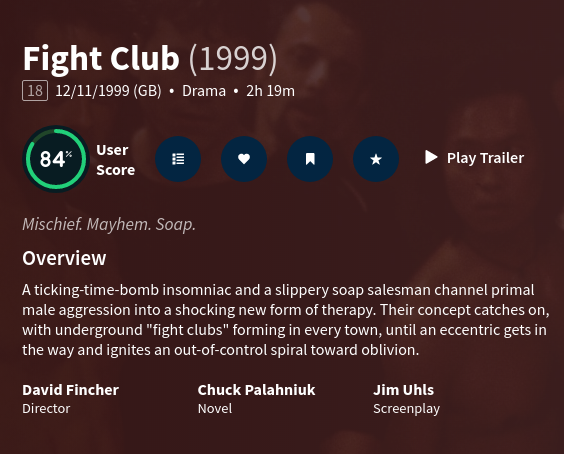
Hi @PenkethBoy, Thank you very much for taking the time to post here as it - if nothing else - makes sure the thread is kept alive. It is true that the director(s) are listed, but I care as much (if not more) for the writers of the films since I do enjoy to be able to follow a writer's work and not just a director's. The reason I'm replying here is that there was a mention of imdb and I think there has been some confusion. I offered the examples of both imdb and rottentomatoes as two major sites where movies/series information is displayed and where the have adopted the format I would like also to see in EMBY. EMBY itself is indeed not using imdb, but themoviedb.org . Every time the metadata is pulled for a specific title we get back the information from that site. To illustrate this, the example I'd like to use is again Fight Club where we can see that the API call is happening as such: 2020-10-09 13:08:46.867 Info HttpClient: GET https://api.themoviedb.org/3/movie/550?api_key=XXXX&append_to_response=casts,releases,images,keywords,trailers&language=en&include_image_language=en,null and in the response we can see this : {"credit_id":"52fe4250c3a36847f8014a4d","department":"Writing","gender":2,"id":7468,"job":"Novel","name":"Chuck Palahniuk","profile_path":null},{"credit_id":"56380f0cc3a3681b5c0200be","department":"Writing","gender":2,"id":7469,"job":"Screenplay","name":"Jim Uhls","profile_path":"/eJPUwP933EiwEWqxEBzPv6Xf0nC.jpg"} So the data is there and it's coming as we'd expect them to. As it happens, apart from imdb and rottentomatoes, themoviedb.org also has the writing team in high regard worthy of their own place , separate from the cast. You can see this here and in the image I've attached (fightclub_themoviedb.png)
 1 point
 -
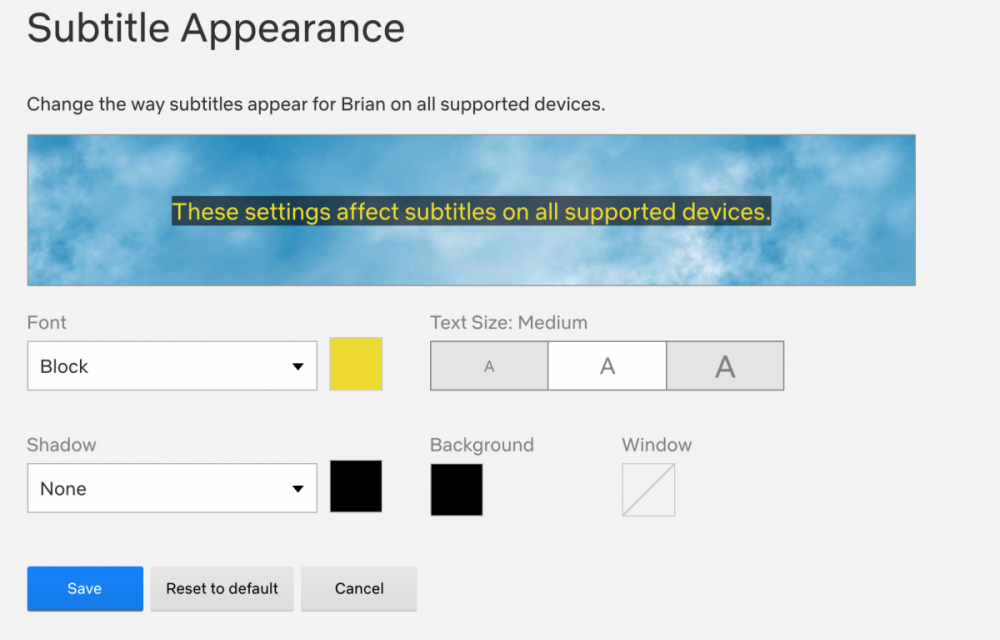
Feature Request Permit subtitle backgrounds for better visibility. It would be good to allow subtitle backgrounds with variable opacity so that the sub text can overlay any existing text. There might be issues where the subtitle is in the same color as the background that might cause viewing issues. I understand that you can change the text color, but this is inconvenient to change the subtitle color to avoid the issue. Let's say I'm watching a video with white hardsubs, and it conflicts with my external subs. Having sub backgrounds would permit a more enjoyable viewing experience and prevent the need to change the color. Example Netflix has a subtitle appearance that permits subtitle backgrounds.
 1 point
 -
Ideally this switch should be added to the Dashboard somewhere.1 point
-
Si, lo que necesitas es configurar el Servidor Emby como un servicio para que inicie automaticamente al encender la PC. Sigue el tutorial que ha dejado Happy2Play.1 point
-
Hi there, yes it is planned for an upcoming update. Thanks for the feedback.1 point
-
If I have a look at the information (.nfo) files of my movie collection, the "country" is available. So this field could be used as sorting criteria. The requirement is legitime imho.1 point
-
Hi, just thought I could also ask about this as well and kind of resurrect it. I feel that seeing the writer as well under the director is the norm. Here are two examples for Fight Club from Imdb (https://www.imdb.com/title/tt0137523/) and RottenTomatoes(https://www.rottentomatoes.com/m/fight_club) Since both of these major sites are pushing for this (and all the rest) I believe, it would make sense to have it in Emby and it would not clatter the page. Thanks! MM1 point
-
Hi All! This is my first topic in this wonderful forum and sadly it's for a problem Today I upgraded my emby server (running on CentOS) . Here are the from/to versions: ---> Package emby-server.x86_64 0:3.5.3.0-1 will be updated ---> Package emby-server.x86_64 0:4.2.0.40-1 will be an update After the upgrade three things have happened (which I think might be connected) 01) The watched status has been lost for every user. 02) The Reports appear to have 0 on the timestamp for dates. 03) Querying the database, shows no results for anything before the upgrade. So, if I go to Reports -> Activity , I get a result like the following (this is an extract) 7/27/19 11:52 AM;<username>;SessionStarted;Info;<username> is online from Chrome;IP address: <ip_address>; 1/1/70 12:00 AM;;UserPolicyUpdated;Info;User policy has been updated for emby;; So, in Reports, the data is there, it's just that all dates have been zero'd . If I go to the Playback Reporting interface, and execute a Custom Query , I get this : rowid DateCreated UserName ItemId ItemType ItemName PlaybackMethod ClientName DeviceName PlayDuration PauseDuration 1 2019-07-27 12:24:34.1903292 <username> 37507 TvChannel RandomChannel01 HD DirectPlay AndroidTv <my_device> 440 0 2 2019-07-27 13:10:47.4163088 <username> 37508 TvChannel RandomChannel02 HD DirectPlay AndroidTv <my_device> 533 0 which is everything after the upgrade. So , I'm not entirely sure how this has happened, hence I'm reaching out. Thanks!!! MM1 point
-
Thanks! The main question was answered, I'll see if I can figure out the plugin issue later. You can resolve this topic!!! MM1 point
-
Hi Luke, I executed a library scan as you told me and I can see that the watched status is fixed, so thanks! Apologies for the late reply but it took around 9hours. However, the other two issues are ongoing. In the Reports I can still see the zero'd dates And also the Playback Reporting plugin shows everything that happened after the upgrade. Thanks! MM1 point
-
Hi Luke, No I have not installed anything in between. I went directly from the 3.5.3.0-1 to the 4.2.0.40-1 Thanks!1 point
-
I have attached the zip file containing the Windows dll to the first post. Needs server 4.1.0.26 not tested with beta 4.2 does not include plugin change for 4.2. Current beta release of NextPVR v5 will always be required make sure you can use NextPVR v5 browser interface before testing with Emby For installation simply drop the dll in Emby\programdata\plugins and configure. It is based on 3.3.1 and will show as 3.5.1.0 in the logs. To configure I recommend selecting the default recording option you prefer and editing the genres that you like. The defaults are mine with schedules direct. To get New, Repeat indicators you will need to configure NextPVR to "Show New in Guide" using the browser or by editing config.xml Information such as Season, Year, Premiere, New, Repeat, Original Air Date, Production Year is based on the data being available in the guide. Martin1 point
-
+1 I would suggest that the same goes for people views. If you click on an actor or director, it would be useful to see their body of work chronologically for the same reasons stated above.1 point