Leaderboard




Popular Content
Showing content with the highest reputation on 10/09/20 in all areas
-
Now I am not saying you are not passing in the streams info. I am just saying at the point of the crash there was none at that time. Which prevented the entire experience. Since this is "pseudo" live tv and not real live tv there has to be some adjustments to get this working right on the Roku. That is what I want to do. No.. that is from the debug of the Roku app. It shows that right before the crash that was sent to console/telnet. Then it shows context and trace back. To the exact offending line and variable. It was crashing on setting the audiotrack/subtitle selectors on the video player which are based on the streams. This is why I said please move as fast as possible. I will continue working on this today and try to solve the issues if you are available. I can work with you to determine why the Roku is having these issues and iron them out. In the future I expect more plugins will have similar issues doing similar things on the Roku. To solve that now means we solve that then, in the future, too. In effect future proofing. To protect the present we must invest in the future. You have a media server but you must self curate the ways you consume that content through navigation. Finding interesting content to watch this way can get mundane. You might get "stuck in a rut". This is sort of "being the network and studio". The plugin curates and becomes the docent of your library creating the channels and indexing the content on each. You simply have to "tune in". This gives the opportunity for easier consumption without the chore of navigation. As Morty, on Rick and Morty said: "We should listen to one random song a day, you know? We'd end up hearing more songs we didn't like, but we'd discover a lot more that we did." The same can be said of TV episodes and movies, you know? Your plugin "is the future" of Live TV. That is what I am saying.3 points
-
New version 0.9.0 in the starting post: Channels: Changed the order of channel content type and library folder selection to compensate problems with the sorting option. (@pmac) Also renamed some of the sort options to make the expected result more clear. Playback: Fixed playback start position for channels with bumpers Added new global playback option that allows you to start the following or current program from the beginning if the program start time is in a specified tolerance Added new playback mode "Playlist" This is something i wanted to do for a long time and i think it's really outstanding. But like every good thing, this will also have some downsides: - Doesn't work with the m3u export function, this will fallback to ffmpeg based continous playback instead - Doesn't work with Chromecast yet - You will loose the ability to use number imput to switch to other channels and you cannot open the onscreen live tv guide (Please support this feature request so some of you will get at least the chance to open the guide) But on the other hand the positive things of this playback mode are really great: + Should work flawlessly with every native Emby app, even with a Roku (@AboveUnrefined). Android TV needs version 1.8.39 or newer. If it does not play at all, report it here. If it starts playing but not with the correct program or start position, then it is a problem of the app like here. + No ffmpeg needed. It's directly playing the videos from your library. So when the Emby app supports this, it will direct play every video, audio or subtitle codec. + You can pause the video without a temporary transcoding file. You can seek back and forth in the current program. You even can jump back and forth between past and future programs of the same channel. (@hstamas) Under the general playback options of the plugin is a new setting especially for this playback mode that allows you to choose if the "Watched" state is only set for the user who is watching the program or also for the user that you have set to create the channels. In most cases it should be enough to clear the browser cache, re-evaluate the options and save them once again.3 points
-
It would be great if we could open the on screen live tv guide by the dedicated guide action with every video, not only when we watch live tv. With dedicated guide action i don't mean the "Up" button, but the "Options" or "Guide" button we can already use on some remotes or in case of Amazon devices the "Menu" button. Currently these buttons will open the standard osd when playing library items. That's redundant because we can do this already by pressing "Down" or "Info". So when we get the possibility to open the osd guide we won't loose but gain a feature. And for people that don't have those extra buttons on their remote, they won't miss anything.2 points
-
I can help on this and figure out why it crashes. Just need to add this plugin and familiarize myself with it enough. When you put the new version up in this thread I can help see why the damn Roku app crashes consuming the streams. We do not want plugins crashing on the Roku app. I can help you solve this. ^_~2 points
-
A new release of Emby Server is currently rolling out to address a few small issues with the 4.5 release. Here are the changes: Resolve slow file read/write performance on Windows1 point
-
Minor changes but this should cover it. div.page {margin-top: -30px;} div.headerTop-withSectionTabs {padding: .8em 0 0; } div.headerMiddle.sectionTabs {margin: 0 20em; } div.homeSectionsContainer .verticalSection,div.nextUpSection.verticalSection, div.recentlyPlayedSection.verticalSection, div.frequentlyPlayedSection.verticalSection, div.suggestions, div.suggestions .verticalSection {margin-top: -2em;} div.withTabs .padded-top-page:not(.homeSectionsContainer) {padding-top: 6em!important;}1 point
-
1 point
-
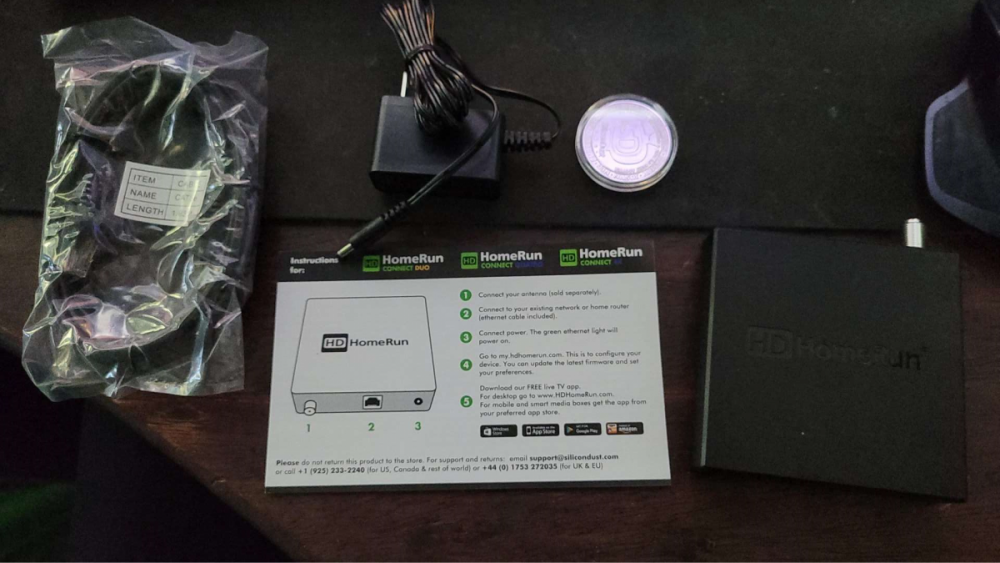
Am hooking it up today... will report back soon-ish (tonight)
 1 point
 -
No that would fall under user provided content, which they have provisions for. The problem is the store reviewers who evaluate our submissions usually don't have an understanding of the way our entire ecosystem works. If they see a plugin in our catalog that provides adult content then it is very likely that they will view us as an adult content provider and we can't risk that. Similar things have already happened to us with the demo emby server that we give them for testing. We almost lost our all ages rating in a couple stores due to this, and you can't try to tell them that it's just sample content because they don't understand and will just reject the submission. So as a developer once you've gone through this enough times in multiple stores you get to a point where you just don't want to take the risks anymore.1 point
-
I am not see any issue thought with only my code. div.withTabs.page {margin-top: -30px;} div.headerTop-withSectionTabs {padding: .8em 0 0; } div.headerMiddle.sectionTabs {margin: 0 20em; } div.homeSectionsContainer .verticalSection {margin-top: -2em;} div.section0 .cardText {display: none;} Specifically for Home Screen verticalSection only.
 1 point
 -
Ok we found the issue. For those of you running the beta builds, can you please try installing the latest beta again over the top of your existing installation? For those who are running the stable version, we'll have those patched shortly. Thanks.1 point
-
Hi, yes we'll pass this along to Gracenote. Thanks for reporting.1 point
-
We'll test that out. Looks like you've discovered a good workaround though. Thanks.1 point
-
The way the application works is the playback recovery can also be an issue. It likely is something in the app causing the crash because we never anticipated some value being missing. The object itself in the json response. All the title, name, etc.. All those fields need to exist in the object. The app expects them to exist. I suspect in this case just some value we aren't checking for validity. In effect it is null and we are trying to do evaluations or computations on it. That will crash the Roku. We do sanitize and verify all the standard stuff. But my bet is something is null we are not expecting to be and that stops the entire show. I can dig into this in just a bit and push fixes to update the app. Do not worry.1 point
-
I actually have one of the 2 primes I own setup as ClearQAM. I have a crazy number of HDHR connects got them cheap so there really isn't the need for it, what can I say I like to play around.1 point
-
The Roku is entirely event based. There is really no runtime pointer of where processing is happening. If the event occurs the Roku handles it. This makes somes things a bit more difficult because there has to be triggers, observers, and handlers. I am suspect it is just something we haven't run across yet and something simple. The mechanics in the Roku app are quite simple. But like you said when things happen too fast this event based approach can fail. We can add special handling for your plugin if we must. It cannot crash that is the general idea. It must work on Roku if it works anywhere else. I can make that happen.1 point
-
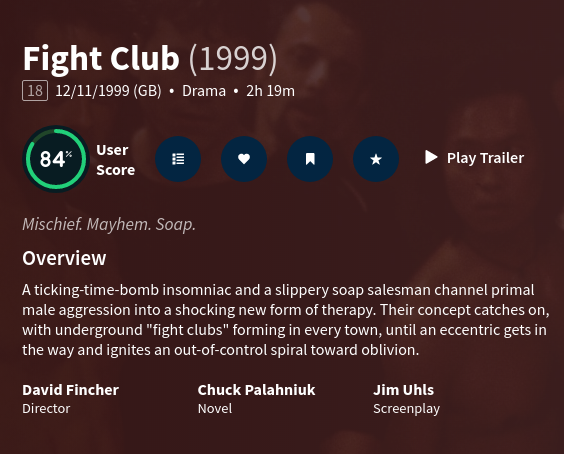
Hi @PenkethBoy, Thank you very much for taking the time to post here as it - if nothing else - makes sure the thread is kept alive. It is true that the director(s) are listed, but I care as much (if not more) for the writers of the films since I do enjoy to be able to follow a writer's work and not just a director's. The reason I'm replying here is that there was a mention of imdb and I think there has been some confusion. I offered the examples of both imdb and rottentomatoes as two major sites where movies/series information is displayed and where the have adopted the format I would like also to see in EMBY. EMBY itself is indeed not using imdb, but themoviedb.org . Every time the metadata is pulled for a specific title we get back the information from that site. To illustrate this, the example I'd like to use is again Fight Club where we can see that the API call is happening as such: 2020-10-09 13:08:46.867 Info HttpClient: GET https://api.themoviedb.org/3/movie/550?api_key=XXXX&append_to_response=casts,releases,images,keywords,trailers&language=en&include_image_language=en,null and in the response we can see this : {"credit_id":"52fe4250c3a36847f8014a4d","department":"Writing","gender":2,"id":7468,"job":"Novel","name":"Chuck Palahniuk","profile_path":null},{"credit_id":"56380f0cc3a3681b5c0200be","department":"Writing","gender":2,"id":7469,"job":"Screenplay","name":"Jim Uhls","profile_path":"/eJPUwP933EiwEWqxEBzPv6Xf0nC.jpg"} So the data is there and it's coming as we'd expect them to. As it happens, apart from imdb and rottentomatoes, themoviedb.org also has the writing team in high regard worthy of their own place , separate from the cast. You can see this here and in the image I've attached (fightclub_themoviedb.png)
 1 point
 -
The process spawns ffmpeg to do the jpeg extraction - so unless it's doing this at top priority (I doubt it) then it's running in parallel with the other tasks. So if you 'really' wanted to immediate edit metadata - then there is nothing stopping you doing that. Personally I wait until the nightly batch run to create the BIF's - but if you do want them quick, then there is nothing to stop you changing the schedule to say every 30 mins.1 point
-
Done. I'll let you know in a week or so.1 point
-
Thanks Luke. Would have thought Samsung would have made the process a bit slicker than that. Resetting the TV and inserting the USB seems to have worked though.1 point
-
Only downside I can think of doing that would be a 3D movie on Samsung TVs as it wants it in an m2ts container to do auto switching.1 point
-
The issue is resolved. Thanks for your help.1 point
-
Hi I've fix it turned off the Web shield in Total AV and it picked the Emby server right away.1 point
-
Thanks for the offer. Right now we have an idea of what we think the problem is. We need to split the armv7 package into two variations depending on models. We should have a package up soon. Thanks.1 point
-
Hi, this should be resolved for the next update to the app. thanks.1 point
-
@frk1337 the next update to our iOS and Apple TV apps will have built-in support for av1. Actually for iOS it will be two updates from now because we already have one in apple review. Thanks.1 point
-
Thanks for your reply. The app indeed says "browsing your collection". Just bought it and everything is working fine now.1 point
-
Release 1.4.8 should be rolling out to devices now so this should be fixed!1 point
-
We're looking into resolving this for the next release.1 point
-
Setting a custom rating in the metadata editor is probably your best bet.1 point
-
According to logs, the remote address provided by your emby server does not reflect your reverse proxy. For this to work, you need to update your server settings. In your server settings > advanced; Enable allow remote connections. Change secure connection mode to handled by reverse proxy. Set your public https port to 443 Set your external domain ie emby.blah.com You want your remote address in the dashboard to reflect the address via your reverse proxy otherwise clients won’t know the way to reach your server externally. Once that is done, restart your server, and it should hopefully work. If not, go through the emby home to emby connect linking process once more. This should get you going.1 point
-
Feature Request: A Global server broadcast message to all active clients: 1. Triggered on server reboot request (server restarting for updates.. will be back up shortly) 2. Manual global broadcast (server going down for maintenance.. will be back in 30min) Automatic notice to be optional setting.1 point