Leaderboard




Popular Content
Showing content with the highest reputation on 10/08/20 in all areas
-
New version 0.9.0 in the starting post: Channels: Changed the order of channel content type and library folder selection to compensate problems with the sorting option. (@pmac) Also renamed some of the sort options to make the expected result more clear. Playback: Fixed playback start position for channels with bumpers Added new global playback option that allows you to start the following or current program from the beginning if the program start time is in a specified tolerance Added new playback mode "Playlist" This is something i wanted to do for a long time and i think it's really outstanding. But like every good thing, this will also have some downsides: - Doesn't work with the m3u export function, this will fallback to ffmpeg based continous playback instead - Doesn't work with Chromecast yet - You will loose the ability to use number imput to switch to other channels and you cannot open the onscreen live tv guide (Please support this feature request so some of you will get at least the chance to open the guide) But on the other hand the positive things of this playback mode are really great: + Should work flawlessly with every native Emby app, even with a Roku (@AboveUnrefined). Android TV needs version 1.8.39 or newer. If it does not play at all, report it here. If it starts playing but not with the correct program or start position, then it is a problem of the app like here. + No ffmpeg needed. It's directly playing the videos from your library. So when the Emby app supports this, it will direct play every video, audio or subtitle codec. + You can pause the video without a temporary transcoding file. You can seek back and forth in the current program. You even can jump back and forth between past and future programs of the same channel. (@hstamas) Under the general playback options of the plugin is a new setting especially for this playback mode that allows you to choose if the "Watched" state is only set for the user who is watching the program or also for the user that you have set to create the channels. In most cases it should be enough to clear the browser cache, re-evaluate the options and save them once again.4 points
-
It would be great if we could open the on screen live tv guide by the dedicated guide action with every video, not only when we watch live tv. With dedicated guide action i don't mean the "Up" button, but the "Options" or "Guide" button we can already use on some remotes or in case of Amazon devices the "Menu" button. Currently these buttons will open the standard osd when playing library items. That's redundant because we can do this already by pressing "Down" or "Info". So when we get the possibility to open the osd guide we won't loose but gain a feature. And for people that don't have those extra buttons on their remote, they won't miss anything.2 points
-
Who the heck decided to put the power button on the bottom of the remote? Has anyone ever seen a remote where the power button wasn't at the top? Do they think that if they make it hard enough to find the button, you just won't turn it off?2 points
-
https://emby.media/download.html Auto-Start Locate the autostart file: ~/.config/lxsession/LXDE-pi/autostart If LXDE-pi is missing then copy it from: /etc/xdg/lxsession/ Add this line to the end of the autostart file: @emby-theater1 point
-
Be able to create playlist based on a certain criteria, like genre and or year, in order to create a dynamic playlist that it refreshes automatically when new content is added. This way you can for example, create a tv comedy playlist from the 90's, or a new sci-fi Movies playlist. Some other criteria for rules could be the rating, watched/unwantched, score, tags, language, audio codec, etc The possibilities could be endless1 point
-
Pretty simple suggestion. I have multiple users for my Emby server. If I want to do continuous maintenance on the media, I have to tell everyone. some of them are harder to reach than others ( i.e. no Facebook or Skype chat etc. ) It would be great if say... on the admin panel, I could hit a check box that enables 'maintenance mode', where the server still runs does everything as normal, but instead of the login screen it displays a maintenance page saying the server is unavailable. Even better if I were able to directly put a reason in a text box that would then display on the login screen as well. Not really sure what others would think of this, but for me it would be quite helpful. mostly if I want to make sure no one is trying to access content I know won't work until I've done a full library scan again. Thanks for reading. -Kyle1 point
-
Feature Request: Have User Groups and all settings applied at the Group Level That way you can just assign users to the appropriate Group and all settings will be inheritated.1 point
-
Hello, Perhaps I am not the first one to ask this question but it will be very cool if this feature could be implemented. I have 2 servers one at home and the other at work. ( and soon a third one...) So I have a movies library called movies on each server. I would like to see all the movies from a single 'virtual server location' when I use the app (ios or android ) where I will see only one movies library containing movies informations from the movie library at work and the movie library at home. It's an aggregation of movies informations from the movie library at work and the movie library at home. In fact when a user have multiple servers it will be perfect if another choice in the server list called "all servers" for example appears automatically with a merge of media informations from librairies with the same name on different servers.1 point
-
I would like to request a sleep timer function for the Emby app. For example, when a song is playing, it should be possible to quickly and easily set a sleep timer to shut off the song after a desired interval. Options could include 5, 10, 15, 20, 30, 45, 60, 120 minutes. If it had this, I would be happy to purchase Premiere.1 point
-
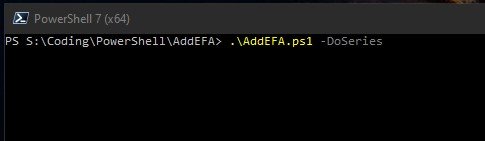
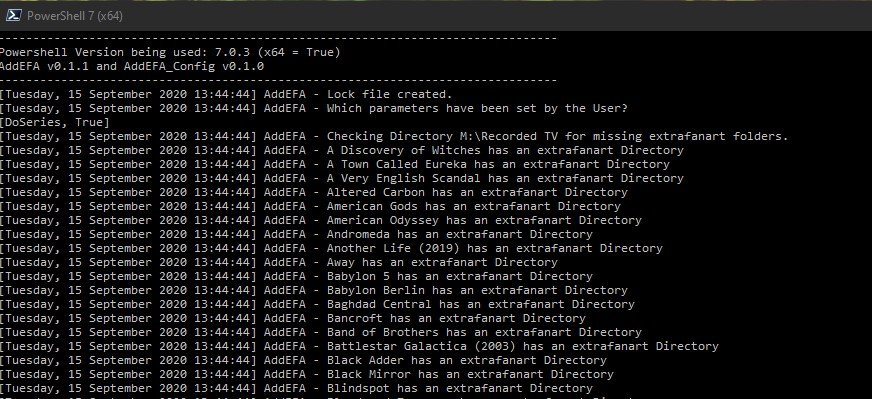
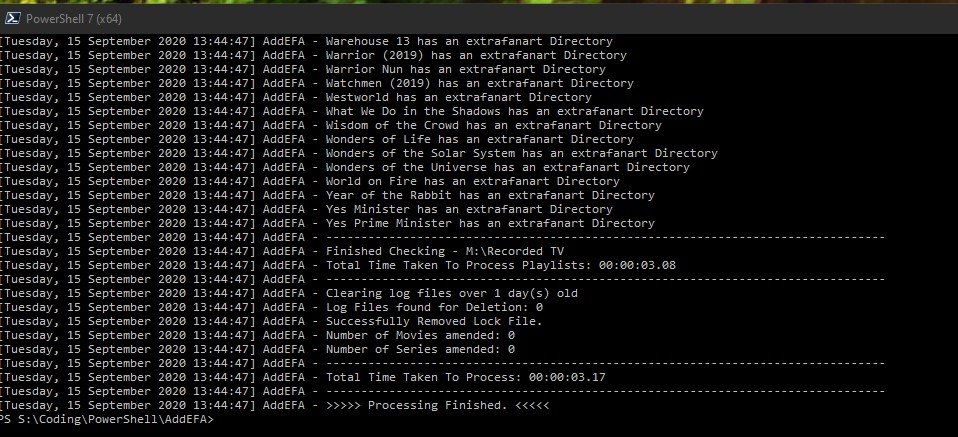
(15/09/2020) If like me you liked the Extrafanart sub directory to store all the downloaded fanartX.jpg files to keep the main item folder clear of clutter then you are in luck. Context In a recent beta / nfo plugin update the creation of extrafanart directories was remove (as Kodi does not support them anymore) and now fanartX files are saved to the main folder of an item. So this script allows you to clean up this situation. The script is setup to work with Movies and Series (TV Shows) only at present and not Mixed content folders either - maybe a future update might cover this but for now only run it against supported structures. User Notes - (version 1.2) - thanks to @CBers and @FrostByte for proofreading. AddEFA - script to add extrafanart directory and move the fanartX files to it from the main directory of a newly added item - Movie or Series 1.0 Basic Function 1.1 This script is to add the extrafanart directory back since in the last few beta server versions the support for it was removed when a new Series or Movie is added to Emby. 1.2 It also moves fanartX.jpg files to the extrfanart directory if they exist. 1.3 The extrafanart directory is not created if no fanartx files exist in the main directory for the item. 1.4 It leaves the fanart.jpg in the main directory of the item. 2.0 Script Requirements 2.1 The script is written in Powershell for version 7.0.3 2.2 The script requires at least Powershell 7.0 - Powershell can be downloaded from https://github.com/PowerShell/PowerShell/releases/tag/v7.0.3 - the latest Release version is 7.0.3 as of 15/09/2020. Remember to set the execution policy you require - Google it if you are not sure. 2.3 If you try and run it in Powershell 5.1/6/0 etc it will abort and not run as some of the code is PS 7 specific. 2.4 Powershell 7 and 5.1 etc can coexist on the same machine with no issues (Windows) 3.0 Setup Requirements 3.1 I have attached to the first post a zip file (AddEFA.zip) containing 3 files 3.2 AddEFA.ps1 - the main script file, AddEFA_config.ps1 - config file for the main script file (more on this below) and these user notes. 3.3 Also in the zip file is a logs folder which the script will look for to write its log file too. The location of the logs folder can be changed in the _config file. 3.4 Unzip the file to your location of choice - the main folder for the script (AddEFA) can be changed to anything you like. BUT the ps1 files should not have their names modified. 3.5 Open the _config file in any text editor and amend the setting you want and don't forget to save it after you change things! 3.5.1 Log_Path - where you want the logs saved 3.5.2 MovieBaseDir - full paths to one or multiple movie root folders - unc paths are supported - Enclose BaseDir folders in single quotes(') and separate by commas. 3.5.3 SeriesBaseDir - as above - Enclose BaseDir folders in single quotes(') and separate by commas. 3.5.4 Log_Retention - how many days you want to keep the logs for. 3.6 Why a config file - for convenience - you can replace the main ps1 file and not have to keep updating your paths etc if I need to release a new version. 3.6.1 I anticipate that the config file format will not change - with current plans - but if I add some other functionality that requires it you will get a new version etc - and only at that time would you need to edit the config again - other than your own changes. 4.0 Running the script 4.1 First you need to open a PS7 console window - there are various ways to do it - I will just do the one that most will be able to follow. 4.1.1 Start>Powershell>Powershell 7 (x64) will open the console window. 4.1.2 Navigate to the folder where the AddEFA.ps1 and config files exist 4.1.3 To run the script you need to type the following 4.1.4 .\AddEFA -DoMovies -DoSeries and then hit return - if you have things configured correctly the script will be off to the races. 4.1.5 Notice the full stop before the \ above? It's needed don't forget to type it - otherwise PS will complain! 4.1.6 The -Doxxxx are called parameters and at least one needs to be supplied - i.e. without them the script will do nothing much. You can supply both or singly - up to you. 4.1.7 If you get errors see below. 4.2 The script will write to the console window at the same time as the log - they are essentially the same - so if things fly by and you can't read what's happening - go see the log file. 4.3 When running the script it creates an AddEFA.lock file to the script directory. This is to prevent the script from being run twice or more concurrently - i.e. stopping multiple scripts fighting over files! 4.4 Once the script completes - the lock file is removed. 4.5 Once complete then your Movies/Series should have been updated where necessary - see log file for details of which was amended or not and why. 4.6 Beyond the scope of these notes but it's easy to schedule this script to run via task scheduler or the Emby ScripterX Plugin for say every couple of days - depending how much on average you add to your server. 5.0 Limitations / Restrictions 5.1 The BaseDir's you give the script, in the config file, need to have a structure which needs to be followed - see below. 5.2 MovieBaseDir\<movie individual main directory> - for me that would be M:\Movies\22 Bullets (2010) or M:\Movies\300 (2007) etc where M:\movies is the BaseDir 5.3 SeriesBaseDir\<Show individual main directory> - for me that would be M:\TV\Babylon 5 or M:\Movies\Catch-22 etc where M:\TV is the BaseDir 5.4 If you have any movies which are not in their own directories within the MovieBaseDir - put them in separate folders - or don't run the script if this is an issue 5.5 Equally the same basic structure is expected for Series - i.e. nothing not in a folder within the baseDir for Series - i.e. no loose episodes etc 5.6 If you say have your movies in Alphabetical groups say \movies\A-H, \movies\I-R etc then add those as the baseDir in the config as you can have more than one. Each of these directories will be processed one after the other. 5.6 Any other eclectic folder structure and you are on your own! Results might be weird! 5.7 The config file must be in same folder as the main script. 6.0 Errors you might see 6.1 These are common errors due to incorrect config/ finger trouble 6.2 You forget the full stop before the \ 6.3 You spell the parameters wrong 6.4 A lock file exists in the script folder - either another instance of the script is running or shock horror the script crashed last time - this never happens ... 6.5 The baseDir paths you have given are invalid/not accessible 6.6 The log_path is invalid/not accessible etc - not going to try and cover everything under the sun! 6.7 Either PS or the script will indicate what is wrong for most of the common errors - read what they say and you should be able to figure it out. 7.0 Summary 7.1 The script has been tested by myself and @cbers/@frostbyte and if they can get it to work so should you 7.2 If PS is new to you then you have a smallish learning curve to climb but its not huge - Google can help here. Example Screenshots Fig1 - about to run script - note PS has its current directory - pointing at the script directory Point 4.1.2 above Fig 2 - Script Running against my TV library Fig 3 - Script has finished in just over 3 seconds. Its not amended anything as no new TV shows added recently. Files - AddEFA.zip - as decribed in 3.1 above. AddEFA.zip I will try and respond to queries/issue with the script when i can - i here most days so should respond quickly. What i'm not going to do in this thread is answer PS issues other than directly related to this script. But i will if they are posted elsewhere if i can answer them. I want to keep this thread on track and not wander off on some winding road to nowhere Think That's It Have Fun PenkethBoy
 1 point
 -
Hi guys, I was wondering if it was possible to modify the way the playlists behave for movies and TV series. I tend to put movies that I plan to see on various playlists (e.g. Own, Family, ...). When you click on one of the items on the list the video starts playing right away but sometimes it better to get a chance to read the summary or see a trailer. For my use case it would therefore be ideal if selecting an item from a (movies/TV series) playlist would bring you to its Emby site rather than starting playback. What do you think? Would such an approach be feasible? Thanks, Glin1 point
-
My Samsung TV cannot directly play PGS Sub format subtitles (commonly used in blu-ray media), but it can directly play the video and audio. In this scenario the server re-encodes the video track with hard subs... I might be watching a 4K H265 video and just because the subs aren't compatible, the entire video has to be transcoded. From my point of view, that's a load of unnecessary work that we can potentially avoid. Wouldn't it make a lot more sense to try converting the subtitle track to VobSub format, or at least have an checkbox option in the user profile to "Convert incompatible subtitle track to VobSub" if the incompatible subtitle track is the only reason for transcoding? VobSub has much wider support on devices, as is the case with my particular brand of TV. Implementing this would be great for those of us using who enjoy direct streaming blu-ray content to Samsung TVs and other devices that don't support PGSSub subtitles. There might be other subtitle formats I'm not familiar with that could also be converted with this method. It should be very easy to implement, here's a quick example of an ffmpeg command converting pgssub to vobsub: ffmpeg -fix_sub_duration -i "input.mkv" -c copy -c:s dvd_subtitle out.mkv The '-fix_sub_duration' argument is necessary for some reason. Without it, subtitles don't display at all or they display and never disappear.1 point
-
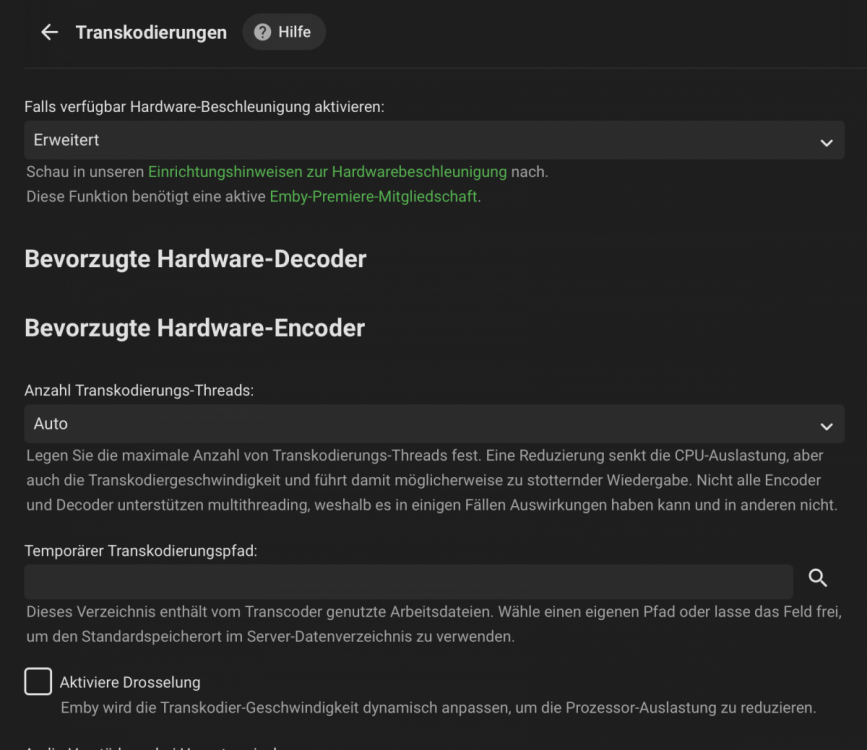
Hi there, VAAPI transcoding worked fine a while ago, was getting around 70fps max. Now with the current v4.5.1.0 VAAPI isn't detected anymore. See screenshot below. Logs are attached. Is this a known issue currently with this architecture? Regards, Burrito78 hardware_detection-63737661355.txt embyserver.txt
 1 point
 -
I know you have beta testers. I'm sorry I'm not one. In my youth I might have participated, but in my old age I prefer stable releases, extremely stable. I'm so afraid of change that when a new stable release is out, I prefer to let others install it before me, so I can check the forum for any issues that - and I know this is rare - any issues that made it past the beta stage. So, please, for the love of Vader, please stop re-enabling automatic server updates when I click the Update Now button on the dashboard. My old-ass brain can't remember to go back and disable it, again, every time. I know I suck. I know I'm no fun. But I unchecked that box for a reason. For it to re-check itself is just.. it's frustrating. And yes there are probably more important things going on in the world. Thanks for reading though.1 point
-
It's been only a day since the rebuild, but so far so good. Thanks.1 point
-
+1 on these features and I would also like to be able to position subtitles lower on the screen especially when watching 2:35 aspect ratio. I use Nvidia shield Pro and android mobile and tablet.1 point
-
Ideally this switch should be added to the Dashboard somewhere.1 point
-
Not movie suggestions but something else.. You can tag your movies as "Halloween" and then set up a channel with Virtual TV Plugin for continuous, randomly selected movies to "plug in" your kids..1 point
-
just to wrap up, cause you tend do overlook that things making it display an already fetched and present value, eg in just a seperate line, takes now more then at least 3 years1 point
-
So that actually worked, thx @CBers I am happy, the root issue still exists ! @Luke FYI1 point
-
After your previous post decided today to give it another shot. Looks like it installed correctly this time. I'll know once I sign into it. Thanks1 point
-
also the spec of the machine and type of disc the db is located on1 point
-
Thanks for the feedback.1 point
-
Hi, try mounting the windows share path to a local path using the tools in your operating system. Then you should be able to add that local path into Emby Server. Please let us know if this helps. thanks !1 point
-
Hi, yes we can look at expanding on subtitle display options. Thanks for the feedback.1 point
-
A plugin could do it, yes.1 point
-
I see the server updated over night. I will test later. I hope it is fixed. Thank You1 point
-
Hi. No, this is not obscured but we will be able to tell if someone starts abusing it. As Cayars said, I think this is probably extremely unlikely. Thanks.1 point
-
Just a quick maintenance update to address a few issues - some of which were caused by the new tvOS release. Full release notes here: View the full article1 point
-
Yes it's on our list. Thanks for the feedback.1 point
-
Hi, yes this only happens when you click the update now button. It's something we'll look at resolving in a future update. Thanks.1 point
-
@chudak When you restore from your backup, do NOT re-install the plugins, but start afresh from the plugin catalog. Or, navigate into the Emby backup and remove the DLL and configuration file(s) before restoring. Then you can install the plugin direct from the catalog and set it up afresh.1 point
-
I've always installed Shark007 codec pack to get subtitles to work in MCE. You might have to have a hunt around for an older version as I think shark has discontinued live tv support in MCE.1 point
-
That was it. Sorted1 point
-
I took a quick scan through one of the logs and found this. Background information - this is Day 1 of my using this DS920+. My DS918+ failed and I've installed the drives in the 920 and migrated it. The Emby package failed in it's migration, so I've installed the version mentioned above. Are the access rights to my media library not what they were on the 918? Maybe I need to change them again? I'll go check after I post this. Thanks for your help Application path: /volume1/@appstore/EmbyServer/system System.UnauthorizedAccessException: System.UnauthorizedAccessException: Access to the path '/volume1/Media' is denied. ---> System.IO.IOException: Permission denied --- End of inner exception stack trace --- at System.IO.Enumeration.FileSystemEnumerator`1.CreateDirectoryHandle(String path, Boolean ignoreNotFound) at System.IO.Enumeration.FileSystemEnumerator`1.Init() at System.IO.Enumeration.FileSystemEnumerator`1..ctor(String directory, Boolean isNormalized, EnumerationOptions options) at System.IO.Enumeration.FileSystemEnumerable`1..ctor(String directory, FindTransform transform, EnumerationOptions options, Boolean isNormalized) at System.IO.Enumeration.FileSystemEnumerableFactory.FileSystemInfos(String directory, String expression, EnumerationOptions options, Boolean isNormalized) at System.IO.DirectoryInfo.InternalEnumerateInfos(String path, String searchPattern, SearchTarget searchTarget, EnumerationOptions options) at System.IO.DirectoryInfo.EnumerateFileSystemInfos(String searchPattern, SearchOption searchOption) at Emby.Server.Implementations.IO.ManagedFileSystem.GetFileSystemEntries(String path, Boolean recursive) at MediaBrowser.Api.EnvironmentService.GetFileSystemEntries(GetDirectoryContents request) at MediaBrowser.Api.EnvironmentService.Get(GetDirectoryContents request) at Emby.Server.Implementations.Services.ServiceController.Execute(HttpListenerHost appHost, Object requestDto, IRequest req) at Emby.Server.Implementations.Services.ServiceHandler.ProcessRequestAsync(HttpListenerHost appHost, IRequest httpReq, IResponse httpRes, RestPath restPath, String responseContentType, CancellationToken cancellationToken) at Emby.Server.Implementations.HttpServer.HttpListenerHost.RequestHandler(IRequest httpReq, ReadOnlyMemory`1 urlString, ReadOnlyMemory`1 localPath, CancellationToken cancellationToken) Source: System.IO.FileSystem TargetSite: IntPtr CreateDirectoryHandle(System.String, Boolean) InnerException: System.IO.IOException: Permission denied Source: TargetSite:1 point
-
The Reports plugin can do this. Just need to filter by Favorites then export to excel or csv.1 point
-
Sorry I haven't had a chance to get the log Luke. But I did test one of the videos today that was previously crashing the app. Seems to be resolved with no issues. I'll keep testing with other videos and let you know if there are any issues. Thanks for the help!1 point
-
@chef No this plugin is the reverse of what you are saying, It will SHOW what movies or tv shows MATCH on the list. (If you want to show the "missing" things also would be wonderful but I think thats not priority) So many people like to have a collection that shows you know the top 250 Imdb movies, or all the James Bond Movies. I usually say "Collections" but I like this library format also, less clicking. But I guess you could make that a toggle. So there are many automated trakt lists or people can make their own, then the plugin will get that list every night and if emby has it, put it in that collection/libary whatever we are calling them . Heres some ref: https://trakt.tv/users/nielsz/lists/active-imdb-top-250?sort=rank,asc https://trakt.tv/users/giladg/lists/top-10-movies-of-the-week?sort=added,asc Just FYI this is a highly requested item in Plex and Emby1 point
-
1.0.82 is the September USB release, so it's not that far behind. I expect 1.0.84 should launch in the store in the next few days.1 point
-
This does not seem to be a rampage... it feels more like a tantrum1 point
-
I use Nvidia shield i dont think i can alter mpv.conf using that.1 point
-
Working great on Manjaro from that AUR repository!1 point
-
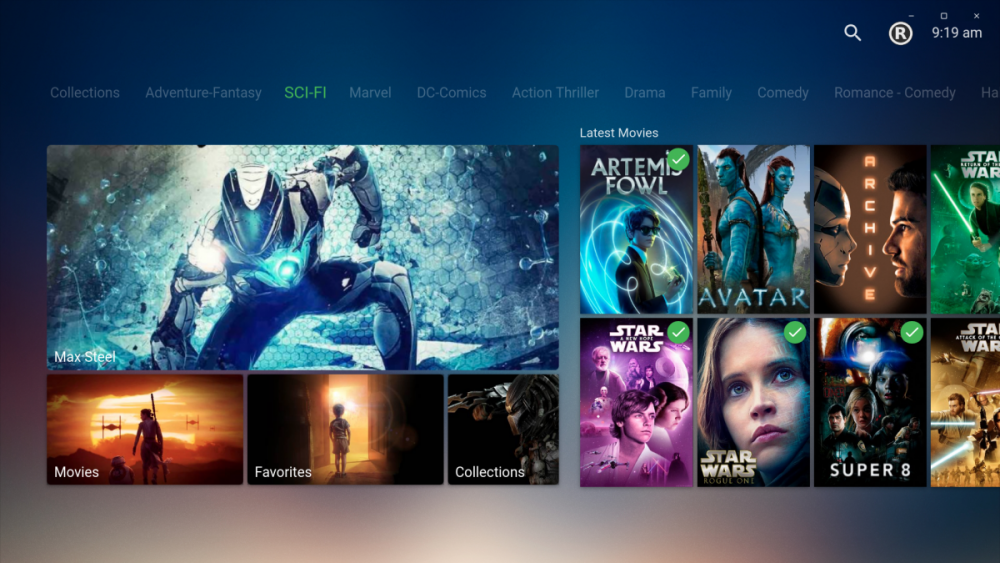
This is how looks in my computer
 1 point
 -
Yes, it works! https://aur.archlinux.org/packages/emby-theater-bin Git Clone URL: https://aur.archlinux.org/emby-theater-bin.git (read-only, click to copy) Package Base: emby-theater-bin Description: An Electron app for Emby Upstream URL: https://github.com/MediaBrowser/emby-theater-electron Licenses: GPL2 Conflicts: emby-theater Provides: emby-theater Submitter: bboehmke Maintainer: bboehmke Last Packager: bboehmke Votes: 3 Popularity: 1.52 First Submitted: 2020-07-27 19:30 Last Updated: 2020-10-03 07:471 point
-
Hi, no, but it's something I've been meaning to add.1 point
-
Thanks @Sammy! I downloaded the evaluation version of MCEBuddy and have figured out how to convert to the original directory and save the original video file off to NAS. I have also figured out how to do the same using Emby's Convert feature (other than moving the original video file) but I like some of MCEBuddy's additional features like removing commercials. Thanks for the suggestion!!1 point
-
Hi I agree i would love to see this feature on emby. Plex and netflixs have it. Also i would like to be able to position the subtitles myself on the TV screen. Thanks1 point
-
I have sorted it now not sure how this happened but all my library's had changed to mixed content type. I've just removed the movie library and changed it back to movie type and hey presto the options within the library reappeared thanks for your help tho cheers tinni1 point
-
Hey guys! I was thinking about this feature as well and I'm running a Plex Server with my Emby server. Plex recently introduced the skip intro feature and it's detecting intros as a pre-processed task which you can set like you would set a thumbnail extraction task. I love this feature so much and would even love it more on Emby. I'm too less of a tech-guy to say how they do it, but it has to analyse the episodes somehow and then put markers where the intro starts and stops. Would love to see this on Emby as well, considering this thread is 3 years old already and has quite some good feedback1 point