Leaderboard




Popular Content
Showing content with the highest reputation on 10/04/20 in all areas
-
Be happy they are even offering Lifetime. They could move to a subscription only service like many others have. I say get it while you can.4 points
-
Obviously everyone's finances are different but as @Gilgamesh_48 said, this is not a cheap hobby and Emby is probably the least expensive part of it already. For example, my collection: 2 NAS chassis, $450 each 9 8TB drives at $200 each (when I bought them, the model's down to $150 now) 5 12TB drives at $320 each Emby server at $750 1950 movies at $7 each (this is low but I'd like to pretend that's my average) 189 TV Series at $20 each (again, WAY low) Not factoring in the time spent on my little hobby or the electricity to run it all, that's $23,080. TVs, playback hardware, sound system, etc., were all on top of that. Emby is $120 bucks and is the ONLY way to make all that investment work together for me. It's a freaking bargain. I have zero say in whether or not there is another sale or any pricing changes now or in the future but if you look at those numbers above I think you'll understand why many folks look at the request a bit dubiously.4 points
-
Emby is a great value at the full price. Also the main reason for getting premier is to support Emby. It actually decreases the value of a product to provide discounts unless the discount is applied universally. I hope Emby never provides a discount and particularly that applies to those begging and whining for said discount. If you cannot afford to pay for premier at its full price then there really is no reason to even use Emby. Legally acquiring media is pretty expensive and the hardware required to run a decent Emby server is not cheap and that does not mention the upkeep and power requirements. If the price of Emby premier is too much for someone then they should just run the free level or nothing at all. I do not agree with the need for student discounts or senior discounts or any other discount simply based on status, or lack thereof, of some sort. Pony up the regular fee or do not but it is sad to see people begging for a discount like they are somehow special and deserving of being subsidized by the rest of us.4 points
-
You don't get much computer and storage capable of media streaming for $1000, and less than $1000 won't buy enough films and series to make it really worth having a server at all. But $120 (for lifetime) is still peanuts alongside the minimal $2000 I postulate. Anyway, discounts mean one of two things - either they are running short of sales and will soon cease operations, or they are routinely overcharging and occasionally have a sale to distract people from that fact. Paul2 points
-
It could rotate or something, like in the theater Of coarse it would have to be able to be turned off I suppose for people who don't like the idea.1 point
-
I would like to see a plug-in developed which allows for transcoding to be offset. My thoughts are for a transcoding server (high powered pc), running cut-down/transcoding only version of Emby. Then on my main Emby server a plug-in which offsets transcoding to the high powered pc (if available) Originally I had thought of this as being a high availability server https://emby.media/community/index.php?/topic/41443-emby-server-high-availability But thinking about this more, my requirement isn't for high availability but simply to offset the transcoding elsewhere.1 point
-
... as I was tired of manually grouping all my movie versions into groups after each recreation of the db, I created a plugin to help with that. The use case is having movies, that belong together spread around and not being able to easily match the emby naming conventions, but still having the desire to present them as one item with multiple versions. The plugin works similar to the auto boxsets, but does the "movie versions grouping" - it will group all movies based on their TMDB id into one item, regardless of where they're placed and how they're named. I made that for myself - however, if anybody is interested, attached is a plugin that solves this issue. Attached version is for current 3.6.0.49 beta Server, do NOT use it with stable release! Plugin is alpha state, you should only use it, if you are willing to backup your db (there is no way to revert the changes otherwise!) and manually put the dll in the server plugin directory. Do not use it in your production environment before having tested in a test environment that you're fine with what it does - seriously! ;-). Note: There is a known bug in the web GUI presentation which is described here, which needs to be fixed on emby side. Edit: the mentioned display bug in BoxSets is fixed in Emby now, thanks Luke. AutoCollections-for3-6-0-49-betaServer.zip AutoCollections-for3-6-0-75-betaServer.zip AutoCollections-for-4.1.0.15-betaServer.zip AutoCollections-for-4.2.0.17-betaServer.zip (4.6.0.10 and before) 4.6.4.0 and above (does not require beta server as version number has been surpassed) AutoCollections-for-4.6.0.22-betaServer.zip Note: Original version will cause issue with other new plugins like Top Picks. Updates by community members: v.1.0.0.4 New update thanks to @Cheesegeezer Looks like we've managed to update the plugin, to be current Emby Server 4.7.7 (minimum). Some Changes to be aware of Automatic Library scan and updates are disabled, too many things are triggering library scans at the moment and entering into an endless loop which will crash the server. Moved to a Scheduled task now. Fully Locked item Metadata can be ignored in the Plugin Settings for grouping. (Partial field may have worked before but you need to Lock the item itself now) ".strm" files are ignored from any processing New plugin Graphics with a big nod to MikePlanet This is always Mikes plugin and the work he has done is fantastic. - We only did essential maintenance to keep this alive for you peeps. AutoCollections_1.0.0.4.zip v1.0.0.5 Removed Top Pick Items from the available item list re introduced the auto scanning... this will take place 1 min after an item event is detected re introduced auto run after a library scan tested against top pick plugin and there is no endless looping... but please test fixed the locked items bug. Good luck and let me know how the testing goes. AutoCollections.v1.0.0.5.zip v.1.0.0.9 New update thanks to @Hoptional Added option whether to Merge items across different libraries Compatible with nested folder structures, the "Top Picks", and the "New Releases" plugin Improved logging AutoCollections_1.0.0.9-libraryoption.dll1 point
-
It appears that any playlist that any user creates is public--all other users can see it. I can appreciate the benefit of a public playlist. I could create a playlist called "Harv's Favorite Horror Films" for example, in case other users are interested in checking out what I like. However, the way most of my users are using playlists is to keep track of things they want to watch in the future. They are typically things that the user has not watched yet, so it's not meant as a recommendation to others, just as a way of them personally keeping track of what they want to watch. Having that kind of playlist be public is of questionable benefit to other users. Additionally, it is not clear when you create a playlist that other users will be able to see it. That has the potential to cause some embarrassment. He hasn't created one yet, but I wouldn't want to see my nephew's "movies to fap to" playlist, for example. If I could make a suggestion, I would suggest associating each playlist with the user who created it, and giving that user the ability to make the playlist private or public. For example, the following two checkboxes could be shown when creating or editing a playlist: Allow other users to see this playlist Allow other users to edit this playlist Initially, both checkboxes would be unchecked. Since another user cannot edit a playlist they cannot see, the second would be allowed to be checked only if the first were also checked. (You could grey it out to make that clear.) Depending on your UI preference, it could also be a drop-down menu. Playlist visibility: (Only me | all users can view | all users can view and edit) Thanks for considering this.1 point
-
Should be very soon!1 point
-
Delete the current image and do a library scan.1 point
-
Wow... more than one fanboy in this thread. I paid full retail for Emby and 50% for Plex lifetime. I don't consider myself cheap or a beggar for asking when the next discount was likely? Especially in today's climate when anyone could lose their job with little notice. And $23,000? Come on... That is way past average Emby user and at least an intermediate level r/Datahoarder. Good people mind you, just lightyears beyond the average dad trying to setup a decent home video server for the family.1 point
-
Whatever you did, that got it. Works like it should now. Thank you!!!1 point
-
Home videos will do that for you.1 point
-
Thanks Luke Frustration!1 point
-
I would love the have the ability to play an item from my library rather than from the Live TV source if available. example: I browse the live guide and see a tv show or movie that I want to watch. I open the details view and at that point, Emby could check if I have a local copy. If I do, rather than watching it "Live", I'd like to see Emby add a new button, "local play" or whatever, so I can play it from my library instead of the live feed. Or I'd even take it sending me to a pre-run search result page or even just sending me straight to the item's detail page. Anything that could help me quickly find and start that item. Main reasons: 1) starting from beginning of the item 2) have total control of the content if available (diff audio or subs) 3) possibly higher quality version(s) available 4) for tv, adds the ability to possibly binge watch that show Thanks for considering. j1 point
-
It would actually be helpful yes to see the latest state of affairs with the new server. Thanks.1 point
-
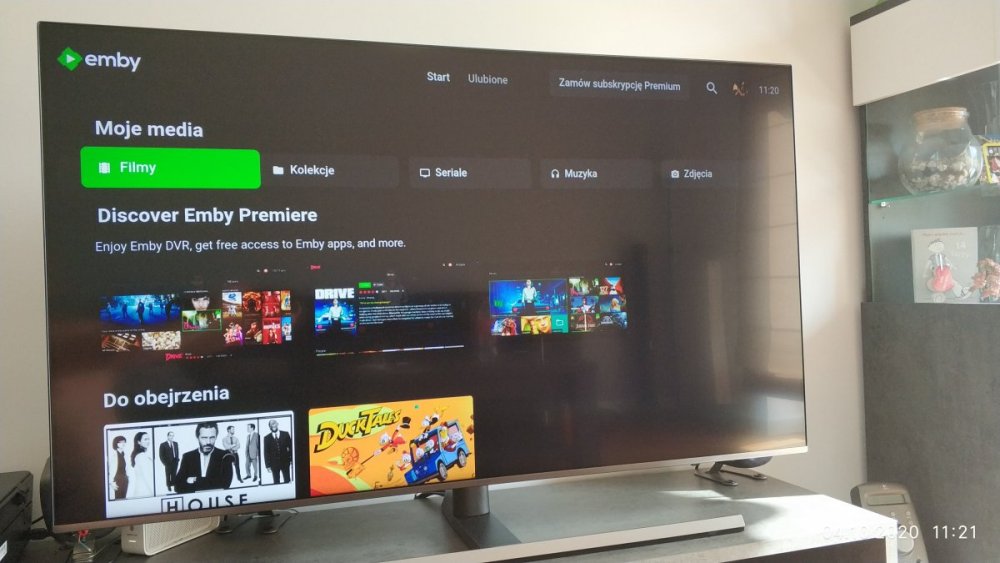
On tizen client app v1.0.85 I can't go below "Discover Emby Premiere" section to for example to watch (do obejrzenia) section. I can select my media, or go to profile. This discover emby premiere is not always displaying and when it doesn't navigation on start screen working fine.
 1 point
 -
Excellent. I appreciate it. Thank you.1 point
-
I also use metadata scrapped from Internet. But every year when Halloween & Christmas are coming, I want this feature to tag movies with Halloween or Holiday,1 point
-
Quick follow up. I just now upgraded from Ubuntu Server 18.04.5 to 20.04.1 and I'm happy to report it was without incident. I don't know why I lost everything when I upgraded from 16.04 to 18.04, but this time it worked like a charm. Could it be that last time, I didn't wait until the release of 18.04.1 and the upgrade process was buggy? I guess I'll never know. Thank you for a rock solid product. I just wish everything in my life was this reliable lol.1 point
-
Almost every IPTV provider that is legal is using their own proprietary delivery mechanism that won't work with Emby. The closest you can probably get to legal is Locast and that requires another piece of software for it to get into emby. If it plays live in Emby, you can record it with Emby. You can take it to extremes and use IP Video encoders that take HDMI as an input and record that via Emby. If you're concerned about the legality then don't use IPTV services.1 point
-
Just tried it, took all of two seconds to pair and control Emby. That's all I've tried at the moment.1 point
-
Return of the Jedi & The Empire Strikes Back were the original titles when there were only 3. Now of course they all follow the "Star Wars: Episode X nomenclature.1 point
-
If you look at Musicbrainz AcoustIDs enough you'll see that it is not ME that is tagging the music incorrectly but MusicBrainz that has incorrect data. That combined with utterly SLOPPY data (upper/lower case, slight variations in the artist names/song names, stray tracks on albums that don't match the album, incorrect album lengths, missing data, etc) it's not unreasonable to want nothing to do with the data from that website. Not only that, as I described, if I simply DECIDE to tag a series of tracks as being by the artist "Steve Johnson" instead of "The Furious 5 including Steve Johnson" because it puts them in the "Steven Johnson" folder so I can find them then Emby shouldn't arbitrarily decide to ignore my tagging data and put it wherever it feels like. It should obey my tagging data and put it in the proper artist folder. P.S. In the same vein, if I want to tag a song from some vinyl single or my own rip as track x on an album and delete the proper track x on that album that should also be my prerogative. The tagging should be paramount. Not the AcoustID IF it works (which it rarely does).1 point
-
Okay makes sense, best practice is to avoid transcoding when possible right?1 point
-
Had a feeling that would be next. Replace previous code with this code. div.withTabs.page {margin-top: -50px;}1 point
-
Thanks! I found the link, I install it and works well now.1 point
-
This will be in the next update to the android app, and two updates from now in the iOS app. You'll be able to select which folders you want to upload. Thanks.1 point
-
At the same time if Cast and crew can show 32 why would episodes be limited to something less? Realistically should a limit not be the same everywhere?1 point
-
...and that worked first time. Thanks ebr!1 point
-
I see. It is OK for you to request something and say it is a good idea but others are not allowed to express contrary opinions. That is not how forums work and I will express my opinions on suggestions as I see fit. Of course you are free to express yours as well. If either of us get out of hand I am sure some moderator will step in and say so.1 point
-
That is what they make wires and splitters and extractors for. In most cases there is a hardware solution for playing video on one device and audio on another. When something like that gets done in software there are problems like sync that crop up. Hardware solutions can also have that kind of problem but the are much more rare. I play video on my TV and audio on an old receiver that has no HDMI functionality at all.1 point
-
Any chance this could be looked at resolving in an nfo plugin update? thanks1 point
-
https://www.pcgamer.com/nvidia-cuda-support-for-covid-research/1 point
-
I put together some modern, streaming service style genre covers a while back. You might find some random artists in the gdrive too (for 'best of' playlists and whatnot). https://drive.google.com/drive/folders/1Bw75EjE0Gor7LCwNbcxLPmT966YyMbs5?usp=sharing Here are a few examples:



 1 point
 -
I think in TV layouts this would be a good idea. I like how apple tv does it:1 point
-
wget https://github.com/MediaBrowser/Emby.Releases/releases/download/3.4.1.0/emby-server-deb_3.4.1.0_amd64.deb sudo service stop emby-server sudo dpkg -i emby* At least this is the way i do this and never had a problem with loosing any data. By the way the Link is a sample. normaly i grab them by right klick on the Link and than copy url.1 point
-
See our wiki article on github: https://github.com/MediaBrowser/Wiki/wiki/Running%20Emby%20Server%20as%20a%20Windows%20Service Thanks !1 point