Leaderboard




Popular Content
Showing content with the highest reputation on 10/01/20 in all areas
-
I really hope not. Emby is a service for streaming local media and streaming external media is a very different can of worms. Plex was a good streaming service but they pretty much ruined themselves, for me at least, by trying to be everything for everybody. Emby really needs to not try to expand their functionality to other duties beyond what they already do. They just need to refine and stabilize what they have. While it is surely possible to add external streaming to Emby every time a system like Emby grows it increases the number of failure points and it becomes harder to fully debug the product. Whenever a system like Emby wants to grow the question gets asked "can we do that?" But the real question that should get asked is "should we do that." In this case I believe the answer is no, we should NOT do that.6 points
-
Enabling direct file playback on Nvidia Shield. A wiki article is on the way. In short: 1. Install Android TV beta .36 2. Enable direct file playback in settings (Android TV app) 3. Mount your network storage in Nvidia Shield https://nvidia.custhelp.com/app/answers/detail/a_id/4836/~/how-do-i-share-pc-folders-with-shield 4. Check the mount point name in Nvidia Shield 5. Make sure the Emby library path matches the mount point name in Nvidia Shield. You can use the alternate path. Be careful, that route is case sensitive: If your Nvidia Shield mount point is /storage/YOURSERVER/Your_SharE/ your library path or alternative path must be \\YOURSERVER\Your_SharE During playback, check SFN (Stats for Nerds). Look at the protocol, http or file4 points
-
I see. It is OK for you to request something and say it is a good idea but others are not allowed to express contrary opinions. That is not how forums work and I will express my opinions on suggestions as I see fit. Of course you are free to express yours as well. If either of us get out of hand I am sure some moderator will step in and say so.3 points
-
Be able to create playlist based on a certain criteria, like genre and or year, in order to create a dynamic playlist that it refreshes automatically when new content is added. This way you can for example, create a tv comedy playlist from the 90's, or a new sci-fi Movies playlist. Some other criteria for rules could be the rating, watched/unwantched, score, tags, language, audio codec, etc The possibilities could be endless1 point
-
Hello, It will be great to have the possibility to exclude a library from the global search. For example the Adult content one. Or at least to be able to exclude a tag from the global search and by this I can tag the entire Adult library as Adult and Adult tag to be globally excluded on search. Imagine what happens when you want to search for "Coffee with Ana" movie and you start typing in the search field "Ana" with little kids near you Thanks!1 point
-
While Emby already has recommendations built in based on previously watched items I find they are not all that helpful. They seem to be based on genre only, for example, because you watched a comedy here are other comedies in your library. I do like how the also directed by/appear in recommendations work though. What would be great is if Emby could incorporate Trakt's recommendations as they are much more sophisticated. Trakt's recommendations are not only based off of what you have previously watched but also what your Trakt friends and other Trakt users have watched. It takes user ratings and trending/popular media into account. Ideally Emby would include full Trakt integration allowing users to rate media after watching, view lists and recommendations, and view upcoming media all from within Emby but for now I think recommendations would be a nice addition. Trakt has the potential to give Emby that community feel and allow users to discover new media, find something to watch, and recommend media to other users. http://docs.trakt.apiary.io/#reference/recommendations1 point
-
I suggested in a totally different thread a bit ago about possibly adding Discogs as a meta fetcher... https://emby.media/community/index.php?/topic/79280-duplicate-music-artists-entries-how-to-get-rid-of-them/ That thread has had a few +1 reply posts. As such i figured adding it to the feature requests was the proper way to gauge interest. If you have used MP3tag you should be familiar with Discogs. Its a GREAT alternative to Musicbrainz.1 point
-
OK, I think this could be fun and nothing else really. It would take a user a lot to actually implement, but in the end, I think it could be great. The idea is to be able to add a custom picked trailer/clip/intro/whatever in the movie folder, named in a specific way (i.e. movie_name_(1999)-preroll.ext), that would then automatically play at the start of that movie if you enable this 'feature'. The concept is to find a great trailer for a movie and be able to force it to play before the start of a specific movie. It should auto-add to the queue and can be skipped if really desired. There are a few reasons/use cases I can think of... a quick way to hit play and see the trailer for the movie you are thinking about and have a chance to decide to continue to watch it or maybe not (less clicks than choosing a trailer which may not be the best random one)... or, just a way to start the movie and get in the mood to see it or even give you a minute or two to get comfy... or show a different kind of intro and set a different mood completely. The sky is the limit really. You could use a stock old HBO intro, or some fun Netflix or Youtube intro animation, a 'lets all go to the lobby', or a random news or SNL clip about the upcoming movie... or whatever you want... But with time and patience of the user, I just think it could be really fun to have. And yes, this is different than the random trailers/intros we have already. It would be customized per movie and yes, a lot of user work and not automated. Just a naming convention and a ton of time for the users. This obviously only impacts local trailers/pre-rolls. Not a full fledged plugin with youtube or anything. And, super bonus expanded request... post-roll.... same idea, but have the ability to add a trailer/clip at the end.. think of a trilogy... have a trailer for the next movie start at the end of the movie as a teaser. Anyway... just drinking and thinking....... nothing to see here really.. move along.... cheers! j1 point
-
(I have approval from the mods to post this) My name is Oliver Bowers and I am a researcher from Washington State University, and I am conducting academic research into home theater personal computer (HTPC) software communities. This message is to request your participation in my research through audio-only interview. This research is being conducted across several similar online communities in order to explore components including content, usage, and the future of digital media and platforms such as this. The reason I am interviewing users is so that I can gain actual insights with the goal of driving future policy direction, which unfortunately often rely on assumptions and negative perceptions regarding online communities such as this. The interviews are likely to take an hour of your time and will not require any additional time commitment on your part. All interviews will be strictly confidential, and all data will be anonymized after transcription. I am asking you to participate because of your role in the Emby community, and because I believe that your knowledge, experiences, and insights could be a valuable asset to understanding the different types of users, the complexities of the community, and the software itself. If you are willing to participate then please send me a message or email me through my university address oliver.bowers@wsu.edu so that we can schedule the interview. If you can think of other users who could be valuable participants and may be willing to participate then please pass this message onto them as well. If you have any questions, please do not hesitate to reach out to me. This study has been certified as exempt from the need for review by the Washington State University Institutional Review Board. Thank you for your time and I hope you are willing to discuss your experiences with me.1 point
-
Is there anyway to tell my Terramaster TNAS to automatically restart Emby Server when it crashes? It seems to crash VERY often when I scrub through a movie.1 point
-
A new release of Emby Server is currently rolling out to address a few small issues with the 4.5 release. Here are the changes: Resolve install failures on certain Synology NAS models Fix include by tags feature returning incorrect content in certain situations Fix SSL http2 errors on Windows 8 & 2012 Fix connection issues when used with HAProxy Fix local network address detection causing virtual adapters to be preferred Don't try to schedule wakes when running as windows service Fix audio podcast playback on mono-based platforms Update MovieDb plugin to 1.3.71 point
-
As previously discussed we use <episodenumberend> and it appears the new Kodi way is both episodedetails stacked in one file. per linked topic above1 point
-
That depends on things like the target bitrate and the standard for "negligible" that you are applying. Paul1 point
-
Yes this was helpful. Thank you!1 point
-
Also, all is fine when I play video from usb on TV in default tizen video player and also is fine when using emby dlna server. Only app which has problem is emby client for tizen.1 point
-
1 point
-
It does (work). Picked up my new "Chromecast with Google TV" yesterday. One quirk - attempting to install directly from the Play Store, it saw the Chromecast device but it was greyed out for installation. On the Chromecast. I went into Home|Search for apps, entered Emby, and it quicky found Emby for Android TV. I installed from there and it all seems to work well so far. I went back to the Play Store and now it sees the app as installed.1 point
-
Says it all really - I don't want to see any 3rd party streams - if I did, then I'd use another app.
 1 point
 -
Go into your 4K library and select the "cog" icon. In that menu select "Enhanced Tabbed View" for the "Choose the view for this Library" option. This is the default so you changed this at some point in the past.1 point
-
These usually involve so many interstitial commercials that you would go crazy. The free streams like PlutoTV are chock full of advertising and drive you insane. We will be right back. Then another that says we will be right back. Right back to what? Another commercial... The other guys must show more advertising than the normal application(or TV) would. They purposely shovel more advertising at you. You are the product. They are marketing you. You are a number and the more advertising you watch you are the product. They are selling your eyeballs to the companies that make this advertising. Doing what the other guys did will only make this become more pervasive and problematic. Be glad Emby isn't doing that. Jump for joy and shout it from the roof tops. It is a dark road once you start down that path. You can hear the wolves howling in the distance but cannot see them yet. That is advertising. You don't know it is a problem until every 30 minutes is 15 minutes worth of commercials and 15 minutes of program. Once it gets there, maybe it can be 75% commercials and 25% program. Would you like that? That could possibly mean HBOMAX is free. You(the product) just need to sit through 4 hours of commercials to watch 1 hour of programming. Would you do that? The other guys are betting you would. That is why they want control of your users on your server. Your users are the product. You are the product. Also.. a thread is not property of the OP. The Emby LLC owns your comments. They are no longer yours. You gave up those rights the moment you posted. Try to be nice. We are here to help you.1 point
-
Not yet. It's supposed to get an update in '21 that will enable it I heard.1 point
-
No, hace unas semanas hicieron cambios en el sitio subdivx y todavia no pude adaptarlo. Tal vez este fin de semana o la semana proxima, suba una actuliazación.1 point
-
Well said - and agree 100% Transcoding it to play it would have resulted in a less quality viewing experience vs doing what you have done which is do this in advance. I did this myself a few years ago, batch convert everything that wasn't h264 to h264, AAC - so it would direct play. Did I lose quality - likely yes - but what is the point of having the original on disk (or the VHS tapes in the basement..) when you can't play it back (easily) anyway ! The fact you can now play it - means you (and more importantly, others for home video) can enjoy it.1 point
-
I'll second the request for hotkeys. Also, I would like to have a setting for subtitle offset steps. In my experience, adjusting the subtitles in 500 ms intervals is suffciently accurate and a lot easier to sync correctly on the fly.1 point
-
I think this thread has gone a bit off topic tbh and that discussion should probably go into 'General Discussion' but I completely agree with @cayars If you have access to uncompressed masters, good for you - but don't expect a product designed for commercially available media to play them.1 point
-
That's simply because the online version that updates from Package Center is that 4.4.3.0-1 version and its the last version for that deployment approach UNTIL officially classified as part of the Synology Store which its in progress. For now, everyone has to download the package and apply manually is my understanding.1 point
-
Bruce Lee: Don't limit bitrate my friend.1 point
-
Good job Carlo. You're a legend in your own living room. Almost nothing you said applies. You seem to think that you set the standard. That if the great Carlo can't or doesn't do something, nobody else does. You really need to stuff your ego somewhere. I can tell you with certainty, that you have no influence on what I do with my media. Emby's limits are in my way, regardless of any opinion you might have. My request, stands....so you should sit....in a corner.....silently.1 point
-
Direct file play is a workaround, there’s something wrong while serving http from an smb share.1 point
-
Whenever I get new movie, I'm repeatedly checking the bitrate to make sure it isn't too high for emby. I would like to stop doing that. There's plenty of media out there that is higher than 160Mb/s. I avoid it because of this. When I get my new GPU with HDMI 2.1, I want to rip the roof off this stuff. Emby is in the way with these ridiculous restrictions. Carlo, you have very low standards.1 point
-
Hi, jump into the testing area of the community to try it1 point
-
I have it working now... Finally stream type: file Just played 15 mins without a hiccup. Thank you1 point
-
Okay I feel so stupid.... After comparing with a fresh install of emby I saw that I completely overlooked the read and write permissions. I was looking at the which user could acces it. So it is fixed now. But strangely if i change the logo it stays there for a little bit of time and then it's gone.1 point
-
All my media is just fine for my old eyes and ears. I have almost nothing above 1080p and most is 720p or lower. I have no control of the old media's resolution as my uncle left me the files that had been extracted from old VHS and Betamax recordings. Any slight degradation is unimportant for me and FFmpeg is just fine for my purposes. I do not need or want fancy tools or to do deap analisis to make things "perfect." For me good enough is just that good enough. That is I made zero "sacrifices" in that my media, except for some very very old rips of media looks just fine to me and those old rips are not part of what I changed. They already direct played but they are just poor rips that my uncle prepared many many years ago. I see no reason to have my media in formats or resolutions that do not look or sound "better" to me. The statement you made "Making any media less than the original, is never a good thing" is simply wrong. If you save space or strain on your computer and you can see and hear no difference then whatever "degradations" happen are totally meaningless. I have my medai in a format that works well for me and I see no reason to try for dubious improvements. I think many people worry entirely too much about getting the "best" quality they can when, I believe, they should simply get their media in a form where they see andhear little or no difference.1 point
-
Getting Emby Premiere is the best way to accomplish that!1 point
-
I wasn't implying that it doesn't, only saying that with Nvidia cards, a large part of the work utilizes the ICs as opposed to loading up the GPU, directly. I've got a brand new EVGA 2060 XC Ultra Gaming, in the original box, that I'm probably going to sell. I have two of them, and this one is collecting dust.1 point
-
3070 for $499. Tempting. Doesn't sound quite so good when its in NZ dollars plus gst though...1 point
-
@Punch I was just thinking about this. Try installing NextPVR on your NUC with your custom IPTV file. If NextPVR can access and playback your streams we have a clear path as we can use NextPVR to feed Emby the channels and use the Split Tunnel feature of your VPN provider. All we do if have NextPVR feed Emby an M3U list and we setup the VPN to force NextPVR to use the VPN connection. Or if you have another machine on your network that's always on and uses VPN just install NextPVR on that machine. Either way. But give NextPVR a shot to see if it can play your streams. If so it's cake to setup in Emby.1 point
-
1 point
-
It raises a very good security point tbh - anybody 'could' pretend to be Emby support and request a team session. Is there a way to have a category for 'Support Specialist' rather than 'Members' on the forum profile ? ie along the lines of 'Admin' and 'Mod's' for example? Anybody can edit their profile to add 'Support Specialist' under their name - so while useful, this could be abused.
 1 point
 -
Is "staff" as in infection? Sorry, again my poor impulse control strikes. Actually @cayars is one of the three most helpful people on the board and one of the ones that has been most patient with me and my stumbles through the world of Emby. I sometimes try to help as well but my fumblings are more often guesses while @cayarsalmost always knows what he is talking about. If he can help this old cranky geezer he has a good chance of helping anybody. Now we don't want @cayars getting a swelled head so I am reserving two good insults for use in the future to balance this overdose of sweetness.1 point
-
Hi, we're looking into this. Thanks for reporting.1 point
-
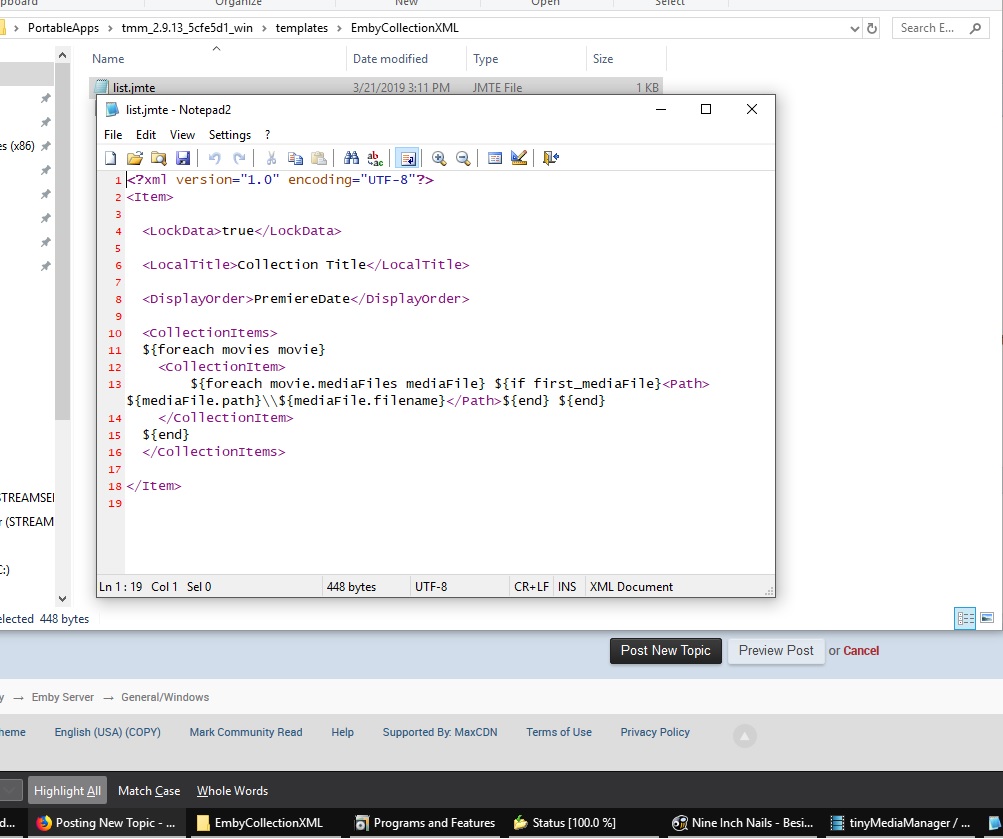
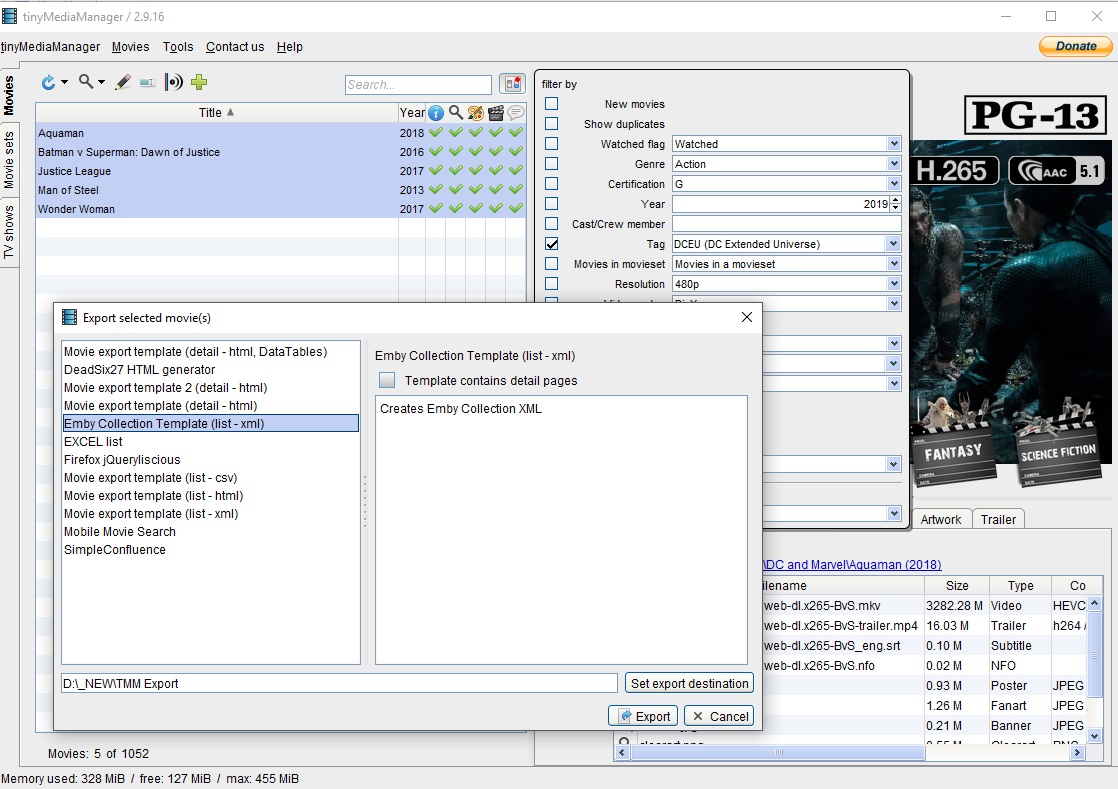
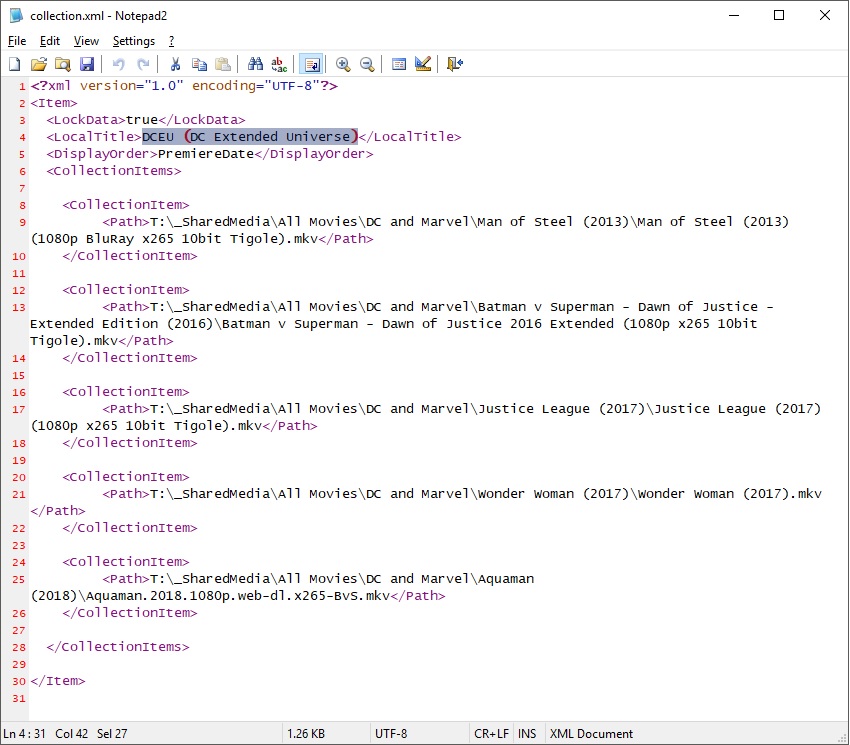
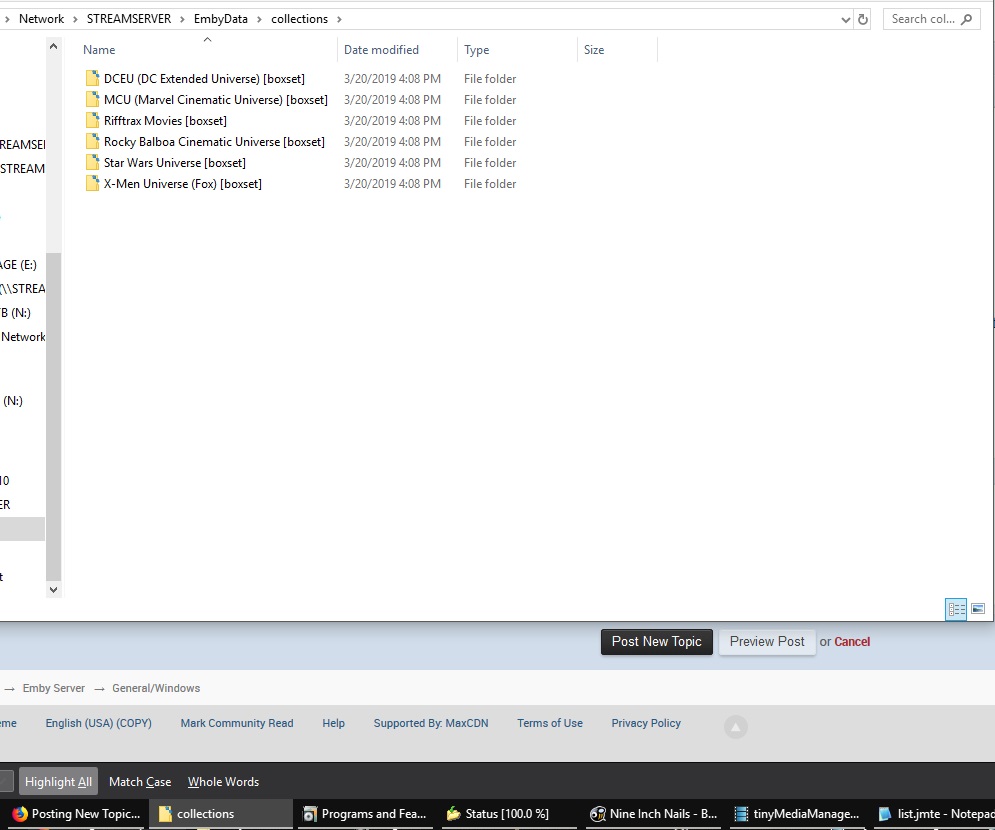
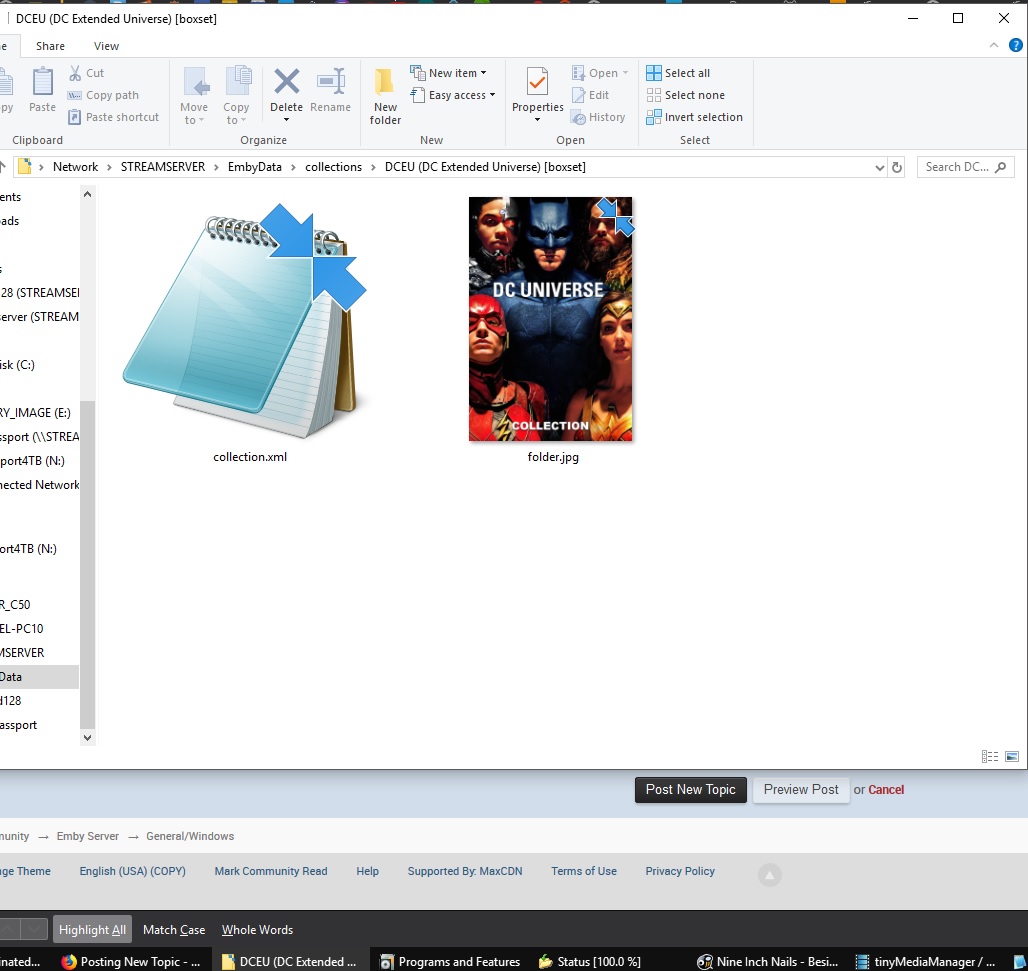
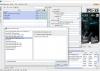
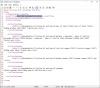
Hi everyone. I use TinyMediaManager to do all of my metadata. I happen to move my files around a lot based on my own organizational madness, lol. This would KILL Emby's collections method. I switched over from Plex a few days ago and this was maddening because I was used to using tags. So I wrote an export template for TinyMediaManager that exports a list of movies in xml form. I wrote my template to conform to Emby's collection.xml scheme and placed the xml in a "CollectionName [boxset]" folder in the Collections folder. I was pleasantly surprised to find that it worked. So, I can rearrange my files at will, use whatever folder and naming scheme that I wish, replace files with better quality rips, re-tag or rename, or pretty much do whatever i want. I just thought that I'd share my methods for people in the same situation. I have several MoviesFolders though, including a folder containing all the movies that I haven't watched yet. There's also a folder of movies that I consider temporary residents on my hard drive. TinyMediaManager keeps it's export templates in a folder named "templates" in the main program folder. In this folder, I had to create a folder named "EmbyCollectionXML". In that folder, I need 2 files. I need a "template.conf" file and a "list.jmte" file. TinyMediaManagerFolder\templates\EmbyCollectionXML\ In the conf file I needed the following: name =EXCEL list type=movie list=list.jmte extension=xml description=This template exports a valid Emby collections.xml file In the list.jmte I needed the following: <?xml version="1.0" encoding="UTF-8"?> <Item> <LockData> true </LockData> <LocalTitle>Collection Title</LocalTitle> <DisplayOrder>PremiereDate</DisplayOrder> <CollectionItems> ${foreach movies movie} <CollectionItem> ${foreach movie.mediaFiles mediaFile} ${if first_mediaFile}<Path>${mediaFile.path}\\${mediaFile.filename}</Path>${end} ${end} </CollectionItem> ${end} </CollectionItems> </Item> This template exports an xml that writes the path for every one of your movies inside a CollectionItem. In TinyMediaManager, I simply filter the list by tags or by "datasource" or by whatever I want, then I export the list using my template. Open that xml and change "Collection Title" to whatever the name of my Collection will be. Rename the xml to "Collection Title.xml" Create a folder inside your Emby Collections folder: \Emby-Server\programdata\data\collections\Collection Title [boxset]\ Place your xml in that folder. I put a folder.jpg in there too for my collection. I refreshed my Collections in Emby and BOOM: There it was. I don't know if this will be helpful for anyone else, but that's how I do it for my custom collections that plugins might not pick up and to deal with me moving stuff around occasionally. It's best for big collections or random custom collections. Oh, and the reason I can't just filter by tags on the movies screen is because I'm using the Tizen version of Emby client on a Samsung Smart TV. That means if I filter and there aren't enough movies, I can't get back to that "Filters" button. It's been discussed in another thread.
 1 point
 -
I will add that we have had reports of the Roku itself not working that well without an internet connection, so test that out.1 point
-
Okay, looking at the log with both encoding and decoding enabled....it's as I feared. It's trying to transcode to 2160p 8-bit h.264. The card can definitely do it (upper limit on the encoder I think is 8k), but decoding 2160p h.264 is iffy on most playback devices and they can't handle that resolution with h.264. Some are smart enough to say they can't do it, but others try and you get all kinds of weird behaviour because the decoder just can't keep up with the data or just aren't designed to process more than 1080p-sized frames (or can't downscale fast enough). PCs (and HTPCs) can generally deal with 2160p h.264, but they're about the only consumer-level things that I know of that can. To make matters worse, it's reducing the gamut without any tonemapping...read: it's doing 10->8bit without a proper conversion. Even if it played properly, I wouldn't be surprised if it looked either too dark or washed out as a result. Really, you probably do not want to transcode 2160p ("4k") HEVC "HDR" (HEVC Main10) files to anything but HEVC Main10...and even that is tricky right now as ffmpeg doesn't know how to carry the HDR metadata over from the source file (it has to be specified manually, which is a pain). You can do HDR to 8bit (so-called "SDR"), but it requires a process called tonemapping, where the expanded colourspace of "10bit/HDR" is mapped onto the smaller 8bit colourspace. Unfortunately, Emby doesn't appear to know how to do that yet. Doing it "right" is a non-trivial process; doing it "well enough" is much easier, but there are still different methods that would need to be picked from. Lastly, as noted above, most devices only support 2160p resolutions for specific codecs, often only HEVC and maybe VP9 as well, so it would be prudent to downscale for compatibility if h.264 is used. Knowing all of that, and that Emby really doesn't "do" 4k transcoding well enough yet, you really don't want to touch the video stream at all for UHD HDR rips (audio transcodes are fine,sub overlay/burn-in/bitrate reduction are not)...and just manually transcode them yourself if you need lower bitrates (which takes forever using software encoding and can't be done well with something like Handbrake properly yet due to a back-end limitation, IIRC). I'm not sure if ffmpeg's wrapper supports metadata inclusion with the hardware encoders (like nvenc) yet, so that may be out as an option too....although I think rigaya's nvencc encoder-wrapper supports it these days, so you could try that if it interests you. I've actually written special scripts just to read HDR metadata from and re-encode UHDs because of how much of a PITA the HDR metadata is to retrieve and "pass along" to the x265 encoder. It can clearly be automated, but encoding HEVC is significantly harder to do compared to h.264 and without a hardware encoder, it would crush a lot of machines if it was available to use in something like Emby. Even with hardware encoding, injecting the metadata and signalling required for HDR playback isn't well supported by the hardware encoders' front-ends yet, so you'd have to find a way to inject the proper messages into the video stream after the fact (not easy) or you may not get "HDR mode" playback at all. TLDR: Transcoding UHD HDR is hard and Emby doesn't know how, so avoid doing it It's not an answer that I'm happy about, but until 4k transcoding with HEVC/x265 is implemented in Emby (or at least tonemapping and forced downscaling if using h.264), there isn't much that can be done about it.1 point
-
This community is here to help you. Here are some guidelines on what information you should supply when reporting issues. Make sure to check out our Knowledge Base for more useful information. Reporting Emby Issues Please create a topic in the community. Describe the problem in your own words, including what you're trying to accomplish, and where you're getting stuck. Please mention some specific examples. In your description, be very specific about the steps you took and what happened with the system. Describe it like you are talking to a blind person - because you are. We cannot see what you did or what happened so be as specific as possible. If you saw error messages, please tell us what they were. If the problem is difficult to explain, please include screenshots that demonstrate the issue. Please attach the server log from the time frame the activity occurred. See the section below titled Emby Server Logs. Please supply the full and complete log file in txt format. Please don't zip or compress, and avoid attempting to extract relevant sections. Everything is relevant to us. If a server transcoding log (ffmpeg log) was also generated during playback (in the server logs folder), please attach that as well. If you are using the Roku or Android TV specific app, please also follow the instructions below to send a log from the app. Emby Server Logs Logs can be accessed directly within the server's web interface by navigating to Logs under Emby Server sidebar section. If you're having difficulty using the web interface, log files can be found in the logs subfolder of the Emby Server Data Folder . Note: Be aware that these log files would not be sanitized if obtained directly from the logs folder and should not be uploaded in the forums. If there is an error downloading the logs through the Emby Web interface for Settings / Logs, please enable debug logging, repeat the attempt to download the logs and report the problem in the forum indicating the logs download issue. The raw logs can then be forwarded to a member of the Emby Team when requested. Emby for Android TV/Fire TV and Emby for Roku Logs These apps have the option to send an app log to us electronically. You enter the settings page and turn on the "Debug Options". Now there will be a new tile on your home page settings row (or menu option on the user menu at the top) labelled "Send Log". Reproduce your problem and then use this button to send the log. Then add the following information to your report in the forum: Exactly what you were doing and what happened. Include the name of whatever you played if it is a playback problem The time you sent the log (in Eastern Time please - UTC -5) The name of the Emby user on the local server that was logged in at the time How to Post Log Files You can simply drag a file onto your post to attach it. Alternatively, you can upload your log file to Paste2 or a DropBox account and then post the link in your topic. Please avoid linking us to log files that require us to sign into a website. If the problem is occurring in the Emby Web app, please remove any custom CSS you may have created and see if the issue remains after that.1 point