Leaderboard




Popular Content
Showing content with the highest reputation on 09/25/20 in all areas
-
With ISP supplied routers/switches/ap's - definitely. Wifi 6 should improve things but ultimately, you are never going to get a more reliable connection than wired.2 points
-
Thanks, all worked out, just couldn't find the righ files in the new file structure. Kudos.2 points
-
I could probably add to the script to handle this or better yet just make a 4K version. I never really even thought about doing it to be honest because of the way most of us use Emby. For example I have a 4K library and only share it with members in my house and they know only to use it on the property (house, garage, work shop, pond area, screen porch, etc). For these 4K movies it's all about QUALITY and they are pure rips with no conversions done at all. Now in my normal movie library I'll have 1080p versions that have ran through the scripts and have been compressed, have 2 channel AAC audio ADDED when needed and produce files that will pay back on any device (as long a bitrate not exceeded). So 4K is for in house viewing where quality trumps size and bitrate doesn't matter. Normal library is designed for good quality 1080 that will direct play anywhere. Thus I've never worried about trying to compress 4K. Make sense?2 points
-
A router is used for the routing/NAT only - it is not used for LAN traffic. Therefore as @vdatanet has said, you just need to create an Ethernet network (with a small gigabit switch), next to your PC and TV, plug them both into it - and then use a Wireless bridge plugged into the same Ethernet switch which will give you wireless access to your router for internet access and core LAN services such as DHCP. All emby traffic between your TV and PC (and anything else plugged into the switch) will stay wired. The downside is if you lose wireless, then you lose the internet on the wired network and the ability to renew your DHCP leases. edit - it's Friday afternoon and I'm bored - so a quick mock up below ...
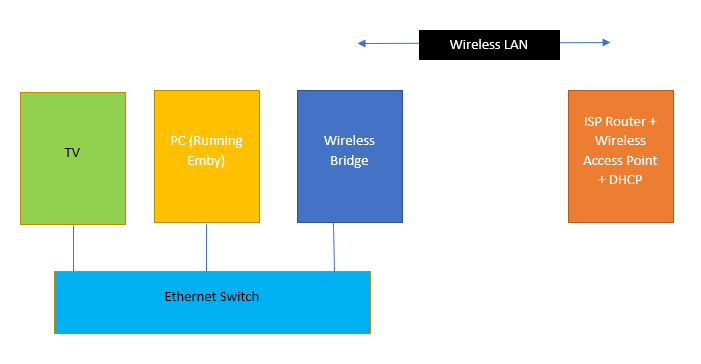 2 points
 -
If you can't connect your router, you can add a switch, connect both TV and Computer and add a wireless AP in bridge mode connected to the switch.2 points
-
It would be great to be able to configure channel groups in LiveTV, which can be selected in the guide view (maybe as tabs) so that we can more quickly navigate to preferred channels using the d-pad. Perhaps start with Favorites by default, but be able to add custom groups (similar to collections) which we can add channels to (Network, Premium, Basic Cable, Kids, News etc.).1 point
-
Please read this post first. I was wondering if it would be possible to add something that would allow you to skip the intro to shows automatically while binge watching. When watching Netflix it does this for some shows, and im not sure if thats a feature of Netflix itself or a Chrome extension i use called "Flix Assist" but it would be a nice feature to have within Emby as well. and possibly even create a custom timed skip for specific shows1 point
-
I have Emby server running on win10 pro. I cannot see the dlna server on either of my 2 samsung TV's or my android phone. I also cannot connect using the emby app on the tv or the phone (using the local ip of the server pc), it just refuses to connect. All devices are connected via wifi to the same Asus AC86U running Merlin firmware. I have tried disabling windows firewall completely as well as rebooting the pc. UPNP on the router is turned on. I have no other firewall software on the pc. It isn't just emby as I also have serviio and that is the same, it used to work a few months ago but now the tv cannot see it at all. I don't know what has changed during that time, nothing I am aware of, same router, same pc, same tv. I did change the wifi card in the pc a while ago to an Intel AX200 card (so I could use wifi direct) but I don't even know if it is possible for that to affect it, the wifi is working perfectly. However wifi Direct also doesn't work, when I select a video to send to the tv, the pc can see the TV since its in the list of devices, and the tv does show that it is attempting to connect, but it then fails. However if I set the tv up as an additional wireless screen in windows, i can put things on that screen, so clearly the 2 devices can communicate with each other over their wifi connections, they just refuse to work with dlna, wifi direct, or Emby. I am all out of ideas, it is clearly somehow related to the pc but I have no clue what.1 point
-
jbjtech you sort of answered this yourself as you're using Ubiquiti smart switches. Change them out to $20 best buy switches with multiple switches between you're two computers and report back. You're results are what should be had by a good switch. But to be fair this isn't what I was getting at. It's not just bandwidth but the combination of how they're used and LATENCY that happens. When you're streaming 75 Mbps steams you're pushing it. Don't forget the overhead of start/stop bits on that stream as well as TCP and network overhead and you're much closer to 100 Mbps which is borderline. Shave 5 to 10 Mbps off the stream and you've got much more margin available and could likely stream NAS->PC->Client all day long smoothly. As Happy2Play has commented a couple of times, these files weren't designed for Ethernet apps but from a dedicated device that can spin and read back a disc at high bitrates outputting to HDMI. They read sequentially very fast but random access time really sucks. When we rip them and play them back through a network we add a lot of latency even if it doesn't sound like much. This is latency that didn't exist in disc->HDMI output. These ARE FRINGE speeds for sure even though it would seem like it's only 1/10th of your network bandwidth. It's far higher when you factor in all the other latency points and delays that can happen from disc to NAS computer to NAS Ethernet to switch to network to switch to PC/Emby Server to processing to ethernet to switch to ethernet to device as the network diagram shows. Does a 70 Mbps or 65 Mbps stream play ok without stutter?1 point
-
The log suggest new transcodes can not start do to no space. But yes there are other topics of this happening when Emby runs out of space and affect admin user or locks user out. I would first Restart Emby to purge transcode folder and free up some space if possible. May need to consider relocating transcode folder to a larger drive space.1 point
-
So as cayars mentioned Emby server bandwidth in and out to play the media and if the server kicks off a scan or any other metadata related process more traffic back and forth to the NAS. So there could be many variables. But in the end it might be achievable but high bitrate media will always have issue in a network environment as it was designed for HDMI not network. I would assume a item with a lower bitrate does not have this issue correct?1 point
-
There is still the controversy of Direct play, is the the item actually direct playing without the server or is the server feeding the client (so bandwidth in and out)? What is the max bitrate of the Shield?1 point
-
Also most devices/client will have set bitrate limits so pure 4K across ethernet will/could always be a issue.1 point
-
At the same time this high bitrate media is not optimized for ethernet and was design to be delivered via HDMI. This is why no service that provides 4K, provides media at no higher then 25Mb bitrate.1 point
-
On a 70" screen, I would personally not want to compress 4K at all. The cost of an 8Tb HDD vs all the grief/time/effort and quality loss is just not worth the grief imo. It's a bit like buying a Ferrari, then filling it with cheap petrol, keeping it under 2000 revs and using it to go to the supermarket - if you have a 70" 4K screen, then give it the best image you can !1 point
-
I'll have you know a good quarter of that is completely essential...1 point
-
DVDfab, UHD ripper module.1 point
-
To rewind a bit - what is the goal here ? What are you trying to achieve ?1 point
-
1. its logowhite.jpg you need to replace is in ..\system\dashboard-ui\modules\themes 2 and 3 favicon.ico just replace with your own need to edit index.html - replace "emby" four times in that file and manifest.json file all can be found in ..\system\dashboard-ui these get replaced on every server update and as there is a 4.5.1.0 coming next week you will have to do it again so keep copies for you to copy over TIP - go look at the system.old directory you will find the old files there1 point
-
Good day, I do not see any reason giving Ebr a hard time, when it totally my fault (I forgot when we testing the new forum build, we agree to chose this setting). I am at the moment try to find a solution (within the Editor) that could work the way some wanted, as you know by now, we like to make this forum comfortable place to post and share, even to chat as best we could if it not risking some issue. I have a list got it from this thread, things we need to do, but please give us some times, thanks. My best1 point
-
If the router is near, you can use the router switch. The location of the router has not been discussed, but I have understood that it is far from the TV and the server.1 point
-
If you want a 1080p version IMHO start with a 1080p version but not a 4K version. The difference in processing needed is crazy different as well as results usually. That's why most of us who do 4K have two different SOURCED files to work with. They are NOT mastered from the same file.1 point
-
Amazing -- this sounds super viable. Once I implement this and have time to test, I will post the outcomes for future users. Thanks guys! You all rock so hard.1 point
-
No one said it was....... Wow1 point
-
Based on your server log, that looks like an incorrect address. Should be 192.168.1.xx...1 point
-
The issue is when the person removes commercials. Depending on the program doing this it can mangle the header. If the file is obtained over the internet it might have a corrupted header. The scene rules do not NUKE for bad header. The scene rules only nukes if the file cannot be played on VLC. Since VLC can play these damaged files by reading the streams they work. But the header will throw off any player that needs to detect the format based on the header. The Roku reads the format detection explicitly from the header. This means length is in the header. It isn't reading the length of the bitstream. When you remux it fixes the header which the Roku relies on. The Roku has more protections built in from crashing their player. They do not want you breaking out of their sandbox they have put they put applications into. Roku does not want their device "hacked" and rooted and su/sudo becomes available.1 point
-
You really need to redo your network to be successful. For example move the Server next to the router so it can be directly plugged in reducing WIFI by half. Most clients are fine over WIFI but you want at least the server connected and NOT using WIFI.1 point
-
Hi. Something has to be wrong with the headers in this mkv. The player just thinks the item is finished. Can you try remuxing it?1 point
-
Great, thanks for testing.1 point
-
It is not our software and we simply have better things to work on than trying to customize such an obscure thing that is already behaving in an acceptable and standard way. We have to pick our battles and spending time customizing tiny features of the forum just isn't one we need to fight right now.1 point
-
Je suis bien d'accord avec @Mickelebof, j'adore EMBY. Je partage avec mes amis et souvent il adhère aussi Franchement c'est un super outil. J'adore en plus la communauté et les administrateurs qui sont au top ! Continuez comme ça1 point
-
That's true. Instead of waiting, I just bought a "cheap" Mi box S and I'm quite happy with it. But it would be much better for me with Emby theater with Xbox One.1 point
-
More goodies for subtitle fans:1 point
-
It looks like your clients either have low bandwidth or (most likely) they are not advertising the correct available bandwidth which is forcing a transcode for the stream from the original ~20mbps down to ~1mbps. So what you have here are two things, incorrect client bitrate and possibly unnecessary work. This is Live TV so even with a lot of compute power for transcoding you can't go faster than real time and any work slows things down slightly, CPU time, I/O, etc. This is one of the reasons pausing helps, it builds enough of a buffer to keep things smooth. See if you can stop transcoding by asking your users to set a higher bitrate. This might help some if they can direct stream but if they're using something like a browser then it's going to transcode Live TV because they can't play MPEG2 natively. The stuttering is basically a buffer underrun. It doesn't happen with ripped and recorded media because the streams can be served faster than the playback speed and build a buffer on the client. With Live TV Emby doesn't give much and from what I've seen it can be affected by the speed at which segments are created and switched on disk. Slow storage can make it worse while fast storage helps but doesn't cure it for everyone. Also some clients can handle it better than others. I notice it on browsers but not Android TV.1 point
-
We can look at improving it. Thanks for the feedback.1 point
-
Hi, we generally don't recommend it because emby will have one internally.1 point
-
Yes we should add this.1 point
-
Just reporting back. With Super fast and CRF at 22, it works really good. Direct Streaming almost everything, and the clients that cant, will transcode. My Upload has never gone above 50Mbit so far.1 point
-
I've patched the released builds so that new users will not run into this issue anymore .For anyone else still affected, you can just install again from the website over the top of your existing build. There will also be a 4.5.1 update early next week. Thanks.1 point
-
Streaming 4K shouldn't be an issue no matter which NAS you choose. Transcoding, especially 4K to 4K will be what kills you if you need that. If you go with Synology make sure it's Intel based cpu, plus the new 4K GPU in their 2020 geminilake models should make a difference.1 point
-
This is getting better and better. Just used EmbyStat to get an overview of all my HEVC & 10 bit movies in my library. Would be nice to have the "list view" for tv shows as well and to be able to export the list you looking at. Thank you, @reggi!1 point
-
I've stopped hoping months ago. This is such a strange situation, why hasn't Microsoft stepped-up ? It's been a problem for years for a lot of devices. An Xbox One S could be in the cabinet of a lot of HT enthusiasts considering it's the cheapest 4k Blu-ray player, has all the streaming services in 4k and is also a fully fledged game console. Oh by the way, while we haven't had an update on this subject for months, things are evolving ! First regarding DTS : https://www.engadget.com/dtx-s-home-theater-xbox-one-insider-082918532.html. It doesn't mean much but I think we can hope for improved compatibility with DTS, at least when using the Movies app. Next, if you're using Plex you're probably well on your way to ditching Emby from your Xbox ! Latest update reads : "The public preview app also contains some changes that may help with buffering issues affecting some users. With the help of Microsoft we have tracked down the potential cause in our player engine and have implemented a solution that should greatly improve the issue for most users." First comment on the thread : "I currently have a 70Mb 4k video playing without issue. HDR looks great. I am able to fast forward and skip ahead without any hiccups now. I would have usually had it buffer by now too but time will tell. Going to let the whole video play and report back. I’m very excited about this. Really hoping that I can stop switching over to my TV to use Plex. Edit: I just watched the full move with no buffering. I’m calling it a win." Now truth be told it doesn't seem to be perfect yet ! But they added "Please keep in mind however, that this isn’t a magic bullet and some buffering may still occur while we work on a longer term solution to the issue." Really didn't think I'd see the day where Plex developers would end up doing such a good job compared to Emby devs... Reading "With the help of Microsoft" makes me think that Microsoft finally realized that a 300$ Series S is a superb value proposition against a 199$ Shield Pro provided that everything works well and decided to help Plex devs fix their issues. So I guess all of this leaves us with two questions : 1. Have you also been approached/had contacts with Microsoft to solve these issues ? 2. If not, will we ever see a working iteration of Emby for Xbox ?1 point
-
Yes you can be selective. this is the snippet code taken from the navdrawercontent.js in it's default mode menuHtml+='<div is="emby-collapse" title="'+item.name+'" data-expanded="true" class="navDrawerCollapseSection" If we look at the navbar we can see each section has a title: Which is the: title="'+item.name+'" The nav sections are being created in a loop, which is grabbing the "item.name" (the "Title" for each section) Since we know it gets created there, we can create a conditional which will target the "item.name" in the loop and set the "data-expanded" as needed. The new code would look like this: menuHtml+='<div is="emby-collapse" title="'+item.name+'" data-expanded=' + (item.name == "Server" ? "true" : "false") +' class="navDrawerCollapseSection" We can do it for each section, by lengthening the conditional statement menuHtml+='<div is="emby-collapse" title="'+item.name+'" data-expanded=' + (item.name == "Server" || item.name == "Admin" ? "true" : "false") +' class="navDrawerCollapseSection" which would keep only Server, and Admin open with the rest closed. Let me know if I've made sense Or we could be like Luke and start using "!0" or "!1" as boolean values all over, LOL! !0 = "not false" = "true" !1 = "not true" = "false" We almost have DeMorgans law there... LOL!1 point
-
Yep, just updated and it works just fine and grouped movies like it has before.1 point
-
You simply shutdown the server and install the new version over the top using the instructions on the website.1 point
-
So just a follow up - this plugin has made the big question of how to manage 4K content SOOOOO much easier. I've now been able to delete my multiple '4K Collection' versions and keep them all in a single collection (along with the 1080p versions etc) and clients only see what they are permissioned to see from that one collection. BINGO ... I'm really not sure why this is not in the Core code - is there a technical reason as presumably, it's just matching tmdb ID's ?1 point
-
Seconding this. Either make this a permanent plugin or bring it inline with emby in the same way TV Shows are already doing1 point
-
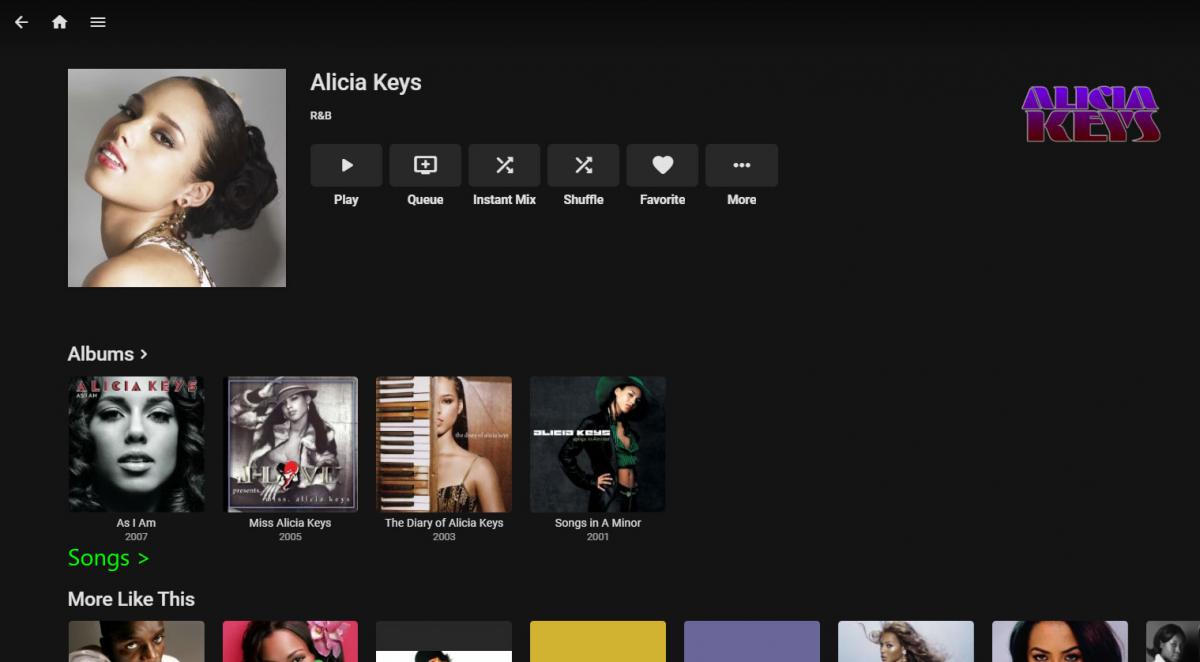
I listen to a lot of electronic/dance music, and there's a lot of cases where multiple musicians may collaborate on a song. Likewise I have purchased a number of compilation albums where a specific musician may only contribute one or two songs out of a dozen or more. I'd like to be able to view all the songs I have in my library that were made by/involved a specific artist. However, if I go to an artist page, I only get a list of albums that they were involved in, even though 90% of the songs in some of the albums have nothing to do with them. Would it be possible to add a view somewhere (such as on the artist info page) that will allow showing all the songs in a library made by that specific artist?1 point
-
Would it be possible for Emby to list all the songs (or filter a set number of songs if performance is a concern), from an artist in the artist view. If this is currently possible, let me know how it can be achieved... haven't seen anything in the options
 1 point
 -
Hi. Is there a option to have channel groups via the live tv folder? As in I have 4 M3u lists on 1 server but the whole live tv folder is not grouped or even in alphabetical order. Would be great to have the whole list grouped to navigate the list quickly. Eg Sports News Movies Entertainment Kids etc etc Is this something the emby team can incorporate? Many thanks1 point