Leaderboard




Popular Content
Showing content with the highest reputation on 09/15/20 in all areas
-
I would like to see a plug-in developed which allows for transcoding to be offset. My thoughts are for a transcoding server (high powered pc), running cut-down/transcoding only version of Emby. Then on my main Emby server a plug-in which offsets transcoding to the high powered pc (if available) Originally I had thought of this as being a high availability server https://emby.media/community/index.php?/topic/41443-emby-server-high-availability But thinking about this more, my requirement isn't for high availability but simply to offset the transcoding elsewhere.2 points
-
I want to share what I think has solved playback issues I've been having. I'd been having weird audio issues since getting my Nvidia Shield Pro 2019. When starting a movie or tv show file, the audio would take a second to kick in after the video has already started. It'd be in sync, but odd nonetheless. I also noticed that LIVE TV would fall out of sync over time. I'd have to stop and restart the show. However, the real annoying problem I was having was while watching football games that I edit and encode from recordings - I like to re-watch NFL games. All the files would start out as direct play, but when I'd start to use FF to skip between plays or rewind to watch a play again, playback eventually would move over to direct stream then full on transcoding and throw a DirectPlay error. Logs would show that it was all audio related. I never had issues with direct play of my football games with my previous HTPC, so I thought maybe it had something to do with Emby Android TV, but then I realized that I also use Emby Android TV on my FireTV and do not have these issues on it. So I was back to wondering what is with this Nvidia Shield that could be causing these problems? I searched the forums here and didn't find anything related to my issue and after looking in the Nvidia Shield's settings and finding what I think has solved everything, I looked again on the forums to see if anyone else pointed it out. No one has or I can't find it ... so here's what solved it for me: Under Nvidia Shield Settings > Device Preferences > Display & Sound > Advanced sound setttings > Dolby audio processing was toggled ON. I toggled it OFF and have not had any of the above issues since. I have the latest Nvidia Shield update 8.2.0(32.6.435.1) which may have somehow toggled that ON by default or it's always been on since I've had it. I surmise that this Dolby audio processing was forcing the Shield to always process regardless if it's connected to a receiver that can do the work, therefore causing delays and sync issues. Just a single click and all is well. Anyway, just wanted to post this in case others were noticing these issues with their Shield.2 points
-
So, mom and dad must approve junior's science project before he can take it to school and show everybody?2 points
-
Hi, not yet but hoping to be able to get to them soon.2 points
-
New issue when editing/creating a post if you do ":)" or any other emoji code by hand and dont press space after - it locks the cursor and things like cursor keys dont work it feels like the forum has locked (it hasn't) and you wonder why you can move around etc also does the same thing if you post in text with emoji codes without spaces after them Not the end of the world but confusing till you know whats going on2 points
-
i'm leaning towards TMDB myself - for all metadata not done any meaningful comparisons on how many series they have vs TVDB - if asked to guess i would say that the % difference is getting less by the day espeically with newer content Old shows from the 70/80s etc might be quite different etc I think the sub service will be the end for TVDB - will put people off and things will not get updated as much - but i may be proved wrong2 points
-
Well your last sentence says it all haha, it's hard or even impossible to do it in a way everyone will be happy. On top of that, your second sentence is probably true, but we will never know. It's basically saying you would pick a certain group/party to lead your land (in a democracy) because you think most people would like to see them lead, but they don't know when it's time to vote, or just can't be bothered to come vote, so they don't but we still have to take in account their votes/feelings. That's simply impossible since it will become guess work for many features. Haven't been on here for quite some time, and to see this as in the first topic I check is just awesome news great job! Looking forward to the version release. I did this, and still sometimes do it. But when your library grows exponentially, it gets pretty annoying at some point. I have done this for years when needed. However personally I do not need subs and feel like it's a waste of time as I do not need them. But some of my family members do need/want them for anything they request. At first that still wasn't a problem but these days more family members join in, and therefor there is quite a growth in requests. So at some point I decided to start automating some things, which expanded (getting emby to more easily cater to wishes of my family). With emby it downloads subtitles automatically which was already quite some work covered honestly. Then the manual download for subs became available which was also awesome, since my family members can now pick a new subtitle if they don't like the one that's there or if it doesn't match. However if there is a change for off set, that's perfect cause there is no way I would ever have to worry about subs anymore. I generally don't use them, and at that point my family members can take care of it themselves. Subtitle edit unfortunately only gets you so far since you have to do everything yourself Basically yeah, but doesn't that make sense when you aren't doing it for yourself but for your users? I mean I love it when my family is greatful, but I'd rather have my time back, I'm an egoistic bastard like that Emby solves like a ton of work for me with all the features they add, saving me the time that I would have to use to make my family happy.2 points
-
We are looking into improving it. Thanks for the feedback.2 points
-
This will be in Emby Server 4.5. You'll be able to use the controls in the video player to set the playback speed.2 points
-
I have about 100GB of comic books that I have to shuttle back and forth between skydrive, dropbox, and storage on my tablet. Most comic book files are simply cbr and cbz archives, which are just renamed rar and zip files respectively. I'm not sure how hard it would be to implement, but with the influx of tablets and tablet support for MB, I think a comic book section would be a fantastic addition to MB for centralized control and metadata management. Here's one existing comic book metadata format: http://code.google.com/p/comicbookinfo/1 point
-
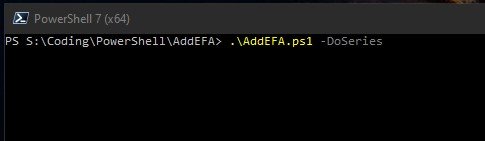
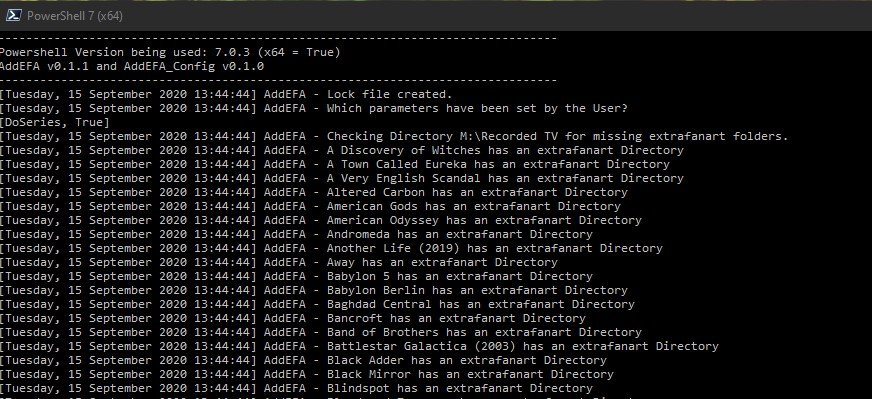
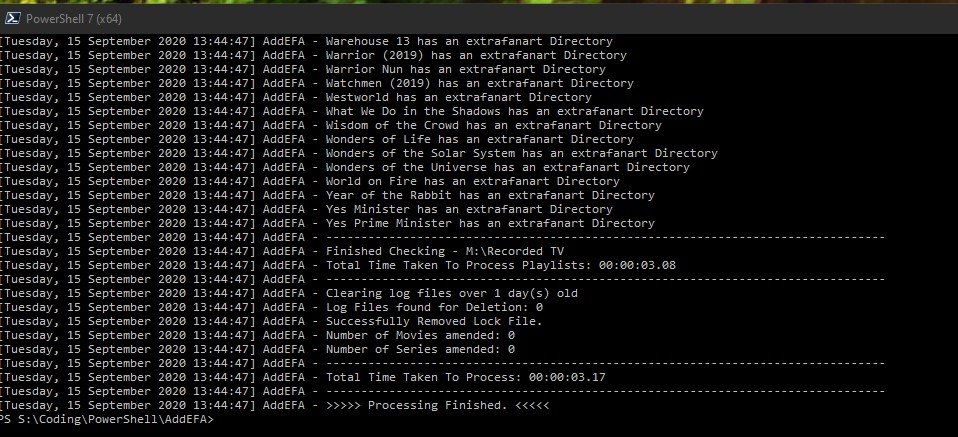
(15/09/2020) If like me you liked the Extrafanart sub directory to store all the downloaded fanartX.jpg files to keep the main item folder clear of clutter then you are in luck. Context In a recent beta / nfo plugin update the creation of extrafanart directories was remove (as Kodi does not support them anymore) and now fanartX files are saved to the main folder of an item. So this script allows you to clean up this situation. The script is setup to work with Movies and Series (TV Shows) only at present and not Mixed content folders either - maybe a future update might cover this but for now only run it against supported structures. User Notes - (version 1.2) - thanks to @CBers and @FrostByte for proofreading. AddEFA - script to add extrafanart directory and move the fanartX files to it from the main directory of a newly added item - Movie or Series 1.0 Basic Function 1.1 This script is to add the extrafanart directory back since in the last few beta server versions the support for it was removed when a new Series or Movie is added to Emby. 1.2 It also moves fanartX.jpg files to the extrfanart directory if they exist. 1.3 The extrafanart directory is not created if no fanartx files exist in the main directory for the item. 1.4 It leaves the fanart.jpg in the main directory of the item. 2.0 Script Requirements 2.1 The script is written in Powershell for version 7.0.3 2.2 The script requires at least Powershell 7.0 - Powershell can be downloaded from https://github.com/PowerShell/PowerShell/releases/tag/v7.0.3 - the latest Release version is 7.0.3 as of 15/09/2020. Remember to set the execution policy you require - Google it if you are not sure. 2.3 If you try and run it in Powershell 5.1/6/0 etc it will abort and not run as some of the code is PS 7 specific. 2.4 Powershell 7 and 5.1 etc can coexist on the same machine with no issues (Windows) 3.0 Setup Requirements 3.1 I have attached to the first post a zip file (AddEFA.zip) containing 3 files 3.2 AddEFA.ps1 - the main script file, AddEFA_config.ps1 - config file for the main script file (more on this below) and these user notes. 3.3 Also in the zip file is a logs folder which the script will look for to write its log file too. The location of the logs folder can be changed in the _config file. 3.4 Unzip the file to your location of choice - the main folder for the script (AddEFA) can be changed to anything you like. BUT the ps1 files should not have their names modified. 3.5 Open the _config file in any text editor and amend the setting you want and don't forget to save it after you change things! 3.5.1 Log_Path - where you want the logs saved 3.5.2 MovieBaseDir - full paths to one or multiple movie root folders - unc paths are supported - Enclose BaseDir folders in single quotes(') and separate by commas. 3.5.3 SeriesBaseDir - as above - Enclose BaseDir folders in single quotes(') and separate by commas. 3.5.4 Log_Retention - how many days you want to keep the logs for. 3.6 Why a config file - for convenience - you can replace the main ps1 file and not have to keep updating your paths etc if I need to release a new version. 3.6.1 I anticipate that the config file format will not change - with current plans - but if I add some other functionality that requires it you will get a new version etc - and only at that time would you need to edit the config again - other than your own changes. 4.0 Running the script 4.1 First you need to open a PS7 console window - there are various ways to do it - I will just do the one that most will be able to follow. 4.1.1 Start>Powershell>Powershell 7 (x64) will open the console window. 4.1.2 Navigate to the folder where the AddEFA.ps1 and config files exist 4.1.3 To run the script you need to type the following 4.1.4 .\AddEFA -DoMovies -DoSeries and then hit return - if you have things configured correctly the script will be off to the races. 4.1.5 Notice the full stop before the \ above? It's needed don't forget to type it - otherwise PS will complain! 4.1.6 The -Doxxxx are called parameters and at least one needs to be supplied - i.e. without them the script will do nothing much. You can supply both or singly - up to you. 4.1.7 If you get errors see below. 4.2 The script will write to the console window at the same time as the log - they are essentially the same - so if things fly by and you can't read what's happening - go see the log file. 4.3 When running the script it creates an AddEFA.lock file to the script directory. This is to prevent the script from being run twice or more concurrently - i.e. stopping multiple scripts fighting over files! 4.4 Once the script completes - the lock file is removed. 4.5 Once complete then your Movies/Series should have been updated where necessary - see log file for details of which was amended or not and why. 4.6 Beyond the scope of these notes but it's easy to schedule this script to run via task scheduler or the Emby ScripterX Plugin for say every couple of days - depending how much on average you add to your server. 5.0 Limitations / Restrictions 5.1 The BaseDir's you give the script, in the config file, need to have a structure which needs to be followed - see below. 5.2 MovieBaseDir\<movie individual main directory> - for me that would be M:\Movies\22 Bullets (2010) or M:\Movies\300 (2007) etc where M:\movies is the BaseDir 5.3 SeriesBaseDir\<Show individual main directory> - for me that would be M:\TV\Babylon 5 or M:\Movies\Catch-22 etc where M:\TV is the BaseDir 5.4 If you have any movies which are not in their own directories within the MovieBaseDir - put them in separate folders - or don't run the script if this is an issue 5.5 Equally the same basic structure is expected for Series - i.e. nothing not in a folder within the baseDir for Series - i.e. no loose episodes etc 5.6 If you say have your movies in Alphabetical groups say \movies\A-H, \movies\I-R etc then add those as the baseDir in the config as you can have more than one. Each of these directories will be processed one after the other. 5.6 Any other eclectic folder structure and you are on your own! Results might be weird! 5.7 The config file must be in same folder as the main script. 6.0 Errors you might see 6.1 These are common errors due to incorrect config/ finger trouble 6.2 You forget the full stop before the \ 6.3 You spell the parameters wrong 6.4 A lock file exists in the script folder - either another instance of the script is running or shock horror the script crashed last time - this never happens ... 6.5 The baseDir paths you have given are invalid/not accessible 6.6 The log_path is invalid/not accessible etc - not going to try and cover everything under the sun! 6.7 Either PS or the script will indicate what is wrong for most of the common errors - read what they say and you should be able to figure it out. 7.0 Summary 7.1 The script has been tested by myself and @cbers/@frostbyte and if they can get it to work so should you 7.2 If PS is new to you then you have a smallish learning curve to climb but its not huge - Google can help here. Example Screenshots Fig1 - about to run script - note PS has its current directory - pointing at the script directory Point 4.1.2 above Fig 2 - Script Running against my TV library Fig 3 - Script has finished in just over 3 seconds. Its not amended anything as no new TV shows added recently. Files - AddEFA.zip - as decribed in 3.1 above. AddEFA.zip I will try and respond to queries/issue with the script when i can - i here most days so should respond quickly. What i'm not going to do in this thread is answer PS issues other than directly related to this script. But i will if they are posted elsewhere if i can answer them. I want to keep this thread on track and not wander off on some winding road to nowhere Think That's It Have Fun PenkethBoy
 1 point
 -
I thought I'd post my emby post-processing dvr script. Tested and working on Debian Linux 8.9 Files processed end up being named *originalvideoname*.ts.mkv so i can search by that and make sure recordings have no issues. After I look at them, I manually rename to just .mkv. I do not have automatically convert recordings checked or the two preserve boxes checked under live tv --> settings. Script flow: see if lockfile exists. if so wait 60 sec create lockfile commerical scan and commerical cutting ccextractor to pull out closed captions and convert to srt file Encode to h264 using ffmpeg and combine in srt file from previous step Trim off first 60 sec from recording (due to iptv delay you get a minute from previous show. I have recordings set to last 1 min longer in emby record. The shows using my OTA tuners start early by 1 min to compensate) Remove srt/extra files Overwrite original ts recording delete lockfile Depends on: comskip, comcut (comchap optional), ccextractor, ffmpeg I eventually want to fool around with a nvidia gtx 1050 and see how nevnc with hevc/h265 works on the ffmpeg encoding line. Software h265 encoding on very fast saves an additional 30-40% space on same setting as h264 on medium but my encoding framerate goes from 420fps (14x) to 69fps (2.3x) on dual Xeon e5-2670s. The picture looks pretty much identical when i look at them side by side post.sh emby script #!/bin/csh set path = ($path /usr/local/bin) set lockFile = '/tmp/dvrProcessing.lock' set origFile = "$1" set tmpFile = "$1.tmp" set tmpEncode = "$1.mkv" set tmpEncode2 = "$1.2.mkv" set tmpSrt = "$1.srt" set dvrPostLog = '/path/to/embydvr/dvrProcessing.log' set dvrLockLog = '/path/to/embydvr/dvrLock.log' #Wait if post processing is already running while ( -f $lockFile ) echo "'$lockFile' exists, sleeping processing of '$origFile'" | tee $dvrLockLog sleep 60 end #Create lock file to prevent other post-processing from running simultaneously echo "Creating lock file for processing '$origFile'" | tee -a $dvrPostLog touch $lockFile #Mark and cut commercials echo "cut from '$origFile'" | tee -a $dvrPostLog /path/to/embydvr/comchap/comcut --lockfile=/tmp/comchap.lock --comskip-ini=/path/to/embydvr/comskip.ini "$origFile" #Pull CC from file to SRT file echo "Pulling Closed captions from '$origFile' to SRT file" | tee -a $dvrPostLog ccextractor "$origFile" -o "$tmpSrt" #Encode file to H.264 with mkv container using ffmpeg and mux in CC srt echo "Re-encoding '$origFile' to MKV file while adding cc data" | tee -a $dvrPostLog /usr/bin/ffmpeg -i "$origFile" -i "$tmpSrt" -map 0 -map 1 -acodec copy -scodec copy -c:v libx264 -preset medium -crf 23 -profile:v high -level 4.1 -deinterlace "$tmpEncode" #Trim off first minute echo "Remove first 60 sec of file" | tee -a $dvrPostLog /usr/bin/ffmpeg -ss 00:01:00 -i "$tmpEncode" -vcodec copy -acodec copy -scodec copy "$tmpEncode2" #Remove SRT file echo "Remove SRT file" | tee -a $dvrPostLog rm -f "$tmpSrt" #Remove tmpEncode file echo "Remove tmpEncode file" | tee -a $dvrPostLog rm -f "$tmpEncode" #Rename transcoded file to temp file in case no subtitles echo "Rename 2nd transcoded file to tmp file" | tee -a $dvrPostLog mv -f "$tmpEncode2" "$tmpFile" #Overwrite original ts file with the transcoded file echo "Removing '$origFile'" | tee -a $dvrPostLog mv -f "$tmpFile" "$origFile" #Rename .ts file to .ts.mkv echo "Renaming '$origFile' to .mkv" | tee -a $dvrPostLog mv -f "$origFile" "$1.mkv" #Remove lock file echo "Done processing '$origFile' removing lock" | tee -a $dvrPostLog rm $lockFile exit 01 point
-
Sounds promising Abo i thought you were only 211 point
-
Yes I was already fetching the full record, making updates to said record and posting it back. The API would quite happily let me update multiple fields at once, except when I updated ForcedSortName. Whenever I updated that field at the same time as other fields, it ignored the change for ForcedSortName. Though I did find if I updated the record with all the other fields, posted that back, then updated ForcedSortName and posted that back, in that case everything worked. I had assumed that was one of those undocumented "yeah you have to do that" features of Emby, but from what Luke says, apparently not. So now I'm thinking maybe it's one of those "Emby has got itself befuddled and needs a restart" things that I'm also getting used to, so I restarted Emby, removed the interemediate post and now it happily updates ForcedSortName along with other fields. I might go back now and see if it sorts properly, and doesn't randomly lose PremiereDate and Year, which was something else I was seeing occasionally when setting ForcedSortName.1 point
-
In an ideal world yes - but that adds another series of things to be coded tested etc on the server Keep it simple initially - and see what the feedback is first - then adjust - then do the gold plated server does it for you option if we wait for the gold plated version - see you late next year - as way more important things need doing I suggested this as way to help with support - quickly and simply - not add extra (although nice to have) options to the server backlog etc1 point
-
Suena a que tienes un problema con la conexión a internet. Verifica si el firewall no esta impidiendo que Emby acceda a internet o que no haya algún otro problema con la conectividad de tu servidor al internet. Tanto los plugins como los metadatos son extraídos de internet.1 point
-
It should not involve writing a lot of text. Ideally, the server would assist the submission in some way that the user has to do minimal work only: Fill out a single text field explaining the problem Have a real form with multiple choice and selection fields Additional text fields should only be for single or few words1 point
-
Wow, more awesome news. Great job you guys1 point
-
That's true, I believe OMBI github even has a bot that checks if the made post has all the needed information (or correct format or something) and if not, it automatically locks/removes it or something. Does kind of help him stay on track. Though it can be annoying and scare people away I guess if it gets too strict.1 point
-
Hey guys i am hoping someone could help with this as im completely stumped lol I recently discovered that my internet provider is giving me shocking results for internet quality as i am only getting around 30mbps download and for upload a shocking result of 2-4mbps. this is what made my transcoding so bad as i couldnt provide enough upload speed for my friends to watch the film they wanted. ( thank you cayars for helping me with finding the problem to this ) So i have thought of going with my phone provider (three) as they offer 4G broadband with out the mess involved in between. before i purchase this i wanted to temporarily use my hotspot from my phone while i wait for the contract for the internet to come to a end, however emby server remote isnt connecting at all. i have made sure ports through the firewall are allowed and clear along with checking it against CanYouSeeMe.org. i can switch back to my normal wired internet restart emby and all works fine but using my hotspot i have no joy. has anyone had this before or and i doing something so silly i cant see what i a missing haha ? any help would be a massive help thanks guys embyserver.txt hardware_detection-63735724769.txt1 point
-
Good info guys. Obviously things are different all over the world. I just wanted to make sure "Unlimited" really meant that because often in the states words on a plan name don't have the same meaning as the old dictionary. Here it's often like renting a car with unlimited miles but they fail to tell you after the first hundred miles the car doesn't go faster than 10 KPH. LOL1 point
-
It not possible with WinTV but you can do this with NextPVR or just wait there new ver of Emby that dose away with WinTV but it not maybe for a while maybe it will be done by end of the year. Why not combine the two antennas in one line then add two guide and map them if need be.1 point
-
Three ('3') in the UK claims that its unlimited plans have no caps or throttling. I've never noticed any, but OTOH, they are often not the fastest in areas I frequent. Paul1 point
-
Considering i'm the only one with Hauppauge tuners who tests this new app - and it still very far away from working as a release app Lots of missing stuff or only place holders or its hit and miss if it works It will get there eventually but it hard to focus on it when things only happen every two to three weeks - see lack of posts by the majority of tester including yourself Ok - will leave the thread alone now.1 point
-
It way way off being usable - and the dev is very slow going - you are getting people hopes up for something that wont be avaialable for some time1 point
-
Well I like having video in the car myself.1 point
-
I've got a 1st gen i7 which had no support for any of this. Most of my files are HEVC encoded. What I did was install a cheap GTX-750TI card in it. It can't encode HEVC but can decode it. It can ENCODE h.264 so any time one of my files needs transcoding the cheap video card can do it. So adding an nvidia GPU is always an option!1 point
-
What device are you casting to?1 point
-
Definitely not. My previous post has even a link to Kodi's nfo scraper code and there the Emby "aspectratio" is never read.1 point
-
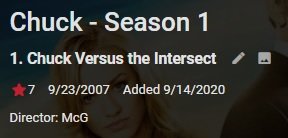
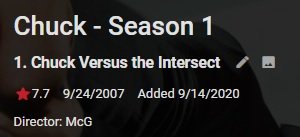
OT: @Luke is this a defect in TMDB metadata? I do not get the same result with TVDB metadata. TMDB only presents airdate 9/23/2007 in the UI TVDB only presents airdate 9/24/2007 in the UI.
 1 point
 -
HD home run prime. Been watching tv most of the night and so far so good1 point
-
Hi, There's a very good chance your cell provider is using cgNAT (carrier grade network address translation) basically making it impossible to breach through to your server without you using tricks like a public VPN. You will want to read contract very carefully as I've never see a cell based UNLIMITED plan. Everyone I've seen has caps or auto throttling at X transferred allotment to SLOW speeds (but still unlimited). Now with that said some wireless companies will work with Emby. Can we assume you have a wireless network on the Emby server so you disconnected from the wired network, then connected to the wireless network? Can we also assume you restarted Emby? Does Emby show a different remote address in the dashboard?1 point
-
Are the subs and movie files named properly? For example, I have: \\<SERVER>\<SHARE>\Be Cool (2005)\Be Cool (2005).mkv \\<SERVER>\<SHARE>\Be Cool (2005)\Be Cool (2005).eng.srt1 point
-
The answer is to exit the app (completely) so that the app restarts, then it will work fine. There is currently an issue with selecting a server straight after it's been added.1 point
-
OK thanks, we'll check it out. @ebr I don't have a fire stick. Can you check this out?1 point
-
That feature is coming. Thanks for the feedback.1 point
-
Gracias @Luke...Aprovecho para pedirte, lo que muchos usuarios estamos solicitando para la app de Samsung y es que podamos saltar los capitulos, mientras visualizamos la peli, como tiene Android TV, Fire Stick y creo que tambien la app de LG..Además observo que en Android Tv al menos, cuando das al boton de abajo del mando de la TV Box, tiene muchas más opciones, como ver la sinopsis, los actores de la peli, es una maravilla..¿Por que no se implementa en la app de Samsung? Tan complicado resulta?..Muchas gracias por tu tiempo....1 point
-
So I just realised that I were supposed to check "Save artwork into media folders", NOT uncheck! Thanks for all help!1 point
-
Oh wow! The plot thickens! The Pro it is Thanks again, guys!1 point
-
This would make a lot of sense and be very useful1 point
-
Hi. As long as you stay within the device limit, you can do this. Many answers like this can be found in our KB. Thanks. Can I use my Emby Premiere Key on More than One Server1 point
-
Internet no longer required to run Most of the changes in this version are "under the hood" but the most significant thing you will notice is that a constant internet connection is no longer required for this app to function. Emby Premiere will still need periodic internet to validate but this app used to require a constant connection to function and no longer does. Other changes and improvements: New Features / Improvements: App no longer requires the Internet to function "mov_text" subtitles are now embedded on the Native Player. Added play button support on Siri Remote to libraries Fixed jerky scrolling behavior that was prevalent in most of the app but especially in grid-based views Improved handling of missing episodes by adding a "MISSING" tag to episodes in a season and on specific episode detail view App now respects Live TV access settings App now respects Live TV Recording Management access settings Folder items no longer display the tabs across the top New Playback settings view that aligns with the web app New Subtitles settings view that aligns with the web app (no subtitle appearance settings yet) tvOS 13 Launch Screen updates: The Launch Screen now respect the device Appearance (Dark / Light) The "Starting Up..." screen has been replaced with a screen that looks identical to the Launch Screen creating a smoother experience Instead of showing a white screen on startup (say when Internet is unavailable to validate a device) the Emby loading screen is persistent until those requests finish. Additionally, an activity indicator is present so the user knows something is happening. Loaders are now present when selecting a server and a user so the user knows activity is taking place. Select Version / Audio / Subtitles view has been re-written. With this update we've added a Resume button in addition to the play button Now when you play an item in the middle of a playlist or music album it will continue playing the next item. In a previous version it would only play that one item There is now a played indicator for items in a video playlist so you can tell if it's been watched or not The Now Playing menu item is back. This was removed in previous releases due to a tvOS bug that would cause duplicate "Now Playing" and app crashes. Apple fixed this in tvOS 13.4. DTS 5.1 audio is now correctly transcoded to AC-3 Bug Fixes: Fixed a bug where a movie’s poster was shown in a thumb during a recording Fixed a bug that prevented playing an active recording from detail when selected from the home screen Fixed a bug that prevented playing an active recording directly from the home screen Fixed a bug where an active recording wasn't showing the proper image Fixed a bug where the Episode Detail view would show "undefined" when other episodes had no episode numbers Fixed a bug in tvOS 14 where an error would display when backing out of playback Fixed a number of bugs in the Live TV Guide that would cause app crashes Fixed a bug where the Season Detail view would show "undefined" when an episode didn't have a number Fixed a bug where the episode title would not display in the Info menu for the native player Fixed a Top Shelf crash when image URLs did not exist for items Fixed a bug that prevented podcast art from showing when using the Podcasts plugin Fixed a bug where pressing back/menu from when selecting Instant Mix from an album detail would show a black loading screen Fixed a bug where pressing back/menu from when selecting Instant Mix from an artist detail would show a black loading screen Fixed a bug where pressing back/menu from shuffle on album detail would show a black loading screen Fixed a bug where pressing back/menu from shuffle on artist detail would show a black loading screen Fixed a bug where pressing back/menu from shuffle on albums, album artists, and songs tabs would show a black loading screen Fixed a bug where pressing back/menu from play all on albums, album artists, and songs tabs would show a black loading screen Fixed a bug where track numbers weren’t displaying properly Fixed a bug where album that has been favorited would not show in UI Fixed a bug where actor roles with quotes would show as HTML encoded quotes Fixed a bug where network requests would fire for first tab in a Menu view even if it wasn’t your default In the Channels view of Live TV if there is no channel number if previously displayed "undefined." Now it just displays the channel name if the channel number isn't defined. View the full article1 point
-
i need this too, i usually read some novel tec docs and comics. i think it's a necessarily function for someone like me.1 point
-
Hello, when is Kodi 19 supported? I miss this skin so much that I would like to use it under Kodi 19 as well. Can I expect support? If so, when? greetings from Germany1 point
-
Keep in mind this is a work in progress. The hope is to reduce the amount of duplicate requests and focus the communities input on areas they would like to see improvements.1 point
-
Reserved1 point
-
I've been using this script for about a year and it's solid. Just need to ensure log rotation is set up correctly as this causes the syslog and daemon.log files to grow rapidly. In addition to rotating daily I also set them to rotate with a maxsize of 5GB. Below is a partial logrotate config /var/log/syslog /var/log/daemon.log { rotate 7 daily missingok notifempty delaycompress compress maxsize 5G postrotate invoke-rc.d rsyslog rotate > /dev/null endscript } I also modified the original script to add timestamps to the log file and support hardware acceleration using my Nvidia gpu #!/bin/csh set path = ($path /usr/local/bin) set lockFile = '/tmp/dvrProcessing.lock' set origFile = "$1" set tmpFile = "$1.tmp" set tmpEncode = "$1.mkv" set tmpEncode2 = "$1.2.mkv" set tmpSrt = "$1.srt" set dvrPostLog = '/opt/scripts/commercial-cutting/dvrProcessing.log' set dvrLockLog = '/opt/scripts/commercial-cutting/dvrLock.log' #Wait if post processing is already running while ( -f $lockFile ) echo "`date '+%Y-%m-%d %H:%M:%S'` '$lockFile' exists, sleeping processing of '$origFile'" | tee $dvrLockLog sleep 60 end #Create lock file to prevent other post-processing from running simultaneously echo "`date '+%Y-%m-%d %H:%M:%S'` Creating lock file for processing '$origFile'" | tee -a $dvrPostLog touch $lockFile #Mark and cut commercials echo "`date '+%Y-%m-%d %H:%M:%S'` cut from '$origFile'" | tee -a $dvrPostLog /usr/local/bin/comcut --lockfile=/tmp/comchap.lock --comskip-ini=/opt/scripts/commercial-cutting/comskip.ini "$origFile" #Pull CC from file to SRT file echo "`date '+%Y-%m-%d %H:%M:%S'` Pulling Closed captions from '$origFile' to SRT file" | tee -a $dvrPostLog /usr/local/bin/ccextractor "$origFile" -o "$tmpSrt" #Encode file to H.264 with mkv container using ffmpeg and mux in CC srt echo "`date '+%Y-%m-%d %H:%M:%S'` Re-encoding '$origFile' to MKV file while adding cc data" | tee -a $dvrPostLog /opt/emby-server/bin/ffmpeg -c:v h264_cuvid -i "$origFile" -i "$tmpSrt" -map 0 -map 1 -acodec copy -scodec copy -c:v h264_nvenc -preset medium -crf 23 -profile:v high -level 4.1 -deinterlace "$tmpEncode" #Trim off first minute echo "`date '+%Y-%m-%d %H:%M:%S'` Remove first 60 sec of file" | tee -a $dvrPostLog /opt/emby-server/bin/ffmpeg -ss 00:01:00 -i "$tmpEncode" -vcodec copy -acodec copy -scodec copy "$tmpEncode2" #Remove SRT file echo "`date '+%Y-%m-%d %H:%M:%S'` Remove SRT file" | tee -a $dvrPostLog rm -f "$tmpSrt" #Remove tmpEncode file echo "`date '+%Y-%m-%d %H:%M:%S'` Remove tmpEncode file" | tee -a $dvrPostLog rm -f "$tmpEncode" #Rename transcoded file to temp file in case no subtitles echo "`date '+%Y-%m-%d %H:%M:%S'` Rename 2nd transcoded file to tmp file" | tee -a $dvrPostLog mv -f "$tmpEncode2" "$tmpFile" #Overwrite original ts file with the transcoded file echo "`date '+%Y-%m-%d %H:%M:%S'` Removing '$origFile'" | tee -a $dvrPostLog mv -f "$tmpFile" "$origFile" #Rename .ts file to .ts.mkv echo "`date '+%Y-%m-%d %H:%M:%S'` Renaming '$origFile' to .mkv" | tee -a $dvrPostLog mv -f "$origFile" "$1.mkv" #Remove lock file echo "`date '+%Y-%m-%d %H:%M:%S'` Done processing '$origFile' removing lock" | tee -a $dvrPostLog rm $lockFile exit 0 Thanks @@ShotToTheDome for the hard work.1 point
-
I've been using a more aggressive comskip.ini It is using all available detection methods so it takes a lot longer to run, but it hasn't missed any commercials yet in my usage. Also sticking with TS files works better for me with the iptv setup I have along with auto-looping on. I think overall TS is just a more stable recording method after a lot of usage with both comskip.ini.txt1 point
-
New post processing script for use if you want to "automatically convert recordings to a streaming friendly format" also check preserve original video and preserve original audio. After the recording completes, the script changes recording mkv ext back to ts, pulls out closed captions and then goes through things as usual. At the end you are left with a the original name in .mkv and the .srt file if it exists. I've found for IPTV using these settings allows for more variance in stream without it stopping or starting a new "xxxx-1.ts" stream for a recording #!/bin/csh set path = ($path /usr/local/bin) set lockFile = '/tmp/dvrProcessing.lock' set origFile = "$1" set tmpFile = "$1.tmp" set tmpEncode = "$1.mkv" set tmpEncode2 = "$1.2.mkv" set tmpSrt = "$1.srt" set dvrPostLog = '/path/to/embydvr/dvrProcessing.log' set dvrLockLog = '/path/to/embydvr/dvrLock.log' #Wait if post processing is already running while ( -f $lockFile ) echo "'$lockFile' exists, sleeping processing of '$origFile'" | tee $dvrLockLog sleep 60 end #Create lock file to prevent other post-processing from running simultaneously echo "Creating lock file for processing '$origFile'" | tee -a $dvrPostLog touch $lockFile #Rename .ts file to .ts.mkv echo "Renaming '$origFile' to .ts" | tee -a $dvrPostLog cp -f "$origFile" "$1.ts" #Mark and cut commercials echo "cut from '$origFile'" | tee -a $dvrPostLog /path/to/embydvr/comchap/comcut --lockfile=/tmp/comchap.lock --comskip-ini=/path/to/embydvr/comskip.ini "$1.ts" #Pull CC from file to SRT file echo "Pulling Closed captions from '$origFile' to SRT file" | tee -a $dvrPostLog ccextractor "$1.ts" -o "$tmpSrt" #Encode file to H.264 with mkv container using ffmpeg echo "Re-encoding '$origFile' to MKV file while adding cc data" | tee -a $dvrPostLog /usr/bin/ffmpeg -i "$1.ts" -map 0 -acodec copy -scodec copy -c:v libx264 -preset medium -crf 23 -profile:v high -level 4.1 -deinterlace "$tmpEncode" #Trim off first minute echo "Remove first 60 sec of file" | tee -a $dvrPostLog /usr/bin/ffmpeg -ss 00:01:00 -i "$tmpEncode" -vcodec copy -acodec copy -scodec copy "$tmpEncode2" #Rename encodes to tmpfile echo "Rename 2nd transcoded file to tmp file" | tee -a $dvrPostLog mv -f "$tmpEncode" "$tmpFile" mv -f "$tmpEncode2" "$tmpFile" #Overwrite original ts file with the transcoded file echo "Removing '$origFile'" | tee -a $dvrPostLog mv -f "$tmpFile" "$origFile" #Remove leftover .ts file echo "Remove leftover .ts file" | tee -a $dvrPostLog rm -f "$1.ts" #Remove lock file echo "Done processing '$origFile' removing lock" | tee -a $dvrPostLog rm $lockFile exit 01 point
-
Installing the programs needed by the script assuming Ubuntu/Debian CCextractor git for ccextractor - https://github.com/CCExtractor/ccextractor clone ccextractor from git source go to directory you want to use. I'll call mine /media/ssd/ cd /media/ssd git clone https://github.com/CCExtractor/ccextractor.git This will pull in the ccextractor code to new directory called ccextractor cd ccextrator for ubuntu/debian - download dependencies: sudo apt-get install -y gcc libcurl4-gnutls-dev tesseract-ocr tesseract-ocr-dev libleptonica-dev now we need to go into the build directory cd /media/ssd/ccextractor/linux ./build # test your build ./ccextractor now we need to place ccextractor where we can call it from a built in path sudo cp ccextractor /usr/local/bin/ccextractor Comskip git for comskip - https://github.com/erikkaashoek/Comskip clone comskip from git source cd /media/ssd git clone https://github.com/erikkaashoek/Comskip.git go to new Comskip directory install build requirements cd Comskip sudo apt-get install -y autoconf automake libtool build comskip ./autogen.sh ./configure here i ran into a missing package argtable2 cd /tmp wget http://ftp.us.debian.org/debian/pool/main/a/argtable2/libargtable2-0_12-1.1_amd64.deb wget http://ftp.us.debian.org/debian/pool/main/a/argtable2/libargtable2-docs_12-1.1_all.deb wget http://ftp.us.debian.org/debian/pool/main/a/argtable2/libargtable2-dev_12-1.1_amd64.deb sudo dpkg -i libargtable2-0_12-1.1_amd64.deb libargtable2-docs_12-1.1_all.deb libargtable2-dev_12-1.1_amd64.deb also more missing packages: sudo apt-get install -y libavutil-dev libavformat-dev libavcodec-dev unfortunately the version were too low so I had to install from jessie-backports repo. You'll have to setup backports for your version of linux if you run into same problem in your /etc/apt/sources.list sudo apt-get -t jessie-backports install libavutil-dev libavformat-dev libavcodec-dev now finally can run ./configure cd /media/ssd/Comskip make again copy comskip to a path you can call from anywhere sudo cp comskip /usr/local/bin/comskip Comchap/Comcut cd /media/ssd git clone https://github.com/BrettSheleski/comchap.git cd comchap make sudo cp comchap /usr/local/bin/comchap sudo cp comcut /usr/local/bin/comcut Make sure you have newest version of ffmpeg installed I've installed mine from jessie-backports but probably whatever you have in your current repo is fine (I wanted NVENC for hevc so i needed a newer version) If you want to use comchap you'll need to adjust some of the code in the original script. Attached comskip.ini I use. Also version 2 of comskip that may be more accurate Also if you don't have it you need csh package to run dvr script sudo apt-get install csh comskip.ini.txt1 point