Leaderboard




Popular Content
Showing content with the highest reputation on 09/09/20 in all areas
-
First thing I did in Notepad+ is change all #EXTINF:-1 to #EXTINF:-1 channel-id="XXXX" ... then edited with correct channel ... it takes a while but you only have to do it once. My Sample m3u below #EXTINF:-1 channel-id="6007" tvg-logo="https://tmsimg.fancybits.co/assets/s68344_ll_h3_ad.png" tvg-name="CSPAN" group-title="HD",CSPAN http://mediapc:8089/devices/TVE-Comcast_SSO/channels/6007/hls/master.m3u8? #EXTINF:-1 channel-id="6008" tvg-logo="https://tmsimg.fancybits.co/assets/s68334_ll_h3_ac.png" tvg-name="CSPAN2" group-title="HD",CSPAN2 http://mediapc:8089/devices/TVE-Comcast_SSO/channels/6008/hls/master.m3u8?2 points
-
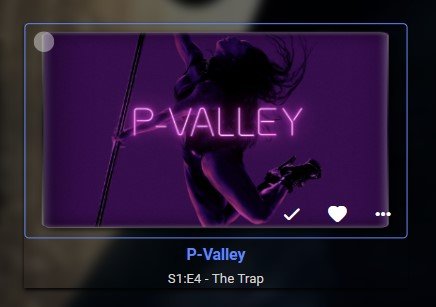
@tomnjerry74 mine works fine with inf scroll on movies page etc - try this - i have it at 1.03 as higher and the box does not render correctly this is with .25 beta and chrome 85 /*----- Posters slightly transparent, then opaque on hover ----*/ .cardBox{opacity: .85;} .cardBox:hover{opacity: 1;} /* ----- Poster background colour change and shadow on hover ----*/ .cardBox:hover {background:transparent !important; -webkit-box-shadow: 0px 2px 4px #000000; -moz-box-shadow: 0px 2px 4px #000000; box-shadow: 0px 2px 4px #000000; } /*--- Remove Play Indicator ---*/ .cardOverlayFab-primary {display: none !important} /* ----- Poster enlarge on hover ---- (V 2.9 - modified scale) */ .cardBox{transition:all 0.15s;} .cardBox:hover {transform:scale(1.03);transition:all 0.15s;} /*---- Add blue box around focused item (v2.9) ----*/ div.cardOverlayContainer { background: transparent; border-style: solid; border-width: 1.5px 1.5px 1.5px 1.5px; border-color: #4285F4; border-radius: 0.3rem; }2 points
-
I uninstalled it last night, and curiously, after just reinstalling it, it now works.2 points
-
Q-Droid was right! AlphardvB allowed me to SSH into his server and I found that the pi directory had ACL permissions set: drwxrwxrwx+. What I did to fix it was to install ACL, then run setfacl -bn pi to remove the special permissions, then chmod them correctly and was then was able to add /media/pi/kids in Emby.2 points
-
Hey guys, new version is ready for download 0.1.beta.24 Changes: Fixed (hopefully) bug that gives a white screen on movie "General" page load #1295 Added codec, HDR, and bit depth filters #1334 Fixed arg null exp bug #1338 Fixed links to Jellyfin pages #1335 Fixed null ref exp on people sync #1337 Switched to Name in movie table #1341 These are mostly bug fixes, only extra feature is 1334 (added 3 new filters in the movie table page) Next will be adding the tv show list page and missing episodes view.2 points
-
had a play with this and for me i reduced the px to 1.5 the box is more blue on my screen than shows in the screen shot
 2 points
 -
In the old forum it used to show how many view a thread had had is this possible in the new forum - can be a gauge of a popular thread even if not many are posting to it2 points
-
Are you doing something like this. div.cardOverlayContainer { background: transparent; border-style: solid; border-color: blue; }2 points
-
The thing to be aware of is the the LG C9 and CX models support TrueHD over eArc, but it is not supported in 3rd party apps like Emby, so even though it has eArc and TrueHD support, it has been tested several times and does not work in the Emby client. Samsung may or may not have the same issue, so until someone tests and confirms it, we won't know for sure. Check out this article in the Emby LG knowledge base, particularly from about half way down https://support.emby.media/support/solutions/articles/44001984861-why-does-the-emby-app-for-my-lg-tv-not-play-the-dolby-atmos-truehd-audio-without-transcoding- If your alternative is a 2019 Shield Pro, and you are still planning on buying a TV, then the TU7000 is still a good choice and there's a chance it might work when you test it for us2 points
-
ability to be able to add a collection into another collection. ie: Spiderman Collection into a SuperHero Collection. like i could with mediabrowser with shortcuts. TIA1 point
-
I would like the ability to disable the camera upload feature, both per-user and globally. It seems odd to me that that isn't already there as far as I can find... Sure I could just not use it, but that depends on trust that your other users wont decide to enable it, as the only on/off is in each users personal preferences.1 point
-
Maybe there could be an option to show only unwatched media in the "Because you watched..." and "Because you liked..." sections of the Suggestions Tab? Or is there already? Anyway, I'm using the web client via Firefox on a Windows 7 Ultimate machine...1 point
-
Hello. Would be great to be able to adjust subitiles delay in Emby Theatre or Web client like we can in VLC with "H" and "J" shortcuts (up and down). Thanks !1 point
-
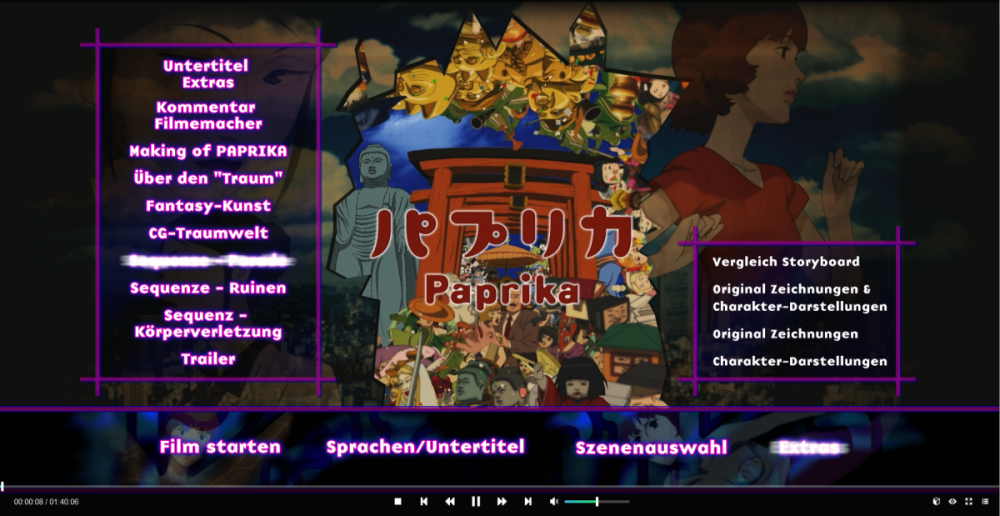
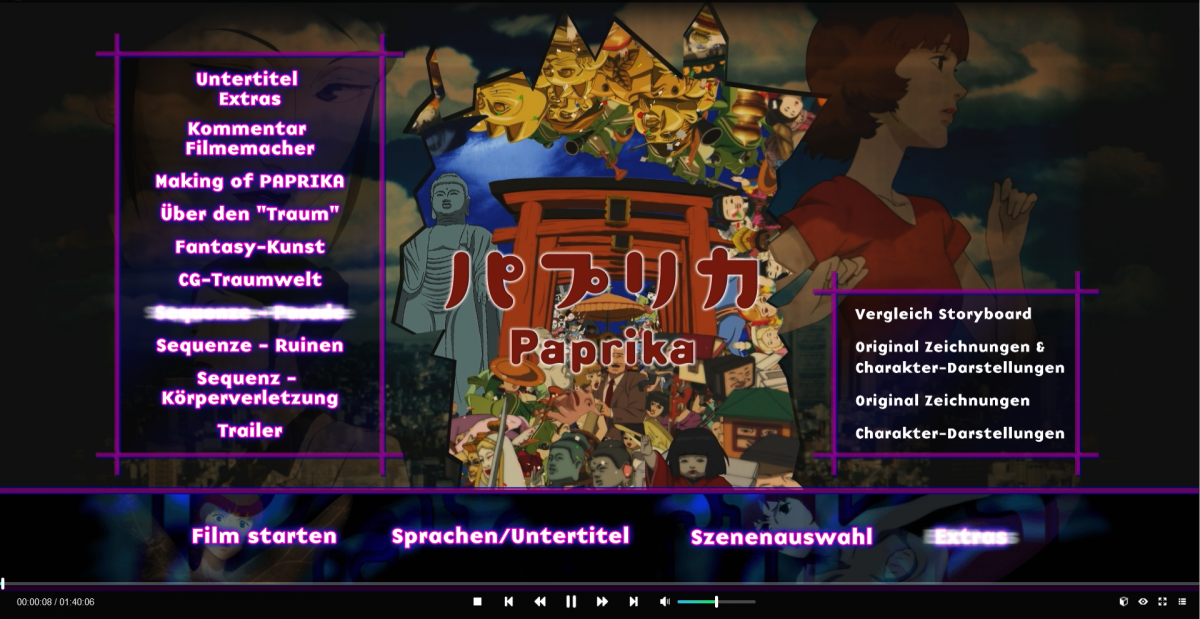
Hi, I allways do a complete Rip of my Blurays into Makemkv and try to convert the structure as close to the Original Bluray as possible. For example: I name the chapters of a movie, if they are named on the original bluray or if they have a small chapter paper inside the bluray box. I also rip the Bluray Menu and put it inside emby as backdrop. I try to preserve as much as possible, the only exception are languages. I just keep the native language of the movie + my native language. Sometimes bluray extras have a sub-structure. I have a screenshot to explain what I mean: On the left side is the structure of the main bluray menu. On the right side is the sub-structure of the specific bluray extra. I tried allready some attempts by myself, but I found never a solution, which I was real happy with it. 1. My first attempt was to rip every bluray extra as a own mkv file: Example: File 1: "Sequence - Parade - Vergleich Storyboard.mkv", File 2: "Sequence - Parade - Original Zeichnungen & Charakter-Darstellungen.mkv", File 3: "Sequence - Parade - Original Zeichnungen.mkv", File 4: "File 4: "Sequence - Parade - Charakter-Darstellungen.mkv". The bad thing about it, you got many many many extras for some movies, which results into a confusing & complex overview of extras, because of it's sheer mass. 2. My second attempt was to merge all extras of one sub-structure into a single file and create chapters for each single file. After that I use a chapter editor and named the chapters after the sub-structure of the movie. This method keeps the number of extras small and it looks "nice & clean" inside emby. The problem is, you can't work with this inside emby if you have movies, because there is no chapter view for movie extras. This method works very nice for TV-Shows, since "Specials" inside TV-Shows are handled like Episode. You can look into the chapters and jump directly into a specific chapter if you want this. So my request would be a method, to keep movie extras a little bit more organised. Perhaps it would be possible to add some sub-structure, on the Extras Tab? Maybe it would also be possible to open a extra in chapter view? I don't know. Maybe somebody got a "best practice" solution for it. I haven't found a solution, with I am happy for right now . A good example for a bluray with mass extras is for example "Grindhouse" Double Feature. In this case I would create 3 sub-structures: 1. Planet Terror, 2. Deathproof, 3. Grindhouse. This Bluray has with it's Bonus Disc around 45 extras. I have also started to numbering the extras to keep them a little bit organised.
 1 point
 -
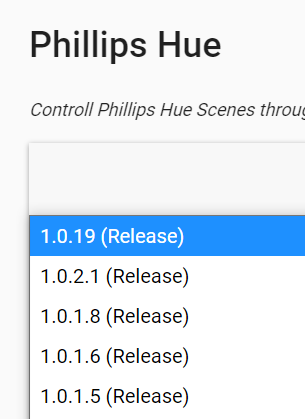
I think you'll need ot make it 1.1.0.0. This is the hierarchy it shows now @chef
 1 point
 -
Is this it ... https://gist.github.com/aaearon/3e1d4958cf726066c8f55d15da7d86b41 point
-
If using Channels DVR you can get a m3u by all or specific device Gives you m3u with all devices ... http://iptochannelsdvr:8089/devices/Any/channels.m3u Specific tuner http://iptochannelsdvr:8089/devices/13147C7B/channels.m3u1 point
-
OK. Thank you for your long commitment! Now I am even more convinced than at the beginning: Emby for NAS has some bugs! I hope I'll be happy with Emby on PC now. Arno1 point
-
OK, no problem I won't tell you anything more about it. LOL1 point
-
I guess someone can write a script but .. I did the easiest way for me.1 point
-
Yes it would appear to this item.css forcing margins.. .detailImageContainerCard .cardBox { margin-right: 0!important; margin-top: 0!important; margin-bottom: 0!important; } Quick fix use .cardBox-bottompadded instead of .cardBox. But if you disable Show fields Title and Year this will stop this zoom as there will no longer be a bottompadded. /* ----- Poster enlarge on hover ---- (V 2.9 - modified scale) */ .cardBox-bottompadded{transition:all 0.15s;} .cardBox-bottompadded:hover {transform:scale(1.03);transition:all 0.15s;}1 point
-
Hi, you enabled MovieDb metadata for episodes, which although richer than tvdb, it will cause library scans to be slower because metadata has to be downloaded one at a time for each episode.1 point
-
You can assign channel numbers by editing the M3U which I am sure you know. I messed around with M3U's for HDHomeRun tuners a bit - never found a way to do it for more than 1 tuner and not end up with multiple duplicates for the channels. There must be a way just haven't figured it yet.1 point
-
Emby Beta finally showed up on my TV and I have the arrows showing now. Also, it's been playing non-stop for 17 hours and hasn't given me any issues. Thanks for all the help!!1 point
-
I've downloaded the new version. I will report back after 12am Thanks again!1 point
-
She is all good now..connected her shield on here Google account..plus did emby connect..and your right about making sure the next button is highlighted..its hard to see..but it connected & shes all good1 point
-
Yes that sounds right! But 4am? My wife gets home from work at 2am or later and its dark until 6am generally1 point
-
That would return true between "SceneSchedule" and 4am which I think is the reverse of the intent of the setting??1 point
-
Hi Luke, used the above address with no issue, all settings work Thanks1 point
-
Yeah I'll try again but my testing previously suggested it was happening in the default skin too unfortunately. Good test though. Will update.1 point
-
i use a program called mp3tag to edit tags, it supports all music formats i use (flac(?)/mp3(id3..)) and others. '/' is probably the most compatible (with other players) separator, i use ';' as there are very few real artists with ';' in their name, Emby supports ';', but check your other players treat ';' as separator if going to use. Splitting automatically on common connecting words (featuring, feat. ft. etc) has been requested previously but would be difficult to implement, for now you will have to remove the connecting words and use separators. Or tag your songs through Musicbrainz Picard (prior to or instead of Mp3tag). With Picard you wont see your connecting words in Emby but equally you dont have to remove them from the the artist/albumartist tags (if other softwares you use can understand connecting words), this is because Emby reads the Picard tags directly to extract artists and album artists (in preference to the standard ones).1 point
-
Yes we'll be supporting DSM 7.0.1 point
-
I am pretty sure all DLNA traffic is on port 1900.1 point
-
Any update on this? Thanks1 point
-
That's good. Even though pi is listed was the OP able to go into it? It looks like /media is good but not proof of /media/pi access, unless I missed that check as well.1 point
-
We are working on the new delivery method for ass/ssa subtitles when remuxing but it's going to take a bit longer.1 point
-
I have tv connected via optical out because my audio receiver is older and support HD only ( no 4K, HDR) but when I play on PS4 , which is connected directly by hdmi to tv , tv passthrough sound correctly by optical out. But not in case of Emby. I get only stereo from Emby app but from PS4 I can get DTS etc.. I will test it more when I come back home via ARC.1 point
-
You can test this by temporarily turning off these two user settings on the server Allow video playback that requires transcoding Allow video playback that requires conversion without re-encoding This will prevent it from trying to convert the TrueHD audio. If it plays through to the amp then we can update the client to better support this automatically. If not, then there is probably not much we can do.1 point
-
We need to add a way to scroll it with the remote. But a mouse wheel will do it as well.1 point
-
@Beebo Thanks for confirm the real answer. I was beginning to suspect we needed to eyeball that entire subtitle logic in the Roku app and trace it fully again. I really didn't want to repeat that process as I was sure we nailed it the last time we took that deep dive, but you never know. Thanks very much for confirm that we have done the right thing already. Appreciate.1 point
-
I went through everything again with the latest DLL. I couldn't find any issues. I'm seeing what I expect to see. Thanks for your patience and for working with me on this. Very pleased.1 point
-
I have to disagree. For one thing, swapping out half your entire setup is not really a solution, and Roku handles subtitles just fine. It was the transcode throttling setting in Emby Server that was causing issues, which took me a while to discover since it's not obviously related to subtitles. But they work perfectly now. And btw, even when my QNAP does have to transcode (in most cases, it's just audio anyway), I don't experience any problems with that either.1 point
-
La película tiene un bitrate: 6084 kb/s, superior al bitrate soportado, seguro que no tienes seleccionada una reducción de calidad a 5 Mbps? La reproducción es remota. Si es remota, hay que mirar que no este en calidad Auto, ya que el bitrate máximo calculado automáticamente es muy conservativo.1 point
-
Yes it's something we'll be looking at revamping in upcoming updates. Thanks for the feedback.1 point
-
Pero esto que comentas es algo totalmente diferente...A ver si es que está transcodificando..cuando lo hace tarda más tiempo en cargar...Para evitar la mayoría de transcodificaciones en el apartado de reproducción del cliente, debes poner todo en máxima calidad 4k-120 Mb y se pondrá en reproducción directa...Saludos...1 point
-
Buenos días, yo también tengo Emby Premiere y no me ocurre esto que comentas. No creo que esté relacionado. Lo que si debes comprobar es si has instalado el plugin CoverArt. Si es así, que sepas que te va a ralentizar mucho la visualización de las diferentes portadas. Yo tuve que desinstalarlo y me carga muy rápido y fluido. Saludos...1 point
-
@EZEdI whole heartedly agree. I REALLY wish they would at least tell us what's planned for the next 6 months. I too am pulling for Emby, but there are some big gaps that I have to use Plex for. Wish I didn't have to but I have no choice. Now that we have an improved forum, maybe at a bare minimum we could get real voting added. Liking the first post doesn't work very well and isn't well known as a voting method. Make it obvious and allow us to sort by most votes so we have an idea (and devs have a better idea) of what users really want. Overall, it's getting there. Just wish I knew what was around the corner.1 point
-
For anyone who stumbles across this, there seems to have been a breaking change in the mesa drivers sometime between September 2019 and December 2019 (I use the oibaf PPA). Emby only officially supports the AMD Radeon Software for Linux 18.40. Which in turn is only supported on Ubuntu. I'm using Linux Mint so the installation of this flavor of driver fails. The mesa drivers worked for a time, but that time has ended.1 point
-
We need to expand on our trial facilities in order to accommodate this.1 point















.thumb.jpg.8268a4624d9bdfe1bf395c98d2a2b75a.jpg)