Leaderboard




Popular Content
Showing content with the highest reputation on 09/03/20 in all areas
-
We could tell you but we'd have to kill you...5 points
-
Nah. No wife should ever be unhappy but: "Bigamy is having one wife too many. Monogamy is the same." Oscar Wilde2 points
-
How many do you have!? LOL Happy wife, Happy Life!?2 points
-
Yes this will be going into our version soon. Thanks for the feedback.2 points
-
They have answered my support ticket telling me that they sent my concerns to the engineering department for a better analysis. They also told me that the EMBY is not completely synchronized with all the roku installation platform, and will investigate to confirm what is happening in brazil so I can install it.2 points
-
Go on, you can tell us. You can still kill Gilgamesh_48. Shoot the messenger. Am sure he (?) would have no problem sacrificing himself for the good of the team2 points
-
OK yes I see that. That's resolved for the next update. Thanks.2 points
-
DLNA does not broadcast outside the network the DLNA server is configure on.2 points
-
You will want to disable the user option "Allow remote control of shared devices" per user external user as mentioned about. When the remote user signs in they should no longer see those devices. See Remote Control section ON - "Allow remote control of other users" OFF - "Allow remote control of shared devices" or both off2 points
-
DLNA I'm sure only works on the server network. However Emby support "Casting" to other devices which I'm sure you're users will want to be able to do. For example they can login on their phone and cast a video to their Chromecast or Samsung TV as examples. Have you tried: OFF - "Allow remote control of other users" ON - "Allow remote control of shared devices" I believe the user can only "cast" to the device with these settings if they have an account/logged in previously on that device. Use a standard user (not your admin account) to test with.2 points
-
Hi, DLNA will only work on the network where the server is located. DLNA is considered a shared resource until it's in use I believe. If I understand you correctly, you will not want "Allow remote control of shared devices" turned on for non home members but it depends how others are using and sharing devices. There is no right or wrong way to configure this. It's need based.2 points
-
Apologies if this is a dupe with 190 pages of requests it is had to make sure. IMDB and themoviedb both have a lists feature and whilst i realize we cant use IMDB as a data source i use it here to show the concept (since it is easier to google examples that themoviedb). If a list could be the source of a collection tag it opens the door to some quite nice views. For example: TOP 100 BEST DISASTER FILMS https://www.imdb.com/list/ls002913604/ Top 100 Greatest Movies of All Time https://www.imdb.com/list/ls055592025/ Cult Pics https://www.themoviedb.org/list/1205521 point
-
While Emby already has recommendations built in based on previously watched items I find they are not all that helpful. They seem to be based on genre only, for example, because you watched a comedy here are other comedies in your library. I do like how the also directed by/appear in recommendations work though. What would be great is if Emby could incorporate Trakt's recommendations as they are much more sophisticated. Trakt's recommendations are not only based off of what you have previously watched but also what your Trakt friends and other Trakt users have watched. It takes user ratings and trending/popular media into account. Ideally Emby would include full Trakt integration allowing users to rate media after watching, view lists and recommendations, and view upcoming media all from within Emby but for now I think recommendations would be a nice addition. Trakt has the potential to give Emby that community feel and allow users to discover new media, find something to watch, and recommend media to other users. http://docs.trakt.apiary.io/#reference/recommendations1 point
-
Plex just announced that their beta will support Dolby Vision, is this something you guys have looked into at all? https://forums.plex.tv/t/release-announcements-android-tv-beta/154124/241?u=lock5711 point
-
@cayars @speechles Thank you guys for your responses, that makes a lot more sense. It would be a cool feature for the select few who do use Emby offline, but you're right, it would cause many more problems than it would solve (and it's honestly just a minor inconvenience to check in the device). I appreciate the time for your responses!1 point
-
Only if you are willing to manually edit the database and per library options.xml, while offline. Similar to this.1 point
-
Maybe he's Mormon and has a few. LOL Imagine having pissed them all off. UnHappy wives, miserable lives.1 point
-
1 point
-
1 point
-
I about crapped my pants when the initial text file I got back was 45k+ lines long, but I noticed some duplicates, so I filtered for unique entries and its a much more manageable 1500 or so... Still alot of bad files, but I just made one big batch file MOVE to another non-scanned folder location, and at least emby isn't choking on the bad files during scans anymore. Thanks again for everyone's help... now I gotta get to work re-acquiring what I can that is bad... -G1 point
-
Ah thanks for pointing me in the right direction as I never thought to check the XML files So i recently moved my data to a new NAS so all paths in the XML file are still pointing to the old NAS. Would it be as simple as replacing the paths? Luckily only the server name changed so that should be quick and easy to do. Edit: Yup, that and a library scan has brought them back. Thanks @Happy2Play!1 point
-
Are the contents of the playlist.xml files correct?1 point
-
I have had exactly that (just yesterday in fact) - I simply had not yet worked out the circumstances to report, but quoting a post near the end of the penultimate page was definitely in common. Paul1 point
-
Yup with their latest windows app it's extremely easy to set that up. That said, Emby seems to behave fine when being used behind a VPN, Plex really doesn't like it.1 point
-
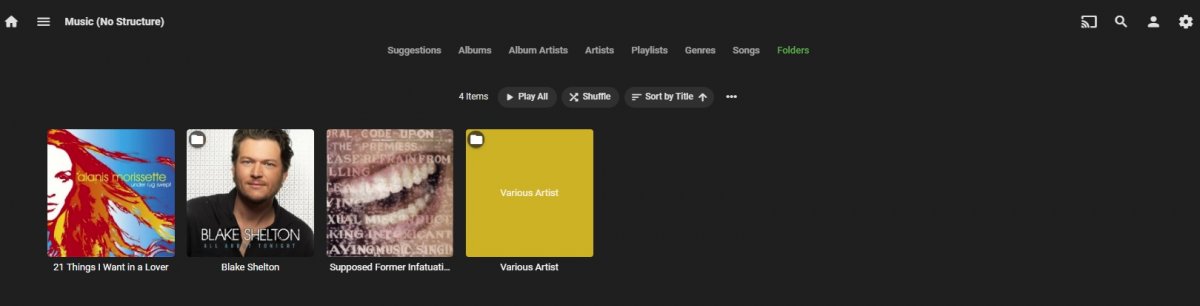
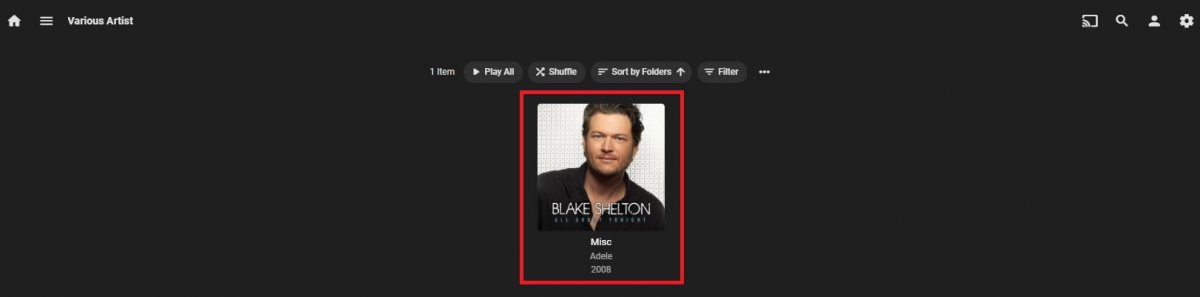
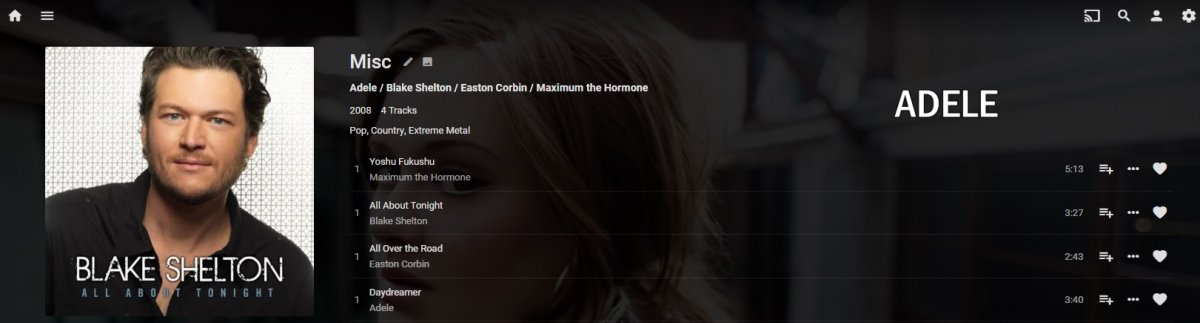
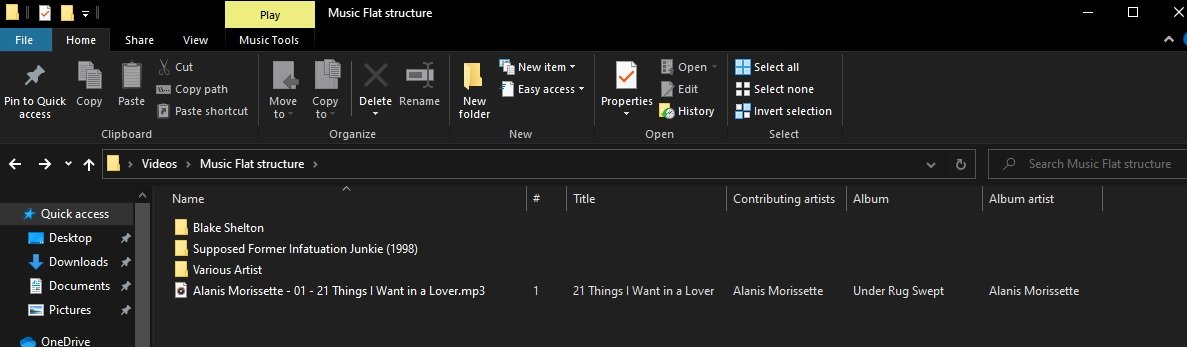
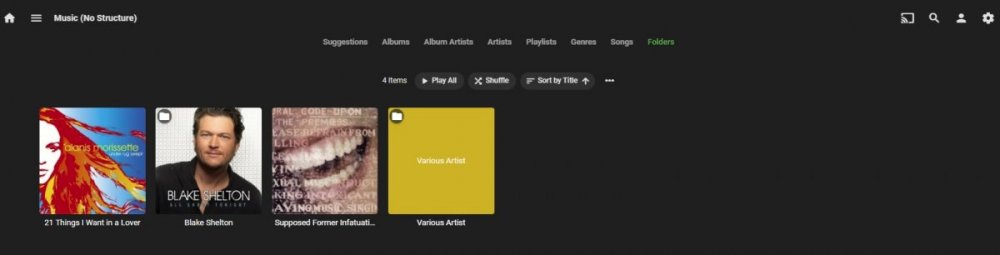
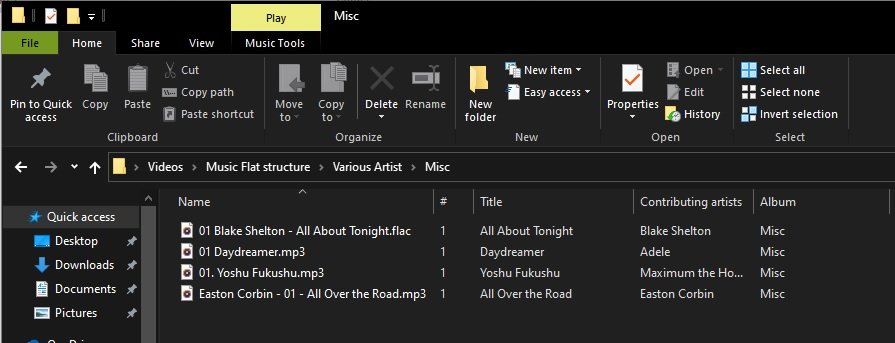
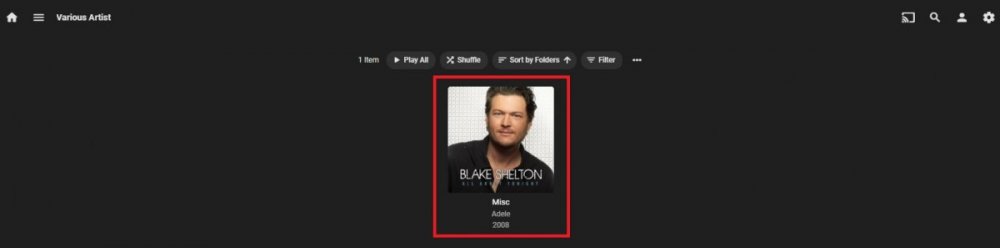
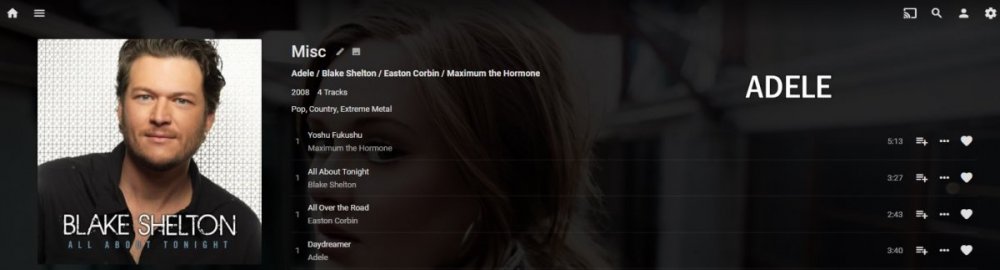
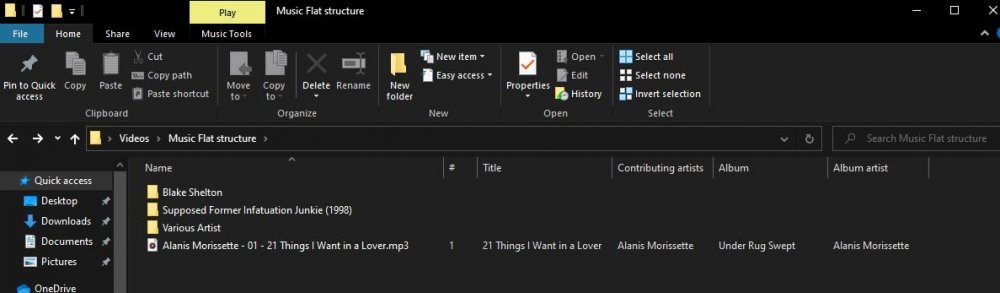
Basically in a /Music/Artist/Album all tracks must reside in a album folder.. Not ideal but currently single tracks can reside outside /Artist folder though (/Music). Would need to look at specific example but suspect extended tags. I had no issue putting tracks from 4 Artists in a Various Artists/Misc folder, removing all MusicBrainz tags and tagging Album to Misc. But other tags and image will/could me a issue. Until Emby become fully tag based there are limitations.
 1 point
 -
Most tagging software can structure everything for you.1 point
-
1 point
-
There is no such episode as there is only 35 episodes in season 2, so they need renamed accordingly per season. https://thetvdb.com/series/dragon-ball-z/seasons/official/2 If you want Absolute, you change Display order to Absolute and uses Season 1 folder with all episode and you can leave them with 1-314 but preferably S01E01-S01E314. https://thetvdb.com/series/dragon-ball-z/seasons/absolute/11 point
-
The company i work for has stopped supporting quick sync, not because of quality, but stability and speed. No personal experience outside of work though.1 point
-
That's a great idea. Looking forward to what you find. This information will help us help you if possible to get the best setup and you might even figure it out on your own as well doing a bit of playing a long the way.1 point
-
Hi. We've never had pay restrictions on local vs remote playback. Certain apps/features require payment regardless of where they are used. Thanks.1 point
-
Any chance you could give us a real-life example of what you're trying to "fix". What devices does a remote user see that they can "cast" to that you don't want them to?1 point
-
https://emby.media/community/index.php?/topic/88354-help-remote-access-chromecast/&do=findComment&comment=904223 Does this help?1 point
-
Ok I see what's going on, thanks.1 point
-
I have not figured it out exactly but I get the same result with tracks without Musicbrainz ids embedded. My guess would be the by name lookup is creating issues for ACE and ACE+. As mentioned above using Picard provided correct results. But will be doing some more testing. @Luke does that sound right?1 point
-
@Luke it would appear the header is transparent on this client.1 point
-
DLNA is the wild card type device. It's considered a SHARED DEVICE (as the option mentions) so that does give others access to this. It would be useful if we had a 3rd option "Allow users to control DLNA devices" but this would likely be hard to do. A Question for you. Do you need DLNA in your LAN environment? If you have a device feeding your sound system/TV you may not need DLNA at all and could turn this off. Then "Shared Devices" become much more useful for others and can't mess you up either.1 point
-
On Dashboard-Library your Music library what metadata downloaders do you have enabled.1 point
-
Are you on your local LAN when you reset the password? What is the URL in your browser when you're at the forget password button?1 point
-
@Abobader1 point
-
HI, I would like to request a feature where, when searching for a movie or tv show, if multiple versions exist in seperate librarys,then the librarys would be labeled. For example if I search for movie YYY I might get two returned search results, but I have no idea if this is the 4k version, the non 4k version etc(unless playing). So a library name on each movie in some way to indicate which library movie YYY is in. thanks1 point
-
@7illusions it might actually as simple as updating to the newer login params, specifically pw for password: https://github.com/MediaBrowser/Emby/wiki/User-Authentication1 point
-
He changed what the "shortcut" was pointing to in windows (the HDR script vs Emby) but then edited it to use the icon. So it would change the screen mode, launch Emby Theater then switch back on Theater exit with the Emby icon on the desktop. Edit: @blixt99 anyone ever tell you that you look a bit like Alex Lifeson of Rush? (at least your pic does if you weren't wearing glasses). You don't happen to know how to play La Villa Strangiato or Tom Sawyer on a Guitar by chance do you? LOL1 point
-
It enables a windows HDR option which doesn't exist in windows 7 so it's not going to work for you.1 point
-
UHD files are tough in general for transcoding. I try to avoid that on my system by keeping 4K in it's own library and I only grant access to this library for people who can direct play the media. If they can't direct play it then they have to use the normal version I have in my regular Movies library. This also solves HDR to SDR color space issues transcoding as well.1 point
-
Many people mix in videos with their photos but, when playing a slide show, probably don't want every single video to play automatically. We should probably make a way for you to play it manually while the thumb is on screen.1 point
-
Ver este post: https://emby.media/community/index.php?/topic/72548-permisos-en-centos/&do=findComment&comment=730586 El problema que estás teniendo es que tu disco se está montando en el usuario en /media/usuario/TUDISCO para hacer ese cambio desde el disk manager como root 1-lo desmontas 2- aplicas lo de la imagen. 3. vuelves a montar el disco ahora deberá haberse montado en /mnt/TUNOMBEDEDISCO1 point
-
Not at all. Everything is still split up in the separate libraries. Folder view is rarely used, mainly for holiday videos. Otherwise all of the holidays get mushed together. Playlists and collections for watching Looney Tunes and Cartoons. Regular Cartoon series and TV shows are both tv shows but separate libraries. Plagiarize away1 point
-
Yes, it is still a planned feature. I'll be working on updating the Alexa skill very soon and will look to add this feature.1 point
-
The cartoons are just the cartoons. Hell, the scraper will treat a file called S1953E18 Duck Dodgers in the 24th and a Half Century.mp4 the same whether it's a video containing the cartoon, a renamed copy of Conan the Barbarian, or a text file. The Blu-Ray versions are simply higher res versions captured from new master scans that WB is doing as part of their film preservation efforts. The master files were likely scanned at 4k resolution. I don't have the DVD source discs to compare to but the Blu-Rays are beautiful...generally speaking, remastered HD animation is definitely worth having. The quality difference in the classic Disney films, for example, is astounding. It sounds like you're either leaving your discs in VOB or ISO format. That's not going to work with a scraper. There is no entry in any of the source sites for discs containing multiple cartoons. If you want the scraper to recognize these items you have two options. Treat as movies. Break discs down into individual files, identify each cartoon, organize and label like this: \Movies\Duck Dodgers in the 24th and a Half Century (1953)\Duck Dodgers in the 24th and a Half Century (1953).mp4 \Movies\Mad as a Mars Hare (1963)\Mad as a Mars Hare (1963).mp4 Treat as TV. Break discs down into individual files, identify each cartoon, organize and label like this: \TV\Looney Tunes\Season 1953\Looney Tunes S1953E18 Duck Dodgers in the 24th and a Half Century.mp4 \TV\Looney Tunes\Season 1963\Looney Tunes S1963E14 Mad as a Mars Hare.mp4 If you choose the first option each cartoon will show up in Movies as an individual item. You can create a collection to house them. That's how my Pixar shorts are grouped. If you choose the latter all the items show under TV organized into 'seasons' that match the release year of the short. That's now my Looney Tunes are grouped. Totally up to you which you prefer.1 point