Leaderboard




Popular Content
Showing content with the highest reputation on 09/02/20 in all areas
-
I mentioned it in another thread, but thought I'd put it here since this looks like a new section--just for posterity. Would like to have a bulk meta data editor function. For example, if I have 750 videos whose producing studio is the same, I want to select those videos and apply the name of the studio to those videos. Similarly, if there is a custom tag I want to apply to a subset of those movies, I want to be able to select them in bulk and apply the tag to those videos (instead of selecting them one by one).2 points
-
Yes, I realise that - thanks! (I've made a separate thread for the simple 4:3 stretched to 16:9 matter.) Paul2 points
-
If selected, it will switch to a mode with a resolution that matches the content. If not, it will leave the resolution the same and look for a mode with just the proper frame rate. Yes, this is for those that want their TV to do scaling instead of the Android device.2 points
-
Be able to create playlist based on a certain criteria, like genre and or year, in order to create a dynamic playlist that it refreshes automatically when new content is added. This way you can for example, create a tv comedy playlist from the 90's, or a new sci-fi Movies playlist. Some other criteria for rules could be the rating, watched/unwantched, score, tags, language, audio codec, etc The possibilities could be endless1 point
-
ability to be able to add a collection into another collection. ie: Spiderman Collection into a SuperHero Collection. like i could with mediabrowser with shortcuts. TIA1 point
-
I would love the option to store Emby's database in MySQL - I have a setup that serves around 30 people and I feel that there would be real performance gains by using a proper relational backend over SQLite (I'm presuming). On top of this it would make life easier for me when reporting on watched status a cross users.1 point
-
As I mention in a related post, I love the additional subfolders for Movie Extras (eg, Shorts, Scenes, Interviews, etc.)! It would be awesome to extend this functionality to TV Series as well. Specifically to add support for many/all of the same folders supported for Movie Extras, eg, extras specials shorts scenes featurettes behind the scenes deleted scenes interviews trailers As well as any additional folders that get added in the future (eg, hopefully Galleries). Support Placement of "Extras" Folders Within Each Season Folder, Plus A Naming Scheme to Link A Particular Extras Folder with a Specific Episode (eg, "\Season 1\E1 - Deleted Scenes\" for episode 1 deleted scenes): I want to clarify that it would be great if these various "extras" folder types could reside within each Season folder. So for example, within a Season 1 folder we could then have an "Extras" folder, a "Deleted Scenes" folder, a "Featurettes" folder, etc. And furthermore, that we could designate a particular folder to refer to a specific episode (eg, "\Season 1\E1 - Deleted Scenes\" for episode 1 deleted scenes). See more below, particularly why I think this would be so useful: https://emby.media/community/index.php?/topic/55915-emby-server-theater-additional-extrasspecial-folder-types-for-tv-series-similar-to-movies/&do=findComment&comment=587195 Thanks for your consideration! PS - If this is something you might like to see implemented, be sure to "Like" this top/first post (as well as any subsequent posts in this thread that highlight particular aspects of what you are interested in) -- "Liking" the top/first post helps the Devs to know how much interest there is in a given Feature Request.1 point
-
While Emby already has recommendations built in based on previously watched items I find they are not all that helpful. They seem to be based on genre only, for example, because you watched a comedy here are other comedies in your library. I do like how the also directed by/appear in recommendations work though. What would be great is if Emby could incorporate Trakt's recommendations as they are much more sophisticated. Trakt's recommendations are not only based off of what you have previously watched but also what your Trakt friends and other Trakt users have watched. It takes user ratings and trending/popular media into account. Ideally Emby would include full Trakt integration allowing users to rate media after watching, view lists and recommendations, and view upcoming media all from within Emby but for now I think recommendations would be a nice addition. Trakt has the potential to give Emby that community feel and allow users to discover new media, find something to watch, and recommend media to other users. http://docs.trakt.apiary.io/#reference/recommendations1 point
-
Howdy everyone! I was browsing the forums and saw there had been talks about people requesting a Vizio Smart TV App for emby. Is that still on the maybe pile? Just curious as I just picked up a new Vizio TV and would love to have the app built in. Looking forward to your reply! Thanks1 point
-
hey what I'm really missing is support for audiobooks. Simply saving the resume point for those mp3s would be absolutely enough, no need to fetch metadata etc.1 point
-
To gauge interest... What if you had the ability to "Forget" a series for the purposes of Next Up display. That is, it would no longer show in Next Up - unless you watched another episode. Sometimes you maybe watch a series for a while and, even though there is more of it or more is made later, maybe it isn't as good as the earlier seasons or maybe you just don't have time for it anymore. So you'd like it to quit showing up in your Next Up list so it is less cluttered and you can focus on the series you are actually watching now. If you start watching it again, the "forget" would be forgotten and it would start to show up in Next Up again.1 point
-
Just a side note: @PenkethBoy is right: It's all about the settings. The only reason why one could easily think that sw encoding quality would be much better than hw encoding, is a mismatch in Emby's default settings for either case. (ultimately, sw libx265 is probably in fact superior to most hw encoders, but that's just the final few percent. The effect/difference that you're typically seeing is rather caused by the above)1 point
-
I have no problem with anime over 100 episodes, of which I have a handful. I follow the Emby naming guidelines as closely as I can and number shows according to the TVDB numbering (I do not use the Anime plugin to get extra metadata). The format is just slightly different from yours, so perhaps you could try it: /Show_Name/Season nn/Show_Name snnenn I don't normally bother to give the episode numbers up to 99 an initial leading zero, as I didn't find it necessary; but in the series I did, there was no change in behaviour. Paul1 point
-
Hi, You should be good all around if you rip to MP4, use H.264 video codec and make sure to include a 2 channel AAC audio track (and any other audio tracks after this).1 point
-
Yes, it looks likely that this may be the case. I'm no programmer but it looks as though when a recording is scheduled, Emby calculates the amount of time to elapse before the timer is due rather than setting an absolute target time? When the computer sleeps. that "internal" Emby timer is not decremented so it becomes later by the amount of time the computer has been asleep. I'm not sure if Emby is aware that the computer has been sleeping or is notified when it re-awakens. I also don't know how often or under what circumstances it checks in with the real time clock to maintain it's timings. Suspect the answer to this may lie there somewhere. Also the fact that the computer can wake from an Emby generated scheduled task and then idle itself back to sleep again without Emby making any entries in the server log during that time suggests that Emby maybe does not recognise that it is still running until there is some user input to it? Tomorrow I will try two timers - on I will let the computer wake up unattended and the other I will interact with Emby as soon as the computer has woken and we'll see if that makes any difference.1 point
-
Tagging with Picard shows the correct information though. To me this would have to be something in the lookup process.1 point
-
https://emby.media/premiere-ext.html Send PM to @ebr telling him what you need1 point
-
These are my setting, I use default settings: ... <EnableUPnP>false</EnableUPnP> <PublicPort>8096</PublicPort> <PublicHttpsPort>8920</PublicHttpsPort> <HttpServerPortNumber>8096</HttpServerPortNumber> <HttpsPortNumber>8920</HttpsPortNumber> <EnableHttps>false</EnableHttps> <IsPortAuthorized>true</IsPortAuthorized> <AutoRunWebApp>true</AutoRunWebApp> <EnableRemoteAccess>true</EnableRemoteAccess> ...1 point
-
+1 for a Vizio app! FWIW, I have access to 5 Vizio Smart TVs for testing purposes. I will see what I can do to lean on Vizio as well...1 point
-
Thanks for the feedback.1 point
-
extract with "gMKVExtractGui" needs MKVToolNix installed to work and to convert "subtitle edit" - does a lot more than just convert sub files etc1 point
-
Hi, yes this has come up before relating to MovieDb. It's possible for the future. Thanks.1 point
-
@Luke I appreciate the response, but that's kind of the boiler plate answer. Can you please commit to this? This is an EXTREMELY basic feature that definitely needs to be included for all the platforms. Other than 4k not working on the Xbox, this is now the primary reason I still have Plex installed. I really shouldn't need 2 server apps installed. Can you please address this feature in the near term (1 - 2 months) app updates?1 point
-
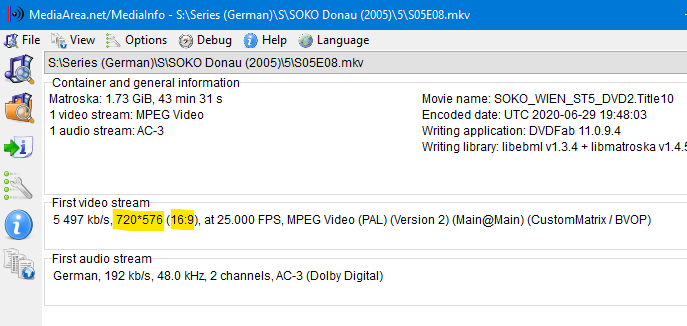
I'm always focusing on the OP. And the OP has posted the MediaInfo screenshot indicating that the video is anamorphic. If you have a different issue, please create your own topic. Thanks.1 point
-
Yes it's a good idea to add. Thanks.1 point
-
This is a veteran bug about thumbnail generation for anamorphic (SAR: 720:576 == 4:3; DAR: 16:9) videos. It is fixed internally but the fix hasn't made it into beta yet.
 1 point
 -
Geiz ist halt noch immer geil...1 point
-
OK, I think I know what's going on here. I'm not aware of anyone trying to transcode 4K content on a 1080 model in the past, so this has not really been tried before, but it should work fine. There was more than one thing that needed to be fixed for this, so hopefully the next USB release should resolve this. Thanks for your patience.1 point
-
And what about resolution match option?1 point
-
A setting frequently missed (as peoples screen shots of issues shows in 'Stats for Nerds'..) is the frame rate matching option - which is off by default. If your TV refresh can match the source (which on any modern TV in the last 10 years should be able to do) then this should be switched on - resulting in much smoother 'panning' and less 'juddering' in films. Modern TV's do a much better job then they used to with 'pulldown' (trying to match the video frame rate to the TV) but it is still much better to just refresh at the Native refresh rate if you have the option. The downside is you might see the screen 'blank' for a fraction of a second when switching back to the Emby menu's.1 point
-
I use ffprobe from Emby ffprobe -i "source"1 point
-
Fyi there are several topic on Auto and it sending data at to low a bitrate. I personally have the user set the client to max quality and control the quality by the stream limit I apply to the user.1 point
-
With Emby Premiere you can unlock all of your devices rather than having to purchase unlocks for each individually.1 point
-
This is because of a locale using arabic decimal style. Is your windows configured to use arabic formatting for date/time?1 point
-
I have no issues on Windows FF 81.0b4 (64-bit) or Nightly 82.0a1 (2020-09-01) (64-bit). 4.5.0.221 point
-
This guy is an absolute champion.1 point
-
Looking forward to new version.1 point
-
I was able to resolve this issue by removing all folders (the specific collections) from the collections folder (in my case /config/data/collections), then scan the collections folder for changes, verify nothing was there, move all the folders back, then scan again, all collections, posters, theme music and movies are all there again. Before i did this, I changed the ownership and permissions, and that didn't resolve the issue.1 point
-
Which is an entry level Orsay tv from 2015 https://developer.samsung.com/smarttv/develop/specifications/tv-model-groups.html So I'm guessing running .122 if it was downloaded from the Samsung store (looks like it was built in North America), but if @Tolerant could confirm the version running that would help.1 point
-
Model: UN32J5205AF Type: UN32J52051 point
-
I appreciate the info thanks. The app has actually worked better for me than it did on the fire stick. Keep up the good work.1 point
-
it's really disappointing, it's the big black point of this application for me1 point
-
Looks like your other questions were answered. My biggest advantage of Emby over Plex is the fact that it's my server and my users. Even though you "can" use Emby Connect, you don't have to. Other than a device being used, Emby doesn't really have any information on my users. I've set up my own domain, secured it, and create my own users. Plex on the other hand wants everyone to be a Plex user so that they can sell them on additional content and services. I'm not saying that's inherently bad, it's just not the business model I prefer for my own media server.1 point
-
Hi. The subtitle editing permission is already there. The others or, rather, a role-based permission system, is a good idea for the future.1 point
-
My lack of organization is the real answer to this lol. I need to set up a spreadsheet of all the icons from the original collection and see what I'm missing from the colored/coloured collections. I have big plans, but I need to lay down the mapping first so the details don't get lost. Good looking out, and I will try to get this corrected ASAP. I work in sports media, so work is getting busy, but I love working on these in my spare time. If you want to pm me what is missing from the black collection, I'll start making those. More than likely if it's missing in that collection, it's missing in all the others and I'll add them to my master template. Thanks, Dibbes!!1 point
-
Hi @Thomas Straub, welcome. There are two plugin folders to be aware of inside the Emby-Server folder structure. One is at "Emby-Server/system/plugins" The other "Emby-Server/programdata/plugins". You want to out the dll in the "programdata/plugins" folder and restart the server. @Dibbes let me see what I can do with the year data. I'll get back to you.1 point
-
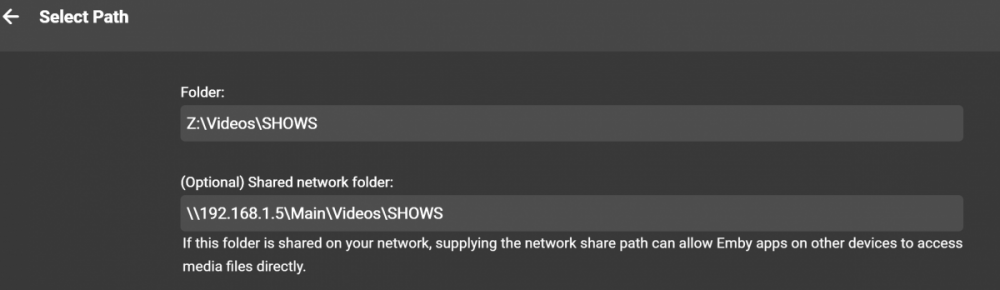
I'm sorry, I'm afraid I'm not entirely sure what you mean? Library config and address? Do you mean this? (Note: This is just for TV Shows. I have 8 libraries. Shows seems to be what I have most issue with)
 1 point
 -
HI, you should be able to do this with the next release. Thanks.1 point
-
+1 for this issue I'm experiencing the same thing with Xbox one. Was working fine until last night, I can launch emby, browse all content but the second I start to play anything I get the spinning circle of death. Nothing has changed in my environment, all other devices play fine, only seems to be Xbox one.1 point
-
Bulk editing of metadata is something we'd like to add for a future release. thanks !1 point