Leaderboard




Popular Content
Showing content with the highest reputation on 08/29/20 in all areas
-
First of all, Thank you to whomever or whatever changed that now allows Trailers to be played on a Amazon Fire TV Stick. All of you at Emby ROCK! Maybe others can test different models with slightly different versions. Also all of my devices are unmodified (side-loaded). I've only been able to test it on 1 Device so far. Plan to check others later this week. But here is what it is working on so far. Amazon Fire TV Stick 4k Fire OS: 6.7.2.3 (NS6273/2773) Fire TV Home Version: 6240042.1 (not sure if relevant) AndroidTv: 1.8.24a Emby Server: 4.5.0.22 beta (Premiere Key) Trailers (plugin): 1.2.9.0 Also if this was covered somewhere else already, I did a search and didn't see anything and thought this was excellent news. This is a huge + for Emby and Fire OS as it was a feature sorely missed. -jack2 points
-
I found it in my recycle bin... tizen 1.0.81.zip BTW I have the same problem on KS7000 (2016)2 points
-
Looking now. It's a name my mother use to call me sometimes... ... is all i know right now. Looks like it is using XML RSS to get channel info.2 points
-
Pretty simple suggestion. I have multiple users for my Emby server. If I want to do continuous maintenance on the media, I have to tell everyone. some of them are harder to reach than others ( i.e. no Facebook or Skype chat etc. ) It would be great if say... on the admin panel, I could hit a check box that enables 'maintenance mode', where the server still runs does everything as normal, but instead of the login screen it displays a maintenance page saying the server is unavailable. Even better if I were able to directly put a reason in a text box that would then display on the login screen as well. Not really sure what others would think of this, but for me it would be quite helpful. mostly if I want to make sure no one is trying to access content I know won't work until I've done a full library scan again. Thanks for reading. -Kyle1 point
-
I've seen this option on other players, and it has come in handy many times. It's for when you're listening to an album / playlist, and you decide you're done for now, but you want the current song to finish. Sorry if this has been suggested before. I searched, I swear.1 point
-
As I mention in a related post, I love the additional subfolders for Movie Extras (eg, Shorts, Scenes, Interviews, etc.)! It would be awesome to extend this functionality to TV Series as well. Specifically to add support for many/all of the same folders supported for Movie Extras, eg, extras specials shorts scenes featurettes behind the scenes deleted scenes interviews trailers As well as any additional folders that get added in the future (eg, hopefully Galleries). Support Placement of "Extras" Folders Within Each Season Folder, Plus A Naming Scheme to Link A Particular Extras Folder with a Specific Episode (eg, "\Season 1\E1 - Deleted Scenes\" for episode 1 deleted scenes): I want to clarify that it would be great if these various "extras" folder types could reside within each Season folder. So for example, within a Season 1 folder we could then have an "Extras" folder, a "Deleted Scenes" folder, a "Featurettes" folder, etc. And furthermore, that we could designate a particular folder to refer to a specific episode (eg, "\Season 1\E1 - Deleted Scenes\" for episode 1 deleted scenes). See more below, particularly why I think this would be so useful: https://emby.media/community/index.php?/topic/55915-emby-server-theater-additional-extrasspecial-folder-types-for-tv-series-similar-to-movies/&do=findComment&comment=587195 Thanks for your consideration! PS - If this is something you might like to see implemented, be sure to "Like" this top/first post (as well as any subsequent posts in this thread that highlight particular aspects of what you are interested in) -- "Liking" the top/first post helps the Devs to know how much interest there is in a given Feature Request.1 point
-
Emby Theater takes 30 seconds to update - and there's absolutely no indication that anything is happening during those 30 seconds. Please display some kind of splash screen image during the update process.1 point
-
I have chapter-split all of my audiobooks, but there is no album or folder-level Play/Resume button, meaning I have to select one chapter at a time to listen to my audiobooks in Emby, or else manually add each chapter to a playlist or some such. Please add playback controls for the album/folder instead of just each individual file in the Book content type.1 point
-
What does this plugin do? It will sync playback progress of media items between two accounts Why is it useful: Regular user accounts (not admin) may have simpler to key-in passwords (note: not simpler passwords... simpler to key in passwords) for remote controls. If you have an admin account with a password which is extra difficult to key in on remotes, and you would like to keep the admin account's watched status up-to-date, but would consider using a 'non-admin' account to watch media, then you can sync the progress data back to your admin account. This plugin will only sync the playback progress data to an account if the position of the playing media (when stopped), is further along in the runtime then what was already present in the sync'd account. I hope I have explained it well enough. Feel free to check out the Github for this plugin: https://github.com/chefbennyj1/Emby.AccountSync or ask questions. Thanks AccountSync.zip1 point
-
To gauge interest... What if you had the ability to "Forget" a series for the purposes of Next Up display. That is, it would no longer show in Next Up - unless you watched another episode. Sometimes you maybe watch a series for a while and, even though there is more of it or more is made later, maybe it isn't as good as the earlier seasons or maybe you just don't have time for it anymore. So you'd like it to quit showing up in your Next Up list so it is less cluttered and you can focus on the series you are actually watching now. If you start watching it again, the "forget" would be forgotten and it would start to show up in Next Up again.1 point
-
Yes, thank you for your help.1 point
-
But existing people would not factor into a Media item refresh as the person already exist and there is zero point if you refresh every Tom Cruise movie to refresh the actors that many times. So People will always be a delicate subject as you could be black listed for say requesting Tom Cruise 20 times because you have 20 movies. Service provides have requested to quit hammering their site so we will always be limited or they could always black list Emby's api key.1 point
-
No good reason, actually. I fled the Windows world decades ago somewhere between XP and VIsta. I'm assuming it's better now but Windows networking always drove me crazy. I remember the Chameleon IP stack for Windows 3.1. Back in the 90's I was CTO at little company doing ruggedized notebook machines for K12 education. Paul Allen was one of the early investors. I told him we were planning to run Win95 out of flash and he said we would never get it to work, (but he invested anyway!). We did get it to work, but discovered that while Windows wouldn't run in 32MB of memory without a swap file, it would run in 16MB with a 16MB swap file. (Yes... megs, not gigs). So we built the initial machines with 32MB of RAM and used half of it as a RAMdisk. (Actually it ran a bit faster than it did with 16 MB of RAM and a big swap file on rotating storage). It was early days for flash memory but we needed to do that because the spec we needed to meet was a 5-foot drop to concrete. Disks of the day (and maybe even today) simply weren't up to it. But the Emby Server on Linux has been very stable for me. I just got seduced into the Nvidia Shield Pro because of the promise of a small, quiet set-top box with a nice remote that promised (but didn't deliver) hardware acceleration for HVEC encoding. Switching from an HDHR Duo to an Extend fixed the problem with Live TV recordings on the Linux box. The Linux boxes on the shelf here are all at least 5 years old with little Atom processors (except for a couple of RaspberryPis and a Jetson Nano), so they're pretty anemic and don't have a real GPU, ...well the Nano does but it can't yet run ffmpeg! My son did give up on the Shield and move his Emby Server to a Windows machine because he was trying to do 10-bit 4K transcoding and again the Shield fell short. So the plan is to build a linux box with a real GPU and use that for my primary Emby server. But I'm up to my eyeballs in projects right now, so that will have to wait a couple of months. I'll limp along on the Atom box for the moment, and just use the Shield for the Emby Client, and a little experimentation with the Beta Server. I do like Shield remote... way better than the AppleTV remote. But with all the trekking down rabbit holes, I have learned a lot playing with the Emby Server on the Shield. And I'm grateful for all the patient support from the Emby team. You guys rock!1 point
-
Have a look at emby's systemd service file, is there a line ReadWritePaths= if so you may need to add a path to your folder systemctl edit emby-server [Service] ReadWritePaths=/path/to/my/share regards1 point
-
dont think its anymore tedious to do as once done it will just work with a script if you got to plex enjoy them mining your data1 point
-
You configured the server to use your embedded titles. It did what you told it to do.1 point
-
A server log may explain it all but it needs to reflect one of these files.1 point
-
Depende del fabricante del televisor, pero es un proceso muy similar en todos los dispositivos Android TV: https://www.howtogeek.com/251527/how-to-change-your-android-tvs-device-name/1 point
-
The next release is currently in the beta channel.1 point
-
Sometimes I think VirtualTV is planning the TV broadcasting program each time (every day?) for the whole year. My EPG option is set to seven days. So this is strange. Maybe another reason for the delays in refreshing the guide data? At the moment "Refresh Guide" takes almost half an hour for just half a dozen movie test channels. If I mix in TV shows or create TV show channels, it takes way longer.
 1 point
 -
No thread as this was done in combination of PM and remote help. You seem to have a firm understanding of what to do and I don't think you'll have a problem with setup or deployment at all! Feel free to PM me or ask in a thread if needed for any specific help however! Carlo1 point
-
Hello again, it turned out to be the settings on the Sony DN1080 receiver (which I find very odd). A long time ago I had disabled CEC (which would also disable earc) on the receiver because everytime I turned on the TV (and the receiver because of CEC) after 30 secs the receiver would launch its HOME overlay and I would have to manually select my source (S902 box with Kody and embycon) which was the most annoying thing. By disabling CEC on the receiver I could still control the box with the TV remote (LG B7) and since the box was directly connected to the receiver I would still get atmos passthrough. The thing is, sometimes I use Emby for LG to watch TV shows and I just use the TV speakers.. then for movies I use also the receiver. It wasn't such a big deal having to turn them both on and control de volume with the receiver remote... also just for music I would not have wanted the tv to be on.. I have enabled CEC and auto standby on the 3 devices now (tv, receiver and shield) and when I put the shield to sleep the tv and receiver turn off... and they turn back on when I wake the shield tv... AND most importantly the stupid receiver doesn't launch the HOME overlay anymore after 30 seconds. I am very happy.. at last. But I don't understand why passthrough wouldn't work with CEC (or earc) disabled since the receiver is getting the signal from the shield directly and not from the tv through arc or earc. Anyway, I hope this will help somebody.. sorry for the first ranting1 point
-
Please refrain from profanity as this is a family friendly environment. We are looking into this issue.1 point
-
The Roku will get there with all those same options that are in the Android TV app. The challenge with Roku is the lack of any libraries you can repurpose. There is no javascript. There is no C. There is just brightscript. On top of brightscript is a rather cool XML scripting engine called scene graph. It uses similar extensions to programming video games. But there are limits. You are bound into the original interfaces Roku provides. Then using those you can extend them to provide more functionality. Then extend that interface again to provide even more. And stack upon these interfaces with components and build the bones of the application rather quickly. The XML provides access to the render thread. The brightscript runs in the render thread. So you can change what is within the XML using brightscript. Basically you extend again the component with brightscript. It makes it confusing at first because you have 3 levels of code. It is a lot like writing COBOL and you saw how those coders were recently in demand. To code on Roku you have to get your hands dirty. You have to be ready to fail 100x and "get it" on the 101st try. Nothing comes easy. But eventually you learn the quirks and can work around them. That is until the next firmware update. Then all is back to square one and you must chase bugs that may appear in the app because the firmware changed. It makes it fun because nothing easy is ever worth doing. You feel accomplished when things on Roku start to work as you imagined them. Then you go maybe this isn't as hard as every person says it is. But trust me. It isn't hard. It is difficult juggling because of all the inner dependencies and inner relationships on how they pass object references among themselves. It is juggling while balancing on a beam. At any time.. crash. But that is the fun of this. If you aren't having fun it isn't really worth doing unless you put your heart in it. Right? That is what we do.1 point
-
Great, 2017 Pro is better than 2019 Tube1 point
-
I really liked the LG Client app, with the exception of the issues I mentioned, but I finally got irritated enough with it to try something different. I first bought a Roku Premiere and gave that a shot but I really didn't like the interface, so I returned that and got a Mi Box S, and I can't say how happy I am that I did. The Client for Android TV shines in every aspect! I expected that it would as there are probably far more people with Android boxes or TV's than there are those with LG TV's and I suspect that more development time is probably devoted to Android than some of the other Clients available. And with the Emby Client for Android TV there are several options available that didn't exist in the LG Client or Browser that I never knew I wanted, until they were there!1 point
-
Yes, it's only older/2016 models1 point
-
A fix will be coming soon1 point
-
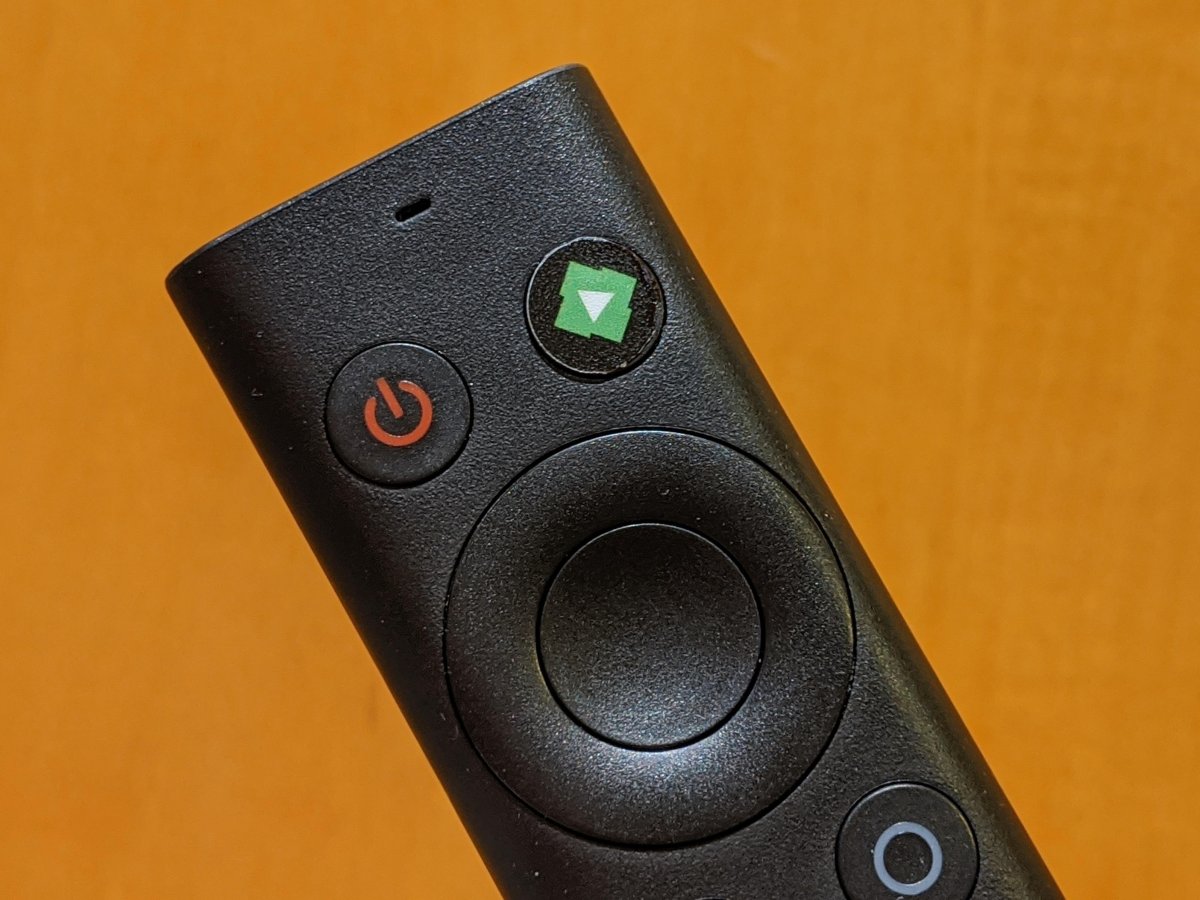
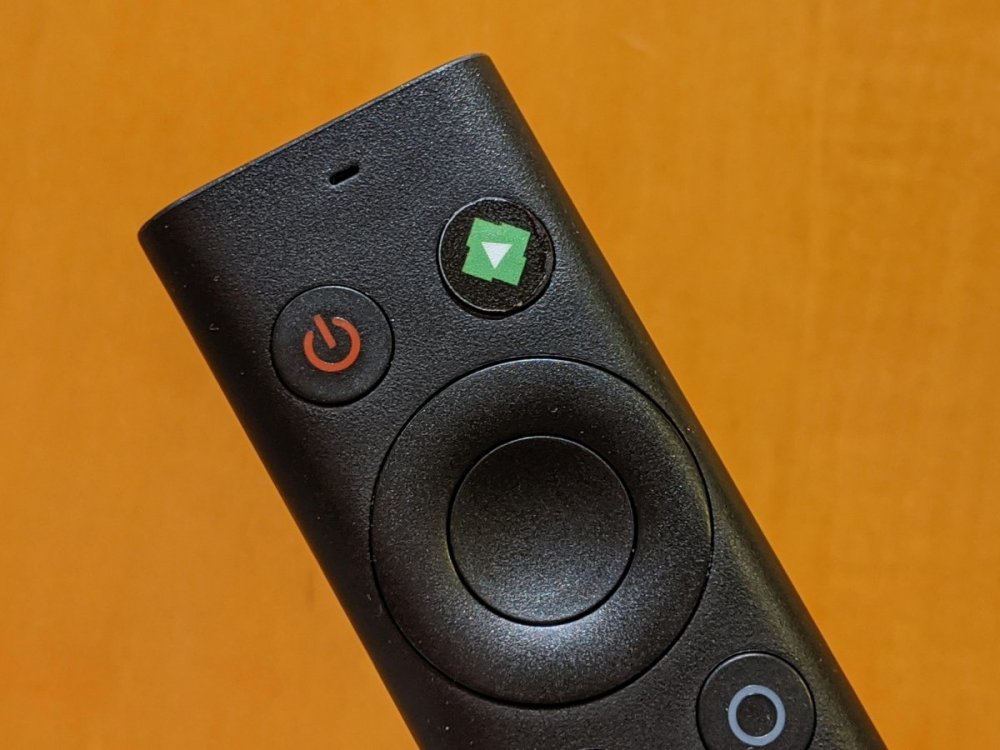
For anyone interested the company I bought the oblong Emby sticker (post #2) from now makes one for the menu button. I have no complaints about the one I got, very good quality.
 1 point
 -
High bitrate content playback issues (Shield Tube) are not on the list of known issues: https://www.nvidia.com/en-us/geforce/forums/shield-tv/9/395152/knwon-issues-shield-experience-upgrade-82/ Either they don't know or they don't want to know.1 point
-
"Only supports AC 5.1" are not the right words, I meant it does not support lossless audio and DTS but it supports AC3 5.1, a quite common system In summary: If you want to ensure direct playback, you must have as many tracks as systems you have. You can forget about the audio and let Emby do the job, it works perfectly, but you may run into problems streaming some 4K HEVC HDR content (the answer to the original question)1 point
-
Thanks Puffy Acoustic Alternative Pop Alternative Rock Audio Book Blues Britpop Classical Comedy Country - done Dance Easy Listening - done Electronica & Dance Folk Funk Grunge Hard Rock Heavy Metal - done Indie Pop Indie Rock Jazz - Done New Wave Podcast Pop - Done Pop Rock Post Grunge Progressive Rock Punk Rock R&B - Done Rap & Hip Hop - Done Reggae Reggae & Ska Rock - Done Rockabilly Ska Soft Rock Soul And R&B Soundtrack - Done Sorry its a bit long No Rush - when you have time1 point
-
Did you identify / label your extras as suggested? https://support.emby.media/support/solutions/articles/44001159102-movie-naming All the items you mentioned display nicely following these directions.1 point
-
The file may be but it is HEVC so you have to remember that a transcode will convert to h264 and double the bitrate to try and keep quality. The only time it is not double is if quality is set on the client to a specific value or you have a streaming limit set if external. Playbackprotocal shows 140Mbps limit &VideoBitrate=139680000&AudioBitrate=320000 File has a bitrate of almost 4Mbps "Bitrate":3923586 and the transcode is almost 8Mbps as mentioned by vdatanet -c:v:0 libx264 -pix_fmt yuv420p -maxrate 7847172 -bufsize 15694344 So if lowering the "Home network quality" (Playback setting) plays back properly that would suggest a LAN network issue. WAN speedtest would be irrelevent in this LAN connection. If you were connecting remotely then you would have a Stream limit of maybe 4Mpbs as your upload is almost 6Mbps but not likely to ever truly sustain that. What is the quality set to on the phone? What client on the phone? The phone is on wifi and not cellular data, correct?1 point
-
@sooty234 I can check that, but that would be very surprising. It's never been an issue for over a year and nothing has changed. I just use the build in Windows Firewall, and Windows Defender for AV. I actually flag the entire share drive that hosts all of my Emby media files in "excluded". What additional Firewall/AV settings specifically need to be adjusted? @Luke "Z drive" is another computer. It is a Windows 10 computer that hosts a RAID 10 array, also hosts Emby Server. I share that drive out to the network. My main rig has constant access. I have never once had an access issue, so if that is the problem, then it is exclusive to Emby Theater. What suggestions would you make for network shared drives that are specific to Emby. Also, why would Emby Web not have an issue accessing the same drive, but Emby Theater does. EDIT / Update: The issue seems to suddenly be gone, thought testing has been minimal. However, I keep opening videos, exiting out, reopening, and so on... have not seen spinning circle. Downside is that I'm not sure what fixed it, as I've tried so many things, but I have a couple of theories: 1. I have no idea if this is related, but I have a Valve Index VR Headset, it is connected to the same nVidia GPU as my main monitor. (TV = HDMI, Display port for Index). Anyway, Valve or nVidia made a change recently or perhaps even Microsoft but there's been some oddities with audio in particular. I wonder if that has played a role in causing an issue with the video file as it contains audio. I usually fix the issues with the Index by unplugging it, rebooting my computer, then plugging it back in after Windows is fully loaded 2. nVidia did have a driver update that came out last week (I believe a "game ready driver" for MS Flight Simulator). I was just one version behind, but I ran this, did a clean install and rebooted. After doing those two things above, I have done a bit of testing with Emby, in particular the Watchmen episode and it never hits spinning circle. Sort of soon to say it's fixed, but seems much beter. Thought I would add that.1 point
-
Did you look in DeviceMessengerService?1 point
-
It is also possible that the different Google accounts store completely different settings on the device - which would mean this wouldn't work.1 point
-
Yep this one requires its own code, but still a lot less code to worry about.1 point
-
It looks like a communications problem, not an OS issue since Office & the Emby Server are both running Win10. But since I turned off the Fwall on both Win10 PCs... its not Win10 blocking it. I dont have any other AV or FW software running... AND I have Blue Iris and a Home Automation app both running on the Emby Server Win10 PC, sending info to/from PCs, Phones, Tablets, etc all over the house - wired and wireless btw... Phone is Android 91 point
-
Have you tried moving these files out of the library, scanning then starting to put them back using the 2 that go missing first? I mean put those 2 in and scan library to see what happens?1 point
-
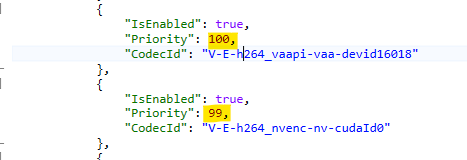
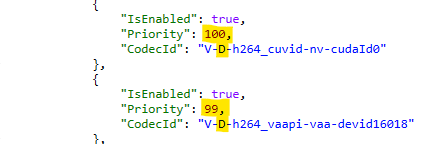
@sfatula - Your screen doesn't match your logs. The hw detection log shows a configuration where the VAAPI encoder has a higher priority than the Nvidia: And that's what can be seen in the ffmpeg log: The encoder is chosen first and it's VAAPI due to its higher priority. For the decoders, Nvidia has a higher priority: But - we do no longer allow certain combinations of hardware accelerations (the reasons are too complex to explain briefly). VAAPI and Nvidia is one of those unsupported combinations. And that's what the message says: So, Emby is choosing the VAAPI decoder - which is a much better choice to combine with the VAAPI encoder, because thanks to that, you get a full hardware processing pipeline, as can be seen in the ffmpeg log. Bottom line: To use Nvidia instead, you need to set the Nvidia encoder to the highest priority. Your screenshot shows that - but that setting was not active at the time of the ffmpeg log.

 1 point
 -
Might as well stick this here - don't think there's anything rude in it Might be useful. The good stuff is mostly Happy2play, the crude stuff is mine. There's probably lots of unintended consequences in it and stuff thats accidentally had effects applied to it twice. Stuff that stopped working, etc, etc. Kind of made stuff blue then made it paler with grayscale. /* Increase My Media Image Size */ div.card.smallBackdropCard {width: 20.0%; !important;} /* Remove Play Indicator Button */ .cardOverlayFab-primary {display: none !important;} /* Make Alphapicker Slightly Bigger */ .alphaPicker-vertical {font-size: 115% !important;} /* Position Alphapicker Vertically */ .alphaPicker {bottom: 40px !important;} /* ---------------------------------------------------------------------------------------------------- */ /* Remove Poster Thumb */ div.detailImageContainer {display: none; } /* Move Stuff Down for Movies and Series */ div.topDetailsContainer.flex.flex-direction-row-reverse {padding-top: 30em; } /* Move Stuff Down for Albums */ div.topDetailsContainer.flex.flex-direction-row {padding-top: 40em; } /*img.detailImage detailImage-side {display: None !important; }*/ /*What does this do*/ /*div.item-side-imageContainer {display: none; }*/ /* Move Logo Down */ /* div.detailLogo {position: absolute; top: 32em; } */ /* Move Logo Down */ /* div.detailLogo.flex.flex-direction-row {padding-top: 16em; } */ /* Make Backdrop Much Brighter */ .backgroundContainer.withBackdrop {background: rgba(0,0,0,.10)!important;} /*Make Backdrops Almost Black and White*/ .backdropContainer {filter: blur(0px) grayscale(80%)!important;} /* Make Home Page Posters, Movie TV Posters, Actors Etc Almost Black and White */ /*.itemsContainer {filter: blur(0px) grayscale(80%)!important;}*/ /*OR*/ /*.mainAnimatedPages.skinBody {filter: blur(0px) grayscale(80%)!important;}*/ /*OR as above but exclude TV Guide*/ div.scrollSlider.flex-grow.padded-top-page {filter: blur(0px) grayscale(80%)!important;} /* Make Logo Almost Black and White */ /*.detailLogo {filter: blur(0px) grayscale(80%)!important;}*/ /* Add Gradient to Main Movie or Episode Page */ div.itemMainScrollSlider {background: linear-gradient(rgba(0,0,0,0),rgba(0,0,0,.9));} /* Add Transparent Grey Background to Episode Summary */ div.listItem-withContentWrapper div.listItem-content {background: rgba(0, 0, 0, 0.3);} /* Resize Season Posters */ body > div.mainAnimatedPages.skinBody.skinBody-withWindowScroll > div:nth-child(n) > div > div.verticalSection.childrenSection-x > div > div.scrollSlider.focuscontainer-x.itemsContainer.padded-left.padded-right.focusable.scrollX.hiddenScrollX > div > div > div.cardScalable > div.cardPadder-square {padding-bottom: 147%;} [data-type="Genre"] div.cardPadder-square { padding-bottom: 150%; } /* ---------------------------------------------------------------------------------------------------- */ /*Count and Played Indicator to Blue*/ div.countIndicator, i.playedIndicator {background: #3086CF;} /*Change Logo*/ .pageTitleWithLogo { background-image: url("C:\Users\schoo\AppData\Roaming\Emby-Server\system\dashboard-ui\modules\themes\logodark.png") !important; height: 50px !important; width: 190px !important; } .pageTitleWithDefautLogo { height: 53px !important; } /* ------------------------------------------------------------------------------------------------- */ /*Change Slider Colour*/ .emby-slider { color: #3086CF !important; } .emby-slider::-moz-range-progress { background: #3086CF !important; } .emby-slider::-webkit-slider-thumb { background: #3086CF !important; } .emby-slider::-moz-range-thumb { background: #3086CF !important; } .emby-slider::-ms-thumb { background: #3086CF !important; } .emby-slider-background-lower { background-color: #3086CF !important; } /*Change Colour of Play Button*/ .cardOverlayButtonIcon { background-color: #3086CF !important; } /* ----------------------------------------OR------------------------------------------------------- */ /*Change Slider Colour*/ /*FireFox OSD*/ input.emby-slider::-moz-range-thumb, input.emby-slider::-moz-range-progress { background:blue; } /*Chrome-Edge OSD*/ div.emby-slider-background-lower, input.emby-slider::-webkit-slider-thumb { background-color:blue; } /*Change Colour of Play Button*/ button.cardOverlayFab-primary i, button.cardOverlayFab-primary i:hover { background-color: blue; } /* ---------------------------------------------------------------------------------------------------- */ /* Remove Album from Now Playing */ .osdPoster-img {display: None !important} /*div.osdPoster-img { background-position: left 10px bottom; background-size: 100px;}*/ /* Make Music Backdrop Full Screen and Make Playlist Transparent */ div.backdropContainer.backdropContainer-remotecontrol {right: 0%;} /*div.upNextBar.upNextBar-static.flex.align-items-center {background: transparent;}*/ /*div.osdPlaylist.flex.flex-grow.hide.osdPlaylist-hidden {background: transparent;}*/ div.upNextBar.upNextBar-static.flex.align-items-center {background: rgba(0,0,0,.33)!important;} div.osdPlaylist.flex.flex-grow.hide.osdPlaylist-hidden {background: rgba(0,0,0,.33)!important;} /* Make Music Playlist Almost Black and White */ div.osdPlaylist.flex.flex-grow.hide.osdPlaylist-hidden {filter: grayscale(80%);} /* Add Dropshadow to Music Playlist */ div.upNextBar.upNextBar-static.flex.align-items-center {text-shadow: 2px 2px #000000;} /* Add Dropshadow to Song Name */ h2.videoOsdParentTitle {text-shadow: 2px 2px #000000;} /* Playing Now Queue - Second Line of Album and Song Name to Blue */ h3.videoOsdTitle { color: #3086CF !important;} /* Make Bottom Controls Almost Black and White */ .videoOsdBottomInner {filter: blur(0px) grayscale(80%)!important;} /* ---------------------------------------------------------------------------------------------------- */ /*Make CSS Box Bigger*/ #txtCustomCss {height: 700px; width: 800px;} /*Make Star Rating and Rotten Tomatoes almost Black and White*/ /*div.verticalSection {filter: blur(0px) grayscale(80%)!important;}*/ div.verticalSection.detailMainContainer {filter: blur(0px) grayscale(80%)!important;} /*Make Main Section of Dashboard almost Black and White*/ /*div.libraryOptions {filter: blur(0px) grayscale(80%)!important;}*/ div.content-primary {filter: blur(0px) grayscale(80%)!important;} /*Make Top Row Blue*/ div.skinHeader { color: #3086CF !important;} /*Make Top Row almost Back and White*/ div.skinHeader { filter: grayscale(80%) !important;} /*Make Left Hand Menu Blue*/ div.mainDrawer { color: #3086CF !important;} /*Make Left Hand Menu almost Back and White*/ div.mainDrawer {filter: grayscale(80%) !important;} /*OR*/ /*a.navMenuOption.emby-button {filter: grayscale(80%) !important;}*/ /*Make Second from Top Row Blue on Media Page*/ button.emby-tab-button.emby-button.emby-tab-button-active { color: #3086CF !important;} /*Make Second from Top Row Blue on Dashboard Page*/ a.emby-tab-button.emby-tab-button-active.emby-button { color: #3086CF !important;} /*Try to Make Connection Help Blue - works for text not background*/ /*a.raised.raised-mini.button-submit.emby-button { color: #3086CF !important;}*/ /*Make Emby Version Number and Http Links Blue*/ a.button-link.emby-button { color: #3086CF !important;} /*Make Selected Item in Left Hand Menu White*/ a.navMenuOption.emby-button.navMenuOption-selected { color: #FFFFFF !important;} a.navMenuOption.emby-button.navMenuOption-selected { background: #3086CF !important;} a.navMenuOption.emby-button.navMenuOption-selected { opacity: 0.4 !important;} /*Stop Items (Genres, Director) in Details Page Being Accidentally Made Blue*/ a.button-link.emby-button { color: #FFFFFF !important;} /*Make Main Section of Display almost Black and White*/ form.auto-center {filter: grayscale(80%) !important;} /*Make Now Playing Music Bar almost Black and White*/ .nowPlayingBarTop {filter: grayscale(80%) !important;} /* ---------------------------------------------------------------------------------------------------- */ /*Make Dashboard Checkboxes Blue*/ input.emby-checkbox:checked+span:before { border-color: #3086CF; background-color: #3086CF; } /*Make Dashboard Save Buttons Blue*/ button.button-submit:not(.emby-button-tv), button.button-submit:not(.emby-button-tv):focus { background: #3086CF; } /*button.button-submit:not(.emby-button-tv), button.button-submit:not(.emby-button-tv):focus { filter: grayscale(80%); }*/ /* ---------------------------------------------------------------------------------------------------- */ /*All Guide Entries Gray20*/ div.tabContent.flex.flex-direction-column.flex-grow.padded-top-page.is-active { background: #333333;} /*Top Left Corner of Guide Only Gray15*/ div.channelCell { background: #262626 !important;} /*All Channels Left Hand Side Gray15*/ button.channelCell.channelCell-mobilefocus.itemAction { background: #262626 !important;} /*Row of Times in Guide Gray15*/ div.timeslotHeaders { background: #262626;} /*OR*/ /*Row of Times in Guide Gray15*/ /*div.timeslotHeaders.flex.flex-grow.flex-direction-row { background: #262626;}*/ /*Adjust Colour and Width of Current Time Indicator*/ div.guide-currentTimeIndicatorDot {width: 3px;} div.guide-currentTimeIndicatorDot {background: #3086CF;} /*Try to Make Guide Narrower Vertically and Left Hand List Wider*/ /*div.virtualScrollItem.epgRow {height: 55px; !important;}*/ /*button.channelCell.channelCell-mobilefocus.itemAction { width: 150px;}*/ /*div.channelCell { width: 150px;;}*/ /*Try to make guide full colour*/ /*div.guideContainer.flex-grow.tvguide {filter: blur(0px) grayscale(0%)!important;}*/ /*Add Border to Program Cells Vertical Only*/ .programCell { border-width: 0px 4px 0px 4px!important; border-color: rgba(0,0,0,1) !important; } /*Add Border to Program Cells Horizontal Only*/ div.virtualScrollItem.epgRow.flex { border-width: 4px 0px 4px 0px!important; border-color: rgba(0,0,0,1) !important; } /*Add Right Hand Border to All Channels Left Hand Side*/ button.channelCell.channelCell-mobilefocus.itemAction { border-width: 0px 4px 0px 0px!important; border-color: rgba(0,0,0,1) !important;; } /*Make Text Blue and Almost Black and White in some Pop-up boxes eg filters*/ label.selectLabel { color: #3086CF !important;} label.selectLabel { filter: grayscale(80%) !important;} label.emby-checkbox-label { color: #3086CF !important;} label.emby-checkbox-label { filter: grayscale(80%) !important;} /*Make Attribute Text Blue and Almost Black and White in some Pop-up boxes eg New in TV Guide*/ div.mediaInfoProgramAttribute.mediaInfoItem.newTvProgram { background: #3086CF !important;} div.mediaInfoProgramAttribute.mediaInfoItem.newTvProgram { filter: grayscale(80%) !important;} /*Make Text Almost Black and White in some Pop-up boxes eg Save in TV Guide*/ button.raised.btnPlay.block { filter: grayscale(80%) !important;} /*Make Dashboard Connection Help Blue - Already Pale*/ a.raised.raised-mini.button-submit.emby-button { background: #3086CF !important;} /*OR*/ /*a.raised.raised-mini.button-submit { background: #3086CF !important;}*/ i.md-icon:not (.md-icon.navMenuOptionIcon) { background: #3086CF !important;} /*i.md-icon { background: #3086CF !important;}*/ /*Make Restart Shutdown buttons Almost Black and White*/ div.formDialogFooter { filter: grayscale(80%) !important;}1 point
-
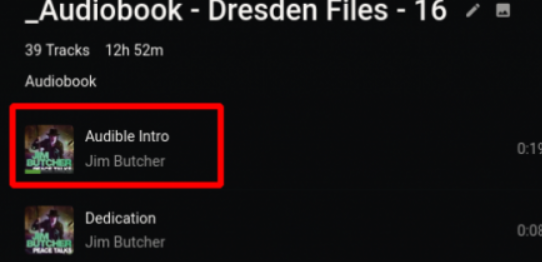
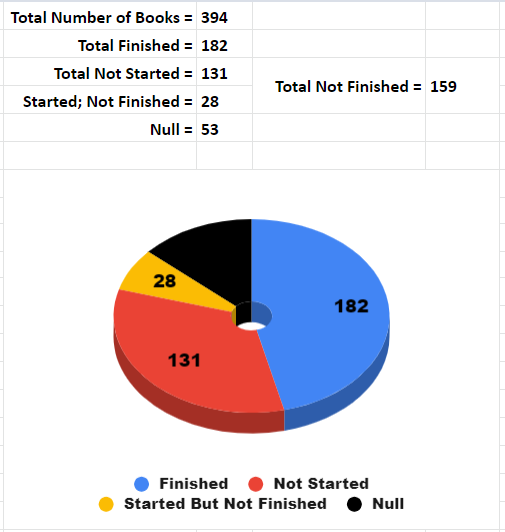
@ebr @Luke After reading negativezeroe's post about putting an audiobook in a playlist, I tried that. I imported an audiobook into a playlist, and you know... it worked fine. Sure, there are problems. The album/playlist doesn't show how much progress there is; there is no "Listened" check-mark toggle on Android (mobile?); It is too easy to reorder chapters/tracks in Android (mobile?); and the Continue Listening function is still useless. And yet, the app shows which tracks were marked as Listened, the current track has a progress indicator under its artwork, and when you click a track it queues the whole playlist. So it works. It's janky, it's ugly, and it adds the step of adding book albums to a playlist, but it works. I'm going to keep bugging you guys to properly implement this. I literally have listened to 182 of (a current) 341 audiobooks on my media server. Last listened to Roots, and then Mark of Zorro; now listening to Hell Divers. So I really do listen to books all the time. Yeah, I'm going to keep bringing this feature request up.
 1 point
 -
@scharbag and in case you're interested, here the one without the case: https://drive.google.com/file/d/1xROIW-T-DPX4pgd60Uot6qciscK3otLE/view?usp=sharing and the corresponding backdrops as well: https://drive.google.com/file/d/1MfgpIHn7ULwdLCbAKkaQotzD04TJoTHs/view?usp=sharing Not sure who the original creators were after more than 10 years... suffice to say I did not create these1 point
-
Thanks Corey, I realize this is a personal opinion only. As far as the browser I love the look so much better then Plex for example. To me Emby looks awesome on my web browser but for me the Apple TV OS doesn't look as good. But again loving Emby so far and glad I'm coming over from Plex1 point
-
@vaise Danke. Thanks for the awesome post. Very happy you are happy. There is more good stuff coming for Roku. It isn't "there yet" as far as complete. It cannot and will never be complete... It always has something new that can be done or some new display technique that can be used. There is more than just I in team (there is more than me coding Roku for Emby). It is a team effort. The community also helps by finding bugs. Together we can build something. There is more good coming that should make the happiness factor on Roku increase significantly and the frustration decrease substantially. Make the app easier to use and more fun for everyone. That is coming. I know that is vague, doesn't give any information on what is changing, but it is an accurate statement. The Roku will be easier to use for everyone ages 3 to 133. You may want to check back on it occasionally to see where things changed. The Roku misses you.1 point
-
Yes but it's already in the web app, Android app and others. It's just not in the lg app yet but it will be in the next app update, which we are currently working on submitting.1 point
-
OK in that case the onboard compression might be perfect for you. I was just trying to give you info I know so you can make an educated decision. Sounds like it could be good for you, but I'd still try and get a demo recording just to verify.1 point
-
Yes it will, that's not intended.1 point
-
YES... a 1000 yes's for me lol1 point