Leaderboard




Popular Content
Showing content with the highest reputation on 08/27/20 in all areas
-
Eclusions for genres and tags are coming with the next update in the next week.3 points
-
Add the ability to start a show late, end a show early. ie: Late Night Talk Shows. I'm only interested in the interviews. Don't record the monologue (start :15 minutes late) nor the musical guest (end :15 minutes early) These shows are intentionally scheduled to start and stop at "the 07s". Having this new ability would eliminate some overlap errors with traditional start and stop times at "the 00s". Kevin2 points
-
Yes, it is.2 points
-
Also mentioned a couple times already in this thread. Simply remove your Premiere key from your server for just long enough to start the app and you can purchase the unlock. This is only necessary if connecting to a Premiere server and wishing to avoid the device limit for that device. Also, the beta app allows direct purchase. Both stores have the beta in review but are moving at their glacial pace these days.2 points
-
You've grown up with watching live tv but on television only runs garbage? You have a big library but don't know what to watch next? Then this for you: "VirtualTV" - my new live tv plugin that allows you to create custom channels based on conditions of your Emby library content. What's missing: Maybe codec conditions Known problems: Needs Emby Premier to work (Playback) Emby's live tv and playback api is very limited, so i've had to make some detours to get things working. The plugin has two general playback modes: "continous" and "playlist" playback. With "continous" mode you can also choose between "live", which bahaves like real live tv or "archive", which plays the videos from the start. In "Continuous" mode multiple videos are queued and concatenated to one big file with the help of ffmpeg. To make this happen every video in the queue has to have some common features (video and audio codec). That's why it often happens that the video also has to be transcoded by ffmpeg. For transcoding the plugin relies on Emby's internal transcoding engine. If there's a problem, not uncommon with hardware acceleration enabled, the plugin also has a problem. Nothing i can do about it. The availability of subtitle tracks is mostly dependant of the Emby user playback settings. In continous playback mode only one (the default) subtitle track can be used and this one has to be burnded into the video (transcoding takes place). In "Playlist" playback mode the videos are pushed as a playlist to the Emby clients. It's like you would play your videos directly from your libraries. This way you get all the features you are used to. Audio and subtitle selection, pause, skipping around and similar things. "Native" playback method was created by the Emby Devs. Similar to Playlist playback it will play the real library videos, but with the big difference that playback is purely initiated by the client app, without any remote command execution. This is why it also works for Roku devices on a WAN network. And although the real videos are played, the whole thing is treated like live TV. This means that channel zapping is possible and no dialogs for playing the next episode are displayed. Unfortunately, the new playback method does not yet support all features. As the name "Archive" suggests, it will currently always start all videos from the beginning. In addition, only very few Emby apps automatically advance to the next video. If you want it to be improved even further, each of you should raise your voice in this thread. To get things started install the plugin via Emby's plugin catalog and restart Emby. Setup your channels with a name and number and choose your playback mode. In the channel conditions you'll have to select an Emby account. This account is used to get library access, respect parental rating, reading watched states and selecting the stream language. At least one textual input field of the conditions has to be filled to get some program data. Fields with an asterisk are either evaluated with an "AND" or "OR" condition among each other. Finally, if you've chosen "Continous Playback" for one of you channels, take a look at the transcoding settings. Save your channel line up and manually trigger a "Guide Refresh". Now have fun! Version History: After a plugin update, always clear your browser cache. If your settings still don't load in the config screen, you have to move the "VirtualTV.xml" out of ...\plugins\configurations and restart Emby. Start from scratch. 2.0.0.0 Unlimited number of channels; New playback method "Native (Archive)"; New security concept for the Export API 2.0.2.0 Performance improvements to Guide Refresh; Preview for Add/Edit Channels; Option to disable Program indicators 2.0.3.0 Fixed missing Playlist sort order for some Content Types; Added support for Seasons with Content Source Collections 2.1.0.0 Selectively enable channels for specific users; Create copies of existing channels; Ordered unwatched episode playback 2.1.5.0 Added option to (auto)enable channels on a specific date range; Bug fixing1 point
-
Library scan running tasks are lacking in their progress reporting. This is most apparent after a fresh install of Emby on a large library, particularly containing many TV episodes. The scan tasks seems to almost immediately skip to the high 80s percentile before it actually starts adding files to the library. The scan task has been running for 2 days straight and has gone up a few percentage points to 90.2% at this point. Would be much better if it reported a more accurate percentage. Alternatively, a count of the number of directories or files it's scanned vs remaining. Currently under 3.6.0.1-beta.1 point
-
Hello, It will be great to have the possibility to exclude a library from the global search. For example the Adult content one. Or at least to be able to exclude a tag from the global search and by this I can tag the entire Adult library as Adult and Adult tag to be globally excluded on search. Imagine what happens when you want to search for "Coffee with Ana" movie and you start typing in the search field "Ana" with little kids near you Thanks!1 point
-
hey what I'm really missing is support for audiobooks. Simply saving the resume point for those mp3s would be absolutely enough, no need to fetch metadata etc.1 point
-
To take a screenshot, press and hold down the HOME button for a couple of seconds (instead of pressing and immediately releasing) and you will see the Twitch menu pop up on the screen, which is used to allow users to record videos and broadcast to Twitch. Regardless of whether you are a Twitch user or not, the added benefit of this menu is that you can also take simple screenshots from any app on the Shield device. Select the last option in the on-screen menu, the 'screenshot' option. Once navigated to and pressed, a screenshot of the current screen is captured, which you can then save using the 'save to gallery' option. A confirmation that the screenshot has been saved, will be displayed in a pop up message at the bottom of the screen. The screenshot is saved to the sdcard\Pictures\Screenshots folder on the Shield. Use a file manager app, such as X-Plore, to navigate to the screenshot file. From there, you can copy/move etc., like any other file. Make sure to enable Nvidia Share in the system settings.1 point
-
HI, I would like to request a feature where, when searching for a movie or tv show, if multiple versions exist in seperate librarys,then the librarys would be labeled. For example if I search for movie YYY I might get two returned search results, but I have no idea if this is the 4k version, the non 4k version etc(unless playing). So a library name on each movie in some way to indicate which library movie YYY is in. thanks1 point
-
Music appears to have no Media Info stats at all whereas video has a extreme detail. e.g. Title480p H264 CodecH264 .... and often 50+ more fields of info. Music.... nada To highlight my point try and use the web interface to determine something as simple as if an audio track is a mp3 or a flac1 point
-
Some of those are multiple boxarts stacked up that have the type showing. DVD, Bluray, etc.. The CD multiples may not. If you mean though.. say I have star wars 7 and 8. Just those in a collection "New star wars" and got it all set. It is going to show the 1st version from each of those if there are multiple version. So if I put 4k and 3d and a crappy SD in the 7 and 8 folders for each. I want to show the collection it might show the crappy SD as the multiple boxart/cd. With versions it is entirely different since that is a paradigm not used with cover art yet. It needs to treat multiple versions like a collection. In regards to cover art only.1 point
-
any chance we can get a "Foreign Movies" or "Subbed Movies" cateogory? It's the only thing that's missing. Thanks for all you do1 point
-
Okay, The endpoint routine gets split, once the request is made, into a couple different switch statements. I have to trace it back to the proper return data to figure out what might need to be updated. The reports API is quite large1 point
-
Just installed the catalog version and it's much better.1 point
-
trying to remember what this report showed previously, but I would think it should show all Artists. In theory Album shows AlbumArtist.1 point
-
i'm not sure what happened but I was finally able to remove the library and now it's working fine. Thanks all!1 point
-
Luke, Did as you asked to no avail. Deleted the 2nd and 3rd Collections and then ran the media scan. The one not deleted disappeared and the 2 movies showed up as separate movies. BUT... I did the following (on a hunch) that fixed the issue; Deleted the Duplicate Collections. Added the separate movies to a New Collection, but this time I gave them a new name. Example: "Blade Runner Collection" was the name of the duplicated collection. I re-created it but named it "Blade Runner". Ran the scan and still only have One "Blade Runner" collection. Next, I renamed the Collection to "Blade Runner Collection". Same as it was originally when it kept duplicating. Ran the scan again. The collection did not duplicate! I did this with the Ant-Man collection with the same results. Could this have been caused by some type of cache issue? I'm glad I have a work-around for it - I just hate not knowing what the cause was. Thanks again for your quick response to this post - appreciate it! John1 point
-
Okay let me see what I can do1 point
-
MetaX is not bad. It takes a bit of getting used to, but most of the time it does what it says on the tin. It's fairly resource intensive though. For MP4 files I've also used mp3tag as it's very versatile when it comes to naming and creating tags from names1 point
-
once you have uploaded an image a drop down appears which you can then choose image type1 point
-
Can you just use a tag like 'retro' for the older movies, and 'scifi' for the scifi channel? Then for each channel, make sure that it requires the tag that corresponds to what you want. Just make sure they don;t share these individual tags. That's what I have basically done and it works well for me.1 point
-
OMG!!! That was the answer. It worked!!! Thank you so much. I was starting to lose hope. Have a blessed day.1 point
-
If only it was that simple. Ended up trying to help bacardi8 for a few minutes remotely to find he's sitting behind an ISP NAT. He's planning on switching ISP/providers so we'll take up remote access later.1 point
-
Ahhhh there it is! It looks like Sonarr left it doubled up my folders. There was another duplicate in TVShows vs Anime folder. I removed the other folder and it fixed this. Thanks!!1 point
-
Hi, If you hover you mouse over one of the two icons you can bring up the 3 dot menu. Do that and click edit metadata. At the top of the new screen will be the path to the file. Do both entries show the same file path or are they different?1 point
-
Short answer: Yes Long answer: Yes, I have a Shield Tube in my son's bedroom, he uses wifi and he doesn't watch high bitrate content. I have connected his Shield to the main TV connected to the gigabit network and I have played a movie with a bitrate of 60 Mbps. The movie is unwatchable. I have put the shield back in my son's bedroom and I hope he does not find out, otherwise he will ask me for a Pro. I have lost hope that this will be fixed with a firmware update.1 point
-
Hi Carlo, thanks for the feedback and info. I'm at work right now so I will see what I can do later when I get home and then come back to you. BR1 point
-
Hi cayars, It worked very well after removing the Emby folder from the NAS, I was able to run the setup from the beginning again and all is fine now. So big thanks for your input. now I only have one problem left, and this is "a good old one" its about remote access. It seems you're the specialist there also, so maybe I could ask you for some help/inputs. I was dealing with this problem already before my above mentioned issue and I still not get it to function properly. In-House (Lan) works very well on all my devices. External (Wan) does not work. I have made the port forward in my router to my IP for external access port 8096 but it seems that its still not open. when i try canyouseeme it tells that there is no pass through on this port. So somewhere there is something that blocks this entrance. Could it be that 8096 is occupied by something else...??? Could it make sense to try out different port numbers, and how to do that...?? Could it be a firewall somewhere that I'm not aware off..?? Maybe you have some suggestions that I could try out.1 point
-
I've dusted off the project. New stable release v4.4.3.0 is now available at https://bintray.com/beta/#/tfl/wdpksrc/Emby/v4.4.3.0-11?tab=files Enjoy!1 point
-
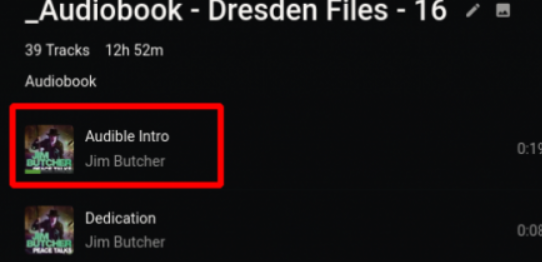
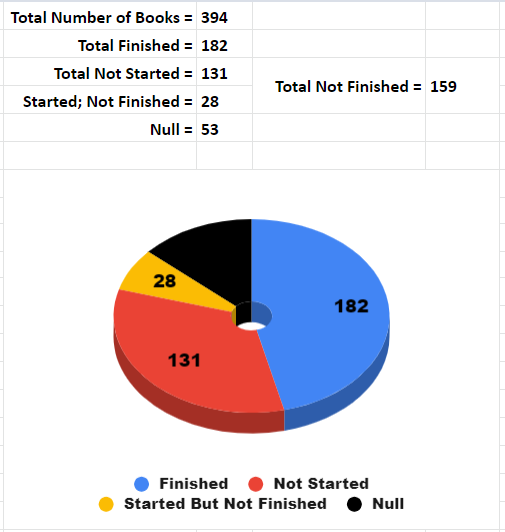
@ebr @Luke After reading negativezeroe's post about putting an audiobook in a playlist, I tried that. I imported an audiobook into a playlist, and you know... it worked fine. Sure, there are problems. The album/playlist doesn't show how much progress there is; there is no "Listened" check-mark toggle on Android (mobile?); It is too easy to reorder chapters/tracks in Android (mobile?); and the Continue Listening function is still useless. And yet, the app shows which tracks were marked as Listened, the current track has a progress indicator under its artwork, and when you click a track it queues the whole playlist. So it works. It's janky, it's ugly, and it adds the step of adding book albums to a playlist, but it works. I'm going to keep bugging you guys to properly implement this. I literally have listened to 182 of (a current) 341 audiobooks on my media server. Last listened to Roots, and then Mark of Zorro; now listening to Hell Divers. So I really do listen to books all the time. Yeah, I'm going to keep bringing this feature request up.
 1 point
 -
What is the point of the Tube one. Run it with 32 bit so everyone goes yuk and buys the expensive one instead ?1 point
-
I have a Shield in my bedroom connected to a 1080p SDR display. 4K HDR movies look better, color is not washed. Keep in mind that this only applies with Direct Play.1 point
-
If you paid several times then you just need to unlock the app again by restoring the purchase. You can thank sony for the bad support on the PS4, they are super unfriendly to small app developers. The cost is insane and emby would never recoup the cost. Pay for the app people, you can only get so far in life being a mooch.1 point
-
Agreed. And it's not as much of an issue now. I think if I was gonna have to buy another 8tb to do parity, that I am just gonna lean in and get 2 and pool them into that second array that once mirrored I will move to my uncles place in a nearby town 45mins away and have a one-way mirror nightly or every 48hrs... that's one of 3 family members accessing my server that won't need to connect over the internet anymore either, he will be able to use it locally at his place... so all around it should be a win... I will keep my 22tb-ish pooled/duplicated locally at my place on my 30tb pool. And that same 22tb (so I guess only 11tb not duplicated) on the 16tb array at the uncles place. So I guess I am learning I lost about 2tb of files overall... before this loss on my part I had about 16tb of actual video (tv 13ish/movies 3+) I didn't loose any of the movies, just the TV that I improperly synced... so now I have TV 11ish and the same 3+ in movies.... So all in, it could have been worse... but also better if I can't determine what I am missing and what I have that is now corrupted/unusable. Thanks to everyone for their help in this situation. This community is always top notch. I haven't posted much in the years since I began using the software (since it was still M.B.) mostly because anytime I have had a question simply searching the forum generally answered my questions. Anyway, there are names that have been responding to this post that I have seen it countless other replies that have helped me on other topics in the past... @CBers, @Gilgamesh_48, @cayars and now the famous @chef... all people that I have recieved help from indirectly by there responses to other peoples questions... and all I feel I should have taken the time to thank in those instances rather than just reading/accepting the fix and moving on. So, to anyone in the community that is active in helping people with their issues, thank you for taking the interest and the time to do so... And anyone else who my current F-up, and the suggestions contained within, might have benefited... Take a second to thank anyone who's insights pushed you in a direction that hadn't occurred to you previously. -G1 point
-
Is anyone else seeing the transcoding-temp folder delete? On both my and my BFs systems (separate Emby servers) , the plug-in (or Emby?) deletes this folder resulting in a message about "No streams available for playback". So to see if we were on the right track, we were able to play files through Emby that require transcoding, and Emby would recreate this folder, but the Virtual TV plugin does not recreate it when it is missing. This resulted in the error mentioned. When we manually recreate this folder, the streams begin working again. @Luke, in there a maintenance process that deletes this folder? I thought this might be useful information for others, and for pünktchen to know.1 point
-
I've put together a list of thoughts I've gathered from my own experience and from other users' input. Some thoughts about what audiobook support is missing in Emby: Top priority features: store album position (not just track position) and when starting the album, go to that track/position instead of track 1 adjustable playback speed (a dealbreaker for me, but some might disagree) when "continue listening" is used, queue up entire album into "now playing" "Nice to have" features (in no particular order): Finish distinguishing media type from Music (still says "latest music" in web, and when downloading on mobile, it puts audiobooks in the "Music" folder, and other similar relics) limit saved progress to one track per album. (That way when you resume an album, there's clearly one place you mean for it to resume from. If you play a few minutes of chapter one, then realize you already finished that chapter and start the next track, you want it to save the progress in track 2, and forget that you played half of chapter 1.) metadata agent for matching artwork and descriptions separate metadata fields for author AND narrator multiple author tags that can allow books to appear under both authors handling of non-square cover art keep track of "in progress" or "continue watching" audiobook albums (add to home screen similar to movies, and create "recently listened books/albums" and "Recently added books/albums" in "Audiobooks" library type, instead of recently added/played tracks as it is now) skip ahead/back in larger (or custom) increments (e.g. 1 minute; currently an app-wide setting) and perhaps separate buttons for small and large jumps (keep 10 second button, but add a new 1 minute or 3 minute button) apply skipping ahead/back to progress in the album, not just the track, i.e. if you're ten seconds into a track and you press "skip back 1 minute" then allow it to go back to before the end of the previous track. Sometimes track boundaries are arbitrary. go back a few seconds automatically when resuming, especially after a long pause or being stopped (restart the word/phrase; could be an optional setting; would be nice for video as well...) sleep timer to stop playback after a given amount of inactivity remember furthest played position in book/album (similar to furthest read position on Kindle) so that if you accidentally start over, or have to jump back for something, you can jump forward to the autosaved furthest location again enable resetting of furthest played position, if you want to start a book over, or accidentally jumped to the end display album duration on album info page show album progress/total duration in playback screen, not just track progress/duration allow shuffling albums, not just tracks somehow account for series of books, perhaps a new tag to account for being in a series and what number in the series. Thus when you finish book one, it can suggest book 2. Perhaps add a "series" view similar to collections. Somehow also account for some books being in multiple series (e.g. book 12 of series A is also book 2 of the spinoff series). Somehow also account for different books in a series having different authors. Just my thoughts, but those top three or four would be enough for me to switch to Emby full time for my audiobook needs. And the rest would take it from "workable" to awesome. Many of these could be summed up as: treat audiobook albums as a single media item for most purposes (showing progress/duration, storing resume position, marking as complete, jumping forward/backward, showing recommendations of albums instead of random tracks, shuffling albums instead of tracks, recently played albums instead of tracks, queue up album instead of track when resuming, etc.)1 point
-
Archive in #326 updated for the above 2 images. Thanks Puffy!1 point
-
If you folks are wanting aomething that will show you what movies are missing from your collections, and you are already using Radarr, there are a couple scripts out there already that will spit out a list for you. They don't interaxt with Emby, but you will at least be able to figure out what is missing so you can fill them out without having to manually hunt everything down: https://www.reddit.com/r/radarr/comments/axhllg/major_update_radarr_collections_and_people_manager1 point
-
It's frustrating why this is not an easy thing (for a developer lol) to do - because a single API call to tmdb lists all the information in a single JSON query, all the sub movies are held in an array. It just needs a sub-query on what's already in the emby dB - match the tmdb numbers and list what you're missing. If we did want to go all the way and list in the App - then 'Auto-Box sets' could write a fake movie file to a predetermined area, named correctly and tmdb would pick it up as the valid movie - the trouble is how do you then mark it as 'missing' as opposed to being valid ? Not sure how it's done for episodes.. In the end, I crudely got the same result by just copying the tmdb collection references from the Auto-Box sets (in Verbose logging) into Excel and queried each one to find the missing items, but to automate this would be a great feature imo as on a few collections I never realised there were follow up or prequel movies at all ..1 point
-
Okay, so exactly as it always has. Wasn't at my server to check.0 points
-
Not yet, sorry.0 points