Leaderboard




Popular Content
Showing content with the highest reputation on 08/26/20 in all areas
-
Great, I've set long press Menu key to open Emby.3 points
-
Released today. https://www.nvidia.com/en-us/geforce/forums/shield-tv/9/394826/shield-experience-upgrade-82-released-8262020/ What's New? Features AI Upscaling: 2019 SHIELD Pro: Adds support for AI-enhanced upscaling for up to 60Hz content 2019 SHIELD Pro: Adds enhanced and AI-enhanced upscaling on GeForce NOW Adds AI upscaling resolution support from 360p to 1440p content (30Hz max for 1440p upscaling) Accessories: SHIELD Remote 2019: Adds 2 new customizable menu button actions: Double press and Long press Adds the following customized menu button options Select Input Source (requires IR) Daydream Send long press menu button to app Adds developer option to turn off auto-pairing of factory paired accessories Adds IR volume control support for projectors SHIELD 2015/2017: Adds ‘Match frame rate (beta)’ feature to quick settings and customized menu button Audio: Allows user selection of audio output device (in Advanced sound settings) Improves IR and CEC volume control behavior Adds IR volume control when using Google home paired with SHIELD (requires IR volume control) Adds IR volume control when using SHIELD TV app (requires IR volume control) SHIELD Controller 2017 & SHIELD Remote 2017/2019: Allows IR volume control to work when SHIELD is not awake. Adds fixed volume support for USB DAC Adds option to disable volume lowering when "OK Google" is detected on Google Home devices (under Volume Control) Display: Adds ability for Kodi to adjust display resolution for 480p content Adds HDR to SDR color tone mapping Network: Adds SMBv3 server compatibility for connecting to SHIELD over local network (removes Plex Media Server dependency) NALA SHIELD 2015 model: Adds DFS WiFi channel support Allows user to grant write access to NAS from installed apps (Apps -> Special app access) Misc: Adds developer option to aggressively free system resources (Proactive kill background process) Removes forced SHIELD Experience upgrade after factory reset SHIELD Wireless Controller (2017) Firmware 1.34 SHIELD Remote (2017) Firmware 1.43 SHIELD Remote (2019) Firmware 1.12 Bug Fixes Audio: Restores surround sound audio while casting Fixes bug where music would not play if display was turned off Resolves audio connectivity issues when pairing with LDAC compatible headsets Adds surround sound support for SoundBlaster X-Fi surround 5.1 pro v3 Restores support for 96kHz/192kHz TrueHD and DTS-HD MA audio passthrough Resolves audio dropout issue when transcoding Dolby audio to AC3 Resolves system hang instances when USB DAC is connected Resolves audio issues when listening to Dolby content on headphones Fixes audio dropout issues when playing high bitrate and TrueHD 7.1 content Resolves bug where USB microphone would not be detected properly Fixes bug where system sounds would not be present after sleep/wake cycles SHIELD 2015/2017: Fixes bug when using Google Home where volume would be reduced but not restored Video/Display: Resolves issue detecting Dolby Vision on Vizio or Panasonic TVs when connecting through Samsung soundbars Removes BT.2020 signaling on standard Dolby Vision displays Fixes crash bug when enabling/disabling "Match Color Space" setting in Netflix Fixes bug where selected custom display modes would not be visible in the "Resolution" list Resolves issues where AI upscaling incorrectly detects some video content as "unsupported" SHIELD 2015/2017: Fixes bug where some VC-1 encoded video would not play properlyFixes SHIELD 2015/2017: Fixes stutter issue observed when playing interlaced video for ~15 minutes SHIELD 2015/2017: Resolves issue where SHIELD loses TV sync on mode set (e.g. power on, wake, refresh/resolution changes) Network: Resolves WiFi disconnect issues when SHIELD sleeps or when connecting to mesh routers Fixes issue where NAS would not be connected after reboot Resolves reporting issue where status would show up as "Unavailable" when mounting NAS Resolves issue where Mac users could not access SD card content from local network Accessories: Increases IR volume control speed for SHIELD Remote 2019 Fixes bug where IR/CEC volume control would not work if using a button remapper Fixes bug where IR control would not work in Restricted Mode Fixes pairing issues with 2015 SHIELD controller Fixes bug where notification would be displayed while pairing SHIELD accessories Fixes bug where customized menu button default setting would not work properly on Kodi Fixes issue where "OK Google" detection settings would not be visible after language change Fixes bug where connected Bluetooth devices with lose pairing after rebooting SHIELD Resolves Bluetooth pairing issues for JBL and AKG devices Adds alternate Bluetooth pairing mode for devices with pairing issues Restores home button functionality when pairing XBOX One Bluetooth controller Resolves disconnect issues with paired DualShock 4 controllers Resolves Bluetooth pairing issues when accessibility services are enabled Misc: Resolves issue where some apps would not be available on Google Play Store for certain SHIELD devices Fixes audio stutter issue when launching Netflix Resolves issue where newly added files would not be visible on external storage until reboot Fixes bug where twitch streaming would not start Fixes PLEX playback issue when playing TrueHD content Fixes bug where SHIELD would not enter daydream mode when paused in Netflix Resolves issue where low battery warning would show up after replacing batteries Removes incorrectly displayed IR setup popup on Phillips TVs Resolves Live Channels app issue where closed captioning was not available Adds IR/CEC volume setup notification while casting Fixes instances where casting would crash if IR volume control was enabled Fixes bug where screenshots were limited to 1080p resolutions2 points
-
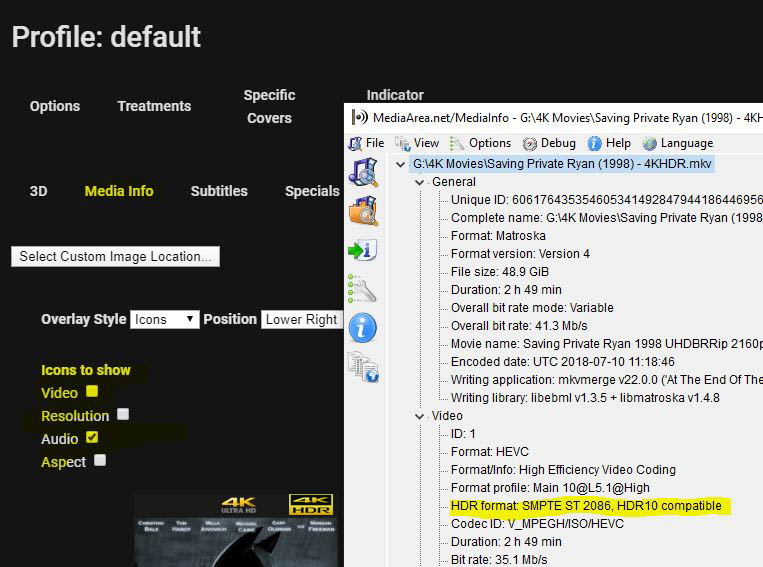
I was wondering how feasible it would be to create an additional option (icons to show) under the Indicator Overlays option for MEdiaInfo and to add "HDR Options". I think it would be helpful if i could see at a glance what movies in my library were encoded with HDR capability. THen, i could create a 'badge' overlay that would say HDR on the cover. see attch
 2 points
 -
Every day I'm getting a notification that the "Cache file cleanup" task has failed with: Access to the path 'C:\Users\Media\AppData\Roaming\MediaBrowser-Server\cache\temp1\a094fb5ea40d4803bf8925493da49239.JPG' is denied. From the server log: 2015-11-13 16:41:48.5551 Info - App: Executing Cache file cleanup 2015-11-13 16:41:49.5412 Info - App: IntervalTrigger fired for task: Log file cleanup 2015-11-13 16:41:49.5412 Info - App: Queueing task DeleteLogFileTask 2015-11-13 16:41:59.9587 Error - App: Error *** Error Report *** Version: 3.0.5781.1 Command line: C:\Users\Media\AppData\Roaming\MediaBrowser-Server\System\MediaBrowser.ServerApplication.exe Operating system: Microsoft Windows NT 6.1.7601 Service Pack 1 Processor count: 4 64-Bit OS: True 64-Bit Process: False Program data path: C:\Users\Media\AppData\Roaming\MediaBrowser-Server Application Path: C:\Users\Media\AppData\Roaming\MediaBrowser-Server\System\MediaBrowser.ServerApplication.exe Access to the path 'C:\Users\Media\AppData\Roaming\MediaBrowser-Server\cache\temp1\a094fb5ea40d4803bf8925493da49239.JPG' is denied. System.UnauthorizedAccessException at System.IO.__Error.WinIOError(Int32 errorCode, String maybeFullPath) at System.IO.File.InternalDelete(String path, Boolean checkHost) at System.IO.File.Delete(String path) at CommonIO.ManagedFileSystem.DeleteFile(String path) at MediaBrowser.Common.Implementations.ScheduledTasks.Tasks.DeleteCacheFileTask.DeleteFile(String path) at MediaBrowser.Common.Implementations.ScheduledTasks.Tasks.DeleteCacheFileTask.DeleteCacheFilesFromDirectory(CancellationToken cancellationToken, String directory, DateTime minDateModified, IProgress`1 progress) at MediaBrowser.Common.Implementations.ScheduledTasks.Tasks.DeleteCacheFileTask.Execute(CancellationToken cancellationToken, IProgress`1 progress) at MediaBrowser.Common.Implementations.ScheduledTasks.ScheduledTaskWorker.<ExecuteInternal>d__c.MoveNext() 2015-11-13 16:41:59.9587 Info - App: Cache file cleanup Failed after 0 minute(s) and 11 seconds Yeaterday's log has the same: 2015-11-12 16:41:36.5716 Info - App: Executing Cache file cleanup 2015-11-12 16:41:37.0596 Info - App: IntervalTrigger fired for task: Log file cleanup 2015-11-12 16:41:37.0596 Info - App: Queueing task DeleteLogFileTask 2015-11-12 16:41:48.5413 Error - App: Error *** Error Report *** Version: 3.0.5781.1 Command line: C:\Users\Media\AppData\Roaming\MediaBrowser-Server\System\MediaBrowser.ServerApplication.exe Operating system: Microsoft Windows NT 6.1.7601 Service Pack 1 Processor count: 4 64-Bit OS: True 64-Bit Process: False Program data path: C:\Users\Media\AppData\Roaming\MediaBrowser-Server Application Path: C:\Users\Media\AppData\Roaming\MediaBrowser-Server\System\MediaBrowser.ServerApplication.exe Access to the path 'C:\Users\Media\AppData\Roaming\MediaBrowser-Server\cache\temp1\a094fb5ea40d4803bf8925493da49239.JPG' is denied. System.UnauthorizedAccessException at System.IO.__Error.WinIOError(Int32 errorCode, String maybeFullPath) at System.IO.File.InternalDelete(String path, Boolean checkHost) at System.IO.File.Delete(String path) at CommonIO.ManagedFileSystem.DeleteFile(String path) at MediaBrowser.Common.Implementations.ScheduledTasks.Tasks.DeleteCacheFileTask.DeleteFile(String path) at MediaBrowser.Common.Implementations.ScheduledTasks.Tasks.DeleteCacheFileTask.DeleteCacheFilesFromDirectory(CancellationToken cancellationToken, String directory, DateTime minDateModified, IProgress`1 progress) at MediaBrowser.Common.Implementations.ScheduledTasks.Tasks.DeleteCacheFileTask.Execute(CancellationToken cancellationToken, IProgress`1 progress) at MediaBrowser.Common.Implementations.ScheduledTasks.ScheduledTaskWorker.<ExecuteInternal>d__c.MoveNext() 2015-11-12 16:41:48.5413 Info - App: Cache file cleanup Failed after 0 minute(s) and 11 seconds The file in question is different each day,as when I look for it, I am able to delete without an issue. This is on my beta system, running v3.0.5781.1. Thanks. .1 point
-
If you're getting the wrong icons it sounds like you're not mapping the channels correctly or you're using a badly constructed IPTV m3u/egp guide combo. What guide source are you using? What model HDHomeRun do you have?1 point
-
It was under shared folder in DSM on synology. now its deleted so I will try from the beginning. But this means with a new login that I will have to start all over again with libraries I guess. I will let you know. Thanks a lot for your help so far, great service1 point
-
I am, so I need to find out how to delete this folder, I never tried before, I will inform.1 point
-
Hi, Have you setup the EPG source and mapped your channels? Your guide source will be where it gets logos from ultimately.1 point
-
What is the point of the Tube one. Run it with 32 bit so everyone goes yuk and buys the expensive one instead ?1 point
-
Hi, what does it show?1 point
-
Puedes utilizar la utilidad de conversión de Emby: https://support.emby.media/support/solutions/articles/44001849018-convert-media1 point
-
I have a Shield in my bedroom connected to a 1080p SDR display. 4K HDR movies look better, color is not washed. Keep in mind that this only applies with Direct Play.1 point
-
Hopefully soon.1 point
-
You need to upgrade your Internet first before worry about machine. You will need 5 to 10 Mb per remote user that will be on at the same time.1 point
-
worked for me1 point
-
That's not very likely. They'd have to have 20-30 devices they use every single week :). 90%+ of our users get by with our normal license with no issues.1 point
-
That's not necessary. You can create an acoount in your server and user can login remotely to your server without an Emby account. Premiere slots are occupied by devices, not users. A single user can consume all Premiere slots.1 point
-
There is version 1.0.4.3 in the catalog. Would you mind either trying the update, or downloading that version?1 point
-
Okay, sorry guys. I'll fix it this morning.1 point
-
update fail for me too.1 point
-
Yes, you can... you can choose which disks to include within the array. You can also use an SSD as a RAID Cache drive, though I'm not sure if USB harddrives can be made part of that. I have never tested that, but to me it would not make any logical sense to allow a USB disk as part of a RAID config...1 point
-
@chef Have you just released a new version of your plugin, as I'm getting errors in download/install? Download validation failed for Disk Space. Probably corrupted during transfer. at Emby.Server.Implementations.Updates.InstallationManager.PerformPackageInstallation(IProgress`1 progress, String target, PackageVersionInfo package, CancellationToken cancellationToken) at Emby.Server.Implementations.Updates.InstallationManager.InstallPackageInternal(PackageVersionInfo package, Boolean isPlugin, IProgress`1 progress, CancellationToken cancellationToken) at Emby.Server.Implementations.Updates.InstallationManager.InstallPackage(PackageVersionInfo package, Boolean isPlugin, IProgress`1 progress, CancellationToken cancellationToken) at Emby.Server.Implementations.ScheduledTasks.PluginUpdateTask.Execute(CancellationToken cancellationToken, IProgress`1 progress) at Emby.Server.Implementations.ScheduledTasks.ScheduledTaskWorker.ExecuteInternal(TaskOptions options) Download validation failed for Disk Space. Probably corrupted during transfer. at Emby.Server.Implementations.Updates.InstallationManager.PerformPackageInstallation(IProgress`1 progress, String target, PackageVersionInfo package, CancellationToken cancellationToken) at Emby.Server.Implementations.Updates.InstallationManager.InstallPackageInternal(PackageVersionInfo package, Boolean isPlugin, IProgress`1 progress, CancellationToken cancellationToken) at Emby.Server.Implementations.Updates.InstallationManager.InstallPackage(PackageVersionInfo package, Boolean isPlugin, IProgress`1 progress, CancellationToken cancellationToken) at Emby.Server.Implementations.ScheduledTasks.PluginUpdateTask.Execute(CancellationToken cancellationToken, IProgress`1 progress) at Emby.Server.Implementations.ScheduledTasks.ScheduledTaskWorker.ExecuteInternal(TaskOptions options) And Disk Space installation failed Download validation failed for Disk Space. Probably corrupted during transfer. I have v1.0.41 installed and I see v1.0.42 is in the catalogue. Thanks.1 point
-
Well that was a bust. The spreadsheet was on streambuzz.net which is no longer. But, I did find this for the TV Everywhere availability for the OTT services.1 point
-
ah that's exactly what I did, I created a 2nd user with access to less content. If DLNA has no authentication by design, I strongly believe the DLNA server should be off by default (or maybe have a single video in a default directory teaching you how to use DLNA). When you turn the feature on, it could pop up a warning that all libraries will be available over DLNA by default unless you create a "safe" user - "do you really want to do this?" I definitely averted a potentially embarrassing situation with a 10 year old upstairs who is tech savvy w multiple devices including a Roku and PS/4!1 point
-
Hi guys, I'm starting off with an apology for wasting everyone's time. Setting the user to "None" for Emby's NFO plugin didn't stop the nfo file creation. Ultimately, what I found was that it was the Embuary add-on in Kodi that was actually producing the nfo files all this time. The moment I disabled the "Metadata Editor," no more nfo files were being written. Again, sorry for wasting everyone's time on this.1 point
-
Yes, that worked. He is able to get into it now. Thank you.1 point
-
Yes that was added in 4.3. so what I would do if either make 4.3 your min required server version for the add-on, which you can enforce when pulling down system info public. Or you can update your code to handle it being null and construct it the old way.1 point
-
Anytime man!1 point
-
Confirmed it's fixed. Thanks chef!1 point
-
Here is the fixed version of Reports Plugin. It is working now for me. Lemme know how I can help out to fix any issues Note: After you install this, clear browsing data to load the new JS into the cache. EmbyReports.zip1 point
-
Since you're on Synology, you can always just keep LAN access enabled in Emby, disable WAN, and use a reverse proxy (which can be configured entirely in the DSM gui). If you are interested and need some help, let me know. Otherwise, what cayars linked will help you set up Emby WAN.1 point
-
@Netfool I predict you may fond Sling to be absolutely infuriating! with their lack of TV Everywhere ennoblement. I certainly did. With Channels supporting TVE good TCE enablement is a must have for any pat TV provider for me. Youtube TV and ATT TV now have decent TVE enablement. I can speak to those directly as I have used them. Philo also has good TVE enablement and that is what I am currently using. Vidgo avertises TVE enablement and I may give their free trail a try to see how good their TVE coverage really is.1 point
-
Dang, you're fast. LOL chef, we appreciate this very much!1 point
-
I am having the exact same issue!!! I can give you what you need to know to help me. Please this is so frustrating.1 point
-
Nice you got 3 years of free playback, that's awesome! Now how about actually paying for the product as intended since you got so much out of it already?1 point
-
Hi. It is re-loading the list due to the change in its content. We will work to improve how it reacts to that. Thanks.1 point
-
I couldn't say with 100% certainty, but I may have found the problem. The "/ccextractor" I had set in my post-processor command line argument may have been the culprit -- the ccextractor program somehow was deleted from the system and didn't exist. Since I corrected the issue, I haven't had any problem with the drive filling with temporary files over time. So, possibly (?) when a post processing command fails, emby fails to delete the temporary files for that recording?1 point
-
MP4 with h264 video and AAC or MP3 audio is best. This will direct play on all devices.1 point
-
Shield 2019 Tube Edition is still a crap playing high bitrate 4K items?0 points
-
I just checked and yeah the ads did come back. I was able to uninstall updates again and make them go away again, but to get rid of them for good I guess I'll have to look for another solution, if there is one.0 points