Leaderboard




Popular Content
Showing content with the highest reputation on 08/24/20 in all areas
-
Hello. I have a playlist per genre and each one can have from 100 to 1000 songs in each one and for some reason, Emby doesn't seem to have code to check before or prevent adding the same track twice. I would like to request a feature to remove duplicate tracks from playlists. Thanks! J2 points
-
Would it be feasible to have a dialogue box that alerts you when you are about to add an item to a playlist that already exists on that playlist? Thanks.1 point
-
Hi, I created emby plugin that gives ability to create smart playlists. It works just like iTunes smart playlists -> based on specified rules, playlists will be automatically updated during library changes. to set rules user must have rights to manage the server rules are specified inside plugin configuration section(in current logged user context): "Manage Emby Server" -> "Advanced" -> "SmartPlaylist". name of smart playlist determines which playlist will be updated playlist will be created automatically if did not exist before playlist will always be updated after saving rules user can set 3 types of update:Live -> update playlist if library changes with conditions -> update after 1000 changed items or update after 2 minutes of inactivity or update after 5 minutes Manual -> update playlist only after saving rules ShuffleDaily/ShuffleWeekly/ShuffleMonthly -> update playlist daily/weekly/monthly rules can be grouped groups can be nested strings are compared in case insensitive manner tested on Windows/Linux with Emby 4.4.0.16 beta Feel free to test. v1.3.0.0(v0.9.1.0 - for emby 4.3.1.0): filter by: Actor\GuestStar, Director, Path, Tags, ReleaseDate, ParentalRating, CommunityRating, Runtime sort by: SortName, ReleaseDate, ParentalRating, CommunityRating, Runtime, Episode(combination of SeriesName and SortName) fix setting proper MediaType for new playlists fix Random sort removed Series MediaType -> use Series criteria instead v1.2.0.0: filter by series -> add "MediaType: Series" and criteria: "Episode Name", "Series" filter by movie name Source code: https://github.com/ppankiewicz/Emby.SmartPlaylist.Plugin SmartPlaylist v0.9.0.0 - for emby 4.3.1.0.zip SmartPlaylistv1.2.0.0.zip SmartPlaylist v1.3.0.0.zip SmartPlaylist v0.9.1.0-foremby4.3.1.0.zip1 point
-
I would like to be able to mark individual media items or even perhaps entire libraries to be excluded from media scans. If I have retrieved all the metadata and images I want for a particular TV series or Music collection and I know that the files will never change and the metadata should never change, I would like to be able to exclude it from scans to a ) reduce scan time b ) decrease the likelihood of unwanted changes being made c ) reduce network utilization I've noticed that even with series that have not had any new episodes in years (and no changes have been made in my filesystem) there is still information being downloaded from metadata providers. I suppose that is to check to make sure it is current/complete, but it is a waste of my network resources which are not plentiful. Perhaps this could be implemented by adding the option to not rescan media that has been marked as locked.1 point
-
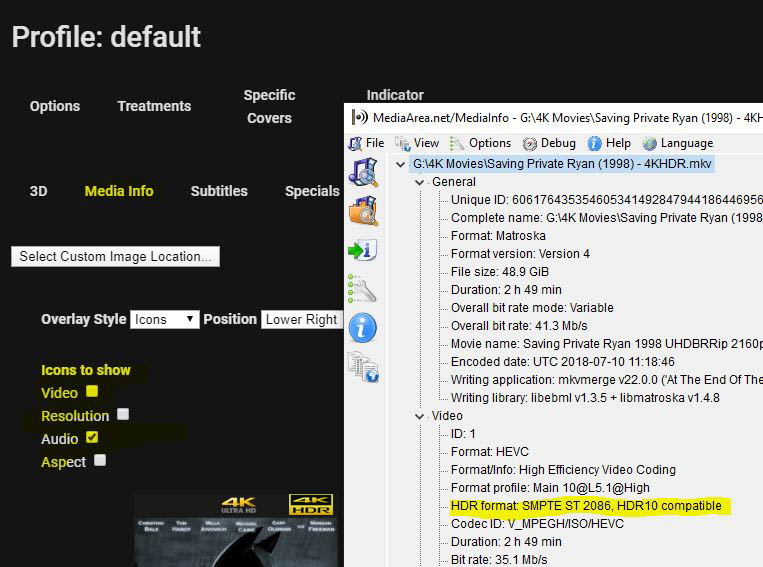
I was wondering how feasible it would be to create an additional option (icons to show) under the Indicator Overlays option for MEdiaInfo and to add "HDR Options". I think it would be helpful if i could see at a glance what movies in my library were encoded with HDR capability. THen, i could create a 'badge' overlay that would say HDR on the cover. see attch
 1 point
 -
@iceman81 @xzilvinas and to all others. To fix this bug with script not working properly with filenames with spaces just change in eac3conv.ps1 iex ".\ffmpeg.exe -i $file -map 0$substream -c:a copy $acstream -c:v copy -c:s copy -f matroska temp.mkv" to iex ".\ffmpeg.exe -i '$file' -map 0$substream -c:a copy $acstream -c:v copy -c:s copy -f matroska temp.mkv" The problem is solely because of the absence of single quotes. Best regards!1 point
-
I'll have to do some more investigation if I can reproduce it again. I was only ever able to reproduce it with that one instance of the series "Mission Impossible". All other items went to the proper program.1 point
-
Ok, giving that a try.1 point
-
All of this is already covered in the article except the "directors" or "commentary" tracks which I just added. Is there anything not covered that's easy to read in the article?1 point
-
Yes. For me honoring tags for parental controls is at least as important as ratings because it gives me a higher degree of control. Tags for parental control works in movies, TV and music but it does not work for collections. I hope it is just an oversite.1 point
-
We are working on all new Hauppauge support that in the near future will no longer have any dependency on WinTV, so stay tuned. That means you'll handle everything inside Emby Server, including selecting what channels you want.1 point
-
@cayarsCarlo - the wiki/KB still does not mention this ? https://support.emby.media/support/solutions/articles/44001159160-subtitles I have made some suggestions below on how we can improve the wiki/KB (sorry about the formatting) ... --- All video files can have external subtitles. Mandatory : The file name must match the video file name before the period. /Movies/Home Alone (1990)/Home Alone (1990).mkv /Movies/Home Alone (1990)/Home Alone (1990).srt Optional : a) They can be suffixed with a condition tag. Default /Movies/Home Alone (1990)/Home Alone (1990).default.srt <-- This becomes the active track if your client has been configured to play the default subtitle track. Forced/Foreign Generally used for 'foreign or alien' type subtitles. /Movies/Home Alone (1990)/Home Alone (1990).forced.srt <-- This becomes the active track if your client has been configured to only play forced subtitles. (generally what you want) b) They can be suffixed with a language tag. (ISO 639) /Movies/Home Alone (1990)/Home Alone (1990).eng.srt <-- English /Movies/Home Alone (1990)/Home Alone (1990).fre.srt <-- French This will show as the full language name during subtitle selection in the emby client. ie eng becomes 'English' c) They can also be suffixed with a non-language tag. This is useful when you have multiple subtitles of the same language that you need to identify separately in the drop down selection. Any text in-between the two periods will be shown, spaces and underscores are not allowed but dashes are permitted. /Movies/Home Alone (1990)/Home Alone (1990).English(Commentary).srt <-- English commentary track. Shown as 'English(Commentary)' in the selection. /Movies/Home Alone (1990)/Home Alone (1990).English-SDH.srt <-- English SDH track. Shown as 'English-SDH' in the selection. d) Combinations You may use a combination of any the above to specify exactly how you would like to see the subtitle listed in the selection. /Movies/Home Alone (1990)/Home Alone (1990).fre.forced.srt <-- Force the French subtitle track to be the active selection. /Movies/Home Alone (1990)/Home Alone (1990).Directors-Commentary.default.srt <-- Make the 'Directors-Commentary' the default subtitle track. Supported formats (client dependent) srt <-- The most compatible client format ass ssa sub/idx vtt1 point
-
Hi, this should be resolved for the next release, thanks.1 point
-
I have a few libraries, and inside each one I'd like to search by tags. For example, let's say I have a library full of videos, with some videos containing monkeys, and some containing dogs. I tagged the videos with monkeys as monkeys, and the videos containing dogs as dogs. Some videos have both, and I tagged them both monkeys and dogs. Is there a way to search with tags so I can search for example for only the videos with dogs, or only videos with both dogs and monkeys?1 point
-
Got if figured out you Q-Droid waas totally right thank you guys1 point
-
Cayars, I was able to add an exception for emby to bypass the VPN. Just didn't realize that was the problem. Everything works now. Thanks!1 point
-
I tried setting AVG to passive mode and vice versa with Windows Firewall. No luck there. The Emby server executable is also allowed through Firewall, so that's good. My ipconfig info was unchanged after rebooting. The thing that fixed my problem, to my knowledge is changing the server name. For whatever reason it allowed the local address to show after restarting the server. Weird.. it's working now though. Thanks for the suggestions everyone, it helped narrow the issue down. Much appreciated
 1 point
 -
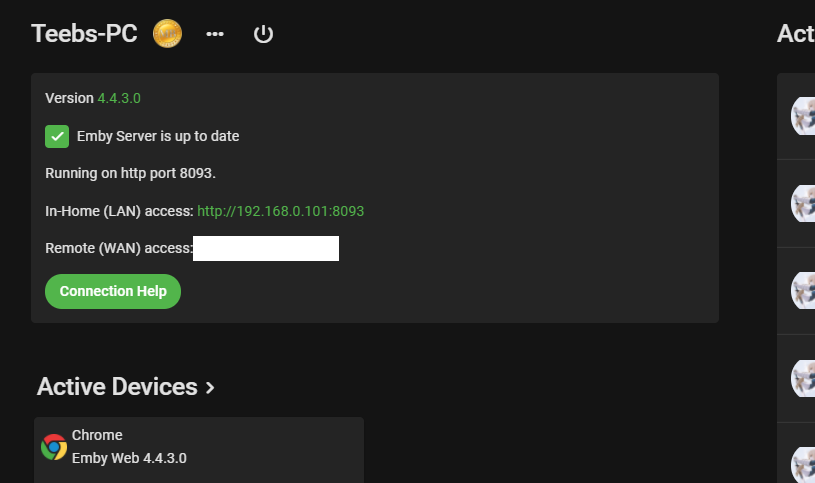
This log shows the music2 being processed, but look at the image. Music can not be Mixed Content. All of your libraries are Mixed content so my first question would be did you Restore your libraries? If so this is a bug in the 4.4.3.0 that has been resolved in the beta server. But you will have to redo all of your libraries do to this bug. There is a work around in another topic I can point you to but will still require rebuilding your database. Just like Collection library is broken also as it should be Collections content type auto generated by the server, but some libraries can be Mixed Content.1 point
-
Ah, the dangers of using common synonyms in documentation and then not giving examples Thanks, working now.1 point
-
I remember similar discussion, but it is usually always around anime and absolute order. As for Season 1 not exactly sure but that is how TVDB presents Absolute order "Season 1"1 point
-
I thought everybody transcoded several different movies at once using ET, Windows store app and web client all at the same time on the same machine. I just tile them all so that I can watch 3 movies at once. It's a great way to catch up on movies when you're behind.1 point
-
It seems that throttling is causing more problems than it even tries to cure. I understand it is an attempt to control CPU load but that is a small gain and throttling introduces a number of smaller issues. It seems, at times, like throttling is similar to being pecked to death by ducks. I have turned throttling off for now and I will probably keep it off until there cease to be reports of it causing problems unless there turns out to be some strongly compelling reason to turn it on. If there are such reasons I sure would like to know. For this case for me remember I am usually the only user on my server and if there are others, only for maybe a month each year, they are always local. I do NOT allow remote connections at all. Also my server has no duties but to serve my media. Throttling just seems more trouble than it is worth.1 point
-
New router usually means new network to Windows. Did you by chance tell it the new network was public instead of private? Check your network profile.1 point
-
Hi, it's resolved for the next release, thanks.1 point
-
Hi there, currently albums are grouped by album folders, not album tag. This is something we'll be changing in upcoming updates as the last step of the process in becoming fully tag driven. Please let us know if this helps. Thanks.1 point
-
beta.23 It appears to working pretty fast MEDIA-SYNC - Job finished after 6 minutes.1 point
-
Because I don't always have the dashboard open, and I'm at the desktop when I go to restart the computer. It's much more obvious in the taskbar because I'm looking right at the desktop/taskbar when I go to restart the computer.1 point
-
The log still shows the same thing. Something is blocking the server from sending outgoing requests. You could also try turning off ipv6 in your router. Occasionally that causes an issue.1 point
-
I know it's a large project and you have limited resources. Then, looking at the amount of attention this plugin and the more or less related plugins that @@chef and @@pünktchen created over the last few months are getting and some other discussions regarding grouping that have been going on and could be seen as related, I'd say it's something worth the investment on short term rather than long term...1 point
-
For everyone having similar issues. Also @@Justy After setting up a local DNS server and directly pointing the DDNS address to the local ip it works. Before the IP was resolved to the public ip like it does when doing it from the outside world.1 point
-
A new version of our Apple TV app is rolling out now. Your device should upgrade automatically. This version cleans up a few things and lays the groundwork for the next release which should have some long-awaited improvements. In this release: New Features / Improvements: Rebuilt the startup / login flow to better align with the other Emby applications. This should significantly improve the reliability of the startup / sign in process. Apple TV Top Shelf Improvements: Top Shelf is now updated when the app enters the foreground or when playback stops. Top Shelf sections have been updated to align with the other Emby applications (Continue Watching, Next Up, Latest Movies) Top Shelf images now match that of other Emby applications Home screen now dynamically adds the Continue Watching section when appropriate Movie Suggestions screen now dynamically adds the Continue Watching section when appropriate Shows Suggestions screen now dynamically adds the Continue Watching section when appropriate Improved internationalization support on most screens. This includes significantly more languages as well as improving consistency in naming where possible. Bug Fixes: Fixed an issue where backdrop images weren't included in the Continue Watching section of the home screen of the app The app will no longer make requests for images that don't exist. This would cause server logs to be polluted with errors Movie images for the Continue Watching section on the home screen have been corrected Fixed an issue where a loader would display when backing out of music playback Fixed a bug that prevented the Person Detail from displaying in newer server versions View the full article1 point