Leaderboard




Popular Content
Showing content with the highest reputation on 08/23/20 in all areas
-
I thought everybody transcoded several different movies at once using ET, Windows store app and web client all at the same time on the same machine. I just tile them all so that I can watch 3 movies at once. It's a great way to catch up on movies when you're behind.3 points
-
New router usually means new network to Windows. Did you by chance tell it the new network was public instead of private? Check your network profile.3 points
-
So single purchase per platform but then it will work for for all devices I own on that platform that are logged into the same account. Grand. When we got the new TV in November and did away with the Firestick I assumed as it was working I had a valid license. Thank you for the support and clearing things up. Will purchase a new unlock.2 points
-
It’s very disappointing that this has not been resolved yet. Even an short term fix of manually listing a pool of trailers that would be randomly played? Anything?? Either way, this does not work and should be removed as advertised functionality.2 points
-
I have emby Premiere Lifetime running on a Synology 918+. I live in a RV and spend a few months at a time disconnected from high speed internet. I typically use my Xbox One with emby Theater to watch and playback my movies from my emby server. This works great as long as I have an internet connection. Feature Request - If the emby Server has been authenticated and has Premiere Lifetime at the time of authentication then allow the server and all clients per the terms of the agreement to work without ever being reconnected to the internet. I get the reconnect every 30 days for monthly or yearly subscribers but if it's lifetime why the requirement to reconnect? It's incredibly frustrating to need to be on the internet to watch movies that I already own running on an emby server that I've purchased for a lifetime.1 point
-
UPDATE: Locast2plex is still in beta and the developers are constantly making updates and improvements. To see the latest information refer to their GitHub page. They have recently updated to 0.5x beta which has changed the set-up instructions (basically they have now require the creation of an config.ini file in the set-up directory). It's pretty straight forward and they include the text within the readme. https://github.com/tgorgdotcom/locast2plex/blob/master/README.md I recommend using the "Command Line" set-up first so you can verify that it is operational, then if you want to automate the process create a Windows Service with NSMM. They are also working on updating the code to work with the most current release of Python 3.8, until they are complete you will need to use Python 2.7 -Logan I saw the Locast Integration post in the Feature Request forum and decided to give it a try. https://emby.media/community/index.php?/topic/68679-locast-supportintegration/ I Love it! This really solves my issues with poor Local TV reception. I live on the edge a large metro area and have spotty reception that causes my Hauppauge Quad TV tuner to freeze on occasion…this really hurts the overall experience. Using Locast2Plex has solved all of my issues and brought the Emby experience almost back to the glory days of Windows Media Center For those not familiar with Locast2Plex here is what it does for me: · All OTA Local Broadcast Stations are now streamed (for me 35 Channels) · HD quality streams (1280 x720p for my streams, but varies by your Locast feed) · Up to 4 Concurrent streams · Record LiveTV · Pause LiveTV How to set-up Locast2Plex: Use this post as a guide - https://github.com/tgorgdotcom/locast2plex/issues/33 Subscribe to Locast (Donation of at least $5 monthly) https://www.locast.org/ Get the lasted Python 2.7x build https://www.python.org/downloads/release/python-2718/ Install it the Directory of your choice, but make it easy, you may have to navigate to that directory by Command Prompt. (I suggest close to the Root) Get the latest Locast2Plex build https://github.com/tgorgdotcom/locast2plex Unzip it in Directory of your choice Get the latest version of FFmpeg https://ffmpeg.org/download.html Move the ffmpeg.exe file to the locast2plex directory you created Get the prerelease build 2.2.4-101 of NSSM https://nssm.cc/download Install in Directory of your choice, but make it easy... Run NSSM using the steps outlined in the post linked above. If everything goes as planned you should get a "Installed Service Successfully" prompt If not you will need to use the Command prompt to setup Locast2Plex - refer to the Readme file at GitHub for Locast2plex...some debugging may be required Start the Locast2plex service using the "Run" - services.msc command Add Locast2plex as a tuner in Emby Select HDHomeRun as TV Source type Input the Tuner IP Address you used during set-up (don't forget the port#) Add TV Guide data for OTA TV for your Locast area Map Channels (If required) Enjoy! HatTip: SMILLS & all4dom1 point
-
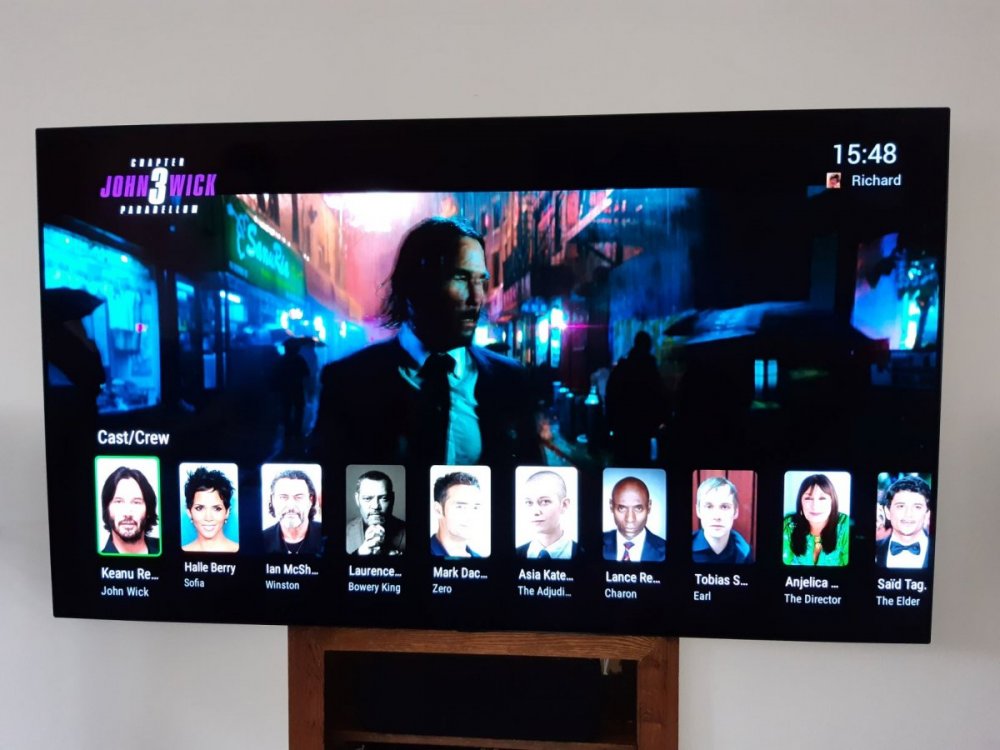
Hi ebr, Just wanted to say thanks for the latest Android TV release - sneaking in a fantastic addition for me personally and that is the ability to show the cast/crew/character details on the screen while the movie is still playing ! I've lost count on the number of times I've come across a character on screen and then could not put a name to that face ! Now I can do it without stopping playback and can continue watching without that nagging me in the back of my head - haha. Thanks !
 1 point
 -
Could series path(s) be added as a column in the reports plugin, i would like to have a csv of all tv series and their path. my series are spread across multiple disks and paths, and when i accidentally deleted a library folder, i had no record of which series were in the deleted path.1 point
-
I have used mkvtoolnix to combine 2 parts, Lord of the Rings extended blurays were all 2 parts. After I named all the chapters in each successfully I did exactly as above and never can tell when watching them that they were ever apart. It's quite easy to use. It's the one most used program for my media besides makemkv and emby,1 point
-
I guess you've arranged the audio so you get a different movie in each ear of your headphones, and subtitles on the third, right? Paul1 point
-
MKVToolnix GUI will append files easily (even if the sources aren't MKV). Add first file to GUI; right-click on first file and select "append" to choose the second (and more) file. Paul1 point
-
The apps also verify key. So even if you could get the server license to verify premiere. The applications also verify that the key given to them by "said" Emby server is legimate. What stops a rogue "Emby" server from just throwing garbage keys at Emby apps saying its licensed keys are valid give me premiere features? The apps have to check too. They verify that indeed the Emby server is genuine. It is the same thing Windows is doing to verify you are using genuine software. That is all this check is. To verify everything is genuine. The unfortunate thing is internet is invaluable in 2020. To lack it means lack of services. That is just how it is. You need a temporary internet hotspot to use when it comes time to authenticate. The moment you lose premiere features on a device or the server shows lack of premiere you need the hotspot. The device or server need to use that hotspot for a bit when starting up. It is what it is. The smell of smoke in Northern California is back. Back with a vengence.1 point
-
Your suggestion worked out. Interesting, the Naruto Shippuden naming convention (Naruto Shippuden/Naruto Shippuden - S01E001 till blah blah - S01E500) i tried before didn't work this time. Honestly, didn't know that adding just Season 01 folder solves all the issue. Weird tho. Sorry, that you had to go back to old posts, looks very recent :). Thank you, helped me big time.1 point
-
You can learn how to set that up here in the guide for administrator section: https://support.emby.media/support/solutions/articles/44001160340-emby-connect1 point
-
Trying to make it happen very soon.1 point
-
Technically a Absolute naming scheme will/should work just requires Season 1 folder and display order set to absolute. Another topic similar issue. Took awhile to find previous discussion. https://emby.media/community/index.php?/topic/88894-problemas-series1 point
-
Yes the authorization headers need to be on that endpoint for certain. If that version works for @ltek I will give him a copy with the headers. Definitely don't want that endpoint hijacked in any way.1 point
-
Hola Luke, si el mismo problema solo 4k, tarda mucho en arrancar y solo un poco, va cargarfo de poco a poco, por lo demás Emby perfecto sobre Android tv1 point
-
I mean using it from the dashboard. If someone were to "hijack" that entire process into a script for automating it would surely be messy. Using the message API itself yeah. That was meant to automate. But the button on the dashboard uses it in just the "parent nag child with message" method. It isn't meant to do more from the dashboard. You aren't meant to purposely annoy your users with messages by default. Unless a person wants that and that is where the plugin comes in. ^_~1 point
-
1 point
-
Is it going to work only in the player or anywhere in the app?1 point
-
They are different clients as they use different players. But as I commented Who will use them on the same system?1 point
-
Who cares you have 25 to waist? As a Home user of 5 people and everyone has 5 devices (not likely) you are still good.1 point
-
What is image 2 from TVDB? If you mean Absolute order then "If not in Season 1 folder Display order: Absolute will get broke into Seasons as your image shows".1 point
-
Sounds interesting. I can probably say with a good certainty, that Jellyfish does not have an easier way to send messages because their platform was taken from emby when it was open source. But, how about this? I can create an endpoint in the server which can handle the message based on the device name in the url instead of the session.Id. Would that be helpful?1 point
-
Awesomeness points for you ! Immediately permissions denied errors came on some other directory. PS: Make a donate button on your website, I (as owner of the lifetime thing) would happily donate some extra! Thanks.1 point
-
We may not have added it to the Android TV app yet. We'll take a look at it. Thanks for reporting.1 point
-
Hi I'm using emby for kodi. everything is working as it should, but sometime when I start kodi Emby for Kodi just loops it's self over and over indefinitely. It scans a few movies and tv shows and then just starts over. One scan is around 7-8 seconds. I'v attached a part of the emby log. As you can see in it it Emby just hammers the server for updates. There also are no new updates to any of the libraries it scans. What I have to do to fix it is repair the libraries in Emby for kodi. Neither restarting emby or kodi helps. Embyserver is 4.4.3.0 Kodi is 18.7 Emby for kodi is 4.1.19 also using newest kodi companion. embyserver.txt1 point
-
The IP probably changed.1 point
-
To make your changes persist across updates use a systemd unit override.1 point
-
To the best of my knowledge, the Anime plugin is a community-provided add-on. So either ask the writers to extend its availability to movies, or maybe plunge into github yourself! However, I have a lot of anime (well over half my library, in fact), and I have found that TVDB and TMDB can handle pretty much anything I throw at them, with careful naming, so I don't use the Anime plugin myself. Although the additional metadata sources provided by the plugin may add more detail in some areas, I have to confess that this doesn't interest me - my interest is in watching the shows or movies themselves, not in reading about them. Finally, remember that many (obviously not all!) anime movies are associated with series, and filing those as specials alongside a series rather than in a separate movies library will provide the opportunity to acquire metadata from more providers. Paul1 point
-
Hi. If you check "Remember Me" it will automatically log in to the last user and server. Does this not cover your need?1 point
-
Hi, it's resolved for the next release, thanks.1 point
-
Is your network connection still set to private? I found that after every update it gets set to public so most things get blocked.1 point
-
I read through some posts on grouping, but not sure if it referred to exactly what I'm wondering: Is there a way to have more epg categories in the epg settings? Right now there are only Movies, Kids, Sports, and News. Is there a way to add Entertainment, PPV, and any other custom groups in order to navigate channels more easily? I'm new to all this, but if I use xteve, will I be able to make the changes in there? Thanks!1 point
-
With a quick test in Store App and Desktop, the mouse wheel had no affect on the volume.1 point
-
@chef if I am not mistaken the servers device list has no affect on devices already holding a premiere slot.1 point
-
Yep, you just need to navigate to the right all the way until you fall onto the buttons. Then press down until you wind up on the "..." button. Press that and check mark on the "Group items into collections" should do it. Let us know what happens. Thanks.1 point
-
Hi, we've embedded a custom player that supports a broad range of codecs. It should be able to direct play just about anything.1 point
-
You don't need to pay for Premiere to use the Emby app for iOS - you can unlock the app for a small one-time in-app payment (for use on all devices with the same Apple account). Paul1 point
-
What is the folder structure? if no structure the Emby still segregates by season, if all in a season 1 folder Emby should present in one season if display order is set to Absolute. What episode is showing as a Special?1 point
-
Hello , today i rename my One piece folder. I just use Filebot and use tvdb naming. I have specials in their seasons. I have folder named One Piece and in there is folders Season 01 , Season 02 , etc...1 point
-
Any update to this yet?1 point
-
I had the same problem here. The only way to import images from TVDB was to choose English in the image search settings. Even the option to choose all languages (when looking for an image) didn't show anything if my real language (Brazilian Portuguese) was selected.1 point
-
Sometimes a DTS to AC3 conversion requires a full transcoding, for example I have a lot of VC1 + DTS files. My iPhone can directly play VC1 files, but converting DTS to AAC also converts the video because you can't deliver VC1 using HLS. In these cases a conversion on the client side is advantageous. But that costs money. In short, if a DTS conversion is required and the video format is not compatible with HLS, a full transcoding will be required.1 point
-
Everytime you play a video it pops up saying syncing. Only lasts a few seconds but annoying.1 point
-
Really pretty! could we get the image files?1 point
-
I would also like to add my name as requesting that setting. I understand the multiple benefits of the non-native player, but I don’t mind lesser quality and more transcoding most of the time if it means I can have PiP1 point
-
That's what I would suggest, a configurable fall-back option so that the user could choose primary and secondary language...1 point
-
Would this be a fallback only if configured? If so then yes this would would be a good option.1 point