Leaderboard




Popular Content
Showing content with the highest reputation on 08/13/20 in all areas
-
I agree with nanohits and cayars. The dashboard is archaic, nor is this the first time this has been asked for.3 points
-
Hello. Would be great to be able to adjust subitiles delay in Emby Theatre or Web client like we can in VLC with "H" and "J" shortcuts (up and down). Thanks !2 points
-
@arrbee99 here is a definition for “Remux” that I hope is helpful. “remux is a rip of a 4K Blu-ray or HD DVD disc to another container format or just stripping the disc of menus and bonus material while keeping the contents of its audio and video streams intact (also keeping the current codecs), guaranteeing the exact 1:1 movie quality as on original disc.” I personally keep my 4K UHD rips in the .MKV container to maintain the best movie quality. I keep Forced Subtitles if needed, but no special feature materials. I ordered the Sonos Arc Soundbar (which is on backorder everywhere). From my research, the proposed connection is Nvidia Shield TV Pro > 4K supported Soundbar > 4K TV and folks appear to be very pleased with the audio quality. I’ll share my learnings once my soundbar arrives and I get it all connected and configured.2 points
-
I don't know if the plugins are all consistent, but if you look at the Emby server directory you will find something along the lines of: C:\Users\[username]\AppData\Roaming\Emby-Server\programdata\plugins\configurations I think that directory name is a good clue as to where to start looking! Paul2 points
-
While I agree a shortcut to home is a good thing to have, an actual on-screen button is probably not the way to do it. It would likely take you more remote presses to get to the home button than it would to just go back to home... In Android TV we implemented a long-press back function to go home. We can look into doing that in Theater as well.2 points
-
I find it incredibly frustrating to use Emby Theater navigation. I have an outstanding feature request to add a simple 'Home' button to the header so that a user can jump out of a 4-level-deep menu trail to get straight back to the Home Screen. As it is now, I feel like I'm using my old Garmin GPS unit that didn't have a home button and it took 5 or 6 back button presses just to get back to the home screen! So frustrating.2 points
-
To me this type of thing is the very nature of a "Dashboard" view. Quick to look at info that makes it easy to see what's going on. If you need more detailed info you can then visit the appropriate spot in Emby. I so dislike having to go look at several tuners to see if there is any activity then look at our current dashboard to see what user is playing TV, to then figure out if that accounts for all tuners in use.2 points
-
I disagree with you totally. The whole point is ease of use and its just cumbersome to click here go there. The current Admin dashboard needs an overhaul. Its archaic at best. Realtime stats is important so we know how its all going.2 points
-
Request that Emby server store Dolby Vision (including profile), Dolby Atmos, DTS:X, HDR10+ (smpte2094) and HLG for appropriate video in the db and use it for display in the media info and track selection sections of movie/episode details screen. This information once in the db can then also be used in numerous other areas like: Mediainfo Cover Art, Stats for Nerds, Distinguishing different DV profiles for hardware support and tone mapping Example Mediainfo app display of HDR10+ ffmpeg patch for HDR10+ https://patchwork.ffmpeg.org/patch/11491/ Related requested that may require DV profile information in order to prevent unneeded TM1 point
-
Please read this post first. I was wondering if it would be possible to add something that would allow you to skip the intro to shows automatically while binge watching. When watching Netflix it does this for some shows, and im not sure if thats a feature of Netflix itself or a Chrome extension i use called "Flix Assist" but it would be a nice feature to have within Emby as well. and possibly even create a custom timed skip for specific shows1 point
-
Hi Emby Team, I'm really hoping there could be some improvements made to the views, handling & features of the Music Videos view. It's one of my most used features in Emby Theater but feel its lacking a little in some areas, primarily around seamless playback and quick navigation as listed below. My Feature Requests: 1) Latest Music Videos added at home screen would allow to play next video (by date added) automatically, with similar feature popup while playing with episodes with the 30 second timer countdown. (Technically this can be done via the Music Video view, Sorting by date, Sorting by descending, exiting out of view, then Play All, but its a bit more convoluted than just picking a video from the Home Screen) 2) Ability to set a different default view when opening Music Videos as seen with other categories (option not available in Home Screen configuration unfortunately). I would like to set my default as Folder instead of Music Videos for example. 3) For Shuffle to be added on all views again. This was there several releases back but seemed to have been deleted. Only Play All is showing now in Music Video view and in Folder view, and Shuffle is only showing in sub-views/sub-folders under Folder view not the root folder. If I could wish for one feature it would be this one! PS - The Play All button under Folder view is missing a space too -> 'PlayAll' 4) For the A-Z shortcut side bar to be added to the Folder view (and all sub-views). Some of my folders contain large numbers of videos that makes it hard to navigate. 5) For Music Videos flagged as Favourites to be shown from the Favourites view from Home Screen (seems to be the only one missing). 6) New Top Menu items for Artist, Playlist, Favourites, Genres & Suggestions to be added as seen in the audio Music view. 7) Music Videos identified for an artist to also appear in a section under the Audio Music Artist section. (eg. If I go to Ice Cube in my Music section, that there is a new video list before the 'More Like This' that lists all the Music Videos for Ice Cube (or featuring the artist as identified by the filename). In this case as well (although might not be common) it would be good to see their movies or documentaries for quick cross-navigation. 8) An ability to extract a new thumbnail from the Emby interface from a different time/frame and potentially perform some basic cropping (to standardise 4:3 & 16:9 differences in video formats/thumb views) as required. ** This is something I would love for movie chapters images & TV episodes too. Provide a way for failed extraction to be repaired, upgrade low quality images, and where black screens are grabbed to find a better image. Can do this externally off course (for most things except chapters) but would be super as a built in feature. 9) New Filter by Bitrate of video or audio streams. It would be great to be able to filter out low quality video or audio tracks when wanting to play a random list of videos to help minimise volume mismatches etc when listening at high volumes in social situations. 10) For the Search to also include Music Videos. Currently no results seem to be found, (not sure if this is due to lack of nfo files?). Would be possible to include searches based off the file names (my music videos are named like 'ICE CUBE - Today Was A Good Day (1995).mkv') 11) Random Music Videos as Emby video backdrop during navigation anywhere in interface (with or without audio option depending on user preference). Thank you for reading. Kind Regards, AD1 point
-
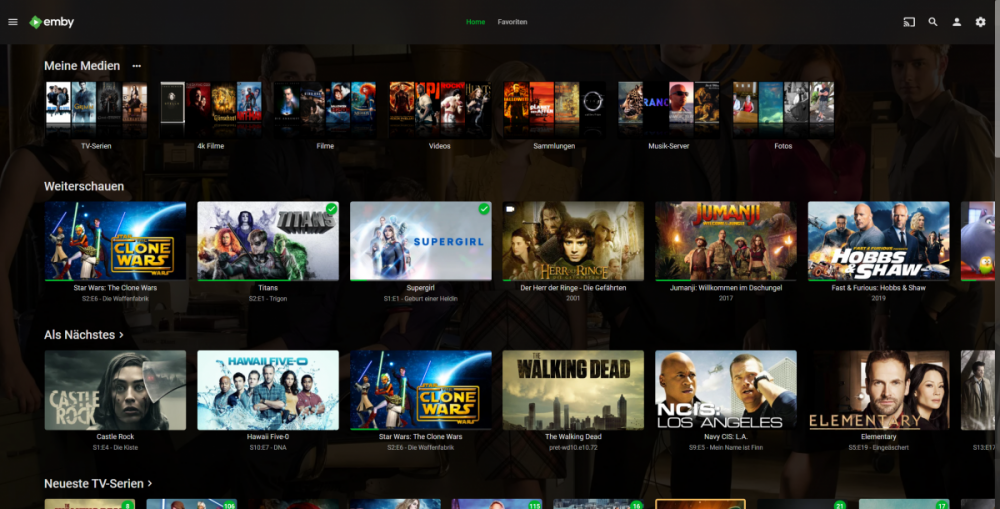
Hi, I've been using Emby for so long and I'm super satisfied. however, something bothers me on AndroidTV and FireTV. Why do the themes look as horribly outdated as Android 2. One comes from the design 10 years ago. The Emby server looks super modern with transparency and backdrops and rounded icons, why is this design not adopted? A revision of the themes with several styles would be very good and contemporary. For example, the AppleTV app also looks much more modern. is something planned in this direction?
 1 point
 -
I feel Emby is improving when it comes to performance. However it lacks compared to its competition on new features (skipping intro), or the UI of it's clients. So what would be the next "'BIG'' thing for emby?1 point
-
IS there anyway we could see a realtime dashboard similar to Plex where when things get updated, you dont need to refresh the website? Maybe some kind of Ajax? Also in the Dashboard is there anyway of showing number of users like a badge so we know how many users are using Emby along with what they are watching etc. Right now it is a laborious process of going to activity to check.1 point
-
Hey, I'm using Emby Theater on Linux (Manjaro KDE). It works nice but now I'm trying to use (Smooth Video Project ) and I can't find a way to make it work. SVP needs MPV with vapoursynth support, that's why on Windows we need to replace the default MPV with one with vapoursynth support (https://www.svp-team.com/forum/viewtopic.php?id=3959) So do you have any idea how I could replace the default MPV with my own MPV build ? Thank you for your time1 point
-
Android TV has always required premiere or an app unlock to support playback, as far as I can recall. I believe you get a trial period. It used to be 14 days IIRC.1 point
-
Creo que no lo saben nadie. Es algo muy raro. Y no es por límite de dispositivos porque he probado poniendola en más móviles y no salta el error, solo en portarlo a la tv. Algo raro se ha tocado.1 point
-
No limit but without a premiere license not all features are available.1 point
-
@heula no setting required for the next release of the server. It will be the new way forward.1 point
-
Yeah right now I have 2 different Google "drives". A 10TB Movie drive and a 10TB TV drive. I actually use Drive File Stream in combination with StableBit CloudDrive but I'll definitely keep your suggestions in mind. Thanks again1 point
-
Hoooooly Crap is Sonarr pretty amazing now. (I had been relying on showRSS for the things I don't/cant record myself). But Sonarr/Jacket together are gonna help fill in the missing episodes without having to pull out and re-rip the DVD/Bluray sets again) and maybe track down some of the recorded stuff too... though alot was old and obscure even when it was current. Anyway, thanks again for putting that recommendation out there. -G1 point
-
sounds good. I will get on this tonight if at all possible.1 point
-
Putting movies in a collection takes the individual movies out of the Movies View and inserts a single entry for the collection. Out of the box no it doesn't. It only does this if you configure it to. If this is what you're getting then it's because you said you wanted it.1 point
-
There's currently no way but it's possible for the future. Thanks.1 point
-
If you only have one server the Trakt plugin is only needed if you need to restore the watch status after a server crash of some kind. There are other ways to do that but I find for my use and with only me as a user then Trakt works easily and well. However, if you have more than one server Trakt is very useful for keeping the watched status' in sync.1 point
-
It likely never occurred to the Devs we would use the feature this way but it's a natural progression of using tags to hide things elsewhere like individual TV Channels, specific TV Show episodes (not just the whole show), etc. I'm of the belief if the item allows editing the TAGs then it should fall under parental security. Same for any individual items if in a grouping of some type like playlists, collections, multi-versions.1 point
-
That's not completely accurate. Libraries are virtual - made up of whatever top-level folders you wish. They have no direct relationship to your file system (except as defined by you by pointing the library to specific folders). Genres are just metadata and the UI provides you the ability to view any particular library in a genre view which, again is virtual. Not related to recording... This is not accurate. Putting an item in a collection, simply adds that item to that collection. Then there are specific ways that collection can be viewed. There is a view-level option to "Collapse items into collections" which will do as you state above but that is optional and can be different for different views.1 point
-
Got it. Here's another option which I've done, and that's to create separate M3U files for channels that cannot be mapped correctly using a single Emby Guide source. I.e., I have 3 channels that cannot be mapped to the main EPG source I use, so I created separate M3U files containing only those channels and mapped them to different guide providers.1 point
-
Thanks, everyone for their assistance. I have to unexpectedly go out of town for some family stuff. I'll get back to this in a week or so. Thanks again, I appreciate your time.1 point
-
no, this was asked for when the mapping function was implemented many years ago. its just not something the dev's have ever considered important enough to do anything about. honestly, as a non US user i would recommend you deal with channel to epg mapping in xteve getting you schedules direct data in xmltv format. its flawless that way1 point
-
Gracias a todos por la respuesta he encontrado esto para aclarar mi ignorancia @ebr @legallink1 point
-
If you like Plex, stay with Plex. Simples. The rest of us like Emby's interface. It can be improved upon but NOT by replicating the terrible UI of Plex which looks more like a computer app than a 10 foot UI interface required for TV. Plex looks thrown together to me hence choosing Emby.1 point
-
+1 I also _pray_ for the ability to remove or even disable automatic channel mapping from EPG. The automatic channel mapping makes my life hell when trying to assign the correct channels through SchedulesDirect1 point
-
Perfect thanks to all of you1 point
-
If it's anything like other clients, you go into the user's options in the Apple TV client, go to playback and you'll see network quality. Click on that for a bunch of premade options. Select the higher one that makes sense. 1080p- 20 Mbps for example. This way it will try to direct play but if it can't will ask for something higher then 3 Mbps. The server will then lower it down to what ever RATE you applied to the user or it's global setting per stream.1 point
-
Hola cayars ya lo solucione tenia un problema con las tarjetas de video ya puedo bajar calidad y subir. Gracias. Y los canales que antes salían en 460 ya subieron a 18001 point
-
The default fallback transcoding level as upped from 1.5Mb to 3.0Mb not long ago. So the client Auto detecting attempts to probe the connect for a good bitrate, but falls back to default upon failure.1 point
-
Well the Dashboard already shows half that info already, but can only assume that much info would need a table not a placeholder. But all this is clutter to me and should be in its own area and there are and will be other plugins doing the exact same thing this. But everyone has there own personal preferences, to me I would want to disable them if it were a Core feature.1 point
-
To me this type of info should be sitting at the top of the DASHBOARD view updating in real time. On the same page you can get more info looking at the activity, devices, alerts but have the real-time info in your face as soon as you login as the admin. That to me says CORE and not plugin. Of course I think the DASHBOARD needs additional info on it as well like status of tuners and especially what is actively being recorded. Can't tell you how many times I've done an Emby restart and screwed up recordings that were in progress that I wasn't aware of!1 point
-
Can't wait to here about this enhancements! Grouping would be amazing!1 point
-
He's talking about a rolled up view for many things the admin would like to know at a glance. Examples: Remote Bandwidth in Use Streaming Downloading Syncing CPU Usage GPU Usage Current Tuners in Use, Tuners free Number of Active Recordings Number of Total Streams Direct Played Direct Streamed Transcoding (CPU, GPU) List of online users and what they are currently doing1 point
-
Hello, This knowledge base article shows how to backup/restore using the Backup plugin as well as how do copy core parts of Emby from one system to another. https://support.emby.media/support/solutions/articles/44001159936-backup So what you could do is a preliminary Emby install on Windows to see where it installs and what paths it used. You can then shut down Emby on the Mint computer, copy over everything as shown in the article, then restart Emby on Mint. You could then do another install right on top of what you copied over on Windows. That is normally all you'll need to do to copy over all you core information. You library paths will probably need to be adjusted depending on where that data is located as well. Make sure the user running Emby on windows has proper access to your library media. Let us know if you hit any problems, Carlo1 point
-
I'll post a log as soon as I get a false match.1 point
-
The plugin works for me pretty ok when it comes to shows. But well I know the movie part is a beta and needs some love. It worked really good till about 2-3 months ago when I started to get false match on movies. All Star Wars movies get some strange match to some move made cut or something like that. Would love to see some more work on the plug in cause it helps so much not having to deal with copying and renaming movies.1 point
-
It just hasn't been done yet.1 point
-
For anyone running linux (debian and flavours), read this:1 point
-
We're up to 4.4.3.0 .. I see tags are there, but it would be a huge pain to go tag every media file.. doable.. but quite a pain.. is there any possibility of auto tagging with genre? I know Genre isn't included in the search yet.. maybe that would be a workaround? I didn't even notice tags were there until I saw this post and went looking for them.. I just know I have 10s of thousands of media files, audio, video.. etc.. it would be way too much to manually tag.. Ultimately the better option would be to be able to search for horror .. I know I can 'filter' by genre when I'm in a playlist or collection, but honestly that doesn't help all that much.. it helps.. Some things that would be good.. 1. Checkboxes for genres to include in search results 2. An option to list ALL media and filter by genre? .. as a workaround 3. Auto tag the genre, again.. as a workaround.. Something I love about Amazon and Netflix and basically every streaming service that exists is the ability to select a genre .. I know it's in the metadata so it should be doable.. Maybe there's just something I'm missing that is already there?1 point
-
Bringing them in line with other video features. For instance, #3 and #4 should be done by now.1 point
-
I have content (in my case work-related seminars, workshops, etc) that does not exist in any online metadata DBs and which I'm trying to organize in a "Home Video" Content Type Library. I would find it very useful if we could populate a few metadata fields by following a particular Filename Pattern. My proposal is that support be added for the following two filename patterns (the first one is my preference, but I think some people might also prefer the second in some instances): (20190415) This Is A Title [People A+People B].mkv This Is A Title (20190415) [People A+People B].mkv (20190415): yyyymmdd, which then populates the fields Release Date (mm/dd/yyyy) and Year (yyyy). If the user enters only a partial string, such as (2019) or (201904) then the provided data still updates the corresponding fields (and whatever is not provided is left blank). This Is A Title: Populates the Title field. [People A+People B]: Populates People, ie, People A is one person, People B is another, and so on. The plus sign "+" acts as the delimiter, which enables more than one person to be indicated. The limit to how many People can be added this way would just be the limits of how long a filename can be (which is an OS-specific limit). A Title or Date (one of the two) would be required, but the People string would be optional. If someone just uses the Date (20190415) then that would populate both the relevant date fields, and it would populate the Title field, eg, with "20190415". I propose that this feature be Enabled for new Library creation (only for Home Video Content Type Libraries), but disabled for existing Home Video Libraries (so we don't mess up anyone's existing content). And of course the feature could be Enabled/Disabled via a checkbox in the Library Settings. Perhaps the Setting could be called "Populate Metadata via Filename" and there could be a link to a wiki article on Github explaining the proper syntax. However, if the Devs feel that this should be treated as an Advanced feature and disabled by default for new Library creation I'm fine with that too. Thanks for considering my request! PS - If this is something you might like to see implemented, be sure to "Like" this top/first post (as well as any subsequent posts in this thread that highlight particular aspects of what you are interested in) -- "Liking" the top/first post helps the Devs to know how much interest there is in a given Feature Request.1 point
-
Hi, yes, expanded music video features are planned for the future. Thanks !1 point