Leaderboard




Popular Content
Showing content with the highest reputation on 08/10/20 in all areas
-
I have provided @Ronstang with a small and unsophisticated Windows command line script to extract EIA-608 closed captions from all the MKV files in a directory tree. The script skips any file with embedded subtitle streams or alongside which is an existing srt subtitles file. The only requirement for the script to run is that it can access ccextractorwin.exe and mkvmerge.exe, each of which can be copied from the portable install downloads from their respective websites and most simply put in the same directory as this script. The subtitles are not embedded into the original file, as that's not necessary in Emby, and would probably double the time taken to run the task. I have assumed, which is apparently usual, that the first CC stream is English and the second, if present, is Spanish. I used the Windows command processor to avoid the need for any other installation, even though writing for it is a peculiar form of self-torture... @echo off SETLOCAL EnableDelayedExpansion echo . if [%1]==[] ( set /p VideoRoot="Base directory for subtitle extraction: " ) else ( set VideoRoot=%1 ) echo ------ for /r %VideoRoot% %%f in (*.mkv) do ( echo Checking %%f for /f %%t in ( ' mkvmerge.exe -i "%%f" ^| find /c /i "subtitles" ' ) do ( if [%%t] NEQ [0] ( echo Video has embedded subtitles ) else ( if exist "%%~df%%~pf%%~nf*.srt" ( echo Subtitle file already present ) else ( echo Processing %%f ccextractorwin.exe -12 -fp -trim -autodash -sc -quiet "%%f" ren "%%~df%%~pf%%~nf_1.srt" "%%~nf.eng.srt" echo Extracted %%~df%%~pf%%~nf.eng.srt if %%~z"\"%%~df%%~pf%%~nf_2.srt\"" LEQ 100 ( del "%%~df%%~pf%%~nf_2.srt" echo No Spanish subtitles ) else ( ren "%%~df%%~pf%%~nf_2.srt" "%%~nf.spa.srt" echo Extracted %%~df%%~pf%%~nf.spa.srt ) ) ) ) echo ------ ) echo Processing of directory tree complete echo . pause There is no error checking, because in my experience during testing any failure just causes the script to terminate. Paul2 points
-
Pretty simple suggestion. I have multiple users for my Emby server. If I want to do continuous maintenance on the media, I have to tell everyone. some of them are harder to reach than others ( i.e. no Facebook or Skype chat etc. ) It would be great if say... on the admin panel, I could hit a check box that enables 'maintenance mode', where the server still runs does everything as normal, but instead of the login screen it displays a maintenance page saying the server is unavailable. Even better if I were able to directly put a reason in a text box that would then display on the login screen as well. Not really sure what others would think of this, but for me it would be quite helpful. mostly if I want to make sure no one is trying to access content I know won't work until I've done a full library scan again. Thanks for reading. -Kyle1 point
-
Love the new radiance blue theme Can we get the option to set the default user theme globally in the admin dashboard?1 point
-
NO LIABILITY IS ACCEPTED AT ALL, so USE AT YOUR OWN RISK. What it does is different to the first posts, the plugin has changed quite a lot Fixes broken image links Removes Corrupt Images - Allows Emby to reload "good" images Downloads Images Refreshes Images (But not the text) What it doesn't do is check if the actor + movie is valid, only the actor name. If you have 2 or more actors for example named "bob smith" it might get the wrong image for one of them. Also to note there is currently no aspect ratio check. You might possibly get some landscape images. Plugin is abandonded, however this plugin (fixed and working properly) is now incorporated inside another plugin. See my post here: https://emby.media/community/index.php?/topic/86323-tmdb-corrupt-image-fix-plugin-for-windows-10/page/7/1 point
-
hey what I'm really missing is support for audiobooks. Simply saving the resume point for those mp3s would be absolutely enough, no need to fetch metadata etc.1 point
-
Music appears to have no Media Info stats at all whereas video has a extreme detail. e.g. Title480p H264 CodecH264 .... and often 50+ more fields of info. Music.... nada To highlight my point try and use the web interface to determine something as simple as if an audio track is a mp3 or a flac1 point
-
I want to thank Paul publicly. He took his personal time to help me with something I had no knowledge of and now I have a simple solution to my problem. He is a real asset to this community as he's always willing to help and I cannot express enough how much I appreciate his effort to solve my problem. We need more people like Paul in this world. I hope the Administrators of this board appreciate his contributions as much as I do. Thanks Paul for everything.....and it's always nice to have a new friend with a similar hobby. Ron1 point
-
Greetings. In music genres, I don't see an option to change the view layout which is currently a tiled grid. I would find it useful to be able to view these as a compact list (perhaps multi-column if possible on larger screens) instead. I have a lot of genres and scrolling through to find the one I want can fiddly especially on smaller screens and particularly if images need to load. I don't find images particularly useful here and just need the genre label. Would it be possible to add view options to switch between the current tiled grid and a list view, perhaps also with a reverse sort option (toggle between A-Z; Z-A)? Thanks!1 point
-
Playlists are exposed via dlna so they might work just fine.1 point
-
Is there any update on this? From what I can see the themes are now supported / available in all apps1 point
-
It's actually the best solution possible as no transcoding is needed and you get perfect playback by using media designed especially for the resolution and bitrate. Don't know how much you know about adaptive streaming done by all the major websites but there is a different file for every possible resolution and bitrate. It's not uncommon for each movie or TV Episode on their sites to have been master 12 different ways and that was with 1080 media. When you get into 4K you're adding additional version of the same media. You don't think Amazon and Netflix have one version of the media and convert on the fly do you? No way, they pre-convert the different versions, store them all so no real-time transcoding takes place. When you convert in real-time you ARE loosing quality compared to a proper conversion that takes how ever long is needed which could easily be 4X to 5X run time length. You can only do so much trying to process video quicker than it's consumed and that's just with one stream. What if you have 3 or 4 transcodes going? HW/GPU helps on the speed front but still is no where near as good as CPU based conversions. BTW, it's the same way with YouTube videos as well. There are multiple versions of each file so any client can "direct play" a single version. Emby does a fantastic job with 1080 and lower resolution files on most average hardware and even does 4K SDR conversions quite well given a decent CPU/GPU but when you get into having to change every pixel color along with everything else you need to do to transcode in REAL-TIME it's near impossible on average consumer hardware for a Server. The display/client side is a different story as it only need contend with one stream. It's one thing to do tone mapping or similar type thing on a PC or device like a shield TV with dedicated hardware and quite another on a server sending streams to rokus, cell phones, web browser, dlna, TVs, etc and that's just the "pure video" conversion. Now imagine having to factor in subtitle burn in on top of this, converting to h.265 or h.264 depending on client. It's a massive amount of processing. So while many are spoiled with Emby's ability to transcode on the fly for 1080p and lower SDR content, 4K HDR is another ball game you've stepped into and takes proper admin planning for these files and how they will get used. For most people a Bluray rip of 4K HDR material is usable only on LAN and not remotely (most not all). You could certainly also master a much lower bitrate version such as 8 to 10 mbps 4K HDR to have much better luck streaming remotely (like what Netflix and Amazon Prime due). But as stated previously you want the 4K version to be the 2nd version added to the system with a 1080 version being the primary so it's the main file used or transcoded from vs the 4K HDR version which for now should never be transcoded. Will this change in the future? Sure, with newer approaches, newer algorithms, newer GPUs that can do this in HW but Emby can't snap it's fingers and make this work across the board for every Emby Server, as it's just not possible at present. If you think of transcoding as a crutch to having proper versions like Netflix and others have it helps with understanding what can and can't be done with transcoding. Transcoding can convert certain video codecs in real-time, it can convert basically any audio format to another and can convert most subtitle formats to other formats to make them compatible with the client. It can even repackage this into a different streaming container. But even before getting into 4K media transcoding has issues with certain codecs that many machines can't handle like VC-1. Even when it can do this transcoding it's not optimal for all clients. For example if you have only 6 mb bandwidth to the client and the device/client can use h.265 that would be the optimal target for conversion of video as quality is better than h.264 for the same bitrate but that's far more CPU intensive and not all GPUs can convert to h.265 while most can decode it. That plays into 4K as well as one of the popular video codecs is 10 bit H.265. So real time transcoding of 4K 10 bit H.265 mostly likely has to downgrade resolution to 1080 or lower, has to massively reduce the bitrate used while also using a less efficient codec like h.264 while changing the 10 bit to 8 bit and that's even before having to tone map color changes, burn in subtitles or touch/modify audio. The moral of the story is that if you want 4K media in Emby and want things to work smoothly you add a 1080p version first to your standard movie library, then add the 4K media to it's own 4K library where only people with the ability to play it back direct can access it. None of this is meant to be an excuse, but just the reality of where we are industry wide of what can/can't be done and how other system handle things. In today's streaming setups you sacrifice storage which is cheap compared to CPU to accomplish different streaming resolutions.1 point
-
That's extremely odd about the write access. It's weird that it can't write only during subtitles, but any other task is perfectly fine. As for opensubtitles being down, I'll try again in the morning to see what is happening. Drive B is a physical drive for metadata attached to the server.1 point
-
Understood, but with the Display Order Option we should have something that covers it. But is fully dependent on what we get from TVDB.1 point
-
So you are attempting to place all episodes in a the series folder with a absolute naming scheme? I am guessing you are getting a drop down multiversion option on 1-46 as that is how the naming is being parsed. Pretty sure you need to put them all in a Season 1 folder, but am not positive. The only provider that will understand this "absolute" naming scheme is TVDB, but you have to change the Display order on the Series from "Aired" to "Absolute". (Edit metadata on the Series and go to Display Order) https://thetvdb.com/series/hunter-x-hunter-2011/seasons/absolute/1 I will do a little testing in this example.1 point
-
Yep, that did it! Thank you.1 point
-
Yes but it's already in the web app, Android app and others. It's just not in the lg app yet but it will be in the next app update, which we are currently working on submitting.1 point
-
Yes a community member could build a notification plugin for this.1 point
-
It should hopefully be for the next release so that the collection will not get created multiple times.1 point
-
Guys - I think you may be missing some details here - yes this is in the Android thread (ie Google) but @Tolerant is saying the SAMSUNG TV APP is not passing Audio via Optical to the Bluetooth TX .. so unless the SAMSUNG TV APP is also using Exo, then I don;t think google is relevant. On a side note, I have a FireTV linked to a Samsung TV (via HDMI), using the TV Optical Out to a Bluetooth TX and it works fine. If I set the SAMSUNG TV speaker settings to 'External' it just plays via the Bluetooth, if I set it to 'Normal' it plays via the TV speakers AND Bluetooth. If I mute the TV, the Bluetooth still plays. This via PCM (again, set on the SAMSUNG TV). If I have the details above correct (ie SAMSUNG APP) - it may well be worth a Mod moving to the Samsung TV section if you still have issues.1 point
-
Nicely done. I was going to offer to remote in and help but seen you making progress. Now that you've done the setup it probably makes sense now why things didn't work previously behind two NATs. Congrats on getting this working as it's not the easiest thing to do if you've never done something like this before!1 point
-
It should be up now. Thanks for reporting.1 point
-
Gave up on rpi4, using old iMac, works great.1 point
-
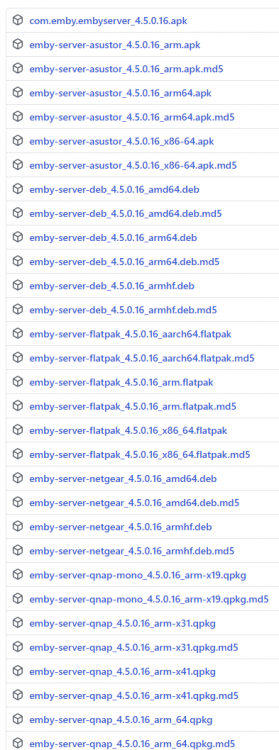
I'm saying that 4.5.0.16 doesn't have a FreeBSD release unlike 4.5.0.15 and earlier betas. Normally there would be a FreeBSD version in there.
 1 point
 -
Simple recipe: For now, forget about HDR and focus on video compression and playback experience . A bit later, you choose some kind of movie with a lot of dark scenes. Get both versions, HDR and SDR and compare . Then get HDR and SDR versions of another movie with rather constant lighting and try to see a difference => That's probably the best way to get and understanding of HDR (at the visualization side, HDR at the recording side is a different story)1 point