
Leaderboard




Popular Content
Showing content with the highest reputation on 08/09/20 in all areas
-
Hello. Would be great to be able to adjust subitiles delay in Emby Theatre or Web client like we can in VLC with "H" and "J" shortcuts (up and down). Thanks !2 points
-
Sorry, yes I did try this and the HW acceleration is working now. Thanks for the help!2 points
-
I would have that that was basic information, rather than hidden behind a debug option. Having debug option permanently enabled on my Shields, I forget what's hidden when it's not enabled.2 points
-
Sorry, but referring to Plex as an example is misleading, especially the Plex ATV App is, compared to Emby, a pain in the ass. In Plex are every useful function unnecessary buried in some submenus, e.g. subtitle or audio selection before playing and so on. Also is the little available backdrop support by Plex, covered by their GUI. Damn, I want to enjoy my backdrops and not their damn GUI Yes, the Plex App has definitely more direct play and subtitle capabilities then Emby but the GUI is so f...king designed that I dropped it as soon as Emby met my requirements. From the GUI design I love a lot of the fine Kodi surfaces, Aeon Nox is my absolut favourite, but I switched from the Kodi surface to the native Emby app because I didn't get the theme music to run on Kodin nor the rotating backgrounds; and I love this features. So, EMBY isn't perfect but compared to Plex it contains the better user experiance.2 points
-
Hey there, I am a long time Plex User tinkering with Emby because I love the way it handles Live TV. Do you guys know of something for Emby server like PlexPy used to be for Plex, that is now called TauTulli or PlexWatch that basically has real time stats and usage from your server, who is watching what, transcoding info, IPs and data of that nature? It really is cool how advanced watching statistics, notifications, alerts and other things that Tautulli has. I had plexpy and one day it just renamed itself to Tautulli.1 point
-
Hi, it looks like a problem with the omdb image server. I would give it a try again later and let's see if it clears up on its own. Thanks.1 point
-
I passed that on to them.1 point
-
Try lowering the in app quality setting to force a full transcode. Please see if that helps. Thanks.1 point
-
The subtitles should be addressed soon. The AVI container may be a bit more difficult but we'll see.1 point
-
Hello, I tested the new beta release and this feature now works as expected. Thanks !!1 point
-
Never mind i worked it out because the path had changed the user's needed updating to give permission to use the dvr.1 point
-
Have you scrolled to the bottom of the details screen? You need to have DEBUG options enabled for some reason.1 point
-
I don't think that is possible. When you first set up the plug in you have to connect it to your Hue Bridge by pushing the big button on the middle of the bridge (assuming you have a v2 bridge). This is a security feature to ensure you are authorising access to your Hue. The Bridge and the device (in this case your server) have to be on the same network for this initial step.1 point
-
So far so good, found 2 issues though. NSSM was missing from the install files, so had to copy that over, remove the service and reinstall the service. A typo in the first run wizard, as it says `Madia sync after wizard'1 point
-
Fixed it. Here's what I did in the AT&T Router: I had to put both of these into the AT&T router and that seems to have bridged it. The NAS is accessed through port 5000. Thanks you guys for catching the double NAT! I was driving myself crazy.
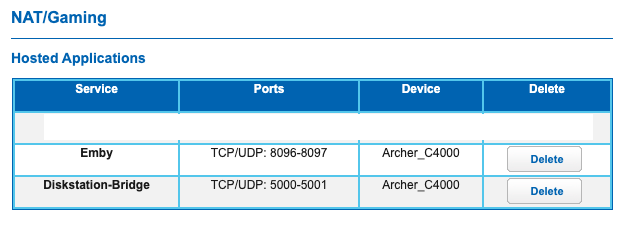 1 point
 -
Hi there, can we please look at an example? Please attach the information requested in how to report a media playback issue: Thanks !1 point
-
Nice, glad you got things working well!1 point
-
We need more information about the problem. What clients for example are being used? Is it specific channels giving you issues or all channels across the board? The more info you can supply the better to help diagnose the issue.1 point








